
TRC-1480 - Remote control UNIVERSAL REMOTE CONTROL - Free user manual and instructions
Find the device manual for free TRC-1480 UNIVERSAL REMOTE CONTROL in PDF.


| Product Type | Universal Remote Control |
| Model | TRC-1480 |
| Brand | Universal Remote Control |
| Dimensions (approx.) | 20 x 5 x 2.5 cm |
| Weight (approx.) | 180 g (with batteries) |
| Power Supply | 2 x AA batteries (not included) |
| Battery Life | Up to 6 months with normal use |
| Main Functions | Control TV, DVD, satellite, cable, audio devices; volume, channel, input selection, power, menu navigation |
| Number of Devices | Controls up to 8 devices |
| Programming Method | Auto-scan and manual code entry |
| Display | Backlit LCD screen |
| Range | Up to 10 meters (infrared) |
| Maintenance & Cleaning | Wipe with a soft, dry cloth; avoid liquids and solvents |
| Safety Precautions | Keep away from moisture and heat; replace batteries in pairs; do not disassemble |
| Spare Parts & Repairability | No user-serviceable parts; contact customer support for battery cover or issues |
| General Information | Compatible with most major brands; includes code list and user manual |
Frequently Asked Questions - TRC-1480 UNIVERSAL REMOTE CONTROL
User questions about TRC-1480 UNIVERSAL REMOTE CONTROL
0 question about this device. Answer the ones you know or ask your own.
Ask a new question about this device
Download the instructions for your Remote control in PDF format for free! Find your manual TRC-1480 - UNIVERSAL REMOTE CONTROL and take your electronic device back in hand. On this page are published all the documents necessary for the use of your device. TRC-1480 by UNIVERSAL REMOTE CONTROL.
USER MANUAL TRC-1480 UNIVERSAL REMOTE CONTROL
Congratulations!....1
Features & Benefits....1
Requirements & Compatibility....2
Parts....2
Connecting the Battery Pack....3
Using the Charging Cradle....3
Two-way via Wi-Fi (2.4GHz & 5GHz)....3
Using the TRC-1480....4
Displaying the Setup Menu....8
Specifications....18
Limited Warranty....19
TOTAL CONTROL 2.0
TRC-1480
OWNER'S MANUAL
Congratulations!
Thank you for purchasing the TRC-1480 Wi-Fi remote control for your Total Control 2.0 system. The TRC-1480 communicates with your Total Control 2.0 system via the local wireless network to control devices throughout your home/business.
Use the TRC-1480 to navigate through rooms, menus, and control your system's audio/video devices, climate, lighting, and more.
Features & Benefits:
- Quick Connect Wi-Fi
When woken up, the remote connects to the wireless network (2.4 GHz or 5GHz) almost instantly for control of your system and devices.
• Two-way Metadata Feedback:
Experience feedback directly on the TRC-1480's 2.4" display when used with an ever expanding line of 3rd Party modules such as HEOS, Ecobee, Sonos, Roku and many more.
Consult with your certified URC integrator to learn more about compatible 3rd party integration.
• Voice Assistant Ready:
Enable the built-in Amazon Alexa service to send commands verbally directly from the remote by pushing the press-to-talk microphone button
• H264 IP Camera Support:
View almost any security camera directly on the TRC-1480's display. The TRC-1480 supports high quality camera streams. Ask your certified URC integrator for further details.

TOTAL CONTROL 2.0
TRC-1480
OWNER'S MANUAL
Requirements & Compatibility:
• Total Control 2.0:
The TRC-1480 requires an MRX Advanced System Controller on the network and must be programmed by a certified Total Control integrator. When programmed, the TRC-1480 is capable of controlling devices around the home/business without being within "line-of-sight" of the equipment by sending commands over the wireless (Wi-Fi) network.
Parts:
- TRC-1480 Wi-Fi Remote Control
• Li-ion Rechargeable Battery - Charging Dock
- Power Adapter
- USB Type C Cable
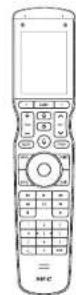
TRC-1480

Charging Cradle

Rechargeable Battery

USB Type C Cable
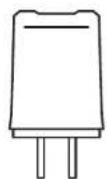
Power Adapter
TOTAL CONTROL 2.0
TRC-1480
OWNER'S MANUAL
Connecting the Battery Pack:
A battery is included in the box when shipped from the factory. Press the spring lock down to unlock and remove the cover. Place the battery into the battery compartment, making sure to align the contacts on the battery with the contacts within the TRC-1480's battery compartment. The battery snaps into place when aligned properly. Replace the battery cover.
Using the Charging Cradle:
Plug the 5V DC adapter into a power outlet and into the rear of the charging cradle. Gently place the TRC-1480 into the cradle, so that the remote automatically aligns itself to the contacts on the charging cradle. The status light immediately illuminates.
It is possible to connect the USB Type C cable directly into the bottom of the TRC-1480.
There are three (3) Status light conditions:
- Red: Indicates the the remote's battery is charging
- Blue: Indicates that the remote's battery is off the charging dock
- White: Indicates that the remote's battery is fully charged
Two-way via Wi-Fi (2.4 GHz or 5GHz);
The TRC-1480 has the capability of providing two-way control of supported devices directly on the 2.4" LCD touch-screen display. These devices must be configured in the Total Control program file. Consult your custom integrator for additional details.

natural_image
Black electronic device with a small screen and indicator lights on the base (no visible text or symbols)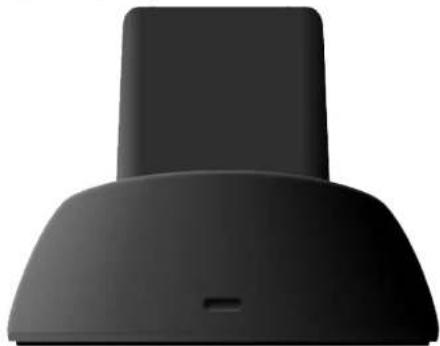
natural_image
Close-up of a black ergonomic hood with a small protrusion on the base (no text or symbols visible)TOTAL CONTROL 2.0
TRC-1480
OWNER'S MANUAL
Using the TRC-1480:
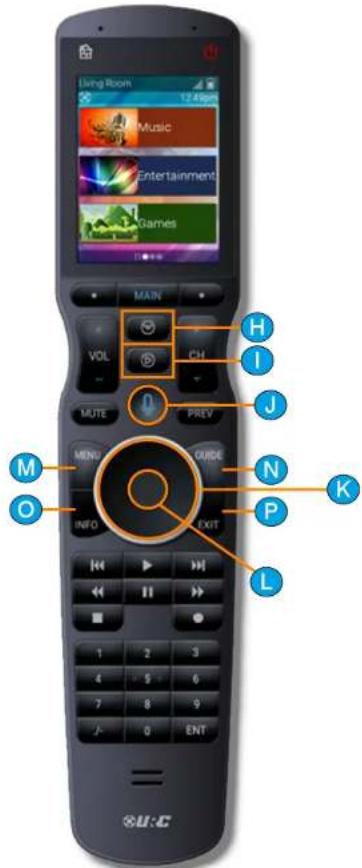
The Main Menu pages display activities and/or devices. Press the Main button to access the Main Menu. Larger systems may have more than one (1) page. Press either of the Page buttons to view additional Main Menu pages.
Although the TRC-1480 is programmed with custom layouts and devices, there are persistent buttons that maintain a steady function:
a. Rooms Menu: This button displays a list of rooms and allows the user to swap between them for control.
b. Room Off/House Off: With a single press of this button, the Total Control system turns off all the devices of the current room.
Press-n-hold this button for greater than three (3) seconds to display the system's Power Menu. This menu allows the user to turn off the room, the entire system, or any custom activity programmed by the custom integrator.
c. Capacitive Touch Screen: The specific function of each button is linked to the screen icon associated to the LCD screen. These buttons are used to select activities, devices, functions, navigate, and more. Speak with your custom integrator for more details.
d. Page Left/Right: These buttons are used to navigate through the various Main Menu and Device/Activity Menu pages.
e. Main: By default, this button returns the user to the previous menu.
f. Vol+, Vol-, & Mute: Used to increase, decrease, or toggle the mute status of the active audio device.
g. CH+, CH-, & Prev: Used to change a cable/SAT channel up or down or to navigate through a device's on-screen menus. The Prev button returns to the device's previous channel or can be used to return the user to a previous menu.

TOTAL CONTROL 2.0
TRC-1480
OWNER'S MANUAL
h. Shortcuts: Displays the customizable shortcuts menu. This menu can only contain shortcuts to room-based devices/activities.
i. Now Playing: Returns the user to the current activity/device menu regardless of what screen is on display.
j. Microphone: Select this button to interact with the native voice assistant service. When pressed, the microphone activates and listens to your verbal commands. The microphone is shut off when the button is no longer pressed.
k. Navigation Keys: Comprised of up, down, left, and right. These buttons are used to navigate through the menus and/or devices.
1. Select: Center button of navigation keys, used to confirm selections displayed on a viewing device.
m. Menu: Displays the on-screen menu of the active device.
n. Guide: Displays the channel guide for the device's on-screen display.
o. Info: Displays channel information for the device's on-screen display.
p. Exit: Closes out any open menus or guides on the display or returns to the previous menu.
TOTAL CONTROL 2.0
TRC-1480
OWNER'S MANUAL
q. Transport Buttons: These are the available buttons:


r. Numerical Keypad: Numbered buttons to change channels.

TOTAL CONTROL 2.0
TRC-1480
OWNER'S MANUAL
Using Voice Control:
The TRC-1480 has the capability of using Amazon Alexa Voice Assistant to control programmed activities, devices, and more.
For instructions on how to enable the Alexa Voice service, refer to page 11.
The TRC-1480 preserves your privacy with a push-to-talk button on the remote control. This means the Alexa Service is only listening when you want it too.
Custom activities and devices can be controlled via Alexa; however, configuration is required. Speak with your certified URC integrator for more details.
Issuing Voice Commands:
Voice Commands can be issued easily and intuitively with the push-to-talk button. This button removes the need to say "Alexa...".
Simply press-n-hold the button and say phrases such as...
• "Turn on bedroom Blu-ray"
• "Turn on living room ESPN"
- "Turn off the kitchen lights"
- And much more...
The TRC-1480 does not support the following Amazon Alexa features:
• Audio Playback via Amazon Music, Audible, or other music services.
- Alexa Drop-In, calls, or video calls
- No graphical feedback
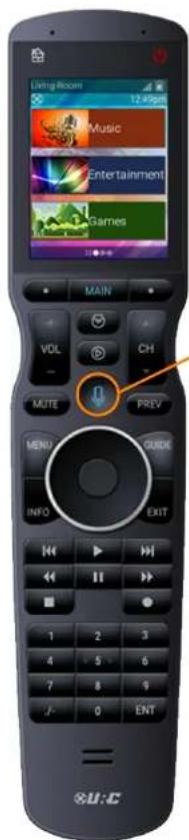

Press-n-hold the microphone button to issue a verbal command such as "Turn on Living Room Cable".
TOTAL CONTROL 2.0
TRC-1480
OWNER'S MANUAL
Displaying the Setup Menu
The Setup Menu allows users to configure or change certain behaviors of the TRC-1480.
Enter the Setup Menu by pressing and holding the Main and Enter (see image at the right) buttons for greater than five (5) seconds.

The Setup Menu times out after 60 seconds and returns the TRC-1480 to the system's Main Menu.
Use the up and down navigation buttons to maneuver between the two Setup pages. To select an option, highlight the desired setting and press the "Select" key at the center of the navigation keys.
To return to a previous page press the left page button (at the left of Main Menu). Press the Main or Exit button to return the remote to the Main Menu.
- Sleep Timers
Power - Network
- Date & Time
- Voice Assistant
- Button Beep
- Brightness
- Pickup
- System
- Software Update
- Button Light
- Factory Default


Image on display presents all the options available on the two (2) Settings Menu pages.
TOTAL CONTROL 2.0
TRC-1480
OWNER'S MANUAL
Sleep Timers:
Adjust the amount of time the screen remains on when the remote is not in use. The time can be set independently based on whether the remote is using battery power or sitting on the charging cradle.
Once the settings are adjusted, press the Save button. Pressing Cancel reverts the remote to the last saved setting.

Leaving the remote's display on for long periods of time may reduce your device's battery life.
Network:
The following options are displayed:
- Wi-Fi Networks: Displays all stored wireless networks. This option allows the user to connect to any network stored on the remote.
- Wireless Search: Select to connect to an available wireless network. SSID and Password may be required.
- Network Settings: Allows the user to configure the remote's network properties such as IP address, Gateway, DNS, and more.
WARNING! Only use this option when instructed by URC's Technical Support team or your custom install professional.

Do not make changes on this screen. Changing network settings may lead to issues controlling the system.

TOTAL CONTROL 2.0
TRC-1480
OWNER'S MANUAL
Voice Assistant:
This Settings Menu option allows you to integrate your Total Control system with voice assistant services such as Amazon Alexa.
Choose the supported voice assistant service (Amazon Alexa) and follow the on-screen directions.
The Alexa setup menu provides a code that must be entered into the Amazon Alexa URL (displayed on the LCD screen of the TRC-1480).
Once enabled, use the push-to-talk button to control the Total Control system or any other Alexa enabled device.
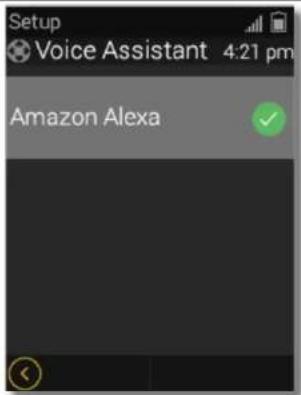

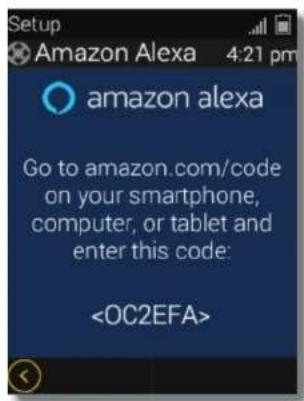

- Alexa Voice Volume: Adjust the volume of the Alexa service on the TRC-1480.
- Notification Volume: Adjust the volume for notification alerts.
- Audio Cue: Enable or disable the audio cue. It provides an audio "chime" that informs the user that the voice service is "listening".
TOTAL CONTROL 2.0
TRC-1480
OWNER'S MANUAL
Enabling Alexa:
Follow these instructions to enable the Alexa Voice Assistant Service:
- From the Settings Menu, select Voice Assistant.

- Select Amazon Alexa.
- Select Get Started.


TOTAL CONTROL 2.0
TRC-1480
OWNER'S MANUAL
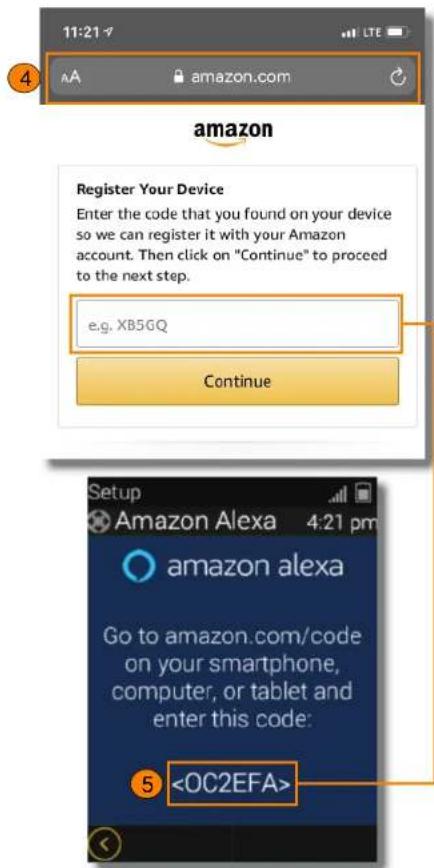
- Open a web browser and navigate to amazon.com/code.
- Enter the code displayed on the TRC-1480.
TOTAL CONTROL 2.0
TRC-1480
OWNER'S MANUAL
Brightness:
Adjust the screen brightness by pressing the adjacent LCD buttons to increase or decrease the brightness level.
Once the brightness has been adjusted, press the Save button. Pressing Cancel reverts the remote to the last saved setting.

High brightness levels may reduce the TRC-1480's battery life.
System:
Displays information about the remote's operating system, memory, etc. Press the More button to view further system information. Pressing the Cancel button exits to the remote's Setup Menu.

TOTAL CONTROL 2.0
TRC-1480
OWNER'S MANUAL
Button Light:
Adjust the brightness of the remote's button backlighting. Press the adjacent LCD buttons to increase or decrease the button backlighting.
Once the button back light has been adjusted, press the Save button. Pressing
Cancel reverts the remote to the last saved setting.

Brighter button light levels may reduce the TRC-1480's battery life.
Power:
Displays the remote's remaining battery level. Adjust when the "Low Battery" warning screen appears.
Once the Power settings have been adjusted, press the Save button. Pressing
Cancel reverts the remote to the last saved setting.

TOTAL CONTROL 2.0
TRC-1480
OWNER'S MANUAL
Date & Time:
The remote's date and time settings have been set by your certified custom integrator. If needed, the date and time settings can be manually changed here.
If the system's date and time are adjusted, the Total Control system adopts the new date and time globally.
If the advanced system controller is reset, it defaults to the program's default location using the Internet. If Internet is not present, the date and time must be entered manually from a URC interface such as the TRC-1480.
Once the date and time settings have been adjusted, press the Save button. Pressing Cancel reverts the remote to the last saved setting.
Button Beep:
Adjust the button "beep" of the remote. Press the adjacent LCD buttons to increase or decrease the volume level.
Once the sound has been adjusted, press the Save button. Pressing Cancel reverts the remote to the last saved setting.

Higher sound levels may reduce the TRC-1480's battery life.

TOTAL CONTROL 2.0
TRC-1480
OWNER'S MANUAL
Pickup:
Turn on or off the remote's pickup sensor. When enabled, the TRC-1480 turns on when the remote is picked up. Select Yes (turn on) or No (turn off).

Enabling the pickup sensor may reduce the TRC-1480's battery life.

Software Update:
URC's system has the ability to be programmed by a certified URC programmer remotely (after initial installation). There may be situations where the device may need to have the software update applied manually.
Select this option only when instructed by your certified URC integrator or URC's Technical Support Team.

TOTAL CONTROL 2.0
TRC-1480
OWNER'S MANUAL
Factory Default:
Resets the memory of the TRC-1480 to the factory settings. All existing programming is erased. The device requires reconfiguration by your certified URC integrator.
WARNING! Only use this button when instructed by URC's Technical Support team.

TOTAL CONTROL 2.0
TRC-1480
OWNER'S MANUAL
Specifications:
Microprocessor: ARM Cortex-A35 Core 1.5GHz x 4
RAM: 8GB eMMC, DDR3 256MB RAM
LCD: 2.4" TFT-LCD, 262K Colors, Backlight By LED
Touch Window: Capacitive Touch
Sound: Mono, Normal 1 watt
Devices: Supports up to 255 devices with text, less with heavy graphics
Usage Pages: Supports up to 255 pages on each devices with text, less with heavy graphics usage
Macro Capability: Up to 255 steps each; however, nesting is supported.
Wi-Fi: IEEE 802.11a/b/g/n/ac
RF Output Power: 2.4 GHz band - 10 dBm, 5 GHz band - 11 dBm
Frequency Range: 2412 MHz \~ 2462MHz, 5150 MHz \~ 5350 MHz, 5470 MHz \~ 5725 MHz
Battery: Lithium Polymer, 3.7V, 2100mAh, 7.77Wh
Battery Charging Time: 3 Hours
Power: 5.0V, 2.0A
Operating Temperature: 0\~40°C
Size: 9.05in x 1.97in x 1.06in
Weight (with battery loaded): 7.2oz

TOTAL CONTROL 2.0
TRC-1480
OWNER'S MANUAL
Warranty Statement:
1. LIMITED WARRANTY AND DISCLAIMERS
Universal Remote Control, Inc. ("URC") warrants that URC equipment purchased directly from URC or from an authorized URC dealer or distributor shall be free from defects in material and workmanship under normal usage for a period of one (1) year from the date of purchase of the product by the end-user, but no longer than thirty-six (36) months from the date of shipment of the URC equipment by URC to an authorized URC dealer or distributor, except that with respect to Total Control® whole-house products, the warranty extends for two (2) years from the date of purchase by the end-user, but no longer than forty-eight (48) months from the date of shipment of the URC equipment by URC to an authorized URC dealer or distributor.
This limited warranty is valid only in the United States of America.
URC equipment purchased from other than an authorized URC dealer or distributor is without warranty.
URC warrants that the software will substantially conform in any material respect to its functional specifications at the time of delivery. URC SHALL NOT BE LIABLE FOR OPERATIONAL, TECHNICAL OR EDITORIAL ERRORS AND/OR OMISSIONS MADE IN THE URC DOCUMENTATION. URC DOES NOT WARRANT THAT THE URC SOFTWARE IS BUG-FREE OR ERROR FREE OR THAT THERE ARE NO ERRORS/BUGS IN THE URC SOFTWARE.
URC warrants that at the time of purchase the URC equipment and the URC software complied with all applicable regulations and policies of the Federal Communications Commission ("FCC") regarding electromagnetic interference caused by electronic/computing devices and to the extent that the URC
equipment and/or the URC software fails to so comply, URC shall, at its own expense, take all reasonable measures to promptly cause such to comply.
THIS LIMITED WARRANTY DOES NOT COVER TECHNICAL ASSISTANCE FOR HARDWARE OR SOFTWARE USAGE EXCEPT AS EXPRESSLY PROVIDED FOR HEREIN.
CERTAIN IMPLIED WARRANTIES, INCLUDING AN IMPLIED WARRANTY OF MERCHANTABILITY AND FITNESS FOR A PARTICULAR PURPOSE, MAY BE AVAILABLE WITH RESPECT TO URC EQUIPMENT. IMPLIED WARRANTIES VARY FROM STATE TO STATE. URC EXPRESSLY LIMITS THESE IMPLIED WARRANTIES, TO THE EXTENT ALLOWABLE BY LAW, TO THE TIME PERIODS COVERED BY THE EXPRESS WRITTEN WARRANTIES PROVIDED HEREIN. OTHERWISE AND EXCEPT AS PROVIDED FOR HEREIN, URC EXPRESSLY DISCLAIMS ALL WARRANTIES, EXPRESS, STATUTORY OR IMPLIED, AND MAKES NO REPRESENTATIONS REGARDING THE USE OF, OR THE RESULTS OF THE USE OF, THE EQUIPMENT, SOFTWARE OR DOCUMENTATION IN TERMS OF CORRECTNESS, ACCURACY, RELIABILITY OR OTHERWISE.
EXCEPT AS EXPRESSLY PROVIDED FOR HEREIN, TECHNICAL SERVICES ARE SUPPLIED "AS IS", WITHOUT ANY WARRANTY, EXPRESS, STATUTORY OR IMPLIED, OF ANY KIND. TO THE MAXIMUM EXTENT PERMITTED BY APPLICABLE LAW, URC EXPRESSLY DISCLAIMS ALL WARRANTIES RELATING TO TECHNICAL SERVICES, EXPRESS, STATUTORY OR IMPLIED, INCLUDING BUT NOT LIMITED TO THE WARRANTIES OF QUALITY OR REASONABLE SKILL AND CARE, OR OUTCOME OR RESULTS.
WITHOUT IN ANY WAY LIMITING THE GENERALITY OF THE OTHER PROVISIONS HEREIN, THIS LIMITED WARRANTY DOES NOT COVER: (I) DAMAGE FROM MISUSE, NEGLECT OR ACTS OF NATURE, (II) MODIFICATIONS, (III) INTEGRATION WITH THIRD PARTY CONTENT, OR (IV)
TOTAL CONTROL 2.0
TRC-1480
OWNER'S MANUAL
BEYOND THE WARRANTY PERIOD AND/ OR FAILURE TO FOLLOW URC WARRANTY CLAIM PROCEDURE.
The warranty limitations and warranty disclaimers may not apply to end user in whole or in part, where such are restricted or excluded by applicable law, and such shall apply to the maximum extent permitted by applicable law.
In the event of any warranty claim, URC will, at its sole option, repair the URC equipment using new or comparable rebuilt parts, or exchange the URC equipment for new or rebuilt equipment. In the event of a defect, these are the end user's exclusive remedies.
All the URC equipment returned for service, exchange or repair require an RGA number. To obtain an RGA number, you must complete a Return Request Form which you may obtain by calling (914) 835-4484 or contacting URC at returnrequest@universalremote.com. To obtain warranty service, end user must deliver the URC equipment, freight prepaid, in its original packaging or packaging affording adequate protection to URC at 37 Ramland Road, Unit 104, Orangeburg, NY 10962. It is end user's responsibility to backup any macro programming, artwork, software or other materials that may have been programmed into the unit. It is likely that such data, software, or other materials will be lost during service and URC will not be responsible for any such damage or loss. A dated purchase receipt, bill of sale, installation contract or other verifiable proof of purchase is required. For the URC equipment support and other important information, please visit URC's website available at www.universalremote.com or call the Customer Service Center at (914) 835-4484.
This limited warranty only covers the URC equipment issues caused by defects in material or workmanship during ordinary consumer use. It does not cover product issues caused by any other reason, including but not limited to product
issues due to commercial use, acts of God, third-party installation, misuse, limitations of technology, or modification of or to any part of the URC equipment. This limited warranty does not cover the URC equipment sold as used, as is, refurbished, so called "B stock" or consumables (such as batteries). This limited warranty is invalid if the factory applied serial number has been altered or removed from the URC equipment. This limited warranty specifically excludes the URC equipment sold by unauthorized resellers.
With the exception of URC's IR-only, broad-based consumer remotes, none of URC's PC programmable remotes or any of our Total Control® whole-house equipment are authorized for online internet sales. Buying URC's PC programmable remotes or any of our Total Control® whole-house equipment online means buying equipment that does not have URC's limited warranty. Such equipment is not eligible for URC tech support or software support, either.
2. URC's LIMITATIONS OF LIABILITY
IN NO EVENT SHALL URC BE LIABLE FOR INDIRECT, SPECIAL, INCIDENTAL, EXEMPLARY, PUNITIVE OR CONSEQUENTIAL DAMAGES OF ANY KIND OR LOSS OF PROFITS OR BUSINESS OPPORTUNITY, EVEN IF URC IS ADVISED OF THE POSSIBILITY OF SUCH DAMAGES.
IN NO EVENT SHALL URC BE LIABLE FOR LOSS OF OR DAMAGE TO DATA, COMPUTER SYSTEMS OR COMPUTER PROGRAMS.
URC'S LIABILITY, IF ANY, FOR DIRECT DAMAGES OF ANY FORM SHALL BE LIMITED TO ACTUAL DAMAGES, NOT IN EXCESS OF AMOUNTS PAID BY END USER FOR THE URC EQUIPMENT.
TOTAL CONTROL 2.0
TRC-1480
OWNER'S MANUAL
IN NO EVENT SHALL URC BE LIABLE FOR ANY EVENTS BEYOND ITS CONTROL, INCLUDING ANY INSTANCE OF FORCE MAJEURE.
IN NO EVENT SHALL URC BE LIABLE FOR THE ACTS OR OMISSIONS OF END USER OR ANY THIRD PARTY.
THE LIMITATIONS OF LIABILITY MAY NOT APPLY TO END USER IN WHOLE OR IN PART, WHERE SUCH ARE RESTRICTED LIMITED OR EXCLUDED BY APPLICABLE LAW AND SUCH SHALL APPLY TO THE MAXIMUM EXTENT PERMITTED BY APPLICABLE LAW.
URC SHALL NOT BE HELD RESPONSIBLE FOR THE STATEMENTS MADE BY OTHERS.
SOME STATES OR JURISDICTIONS DO NOT ALLOW THE EXCLUSION OR LIMITATION OF INCIDENTAL OR CONSEQUENTIAL DAMAGES, OR ALLOW LIMITATIONS ON HOW LONG AN IMPLIED WARRANTY LASTS, SO THE ABOVE LIMITATIONS OR EXCLUSIONS MAY NOT APPLY TO END USER. THIS LIMITED WARRANTY GIVES END USER SPECIFIC LEGAL RIGHTS AND END USER MAY HAVE OTHER RIGHTS WHICH VARY FROM STATE TO STATE OR JURISDICTION TO JURISDICTION.
Precautions and Information Concerning Rechargeable Lithium Polymer Battery:
- If you will not be using your remote control for an extended period of time, be sure to remove the battery
- Do not attempt to dissemble, alter or apply heat to the battery.
- Use care to avoid dropping the battery or subjecting it to severe impact that could damage the case.
- The battery should not be immersed in water.
- Risk of explosion if battery is replaced by an incorrect type.
- Dispose of used batteries according to the instructions.
- Lithium Polymer batteries are recyclable. For the address of a drop-off locations near you, call toll free 1-800-822-8837 or visit http://www.rbrc.com
End User Agreement:
The terms and conditions of the End User Agreement are available at www.universalremote.com/cua.php shall apply.
TOTAL CONTROL 2.0
TRC-1480
OWNER'S MANUAL
Federal Communication Commission Interference Statement:
This equipment has been tested and found to comply with the limits for a Class B digital device, pursuant to part 15 of the FCC Rules. These limits are designed to provide reasonable protection against harmful interference in a residential installation. This equipment generates, uses and can radiate radio frequency energy and, if not installed and used in accordance with the instructions, may cause harmful interference to radio communications. However, there is no guarantee that interference will not occur in a particular installation. If this equipment does cause harmful interference to radio or television reception, which can be determined by turning the equipment off and on, the user is encouraged to try to correct the interference by one more of the following measures:
- Reorient or relocate the receiving antenna.
- Increase the separation between the equipment and receiver.
- Connect the equipment into an outlet on a circuit different from that to which the receiver is connected.
- Consult the dealer or an experienced radio/TV technician for help.
Warning!
Changes or modifications not expressly approved by the manufacturer could void the user's authority to operate the equipment.
Note: The manufacturer is not responsible for any Radio or TV interference caused by unauthorized modifications to this equipment. Such modifications could void the user's authority to operate the equipment.
FCC Caution:
This device complies with Part 15 of the FCC Rules. Operation is subject to the following two conditions: (1) this device may not cause harmful interference, and (2) this device must accept any interference received, including interference that may cause undesired operation.
Any changes or modifications not expressly approved by the party responsible for compliance could void the authority to operate equipment.
The antenna(s) used for this transmitter must not be co-located or operating in conjunction with any other antenna or transmitter.
Federal Communication Commission (FCC) Radiation Exposure Statement:
This equipment complies with FCC radiation exposure limits set forth for an uncontrolled environment. This transmitter must not be co-located or operating in conjunction with any other antenna or transmitter. End users must follow the specific operating instructions for satisfying RF exposure compliance.
Importer & Manufacturer:
- Importer:
Universal Remote Control, Inc.
500 Mamaroneck Ave
Harrison, NY 10528
- Manufacturer:
Summit Technology, Inc.
612, 130, Digital-ro, Geumcheon-gu, Seoul, Republic of Korea
TOTAL CONTROL 2.0
TRC-1480
OWNER'S MANUAL
Declaration of Conformity:
Company Name : Summit Technology, Inc
Company Address : 130, Digital-ro, Namsung Plaza
Suite 611, Geumcheon-gu, Seoul, Korea
Contact Information : Phone: (+82)-2-6929-3161
Product Name : RF Remote Controller
Model Name: TRC-1480
This product herewith complies with the requirements of Radio equipment Directive (2014/53/EU) issued by the Commission of the European Community Compliance with these directives implies conformity to the following European Community.
Date of Issue: :
Name an signature of authorized person :
General Product Manager Summit Technology, Inc
• Radio Equipment Directive
■ EN 62368-1 (2014) + A11 (2017)
■ EN 62479 (2010
■ ETSI EN 301 489-1 V2.1.1 (2016)
- Test Report No.:
Radio:
■ EMC:
■ Health:
■ Safety
■ ETSI EN 301 489-17 V3.1.1 (2016)
■ ETSI EN 300 328 V2.1.1 (2016)
of test reports and/or certificate verified compliance with the standards above
• Radio equipment Directive
■ Certificate No.:
■ Certificate Body : TUV Rhineland
- TOTAL CONTROL 2.0
- Congratulations!
- Features & Benefits:
- - Quick Connect Wi-Fi
- • Two-way Metadata Feedback:
- • Voice Assistant Ready:
- • H264 IP Camera Support:
- Requirements & Compatibility:
- • Total Control 2.0:
- Parts:
- Connecting the Battery Pack:
- Using the Charging Cradle:
- Two-way via Wi-Fi (2.4 GHz or 5GHz);
- Using the TRC-1480:
- Using Voice Control:
- Issuing Voice Commands:
- Displaying the Setup Menu
- Sleep Timers:
- Network:
- Voice Assistant:
- Enabling Alexa:
- Brightness:
- System:
- Button Light:
- Power:
- Date & Time:
- Button Beep:
- Pickup:
- Software Update:
- Factory Default:
- Specifications:
- Warranty Statement:
- LIMITED WARRANTY AND DISCLAIMERS
- This limited warranty is valid only in the United States of America.
- URC equipment purchased from other than an authorized URC dealer or distributor is without warranty.
- URC's LIMITATIONS OF LIABILITY
- Precautions and Information Concerning Rechargeable Lithium Polymer Battery:
- End User Agreement:
- Federal Communication Commission Interference Statement:
- Warning!
- FCC Caution:
- Federal Communication Commission (FCC) Radiation Exposure Statement:
- Importer & Manufacturer:
- - Importer:
- - Manufacturer:
- TRC-1480
- OWNER'S MANUAL
- Declaration of Conformity:
Brand : UNIVERSAL REMOTE CONTROL
Model : TRC-1480
Category : Remote control