
HNU 270AA - Freezer HOOVER - Free user manual and instructions
Find the device manual for free HNU 270AA HOOVER in PDF.


| Product Type | Freezer |
| Model | HNU 270AA |
| Brand | Hoover |
| Climatic Classes | SN (10-32°C), N (16-32°C), ST (18-38°C), T (18-43°C) |
| Power Supply | 220-240V ~ 50Hz (typical) |
| Energy Consumption | See rating plate |
| Defrosting Method | Manual defrost |
| Interior Light | Replaceable bulb (same type and wattage) |
| Storage Capacity | See rating plate for exact capacity |
| Installation Clearance | At least 5 cm gap from wall and surrounding items |
| Leveling | Adjustable feet |
| Cleaning | Bicarbonate of soda solution for interior; damp cloth for exterior |
| Safety Compliance | CE marked, WEEE directive 2002/96/EC |
| Spare Parts Availability | Contact service center for parts |
| Recommended Waiting Time After Installation | At least 2 hours before turning on |
| Noise Levels | Normal operating sounds: humming, gurgling, clicking |
| Warranty | Contact dealer; damage must be reported within 7 days |
Frequently Asked Questions - HNU 270AA HOOVER
User questions about HNU 270AA HOOVER
0 question about this device. Answer the ones you know or ask your own.
Ask a new question about this device
Download the instructions for your Freezer in PDF format for free! Find your manual HNU 270AA - HOOVER and take your electronic device back in hand. On this page are published all the documents necessary for the use of your device. HNU 270AA by HOOVER.
USER MANUAL HNU 270AA HOOVER
MAINTENANCE AND USER'S GUIDE
GB
Congratulations on purchasing this fridge, which has been designed using the latest technologies for an easy-to-use environmentally friendly appliance.
We recommended you read this guide and the technical datasheet carefully to find yout everything you need to know about this fridge.

natural_image
Line drawing of three rectangular kitchen appliances with no text or symbolsA SPACE IS NEEDED BETWEEN „GENERAL“ AND „RECOMMENDATIONS“
This appliance is only intended for storing foods. Any other use is considered hazardous and the manufacturer may not be held liable for any damages. Conformity declaration: the parts of this appliance intended to come into contact with foodstuffs conform to the directive 89/109/EEC and the Italian Law decree no. 108 of 25/01/92 implementing this directive.
CE Appliance conforming to the European directives 89/336/EEC and 73/23/EEC and subsequent amendments.
The dealer shall be notified of any damage within 7 days from purchasing the appliance.
We also recommend you read the terms of the warranty.

This appliance is marked according to the European directive 2002/96/EC on Waste Electrical and Electronic Equipment (WEEE).
By ensuring this product is disposed of correctly, you will help prevent potential negative consequences for the environment and human health, which could otherwise be caused by inappropriate waste handling of
this product.
The symbol on the product indicates that this product may not be treated as household waste. Instead it shall be handed over to the applicable collection point for the recycling of electrical and electronic equipment.
Disposal must be carried out in accordance with local environmental regulations for waste disposal.
For more detailed information about treatment, recovery and recycling of this product, please contact your local city office, your household waste disposal service or the shop where you purchased the product.
Leave the power plug accessible even after the installation of the apparatus.
Do not use electrical devices inside the food compartments, except for the ones equipped with the apparatus or available from our service centres.
Before plugging in the appliance, make sure the voltage on the rating plate is the same as the voltage in your home. The rating plate is inside the appliance, in the bottom left-hand corner of the fridge compartment.
The manufacturer may not be held liable for any damage caused by unearthed wiring systems.
After you have installed the fridge, wait for at least two hours before turning it on.
To ensure your appliance works as efficiently as possible, leave at least a 5 cm gap between the fridge and the wall and between the fridge and items behind or above it (see diagram below).

What to avoid...
Do not install the fridge close to sources of heat.
Do not alter plugs or use adapter plugs or extension leads.
If you have purchased a stainless steel fridge, it will have a peel-off film protecting the surface. Do not use sharp implements to remove the film, as these could damage the steel.

natural_image
Line drawing of a hand holding a tool over a surface with scattered debris (no text or symbols)Do not install the appliance outside.
The appliance works properly at the following temperature ranges:
Climatic class: SN +10 +32°C
Climatic class: N +16 +32°C
Climatic class: ST +18 +38°C
Climatic class: T +18 +43°C
Climatic class: N/ST +16 +38°C
(See appliance's rating plate)

natural_image
Line drawing of a two-story building facade with windows and doors (no text or symbols)RECOMMENDATIONS
We recommend the following, for greater energy saving:
- Do not put hot foods in the fridge.
- Do not pack foods close together as this prevents air circulating.
- Make sure foods do not touch the back of the fridge.
- If the electricity goes off, do not open the fridge door.
The fridge makes some noises when working. This is entirely normal and you might hear HUMMING, GURGLING, RUSTLING AND WHISTLING, as well as slight CLICKING OR JUMPING noises.
Adjust the feet to level the appliance.

natural_image
Simple line drawing of a refrigerator with a hand pointing to its side panel (no text or symbols)Make sure glass containers do not touch in the appliances.

Install the fridge leaving a gap between it and other furniture or appliances.

natural_image
Diagram of a refrigerator with doors and a circular arrow indicating direction (no text or symbols)Make sure accessories are installed properly.
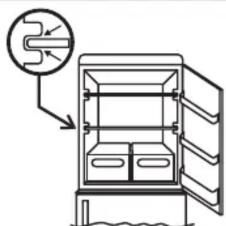
If you have followed the instructions, but your product continues to make irritating noises, other than those resulting from a normal functioning, please contact the technical support service.
MAINTENANCE
Proper maintenance will ensure a long life for your appliance.
Remember to remove the plug before you clean/defrost the fridge, change the fridge light bulb, etc.
Cleaning
Clean the outside of the fridge at regular intervals with a damp cloth. Use a solution of bicarbonate of soda and water to clean the inside. Do not use abrasive products.
An outlet for draining water is located in the middle of the back of the fridge. Make sure this outlet is not obstructed; clean regularly.
Defrosting
It is recommended to defrost the refrigerator each time an excessive layer of frost is formed, then leave the doors open with the apparatus switched off and avoid using sharp or mechanical objects (knives, scissors, etc) to remove the ice from the internal parts, in order to avoid damaging the refrigerating circuit.
NOTE: a small amount of ice on the back of the fridge compartment is normal.
Replacing the fridge light bulb
To replace the light bulb in the fridge compartment:
Adjust the thermostat to „0“ and remove the plug from the socket.


natural_image
Simple line drawing of a three-pin electrical plug and a power outlet (no text or symbols)Use a flat screwdriver to lift up the grid and remove the see-through cover

natural_image
Line drawing of a mechanical component with a tool and directional arrow (no text or symbols)Remove the light bulb and replace with the same type and same watt bulb.

natural_image
Technical line drawing of a mechanical component with directional arrows indicating motion (no text or symbols)Re-fit the cover and plug in the appliance.

natural_image
Technical line drawing of a mechanical component with a tool and circular component (no text or symbols)STORING AND FREEZING FOODS
To make sure foods retain their flavour and substance and stay fresh, store them in the fridge compartment as shown in the figure below. Wrap foods in tin foil or cling film or put them in closed containers.
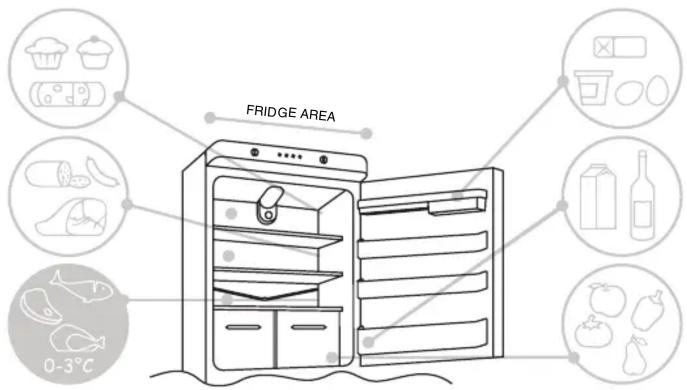
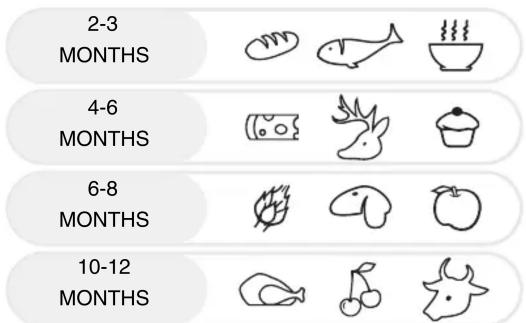
Frozen foods can be stored for approximately one month in compartments
See the table for storing foods in compartments
Foods can only be frozen in * *** compartments
Trouble-shooting
Please contact our service department if you have any difficulties. However you can often solve small or apparently alarming problems yourself. In fact problems may be caused by incorrect use or installation or by unsuitable ambient conditions and in these cases you will be charged
THE FRIDGE DOES NOT WORK
- Make sure the plug is inserted properly in the socket.
- Make sure the thermostat is not set to „0“ or Stop.
- Make sure the electricity is working.
THE FRIDGE IS NOT COLD ENOUGH
- Make sure the thermostat is set properly. Adjust to higher settings.
- Make sure the fridge doors have not been left open for too long.
- Make sure you haven't stored too much food in the fridge.
- Make sure you haven't put hot foods in the fridge.
THERE IS TOO MUCH FROST
- Make sure the door has not been left open for too long. Unplug the fridge, defrost and then turn it back on.
- Make sure the thermostat is not set at a temperature which is too cold (high settings). Adjust to lower settings.
THERE IS TOO MUCH CONDENSATION
- Make sure the door has not been left open for too long.
- Make sure you haven't stored too many fresh foods in the fridge.
- Make sure you haven't put hot foods in the fridge.
THERE IS WATER IN THE FRIDGE COMPARTMENT
- A few drops of water on the sides of the fridge compartment is normal, particularly when a room is humid/damp.
- Make sure the water outlet is not obstructed.
THE LIGHT DOES NOT WORK
- Make sure the plug is inserted in the socket properly.
- Make sure the electricity is working.
- Follow the instructions in the technical datasheet to replace the bulb.
If the problem continues, contact our service department, giving the appliance number and serial number on the rating plate.
- MAINTENANCE AND USER'S GUIDE
- A SPACE IS NEEDED BETWEEN „GENERAL“ AND „RECOMMENDATIONS“
- What to avoid...
- RECOMMENDATIONS
- MAINTENANCE
- Cleaning
- Defrosting
- Replacing the fridge light bulb
- STORING AND FREEZING FOODS
- Trouble-shooting
- THE FRIDGE DOES NOT WORK
- THE FRIDGE IS NOT COLD ENOUGH
- THERE IS TOO MUCH FROST
- THERE IS TOO MUCH CONDENSATION
- THERE IS WATER IN THE FRIDGE COMPARTMENT
- THE LIGHT DOES NOT WORK
Brand : HOOVER
Model : HNU 270AA
Category : Freezer