
i40R - Central heating boiler Atag - Free user manual and instructions
Find the device manual for free i40R Atag in PDF.


| Product Type | Central Heating Boiler |
| Brand | Atag |
| Model | i40R |
| Boiler Category | Closed, condensing, modulating |
| Efficiency Rating | >88% Efficient SEDBUK 2009 |
| Certification | CE marked |
| Display Type | LCD screen with selector wheel, OK, Back, Reset buttons |
| DHW Function | Comfort setpoint adjustable, ECO/COMFORT modes |
| CH Settings | Setpoint temperature adjustable (T set Z1) |
| Pump Function | Default auto on demand; continuous operation selectable for frost protection |
| Boiler Frost Protection | Activates if flow sensor < 5°C, fires until 10°C |
| Water Pressure Range | Recommended 1.0-1.2 bar for iC/iS; system boiler (iR) is open vent |
| Error Code Display | Blocking (temporary) and error (requires reset) codes |
| Maintenance | Periodic check by installer; clean with non-aggressive agents |
| Warranty | Supplied warranty card; requires registration |
| Disposal | Recycle at designated collection point for EEE |
| Benchmark Scheme | Licensed member; commissioning checklist required |
| Gas Type | Natural gas (assumed from UK context) |
| Mounting | Wall-mounted (typical for iR range) |
Frequently Asked Questions - i40R Atag
User questions about i40R Atag
0 question about this device. Answer the ones you know or ask your own.
Ask a new question about this device
Download the instructions for your Central heating boiler in PDF format for free! Find your manual i40R - Atag and take your electronic device back in hand. On this page are published all the documents necessary for the use of your device. i40R by Atag.
USER MANUAL i40R Atag
- Introduction ......3
- Safety 5
- Boiler description....6
- Display and functions....6
4.1 DHW and Heating program....7
4.2 Boiler information....8
4.3 Pump function / Boiler frost protection....10
- Filling the heating system....11
- Error codes....13
- Maintenance....14
- Warranty....14
- Disposal of the product ....14
Important!
It is in your own interest that we should know that you have an ATAG boiler. Please fill out the warranty card completely and send it back to us. Then we can be fully at your service.
1 Introduction




These operating instructions describe the functioning and the operating of the ATAG i-Range boilers. This manual is for the end user. For installation and servicing there is an installation & servicing instructions manual for the installer.
Read this manual fully before operating the boiler. In case of doubt or errors contact your installer.
ATAG Heating Technology Ltd reserves the right to change the specifications and dimensions without prior notice.
Work on the boiler must be carried out by a competent person, (Ref: Gas Safe Register) using correctly calibrated instruments with current test certification.
When replacing parts use only ATAG Service parts.
Contact details for ATAG Heating Technology Ltd can be found on the back page of this manual.
The Benchmark Scheme
ATAG Heating Technology Ltd is a licensed member of the Benchmark Scheme which aims to improve the standards of installation and commissioning of domestic heating and hot water systems in the UK and to encourage regular servicing to optimise safety, efficiency and performance.
Benchmark is managed and promoted by the Heating and Hotwater Industry Council. For more information visit www.centralheating.co.uk
Please ensure that the installer has fully completed the Benchmark Checklist on the inside back pages of the installation instructions supplied with the product and that you have signed it to say that you have received a full and clear explanation of its operation. The installer is legally required to complete a commissioning checklist as a means of complying with the appropriate Building Regulations (England and Wales).
All installations must be notified to Local Area Building Control either directly or through a Competent Persons Scheme. A Building Regulations Compliance Certificate will then be issued to the customer who should, on receipt, write the Notification Number on the Benchmark Checklist.
This product should be serviced regularly to optimise its safety, efficiency and performance. The service engineer should complete the relevant Service Record on the Benchmark Checklist after each service.
The Benchmark Checklist may be required in the event of any warranty work and as supporting documentation relating to home improvements in the optional documents section of the Home Information Pack.
2 Safety
Work on the installation should only be carried out by qualified personnel with calibrated equipment. When replacing parts, only ATAG Service components may be used.

The device may be operated only by authorized persons who have been instructed on the operation and use of the device. Improper use may cause damage to the device and / or to the connected installation.

The appliance is not to be used by children or persons with reduced physical, sensory or mental capabilities, or lack of experience and knowledge, unless they have been given supervision or instruction.

Children being supervised not to play with the appliance.
If you smell gas:
- No naked flames! No smoking!
- Do not switch lights on or off or use other electrical switches.
- Do not use the phone
- Close the gas mains
- Open windows and doors
- Warn the occupants and leave the building
- Only call the gas company or installer once you are outside the building.
Corrosion protection
Do not use sprays, chlorine-containing cleaning products, solvents, paints etc. in the vicinity of the device or its air supply. These substances have an adverse impact on the device and can lead to corrosion that may result in failures.
Checking the heating water
Always use potable water for filling the installation.
Adding chemical agents such as frost and corrosion inhibitors are only to be added by your installer.
If in doubt, check with your installer or ATAG Heating Technology Ltd.
3 Boiler description
The ATAG i-Range boiler is a closed, condensing and modulating heating boiler which meets the European standard (CE).
A declaration of conformity can be obtained from the manufacturer.

The efficiency of the boiler is very high and the radiation convection and standby losses very low. The emission of noxious substances is far below the fixed standards so the boiler is >88% Efficient SEDBUK 2009 rated.
4 Screen and functions
The boiler is equipped with a door at the front. For opening the door just pull at the door handle.

After opening the flap you will find on the inside of the flap a brief overview of the meaning of all the buttons and icons. These are described hereafter.

The Control unit has a 'sleep mode' if no key is operated within a certain time. Activation occurs by any key operation.
Explanation of the buttons
- Selector Wheel Turn the wheel left or right to scroll through available menu options
- OK button Press to select/confirm an item
- BACK button Press to go back one screen
- RESET button Press to reset a fault code
- Commissioning Press to enter into service mode which allows adjustment of button high fire/low fire and CO 2 settings (Do not use. For service purposes only)
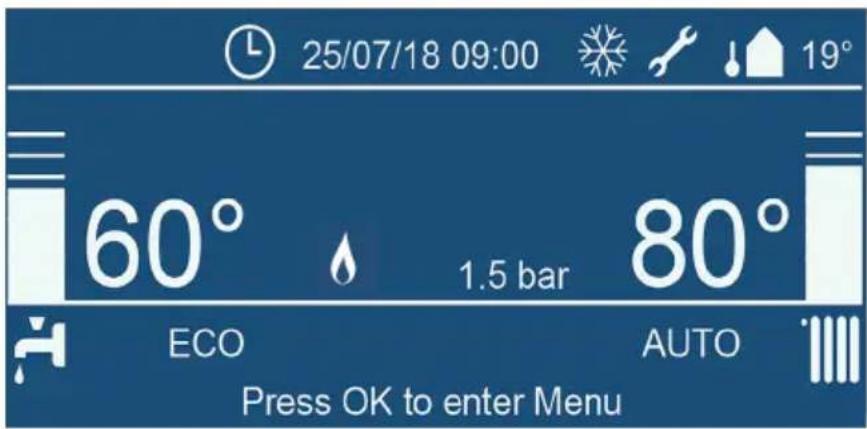

Outdoor temperature (if connected)
Maintenance warning present


Pump continuous/frost protection
Burner on


DHW status symbol. A box around the tap symbol indicates DHW is in operation


Central heating status symbol. A box around the radiator symbol indicates central heating is in operation
ECO
COMFORT
Hot water is not preheated Hot water is pre-heated and kept hot
4.1 DHW and Heating program
Change the Central Heating Setpoint Temperature
- From the Home screen, press OK.
- Turn the selector wheel to highlight Complete Menu. Press OK.
- CH Settings is highlighted. Press OK.
- CH Setpoint Temp is highlighted. Press OK.
- T set Z1 is highlighted. Press OK.
Note: T set Z2 and T set Z3 are inactive functions.
-
Turn the selector wheel until the desired temperature appears on the screen. Press OK.
-
Press the Back button until the Home screen appears.
- From the Home screen, press OK.
- Turn the selector wheel to highlight Complete Menu. Press OK.
- Turn the selector wheel to highlight DHW Settings. Press OK.
- Option DHW Comfort Setpoint Temp is highlighted. Press OK.
- The current DHW comfort Setpoint temperature is displayed. Press OK.
- Turn the selector wheel until the desired temperature appears on the screen. Press OK.
- Press the Back button until the Home screen appears.
4.2 Boiler information
To gain access to the Boiler information, proceed as follows:
The Boiler information is accessible through a code.

1 From the controller Home screen, press the BACK and OK buttons at the same time for 7 seconds.

2 Turn the selector wheel to highlight 007 as the TechnicalCode. PressOK.
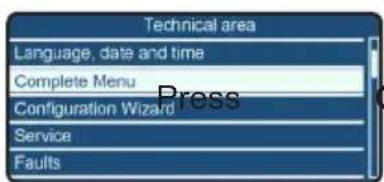
3 Turn the selector wheel to highlight Complete Menu. DK. It is now loading the menu.
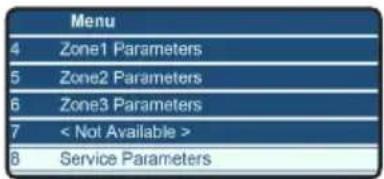
As an example we take the CH Flow Set T.
4 Turn the selector wheel to highlight 8 Service Parameters. PressOK.
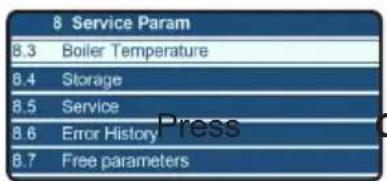
4 Option 8.3 Boiler Temperature is highlighted.
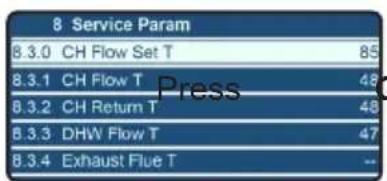
5 Option 8.3.0 CH Flow Set T is highlighted.

The screen left appears.
A list of the most common Boiler information can be found in the table below
| 8.2.2 Fan Speed in Rpm | |
| 8.2.5 DHW Flow Rate in l/min | |
| 8.2.8 Gas Power in kW | |
| 8.2.9 Heating circuit pressure in bar | |
| 8.3.0 CH Flow Set T in °C | |
| 8.3.1 CH Flow T in °C | |
| 8.3.2 CH Return T in °C | |
| 8.3.3 DHW Flow T in °C | |
| 8.3.5 Outdoor T (only if an outside sensor is connected) in °C | |
| 8.7.5 Ionization current in μA |
4.3 Pump function
By default the boiler is set in such a manner that the pump will switch on in case of a heat request for CH or
DHW. Switching on and off is managed entirely by the control system.
Danger of frost
If there is danger of frost damage to the CH installation, it is advisable to let the pump run continuously, proceed as follows:

1 From the controller Home screen, press OK.

2 Turn the selector wheel to highlight Complete Menu. Press OK.

3 CH Settings is highlighted. PressOK.

4 Option CH Setpoint Temp is highlighted. PressOK.

5 Turn the selector wheel to highlight Pump continuous running. PressOK.
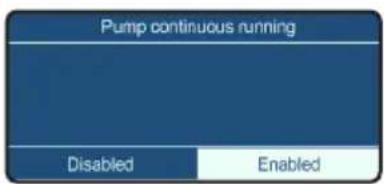
7 Turn the selector wheel to highlight Enable. PressOK. If the pump is set to continuously this is displayed by.
Boiler frost protection
If the (T1) flow sensor registers a temperature of 5° C or below in the boiler, the boiler will fire up. The boiler keeps on firing until the temperature reaches 10° C (measured on the flow sensor) and the boiler switches off again.
5 Filling the heating system
Information on the water pressure (only iC and iS)

Information of the actual water pressure:
The controller Home screen shows OK. The actual water pressure is always visible.
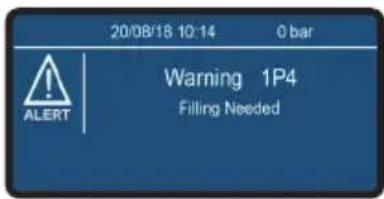
Water pressure is too low (<0.8 bar):
Power is reduced by 20%. The installation should be refilled.
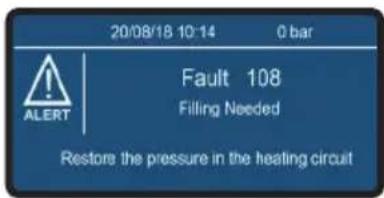
Water pressure is too low (<0.5 bar):
The boiler is taken out of operation. The installation should be refilled.

Air purge program:
After the installation has been refilled and if the pressure was below 0.5 bar the air purge program will start. This will last for approximately 7 minutes.

Water pressure is too high (> 3.0 bar):
The boiler is taken out of operation.
The installation pressure should be reduced by draining water from the heating system.
The central heating installation needs to be filled with potable water according to the requirements in chapter 9.3 'Water quality' in the Installation manual. For filling or topping up the installation use the filling loop according to the following procedure (see figure 1).
Filling procedure
Combi boiler (iC-Range):
The iC-Range boiler is provided with a filling loop. Connect the filling loop between cold water connection (1) and CH connection (2)
- Open slowly the valves (A and B) of the filling loop;
- Read the water pressure from the pressure gauge under the boiler or from the display according to the procedure described above and wait until the pressure reaches between 1.0 and 1.2 bar;
- Close both valves (A and B) of the filling loop. Always disconnect the filling loop and close the valves with the cap nut (3).
System boiler (iS-Range)
The heating system connected to the iS-Range boiler is provided with a filling loop.
Connect the filling loop between cold water tap and the connection on the heating system
- Open slowly the valves of the filling loop
- Read the water pressure from the pressure gauge under the boiler or from the display according to the procedure described above and wait until the pressure reaches 1.2 bar.
- Close both valves of the filling loop
Always disconnect the filling loop.

Figure 1
Regular boiler (iR-Range)
This boiler is part of an 'Open Vent' heating system. The system is not pressurized, but is filled automatically by a filling system in the loft.
If there is a problem with this system, please contact your installer.
When the heating system is filled and after a power interruption the boiler will be reset and starts with a air purge program. The automatic air purge program will take approx. 7 minutes and will be followed by the home screen if the water pressure is above 0.8 bar (pressure reading for iC & iS boilers only).
A detected failure is indicated on the screen in blocking or error messages.
- Blocking code
A blocking code is a temporary error that can be automatically corrected by the boiler.
- Error code
A error code requires the error to be reset and/or corrected for the boiler to go back into a normal operating mode. A "Press the Reset button" message appears on the screen.
An overview of the most common blocking and error codes are listed below.
101 Overheat
102 Pressure Sensor Error
104 Flow Check Failed
108 Pressure < Pmin (< 0.5 bar), Filling needed
1P4 Pressure < Pmin (0.5 - 0.8 bar), Filling needed
109 Pressure > Pmax
110 Send Probe Damaged
112 Return Probe Damaged
114 Outdoor Sensor Damaged
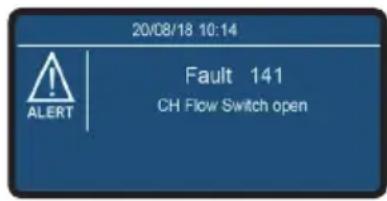
141 CH Flow Switch open
201 DHW Probe Damaged (Combi)
203 Tank Probe Damaged (Solo)
303 PCB Fault
304 Too many resets
501 No flame detected
612 Fan error (fan does not start up)
Example of screen of error message
7 Maintenance
Conclude a maintenance agreement with your installer in order to have the installation periodically checked and adjusted.
The cover of the boiler consists of metal and plastic parts, which can be cleaned with a normal (non-aggressive) cleansing agent.
8 Warranty
For the warranty conditions, see the Warranty Card that has been supplied with the boiler.
9 Disposal of the product
This product should be handed in at a designated collection point, e.g. by handing it in at a duly authorized reseller when purchasing a similar product, or at an authorized collection site for recycling products which contains electrical and electronic equipment (EEE) and batteries and accumulators. Because of the potentially hazardous substances that usually accompany EEE, improper handling of this type of waste could have a possible impact on the environment and human health.
Your cooperation in the proper disposal of this product will contribute to the effective usage of natural resources.
For more information on recycling this product, please contact your city office, local waste disposal facilities, official service for chemical waste, landfill site, or your supplier.
ATAG
kiwa
approved
product

UK WATER SUPPLY REGULATIONS


- IMPORTANT
- 1 INTRODUCTION
- THE BENCHMARK SCHEME
- 2 SAFETY
- IF YOU SMELL GAS
- CORROSION PROTECTION
- CHECKING THE HEATING WATER
- 3 BOILER DESCRIPTION
- 4 SCREEN AND FUNCTIONS
- EXPLANATION OF THE BUTTONS
- 4.1 DHW AND HEATING PROGRAM
- CHANGE THE CENTRAL HEATING SETPOINT TEMPERATURE
- 4.2 BOILER INFORMATION
- 4.3 PUMP FUNCTION
- DANGER OF FROST
- BOILER FROST PROTECTION
- 5 FILLING THE HEATING SYSTEM
- INFORMATION ON THE WATER PRESSURE (ONLY IC AND IS)
- FILLING PROCEDURE
- COMBI BOILER (IC-RANGE)
- SYSTEM BOILER (IS-RANGE)
- REGULAR BOILER (IR-RANGE)
- BLOCKING CODE
- ERROR CODE
- 7 MAINTENANCE
- 8 WARRANTY
- 9 DISPOSAL OF THE PRODUCT
- ATAG
Brand : Atag
Model : i40R
Category : Central heating boiler