
SR-WM4C - Microphone Saramonic - Free user manual and instructions
Find the device manual for free SR-WM4C Saramonic in PDF.


| Product Type | Wireless Microphone System |
| Brand | Saramonic |
| Model | SR-WM4C |
| Category | Microphone |
| Connectivity | Wireless (UHF) |
| Frequency Range | 500-560 MHz |
| Operating Range | Up to 100 meters (line of sight) |
| Battery Type | 2x AA batteries (per transmitter/receiver) |
| Battery Life | Approximately 6 hours |
| Number of Channels | Dual channel (2 microphones) |
| Microphone Type | Lavalier (clip-on) omnidirectional |
| Dimensions (Transmitter) | 63 x 47 x 22 mm |
| Dimensions (Receiver) | 63 x 47 x 22 mm |
| Weight (Transmitter) | 35 g (without batteries) |
| Weight (Receiver) | 35 g (without batteries) |
| Power Supply | Battery or USB-C (receiver) |
| Main Functions | Wireless audio transmission, automatic pairing, mute function, volume control, LCD display |
| Maintenance & Cleaning | Use a dry, soft cloth to clean the body; avoid liquids; store in a dry place |
| Safety Precautions | Do not expose to moisture or extreme temperatures; use only specified batteries; turn off when not in use |
| Spare Parts & Repairability | Batteries and Lavalier microphones are replaceable; contact Saramonic support for repairs |
| General Information | Designed for vlogging, interviews, and content creation; compatible with cameras, smartphones, and recorders |
Frequently Asked Questions - SR-WM4C Saramonic
User questions about SR-WM4C Saramonic
0 question about this device. Answer the ones you know or ask your own.
Ask a new question about this device
Download the instructions for your Microphone in PDF format for free! Find your manual SR-WM4C - Saramonic and take your electronic device back in hand. On this page are published all the documents necessary for the use of your device. SR-WM4C by Saramonic.
USER MANUAL SR-WM4C Saramonic
VHF Wireless Microphone System
Saramonic®
Product Introduction
General Introductions
The Saramonic SR-WM4C system is a compact and lightweight VHF wireless microphone system. Providing a perfect audio solution for recording free from the limit of distance. It is very helpful in film making, broadcast interview and business presentations.
Highlights
- Four switchable channels to keep you free from interference.
- Detachable and flexible antenna can be rotated 360^ accordingly for best sound.
- The high-band VHF provides pure sound.
- Record audio up to 60 meters away with no obstacle.
• Real-time monitor.
• Volume control wheel.
• LED indicator indicates the battery life. - Power provided by LR6/AA size alkaline battery.
- Three optional transmitters: bodypack, handheld and XLR plug-on transmitter.
Specifications
Operating Frequencies
| Channel A Channel | B Channel C Channel D | |
| 203.65MHz 207. | 75MHz 211.55MHz 215.35MHz |
Trans mitte rs
| Operating Frequencies 203-216MHz | |
| Modulation Frequency Modulation | |
| Signal to noise ratio 70dB or more | |
| Antenna 1/8 | λ wire antenna |
| Voice delay 12ms | |
| Audio input connector | SR-WM4C: mini XLRSR-HM4C: noneSR-XLR4C: XLR-3-11C type (female) |
| Current Consumption 150MA | |
| Battery LR6/AA size alkaline battery (not included) | |
| Battery life 5 hours | |
| Dimensions | SR-WM4C: L102*W62*H44.7 mmSR-HM4C: L100.5*W43*H35mmSR-XLR4C: L105*W42*H35mm |
| Weight | SR-WM4C: 80g (2.8 oz) without batterySR-HM4C: 137g (4.8 oz) without batterySR-XLR4C: 139g (4.9 oz) without battery |
Receiver
| Operating Frequencies 203-216MHz | |
| Reception System FM Superheterodyne | |
| Reception Sensitivity 2 μV for 30 dB S/N | |
| Output Connector 3.5 mm (1/8") TRS | |
| DC Input 9V DC (center-positive) | |
| Battery | LR6/AA size alkaline battery (not included) |
| Current Consumption 150 mA | |
| Battery Life 5 hours | |
| Dimensions 102 x 62.0 x 44.7 mm | |
| Antenna Length 178mm | |
| Weight 80 g (2.8 oz) without battery | |
Product Structure
Body-pack Transmitter
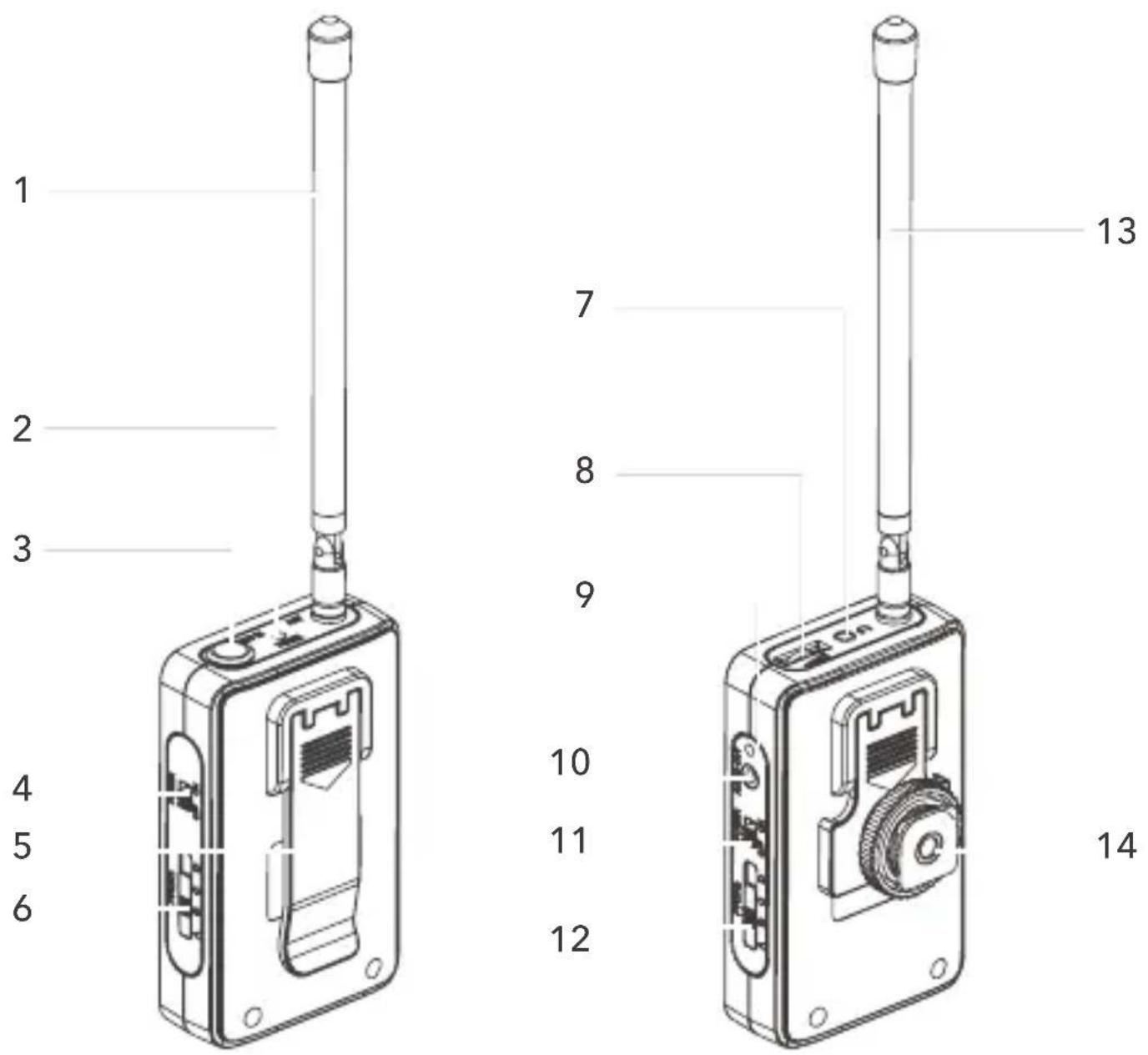
Receiver
- Antenna
- Power Indicator
- Microphone Input Jack
- Power Switch
- Belt Clip
- Channel Selector Switch
-
Headphone Jack
-
Volume Control Wheel
-
Power Indicator
-
Audio Output Jack
-
Power Switch
-
Channel Selector Switch
-
Antenna
-
Cold Shoe Mount Adapter

natural_image
Line drawing of a rectangular electronic device with ports and connectors (no text or symbols)1
- Battery Compartment
Hand-held Transmitter SR-HM4C

-
Battery indicator Solid Green: Sufficient battery level. Solid Red: Low battery
-
Power/Mute button ON, MUTE, OFF
-
Antenna
-
Battery compartment
Operates on two AA batteries (not included).
You could use alkaline, lithium or nickel metal hydride batteries.
- Switchable 4 channels (A, B, C, D)
XLR Plug-on Transmitter SR-XLR4C

- XLR audio input jack
Connects to an XLR microphone or audio devices with line output.
- POWER indicator
Indicates the battery level as follows:
Solid Green: Sufficient battery level.
Solid Red: Low battery.
- +48V power indicator
Lights up when the +48V phantom power is on.
- MUTE indicator
Blinking Green: Audio is muted (i.e., disabled).
-
Channel indicator (A, B, C, D)
-
Power/Mute button
Turns the power or mute function to on or off.
| Function Operation | |
| Power ON Press button for one second or longer | |
| Power OFF Press button until it turns off | |
| Mute ON | Short press button |
| Mute OFF | |
- SET button
Long press the SET button to turn on/off the 48V phantom power. Short press the SET button to choose the channels from A to D.
- Battery compartment
Operates on two AA batteries (alkaline, nickel metal hydride, or lithium batteries).
Setup Guide
1. Install battery
The transmitters and receiver are each operated by two LR6/AA size alkaline batteries. Gently slide out the drawer or cover from the battery compartment. Insert the battery according to the indicator as shown. Slide the drawer closed until it clicks into place.
NOTE: If the SR-WM4C will not be used for a long time, please remove the batteries to prevent product damage due to battery leakage.
LED Indicator Status
| Transmitter | Solid Green Adequate Battery | |
| Solid Red | Low battery & Voltage below 2.2V | |
| Receiver | Solid Green Adequate Battery | |
| Blinking Red | Low battery & Voltage below 2.2V | |
| Solid Red | Low battery & Voltage below 2.1V | |
2. Mount the receiver on the camera or camcorder's hot-shoe or any other cold shoe adapter.
NOTE: Please try to keep the two antennas be parallel for best sound. Please do not touch the antenna during recording.
3. Connect the supplied signal transmission cable from the Audio Out jack on the receiver to the MIC input of a camera or camcorder.
4. Transmitter and receiver pairing.
Both transmitter and receiver must be set to same channel (A, B, C, D). If the selected channel is noisy, please switch both the transmitter and receiver to other channels until you could get a very clear sound.
NOTE: Two transmitters on the same frequency will not work with one receiver.
-
Turn the Power ON/OFF switch of both transmitter and receiver to the ON position.
-
Plug your earphone into the Phone Jack for real time monitor.
-
Adjust the volume control wheel for best sound.
Compatibility
Compatible with any compact camcorder or DSLR camera with a microphone jack.
Packing List
SR-WM4C
One SR-WM4C transmitter
One SR-WM4C receiver
One 1/8"(3.5 mm) signal transmission cable
Two antennas
One omnidirectional lavalier microphone
One pop shield
Two belt clips
One cold shoe mount adapter
User manual
Warranty Card
SR-HM4C
One handheld transmitter
User Manual
Warranty Card
SR-XLR4C
One Plug-on transmitter
User Manual
Warranty Card
www.saramonic.com
The Saramonic logo is trademark which is registered and owned by Saramonic International.
COPYRIGHT 2011-2021 SARAMONIC INTERNATIONAL (A brand of DSQN)
Email: info@saramonic.com


- VHF Wireless Microphone System
- Product Introduction
- General Introductions
- Highlights
- Specifications
- Product Structure
- XLR Plug-on Transmitter SR-XLR4C
- Setup Guide
- Install battery
- Mount the receiver on the camera or camcorder's hot-shoe or any other cold shoe adapter.
- Connect the supplied signal transmission cable from the Audio Out jack on the receiver to the MIC input of a camera or camcorder.
- Transmitter and receiver pairing.
- Compatibility
- Packing List
- SR-WM4C
- SR-HM4C
- SR-XLR4C
Brand : Saramonic
Model : SR-WM4C
Category : Microphone