
AN-VC550 - Webcam LG - Free user manual and instructions
Find the device manual for free AN-VC550 LG in PDF.


| Product Type | Smart Camera (Webcam) |
| Model | AN-VC550 |
| Brand | LG |
| Dimensions (W x H x D) | 112 mm x 56 mm x 38 mm |
| Weight | 114.4 g |
| Video Resolution | Full-HD 1920 x 1080 |
| Output Formats | H.264, JPEG |
| Lens Focus Range | > 100 cm |
| Field of View (Diagonal) | 77° |
| Audio | 2 built-in microphones |
| Interface | USB |
| Operating Temperature | 0 °C to 40 °C |
| Operating Humidity | 0% to 80% |
| Storage Temperature | -20 °C to 70 °C |
| Storage Humidity | 0% to 90% |
| Installation | Mount on TV with velcro tape; connect USB |
| Cleaning Instructions | Wipe with dry cloth; use mild detergent if needed; avoid solvents |
| Safety Warnings | Do not disassemble; avoid liquids; keep away from heat/moisture |
| Compliance | FCC Part 15, EMC, Low Voltage, RoHS |
Frequently Asked Questions - AN-VC550 LG
User questions about AN-VC550 LG
0 question about this device. Answer the ones you know or ask your own.
Ask a new question about this device
Download the instructions for your Webcam in PDF format for free! Find your manual AN-VC550 - LG and take your electronic device back in hand. On this page are published all the documents necessary for the use of your device. AN-VC550 by LG.
USER MANUAL AN-VC550 LG
Please read this manual carefully before operating your set and retain it for future reference.
AN-VC550
PREPARATION
Product Handling
■ Do not let the camera get wet. Liquid getting into the camera could cause a short circuit.
■ Wipe the camera gently with a dry cloth to remove any dust or dirt. If the product is very dirty, spray a mild detergent on the cloth first.
■ If there are any foreign objects on the lens, the image may not be clear. Clean the lens with a soft cloth before use.
- Do not clean with thinner, alcohol, benzene, or any other volatile agent. These may damage the product's surface or affect its operation.
■ Do not disassemble, repair or alter the product. Incorrect disassembly may cause a fire, electric shock, or injury.
■ Do not shake the camera.
■ Do not pull on the cable.
Installation Instructions
■ Make sure you have enough space for connections when installing the product.
■ Do not install in a dusty, dirty, or moist area.
■ Do not install in direct sunlight or near a heat source.
■ Magnetic objects, such as speakers, may interfere with the camera's operation.
■ Install the product in a place with moderate temperature and humidity. The recommended temperature range is 0 °C to 40 °C.
■ Strong electromagnetic waves from other devices could interfere with the camera's operation.
■ Remove all the protective plastic bags (vinyl) before use.
* The product and company names contained in this manual may or may not be registered trademarks or copyrighted, and are only used for identification or explanatory purposes. All trademarks reserved.
* Refer to the model names indicated on the product box for supported TV models.
Overview
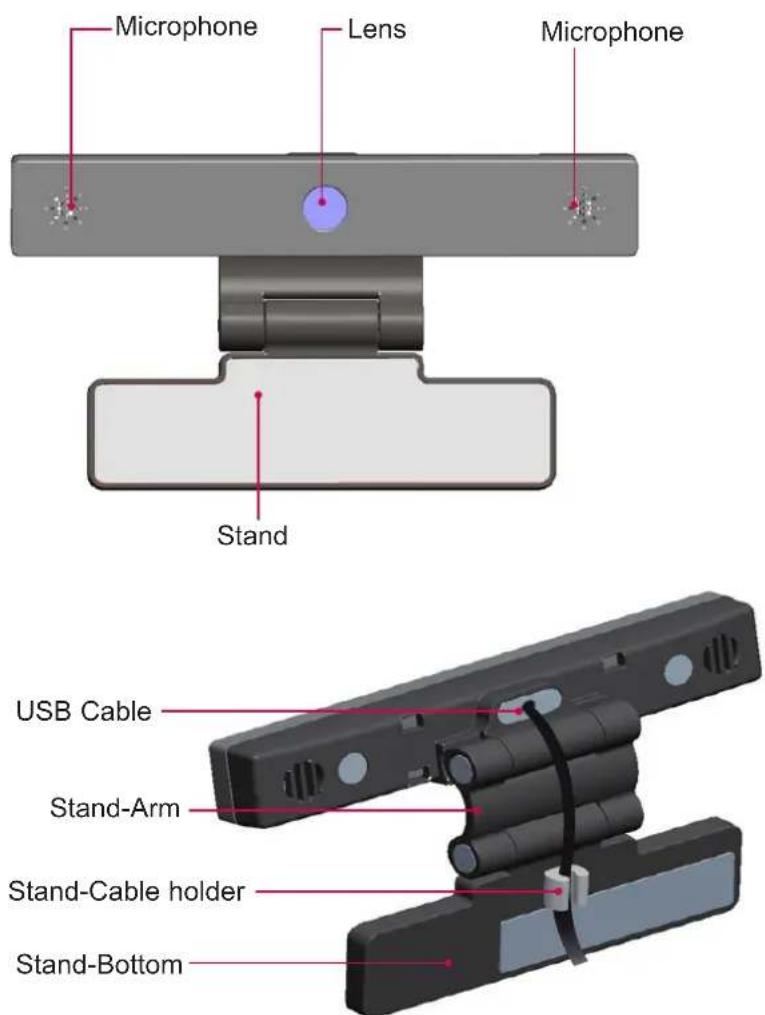
NOTE
▶ Before using the built-in camera, you must recognize the fact that you are legally responsible for the use or misuse of the camera by the relevant national laws including criminal law.
The relevant laws include the Personal Information Protection law which regulates the processing and transferring of personal information and the law which regulates the monitoring by camera in a workplace and other places.
▶ When using the built-in camera, the user must gain consent from the data subjects. Please avoid using the camera in the following manner.
(1) Using the camera in areas where the use of camera is generally prohibited such as restroom, locker room, fitting room, and security area.
(2) Using the camera while causing the infringement of privacy.
(3) Using the camera while causing the violation of the relevant regulations or laws.
Installing the smart camera
1 Unfold the stand and put it on the top center of the TV set.
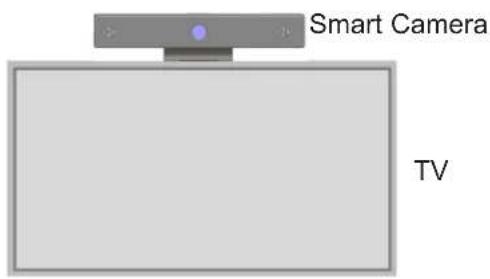
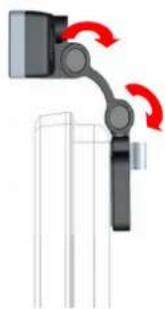
2 Fold the stand.
natural_image
Mechanical assembly diagram showing a robotic arm with red rotational arrows indicating motion (no text or symbols)3 Firmly attach the product to the back of the TV using the velcro tape.
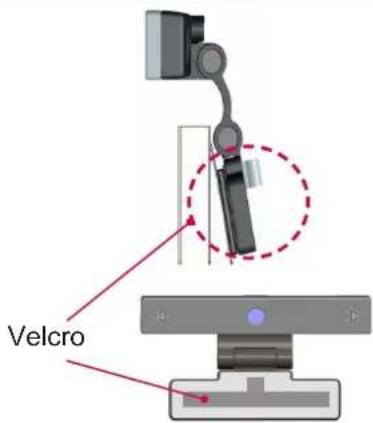
4 Connect the USB cable to the side of the TV. The camera may not work if it is connected through a USB hub.
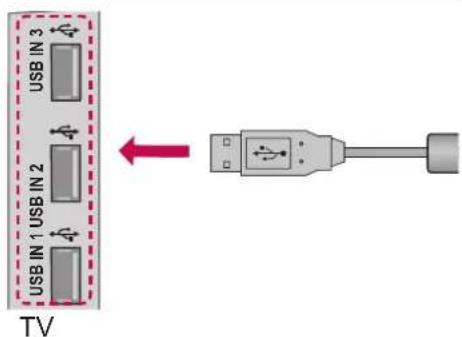
NOTE
▶ For the best quality video and audio outputs, install the camera on the top-center of your TV.
▶ Set up with the television switched off.
▶ When using external speakers, allow sufficient space between the microphones and the speakers.
PRODUCT SPECIFICATIONS
| MODEL | AN-VC550(Smart Camera) | ||
| Dimensions (Width x Height x Depth) 112 mm x 56 mm x 38 mm | |||
| Weight 114.4 g | |||
| Video | Lens | Focus More than 100 cm | |
| Field of Vision 77° in diagonal | |||
| Effective pixels 1920 x 1080 | |||
| Output format H.264, JPEG | |||
| Output Image Full-HD | |||
| Audio Microphone 2 microphones | |||
| Interface USB | |||
| Environmental conditions | Operating Temperature | 0 °C to 40 °C | |
| Operating Humidity 0 % to 80 % | |||
| Storage Temperature | -20 °C to 70 °C | ||
| Storage Humidity 0 % to 90 % | |||
■ Contents in this manual may be changed without prior notice due to upgrade of product functions.
■ The specifications shown above may be altered without prior notice to improve quality.

LG
Life's Good
REGULATORY
FCC NOTICE
This equipment has been tested and found to comply with the limits for a Class B digital device, pursuant to part 15 of the FCC Rules. These limits are designed to provide reasonable protection against harmful interference in a residential installation. This equipment generates, uses and can radiate radio frequency energy and, if not installed and used in accordance with the instructions, may cause harmful interference to radio communications. However, there is no guarantee that interference will not occur in a particular installation. If this equipment does cause harmful interference to radio or television reception, which can be determined by turning the equipment off and on, the user is encouraged to try to correct the interference by one or more of the following measures:
– Reorient or relocate the receiving antenna.
– Increase the separation between the equipment and receiver.
- Connect the equipment into an outlet on a circuit different from that to which the receiver is connected.
- Consult the dealer or an experienced radio/TV technician for help.
You are cautioned that changes or modifications not expressly approved by the part responsible for compliance could void the user's authority to operate the equipment.
This device complies with Part 15 of the FCC Rules. Operation is subject to the following two conditions:
1) this device may not cause harmful interference, and 2) this device must accept any interference received, including interference that may cause undesired operation of the device.

The lightning flash with arrowhead symbol, within an equilateral triangle, is intended to alert the user to the presence of uninsulated “dangerous voltage” within the product’s enclosure that may be of sufficient magnitude to constitute a risk of electric shock to persons.
The exclamation point within an equilateral triangle is intended to alert the user to the presence of important operating and maintenance (servicing) instructions in the literature accompanying the appliance.
Declaration of Conformity
Trade Name: LG
Model : AN-VC550
Responsible Party: LG Electronics Inc.
Address : 1000 Sylvan Ave. Englewood Cliffs NJ 07632 U.S.A
TEL: 201-266-2534
UKRAINE only

001
Ukraine Restriction of Hazardous Substances
The equipment complies with requirements of the Technical Regulation, in terms of restrictions for the use of certain dangerous substances in electrical and electronic equipment.
Адреса імпортера:
CU Conformity Notice
EAC
EU Conformity Notice:

ENGLISH
Declaration of Conformity
LG Electronics hereby declares that this product is in compliance with the following Directives.
EMC Directive 2004/108/EC
LOW VOLTAGE Directive 2006/95/EC
ErP Directive 2009/125/EC
RoHS Directive 2011/65/EU
European representative:
LG Electronics Inc. Krijgsman 1, 1186 DM
Amstelveen, The Netherlands
DEUTSCH
Directive 2004/108/CE EMC
Directive RoHS 2011/65/EU
Representant european:
LG Electronics Krijgsman 1, 1186 DM Amstelveen, Olanda
БЪЛГАРСКИ
Brand : LG
Model : AN-VC550
Category : Webcam