
PDUMID95 - Dehumidifier SereneLife - Free user manual and instructions
Find the device manual for free PDUMID95 SereneLife in PDF.


| Product Type | Dehumidifier |
| Model | PDUMID95 |
| Brand | SereneLife |
| Dimensions (L x W x H) | 13.8 x 10.2 x 19.3 inches |
| Weight | 30 lbs |
| Power Supply | 115V / 60Hz |
| Power Consumption | 700W |
| Dehumidification Capacity | 50 pints per day (at 80°F, 60% RH) |
| Water Tank Capacity | 2.5 liters |
| Humidity Control | Adjustable humidistat with auto shut-off |
| Operating Temperature Range | 41°F to 95°F |
| Fan Speeds | Low, High |
| Continuous Drainage | Yes, via garden hose (not included) |
| Filter Type | Washable pre-filter |
| Maintenance | Clean filter every 2 weeks; empty tank regularly |
| Safety Features | Auto shut-off when tank full, overload protection |
| Replaceable Parts | Filter (part number SLP-FILTER) |
| Energy Star Rated | Yes |
| Warranty | 1 year limited warranty |
Frequently Asked Questions - PDUMID95 SereneLife
User questions about PDUMID95 SereneLife
0 question about this device. Answer the ones you know or ask your own.
Ask a new question about this device
Download the instructions for your Dehumidifier in PDF format for free! Find your manual PDUMID95 - SereneLife and take your electronic device back in hand. On this page are published all the documents necessary for the use of your device. PDUMID95 by SereneLife.
USER MANUAL PDUMID95 SereneLife
We are here to help!
Phone: (1) 718-535-1800
Email: support@pyleusa.com
SereneLife
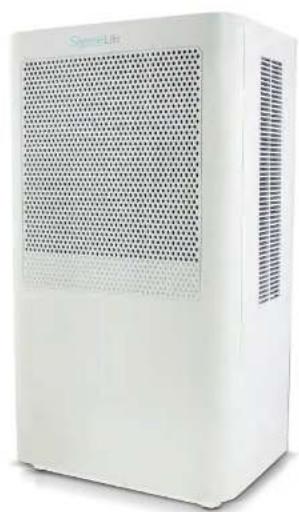
natural_image
White portable air purifier unit with perforated grille and ventilation slots (no visible text or symbols)☆♣*☆♣+X
★□▼○○※■※■A※※※■※※◆○※※※※□
Ultra-Quiet & Electric Small Dehumidifier, 3 Pints Volume Capacity, Space Up to 322 Sq. ft. for Bedroom, Bathroom, RV, Closet & Basement
USER MANUAL
Congratulations for purchasing the Serenelife Portable Energy-Saver Dehumidifier.
This User Guide is intended to provide you with guidelines to ensure that operation of this product is safe and does not pose risk to the user. Any use that does not conform to the guidelines described in this User Guide may void the limited warranty.
Please read all directions before using the product and retain this guide for reference.
This product is intended for household use only.
This product is covered by a limited one-year warranty. Coverage is subject to limits and exclusions.
See warranty for details.
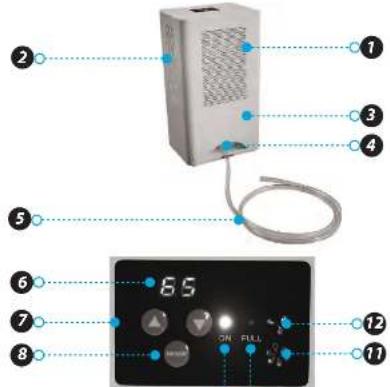
Parts
-
Base unit
-
Vents
-
Reservoir
-
Drain hose port
-
Drain hose
Control Panel
-
Humidity display
-
Humidity controls
-
MODE button
-
ON Indicator light
-
FULL indicator light
-
High fan indicator light
-
Low fan indicator Light
Safety Precautions
- Do not exceed the unit's rated power.
- Do not use a damaged or unspecified power cord.
- Do not modify the cord length or share the outlet with other appliances.
- Do not handle the plug with wet hands.
- Do not install the unit in a place where it may be exposed to combustible gas.
- Do not place the unit near a heat source.
- Disconnect the power if unusual sounds, smells, or smoke comes from the unit.
- Never attempt to take apart or repair the unit.
• Before cleaning the unit, always turn off the power and unplug.
Do not drink or use the water drained from the unit.
- Do not place the unit in a place where it may become wet or damp.
• Always place the unit on a level, stable section of the floor.
- Do not cover the intake or exhaust vents with cloths or towels.
- Keep out of reach of children and pets.
- Do not use in areas where chemicals are handled.
- Never insert fingers or other foreign objects into the vents or openings.
- Do not place heavy objects on the power cord.
- Do not climb on or sit on the unit.
- If water enters the unit, turn it off and disconnect the power. Contact a qualified service technician.
9 10
Operation
-
Press the MODE button to power the unit on. The ON indicator light will turn on.
-
Use the humidity controls to adjust the humidity as needed.
-
To switch the fan speed between high and low, hold dawn the MODE button until the indicator light for either high or low speed turns on.
Emptying the Reservoir
-
When the reservoir is full, the FULL indicator light will turn on and the unit will automatically stop operation.
-
Pull the reservoir out from the back of the unit and empty.
The unit will pause operation until the reservoir is replaced.
Continuous Draining
-
Remove the drain plug an the back of the reservoir:
-
Attach the included drain hose to the unplugged drain.
-
Lead the hose to the floor drain or a suitable drainage facility.
Care and Maintenance
• Always turn the dehumidifier off and unplug before cleaning.
• The reservoir should be washed with fresh water every few weeks.
Features:
- Designed to Dehumidify a Room Up to 322 Square Feet
• 3 Pints Volume Capacity
• Built-in Ventilation Fan for Extended Air Flow
• LED Indicator Lights
• Efficient Room Moisture Control
• Regulates Humidity & Air Dampness
• Helps to Eliminate Odors & Fungus
• Breathe Healthier with Fresh Air
• Lightweight & Compact Size
• Simple One-Switch Button Activation - Low Energy Consumption
• Built-in Air Filtration System - Ultra-Quiet Operation
- Easy Removable Water Tank
• Automatic Power Off with Full Tank
• No Harsh Chemicals or Solutions Required
• Used for Bedrooms, Bathrooms, Kitchens, Closets
• Includes Desktop Power Adapter
Technical Specs:
- Rated Power: 15V
• Rated Current: 6A
• Water Tank Capacity: 101 Oz.
• Effective Dehumidifying for Rooms up to 3 Pints and 322 Sq. ft.
• High-Powered Power Output: 90 Watt
• Moisture Removal: 3 pints/day (1.5 L/day)
• Water Reservoir Capacity: 0.8 gal. (3L)
• Product Dimension: 9.4" x 17" x 7.5"-inches
What's in the Box:
- Portable Dehumidifier
- Reservoir
- Drain Hose
natural_image
White rectangular object with a uniform grid pattern on the left side (no text or symbols)- SereneLife
- Congratulations for purchasing the Serenelife Portable Energy-Saver Dehumidifier.
- Please read all directions before using the product and retain this guide for reference.
- This product is intended for household use only.
- Parts
- Control Panel
- Safety Precautions
- Operation
- Emptying the Reservoir
- Continuous Draining
- Care and Maintenance
- Features:
- Technical Specs:
- What's in the Box:
Brand : SereneLife
Model : PDUMID95
Category : Dehumidifier