
CFM-30TW - Radio SONY - Free user manual and instructions
Find the device manual for free CFM-30TW SONY in PDF.


| Product Type | Portable Radio |
| Brand | Sony |
| Model | CFM-30TW |
| Dimensions (H x W x D) | 200 x 100 x 50 mm |
| Weight | 0.5 kg |
| Power Supply | AC 120V 60Hz or 6V DC (4 x AA batteries) |
| Radio Bands | FM / AM |
| FM Frequency Range | 87.5 – 108 MHz |
| AM Frequency Range | 530 – 1710 kHz |
| Antenna | Telescopic antenna for FM; built-in ferrite bar for AM |
| Speaker | 10 cm (4 inches) full-range |
| Output Power | 2 W |
| Controls | Volume, tuning, band selector, power switch |
| Indicators | LED power indicator |
| Accessories Included | User manual, AC power cord |
| Cleaning & Maintenance | Wipe with a soft, dry cloth. Do not use solvents. |
| Safety Precautions | Keep away from moisture and heat sources. Unplug during storms. |
| Spare Parts & Repairability | Contact Sony authorized service centers for replacement parts. |
| General Information | User manual available online at notice-facile.com |
Frequently Asked Questions - CFM-30TW SONY
User questions about CFM-30TW SONY
0 question about this device. Answer the ones you know or ask your own.
Ask a new question about this device
Download the instructions for your Radio in PDF format for free! Find your manual CFM-30TW - SONY and take your electronic device back in hand. On this page are published all the documents necessary for the use of your device. CFM-30TW by SONY.
USER MANUAL CFM-30TW SONY
Choosing Power Sources Precautions
Rear Panel

Note
Replace the batteries when the player stops operating. Replace all the batteries with new ones.
Connecting the AC power cord
Open the battery compartment and take out the AC power cord. An opening in the compartment door permits AC operation with the door in its place. Then, connect the AC power cord to the wall outlet.
Using the player on batteries
Insert four size D (R20) batteries (not supplied) into the battery compartment.
Specifications
• Frequency range
CFM-20: FM: 87.6 - 108 MHz
AM: 530 - 1710 kHz
CFM-301W: TV H (WEATHER): 7 - 13 ch
TV L/FM: 2 - 6 ch/ 87.6 - 108 MHz AM: 520 - 1710.1 Hz
AM: 350 - 1 /10 kHz Antenna FM/TV: Telecoms antenna
- Antennas FM/TV: Telescope antenna AM: Built-in-family has
• Recording system 2-track mono
• Frequency response 100 - 6 300 Hz
• Speakers. Full-range: 7.7 cm (3½ inches) dia. - 1
• Power output 0.8 W (at 10 % harmonic distortion in
DC operation)
Battery life
FM recording
Sony R20P: Approx. 18 hours
Sony R201. Approx. 15 hours
Sony LR20 alkaline: Approx. 50 hours
Playback
Sany B20P: Antenna, 16 hours
sony Razer + Approx 10 hours
Sony LR20 alkaline: Approx. 42 hours
• Power requirements 120 V AC, 60 Hz/6 V DC, four
size D (R20) batteries
• Power consumption AC5 W
• Dimensions Approx. 278 - 154 - 130 mm (w/h/d)
(11 · 6^1 / 8 · 5^1 / 8 inches) incl. projecting parts and
controls)
• Mass Approx. 1.9 kg (4 lb 3 oz) (incl. batteries)
Design and specifications are subject to change without
notice
Troubleshooting
There is no audio.
- Connect the AC power cord securely
- Connect the AC power cord
- Insert the batteries properly.
- Replace all the batteries if they are weak.
- Adjust the volume.
- Set FUNCTION to the position you want to
operate.
Noise is heard.
- Someone is using a portable telephone or
other equipment that emits radio waves near
other equipment that emits radio waves near
the player. Move the portable telephone, etc.,
Cassette cannot be inserted.
- Insert the cassette properly
• Press ■▲ to release
- Press ■■ to release ▼,
The ● button does not function.
• No cassette is in the tone compartment
- No cassette is in the tape compartment.
• Make sure the safety tab on the cassette is in
plac
Poor playback, recording or
erasing quality.
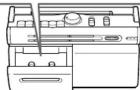
- Dirty heads. Clean the illustrated portions
Dirty heads. Clean the illustrated portions
with a cleaning swab slightly moistened with
cleaning fluid or alcohol.
• Demagnetize the heads and all metal parts in
the tape path with a commercially available
the tape path with a commercially available tape head demagnetizer.

On safety/power sources
- Should any solid object or liquid fall into the
player, unplug the player, and have it checked by
qualified personnel before operating it any
further.
- Unplug the player from the wall outlet when it is
not to be used for an extended period of time
- For battery operation, use four size D (R20)
- For butter batteries
When the battery is not added,
- When the batteries are not to be used, remove
them to avoid damage that can be caused by
battery leakage or corrosion.
• The nameplate indicating operating voltage,
power consumption, etc. is located at the bottom.
On placement/operation
- Do not leave the player in a location near heat
sources, or in a place subject to direct sunlight
excessive dust or mechanical shock
• Do not place anything within 10 mm of the rear
- Do not place anything within 10 mm of the real side of the unit. The ventilation holes must be
side of the unit. The ventilation holes must be
unobstructed for the player to operate prop
and to prolong the line of its components.
• Since a strong magnet is used for the speakers,
keep personal credit cards using magnetic coding
or spring-wound watches away from the player to
prevent possible damage from the magnet
- Do not lift the handle when the telescopic
antenna is extended.
- If the player has not been used for a long time, set
it in the playback mode to warm it up for a few
minutes before inserting a cassette.
•
Notes on cassettes

图 6
| □| ≡
Tab for side A
Tab for side B
Tab for side E
• The use of a cassette
- The use of a cassette with more than 90 minutes of play time is not recommended except for long, continuous recording or playback.
If you have questions or problems concerning your player, please consult your nearest Sony dealer.
SONY®
3-228-217-11 (1)
Radio Cassette-Corder
Operating Instructions
Owner's Record
The model number is located at the bottom, and the serial number is located in the battery compartment. Record these numbers in the spaces provided below. Refer to them whenever you call upon your Sony dealer regarding this product.
Model No. Serial No.
CFM-20/30TW
Sony Corporation ©2001 Printed in China
http://www.world.sony.com/
WARNING
To prevent fire or shock hazard, do not expose the player to rain or moisture.
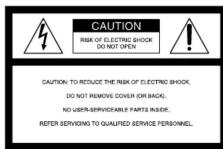
CAUTION TO REDUCE THE RISK OF ELECTRIC SHOCK
DO NOT REMOVE COVER (OR BACK).
NO USER-SERVICEABLE PARTS INSIDE,
REFER SERVICING TO QUALIFIED SERVICE PERSONNEL

This symbol is intended to alert the user
the presence of uninsulated “dangerous
voltage" within the product's enclosure
that may be of sufficient magnitude to constitute a risk of electric shock to
constitute a risk of electric shock to persons

This symbol is intended to alert the user to
the presence of important operating and
maintenance (servicing) instructions in the
literature accompanying the appliance.
You are cautioned that any changes or modifications not expressly approved in this manual could void your authority to operate this equipment.
If you have any questions about this product, you may ca
Sony Direct Response Center 1-(800)-222-7669
or write to:
Sony Direct Response Center 12451 Gateway Blvd. Fort
Myers, FL 33913
Declaration of Conformity
Trade Name: SONY
Model No.: CFM-30TW
Responsible Party: Sony Electronics Inc.
Address: 1 Sony Drive, Park Ridge,
NJ. 0765
Telephone No.: 201-930-6972
This device complies with Part 15 of the FCC Rules.
Operation is subject to the following two conditions:
(1) This device may not cause harmful interference, and (2) this device must report any interference.
and (2) this device must accept any interference received, including interference that may occur
received, including interference that may cause undesired operation
WARNING
Do not install the appliance in a confined space, such as a bookcase or built-in cabinet.
bookcase of built-in cabline
For customers in Canada
To prevent electric shock, match wide blade of plug to
wide slot, fully insert.
Location and controls

* CFM-30TW only
To turn off the radio
Set FUNCTION to TAPE/RADIO OFF.
To improve broadcast reception
Reorient the antenna for FM/TV. Reorient the player itself for AM.


Tip
For the best results, move the player away from the TV receiver.
1 CFM-20: Set FUNCTION to the band you want.
CFM-30TW: Set FUNCTION to RADIO.
Listening to the radio Recording

2 CFM-20: Skip this step.
CFM-30TW: Select the desired band. To listen to the WEATHER band, set BAND to TV H.

3 Tune in the station you want.

Playing a tape
Use TYPE I (normal) tape only.
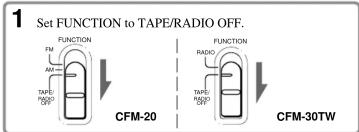
flowchart
graph TD
    A["1 Set FUNCTION to TAPE/RADIO OFF."] --> B["CFM-20"]
    A --> C["CFM-30TW"]
    B --> D["FUNCTION FM AM TAPE/RADIO RFND"]
    C --> E["FUNCTION RADIO TAPE/RADIO RFND"]
2 Insert a recorded tape.
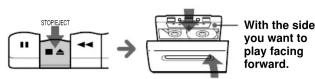

| To | Press |
| stop playback | ■▲ When the tape ends, the playback stops. |
| fast-forward or rewind the tape | ◀◀ or ▶▶ |
| pause playback | II Press the button again to resume playback. |
| eject the cassette | ■▲ |
Use TYPE I (normal) tape only.
- To record from the radio
Tune in the station you want.
To record from the built-in microphone (MIC)
Set FUNCTION to TAPE/RADIO OFF.
2 Insert a blank tape.

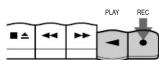
3 Press ●.
(◀ is depressed automatically.)

Tips
- For the best results, use the AC power source.
- Adjusting the volume will not affect the recording level.
Brand : SONY
Model : CFM-30TW
Category : Radio