
SRF-M43 - Radio SONY - Free user manual and instructions
Find the device manual for free SRF-M43 SONY in PDF.


| Product Type | Portable AM/FM Radio |
| Brand | Sony |
| Model | SRF-M43 |
| Color | Black / Silver (typical) | Dimensions (approx) | 5.2 x 2.8 x 1.0 in (132 x 71 x 25 mm) |
| Weight (approx) | 4.2 oz (120 g) with batteries |
| Power Source | 2 x AA batteries (LR6/AA) |
| Battery Life (approx) | Up to 30 hours (FM) / 15 hours (AM) |
| Frequency Range FM | 87.5 – 108 MHz |
| Frequency Range AM | 530 – 1710 kHz |
| Tuning Method | Analog dial |
| Headphone Jack | 3.5 mm stereo |
| Speaker | Built-in monaural speaker |
| Antenna | Built-in ferrite bar (AM), telescopic rod (FM) |
| Additional Features | Carry strap, EQ switch (Normal/Classic/Rock) |
| Cleaning | Wipe with a soft dry cloth. Do not use liquids. |
| Safety | Do not expose to moisture, extreme heat, or direct sunlight. |
| Spare Parts Availability | No official spare parts; product is non-repairable by user. |
| Manual Download | Free PDF available at notice-facile.com |
Frequently Asked Questions - SRF-M43 SONY
User questions about SRF-M43 SONY
0 question about this device. Answer the ones you know or ask your own.
Ask a new question about this device
Download the instructions for your Radio in PDF format for free! Find your manual SRF-M43 - SONY and take your electronic device back in hand. On this page are published all the documents necessary for the use of your device. SRF-M43 by SONY.
USER MANUAL SRF-M43 SONY
Operating Instructions
Before operating the unit, please read this manual thoroughly and retain it for future reference.
The illustrations in this manual are those of the SRF-M43.
Sony Corporation ©1992 Printed in Taiwan R.O.C.
"You are cautioned that any changes or modifications not expressly approved in this manual could void your authority to operate this equipment."
Features
- AM/FM stereo PLL (Phase Locked Loop) synthesized receiver.
- Up to 5 stations in each band, AM or FM, can be preset in the desired order.
- MEGA BASS selector for powerful bass sound. (SRF-M43 only)
Note on AM tuning interval
The AM tuning interval differs depending on areas. The interval of this unit is factory-set to 10 kHz. You can change the interval. (See "Changing AM Tuning-interval".)
| North American countries | 10 kHz |
| Other countries | 9 kHz |
Precautions
- Avoid exposure to temperature extremes, direct sunlight, moisture, sand, dust, or mechanical shock.
Never leave the unit in a car parked in the sun. - In vehicles or in buildings, radio reception may be difficult or noisy. Try listening near a window.
- If there is lightning when you are using this unit, take off the headphones immediately.
Notes on Headphones
Road Safety
Do not use headphones while driving, cycling, or operating any motorized vehicle. It may create a traffic hazard and is illegal in many areas. It can also be potentially dangerous to play your headsets at high volume while walking, especially at pedestrian crossings. You should exercise extreme caution or discontinue use in potentially hazardous situations.
Preventing hearing damage
Avoid using headphones at high volume. Hearing experts advise against continuous, loud and extended play. If you experience a ringing in your ears, reduce volume or discontinue use.
Caring for others
Keep the volume at a moderate level. This will allow you to hear outside sounds and to be considerate to the people around you.
Troubleshooting Guide
No sound
- Incorrect polarity of batteries.
- Weak batteries.
• The VOLUME control is turned down completely.
Very weak or interrupted sound, or unsatisfactory reception.
- Weak batteries.
- Incorrect tuning.
- Weak signal → In a vehicle or in a building, listen near a window.
- The SENS (FM/AM sensitivity) selector is set to LOCAL → Set the selector to DX.
Presetting cannot be made.
Incorrect presetting. → Press the preset button while keeping the ENTER/CLOCK button pressed.
The preset station cannot be received. Weak signal.
No display when pressing the POWER button. Weak batteries.
No operation can be accepted.
" O-n " is displayed in the window. → Press the KEY O-n PROTECT button.
When you turn on the power while the "O O O" in the display window is blinking, the power is turned off right away. Batteries are weak. → Replace them with new ones.
Specifications
Frequency range
| Frequency | Scan step |
| FM: 87.5–108 MHzAM: 530–1710 kHz | 0.1 MHz10 kHz |
| FM: 87.5–108 MHzAM: 531–1710 kHz | 0.05 MHz*9 kHz |
* The frequency display is raised or lowered by steps of 0.1 MHz. (Example: Frequency 88.05 MHz is displayed as "88.0 MHz".)
Antennas
FM: Headphone cord antenna AM: Built-in ferrite bar antenna
Output
Headphone jack (stereo mini-jack)
Power output
| M33 | 15mW + 15mW |
| M43 | 17mW + 17mW |
(at 10% harmonic distortion)
Power requirement
3V DC, two size AA (R6) batteries
Battery life
| M33 | Approx. 25 hours |
| M43 | Approx. 23 hours |
with Sony SUM-3(NS) batteries
Dimensions
Approx. 78×97×30 mm (w/h/d) (3 ^1/8 × 3 ^7/8 × 1 ^3/16 inches) excl. projecting parts and controls
Weight
Approx. 145 g (5.2 oz.) including batteries
Accessories supplied
Stereo headphones (1) Belt holder (1)
Design and specifications subject to change without notice.
Operation
| 1 | 2 Size AA (R6) × 2 | 3 |



Installing Batteries
(See illustration A.)
When to replace the batteries
When the batteries become weak, sound becomes weak or the stereo sound becomes monaural. When the batteries are run down completely, the power is turned off and the "oo" in the display window drinks. When the power is turned on with the indication blinking, the power is turned off right away.
When the “0.0” starts blinking, replace both batteries with new ones. After the batteries are replaced, turn the power on again to stop the blinking of the indication.
When replacing the batteries
Replace the batteries within about forty seconds. If you do not replace them within forty seconds, the preset stations may be erased, and "AM 12:00" blinks in the display window.
For battery life, see "Specifications".
To avoid damage from battery leakage and corrosion
Remove the batteries when you do not use the unit for a long time.
When the batteries are removed for a long time
Preset stations are erased and "AM 12:00" is displayed. Store stations again and reset the clock.
If you have any question or problem concerning your unit that is not covered in this manual, please consult your nearest Sony dealer.
The indication of the power remaining in the battery
(See illustration B.)
When you turn on the unit, the power remaining in the battery is displayed for about one second and a half. The unit displays one of the four indications depending on the power remaining in the battery.
Setting the Clock
(See illustration C.)
Set the clock or display time when the radio is turned off.
1 When you insert batteries for the first time, digits blink in the display window. To stop flashing, press the ENTER/CLOCK button.
AM 12:00 = midnight
PM 12:00 = noon
2 While pressing the ENTER/CLOCK button, press the TUNE/TIME SET buttons (+" or "-") to set the clock to the current time. Each time the TUNE/TIME SET button is pressed, the digits move forward or back by one. When you keep the button pressed, the digits change rapidly.
3 When you release the ENTER/CLOCK button, the clock starts to operate. If you release the ENTER/CLOCK button simultaneously with the time signal as it sounds, the clock starts from zero second.
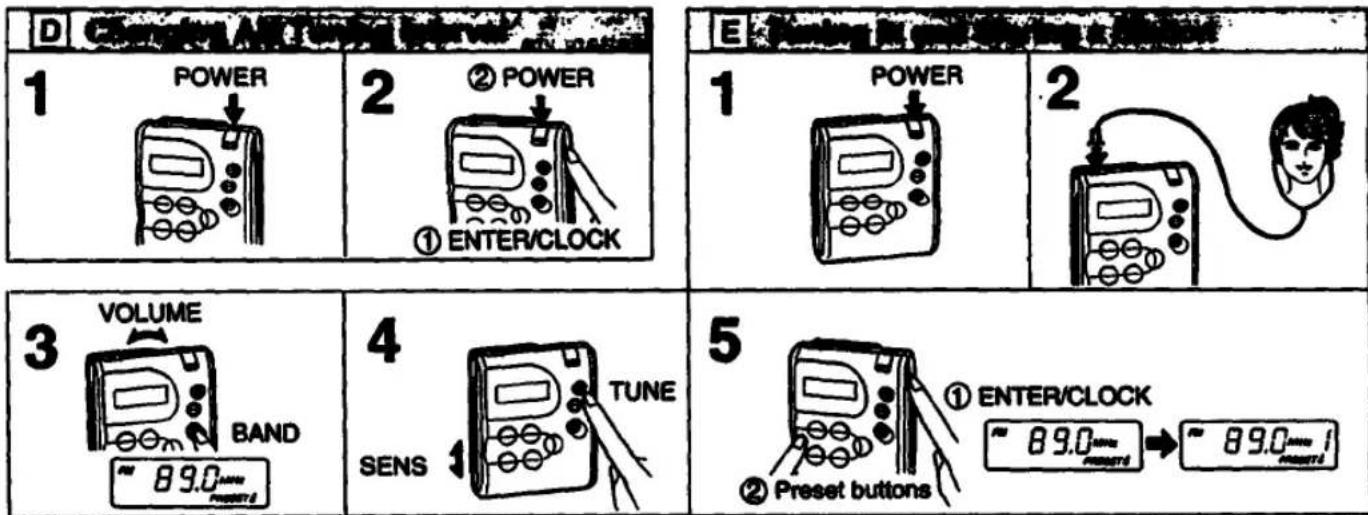
Changing AM Tuning Interval
(See illustration D.)
1 Turn off the power by pressing the POWER button, if it is turned on.
2 While pressing the ENTER/CLOCK button, keep pressing the POWER button for more than 5 seconds. The AM tuning interval has been changed. If you proceed step 2 again, the interval changes again.
1 Turn off the power by pressing the POWER button, if it is turned on. 2 While pressing the ENTER/CLOCK button, keep pressing the POWER button for more than 5 seconds. The AM tuning interval has been changed. If you proceed step 2 again, the interval changes again.
Note
If you proceed with the steps above, the clock and the preset memory are erased, and "AM 12:00" blinks.
Tuning in and Storing Stations
(See illustration E.)
1 Press the POWER button.
2 Connect the supplied headphones.
When you listen to FM programs, extend the
headphone cord fully.
3 Adjust the volume and select a desired band.
4 Tune in a desired station.
+: To tune in a higher frequency.
-: To tune in a lower frequency.
5 Store the station. While keeping the ENTER/CLOCK button pressed (①), press the desired preset number button (②). Then the preset number appears in the display window. Repeat these steps for each station to be preset. Up to 5 stations in each band can be stored.
To turn off the radio, press the POWER button.
To change the preset station
Preset a new station to a desired preset button; the station previously preset for that button will be erased.
For Better Reception
FM reception
Extend the cord of the headphones so that the FM sensitivity will be increased, as it serves as an FM antenna.
AM reception
The ferrite bar antenna is built-in for AM reception. Rotate the unit horizontally for optimum reception.
SENS (FM/AM sensitivity) selector
While listening, normally set the selector (located on the left side) to DX. However, if a very strong station signal causes noise or if multipath signals are heard while listening to an FM program, set it to LOCAL. The noise will be reduced.
Listening to a Preset Station
(See illustration F.)
1 Press the POWER button.
2 Press the desired preset button.
3 Adjust the volume.
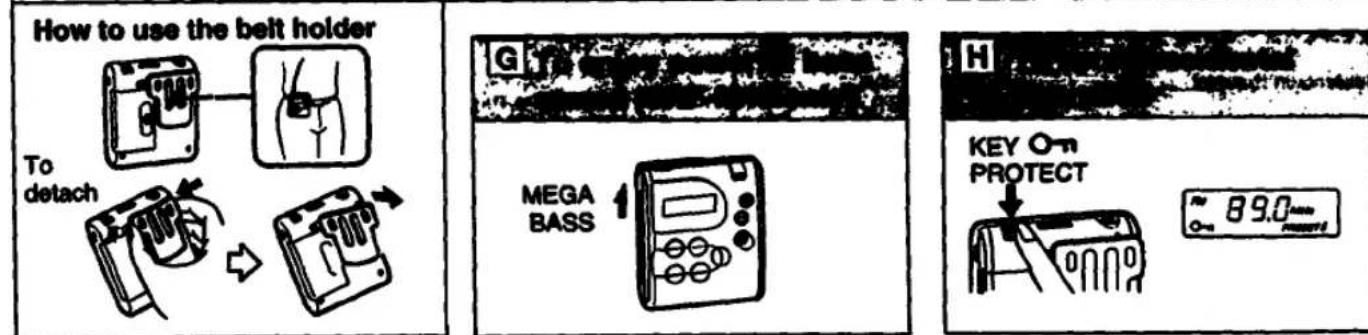
To Enjoy Powerful Bass Sound (SRF-M43 only) (See illustration G.)
Set the MEGA BASS selector to ON to emphasize bass sound.
To Avoid Accidental Operation
(See illustration H.)
Press the KEY O-m Protect button.
- O-m * appears in the display window and the unit will not accept any operation.
To release
Press the button once again." O-n "will disappear.
INFORMATION
To obtain warranty service, please take the product, or deliver the product prepaid, to one of the following Sony Service Centers located around the United States.
All of the following items must be included when the product is shipped prepaid to the SONY SERVICE CENTER.
| — Name, address and a phone number where you may be reached during the day. |
| — A copy of proof of purchase, as evidence that the product is within the warranty period. |
| — Brief description of the product defect. |
| — All supplied accessories with the product. |
| Sony Service Centers | ||
| Abrams | Hawaii | Missouri |
| Pineola | Hawaii | St. John |
| 24th North Sacramento Road | 950 Monopurea Street | 12463-0 North Bend Road |
| Tampa, AZ 05291 | Hawaii, 10 0028 | Bridgeman, MD 830-44 |
| 4021 940-7000 | 4008 834-0622 | 12441 291-2201 |
| Califlants | Illinois | Inner Jersey |
| Burbick Bay Angeles and | Chicago | Ridwark 981 Monopiston And |
| 4100 Riverside Davis, Suite A | 1720 West Peterson, Suite 4 | 266 Route 17 South |
| Turismo, LA 9195b | Grenard Shopping Center | Mittsburgh, NJ 0143D |
| 4210 842-7000 | Chicago, IL 00016 | 1201 529-1066 |
| Costa Mass (Orange County and | 4120 929-0006 | Utica |
| 2170 Brown Street South | Mid 01 Chicago 1901 | Brookline Shopping Center |
| Costa Mass, CA 91638 | 7640 North Carroll Avenue | US Highway 22 Al Meas Avenue |
| 1714 400-0032 | Mid, IL 00060 | Umsley, NJ 07083 |
| St. Bern State Ban Paradise and | 7000 841 2400 | 1301 087 5666 |
| 751 Canina Plaza | Westmont (Chicago 831) | Onta |
| San Diego, CA 94006 | 9030-36 South East Avenue | |
| 44150 871-2010 | Westmont, IL 00060 | Cleveland |
| San Diego | 7000 800-0049 | 6370 York Road |
| 8876 Camples Drive | Baronia | Parma Hedges, OH 44130 |
| San Diego, CA 93723 | Baronia | 4210 844 7060 |
| 4010 270-2724 | Barnett City | |
| San Jose | 11712 West 90th Street | Pennsylvania |
| 1200 Old Oakland Road | Oakland Park | Rhodgale |
| San Jose, CA 96112 | 63 00214 | 651 Park Avenue |
| 4400 200-7000 | 4120 900 2622 | King of Puebla, PA 10408 |
| 12714 788-0050 | ||
| Colorado | Maryland (Washington DC.) | Pittsburgh |
| Washington DC | Woodford Plaza | |
| Denver | 5300 Minneapolis Avenue | 10610 Perry Highway Rd. 1001 |
| Haryana Plaza Center | Buenosville, MD 20706 | Woodford, PA 10060 |
| 107-40 East 88 Avenue | 201 805 1810 | 4121 535-0480 |
| Aurora, CO 00014 | ||
| 2039 758 7000 | Monocahousota | Tampa |
| Florida | Boston | Seville |
| Port Lauderdale | 260 University Avenue | 421 Houston Valley Shopping Center |
| 2060 North 26th Tennessee | 126 Westwood Industrial Center | Delaware, TX 78730 |
| Holywood, FL 23530 | Whitney, IA 00090 | 2141 661-2637 |
| 2064 939-5000 | 6171 329-0130 | Houston |
| 7630 Whittener | ||
| Georgia | Michigan | Houston, TX 77083 |
| 1712 703-8761 | ||
| Atlanta | Detroit | |
| 120 Interstate North Railway East | New, MO 48000 | Washington |
| Santo 410 | 6133 344-4064 | |
| Atrons, GA 30330 | Brenton | |
| 44041 953-5971 | Minnesota | Brenton, OH 08928 |
| Minnesota | 12010 782-0000 | |
PERSONAL/PORTABLE AUDIO PRODUCTS
SONY. LIMITED WARRANTY
SONY CORPORATION OF AMERICA ("SONY") warrants this product against defects in metal or workmanship, as follows:
For a period of 1 year from the date of retail purchase, SONY shall at its sole and absolute option either repair the defective product at no charge or replace the defective product with the same model or its equivalent model at no charge through a SONY SERVICE CENTER.
To obtain warranty service, you must take the product, or deliver the product prepaid, to one of the SONY SERVICE CENTERS located in the United States.
Proof of purchase in the form of a bill of sale or resolated Invoice, which indicates that the product is within the warranty period, must be presented to obtain warranty service. SONY suggests that the purchaser retain the dealer's deed bill of sale as evidence of the date of retail purchase.
This warranty does not cover cosmetic damage, and damage to any part of the product, including the antenna, which results from acts of God, accident, misuse, breaks, improper maintenance, or connection to an improper voltage supply.
This warranty is valid only if the serial number appears on the product. This warranty is valid only in the United States of America.
REPAIR OR REPLACEMENT AS PROVIDED UNDER THIS WARRANTY IS THE EXCLUSIVE REMEDY OF THE CONSUMER, SONY SHALL NOT BE LIABLE FOR ANY INCIDENTAL OR CONSEQUENTIAL
THE DAMAGES FOR BREAK OF ANY EXPRESS OR IMPLIED WARRANTY ON THIS PRODUCT. EXCEPT TO THE EXTENT PROHIBITED BY APPLICABLE LAW, ANY IMPLIED WARRANTY OF MERCHANTABILITY OR FITNESS FOR A PARTICULAR PURPOSE ON THIS PRODUCT IS LIMITED IN DURATION TO THE DURATION OF THIS WARRANTY.
Some states do not allow the exclusion or limitation of incidental or consequential damages, or allow limitations on how long an implied warranty loss, so the above limitations or exclusions may not apply to you. In addition, if you enter into a service contract with the Sony Partnership
within 90 days of the date of sale, the limitation on how long an implied warranty lasts does not apply to you. This warranty gives you specific legal rights, and you may also have other rights which vary from state to state.
Please refer to the list of SONY SERVICE CENTERS on the reverse side for the SONY SERVICE CENTER nearest you.
For your convenience, Sony Corporation of America has established the Customer Information Center to supply you with product or service information.
SONY CUSTOMER INFORMATION CENTER
201-850-SONY (7999) 714-821-SONY (7999) 708-250-SONY (7999)
or write to:
SONY CUSTOMER INFORMATION CENTER Sony Drive, Mall Drop eT1-11 Park Ridge, New Jersey 07656
SONY CORPORATION OF AMERICA Sony Drive, Park Ridge, New Jersey 07656
| INFORMATION |
| This equipment has been tested and found to comply with the limits for a Class B digital device, pursuant to Part 15 of the FCC Rules. These limits are designed to provide reasonable protection against harmful interference in a residential installation. This equipment generates, uses, and can radiate radio frequency energy and, if not installed and used in accordance with the instructions, may cause harmful interference to radio communications. However, there is no guarantee that interference will not occur in a particular installation. If this equipment does cause harmful interference to radio or television reception, which can be determined by turning the equipment off and on, the user is encouraged to try to correct the interference by one or more of the following measures: |
| - Reorient or relocate the receiving antenna. |
| - Increase the separation between the equipment and receiver. |
| - Connect the equipment into an outlet on a circuit different from that to which the receiver is connected. |
| - Consult the dealer or an experienced radio/TV technician for help. |
- Operating Instructions
- Features
- Note on AM tuning interval
- Precautions
- Notes on Headphones
- Road Safety
- Preventing hearing damage
- Caring for others
- Troubleshooting Guide
- No sound
- Specifications
- Operation
- Installing Batteries
- When to replace the batteries
- When replacing the batteries
- To avoid damage from battery leakage and corrosion
- When the batteries are removed for a long time
- The indication of the power remaining in the battery
- Setting the Clock
- Changing AM Tuning Interval
- Tuning in and Storing Stations
- To change the preset station
- For Better Reception
- FM reception
- AM reception
- SENS (FM/AM sensitivity) selector
- Listening to a Preset Station
- To Enjoy Powerful Bass Sound (SRF-M43 only) (See illustration G.)
- To Avoid Accidental Operation
- To release
- SONY. LIMITED WARRANTY
Brand : SONY
Model : SRF-M43
Category : Radio