
ICF-B200 - Radio SONY - Free user manual and instructions
Find the device manual for free ICF-B200 SONY in PDF.


| Product Type | Portable AM/FM Radio |
| Brand | Sony |
| Model | ICF-B200 |
| Frequency Range (AM) | 530 – 1605 kHz |
| Frequency Range (FM) | 87.5 – 108 MHz |
| Speaker Type | Monaural dynamic speaker |
| Power Source | 2 x AA batteries (not included) |
| Battery Life (approx.) | Approximately 40 hours (alkaline) |
| Dimensions (W x H x D) | 70 x 117 x 28 mm |
| Weight (without batteries) | Approx. 195 g |
| Antenna | Built-in ferrite bar for AM, telescopic rod for FM |
| Tuning Control | Analog dial with thumbwheel |
| Audio Output | 3.5 mm stereo headphone jack |
| Carry Strap | Yes, attached |
| Key Functions | On/Off volume knob, tuning knob, band selector (AM/FM) |
| Cleaning & Maintenance | Wipe with a soft, dry cloth. Do not use solvents. |
| Safety Warnings | Avoid exposure to rain, moisture, and extreme temperatures. |
| Spare Parts & Repairability | No user-serviceable parts inside; contact Sony support for repairs. |
| Country of Manufacture | China |
Frequently Asked Questions - ICF-B200 SONY
User questions about ICF-B200 SONY
0 question about this device. Answer the ones you know or ask your own.
Ask a new question about this device
Download the instructions for your Radio in PDF format for free! Find your manual ICF-B200 - SONY and take your electronic device back in hand. On this page are published all the documents necessary for the use of your device. ICF-B200 by SONY.
USER MANUAL ICF-B200 SONY
Operating Instructions
ICF-B200
Sony Corporation © 1997 Printed in Japan
SONY®
Tape Cassette Player/Recorder/CD Player/Mini Disc DAT/Radio/Head Phone/Speaker/MIC/Personals
LIMITED WARRANTY
Portable Audio
Sony Electronics Inc. ("Sony") warrants this Product (including any accessories) against defects in material or workmanship as follows:
-
LABOR: For a period of one (1) year from the date of purchase, if this Product is determined to be defective, Sony will repair or replace the Product, at its option, at no charge, or pay the labor charges to any Sony authorized service facility. After the Warranty Period, you must pay for all labor charges.
-
PARTS: In addition, Sony will supply, at no charge, new or rebuilt replacements in exchange for defective parts for a period of one (1) year. After the warranty period, you must pay for all parts costs.
-
ACCESSORIES: Parts and labor for all accessories are for one (1) year.
To obtain warranty service, you must take the Product, or deliver the Product freight prepaid, in either its original packaging or packaging affording an equal degree of protection, to any authorized Sony service facility.
This warranty does not cover customer instruction, installation, set up adjustments or signal reception problems.
This warranty does not cover cosmetic damage or damage due to acts of God, accident, misuse, abuse, negligence, commercial use, or modification of, or to any part of the Product, including the antenna. This warranty does not cover damage due to improper operation or maintenance, connection to improper voltage supply, or attempted repair by anyone other than a facility authorized by Sony to service the Product. This warranty does not cover Products sold AS IS or WITH ALL FAULTS, or consumables (such as fuses or batteries). This warranty is valid only in the United States.
Proof of purchase in the form of a bill of sale or receipted invoice which is evidence that the unit is within the Warranty period must be presented to obtain warranty service.
This warranty is invalid if the factory applied serial number has been altered or removed from the Product.
REPAIR OR REPLACEMENT AS PROVIDED UNDER THIS WARRANTY IS THE EXCLUSIVE REMEDY OF THE CONSUMER. SONY SHALL NOT BE LIABLE FOR ANY INCIDENTAL OR CONSEQUENTIAL DAMAGES FOR BREACH OF ANY EXPRESS OR IMPLIED WARRANTY ON THIS PRODUCT. EXCEPT TO THE EXTENT PROHIBITED BY APPLICABLE LAW, ANY IMPLIED WARRANTY OF MERCHANTABILITY OR FITNESS FOR A PARTICULAR PURPOSE ON THIS PRODUCT IS LIMITED IN DURATION TO THE DURATION OF THIS WARRANTY.
Some states do not allow the exclusion or limitation of incidental or consequential damages, or allow limitations on how long an implied warranty lasts, so the above limitations or exclusions may not apply to you. In addition, if you enter into a service contract with the Sony Partnership within 90 days of the date of sale, the limitation on how long an implied warranty lasts does not apply to you. This warranty gives you specific legal rights, and you may have other rights which vary from state to state.
For your convenience, Sony Electronics Inc. has established telephone numbers for frequently asked questions:
To locate the servicer or dealer nearest you, or for service assistance or resolution of a service problem, or for product information or operation, call:
Sony Direct Response Center
1-(800)-222-7669
or write to:
Sony Direct Response Center
12451 Gateway Blvd
Fort Myers, FL 33913
For an accessory or part not available from your authorized dealer, call:
1-(800)-488-SONY (7669)
Owner's Record
The model and serial numbers are located at the rear. Record the serial number in the space provided below. Refer to these numbers whenever you call upon your Sony dealer regarding this product. Model No. ICF-B200 Serial No.
You are cautioned that any changes or modifications not expressly approved in this manual could void your authority to operate this equipment.
Before You Begin
Thank you for choosing the Sony radio! It will give you many hours of reliable service and listening pleasure.
Before operating the radio, please read these instructions thoroughly and retain them for future reference.
Features
Self-powered emergency radio
- You may use the radio right away by turning the handle of the power generator, which charges the built-in nickel-cadmium (Ni-Cd) rechargeable battery. —Hand generating function
- You may also use size AA (R6) dry batteries (not supplied).
• Audio Beacon that alerts the surroundings. - Useful dial light when tuning in the dark.
• Water-resistant for all weather operation*.
\* Do not emmerse in water
This product is designed to be water-resistant, but should not be immersed in water or come in continuous contact with water. Before installing the batteries, be sure to wipe off drops of water on the unit.
When disposing the unit
Take out the rechargeable battery for recycle.
Do not open the cabinet other than when disposing the unit.
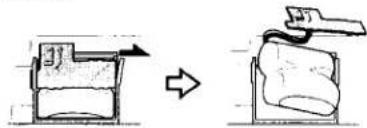
1 Unscrew 5 screws at the rear of the unit and 1 screw inside the dry battery compartment with an plus driver. Then take off the rear cabinet.
2 Hold the substrate on the right side and push it toward the arrow as illustrated below. Then take out the rechargeable battery.
natural_image
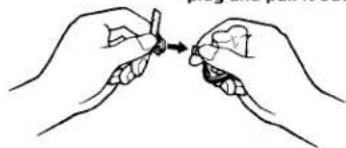
Diagram showing a mechanical device transforming into a device with an arrow indicating motion (no text or symbols present)3 Disconnect the rechargeable battery from the connector on the substrate.
Hold the connector plug and pull it out.
natural_image
Illustration of two hands holding a small object with an arrow pointing to it (no text or symbols present)Notes
- Be sure to disconnect the rechargeable battery from the substrate. If it is connected, electric leakage may occur and it is dangerous. When taking out the battery, be careful not to touch the interior of other parts.
- Be sure to confirm that the rechargeable battery is completely exhausted and then take out the rechargeable battery.
If you have any questions or problem concerning your unit, please consult the nearest Sony dealer.
Precautions
- Do not drop the unit or give a shock to the unit, or it may cause a malfunction.
- Do not leave the unit in a location near heat sources, or in a place subject to direct sunlight, excessive dust, or mechanical shock.
- Should any solid object or liquid fall into the unit, remove the batteries, and have the unit checked by qualified personnel before operating it any further.
- Do not open the cabinet other than when disposing the unit.
- When the case becomes soiled, clean it with a soft cloth dampened with a mild detergent solution. Never use abrasive cleansers or chemical solvents, as they may mar the case.
- Do not leave magnetic bank cards, magnetic train passes, or other cards containing magnetic information near the speaker. The information on the card may be erased by the magnetism inside the speaker.
On water-resistance
- Do not splash large amount of water on the unit.
- Do not emmerse the unit in water.
• Cover the jack with the attached rubber cap when the earphone is not used. - If the unit is splashed with salt water, wipe clean with a damp cloth, then dry with a soft cloth. Do not wash under running water, do not use soap or detergent and do not dry with an electric hair dryer.
- If water has got into the speaker, turn the face of the unit down and pour the water out from the speaker.
- Before opening the battery compartment, be sure the outside of the unit is clean and dry.
RECYCLING NICKEL-CADMIUM BATTERIES
NICKEL-CADMIUM BATTERY.
BATTERY MUST BE RECYCLED OR DISPOSED OF PROPERLY.
Nickel-Cadmium batteries are recyclable. You can help preserve our environment by returning your unwanted batteries to your nearest Sony Service Center for collection, recycling or proper disposal.
Note: In some areas the disposal of nickel-cadm household or business prohibited.

Ni-Cd
For the Sony Service Center nearest you call 1-800-222-SONY(United States only)
Caution: Do not handle damaged or leaking nickel-cadmium batteries.
Specifications
Frequency range
FM: 87.5 - 108 MHz AM: 530 - 1605 kHz
Speaker
Approx. 4.5 cm (1 ^3 /4 inches) dia., 8 ohms
Power output
60 mW (Using the built-in rechargeable battery) 90 mW (Using size AA (R6) dry batteries, not supplied)
Output
② jack (minijack)
Power requirements
Built-in nickel-cadmium (2.4V, 300 mAh, Ni-Cd) battery or 3V DC, two size AA (R6) dry batteries
Dimensions
Approx. 163 × 80 × 55 mm (w/h/d) (6 ^1 /2 × 3 ^1 /4 × 2 ^1 /4 in)
Mass
Approx. 320 g (11.3 oz) Approx. 355 g (12.6 oz) incl. batteries and projecting parts
Supplied accessory Hand strap (1)
Design and specifications are subject to change without notice.
Power Sources
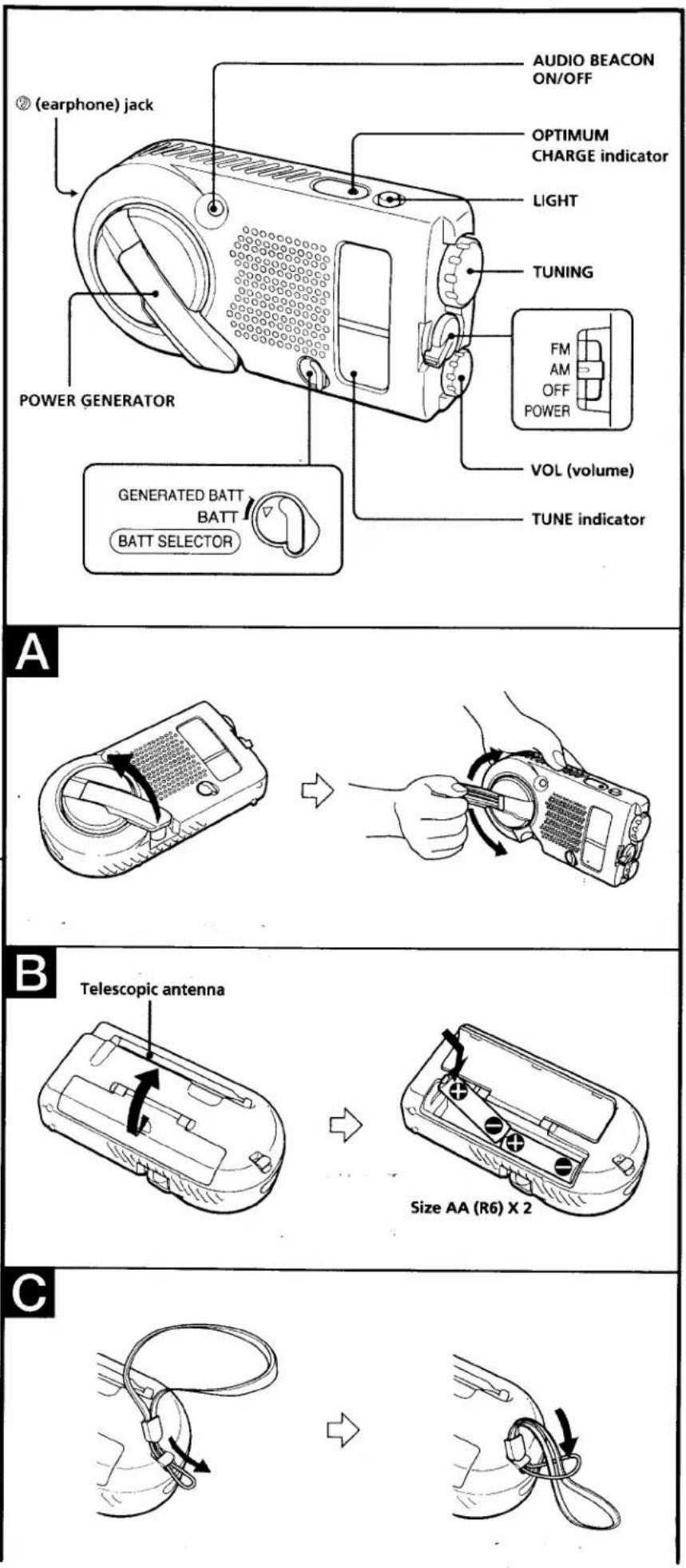
Using the installed rechargeable battery (see fig. A)
You may charge the built-in rechargeable battery and listen to the radio.
1 Pull out the handle of the POWER GENERATOR.
2 To charge, turn the handle one way to either direction.
Turn the handle slowly in the beginning. Then, keep turning the handle continuously at the speed that lights the OPTIMUM CHARGE indicator.
Notes
- When you turn the handle, be careful not to put your finger into the groove for the knob of the handle. You may pinch your finger.
- Be sure to fold in the telescopic antenna when charging. If you leave the telescopic antenna unfolded, the telescopic antenna may hit the surroundings and it is dangerous.
- When you charge, the built-in rechargeable battery will be charged regardless of the setting of the BATT SELECTOR switch.
- If you turn the handle of the POWER GENERATOR while listening to the radio, there may be a noise interference. In this case, turn off the radio and then charge the battery.
The amount of time for charging
When you turn the handle of the POWER GENERATOR, the charging begins and you may listen to the radio. When you keep on turning at the speed to charge, the OPTIMUM CHARGE indicator lights up. While the OPTIMUM CHARGE indicator is lit, keep turning the handle continuously for about a minute.
Which will be approximately 30 minutes* of radio listening.
• The listening time may defer depending on the operation of the unit.
When the rechargeable battery become exhausted.
The sound will become weak and distorted. If this occurs, turn the handle of the power generator to charge the rechargeable battery.
Notes
- When you use the rechargeable battery for the first time, after a long period of time of disuse, leaving the power on for a long time or the rechargeable battery is exhausted, the battery life may be short even after charging it. In this case, charge (for more than a minute) and discharge the battery several times. The battery life will be restored.
- If the rechargeable battery capacity becomes half the normal life, please consult the nearest Sony dealer.
Playing the Radio
1 Set the BATT SELECTOR switch to choose the power source.
2 Turn on the radio and select FM or AM with POWER.
3 Tune in to a station with TUNING. When the station is tuned in, the TUNE indicator lights up.
4 Adjust volume using VOL.
To turn off the radio
Set POWER to OFF.
To improve radio reception
FM: Extend the telescopic antenna and adjust the length, angle and direction to obtain optimum reception.
AM: Rotate the unit horizontally for optimum reception. A ferrite bar antenna is built in the unit.
When using the earphone
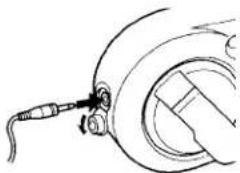
Connect the earphone (not supplied) to Ⓗ (earphone) jack.
When the earphone is connected, the speaker will not emit sound.
natural_image
Line drawing of a mechanical component with a probe inserted, no text or symbols presentNotes
- Do not sound the alarm when using the earphone. The volume for the alarm cannot be adjusted.
- When the earphone is not connected to the ② (earphone) jack, be sure to close the earphone cover. If you do not close the earphone cover, the unit will not be water-resistant.
Useful functions
Using the Audio Beacon
Press the AUDIO BEACON button. Regardless of the POWER switch, the alarm will sound while the AUDIO BEACON button is depressed. To stop the alarm, press the AUDIO BEACON button again.
On the alarm sound
The alarm sound or the volume defers depending on the power source, the capacity of the power source and when the power source become weak or exhausted.
Alarm Sound Level:
Output SPL @ 12 in (30 cm) approx. 75dB
Notes
Installing the dry batteries (see fig. B)
Insert two size AA (R6) batteries (not supplied).
1 Open the lid as illustrated.
2 Insert two size AA (R6) batteries with correct polarity.
3 Close the lid of the battery compartment.
Replacing dry batteries
When the dry batteries become weak, the sound will become weak and distorted. Replace both dry batteries with new ones.
| Battery Life | (Approx. hours) | |
| FM | AM | |
| Sony size AA (R6) batteries | 37 | 44 |
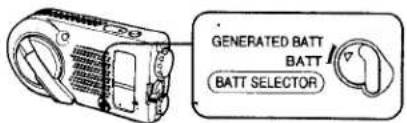
Choosing the power source
Set the BATT SELECTOR switch to the source you want to use.
Nickel-cadmium battery: "GENERATED BATT" Size AA (R6) dry batteries: "BATT"
Check the rechargeable battery and the dry batteries once a year.
Rechargeable battery: turn the handle of the POWER GENERATOR to charge, then confirm that you can listen to the radio.
Dry batteries: turn on the radio to confirm if the sound is not weak or distorted.
• The built-in Audio Beacon is intended as a general purpose signaling device and is not intended for long distance signaling or signaling of an emergency or safety nature.
• The alarm volume cannot be adjusted. Since the volume is very loud, be careful on regular basis.
• Depending on the surrounding noise, the alarm may not be heard.
Using the LIGHT
Press the LIGHT button, the dial light will be lit while this button is pressed.
Attaching the hand strap (see Fig. C)
Attach the supplied hand strap to the strap hole at the side of the unit.
- SONY®
- LIMITED WARRANTY
- Owner's Record
- Before You Begin
- Features
- Self-powered emergency radio
- \* Do not emmerse in water
- When disposing the unit
- Do not open the cabinet other than when disposing the unit.
- Notes
- Precautions
- On water-resistance
- RECYCLING NICKEL-CADMIUM BATTERIES
- NICKEL-CADMIUM BATTERY.
- BATTERY MUST BE RECYCLED OR DISPOSED OF PROPERLY.
- Specifications
- Frequency range
- Speaker
- Power output
- Output
- Power requirements
- Dimensions
- Mass
- Power Sources
- Using the installed rechargeable battery (see fig. A)
- The amount of time for charging
- When the rechargeable battery become exhausted.
- Playing the Radio
- To turn off the radio
- To improve radio reception
- When using the earphone
- Useful functions
- Using the Audio Beacon
- On the alarm sound
- Alarm Sound Level:
- Installing the dry batteries (see fig. B)
- Replacing dry batteries
- Choosing the power source
- Using the LIGHT
- Attaching the hand strap (see Fig. C)
Brand : SONY
Model : ICF-B200
Category : Radio