
PS-LX110 - Turntable SONY - Free user manual and instructions
Find the device manual for free PS-LX110 SONY in PDF.


| Product Type | Belt-driven turntable |
| Brand | Sony |
| Model | PS-LX110 |
| Dimensions (W x D x H) | 420 mm x 350 mm x 120 mm |
| Weight | 3.5 kg |
| Power Supply | AC 100-240 V, 50/60 Hz, 2 W standby |
| Drive System | Belt drive |
| Speeds | 33⅓ and 45 RPM |
| Operation | Semi-automatic |
| Tonearm | Straight, detachable headshell |
| Cartridge | Moving magnet (MM), replaceable |
| Output | RCA line level (built-in phono preamp) |
| Dust Cover | Included, hinged |
| Cleaning | Clean stylus with brush; wipe platter and cover with dry cloth |
| Safety | Keep away from moisture; unplug when not in use |
| Spare Parts Available | Replacement stylus (model: Sony ND-110) and belt |
| Repairability | User-replaceable stylus and belt; service by authorized center for motor issues |
| Warranty | 1 year limited |
Frequently Asked Questions - PS-LX110 SONY
User questions about PS-LX110 SONY
0 question about this device. Answer the ones you know or ask your own.
Ask a new question about this device
Download the instructions for your Turntable in PDF format for free! Find your manual PS-LX110 - SONY and take your electronic device back in hand. On this page are published all the documents necessary for the use of your device. PS-LX110 by SONY.
USER MANUAL PS-LX110 SONY
Troubleshooting Guide
Before going through the check list below, first refer back to the connection and operating procedures. Should any problem persist after you have made those checks, consult your nearest Sony dealer.
| Balance | Costs and marks |
| Tonearm skips, skates or does not advance. | • Turntable is not level.• Relocate player to a level surface. |
| • Clean record with commercially available record cleaning kit. | |
| • Replace defective record. | |
| Poor tone quality. | • Remove dust on stylus by blowing, or with stylus cleaning brush. |
| • Replace worn stylus. | |
| Rumble or low-frequency level* | • Relocate turntable to a steady level surface. |
| • Relocate turntable or speaker. |
This is called "acoustic feedback" and is caused when fibrations from the speakers are transmitted through the air private solid objects (such as the shelves, the cabinet, the floor, etc.) to the turntable, where they are picked up by the stylea, amplified and reproduced through the speakers once again.
Specifications
Plattor
MORGE
Drive system
Open
Локонта-дем
Cambridge type
Stylus
30 cm (12 inches)
DC servo motor
Bell Drive
Return, reject
Stically balanced
Moving magnet type
Sony ND-155G (0.6 mil diamond)
General
Размер requirements 120 V AC, 60 Hz
Power consumption 4 W Dimensions Anemia: 470 x 95 x 260 mm (wBtu)
(17×3m×13m inches)
Weight
Supplied accessories 45-pm adaptor (1)
Design and specifications subject to change without notice
SONY.
Stereo Turntable System
PS-LX110
Operating Instructions
Before operating the unit, please read this manual thoroughly and retain it for future reference.
Owner's Record
The model and serial numbers are located at the rear. Record the serial number in the space provided below. Refer to these numbers whenever you call upon your Sony dealer regarding this product.
Model No. PS-LX110
Serial No.
WARNING
To prevent fire or shock hazard, do not expose the unit to rain or moisture.

This symbol is intended to alert the user to the presence of uninsulated "dangerous voltage" within the product's enclosure that may be of sufficient magnitude to constitute a risk of electric shock to persons.

This symbol is intended to alert the user to the presence of important operating and maintenance (servicing) instructions in the literature accompanying the appliance.
• The graphical symbols are on the bottom enclosure.
1989 by Sony Corporation
Precautions
On safety
• Operate the unit only on 120 V AC, 60 Hz
- Should any solid object or liquid fall into the cabinet, unplug
the unit and have it checked by qualified personnel before
operating it any further.
- Unplug the unit from the wall outlet if it is not to be used for
an extended period of time. To disconnect the cord, pull it out
by grasping the plug. Never pull the cord itself.
On installation
- Place the unit on a level surface.
- Do not install the unit near real sources such as radiators or
Air ducts, or in a place subject to direct sunlight, excessive
dust, mechanical vibration or shock
- Good ventilation is essential to prevent internal heat build-up
in the unit. Place the unit in a location with adequate air oil
culation Do not place the unit on a soft surface.
On cleaning
- Before playing a record, clean the stylus with a soft brush. Brush the stylus from back to front. Never attempt to clean the stylus with your finger tip. If a fluid stylus cleaner is used, make eye out to moisten the stylus too much.
- Clean the cabinet periodically with a soft dry cloth. If the stains are difficult to remove, use a cloth moistened with a mild detergent solution. Do not use solvents such as alcohol, benzine or thinner, since they will damage the finish.
On repacting
Do not throw away the carton and packing materials. It makes an ideal container in which to transport the unit. When shipping the unit to another location, repack it.
If you have any question or problem concerning your unit that is not covered in this manual, please consult your nearest Sony dealer
For detailed precautions, see the leaflet "IMPORTANT SAFEGUARDS".
Connections
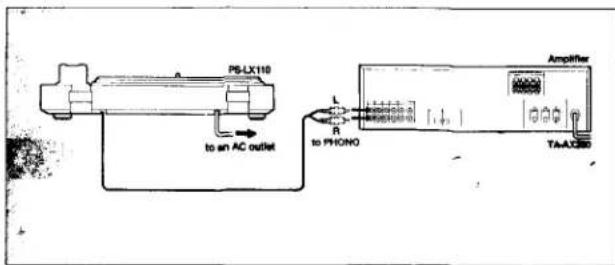
Connect the red plug to the right-channel jack (R), and the white plug to the left-channel jack (L).
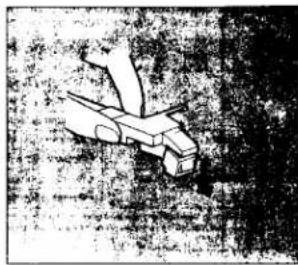
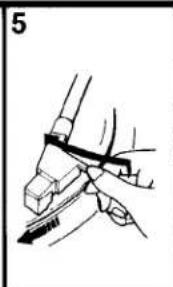
Replacing the Stylus
Replace the styles after approximately 400 hours of use. An ND-155G replacement stylus is available at your Sony dealer. Handle this delicate stylus with care.
1 Turn off power of the amplifier.
2 Secure the tonearm to the arm rest.
3 Detach the stylus by grasping it with your fingers.
4 Insert the new stylus.
natural_image
Illustration of a stylized aircraft in flight, no visible text or symbolsPlaying Records
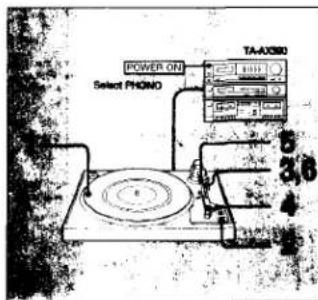
When the record has finished playing When the lonearm reaches the end of the record, it will automatically return to the arm rest.
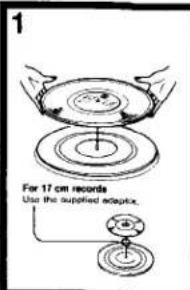
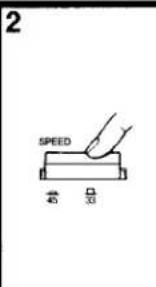
To lift up the stylus during play
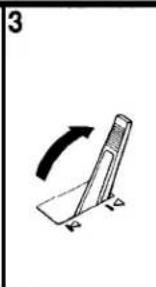
Set the cueing lever to ▼
To stop during play Press REJECT.
natural_image
Simple line drawing of a tilted object with an arrow indicating rotation (no text or symbols)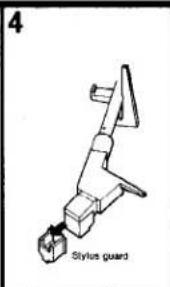
natural_image
Illustration of a hand holding a tool with a pen, no text or symbols present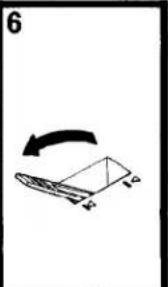
natural_image
Simple line drawing of a folded paper or sheet with an arrow indicating rotation (no text or symbols)Notes
- If the lonearm does not return to the arm rest during initial operation, press the REJECT button. After this, the lonearm will automatically return to the arm rest.
- If you move the tonearm close to the center while the turntable is rotating, the tonearm may return to the arm rest. Do not interfere with this action, as this may damage the automatic return mechanism.
Brand : SONY
Model : PS-LX110
Category : Turntable