
C17WR00N0A - Microwave NEFF - Free user manual and instructions
Find the device manual for free C17WR00N0A NEFF in PDF.


| Brand | Neff |
| Model | C17WR00N0A |
| Product Type | Built-in Microwave |
| Dimensions (HxWxD) | 382 x 594 x 320 mm |
| Cooking Compartment Dimensions (HxWxD) | 220 x 350 x 270 mm |
| Power Supply | 220-240 V, 50/60 Hz |
| Maximum Connected Load | 1220 W |
| Microwave Output Power | 900 W (IEC 60705) |
| Microwave Frequency | 2450 MHz |
| Fuse Rating | 10 A |
| Controls | Touch buttons and ShiftControl rotary dial |
| Display | Digital display with clock and date |
| Microwave Power Levels | 5 levels: 90W, 180W, 360W, 600W, 900W |
| Programmes | Automatic programmes for defrosting, cooking and heating |
| Timer | Up to 24 hours, with audible signal |
| Automatic Door Opening | Yes, with manual override |
| Interior Lighting | LED, switches on when door opens or operation starts |
| Cooling Fan | Runs as needed, continues after operation |
| Safety Features | Child lock via basic settings; magnets in control panel (keep 10 cm from electronic implants) |
| Cleaning | Stainless steel cooking compartment; clean with hot soapy water or vinegar solution; avoid abrasive cleaners |
| Warranty | Standard manufacturer warranty (see after-sales service) |
| Certifications | VDE approved, CE mark, Class B Group 2 (EN 55011, CISPR 11) |
Frequently Asked Questions - C17WR00N0A NEFF
User questions about C17WR00N0A NEFF
0 question about this device. Answer the ones you know or ask your own.
Ask a new question about this device
Download the instructions for your Microwave in PDF format for free! Find your manual C17WR00N0A - NEFF and take your electronic device back in hand. On this page are published all the documents necessary for the use of your device. C17WR00N0A by NEFF.
USER MANUAL C17WR00N0A NEFF
natural_image
Close-up portrait of a man in a dark blue shirt holding a small object, with no visible text or symbols.Microwave
en Instruction manual
C17WR01N0A, C17WR00N0A
Table of contents

Intended use....4

Important safety information .... 4
General information 4
Microwave 5

Causes of damage 6

Environmental protection 7
Environmentally-friendly disposal 7

Getting to know your appliance ..... 7
Control panel 7
Controls 7
Main menu 7
Further information 8
Cooking compartment functions 8

Before using for the first time....8
Initial use 8

Operating the appliance 9
Switching the appliance on and off 9
Operation 9
Selecting an operating mode 9

Microwave....10
Cookware....10
Microwave power settings 10
Setting the microwave 10

Timer....11
Setting the timer 11

Programmes....12
Setting a programme 12
Information on the programmes....12
Resting time 13
Programme table 13

Basic settings....13
Changing settings 13
List of basic settings 13
Power cut 14
Changing the time 14

Cleaning 14
Cleaning agent. 14

Trouble shooting 15

Customer service....16
E number and FD number 16
Technical specifications 16

Tested for you in our cooking studio ..... 16
Defrosting 16
Defrosting, heating up or cooking frozen food .....17
Heating 18
Cooking 18
Microwave tips 19

Test dishes 20
Cooking only using the microwave. . . . . . . . . . . . . . . . . . 20
Defrosting only using the microwave . . . . . . . . . . . . . . . . 20
Additional information on products, accessories, replacement parts and services can be found at www.neff-international.com and in the online shop www.neff-eshop.com

Intended use
Read these instructions carefully. Only then will you be able to operate your appliance safely and correctly. Retain the instruction manual and installation instructions for future use or for subsequent owners.
This appliance is only intended to be fully fitted in a kitchen. Observe the special installation instructions.
Check the appliance for damage after unpacking it. Do not connect the appliance if it has been damaged in transport.
Only a licensed professional may connect appliances without plugs. Damage caused by incorrect connection is not covered under warranty.
This appliance is intended for domestic use only. The appliance must only be used for the preparation of food and drink. The appliance must be supervised during operation. Only use this appliance indoors.
This appliance is intended for use up to a maximum height of 4000 metres above sea level.
This appliance may be used by children over the age of 8 years old and by persons with reduced physical, sensory or mental capabilities or by persons with a lack of experience or knowledge if they are supervised or are instructed by a person responsible for their safety how to use the appliance safely and have understood the associated hazards.
Children must not play with, on, or around the appliance. Children must not clean the appliance or carry out general maintenance unless they are at least 8 years old and are being supervised.
Keep children below the age of 8 years old at a safe distance from the appliance and power cable.
Always slide accessories into the cooking compartment the right way round.

Important safety information
General information
Warning
Risk of fire!
Combustible items stored in the cooking compartment may catch fire. Never store combustible items in the cooking compartment. Never open the appliance door if there is smoke inside. Switch off the appliance and unplug it from the mains or switch off the circuit breaker in the fuse box.
Warning
Risk of serious burns!
■ Accessories and ovenware become very hot. Always use oven gloves to remove accessories or ovenware from the cooking compartment.
■ Alcoholic vapours may catch fire in the hot cooking compartment. Never prepare food containing large quantities of drinks with a high alcohol content. Only use small quantities of drinks with a high alcohol content. Open the appliance door with care.
Warning
Risk of scalding!
■ The accessible parts become hot during operation. Never touch the hot parts. Keep children at a safe distance.
■ When you open the appliance door, hot steam may escape. Open the appliance door with care. Keep children at a safe distance.
■ Water in a hot cooking compartment may create hot steam. Never pour water into the hot cooking compartment.
Warning
Risk of injury!
- Scratched glass in the appliance door may develop into a crack. Do not use a glass scraper, sharp or abrasive cleaning aids or detergents.
■ The hinges on the appliance door move when opening and closing the door, and you may be trapped. Keep your hands away from the hinges.
Warning
Risk of electric shock!
■ Incorrect repairs are dangerous. Repairs may only be carried out and damaged power cables replaced by one of our trained after-sales technicians. If the appliance is defective, unplug the appliance from the mains or switch off the circuit breaker in the fuse box. Contact the after-sales service.
■ The cable insulation on electrical appliances may melt when touching hot parts of the appliance. Never bring electrical appliance cables into contact with hot parts of the appliance.
■ Do not use any high-pressure cleaners or steam cleaners, which can result in an electric shock.
■ A defective appliance may cause electric shock. Never switch on a defective appliance. Unplug the appliance from the mains or switch off the circuit breaker in the fuse box. Contact the after-sales service.
Warning
Hazard due to magnetism!
Permanent magnets are used in the control panel or in the control elements. They may affect electronic implants, e.g. heart pacemakers or insulin pumps. Wearers of electronic implants must stay at least 10 cm away from the control panel.
Microwave
Warning
Risk of fire!
■ Using the appliance for anything other than its intended purpose is dangerous and may cause damage.
The following is not permitted: drying out food or clothing, heating slippers, grain or cereal pillows, sponges, damp cleaning cloths or similar.
For example, heated slippers and grain or cereal pillows may catch fire, even several hours after they have been heated. The appliance must only be used for the preparation of food and drinks.
■ Food may catch fire. Never heat food in heat-retaining packages.
Do not leave food heating unattended in containers made of plastic, paper or other combustible materials.
Do not select a microwave power or time setting that is higher than necessary. Follow the information provided in this instruction manual.
Never use the microwave to dry food.
Never defrost or heat food with a low water content, e.g. bread, at too high a microwave power or for too long.
■ Cooking oil may catch fire. Never use the microwave to heat cooking oil on its own.
Warning
Risk of explosion!
Liquids and other food may explode when in containers that have been tightly sealed. Never heat liquids or other food in containers that have been tightly sealed.
Warning
Risk of burns!
■ Foods with peel or skin may burst or explode during, or even after, heating. Never cook eggs in their shells or reheat hard-boiled eggs. Never cook shellfish or crustaceans. Always prick the yolk when baking or poaching eggs. The skin of foods that have a peel or skin, such as apples, tomatoes, potatoes and sausages, may burst. Before heating, prick the peel or skin.
■ Heat is not distributed evenly through baby food. Never heat baby food in closed containers. Always remove the lid or teat. Stir or shake well after the food has been heated. Check the temperature of the food before it is given to the child.
■ Heated food gives off heat. The ovenware may become hot. Always use oven gloves to remove ovenware or accessories from the cooking compartment.
■ Airtight packaging may burst when food is heated. Always observe the instructions on the packaging. Always use oven gloves to remove dishes from the cooking compartment.
Warning
Risk of scalding!
■ There is a possibility of delayed boiling when a liquid is heated. This means that the liquid reaches boiling temperature without the usual steam bubbles rising to the surface. Even if the container only vibrates a little, the hot liquid may suddenly boil over and spatter. When heating, always place a spoon in the container. This will prevent delayed boiling.


natural_image
Simple illustration of a glass with a blue X mark overlay (no text or symbols)Warning
Risk of injury!
■ Unsuitable ovenware may crack. Porcelain or ceramic ovenware can have small perforations in the handles or lids. These perforations conceal a cavity below. Any moisture that penetrates this cavity could cause the ovenware to crack. Only use microwave-safe ovenware.
■ If using the appliance in microwave mode only, placing cookware and containers made of metal inside the appliance may cause sparks when the appliance is operating. This will damage the appliance. Never use metal containers when using the appliance in microwave mode only.
Warning
Risk of electric shock!
The appliance is a high-voltage appliance. Never remove the casing.
Warning
Risk of serious damage to health!
■ The surface of the appliance may become damaged if it is not cleaned properly. Microwave energy may escape. Clean the appliance on a regular basis, and remove any food residue immediately. Always keep the cooking compartment, door seal, door and door stop clean. → "Cleaning" on page 14
■ Microwave energy may escape if the cooking compartment door or the door seal is damaged. Never use the appliance if the cooking compartment door or the door seal is damaged. Contact the after-sales service.
■ Microwave energy will escape from appliances that do not have any casing. Never remove the casing. For any maintenance or repair work, contact the after-sales service.

Causes of damage
Caution!
■ Creation of sparks: Metal – e.g. a spoon in a glass – must be kept at least 2 cm from the cooking compartment walls and the inside of the door. Sparks can irreparably damage the glass on the inside of the door.
■ Foil containers: Do not use foil containers in the appliance. They damage the appliance by producing sparks.
- Operating the microwave without food: Operating the appliance without food in the cooking compartment may lead to overloading. Never switch on the microwave unless there is food inside. The short crockery test is the exception to this rule.
→ "Microwave" on page 10

natural_image
Simple icon showing a boat with steam inside, enclosed in a rectangular frame with a checkmark (no text or symbols)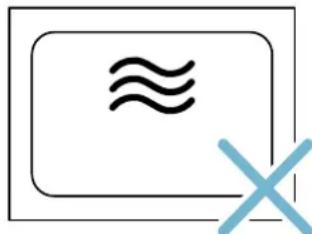
natural_image
Simple icon of a rectangular box with a double-headed 'X' symbol, no text or labels present.■ Moisture in the cooking compartment: Over an extended period of time, moisture in the cooking compartment may lead to corrosion. Allow the cooking compartment to dry after use. Do not keep moist food in the closed cooking compartment for extended periods of time. Do not store food in the cooking compartment.
■ Extremely dirty seal: If the seal is very dirty, the appliance door will no longer close properly during operation. The fronts of adjacent units could be damaged. Always keep the seal clean.
→ "Cleaning" on page 14
■ Microwave popcorn: Never set the microwave output too high. Use a maximum microwave output of 600 watts. Always place the popcorn bag on a glass plate. The door panels may jump if overloaded.

Environmental protection
Environmentally-friendly disposal
Dispose of packaging in an environmentally-friendly manner.
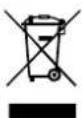
This appliance is labelled in accordance with European Directive 2012/19/EU concerning used electrical and electronic appliances (waste electrical and electronic equipment - WEEE). The guideline determines the framework for the return and recycling of used appliances as applicable throughout the EU.

Getting to know your appliance
In this chapter, we will explain the displays and controls. You will also find out about the various functions of your appliance.
Note: Depending on the appliance model, individual details and colours may differ.
Control panel
In the control panel, set the appliance's different functions. The current settings are shown in the display. The overview shows the control panel when the appliance is switched on with a selected operating mode.

1 Display
2 Touch buttons
3 ShiftControl control
Controls
Use the controls to set your appliance simply and directly.
Touch buttons
There are sensors under the touch buttons. Touch on the corresponding touch button to select a function.
| Touch button Use |
| 1 on/off Switching the appliance on or off |
| 2 Main menu Selecting operating modes and settings |
| 3 Time-setting option Setting the timer |
| 4 Information Displays additional information |
| 5 Automatic door opening Opens the appliance door |
| 6 Start/Stop Starting or stopping the operation |
ShiftControl control
Use the ShiftControl control to navigate through the lines in the display and select the settings. Settings that you can change are shown by the ... arrows.
| Button Use | |
| < Left | Navigates to the left in the display |
| > Right | Navigates to the right in the display |
| ~ Up | Navigates upwards in the display |
| ~ Down | Navigates downwards in the display |
Note: You can also scroll through the settings values quickly by pressing and holding a button. As soon as you release the button, you stop scrolling through the values.
Main menu
Touch the 🔒 touch button to access the main menu.
| Operating mode | Use |
| ~~~~~~~ | Microwave |
| ~~~~~~~ | Programmes |
| P~~~ | Prepares selected meals very easily |

Settings
Individually adjusts the appliance settings.
Further information
If the 1 touch button lights up, information can be displayed. Touch the 2 touch button to do this. The information is displayed for a few seconds.
Cooking compartment functions
The functions in the cooking compartment make your appliance easier to use. This, for example, enables the cooking compartment to be well lit and a cooling fan to prevent the appliance from overheating.
Automatic door opening
The appliance door springs open if you activate the automatic door opening. You can fully open the appliance door manually.
The automatic door opening does not work in the event of a power cut. You can open the door manually.
Notes
■ If you open the appliance door during operation, the operation is paused.
■ When you close the appliance door, the operation does not continue automatically. You must restart the operation manually.
■ If the appliance has been switched off for a long time, the appliance door will open after a time delay.
Interior lighting
When you open the appliance door, the interior lighting switches on. If the door remains open for longer than around five minutes, the cooking compartment lighting switches off again. When the automatic door opening is activated, the cooking compartment lighting switches on again.
For all operating modes, the cooking compartment lighting switches on as soon as the operation is started. When the operation has finished, the lighting switches off.
Cooling fan
The cooling fan switches on as required. The hot air escapes above the door.
The cooling fan may continue to run for a certain time after the operation.
Caution!
Do not cover the ventilation slots. Otherwise, the appliance may overheat.
Notes
■ The appliance remains cool during microwave operation. Despite this, the cooling fan will still switch on. The fan may run on even when the microwave operation has ended.
■ Condensation may form on the door window, interior walls and floor. This is normal and does not adversely affect microwave operation. Wipe away the condensation after cooking.

Before using for the first time
Before you can use your new appliance, you must make some settings.
Initial use
After connecting the appliance to the power or following a power cut, the settings for initial use are shown in the display. It may take a few seconds for the instruction to appear.
Note: You can change these settings again at any time in the basic settings.
Setting the language
- Use the ∨ button to navigate to the next line.
- Use the or button to select the language.
- Use the button to navigate to the previous line.
- Use the > button to select the next setting.
Setting the time
- Use the ∨ button to navigate to the next line.
- Use the or button to select the current hour.
- Use the ∨ button to navigate to the next line.
- Use the < or > button to select the current minute.
- Press the button repeatedly until "Time" appears.
- Use the > button to select the next setting.
Setting the date
- Use the ∨ button to navigate to the next line.
- Use the or button to select the current day.
- Use the ∨ button to navigate to the next line.
- Use the or button to select the current month.
- Use the ∨ button to navigate to the next line.
- Use the or button to select the current year.
- Press the ^ button repeatedly until "Date" appears.
- Use the > button to apply the settings.
The initial use is complete.

Operating the appliance
You have already learnt about the controls and how they work. Now we will explain how to set your appliance. You will learn about what happens when you switch the appliance on and off, and how to select the operating mode.
Switching the appliance on and off
Before you are able to set the appliance, you must switch it on.
Note: The timer can also be set when the appliance is switched off. Some displays and notes remain visible in the display after the appliance has been switched off.
Switch off your device when it is not being used. If no settings are applied for a long time, the appliance switches itself off automatically.
Switching on the appliance
Use the ① touch button to switch on the appliance.
The Neff logo appears in the display, followed by the maximum microwave output.
The appliance is ready to use.
You can find out how to set the operating modes in the individual chapters.
Switching off the appliance
Use the ① touch button to switch off the appliance.
Any functions that may be running are cancelled.
The time and date appear in the display.
Note: You can set whether the time and date should be displayed when the device is switched off in the basic settings. → "Basic settings" on page 13
Operation
Some operating steps are the same for all operating modes. In the following, you can learn about the basic operating steps.
Starting the operation
You must use the || touch button to start each operation.
After the operation starts, your settings are shown in the display.
Note: If the operation is paused due to the appliance door being opened, the operation must be restarted using the D|| touch button after the door has been closed.
Pausing the operation
Use the ▷|| touch button to pause and restart the operation.
Touch the ① touch button to delete the settings.
Notes
■ Opening the appliance door also pauses the operation.
■ The fan may continue to run after an operation is paused or cancelled.
Selecting an operating mode
After the appliance is switched on, the default operating mode is displayed. You can start this setting immediately.
If you want to select a different operating mode, you can find detailed descriptions of these modes in the appropriate chapters.
The following always applies:
- Touch the 🔒 touch button.
The operating modes are shown.
-
Use the or touch button to select the operating mode.
-
Use the ∨ touch button to navigate to the next line.
-
Use the or touch button to select the setting.
Tip: Additional settings are available, depending on the operating mode. For each additional setting, use the ∨ touch button to navigate to the next lines. Use the < or > touch button to select the setting.
- Touch the ▷|| touch button.
The appliance starts the operation.
Note: If you want to leave the current setting, you can navigate back to the operating modes level using the touch button.

Microwave
You can use the microwave to cook, heat up or defrost food quickly.
To ensure optimum use of the microwave, please observe the notes on cookware and familiarise yourself with the data in the application tables at the end of the instruction manual. → "Tested for you in our cooking studio" on page 16
Cookware
Not all cookware is microwavable. So that your food is heated and the appliance is not damaged, only use microwavable cookware.
Suitable cookware
Heat-resistant cookware made of glass, glass ceramic, porcelain, ceramic or heat-resistant plastic are suitable. These materials allow microwaves to pass through.
You can also use serving dishes. This saves you having to transfer food from one dish to another. You should only use cookware with decorative gold or silver trim if the manufacturer guarantees that they are suitable for use in microwaves.
Unsuitable cookware
Metal cookware is unsuitable. Metal does not allow microwaves to pass through. Food in covered metal containers will remain cold.
Caution!
Creation of sparks: Metal – e.g. a spoon in a glass – must be kept at least 2 cm from the cooking compartment walls and the inside of the door. Sparks can irreparably damage the glass on the inside of the door.
Cookware test
Never switch on the microwave unless there is food inside. The short cookware test is the only exception to this rule.
Perform the following test if you are unsure whether your cookware is suitable for use in the microwave.
- Heat the empty cookware at maximum power for 12 to 1 minute.
- Check the temperature of the cookware during this time.
The cookware should remain cold or warm to the touch.
The cookware is unsuitable if it becomes hot or sparks are generated.
In this case, stop the test.

Warning
Risk of burns!
The accessible parts become very hot when in operation. Never touch hot parts. Keep children at a safe distance.
Microwave power settings
The following microwave power settings are available.
The microwave power settings do not always correspond to the exact wattage that the appliance uses.
| Setting Food Maximum cook- ing time | |
| 90 W For defrosting delicate foods 1 hr 30 mins | |
| 180 W For defrosting and continued cooking 1 hr 30 mins | |
| 360 W For cooking meat and for heating del- 1 hr 30 mins | |
| icate foods | |
| 600 W For heating and cooking food 1 hr 30 mins | |
| 900 W For heating liquids 30 mins |
Default value:
The appliance provides a default cooking time for each microwave output setting. You can accept this value or change it in the appropriate area.
The maximum setting is for heating liquids. After a certain period, the microwave's power output is reduced to below maximum to protect the appliance. After a cooling period, the microwave's full power will be available once more.
Setting the microwave
Example: Microwave output 600 W, cooking time 5 minutes.
- Touch the ① touch button.
The appliance is ready to use. The maximum microwave output is displayed as the default value in the display. You can change this at any time. - Use the or touch button to select the required microwave output.
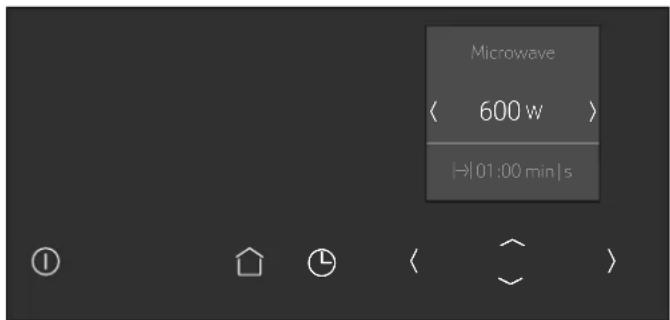
The microwave output and a default cooking time are shown in the display.
-
Touch the ∨ touch button.
The cooking time can be set. -
Use the or touch button to set the required cooking time.
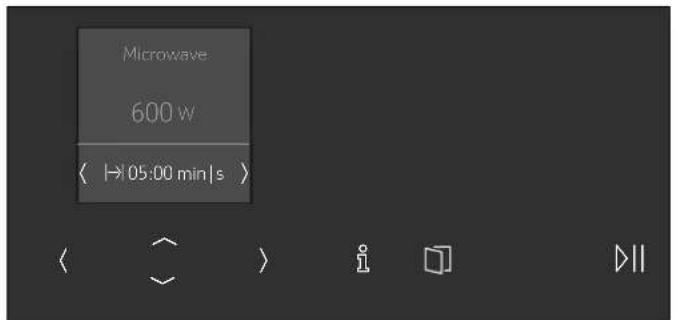
- Touch the ▷|| touch button.
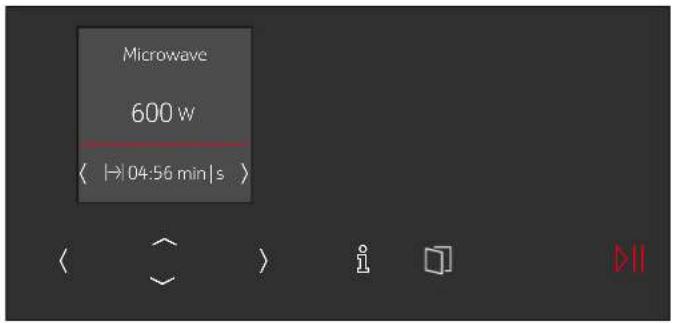
The appliance starts the operation. The cooking time counts down on the display.
Notes
■ When you switch on the appliance, the highest microwave output always appears in the display as a suggestion.
■ If you open the appliance door when the appliance is in use, the fan may continue to run.
Cooking time elapsed
An audible signal sounds.
Operation has finished.
Stopping the audible signal early:
Touch the Ⓛ touch button.
Note: After touching the ⏻ touch button, the timer function appears; after a short time, it automatically disappears. If you touch the ⏻ touch button again, the timer function will disappear instantly.
Use the ① touch button to switch off the appliance.
Changing the cooking time
This can be done at any time.
Use the < or > touch button to change the cooking time. The operation continues.
Changing the microwave output
This can be done at any time.
Use the touch button to change the microwave output.
Use the < or > touch button to set the required microwave output.
The cooking time remains unchanged.
The operation continues.
Note: If the set cooking time exceeds the maximum time for the microwave output of 900 W, it is reduced automatically. The operation stops. Use the || touch button to start the operation.
Timer
You can use the timer as a kitchen timer. The timer runs alongside other settings. You can set it at any time, even if the device is switched off. It has its own audible signal so that you can tell whether it is the timer or a cooking time which has elapsed.
Setting the timer
The maximum setting is 24 hours.
The higher the value, the longer the time intervals.
- Touch the ⏻ touch button.
The timer is displayed. - Use the < or > touch button to set the timer duration.

- Use the ⏻ touch button to start.
Note: The timer will also start automatically after a few seconds.
The timer duration counts down. The display switches back after a short time. If an operating mode is running, a timer symbol is also shown on the display. If the appliance is switched off, the time duration and a timer symbol are shown on the display.
An audible signal sounds once the timer duration has come to an end. Use the ⏻ touch button to cancel the audible signal early.
Notes
■ The timer remains visible in the display if the appliance is switched off.
■ If an operating mode is running, touch the ⏻ touch button to display the timer. The timer duration is displayed for a few seconds and can be altered.
Changing the timer
Touch the ⏻ touch button to change the timer duration. The timer duration is displayed – touch the < or > touch button to change it.
Cancelling the timer
If you want to cancel the timer, reset the duration on the timer to zero. Once the change has been applied, the symbol is no longer lit up.

Programmes
You can prepare food really easily using the various programmes. You select a programme and enter the weight of your food. The program then applies the most suitable settings.
Setting a programme
Example: "Defrost bread" programme, weight 0.25 kg.
- Touch the ① touch button.
The appliance is ready to use. - Touch the 🔊 touch button.
The operating modes are shown. - Use the or touch button to select the P XX operating mode.
- Touch the ∨ touch button.
The first programme appears in the display. - Use the or touch button to set the required programme.

- Touch the ∨ touch button.
The required programme is selected. The default value for the weight appears in the display.
- Use the or touch button to set the required weight.

- Touch the ∨ touch button.
The preparation instruction is displayed.
- Touch the ▷□ touch button.
The appliance starts the operation. The time counts down on the display.
Notes
■ The cooking time is calculated by the programmes.
■ For some dishes, the display provides instructions for turning or stirring during preparation. Follow the information provided. Opening the appliance door pauses the operation. After closing the appliance door, restart the operation. If you do not turn or stir the dish, the programme runs as normal until it reaches the end.
Information on the programmes
Place the food in the cold cooking compartment.
Take the food out of its packaging and weigh it. If it is not possible to enter the exact weight, you should round it up or down.
For the programmes, always use microwavable cookware, for example made of glass or ceramic.
Observe the cookware tips in the programme table.
A table of suitable types of food with appropriate weight ranges and the cookware required can be found in the section after the notes.
It is not possible to set a weight outside the weight range.
With many dishes, a signal sounds after a certain time. Turn or stir the food.
Defrosting:
■ As far as possible, freeze and store food flat and in portion-sized quantities at -18 °C.
■ Place the frozen food in flat cookware, such as a glass or porcelain plate.
■ After defrosting in the appliance, leave the food to continue defrosting for a further 15 to 90 minutes until it reaches an even temperature.
■ Bread should only be defrosted in the required amounts, as it quickly becomes stale.
■ Liquid will be produced when defrosting meat or poultry. Drain off this liquid when turning meat and poultry and under no circumstances use it for other purposes or allow it to come into contact with other foods.
■ After turning, remove any minced meat that has already defrosted.
■ Whole poultry should be placed in the cookware breast-side down and poultry portions skin-side down.
Vegetables:
■ Fresh vegetables: Cut into pieces of an equal size. Add one tablespoon of water for every 100 g vegetables.
■ Frozen vegetables: This programme is only suitable for blanched, not pre-cooked vegetables. It is not suitable for frozen vegetables in a cream sauce. Add 1 to 3 tablespoons of water. Do not add water to spinach or red cabbage.
Potatoes:
■ Boiled potatoes: Cut into pieces of an equal size. Add two tablespoons of water per 100 g of potatoes, and salt to taste.
■ Unpeeled boiled potatoes: Use potatoes of the same thickness. Wash the potatoes and prick the skin. Place the wet potatoes in a dish. Do not add water.
Rice:
■ Do not use brown or boil-in-the-bag rice.
■ Add two to two-and-a-half times the amount of water to rice.
Resting time
Some dishes need to rest in the cooking compartment after the programme has ended.
| Dish Resting time |
| Vegetables Approx. 5 minutes |
| Potatoes Approx. 5 minutes. First pour off the remaining water |
| Rice 5 to 10 minutes |
Programme table
| Programme Suitable food Weight range in kg Cookware | ||
| Defrosting | ||
| Bread* Bread, whole, round or long; sliced bread; sponge cake, yeast cake, fruit flan, cakes without icing, cream or gelatine | 0.20-1.50 kg Shallow cookware without lidCooking compartment floor | |
| Meat* Joints, flat pieces of meat, minced meat, chicken, pou-lard, duck | 0.20-2.00 kg Shallow cookware without lidCooking compartment floor | |
| Fish* Whole fish, fish fillet, fish cutlet 0.10-1.00 kg Shallow cookware without lid | Cooking compartment floor | |
| Cooking | ||
| Fresh vegetables** | Cauliflower, broccoli, carrots, kohlrabi, leeks, peppers, courgettes | 0.15-1.00 kg Cookware with lidCooking compartment floor |
| Frozen vegetables** | Cauliflower, broccoli, carrots, kohlrabi, red cabbage, spinach | 0.15-1.00 kg Cookware with lidCooking compartment floor |
| Potatoes** Boiled potatoes, unpeeled boiled potatoes, chopped potatoes of the same size | 0.20-1.00 kg Cookware with lidCooking compartment floor | |
| Rice** | Rice, long-grain rice | 0.05-0.30 kg Deep cookware with lidCooking compartment floor |
| *) Observe the signals given when it is time to turn the food**) Observe the signals given when it is time to stir the food | ||

Basic settings
There are various settings available to you in order to help use your appliance effectively and simply. You can change these settings as required.
Changing settings
- Touch the ① touch button.
- Touch the 🔊 touch button.
- Use the < or > touch button to select the "设置" settings".
- Use the ∨ touch button to navigate to the next line.
- Use the < or > touch button to select the setting.
- If necessary, use the ∨ touch button to navigate to the next line.
- Use the < or > touch button to select the setting.
- Touch the 🔒 touch button.
- To save the setting, use the √ touch button to select "Save".
To discard the setting, use the touch button to select "Discard".
List of basic settings
| Setting | Options |
| Language | Set the language |
| Clock | Set the current time |
| Date | Sets the current date |
| Audible signal Short cooking time | |
| Medium cooking time* | |
| Long cooking time | |
| Button tone | Switched on |
| Switched off* | |
| (Button tone at on/off always on) | |
| Display brightness | Scale with 5 levels |
| Level 3* | |
| Clock display | Digital + date* |
| Digital | |
| Off | |
| Night-time dimming | Switched off** |
| Switched on (Display dimmed between 22:00 and 6:00) | |
| Demo mode Switched off* | |
| Switched on(only displayed during the first 3 minutes after the appliance has been reset or is used for the first time) | |
| Factory settings Reset | Do not reset* |
| * Factory setting (factory settings may vary depending on the appli-ance model) | |
Note: Changes to the language, button tone and display brightness settings take effect immediately. All other changes take effect after the settings have been saved.
Power cut
The changes you make to the settings are retained even after a power cut.

Cleaning
With good care and cleaning, your appliance will retain its appearance and remain fully functioning for a long time to come. We will explain here how you should correctly care for and clean your appliance.

Warning
Risk of burns!
The appliance becomes very hot. Never touch the interior surfaces of the cooking compartment or the heating elements. Always allow the appliance to cool down. Keep children at a safe distance.

Warning
Risk of electric shock!
Do not use any high-pressure cleaners or steam cleaners, which can result in an electric shock.

Warning
Risk of injury!
Scratched glass in the appliance door may develop into a crack. Do not use a glass scraper, sharp or abrasive cleaning aids or detergents.
Note: Unpleasant odours, for example after fish has been prepared, can be removed very easily. Add a few drops of lemon juice to a cup of water. Always place a spoon in the container to prevent delayed boiling. Heat the water for 1 to 2 minutes at maximum microwave output.
Cleaning agent
To ensure that the different surfaces are not damaged by using the wrong cleaning agent, observe the information in the table.
Do not use:
Only the settings pertaining to the initial use of the appliance need to be implemented once again following a power cut.
Changing the time
If you want to change the time, for example from summer to winter time, you have to change the basic setting.
- Touch the ① touch button.
- Touch the 🔊 touch button.
- Use the < or > touch button to select the "设置" settings".
- Use the ∨ touch button to navigate to the next line.
- Use the < or > touch button to select the time.
- If necessary, use the ∨ touch button to navigate to the next line.
- Use the < or > touch button to change the time.
- Touch the 🔒 touch button.
- To save the setting, use the √ touch button to select "Save".
To discard the setting, use the touch button to select "Discard".
■ Harsh or abrasive cleaning agents.
■ Metal or glass scrapers to clean the door panels.
■ Metal or glass scrapers to clean the door seal.
■ Hard scouring pads or sponges.
■ Cleaning agents with a high alcohol content.
Wash new sponge cloths thoroughly before use.
| Area Cleaning agent | |
| Appliance front Hot soapy water: Clean using a dish cloth and then dry with a soft cloth. Do not use a metal or glass scraper for cleaning. | |
| Display Wipe down using a microfibre cloth or a slightly damp cloth. Do not wipe with a wet cloth. | |
| Stainless steel Hot soapy water: Clean using a dish cloth and then dry with a soft cloth. Remove flecks of limescale, grease, starch and albumin (e.g. egg white) immediately. Corrosion can form under such flecks. Special stainless-steel cleaning agents are available from the after-sales service or from specialist retailers. | |
| Cooking compartment made of stain-less steel | Hot soapy water or vinegar solution: Clean using a dish cloth and then dry with a soft cloth. Do not use oven spray or any other aggressive oven cleaners or abrasive materials. Scouring pads, rough sponges and pan cleaners are also unsuitable. These items scratch the surface. Allow the interior surfaces to dry thoroughly. |
| Door panels Glass cleaner: Clean with a dish cloth. Do not use a glass scraper. | |
| Door sealDo not remove. | Hot soapy water: Clean with a dish cloth and do not scour. Do not use a metal or glass scraper for cleaning. |

Trouble shooting
If a fault occurs, there is often a simple explanation. Before calling the after-sales service, please refer to the fault table and attempt to correct the fault yourself.
Tip: If a dish does not turn out exactly as you wanted, refer to the following chapter, where you will find lots of tips and notes relating to the optimum settings.→ "Tested for you in our cooking studio" on page 16
Warning
Risk of electric shock!
Incorrect repairs are dangerous. Repairs may only be carried out and damaged power cables replaced by one of our trained after-sales technicians. If the appliance is defective, unplug the appliance from the mains or switch off the circuit breaker in the fuse box. Contact the after-sales service.
Fault table
| Fault Possible cause Remedy/information | ||
| The appliance does not work or the display is not working | The plug is not plugged into the mains Connect the appliance to the electricity supply | |
| Power cut Check whether other kitchen appliances are working | ||
| The circuit breaker is faulty Check in the fuse box to make sure that the fuse for the appliance is OK | ||
| Faulty operation Switch off the circuit-breaker for the appliance in the fuse box and switch it back on after approx. 60 seconds | ||
| The appliance cannot be started The appliance door is not fully closed Close the appliance door | ||
| Appliance does not heat up.The□□ symbol for demo mode is shown in the display. | The appliance is in demo mode | Deactivate demo mode in the basic settings.To do this, briefly disconnect the appliance from the mains (switch off the household fuse or the circuit breaker in the fuse box). Then deactivate demo mode in the basic settings within 3 minutes. |
| The interior lighting is not working | The interior lighting is faulty | Call the after-sales service |
| Error message "Exxx"* | If an error message is displayed, switch the appliance off and on again; if the message disappears, it was a one-off problem. If the fault occurs again or the error message is still displayed, please contact the after-sales service and provide the fault code. | |
| * Special features:Error message "E0532": Open and close the appliance door.Error message "E6501": Switch off the appliance. Wait for 10 minutes. Switch the appliance on again. | ||

Customer service
Our after-sales service is there for you if your appliance needs to be repaired. We will always find an appropriate solution, also in order to avoid after-sales personnel having to make unnecessary visits.
E number and FD number
When calling us, please quote the full product number (E no.) and the production number (FD no.) so that we can provide you with the correct advice. The rating plate bearing these numbers can be found when you open the appliance door.
If your appliance operates with steam, you will find the rating plate on the right-hand side behind the panel.

To save time, you can make a note of the numbers for your appliance and the telephone number of the after-sales service in the space below in case you need them.
E no.
FD no.
After-sales service 📞
Please note that a visit from an after-sales service engineer is not free of charge in the event that the appliance has been misused, even during the warranty period.
After-sales contact details for all countries can be found in the attached after-sales service directory.
This appliance corresponds to the standards EN 55011 and CISPR 11. It is a Group 2, Class B product.
Group 2 means that microwaves are produced for the purpose of heating food. Class B states that the appliance is suitable for private households.
Technical specifications
| Power supply 220-240 V, 50/60 Hz | |
| Max. total connected load 1220 W | |
| Microwave output 900 W (IEC 60705) | |
| Microwave frequency 2450 MHz | |
| Fuse 10 A | |
| Dimensions (H/W/D) | |
| - Appliance 382 x 594 x 320 mm | |
| - Cooking compartment 220 x 350 x 270 mm | |
| VDE approved | Yes |
| CE mark | Yes |

Tested for you in our cooking studio
Here, you can find a selection of dishes and the ideal settings for them. We show you which microwave output is best for your dish. There are also tips about cookware and preparation methods.
Notes
■ The values in the table always apply to the cooking compartment when it is cold and empty. Before using the appliance, remove all unnecessary cookware from the cooking compartment.
■ The times specified in the tables are only guidelines. They will depend on the quality and composition of the food.
■ Always use an oven cloth or oven gloves when taking hot cookware out of the cooking compartment.

Warning
Risk of scalding!
When pulling out the cookware, hot liquid may overflow. Carefully pull the cookware out of the cooking compartment.
The following tables provide you with numerous options and settings for the microwave.
The times given in the tables are guidelines; they depend on the cookware used, and the quality, temperature and consistency of the food.
Time ranges are often specified in the tables. Set the shortest time first and then extend the time if necessary. It may be that you have different quantities from those specified in the tables. There is a rule of thumb for operating the microwave: Double the amount = double the time, half the amount = half the time.
You can place the cookware in the middle on the cooking compartment floor. The food will then absorb the microwaves from all sides.
Defrosting
Place the frozen food in an open container on the cooking compartment floor.
Turn or stir the food once or twice during the defrosting time. Large pieces of food should be turned several times. When turning, remove any liquid that has been produced during defrosting.
Leave defrosted items to stand at room temperature for a further 10 to 60 minutes so that the temperature can even out. You can remove the giblets from poultry at this point.
Note: Place the ovenware on the cooking compartment floor.
| Dish Weight Microwave output in watts, time in minutes | Note | |
| Whole pieces of beef, pork or veal (on the bone or boned) | 800 g 180 W, 15 mins + 90 W, 15-25 mins Turn several times | |
| 1000 g 180 W, 20 mins + 90 W, 20-30 mins | ||
| 1500 g 180 W, 25 mins + 90 W, 25-30 mins | ||
| Meat in pieces or slices of beef, veal or pork | 200 g 180 W, 5-8 mins + 90 W, 5-10 mins | Separate the slices/pieces of meat when turning |
| 500 g 180 W, 8-11 mins + 90 W, 10-15 mins | ||
| 800 g 180 W, 10 mins + 90 W, 10-15 mins | ||
| Minced meat, mixed 200 g 90 W, 10-15 mins Freeze food flat if possible; | ||
| turn several times during defrosting and remove any minced meat that has already defrosted | ||
| Poultry or poultry portions 600 g 180 W, 8 mins + 90 W, 10-15 mins Turn during defrosting; | ||
| remove liquid that escapes during defrosting | ||
| Fish fillet, fish steak or slices 400 g 180 W, 5 mins + 90 W, 10-15 mins Separate any defrosted parts | ||
| Whole fish 300 g 180 W, 3 mins + 90 W, 10-15 mins Turn during defrosting | ||
| Vegetables, e.g. peas 300 g 180 W, 10-15 mins Stir carefully during defrosting | ||
| Fruit, e.g. raspberries 300 g 180 W, 6-9 mins | Stir carefully during defrosting and separate | |
| 500 g 180 W, 8 mins + 90 W, 5-10 mins | any defrosted parts | |
| Butter, defrosting | 125 g 180 W, 1 min. + 90 W, 1-2 mins | Remove all packaging |
| 250 g 180 W, 1 min. + 90 W, 2-4 mins | ||
| Loaf of bread | 500 g 180 W, 8 mins + 90 W, 5-10 mins | Turn during defrosting |
| 1000 g 180 W, 12 mins + 90 W, 10-20 mins | ||
| Cakes, dry, e.g. sponge cake | 500 g 90 W, 10-15 mins Separate the pieces of cake; | |
| 750 g 180 W, 5 mins + 90 W, 10-15 mins | only for cakes without icing, cream or crème pâtissière | |
| Cakes, moist, e.g. fruit flan, cheesecake | 500 g 180 W, 5 mins + 90 W, 15-20 mins | Only for cakes without icing, cream or gelatine |
| 750 g 180 W, 7 mins + 90 W, 15-20 mins | ||
Defrosting, heating up or cooking frozen food
Take ready meals out of the packaging. They will heat up more quickly and evenly in microwaveable cookware. The different components of the meal may not require the same amount of time to heat up.
Food which lies flat will cook more quickly than food which is piled high. You should therefore distribute the food so that it is as flat as possible in the cookware. Food should not be placed in layers on top of one another.
Always cover the food. If you do not have a suitable lid for your cookware, use a plate or special microwave foil.
Stir or turn the food 2 or 3 times during cooking.
After heating, allow the food to stand for a further 2 to 5 minutes to allow the temperature to even out.
This will help the food retain its own distinct taste, which means it will require less seasoning.
Note: Place the ovenware on the cooking compartment floor.
| Dish Weight Microwave output in watts, | Note | ||
| time in minutes | |||
| Menu, plated meal, ready meal (2-3 components) | 300-400 g | 600 W, 8-13 mins Covered | |
| Soup | 400 g 600 W, 8-12 mins Cookware with lid | ||
| Stew 500 g 600 W, 10-15 mins Cookware with lid | |||
| Slices or pieces of meat in sauce, e.g. goulash | 500 g | 600 W, 10-15 mins | Cookware with lid |
| Fish, e.g. fillet steaks | 400 g 600 W, 10-15 mins Covered | ||
| Bakes, e.g. lasagne, cannelloni | 450 g | 600 W, 10-15 mins | Use the wire rack and place the cookware on it |
| Dish Weight Microwave output in watts, time in minutes | Note |
| Side dishes, e.g. rice, pasta 250 g 600 W, 3-7 mins Cookware with lid, add liquid | |
| 500 g 600 W, 8-12 mins | |
| Vegetables, e.g. peas, broccoli, carrots 300 g 600 W, 7-11 mins Cookware with lid, add 1 tbsp of water | |
| 600 g 600 W, 14-17 mins | |
| Creamed spinach 450 g 600 W, 10-15 mins Cook without additional water |
Heating
Warning
Risk of scalding!
There is a possibility of delayed boiling when a liquid is heated. This means that the liquid reaches boiling temperature without the usual steam bubbles rising to the surface. Even if the container only vibrates a little, the hot liquid may suddenly boil over and spatter. When heating, always place a spoon in the container. This will prevent delayed boiling.


natural_image
Glass with a black X symbol crossed out, representing an orange glass (no text or symbols present)Caution!
Creation of sparks: Metal – e.g. a spoon in a glass – must be kept at least 2 cm from the cooking compartment walls and the inside of the door. Sparks can irreparably damage the glass on the inside of the door.
Notes
■ Take ready meals out of the packaging. They will heat up more quickly and evenly in microwaveable cookware. The different components of the meal may not require the same amount of time to heat up.
■ Always cover the food. If you do not have a suitable cover for your cookware, use a plate or special microwave foil.
■ Stir or turn the food several times during the heating time. Check the temperature.
■ After heating, allow the food to stand for a further 2 to 5 minutes to allow the temperature to even out.
■ Always use an oven cloth or oven gloves when removing plates from the appliance.
Note: Place the ovenware on the cooking compartment floor.
| Dish Amount Microwave output in watts, time in minutes | Note | ||
| Menu, plated meal, ready meal (2-3 components) | 600 W, 5-8 mins - | ||
| Beverages | 125 ml | 900 W, 12 -1 min. | Always place a spoon in the container, do not overheat alcoholic drinks; check occasionally while heating |
| 200 ml 900 W, 1-2 mins | |||
| 500 ml 900 W, 3-4 mins | |||
| Baby food, e.g. baby bottles | 50 ml | 360 W, approx. 12 min | Bottles without teat or lid; shake or stir well after heating and ensure that you check the temperature |
| 100 ml 360 W, 12 -1 min. | |||
| 200 ml 360 W, 1-2 mins | |||
| Soup, 1 cup | 175 g each | 600 W, 1-2 mins - | |
| Soup, 2 cups | 175 g each | 600 W, 2-3 mins - | |
| Meat in sauce | 500 g 600 W, 7-10 mins - | ||
| Stew 400 g 600 W, 5-7 mins - | |||
| 800 g 600 W, 7-8 mins - | |||
| Vegetables, 1 portion | 150 g 600 W, 2-3 mins - | ||
| Vegetables, 2 portions | 300 g 600 W, 3-5 mins - | ||
Cooking
Notes
■ Food which lies flat will cook more quickly than food which is piled high. You should therefore distribute the food so that it is as flat as possible in the
cookware. Food should not be placed in layers on top of one another.
- Cook the food in cookware with a lid. If you do not have a suitable lid for your cookware, use a plate or special microwave foil.
■ This will help the food retain its own distinct taste, which means it will require less seasoning.
■ After cooking, allow the food to stand for a further 2 to 5 minutes to allow the temperature to even out.
■ Always use an oven cloth or oven gloves when removing plates from the appliance.
Note: Place the ovenware on the cooking compartment floor.
| Dish Amount Microwave output in watts, time in minutes | Note | ||
| Whole chicken, fresh, no giblets 1200 g 600 W, 25-30 mins Turn half way through the time | |||
| Fish fillet, fresh 400 g 600 W, 7-12 mins - | |||
| Fresh vegetables 250 g 600 W, 6-10 mins Cut the vegetables into pieces of equal size; | |||
| 500 g 600 W, 10-15 mins | add 1 to 2 tbsp water per 100 g of vegeta-bles; stir while heating | ||
| Potatoes 250 g 600 W, 8-10 mins Cut the potatoes into pieces of equal size; | |||
| 500 g 600 W, 10-15 mins | add 1 tbsp water for every 100 g of potatoes; stir while heating | ||
| 750 g 600 W, 15-22 mins | |||
| Rice 125 g 600 W, 4-6 mins + | Add double the amount of liquid | ||
| 180 W, 12-15 mins | |||
| 250 g 600 W, 6-8 mins + 180 W, 15-18 mins | |||
| Sweet foods, e.g. blancmange (instant) | 500 ml | 600 W, 6-8 mins | Stir the blancmange thoroughly 2 to 3 times using an egg whisk while heating |
| Fruit, compote | 500 g 600 W, 9-12 mins Stir while heating | ||
| Microwave popcorn | 100 g | 600 W, 3-4 mins | Always place the popcorn bag on the glass tray; observe the manufacturer's instructions |
Microwave tips
| You cannot find any information about the settings for the quantity of food you have prepared. | Lengthen or shorten the cooking time according to the following rule of thumb: Double the amount = double the time, half the amount = half the time |
| The food has become too dry. | Next time, set a shorter cooking time or select a lower microwave power setting. Cover the food and add more liquid. |
| The time has elapsed but the food is not defrosted, hot or cooked. | Set a longer time. Large quantities and food which is piled high require longer times. |
| Time has elapsed but the food is overheated at the edge but not done in the middle. | Stir it during the cooking time and next time, select a lower microwave power setting and a longer cooking time. |
| After defrosting, the poultry or meat is defrosted on the outside but not defrosted in the middle. | Next time, select a lower microwave output setting. Turn large amounts of poultry or meat several times. |

Test dishes
In accordance with EN 60705, IEC 60705 or DIN 44547, and EN 60350 (2009)
The quality and performance of the appliances are tested by test institutes using the following dishes.
Cooking only using the microwave
Dish Microwave output in watts, cooking time in minutes Note
Custard, 1000 g 600 W, 11-12 mins + 180 W, 8-10 mins Pyrex dish
Sponge, 475 g 600 W, 7-9 mins Pyrex dish, dia. 22 cm
Meat loaf, 900 g 600 W, 25-30 mins Pyrex cake dish, 28 cm long
Defrosting only using the microwave
Dish Microwave output in watts, defrosting time in minutes Note
Meat, 500 g "Meat" programme, 500 g
or
180 W, 8 mins + 90 W, 7-10 mins
Pyrex dish, dia. 24 cm
natural_image
Close-up of two men in formal attire, one in dark blue and the other in white (no visible text or symbols)Constructa Neff
Vertriebs-GmbH
Carl-Wery-Straße 34
D-81739 München

- Table of contents
- Intended use
- Important safety information
- General information
- Warning
- Risk of fire!
- Risk of serious burns!
- Risk of scalding!
- Risk of injury!
- Risk of electric shock!
- Hazard due to magnetism!
- Microwave
- Risk of explosion!
- Risk of burns!
- Risk of serious damage to health!
- Causes of damage
- Caution!
- Environmental protection
- Environmentally-friendly disposal
- Getting to know your appliance
- Control panel
- Controls
- Touch buttons
- ShiftControl control
- Main menu
- Further information
- Cooking compartment functions
- Automatic door opening
- Notes
- Interior lighting
- Cooling fan
- Before using for the first time
- Initial use
- Setting the language
- Setting the time
- Setting the date
- Operating the appliance
- Switching the appliance on and off
- Switching on the appliance
- Switching off the appliance
- Operation
- Starting the operation
- Pausing the operation
- Selecting an operating mode
- Cookware
- Suitable cookware
- Unsuitable cookware
- Cookware test
- Microwave power settings
- Default value:
- Setting the microwave
- Cooking time elapsed
- Changing the cooking time
- Changing the microwave output
- Timer
- Setting the timer
- Changing the timer
- Cancelling the timer
- Programmes
- Setting a programme
- Information on the programmes
- Defrosting:
- Vegetables:
- Potatoes:
- Rice:
- Resting time
- Basic settings
- Changing settings
- Power cut
- Cleaning
- Cleaning agent
- Changing the time
- Trouble shooting
- Customer service
- E number and FD number
- After-sales service 📞
- Tested for you in our cooking studio
- Defrosting
- Defrosting, heating up or cooking frozen food
- Heating
- Cooking
- Test dishes
- Cooking only using the microwave
- Defrosting only using the microwave
Brand : NEFF
Model : C17WR00N0A
Category : Microwave