
Platinum Range - Humidifier Meaco - Free user manual and instructions
Find the device manual for free Platinum Range Meaco in PDF.


| Product Type | Ultrasonic Humidifier |
| Brand | Meaco |
| Model | Platinum Range |
| Water Tank Capacity | 3 liters |
| Coverage Area | Up to 30 m² (320 sq ft) |
| Humidification Output | Up to 300 ml per hour |
| Power Supply | AC 100-240V, 50/60Hz |
| Power Consumption | 25 W (typical) |
| Noise Level | < 30 dB(A) |
| Dimensions (W x D x H) | 250 x 240 x 350 mm |
| Weight | 2.2 kg |
| Control Type | Touch panel with LED display |
| Humidistat | Built-in, adjustable target humidity |
| Auto Shut-Off | When tank is empty or target humidity reached |
| Timer | 1-12 hours |
| Filter Type | Replaceable demineralization cartridge (optional) |
| Aroma Diffuser | Built-in essential oil tray |
| Cleaning | Weekly descaling; tank and tray washable |
| Safety Features | Overheat protection, tip-over switch, child lock |
| Replacement Parts | Cartridge (model MCART), aroma tray (MTRAY) |
Frequently Asked Questions - Platinum Range Meaco
User questions about Platinum Range Meaco
0 question about this device. Answer the ones you know or ask your own.
Ask a new question about this device
Download the instructions for your Humidifier in PDF format for free! Find your manual Platinum Range - Meaco and take your electronic device back in hand. On this page are published all the documents necessary for the use of your device. Platinum Range by Meaco.
USER MANUAL Platinum Range Meaco
Meaco Platinum Range Instruction Manual
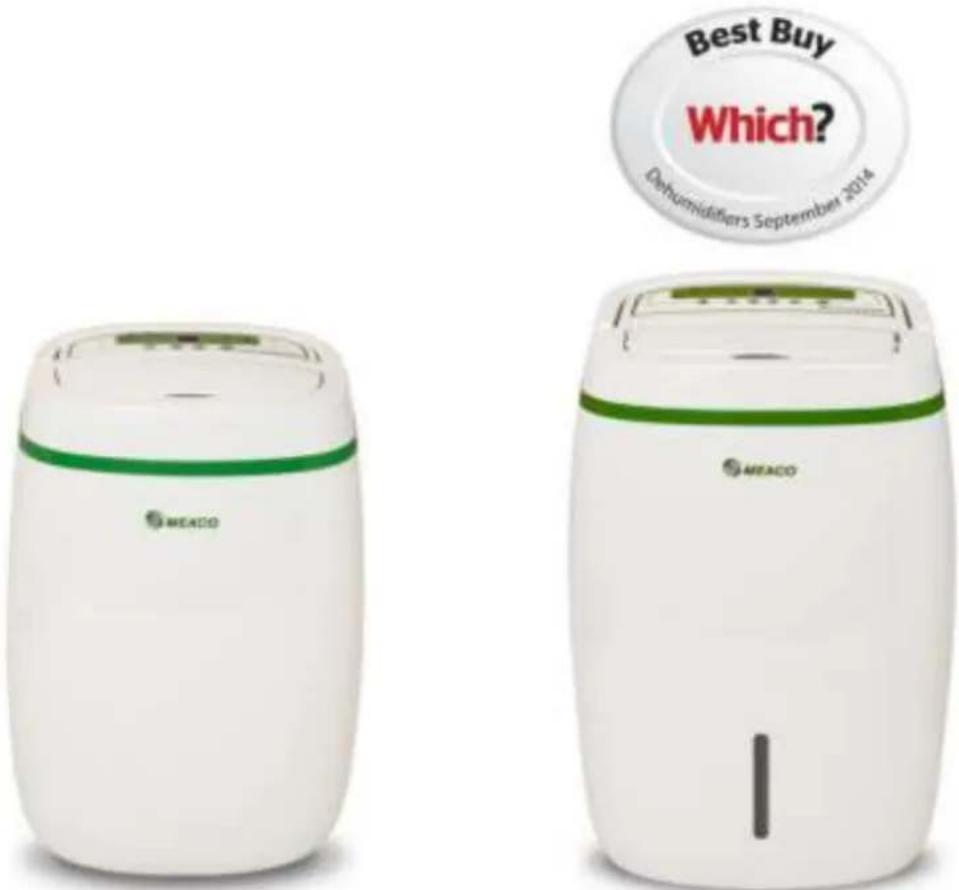
Meaco 12L and 20L Low Energy Dehumidifiers
Please read this instruction manual before using the dehumidifier and keep safe for future reference.
Thank you for choosing Meaco, we really appreciate it
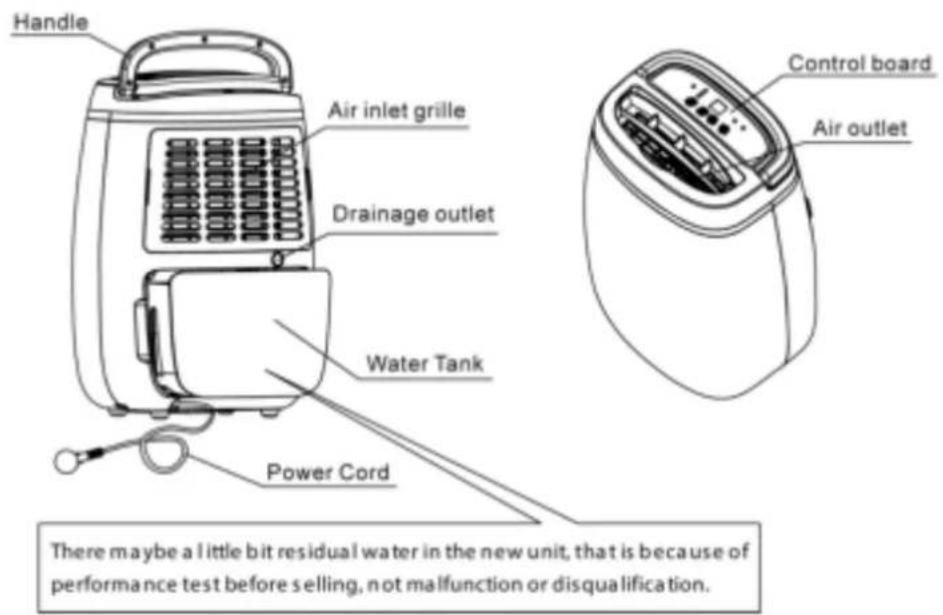
Meaco 12L Low Energy Dehumidifier
Parts List
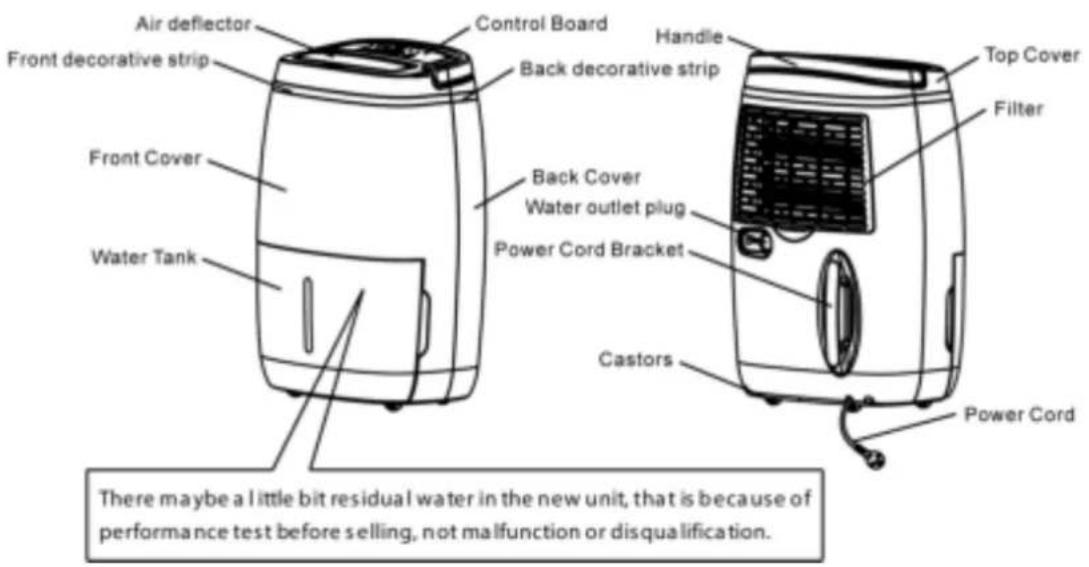
Meaco 20L Low Energy Dehumidifier
Parts List
No drainage hose comes with either dehumidifier because the majority of customers do not need a hose and it is just one more thing that ends up in landfill.
PLEASE READ ALL INSTRUCTIONS CAREFULLY BEFORE OPERATING AND KEEP IN A SAFE PLACE FOR FUTURE REFERENCE.
When using electrical appliances, basic safety precautions should always be followed.
WARNING - This appliance is intended for use in a domestic environment only. Any other use is not recommended by the manufacturer and may cause fire, electrical shocks or other injury to person or property.
- Do not operate the unit with a damaged mains lead, a damaged plug, after it malfunctions, has been dropped or damaged in any way. If any of these happen then return it to an authorised service facility for examination and repair.
- This dehumidifier should always be kept in an upright position to avoid any damage. Locate the unit on a flat stable surface to reduce vibration and to avoid water leakage.
- Check the household voltage to ensure it matches the units rated specification before operating.
- Operate this unit in an ambient temperature between 5°C and 35°C.
- Ensure that the air inlets and outlets are not blocked or covered.
- Do not place the unit too close to curtains or other objects - min 50cm.
- When using the dehumidifier to speed up the drying of wet clothes in the room, keep the clothing at a safe distance from the unit to prevent water from dropping onto the unit or the clothes from blocking the air flow in or out of the dehumidifier.
- Never place anything on top of the unit and do not cover with any kind of material while in use.
- This product is intended for domestic and light office use ONLY and not for commercial, industrial or outdoor use.
- To protect against electrical shocks, do not immerse unit, plug or cord in water, or spray with liquids.
- Never unplug the dehumidifier without pressing the "ON/OFF" button first, as this could damage the unit.
- Always unplug the unit when not in use or moving location. To disconnect from the power supply, grip the plug and pull from the power socket. Never pull by the mains lead.
- Always empty the water tank before storing the unit away.
- Close supervision is necessary when any appliance is used by or near children and pets.
- Do not run the power cord under carpeting, or cover with rugs or runners. Arrange the mains lead away from areas where it may be tripped over.
- Never operate or store the unit in direct sunlight.
- To repair the unit, take it to a qualified service engineer. Repairs carried out by unqualified people may cause damage to the unit or injury to persons or property and void the warranty.
- Where possible, avoid the use of an extension cable as they may overheat and cause a risk of fire. Only use an extension cord after ensuring it is in perfect condition.
- Do not use the unit without the air filter, to prolong the life of the dehumidifier we recommend using the optional HEPA filter. To avoid issues please clean the filter at least every couple of weeks
BS PLUG WIRING FOR UK MODELS
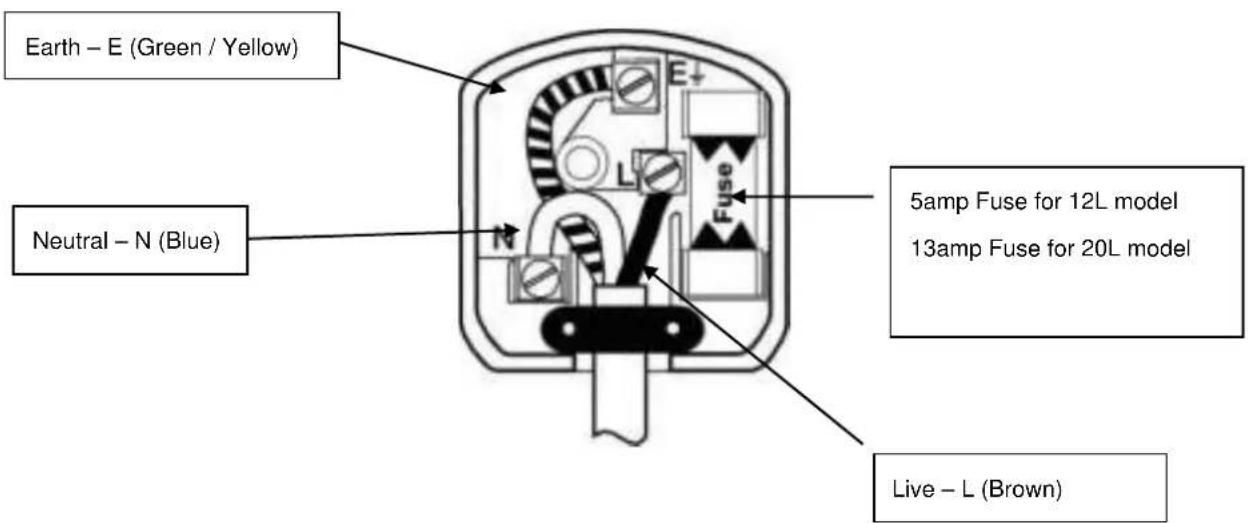
Wiring Instructions: Should it be necessary to change the plug please note the wires in the mains lead are coloured in accordance with the following code:
BLUE - NEUTRAL
BROWN - LIVE
GREEN AND YELLOW – EARTH
As the colours of the wires in the mains lead of this appliance may not correspond with the coloured markings identifying the terminals in your plug, proceed as follows:
- The BLUE wire is the NEUTRAL and must be connected to the terminal which is marked with the letter N or coloured BLACK.
- The BROWN wire is the LIVE and must be connected to the terminal which is marked with the letter L or coloured RED.
- The GREEN/YELLOW is the EARTH and must be connected to the terminal which is marked with the letter E or or coloured GREEN OR GREEN/YELLOW.
- Always ensure that the cord grip is positioned and fastened correctly.
(12L Model) If a 5A (BS 1363) fused plug is used it must be fitted with a 5A fuse. If in doubt consult a qualified electrician.
(20L Model) If a 13A (BS 1363) fused plug is used it must be fitted with a 13A fuse. If in doubt consult a qualified electrician.
Wiring for a 5 or 13Amp Plug (BS1363)
Please note. The Earth Terminal is marked with the letter E or Earth Symbol.
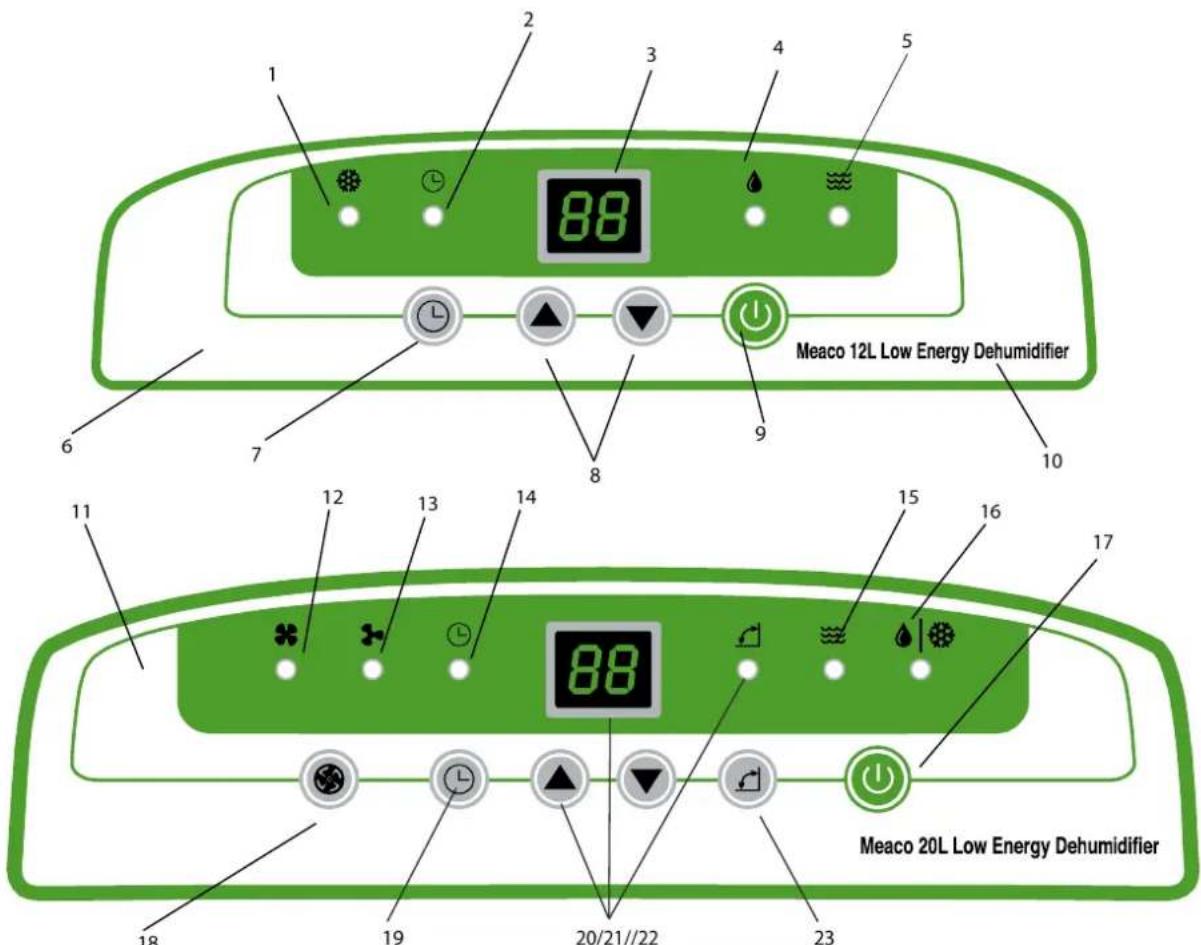
| Meaco 12L Control Panel | Meaco 20L Control Panel | ||
| 1 | Defrost light | 11 | Control panel sticker |
| 2 | Timer light | 12 | High fan speed |
| 3 | Humidity reading/timer display | 13 | Low fan speed |
| 4 | Dehumidification light | 14 | Timer light |
| 5 | Water bucket full light | 15 | Water bucket full light |
| 6 | Control panel sticker | 16 | Dehumification light/defrost light |
| 7 | Timer button | 17 | Power On/Off button |
| 8 | Up and down arrow to change relative humidity set point and timer off setting | 18 | Fan speed button |
| 9 | Power On/Off button | 19 | Timer button |
| 10 | Model number | 20 | Up and down arrow to change relative humidity set point and timer off setting |
| Pressing and holding down the Up and Down buttons at the same time on either model will activate the Child Lock and the buttons on the control panel will freeze up. Repeat to reverse the process. | 21 | Humidity reading/timer display | |
| 22 | Louvre light | ||
| 23 | Louvre on/off light | ||
How to use your dehumidifier
- Plug the dehumidifier in and press the On/Off button
- Select your target relative humidity in steps of 5%rh by using the up and down arrows (we recommend 55%rh for the home). Once this is set the display returns to displaying the room relative humidity.
- Press the UP button one press at a time through the settings CO-30-35-40-45-50-55-60-65-70-75-80%rh
- Press the DOWN button one press at a time through the settings 80-75-70-65-60-55-50-45-40-35-30-CO
• CO stands for continuous and will never turn off (apart from when the bucket is full) - On the 20L you can select your fan speed
- On the 20L you can also turn the louvre on or off by pressing the louvre button.
- On the 12L you can manually adjust the louvre to the correct angle
Other functions of the control panel
- When the tank is full the dehumidifier will stop working, and the bucket full light will flash.
- There is an off timer which allows you to run the dehumidifier for a set number of hours before it turns itself off. Use this mode when you are drying washing and want to turn the machine off after say two hours of high speed drying.
- Below around 16°C the defrost light will come on intermittently to indicate that the dehumidifier is in defrost mode. On the 20L the defrost light is shared between defrost and drying and flashes to indicate defrost mode.
- The one droplet indicator comes on when the dehumidifier is dehumidifying.
- Press the Up and Down arrows at the same time to activate the Child Lock. Repeat the process to turn the Child Lock off.
Meaco Control Logic
When the room relative humidity is 3%rh below your target relative humidity the dehumidifier will stop drying the air but the fan will continue to run for 10 minutes. If the relative humidity is stable then the dehumidifier goes to sleep for 30 minutes.
During this sleep time the humidity reading on the display will probably increase well above the set point. This is because the fan is turned off and the sensor is now reading the relative humidity inside the dehumidifier where it is cold and wet. This is normal and the machine will not turn back on because this is the reading inside the dehumidifier and not the room reading.
After 30 minutes the dehumidifier will wake up and sample the air with just the fan running for 2 minutes so that the relative humidity sensor can tell the control panel what the room relative humidity is, if the relative humidity is 3%rh above the set point then it will start to dehumidify again, if not then the fan will go to sleep again for another 30 minutes.
Drying Laundry
To speed up the drying of laundry we recommend selecting the lowest possible relative humidity (30%rh) or continuous operation (CO) and the maximum fan speed. Use the louvre to point the dry air at the washing whilst making sure that the water from the laundry does not drip onto or into the dehumidifier. Placing the washing and the laundry into a small room, with the heating on and using additional fans will speed up the whole process.
To avoid issues please clean the filter at least every couple of weeks.
Getting the best from your dehumidifier
We have a huge amount of experience in getting the best out of dehumidifiers and solving condensation, damp and mould problems. You will find hundreds of articles on our blog at www.meaco.com, we recommend looking through the advice section or using the search feature.
Alternatively just pick up the phone and call us on 01483 234900 and we will be happy to help you.
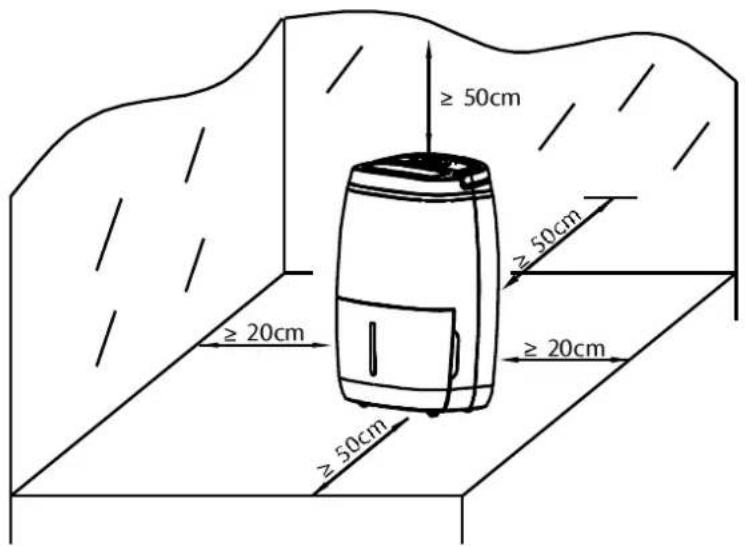
- Place the dehumidifier in an upright position on a stable, flat surface.
- Please ensure the unit is a safe distance away from a wall or furniture.
- Please keep clothes at a safe distance of 50cm away from the air inlet or outlet to prevent water from dripping into the unit.
- Ensure the tank is correctly fitted, if the tank is full or is not in place, the "Empty Tank" light comes on and the dehumidifier will turn off.
- Press the On/Off button.
- Select the relative humidity value that you want to use the dehumidifier in, for most applications this will be the 55%rh. For more detail refer to page six.
• To turn off press the On/Off button again.
Amount of water collected
- When you first use your dehumidifier it will work harder to reduce the room humidity down to your preferred target (say 55%rh). This is the time when it will produce the most water and need emptying most frequently. As the room becomes dryer the dehumidifier collects less water and takes longer to fill the tank, this is perfectly normal. When the target relative humidity has been reached the dehumidifier will stop collecting water, again this is normal.
- If you find that you still have condensation on your windows or you need to dry the air further then use a lower relative humidity setting (40 or 45%rh). This might well be necessary if you have single glazed windows or if the outside air temperature drops towards freezing.

ATTENTION!
- Never use the device with a damaged power cord, plug, cabinet or control panel. Never trap the power cord or allow it to come into contact with sharp edges.
● Failing to follow the instructions may lead to the guarantee becoming void.
Meaco 12L Low Energy Dehumidifier
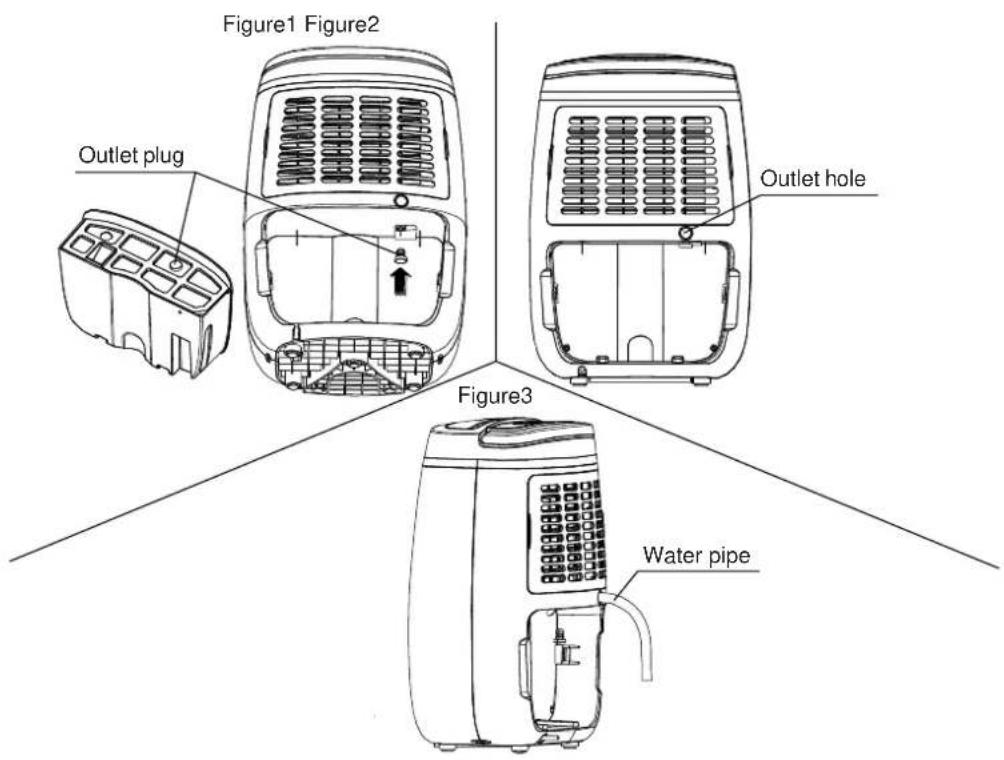
Put the tank back in once the hose has been fitted, British garden hose can be used to drain the water, no hose comes with either dehumidifier.
Meaco 20L Low Energy Dehumidifier
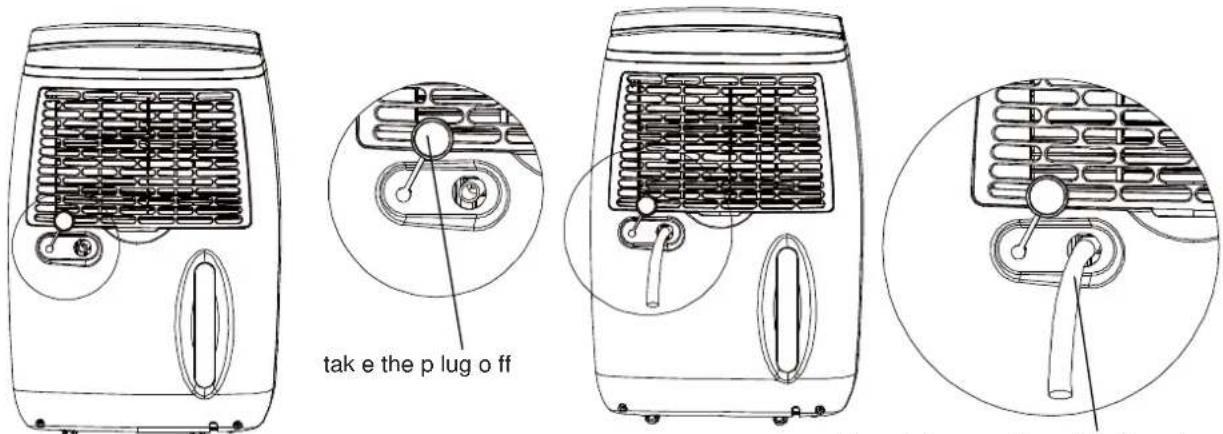
Figure1 Figure2
Plug draina ge pipe with 14mm in diameter in the hose connector
Always make sure that the hose is going downhill, is not blocked or kinked.
CLEANING
Switch the dehumidifier off and remove the plug from the socket before cleaning.
The exterior
Clean the exterior with a soft, dry cloth. If the device is extremely dirty, use a mild cleaning agent. Wipe the dehumidifier with a slightly damp cloth. Never spray the device with water.
The air filter
When used regularly, the filter may become clogged with dust and particles. Therefore the filter should be cleaned at least every two weeks. Follow these steps:
- Remove the filter.
- Clean the filter with a vacuum cleaner or soapy water no hotter than 40^ C. Rinse and dry completely before inserting back into the dehumidifier.
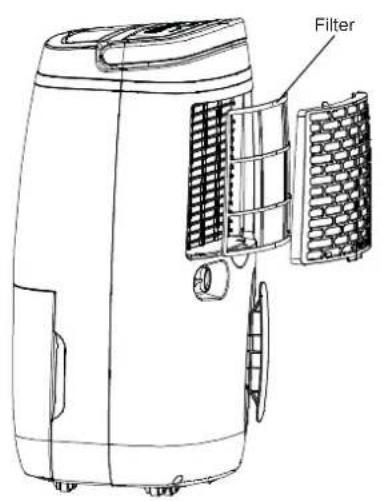
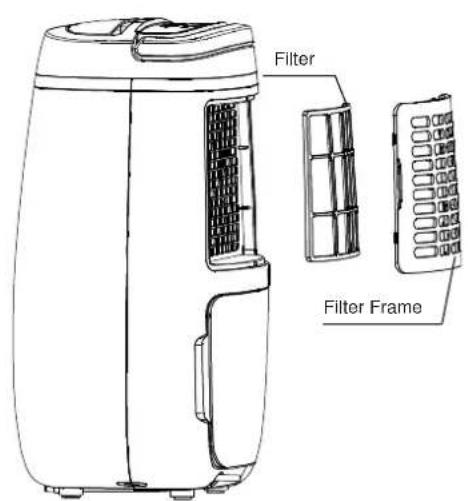
The standard dust filter can be replaced by a HEPA filter for better air cleaning and to remove more particles from the air. If you use a HEPA filter then leave the standard filter in place and it then becomes a pre-filter for extra air cleaning.
Never use the device without the air filter.
STORAGE
If the machine will not be used for a long period of time, take the following steps:
- Remove the plug from the socket and empty the container. Allow the container and the dehumidifier to dry completely, this can take a couple of days.
- Clean the air filter.
- Store the device in a dust-free location away from direct sunlight, preferably covered with a sheet of plastic.
TROUBLESHOOTING
Check the following before contacting technical support:
| Problem | Cause | Solution |
| The unit does not work. | The power is not connected. | Insert the plug into the wall outlet. |
| The device does not dehumidify. | The water container is full. | Remove the water from the container. |
| The water container has not been replaced correctly. | Place the water container in the correct position. | |
| The air filter is clogged. | Clean the air filter. | |
| The temperature or relative humidity in the room where the device is operating is too low. | It is normal that the device does not dehumidify in these conditions. | |
| The dehumidifier works, but reduces the relative humidity insufficiently/there is little water in the water tank. | The house is too large. This dehumidifier can dry up to about a three/five bedroom house (12/20L). | We recommend using a dehumidifier with a greater capacity. |
| There are too many sources of moisture. Bathing, washing, drying clothes and cooking all puts moisture into the air. Bottled gas heating can add too much moisture into the air for a dehumidifier. | We recommend using a dehumidifier with a greater capacity. Consider using a different heat source to a bottled gas heater. | |
| There is too much ventilation. | Reduce ventilation (e.g. close windows and shut doors.) | |
| The air filter is blocked and the reduce air flow is effecting performance. | Clean the air filter. | |
| The windows were clear and now condensation has returned. | The outside air temperature has dropped and the windows are colder. | Use the dehumidifier on a lower relative humidity setting and run it 24 hours a day. |
| I cannot remove the condensation from my windows, even in continuous mode. | The surface temperature of the windows is too low for a dehumidifier to prevent condensation. Common with single glazed windows and when the outside air temperature drops below freezing. | Keep running the dehumidifier on continuous 24 hours a day and when the air temperature outside increases the windows should clear of condensation. |
| Dehumidifier is blowing out warm air. | The dried air is passed over heating coils before it is blown into the room as part of the dehumidification process. | This is normal, a dehumidifier is not an air cooler. |
| Dehumidifier is blowing out cold air | The dehumidifier does not cool the air, the air might feel cooler because it is moving in the same way as the air from a fan in summer feels cooler. | The room temperature will not be reduced by the dehumidifier and it is not cooling the air. |
| The display is not showing the humidity set point. | The display shows the room relative humidity not the set point. | Press the up or down buttons once to see the target relative humidity. |
| I cannot change the set point, I get stuck on CO. | You have been pressing the up or down button and have reached CO. | Press the opposite button to cycle in the other direction through the humidity options. |
| I keep my finger on the buttons but the display does not change | The buttons only move one step at a time. | Press the button and then lift your finger and press the button again to move through the settings. |
| The dehumidifier is noisy. | The air filter is blocked or the unit is on an uneven surface. | Clean the filter and or put the dehumidifier on a flat surface. A dehumidifier will also be noisier on wooden floors than on carpet. |
| Display Error Codes | ||
| Displayed Code | E1 | E2 |
| Error | Coil temperature error | Humidity sensor broken |
| Display | Flashes every 30 seconds | Flashes every 30 seconds |
| What is happening | Unit stills dehumidifies but in defrost mode only. | Units still dehumidifies but in continuous mode only. |
If you get these or any other strange characters on the display then just call the office on 01483 234900 or your local dealer, some faults can be fixed over the phone.
To avoid issues please clean the filter at least every couple of weeks.
CONDITIONS OF WARRANTY
There is a two year warranty on your dehumidifier from the date of purchase. All material or manufacturing defects will be repaired free of charge.
The following applies:
- Any repairs or replacement of components during the warranty period will be not result in an extension of the warranty period.
- The warranty will expire if any alterations have been made, not genuine components have been fitted or if the dehumidifier has been repaired by a third party.
Components subject to normal wear and tear, such as the air filter, are not covered by the warranty.
● The warranty is only valid on presentation of the original, unaltered, and date-stamped purchase receipt. - The warranty does not cover damage caused by actions that deviate from those as described in the user's manual or by neglect.
- The warranty does not include cleaning of excessive dirt or damage to components caused by the unit being clogged.
● All claims for compensation, including consequential damage, will not be entertained.
To prevent unnecessary expenses, we recommend that you always carefully read the user's manual first. If this does not provide a solution, call Meaco and we will be happy to help.
This appliance is not intended for use by person (including children) with reduced physical, sensory or mental capabilities, or lack of experience and knowledge, unless they have been given supervision or instruction concerning use of the appliance by a person responsible for their safety.
Children should be supervised to ensure that they do not play with the appliance.
You can extend your warranty from the standard two years up to a maximum of five years at any time in the first year of ownership by visiting www.meaco.com.
| Meaco 12L Low Energy Dehumidifier | Meaco 20L Low Energy Dehumidifier | |
| Extraction Rate at 30°C and 80%rh | 12 litres per day | 20 litres per day |
| Extraction Rate at 26.7°C and 60%rh | 6.5 litres per day | 11.5 litres per day |
| Digital display | Yes | |
| Variable humidistat | Yes | |
| Meaco Control logic | Yes | |
| Louvre | Yes – manual | Yes – automatic |
| Air flow (nominal) | 100m3/hour | 160m3/hour |
| Auto-restart | Yes | |
| Filter | Yes (Optional HEPA filter) | |
| Noise level at one metre | Maximum 44dB(A) | Maximum (46dB(A) |
| Power supply | 230V, 50Hz | |
| Power consumption | 165W | 255W |
| Fan speeds | One | Two |
| Operating temperatures | 5......35°C | |
| Refrigerant | R134a | |
| Compressor type | Rotary | |
| Tank | 2.5 litres | 6 litres |
| Dimensions (HWD) | 485 x 325 x 248mm | 595 x 385 x 290mm |
| Weight | 9.8Kgs | 13.6Kgs |
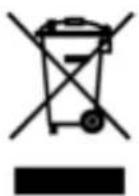
This marking indicates that this product should not be disposed with other household wastes throughout the EU. To prevent possible harm to the environment or human health from uncontrolled waste disposal, recycle it responsibly to promote the sustainable reuse of material resources. To return your used device, please use the return and collection systems or contact the retailer where the product was purchased. They can take this product for environmental safe recycling.
CUSTOMER SERVICE
This dehumidifier has been imported into the U.K. by;
Meaco (U.K.) Limited
Meaco House
Parklands
Railton Road
Guildford
GU2 9JX
Telephone: 01483 234900/0500 418458
Email: sales@meaco.com
Website: www.meaco.com
Fax: 01483 232700
Please record, for future reference, your date of purchase and where you bought the dehumidifier from here.
Date of purchase....
Purchased from www.meaco.com (if not then please record the supplier's name below).
Meaco are specialists in dehumidifiers and would welcome your comments and questions on this dehumidifier. If you do develop a fault within the first year then please do call us and if we cannot fix the problem over the phone we will be happy to collect the dehumidifier from you at our expense and repair or replace as appropriate.
Please save the box just in case this happens.
- Meaco Platinum Range Instruction Manual
- Meaco 12L Low Energy Dehumidifier
- Parts List
- Meaco 20L Low Energy Dehumidifier
- PLEASE READ ALL INSTRUCTIONS CAREFULLY BEFORE OPERATING AND KEEP IN A SAFE PLACE FOR FUTURE REFERENCE.
- BS PLUG WIRING FOR UK MODELS
- How to use your dehumidifier
- Other functions of the control panel
- Meaco Control Logic
- Drying Laundry
- To avoid issues please clean the filter at least every couple of weeks.
- Getting the best from your dehumidifier
- Amount of water collected
- ATTENTION!
- CLEANING
- The exterior
- The air filter
- STORAGE
- TROUBLESHOOTING
- CONDITIONS OF WARRANTY
- The following applies:
- CUSTOMER SERVICE
Brand : Meaco
Model : Platinum Range
Category : Humidifier