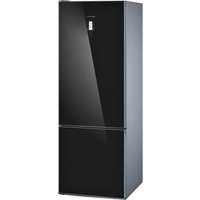
Profilo BD3057W3SN - Refrigerator

BD3057W3SN - Refrigerator Profilo - Free user manual and instructions

Find the device manual for free BD3057W3SN Profilo in PDF.

📄 16 pages English EN Download 💬 AI Question 10 questions ⚙️ Specs
Notice Profilo BD3057W3SN - page 1
Pick your language and provide your email: we'll send you a specifically translated version.
Product Type Refrigerator
Brand Profilo
Model BD3057W3SN
Energy Class A+
Total Gross Capacity 300 L
Refrigerator Capacity 280 L
Freezer Capacity None (fridge only)
Climate Class N-ST
Noise Level 40 dB
Power Supply 230 V / 50 Hz
Power Consumption 0.8 kWh/24h
Dimensions (H x W x D) 1700 x 600 x 650 mm
Weight 62 kg
Number of Shelves 4 glass shelves
Number of Door Bins 3
Number of Crisper Drawers 2
Temperature Control Dial thermostat
Defrost Type Manual
Refrigerant R600a
Door Hinge Reversible
Interior Light LED
Warranty 2 years
Spare Parts Availability 10 years
Certification CE, RoHS

Frequently Asked Questions - BD3057W3SN Profilo

How do I set the temperature on my Profilo BD3057W3SN fridge?
Use the thermostat dial inside the fridge compartment. Turn it to a higher number for colder temperature and lower number for warmer. Usually, setting 3-4 is recommended for normal use.
How often should I defrost the fridge?
This model requires manual defrosting. Defrost when ice build-up exceeds 5 mm (about every 6 months or when needed). Unplug the fridge, remove food, and let ice melt naturally.
How do I clean the fridge?
Clean the interior with a soft cloth and mild detergent in warm water. Avoid abrasive cleaners. Clean door seals regularly. Wipe dry before plugging back.
Can I reverse the door opening direction?
Yes, the door is reversible. Refer to the user manual for step-by-step instructions. You will need a screwdriver and possibly assistance to handle the door.
Why is my fridge making noise?
Some noise is normal: compressor hum, refrigerant flow, or defrost timer. If loud or unusual, check that it is level, not touching walls, and that interior items are stable.
How do I level the fridge?
Adjust the front feet by turning them clockwise to raise or counterclockwise to lower. Place a spirit level on top to ensure it is level side-to-side and front-to-back.
What should I do if the interior light doesn't work?
First check if the fridge is powered. If the light is out, it may be a burned-out LED bulb. Contact a qualified technician for replacement, as LED bulbs may need professional service.
How much food can I store in this fridge?
The fridge has a gross capacity of 300 L and usable capacity of about 280 L. It can accommodate several shelves of food, with two crisper drawers for fruits and vegetables.
Is there a freezer compartment in this model?
No, the Profilo BD3057W3SN is a fridge only (no freezer). It is designed for refrigeration only. For freezing, consider a separate freezer.
Where can I find spare parts or service?
Spare parts are available through authorized service centers for up to 10 years after purchase. Contact Profilo customer support or visit their website for the nearest service provider.

User questions about BD3057W3SN Profilo

0 question about this device. Answer the ones you know or ask your own.

Ask a new question about this device

The email remains private: it is only used to notify you if someone responds to your question.

No questions yet. Be the first to ask one.

Download the instructions for your Refrigerator in PDF format for free! Find your manual BD3057W3SN - Profilo and take your electronic device back in hand. On this page are published all the documents necessary for the use of your device. BD3057W3SN by Profilo.

USER MANUAL BD3057W3SN Profilo

Installationinstructionsen

Montajtalimatlaritr

Сборкаги

Installing the appliance 5

Installation location 5

Distance from wall 5

Installation in cavity 6

Changingoverthedoorhinges ..... 6

Aligning the appliance 6

Transport7......

tr İçindekiler

Transport7......

Cihazın kurulması 7

Gerätaufstellen

Illustration showing a hand holding a folded document with a curved arrow pointing to a grid layout, alongside an open book with text pages.

Transporting

Caution!

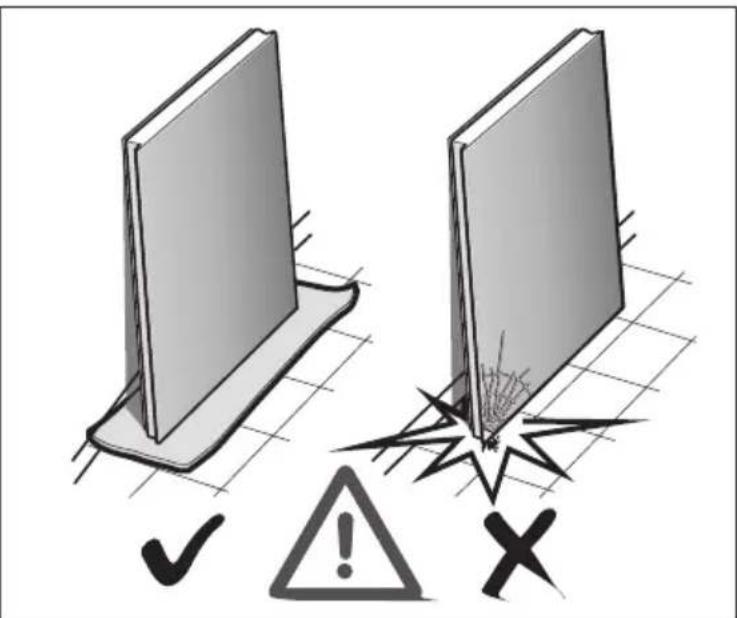
Whentransportingandinstallingthe appliance,handletheappliancedoors carefully.Theglassfrontmayshatter!

The appliance can be pushed. Therefore the height-adjustable feet at the front of the appliance must be completely threaded.

Diagram illustrating a mechanical or electrical component with numbered parts and directional arrows indicating movement or force.

Installingtheappliance

Illustration showing a hand holding a folded document with a curved arrow indicating direction or transformation.

Pleasefoldouttheillustratedlastpage. Theseinstallationinstructionsreferto severalmodels.

Thediagramsmaydiffer.

Installationlocation

Theapplianceshouldbeinstalledinadry, wellventilatedroom. Theinstallation locations should neither be exposed to directs sunlight nor near a heat source, e.g. a cooker, radiator, etc. If installation next to a heat source is unavoidable, use as suitable insulating plate or observe the following minimum distance to a heat source:

3cmtoelectricorgascookers. 30cmtoanoilorsolid-fuelcooker.

Distancefromwall

Ifappliancesfeatureaglassfront, the hingesidemustbeatleast40 mm fromthewalltoensurethatthedoors can beopenedby90°.
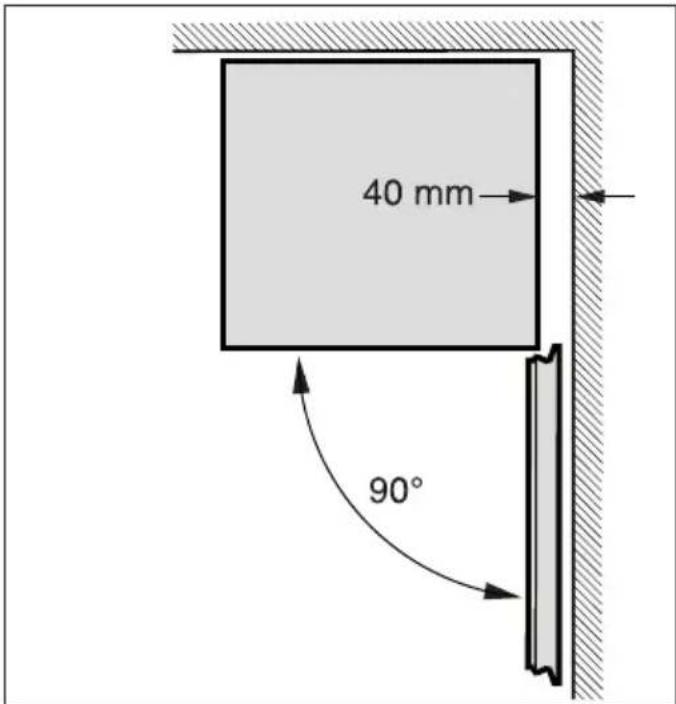
40 mm 90°

Installationincavity

Theappliancemustproject15 mm beyondthefurnitureoneithersideto ensurethatthedoorscanbeopenedby 125°.

95 mm 125°

Changingoverthedoor hinges

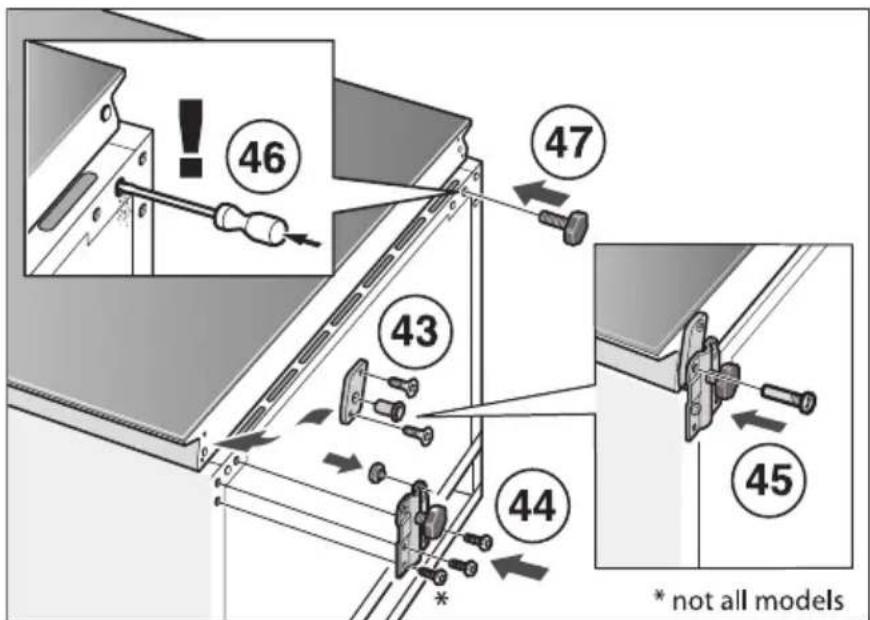
Werecommendthatyouhavethedoor hingeschangedoverbyourcustomer service.Youcanfindoutthecostsfor changingoverthedoorhingesfromyour appropriatecustomerservice.

⚠ Warning!

While changing over the door hinges, ensure that the appliance is not connected to the powers supply. Pull out them ains plug beforehand. Tilt back the appliance if required, place packaging material, etc. underneath.

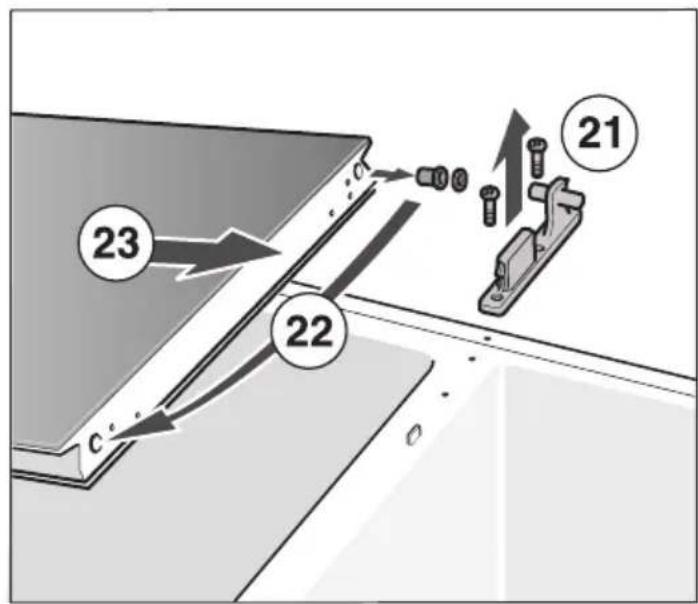
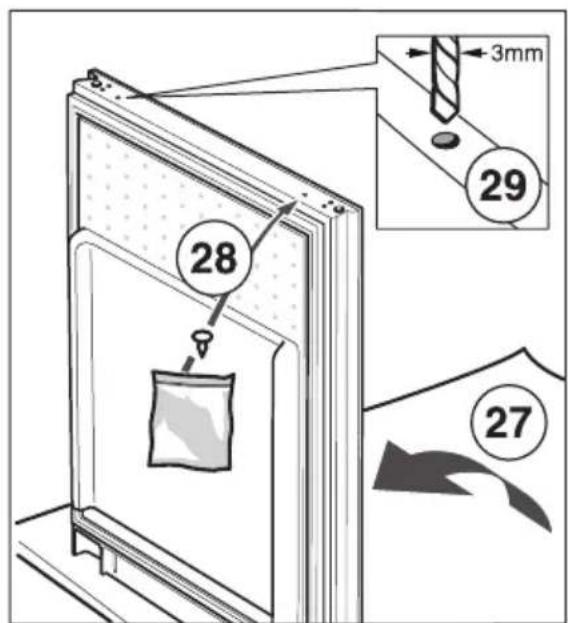
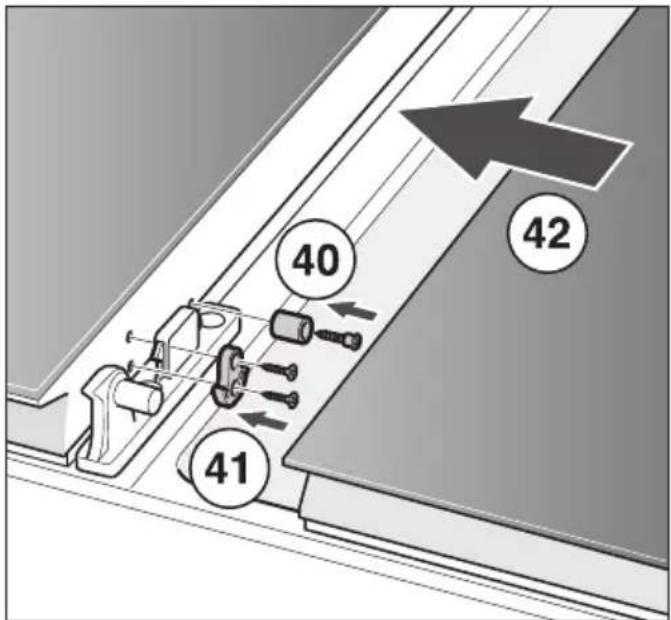
Installationinnumericalsequence.Fig. 1

*Notallmodels.

Aligningtheappliance

Theappliancemustbelevel.Iftheflooris uneven,usethefrontheight-adjustable feet.
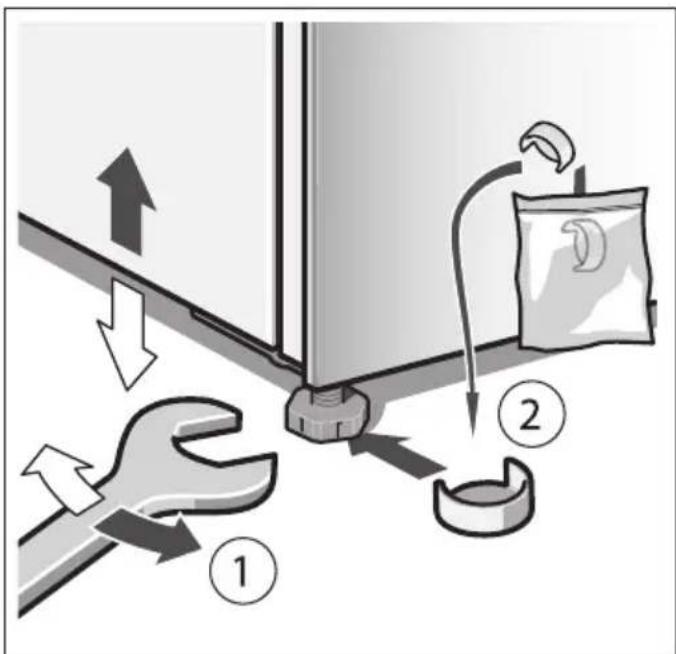
Diagram illustrating a mechanical or electrical process with labeled components and directional arrows indicating flow or movement.

Transport

⚠️Dikkat

Cihazınkurulması

Illustration showing a hand interacting with a document and a grid, with an arrow indicating transformation or mapping.

Транспортировка

⚠️ Осторожно

Diagram showing the internal structure and assembly of a refrigerator with numbered components, including door opening and door placement.

min 40mm 6

11 10 9 7 8 * not all models

Diagram showing a refrigerator with two doors, one open and one closed, connected to an explosion warning symbol.

Safety warning illustration showing two panels with checkmark and warning symbols, one indicating failure or hazard.

Diagram illustrating a mechanical or optical setup with numbered components and a 3mm dimension label, likely from an engineering or physics context.

Technical diagram showing two steps of a tool installation, labeled 18 and 20, with numbered components and directional arrows.

23 22 c 21

24

3mm 25 26

28 29 27

30 31 32 33 34

36 35

37 39 38

40 41 42

46 47 43 45 44 * not all models

Profilo BD3057W3SN - ⚠️ Осторожно - 17

natural_image Illustration of a refrigerator with a curved arrow indicating motion or change (no text or symbols)
52 51 49 53 50

Manual assistant
Powered by Anthropic
Waiting for your message
Product information

Brand : Profilo

Model : BD3057W3SN

Category : Refrigerator