
RAM1-401 - Speaker Stand GENELEC - Free user manual and instructions
Find the device manual for free RAM1-401 GENELEC in PDF.


| Product Type | Speaker Stand |
| Brand | Genelec |
| Model | RAM1-401 |
| Height | 120 - 150 cm (adjustable) |
| Weight Capacity | Up to 15 kg per stand |
| Material | Steel with anti-vibration coating |
| Stand Weight | Approx. 4.5 kg |
| Base Dimensions | 300 x 300 mm |
| Top Plate Dimensions | 200 x 200 mm |
| Cable Management | Integrated cable routing channel |
| Rubber Feet | Yes, non-slip pads |
| Color | Black |
| Assembly Required | Yes, simple tool-free assembly |
| Warranty | 5 years |
| Compatibility | Genelec 8010, 8020, 8030 and similar monitors |
| Height Adjustment | Continuous via locking collar |
| Spike Feet | Optional floor spikes included |
| Cleaning | Wipe with damp cloth, avoid solvents |
| Safety | Sturdy base prevents tipping; ensure screws are tight |
| Spare Parts | Rubber feet and top plate available separately |
Frequently Asked Questions - RAM1-401 GENELEC
User questions about RAM1-401 GENELEC
0 question about this device. Answer the ones you know or ask your own.
Ask a new question about this device
Download the instructions for your Speaker Stand in PDF format for free! Find your manual RAM1-401 - GENELEC and take your electronic device back in hand. On this page are published all the documents necessary for the use of your device. RAM1-401 by GENELEC.
USER MANUAL RAM1-401 GENELEC
Rack Mount Kit (RAM1-401)
Assembly Manual
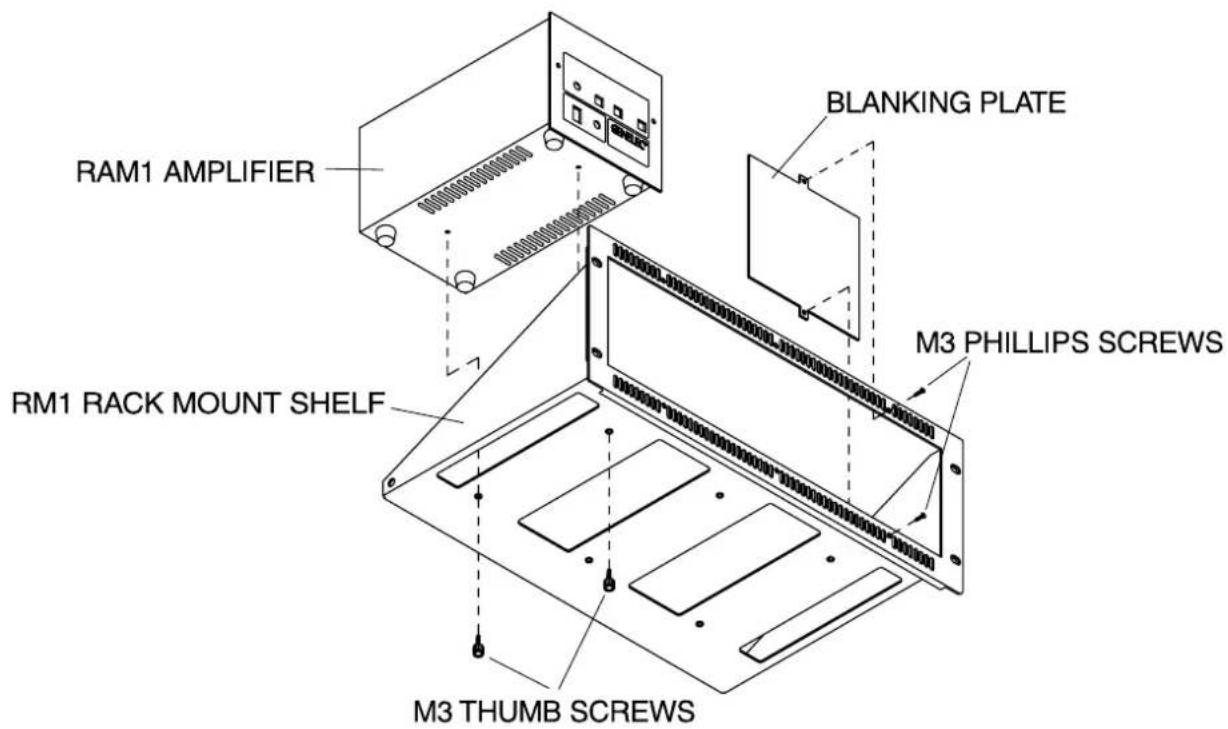
Genelec RM1 rack mount kit is custom-designed for Genelec RAM1 remote amplifier modules. The ventilation holes on the shelf plate and front panel of the RM1 match the location of the heatsinks on the RAM1 amplifier for maximum vertical air circulation and cooling effect. Because of this, three RAM1 amplifiers can be installed tightly together on a RM1 rack mount. If the ventilation holes on the RM1 rack mount and the RAM1 amplifiers are kept uncluttered for a good flow of cooling air, there is no need for any additional space above or below the rack mount, whereas the normal space requirements of a RAM1 amplifier (150 mm / 5 ^7 / _8 " of free space above, 100 mm / 4" behind, 50 mm / 2" on both sides) apply if the RM1 rack mount is not used.
Attach the RAM1 amplifier to the RM1 rack mount with two M3 thumb screws provided with the rack mount kit. The screws go through the holes on the RM1's shelf plate (see figure above). Each RM1 can take three RAM1 units. Two blanking plates are provided to cover empty spaces in the rack if only one or two RAM1's are installed.
GENELEC®
Genelec Oy
Olivitie 5, FIN - 74100 IISALMI, FINLAND
Phone: +358 - 17 - 83881
Fax: +358 - 17 - 812 267
E-mail: genelec@genelec.com
Web: www.genelec.com
Genelec Inc
7 Tech Circle, Natick, MA 01760, USA
All data subject to change without prior notice.
Brand : GENELEC
Model : RAM1-401
Category : Speaker Stand