Dahle 96010 - Mobile whiteboard

96010 - Mobile whiteboard Dahle - Free user manual and instructions

Find the device manual for free 96010 Dahle in PDF.

📄 16 pages English EN Download 💬 AI Question 10 questions ⚙️ Specs
Notice Dahle 96010 - page 1
Pick your language and provide your email: we'll send you a specifically translated version.
Product Type Paper Cutter (Guillotine)
Brand Dahle
Model 96010
Cutting Length 360 mm (14 inches)
Cutting Capacity Up to 10 sheets (80 gsm)
Base Dimensions 500 x 300 mm
Weight 4.5 kg
Blade Material Solingen Steel
Base Material Plastic with non-slip feet
Safety Features Automatic blade lock, safety guard, blade enclosed
Cutting Grid Printed grid with inch and centimeter scales
Paper Clamp Adjustable paper clamp for precise cutting
Maintenance Regular blade cleaning and occasional replacement
Replacement Blade Available as spare part (Dahle 960 series)
Cutting Edge Self-sharpening blade for long life
Warranty 5 years on blade, 1 year on mechanism

Frequently Asked Questions - 96010 Dahle

How do I replace the blade on my Dahle 96010?
To replace the blade, first unplug the device (if electric) or ensure safety lock is engaged. Remove the blade guard, loosen the screws holding the blade, and carefully remove it. Install the new blade with the bevel facing down, tighten screws, and reattach the guard. Always use replacement blades from Dahle 960 series.
What is the maximum paper thickness the Dahle 96010 can cut?
The Dahle 96010 can cut up to 10 sheets of standard 80 gsm paper. For thicker materials like cardstock, reduce the stack to 2-3 sheets to ensure clean cuts and avoid blade damage.
How do I clean the cutting blade?
Clean the blade regularly with a soft cloth dampened with a mild solvent or alcohol. Wipe along the cutting edge away from you. Avoid using abrasive cleaners. For stubborn residue, use a blade cleaning stick.
Is the Dahle 96010 suitable for left-handed users?
Yes, the Dahle 96010 is ambidextrous. The cutting arm can be operated from either side, and the scale is printed on both sides of the base.
How do I align paper for a straight cut?
Place the paper against the backstop and use the printed grid lines to align it. Tighten the paper clamp to hold it in place, then bring the blade down firmly in one smooth motion for a straight cut.
Can I cut photos or glossy paper with the Dahle 96010?
Yes, you can cut photos and glossy paper, but ensure the stack is thin (2-3 sheets) to prevent smudging or tearing. Use the paper clamp to hold the material securely.
What safety features does the Dahle 96010 have?
The Dahle 96010 includes a safety guard that covers the blade when not in use, an automatic blade lock that prevents accidental cutting, and a sturdy base with non-slip feet to prevent movement.
How do I sharpen the blade if it becomes dull?
The Dahle 96010 blade is self-sharpening due to a special hardened steel. If it becomes dull after extended use, it is recommended to replace the blade rather than attempt sharpening.
What are the dimensions of the cutting area?
The cutting area is 360 mm in length and can accommodate paper up to A3 size (297 mm width) or 14 inches. The base has a grid with both inch and centimeter markings.
Where can I find replacement blades for the Dahle 96010?
Replacement blades are available from Dahle authorized dealers or online retailers. Look for parts compatible with the Dahle 960 series. Ensure you purchase the correct blade model as specified in the manual.

User questions about 96010 Dahle

0 question about this device. Answer the ones you know or ask your own.

Ask a new question about this device

The email remains private: it is only used to notify you if someone responds to your question.

No questions yet. Be the first to ask one.

Download the instructions for your Mobile whiteboard in PDF format for free! Find your manual 96010 - Dahle and take your electronic device back in hand. On this page are published all the documents necessary for the use of your device. 96010 by Dahle.

USER MANUAL 96010 Dahle

natural_image Line drawing of three whiteboard easels with different stand designs, arranged in a row (no text or symbols)

DE Montageanleitung
UK/US Assembly instructions
FR Instructions de montage
ES Instrucciones de montaje
IT Istruzioni di montaggio
PT Instruções de montagem
NL Montage Handleiding
DK Monteringsvejledning
FI Kokoamisohje
NO Monteringsveiledning
SE Monteringsinstruktioner
SI Navodila za montažo
HR Szerelési útmutató
HU Szerelési útmutató

RU Инструкция по сборке
EE Paigaldusjuhend
LT Surinkimo instrukcija
LV Montāžas pamācība
CZ Montážní návod
SK Návod na montáž
PL Instrukcja montażu
RO Instructiuni de asamblare
BG Упътване за монтаж
TR Kurulum talmatlari
GR Οδηγίες Συναρμολό γησης
AE تعليمات التركيب
JP 組立方法について
CN 安装指南

Dahle 96010 - 1

FR Attention / Prudence

UK/US Do not expose to the wet

UK/US Place in a stable position

natural_image Diagram of a four-pole mechanical device with wheels and a control knob, no text or symbols present

2.3.2.4.

Diagram illustrating a mechanical or electrical hazard, showing a spring being cut with scissors and warning symbols.

  1. Dahle 96010 - 4

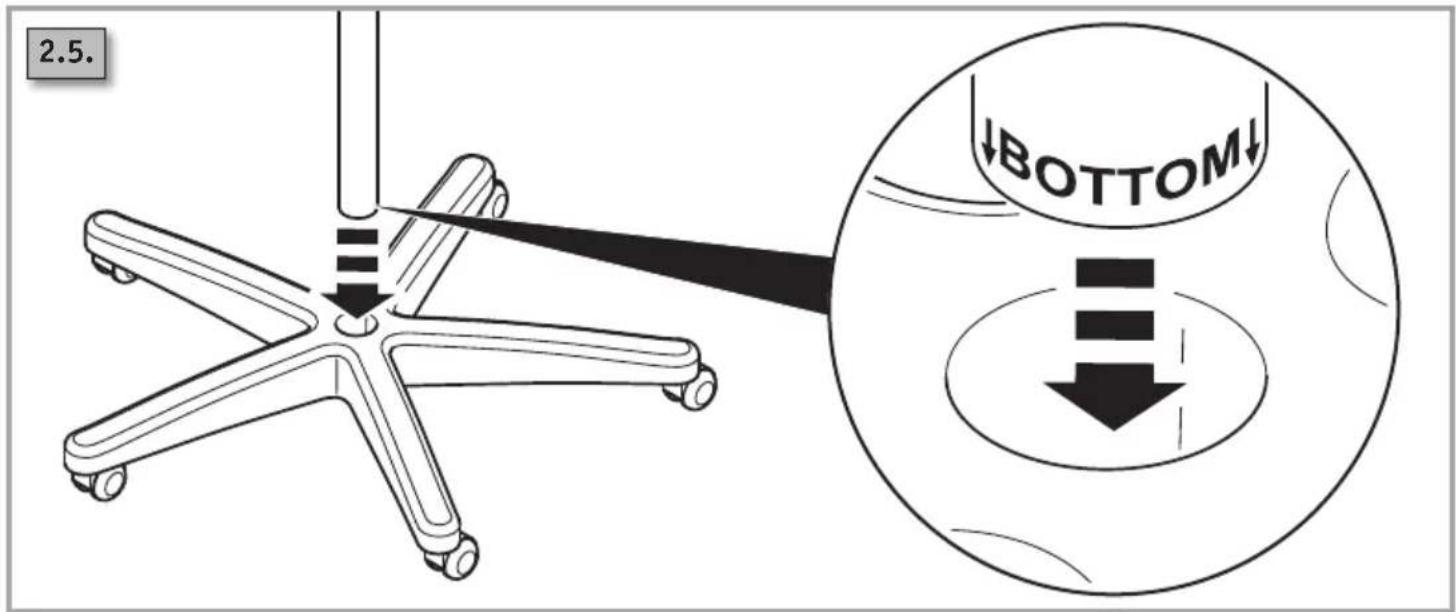
2.5. BOTTOM↓

Dahle 96010 - 6

natural_image Technical illustration of a mechanical assembly with two views: one showing a bracket and pin assembly, the other showing a flat plate with arrows indicating motion (no text or symbols)
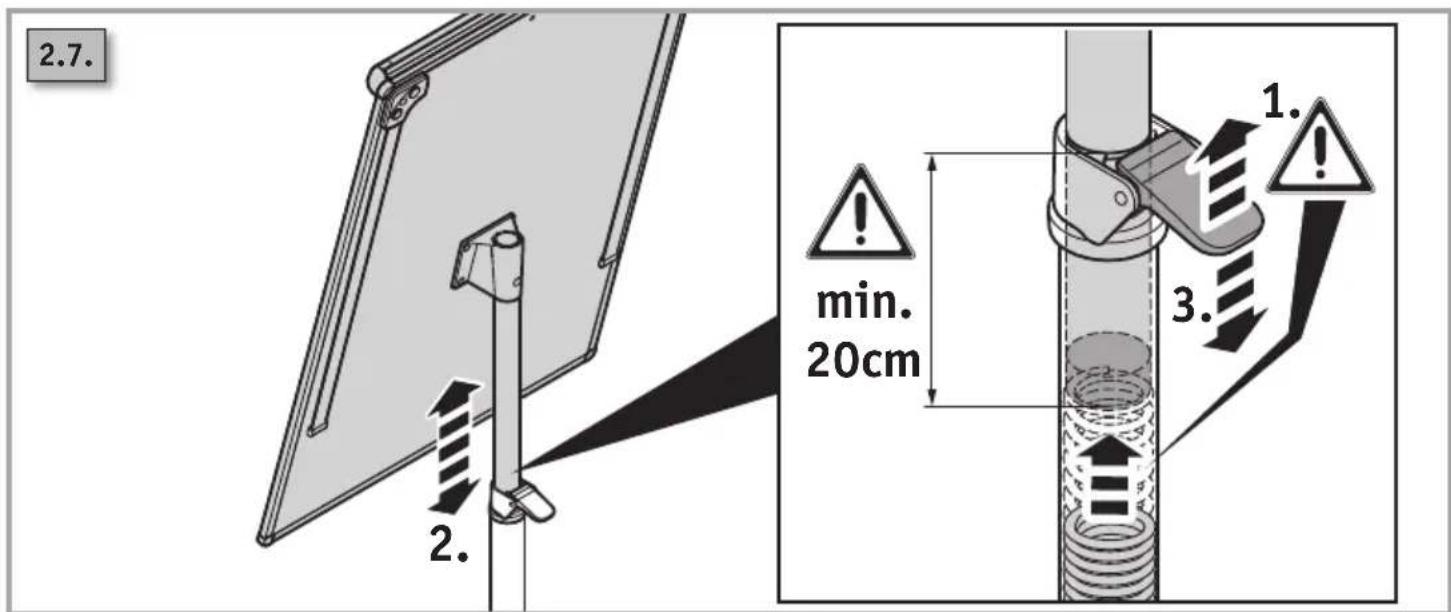
2.7. 2. min. 20cm 1. 3.

DE

When assembling or disassembling the flip chart, please note:

  1. Slowly pull out the board with the screwed-on part of the upright stand pipe.
  2. Only then unscrew the upper part of the stand pipe from the board. If done the other way round, you may get seriously injured by the spring jumping out!

FR

2.1.

Dahle 96010 - FR - 2

natural_image Line drawing of a rectangular frame with a roller support and corner brackets (no text or symbols)
96003 96005 96010 MUTTERMECH Assembly instructions Instructions to manage Performance to manage Industrial management Indicators to manage Manage Handibility Marketing/Marketing Marketing/Marketing Marketing/Marketing Marketing/Marketing Formwork/Formwork Formwork/Formwork Formwork/Formwork Formwork/Formwork Formwork/Formwork Formwork/Formwork Formwork/Formwork Formwork/Formwork Formwork/Formwork Formwork/Formwork Formwork/Formwork Formwork/Formwork Formwork/Formwork Formwork/Formwork Formwork/Formwork Formwork/Formwork Formwork/Formwork Formwork/ Formwork/Formwork Formwork/Formwork Formwork/Formwork Formwork/Formwork Formwork/Formwork Formwork/Formwork Formwork/Formwork Formwork/Formwork Formwork/Formwork Formwork/Formwork Formwork/Formwork Formwork/Formwork Formwork/Formwork Formwork/Formwork Formwork/Formwork Formwork/Formwork Formwork/Modelling Formwork/Modelling Formwork/Modelling Formwork/Modelling Formwork/Modelling Formwork/Modelling Formwork/Modelling Formwork/Modelling Formwork/Modelling Formwork/Modelling Formwork/Modelling Formwork/Modelling Formwork/Modelling Formwork/Modelling Formwork/Modelling Formwork/Modelling Formwork/Modelling Formwork/Materials Formwork/Materials Formwork/Materials Formwork/Materials Formwork/Materials Formwork/Materials Formwork/Materials Formwork/Materials Formwork/Materials Formwork/Materials Formwork/Materials Formwork/Materials Formwork/Materials Formwork/Materials Formwork/Materials Formwork/Materials Formwork/Materials Formwork/Sales Formwork/Sales Formwork/Sales Formwork/Sales Formwork/Sales Formwork/Sales Formwork/Sales Formwork/Sales Formwork/Sales Formwork/Sales Formwork/Sales Formwork/Sales Formwork/Sales Formwork/Sales Formwork/Sales

Dahle 96010 - FR - 4

Dahle 96010 - FR - 5

natural_image Two whiteboard-shaped white presentation stands, one plain and one plain with metal legs (no text or symbols visible)

Dahle 96010 - FR - 6

Dahle 96010 - FR - 7

2.1.
Dahle 96010 - FR - 8

Dahle 96010 - FR - 9

Dahle 96010 - FR - 10

Dahle 96010 - FR - 11

49808 Lingen | Germany

Service contact:

96472 Rödental | Germany

Tel.: +49 9563 75299-0

Fax: +49 9563 75299-333

Table of contents Click a title to access it
Manual assistant
Powered by Anthropic
Waiting for your message
Product information

Brand : Dahle

Model : 96010

Category : Mobile whiteboard