
TU-CT20 - Audio tuner PANASONIC - Free user manual and instructions
Find the device manual for free TU-CT20 PANASONIC in PDF.


User questions about TU-CT20 PANASONIC
0 question about this device. Answer the ones you know or ask your own.
Ask a new question about this device
Download the instructions for your Audio tuner in PDF format for free! Find your manual TU-CT20 - PANASONIC and take your electronic device back in hand. On this page are published all the documents necessary for the use of your device. TU-CT20 by PANASONIC.
USER MANUAL TU-CT20 PANASONIC
natural_image
Exterior view of a Panasonic DVD-ROM device (no text or symbols on body)TQB8E3730-2
Contents
ACCESSORIES 1
WARNINGS AND PRECAUTIONS 2
REMOTE CONTROL 3
QUICK START GUIDE 4
SETUP 6
TV GUIDE 8
SPECIFICATIONS 9
GUARANTEE 10
Accessories
Operating Instruction Book TQB8E3730
Batteries x 2 UM-3DJ-2P
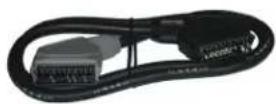
SCART cable
PAN-5143-02
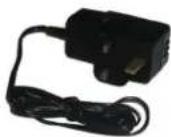
Power Adapter
STM51V1.5A
Remote control
EUR648500
Welcome
We hope you have many years of enjoyment from your new Panasonic Digital converter box.
The simple, easy to follow instructions will enable you to quickly set up and install the equipment and begin your enjoyment of the available services.
The availability of Digital services in your area is dependent on the transmissions received by your aerial and the configuration of your existing equipment.
Warnings and precautions
- This Digital converter box (DCB) is intended for the reception of Digital TV picture and sound signals.
If the Digital converter box (DCB) is exposed to drastic temperature changes, e.g. taking it from a cold room to a warm room, connect it to the mains supply and let it stand for at least two hours.
Do not expose the Digital converter box (DCB) to any moisture. The Digital converter box (DCB) is designed for use indoors and should be protected against moisture (splashes of water etc.).
Do not expose the Digital converter box (DCB) to dripping or splashing water and objects filled with liquid, such as vases, must not be placed on top of or above the unit.
Adequate ventilation is essential to prevent failure of electrical components, we recommend that a gap of at least 5cm is left all around this Digital converter box (DCB) even when it is placed inside a cabinet or between shelves.
◆ Ensure that the ventilation holes beneath the unit are not blocked.
Do not place the receiver in the immediate vicinity of a heat source or in direct sunlight as this would prevent appropriate cooling.
To prevent fire, never place any type of candle or naked flame on top of or near the Digital converter box (DCB).
♦ Caring for your Digital converter box (DCB) Remove the mains plug from the wall socket. The cabinet can be cleaned with a dry clean cloth. Do not use solutions containing benzol or petroleum.
Make sure that all the electrical connections are properly made. Do not connect any of your equipment (TV, video recorder, etc.) to the mains supply until you have properly connected all the other leads. Disconnect your Digital converter box (DCB) from the mains supply before you disconnect any other equipment from its rear panel.
Remote control
Standby On/Off Switches Digital converter box On or Off standby
Setup button
Press to access the Setup menu
Text button
Switches to text mode
Guide
Press to access Guide
Exit
Used to exit from menu/Guide
TV Standby
Switches Panasonic TV On or Off standby
Mute
Turns the sound on/off (Panasonic TV's only)
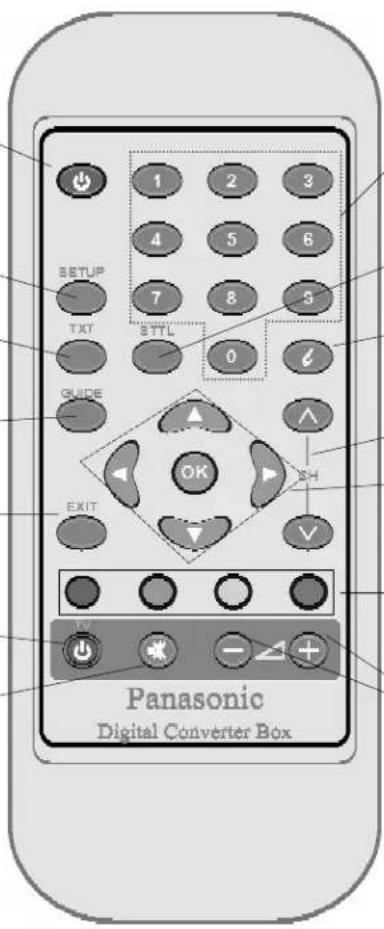
Programme/channel change buttons.
STTL Button (Subtitle)
Press the STTL button to turn subtitles on /off.
Information
Shows information about current programme
Channel up/down
Cursor keys
Used for navigation in picture, menus and digital text
Coloured buttons
Used for specific actions in menus and digital text mode
Volume up/down
(Panasonic TV's only)
Quick set-up guide
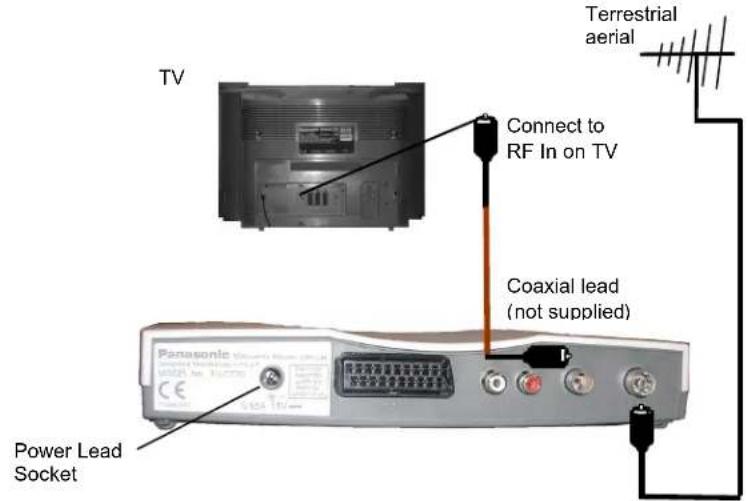
- Connection of DCB using an RF cable only
Always disconnect your DCB from the mains supply before you connect it to (or disconnect it from) any other equipment.
- Connection of DCB and VCR using Scart and RF cables
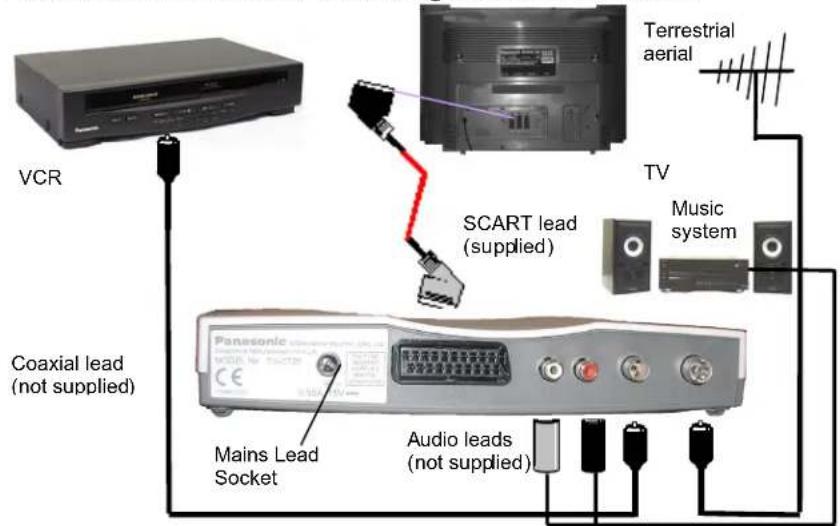
Note: When connecting SCART cable please ensure you follow indications on cable. Light grey end connected to DCB and black end connected to TV/VCR.
Quick set-up guide
- Connect your Digital Converter box (DCB), as shown on previous page and switch on.
- Auto Setup will begin, your stations will be located, sorted into order and stored ready for use.
Note: During Auto Setup the LED will flash. When the LED has stopped flashing, if you have connected the DCB to TV with an RF cable, you will have to tune in TV channel to view signal from DCB.
- The software will automatically allocate an available channel position for RF output. Should there be any interference you can change the RF output channel using number buttons or you can switch off RF output by inputting 00.
- Using Up/Down keys move to AV out and if required change between RGB and Video using Left/Right keys.
- Move down again to specify TV screen size i.e. 4:3 or 16:9.
- Select Continue to Owner ID for the option of entering a security code and personal details into memory. In the event of theft of the DCB this could help Police to trace the owner.
- Using up/down arrows to select the character position and left/right arrows to scroll through letters and numbers, input your name, house number and postcode.
- To store any input information press OK.
- To exit without saving press EXIT.
You are now ready to begin viewing programmes
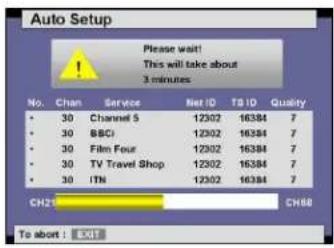
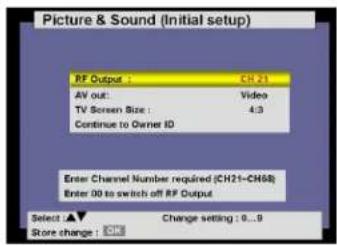
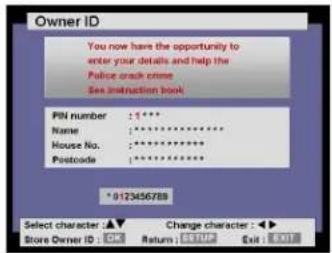
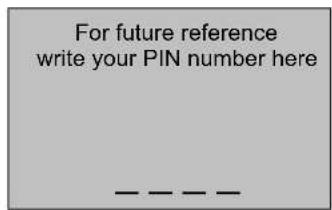
Note: For ease of use all key operations are indicated at the bottom of the screen.
SETUP
Press SETUP button to access Setup menu
Preferred Subtitle
Using OK button access menu. Select your preferred subtitle language using up/down keys. To store your selection press OK.
To return to Setup press Setup button
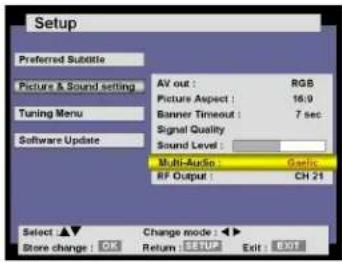
Picture and Sound setting
Using OK button to access menu.
AV Out
Allows selection between RGB and video. To store your selection press OK.
Picture Aspect
Allows selection of picture format between 4:3 and 16:9. To store your selection press OK.
Banner Timeout
Increase or decrease length of time banner is displayed on screen (0-10 secs). To store your selection press OK.
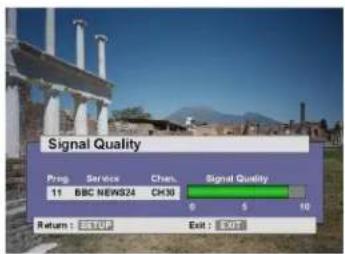
Signal Quality
To access and confirm signal quality press OK. To return to Setup press Setup button.
Sound Level
Increase or decrease DCB volume.
Multi Audio
Multi audio will allow you to select an alternative sound track. The number of options available depends on each broadcast. To store your selection press OK. Note: When you change channel you will need to reset your Multi-Audio preference.
RF Output
The software will automatically allocate an available channel position for RF output. Should there be any interference you can change the RF output channel using number buttons or you can switch off RF output by inputting 00. To return to Setup press Setup button.
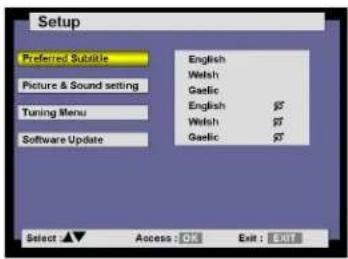
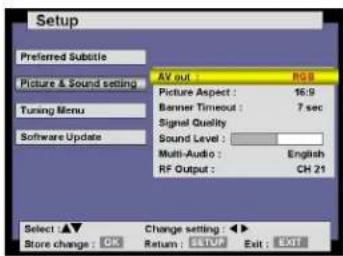
SETUP
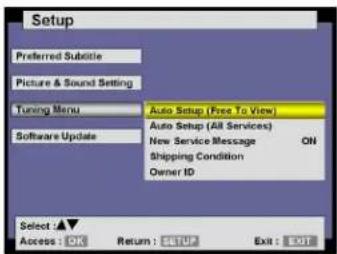
Tuning Menu
Using OK button to access menu.
Auto Setup (Free To View)
Press OK to access menu. Press OK again to confirm. The DCB will now search for all available free to view channels, sort them and store them ready for use.
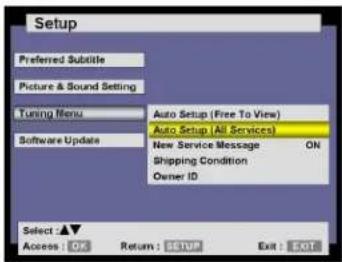
Auto Setup (All Services)
Press OK to access menu. Press OK again to confirm. The DCB will now search for all available channels, sort them and store them ready for use. You may find that you will locate some stations which from time to time will preview future programming.
Note: If Autosetup is run you may have to tune your TV receiver for RF output.
New Service Message
Should a new service become available you will be notified via an on-screen display. To add this new service simply access Auto Setup (All Services) and update your programme list.
Press left/right buttons to change this function from on to off.
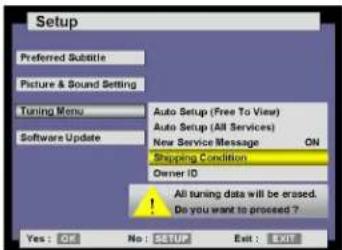
Shipping Condition
Allows you to clear all tuning information and reset back to factory settings. The DCB will then perform Auto-Setup after reset.
Note: Owner ID will not be reset.
Owner ID
Allows you to enter a security code and address information.
To return to Setup press Setup button
Software Update Menu
Use OK button to access menu.
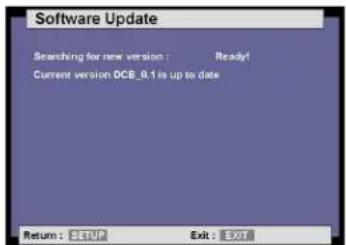
Software Update
From time to time new versions of software will become available. To confirm whether you have the latest version press OK. The DCB will confirm version of software and if available download latest version. This can take up to 15 minutes.
Note: The unit will automatically detect new software versions and an on screen indication will appear.
To exit from SETUP press the EXIT button.
TV Guide
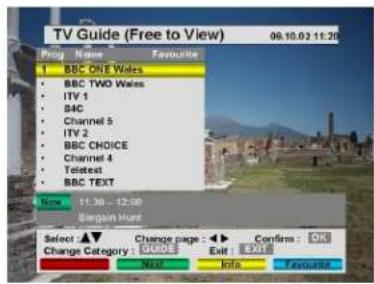
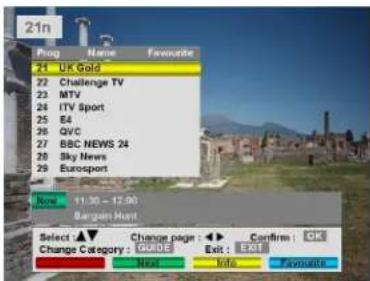
Press GUIDE button to access TV Guide. The TV Guide is a helpful and easy to use on-screen feature.
-
To quickly scroll through all available channels press the up/down buttons.
-
To change page use the left/right buttons.
Press the Blue button (Favourite) to add your most frequently watched programme positions and display them as a list in the TV Guide. To delete a selection from your Favourite list, select the programme and press the blue button, the tick will disappear and the selection will be removed from the list.
Note: Pressing the Blue button with the banner displayed will step you through the favourites list.
It is possible to scroll through three separate lists. To scroll between All Category, Free To View and Favourites, press the GUIDE button repeatedly. To view the currently selected programme press the OK button.
Should you wish to see what programme is coming next, press the Green button and scroll between Now and Next.
Pressing the Yellow button will give you a brief synopsis of the current programme. Pressing the Green button whilst in this mode will scroll between Now and Next.
i Button (Information button)
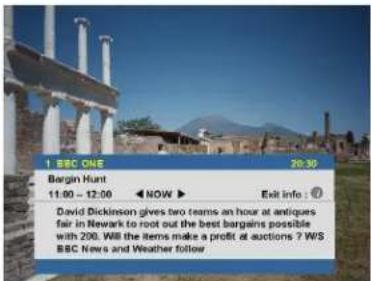
Press the i button to display the banner.
Press the i button twice to display more information on the current programme position.
Note: Pressing the left/right buttons in this mode will toggle between Now and Next.
TXT Button
Press the Text Button to view Digital Teletext. Press again to turn off this feature.
STTL Button (Subtitle)
Press the STTL button to turn on subtitles and press again to turn subtitles off.
Specifications
| Dimensions W 235mm | D 135mmH 38mm | |
| Weight 0,4Kg | ||
| Power Source External Power Supply 15Vdc 10W (<6W s/By) | ||
| Signal Source-DVB-T UHF RF with loop through CH21-CH68 | ||
| Frequency Range 474Mhz-850Mhz | ||
| Modulation 16/64QAM (COFDM) | ||
| Carriers 2K/8K | ||
| Outer Coding 1 /2 ,2/3, 3/4, 5/6, 7/8 | ||
| Guard Intervals 1⁄4, 1/8, 1/16, 1/32 | ||
| Local Keys None | ||
| Infra Red Remote Up to 33 | Key Remote | |
| Display LED (Bi-colour) + OSD Red/Green LED + OSD | ||
| RF Output Modulated RF Output Pal (UHF only) | CH21-CH68 | |
| AV Output via SCART | PAL CVBS/RGB outSwitchable, slowswitch,high speed switch,L+R audio out withadjustable level | Outputs to CENELECspecification |
| RCA | L+R audio out | |
UNITED KINGDOM / IRELAND
PANASONIC TECHNICS
GUARANTEE
CONDITIONS OF GUARANTEE
This guarantee is in addition to and does not in any way affect any statutory or other rights of consumer purchasers. If within the applicable guarantee period (as shown in 8 below) the appliance proves to be defective by reason of faulty design, workmanship or materials, we undertake subject to the following conditions to have the defective appliance (or any part or parts thereof) repaired or at our discretion replaced free of charge.
- The appliance shall have been purchased and used solely within the EU/EEA countries and used solely for domestic and normal purposes and in accordance with standard operating instructions and the technical and/or Safety Standards required in the country where the appliance is to be used.
- For appliances used in the U.K., Channel Islands, Isle of Man and Republic of Ireland the appliance should be returned together with this guarantee and proof of purchase promptly on being found defective, at the purchasers risk and expense, to the authorised dealer from whom the appliance was purchased or to the nearest authorised Service Dealer. All enquiries must be through such dealers.
- The guarantee shall not apply to damage caused through fire, accident, misuse, wear and tear, neglect, ictorrect adjustment or repair, to damage caused through installation, adaption, modifications, or use in an improper manner or inconsistent with the technical and/or safety standards required in the country where this appliance is used, or to damage occurring during transit to or from the purchaser.
- If at any time during the guarantee period any part or parts of the appliance are replaced with a part or parts not supplied or approved by us or of an objective quality safe and suitable for the appliance, or the appliance has been dismantled or repaired by a person not authorised by us, the purchaser shall not be entitled to any rights and/or remedies under this guarantee.
- The purchasers sole and exclusive remedy under this guarantee against us is for the repair (or at our discretion the replacement) of the appliance or any part or parts and no other remedy, including, but not limited to, incidental or consequential damage or loss of whatsoever nature shall be available to the purchaser.
- This guarantee shall not apply to stylus, bulbs, batteries, dust covers, dust bags, belts, brushes, cabinet parts or any other parts of a limited natural life.
- Our decision on all matters relating to complaints shall be final. Any appliance or defective part which has been replaced shall become our property.
- The guarantee period applicable to this appliance shall be 12 months.
Pan European Guarantee; Conditions applicable in any country other than the country of original purchase.
A. When the purchaser finds the appliance to be defective, he should promptly contact the proper sales company or distributor in the EU/EEA country or Turkey where this guarantee is claimed, as indicated in the "product services guide" or the nearest authorised dealer together with the guarantee and proof of date of purchase. The purchaser will then be informed whether i The sales company or national distributor will handle the repair service or
ii The sales company or national distributor will arrange for trans-shipment of the appliance to the EU/EEA country or Turkey where the appliance was originally marketed, or iii the purchaser may himself send the appliance to the sales company or national distributor in the EU/EEA country or Turkey where the appliance was originally marketed
B. If the appliance is a product/model which is normally supplied by the sales company or national distributor in the country where it is used by the purchaser, then the appliance together with the guarantee and proof of date of purchase, should be returned at the purchaser's risk and expense to such sales company or distributor, which will handle the repair service. In some countries, the affiliated sales company or national distributor will designate dealers or certain service centres to execute the repairs involved.
C. If the appliance is a product/model which is not normally supplied in the country where used, or if the appliances internal or external product characteristics are different from those of the equivalent model in the country where used, the sales company or national distributor may be able to have the guarantee repair service executed by obtaining spare parts from the country where the appliance was originally marketed, or it may be necessary to have the guarantee repair service executed by the sales company or national distributor in the country where the appliance was originally marketed. In either case the purchaser must furnish this guarantee and proof of date of purchase. Any necessary transportation, both of the appliance and any spare parts, will be at the purchasers risk and expense, and there may be a consequent delay in the repair service.
D. When the consumer sends the appliance for repair to the sales company or national distributor in the country of use of the appliance, the service will be provided on the same local terms and conditions (including the period of guarantee coverage) as prevail for the same model appliance in the country of use, and not the country of initial sale in the EU/EEA or Turkey. Where the consumer sends the appliance for repair to the sales company or national distributor in the EU/EEA or Turkey where the appliance was originally marketed the repair service will be provided on the local terms and conditions prevailing in the country of initial sale in the EU/EEA or Turkey.
E. Some product models require adjustment or adaptation for proper performance and safe use in safety or other technical standards imposed or recommended by applicable regulations. For certain product models the cost of such adjustment or adaptation may be substantial and it may be difficult to satisfy local voltage requirements and safety or other technical standards. It is strongly recommended that the purchaser investigate these local technical and safety factors before using the appliance in another EU/EEA country or Turkey.
F. The guarantee shall not cover the cost of any adjustments or adaptations to meet local voltage requirements and safety or other technical standards. The sales company or national distributor may be in a position to make the necessary adjustments or adaptations to certain product models at the cost of the purchaser. However, for technical reasons it is not possible to adjust or adapt all product models to comply with local voltage requirements and safety or other technical standards. Moreover where adaptations or adjustments are carried out the performance of the appliance may be affected.
G. If in the opinion of the sales company or national distributor in the country where the appliance is used the purchaser has the necessary adjustments or adaptations to local voltage requirements and technical or safety standards properly made, any subsequent guarantee repair service will be provided as above indicated, provided the purchaser discloses the nature of the adjustment or adaptation if relevant to the repair. (It is recommended that the purchaser should not send adapted or adjusted equipment for repair to the sales company or the national distributor in the country where the appliance was originally marketed if the repair relates in any way to the adaptation or adjustment)
H. This guarantee shall only be valid in territories subject to the laws of the European Union and the EEA, as well as Turkey.
Please keep the guarantee with your receipt.
In the unlikely event that service is required please contact Help Line Number 0800 1693012
shop@Panasonic
www.panasonic.co.uk (for UK customers only)
Caution: Please ensure that the form is completed at the time of purchase and present it to your dealer with receipt attached for under guarantee service, otherwise your guarantee may be affected.
| Model: |
| Serial No.: |
| Date of Sale: |
| Original Importer/Country |
| Customer's Name and Address: |
| Dealer's Stamp |
- Contents
- Accessories
- Welcome
- Warnings and precautions
- Remote control
- Setup button
- Text button
- Guide
- Exit
- TV Standby
- Mute
- STTL Button (Subtitle)
- Information
- Channel up/down
- Cursor keys
- Coloured buttons
- Volume up/down
- Quick set-up guide
- - Connection of DCB using an RF cable only
- - Connection of DCB and VCR using Scart and RF cables
- SETUP
- Preferred Subtitle
- Picture and Sound setting
- AV Out
- Picture Aspect
- Banner Timeout
- Signal Quality
- Sound Level
- Multi Audio
- RF Output
- Tuning Menu
- Auto Setup (Free To View)
- Auto Setup (All Services)
- New Service Message
- Shipping Condition
- Owner ID
- Software Update Menu
- Software Update
- TV Guide
- i Button (Information button)
- TXT Button
- UNITED KINGDOM / IRELAND
- PANASONIC TECHNICS
- GUARANTEE
- CONDITIONS OF GUARANTEE
- shop@Panasonic
Brand : PANASONIC
Model : TU-CT20
Category : Audio tuner