
LAM3401 - Built-in electric oven SAMSUNG - Free user manual and instructions
Find the device manual for free LAM3401 SAMSUNG in PDF.


| Product Type | French Door Refrigerator |
| Total Capacity | 22 cu. ft. |
| Dimensions (W x D x H) | 35.75 x 33.5 x 70 inches |
| Weight | 280 lbs |
| Power Supply | 120V, 60Hz, 15A |
| Annual Energy Consumption | 698 kWh |
| Cooling System | Dual Cooling with Twin Cooling Plus™ |
| Compressor | Digital Inverter Compressor (10-Year Warranty) |
| Ice Maker | Ice Master with Auto Fill |
| Water Filter | HAF-CIN/EXP (Replacement every 6 months) |
| Shelves | Tempered glass spill-proof shelves |
| Door Bins | Adjustable gallon-sized bins |
| Temperature Control | Digital display with precise control |
| Holiday Mode | Keeps freezer cold while cooling off refrigerator |
| Child Lock | Yes (controls lock function) |
| Door Alarm | Audible alarm if door left open |
| Cleaning Condenser Coils | Recommended every 6 months |
| Replacement Parts | Water filter, ice maker, shelves, door bins |
| Repair Service | Authorized Samsung service centers |
| Warranty | 1 year parts and labor, 10 years compressor |
Frequently Asked Questions - LAM3401 SAMSUNG
User questions about LAM3401 SAMSUNG
0 question about this device. Answer the ones you know or ask your own.
Ask a new question about this device
Download the instructions for your Built-in electric oven in PDF format for free! Find your manual LAM3401 - SAMSUNG and take your electronic device back in hand. On this page are published all the documents necessary for the use of your device. LAM3401 by SAMSUNG.
USER MANUAL LAM3401 SAMSUNG
natural_image
Black-and-white photo of a cooked dish with meat, vegetables, and herbs in a rectangular bowl (no text or symbols visible)User & Installation Guide
LAMONA
Exclusive to Howdens Joinery Co.
using this manual
Thank you for choosing Lamona built-in oven.
This user Manual contains important information on safety and instructions intended to assist you in the operation and maintenance of your appliance.
Please take the time to read this Owner's Manual before using your oven and keep this book for future reference.
The following symbols are used in the text of this Owner's Manual:

WARNING or CAUTION Important Note


safety instructions
Installation of this oven must be performed only by a licensed electrician. The installer is responsible for connecting the appliance to the mains power supply in observance of the relevant safety recommendations.
WARNING
This appliance is not intended for use by persons (including children) with reduced physical, sensory or mental capabilities, or lack of experience and knowledge, unless they have been given supervision or instruction concerning use of the appliance by a person responsible for their safety.
Children should be supervised to ensure that they do not play with the appliance.
If the supply cord is defective, it must be replaced by a special cord or assembly available from the manufacturer or an authorised service agent. (Fixed wiring type model only)
If the supply cord is damaged, it must be replaced by the manufacturer, its service agent or similarly qualified persons in order to avoid a hazard. (power cord type model only)
Appliance should allow to disconnection of the appliance from the supply after installation. The disconnection may be achieved by having the plug accessible or by incorporating a switch in the fixed wiring in accordance with the wiring rules.
2_using this manual
During use the appliance becomes hot. Care should be taken to avoid touching heating elements inside the oven.
⚠ WARNING: Accessible parts may become hot during use. Young children should be kept away.
If this appliance has steam or self cleaning function, excess spillage must be removed before cleaning and all utensils should not be left in the oven during steam cleaning or self cleaning. (cleaning function model only)
If this appliance has self cleaning function, during self cleaning the surfaces may get hotter than usual and children should be kept away. (cleaning function model only)
Only use the temperature probe recommended for this oven. (temperature sensing probe model only)
A steam cleaner is not to be used.
⚠ WARNING: Ensure that the appliance is switched off before replacing the lamp to avoid the possibility of electric shock.
Do not use harsh abrasive cleaners or sharp metal scrapers to clean the oven door glass since they can scratch the surface, which may result in shattering of the glass.
⚠ WARNING: The appliance and its accessible parts become hot during use.
Care should be taken to avoid touching heating elements.
Children less than 8 years of age shall be kept away unless continuously supervised.


This appliance can be used by children aged from 8 years and above and persons with reduced physical, sensory or mental capabilities or lack of experience and knowledge if they have been given supervision or instruction concerning use of the appliance in a safe way and understand the hazards involved. Children shall not play with the appliance. Cleaning and user maintenance shall not be made by children without supervision.
The temperature of accessible surfaces may be high when the appliance is operating.
The door or the outer surface may get hot when the appliance is operating.
Keep the appliance and its cord out of reach of children less than 8 years.
Appliances are not intended to be operated by means of an external timer or separate remote-control system.
Please put the bent up frame side to the back, in order to support the restposition when cooking big loads. (Depending on model)

natural_image
3D rendering of a rectangular metal grate or grating structure (no text or symbols)CAUTION
If the oven has been damaged in transport, do not connect it.
This appliance must be connected to the mains power supply only by a specially licensed electrician.
In the event of a fault or damage to the appliance, do not attempt to operate it.
Repairs should be performed by a licensed technician only. Improper repair may result in considerable danger to you and others. If your oven needs repair, contact Service Centre or your dealer.
Electrical leads and cables should not be allowed to touch the oven.
The oven should be connected to the mains power supply by means of an approved circuit breaker or fuse. Never use multiple plug adapters or extension leads.
The power supply of the appliance should be turned off when it is being repaired or cleaned.
Take care when connecting electrical appliances to sockets near the oven.
If this appliance has steam cooking function, do not operate this appliance when the water supply cartridge is damaged. (Steam function model only)
When the cartridge is cracked or broken, do not use it and contact your nearest service center. (Steam function model only)
This oven has been designed only for the cooking of household foods.
4\_safety instructions
| During use, the oven interior surfaces become hot enough to cause burns. Do not touch heating elements or interior surfaces of the oven until they have had time to cool. |
| Never store flammable materials in the oven. |
| The oven surfaces become hot when the appliance is operated at a high temperature for an extended period of time. |
| When cooking, take care when opening the oven door as hot air and steam can escape rapidly. |
| When cooking dishes that contain alcohol, the alcohol may evaporate due to the high temperatures and the vapour can catch fire if it comes into contact with a hot part of the oven. |
| For your safety, do not use high-pressure water cleaners or steam jet cleaners. |
| Children should be kept at a safe distance when the oven is in use. |
| Frozen foods such as pizzas should be cooked on the Big grid. If the baking tray is used, it may become deformed due to the great variation in temperatures. |
| Do not pour water into the oven bottom when it is hot. This could cause damage to the enamel surface. |
| The oven door must be closed during cooking. |
| Do not line the oven bottom with aluminium foil and do not place any baking trays or tins on it. The aluminium foil blocks the heat, which may result in damage to the enamel surfaces and cause poor cooking results. |
| Fruit juices will leave stains, which can become indelible on the enamel surfaces of the oven. When cooking very moist cakes, use the deep pan. |
| Do not rest bakeware on the open oven door. |
| Young children should be supervised to ensure that they do not play with the appliance. |
| Keep children away from the door when opening or closing it as they may bump themselves on the door or catch their fingers in the door. |
| Do not step, lean, sit or place heavy stuff on the door. |
| Do not open the door with unnecessarily strong power. |
| ⚠ WARNING: Do not disconnect the appliance from the main power supply even after the cooking process is completed. |
| ⚠ WARNING: Do not leave the door open while oven is cooking. |
| Keep children away from the door when opening or closing it as they may bump themselves on the door or catch their fingers in the door. |
safety instructions_5
installation

Safety instructions for the installation
This oven may be installed only by a qualified electrician. The installer is responsible for connecting the appliance to the mains and observing the relevant safety regulations.
Technical specifications
Input voltage / frequency
Volume (usable capacity)
Output rating
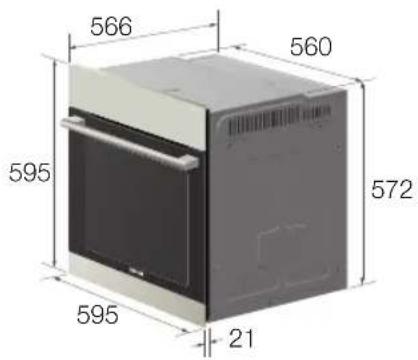
Housing (W x H x D)
Oven interior (W x H x D)
230 V \~ 50 Hz
65 ℓ
max. 2400 W
595 × 595 × 566 mm
440 × 365 × 405 mm
Power connection
A multi-pole isolator switch (with at least 3 mm contact spacing) must be provided in order to satisfy safety regulations. The power cable (H05 RR-F or H05 VV-F, min. 1.5 m, 1.5 \~ 2.5 mm 2 ) must be of sufficient length to be connected to the oven, even if the oven stands on the floor in front of its built-in cabinet. Open the rear connection cover of the oven with a screwdriver and loosen the screws of the cable clamp before you connect the wires to the relevant connection terminals. The oven is earthed via the ( 12 terminal. (The manufacturer accepts no responsibility for faults or accidents arising from a defective earth connection)
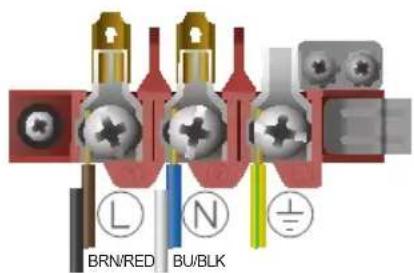
Please ensure that the power cable is not trapped between the oven and units or wall when pushing back into position. Do not route cable over any potentially hot surfaces.
Installation in the cabinet
This is a built-in oven, which needs to be installed into an upper or lower cabinet.
- Observe minimum distances.
• Fix oven on both sides using screws
After installation, remove the vinyl protective film from the door to the appliance and the protective film from the interior surfaces of the oven.
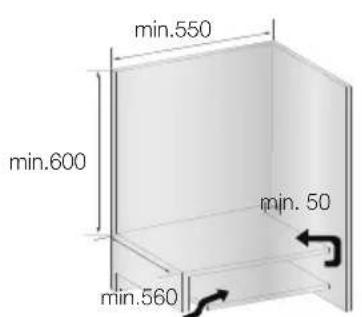
Air flow

CAUTION: Be sure to insert the grill pan correctly into the side racks. leave at least 2cm clearance from the bottom of the oven, otherwise the enamel surface could be damaged.

WARNING: Be very careful removing meals and/or accessories out of the oven. Hot meals, accessories and surfaces can burn you!

Grill pan, grid & shelves
Shelf width : 461 mm
Grid width : 422 mm
Grill pan width : 460 mm


The oven lamp will remain illuminated until the internal oven cooling fan stops. (This may be some time after the oven controls have been turned to 'OFF' position).
*Do not turn the mains power off until cooling is complete
parts and features_7
oven use
USING THE COOKING MODE
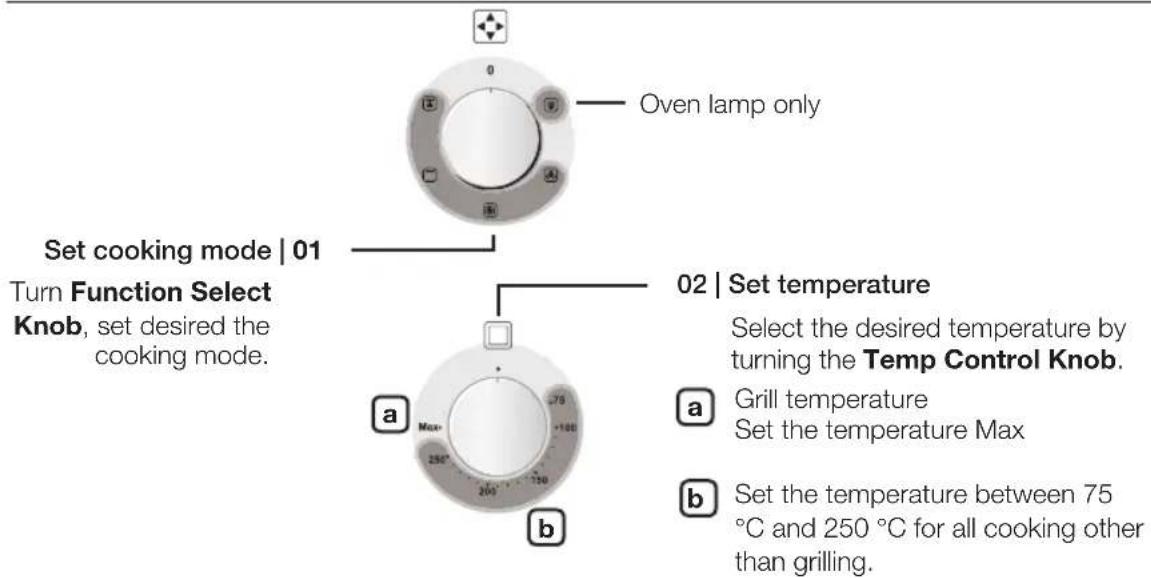
Oven functions

Fan only
The oven is not heated. Only the fan(in the rear wall) is in operation. Frozen granular food is thawed slowly at room temperature. Cooked food may be cooled down.

Fan Cooking
The heat generated by the oven element is distributed throughout the oven by the fan. This function should be used for frozen dishes, baking and roasting. Suggested temperature: 170°C

Large Grill
Heat is emitted from the large area grill. This function should be used for toasting and grilling meat. - Set the temperature to maximum level.

Grill with convection air
The grill effect is not as strong as with normal grilling.
- Put small or medium sized portions in correct shelf position under the grill element for grilling
- Set the temperature to maximum level.
• Turn the food after half of the grilling time.
SET TIME OF DAY
You will need to set the clock before operating the oven.

12:00
Set time | 01
Press timer and cook time at the same time until clock icon(①)appears on the display then release.
8_oven use
Press Minus and Plus Key to set desired time.

13:25
02 | Confirm time
Press Keys for time adjustment to set the current time.
SET MINUTE TIMER

00:00
Set timer | 01
Press Timer button.


Press Minus and Plus Key to set desired time.

00:05
02 | Confirm timer
Press Keys for time adjustment to confirm.

If you want to stop the timer operation, set the Timer to 0:00.
Timer will beep 2 minutes.
To stop the timer beep press
SET DELAY COOK TIME

00:00
Set cook time | 01
Press Cook Time button.

natural_image
Simple diagram with two circles labeled - and + connected by lines (no text or symbols beyond basic symbols)
00:05
02 | Confirm cook time
Press Keys for time adjustment to confirm.
Set end time

12:00
Set end time | 03
Press End Time button.
Press Minus and Plus Key to set desired time.


12:10
04 | Confirm end time
Press Keys for time adjustment to confirm.

Select oven function and temperature.
If you want to stop the cook time operation, set the cook time to 0:00.
SET END TIME

12:00
Set end time | 01
Press End Time button.

Press Minus and Plus Key to set desired time.

12:10
02 | Confirm end time
Press Keys for time adjustment to confirm.

Select oven function and temperature.
If you want to stop the end time operation, set the end time to current time.
oven use_9
test dishes
According to standard EN 60350 and DIN44547
Baking
The recommendations for baking refer to preheated oven.
| Type of Food | Dish & Notes | Shelf level | Cooking Mode | Temp. (°C) | Cooking time (min.) |
| Shortbread | Baking tray on shelf 1 Fan | Cooking 140-1 | 60 20-30 | ||
| Baking tray on shelf 1+4 | Fan Cooking | 140-160 25-35 | |||
| Small Cakes | Baking tray on shelf 1 Fan | Cooking 150- | 170 20-30 | ||
| Baking tray on shelf 1+4 | Fan Cooking | 150-170 25-35 | |||
| Fatless Sponge Cake | Springform cake tin on Shelf (ø 26 cm) | 1 Fan | Cooking 140-160 | 30-40 | |
| Shelves2 Springform cake tins* (ø 26 cm) | 1+4 Fan | Cooking 140-160 | 35-45 | ||
| Apple Pie Shelves | 2 Springform cake tins* (ø 20 cm) | 1+4 Fan | Cooking 150-170 | 90-110 |
* Two cakes are arranged on shelves in the centre of the oven.
Grilling
Use this function with the maximum temperature setting of Max.
Preheat the empty oven for 5 minutes using Large Grill function.
| Type of Food | Dish & Notes | Shelf level | Cooking Mode | Temp. (°C) | Cooking time (min.) |
| White Bread Toast | Grill pan & grid 5 Large | Grill Max | 1st: 1-2 | 2nd: 1-1 12 | |
| Beef Burgers (12ea) | Grill pan & grid | 4 Large | Grill Max 1st: 1 | 2-16 | 2nd: 8-13 |
10_test dishes
cleaning and care
CLEANING

Make sure the oven and any accessory is cool before cleaning. We recommend that you clean the oven after each use to prevent the build-up of burnt-on food and the associated smells produced.
Oven Interior
- For cleaning the interior of the oven, use a clean cloth and a mild cleaning agent or warm soapy water.
• Great care should be taken if cleaning the door seal. - Do not use scouring pads or abrasive cleaning sponges.
• To remove stubborn soil, use a dedicated branded oven cleaner.
Oven Exterior
- For cleaning the exterior of the oven, use a clean cloth and a mild cleaning agent or warm soapy water.
• Dry with kitchen roll or a dry towel. - Do not use scourers, caustic cleaners or abrasive products.
Stainless steel oven fronts
- Do not use steel wool, scouring pads or other abrasives. They may damage the finish.
Aluminium oven fronts
- Wipe the surface gently with a soft clean cloth or microfibre cloth and a mild window cleaning detergent.
Accessory
- Wash the grill pan and grid after every use and dry it with a kitchen towel. If necessary, leave in warm soapy water for about 30 minutes for easier cleaning.
DOOR REMOVAL
For normal use, the oven door must not be removed but if removal is necessary, for example, for cleaning purposes, follow these instructions.

CAUTION: The oven door is heavy.

natural_image
Mechanical component with blue arrow indicating rotation, no visible text or symbols- Ensure oven is cold. Open the door and flip open the clips at both hinges completely.
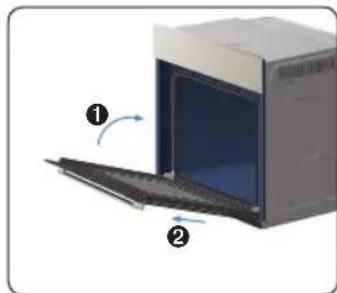
natural_image
Diagram of an oven with a door and side panel, showing internal components and directional arrows (no text or symbols)- Close the door to approximately 70°. With both hands, grip the sides of the door centrally and pull/ lift the door until the door and hinges come away from the oven.
cleaning and care_11
natural_image
Interior view of an oven with a circular vent and a magnified inset showing a component (no text or symbols)- Press central part of the side runner top portion.

natural_image
Diagram of a double door with ventilation duct and fan (no text or symbols)- Rotate the side runner by approximately 45irc

natural_image
Diagram of a mechanical or electrical component inside a rectangular chamber, showing internal structure with no visible text or symbols.- Pull and remove the side runner from bottom two holes.

ATTACHING: Repeat steps 1, 2 and 3 in reverse order.
DOOR GLASS REMOVAL
The oven door can be removed for cleaning.

natural_image
3D diagram of a rectangular object with two side supports and directional arrows indicating orientation (no text or symbols)- Press the buttons on the left and right sides of the the door together.

natural_image
Isometric view of a mechanical assembly with layered components and a central arrow (no text or symbols)- Detach the covering and remove glass 1 from the door.

natural_image
Pure diagram of a rectangular frame with internal diagonal lines and a central arrow, no text or symbols present.- Lift glass 2 and Clean the sheets with warm water or washing-up liquid and polish dry them with a soft clean cloth.

The screen printed surface of the glass should be on the inside, between the glass sheets.
BULB REPLACEMENT

Danger of electric shock! Before replacing the oven bulb:
- Switch oven Off and ensure oven is cold.
- Disconnect the oven from the mains.
- Protect the oven light bulb and the glass cap by laying a cloth on the bottom of the oven compartment.
Lamp removal
- Remove cap by turning anticlockwise and remove the metal ring, and the sheet ring. Replace the bulb with a 25 watt, 230 V, 300 °C heat-resistant oven light bulb.
- Clean the glass cap, the metal ring and the sheet ring if necessary.
- Fit the metal and the sheet ring to the glass cap.
- Locate glass cap into hole and turn it clockwise to secure.
12_cleaning and care

natural_image
Hand inserting a coin into a car's seat, showing the arrow direction (no text or symbols)
guarantee & service
TROUBLESHOOTING
| PROBLEM SOLUTION | |
| What should I do if the oven doesn’t heat up? | The oven may not be switched on. Switch the oven on.Check to see if the required settings have been applied.A household fuse may have blown or a circuit breaker may have tripped. Replace the fuses or reset the circuit. If this happens repeatedly, call a qualified electrician. |
| What should I do if, even though the oven function and temperature have been set, the oven does not heat up? | There may be problems with the internal electrical connections. Call the help-line. |
| What should I do if the oven light doesn’t illuminate? | The oven light may have failed. Replace the oven light bulb (see section “Bulb replacement”). |
ERROR AND SAFETY CODES
| CODE PROBLEM SOLUTION | ||
| E-21 | E-22 | Temperature Sensor ErrorThere is a fault with temperature sensor. |
| E-23 | E-24 | Cooling Sensor ErrorThere is a fault with Cooling system. |
| S-01 | Safety ShutoffOven has continued operating at set temperature for prolonged time. | |
| -SE- | Button ErrorIt occurs when the button is pressed and held for over 10 seconds. | |
| E-0A | Over Heating ErrorThere is a fault with heating system. | |
English

Correct Disposal of This Product (Waste Electrical & Electronic Equipment)
(Applicable in the European Union and other European countries with separate collection systems)
This marking on the product, accessories or literature indicates that the product and its electronic accessories should not be disposed of with other household waste at the end of their working life. To prevent possible harm to the environment or human health from uncontrolled waste disposal, please separate these items from other types of waste and recycle them responsibly to promote the sustainable reuse of material resources. Household users should contact either the retailer where they purchased this product, or their local government office, for details of where and how they can take these items for environmentally safe recycling. Business users should contact their supplier and check the terms and conditions of the purchase contract. This product and its electronic accessories should not be mixed with other commercial wastes for disposal.
guarantee & service_13
product guarantee details (uk only)
Details of your guarantee are shown on your Howdens Proof of Purchase Document.
GuaranTee cOndiTiOns
(a) Any claim during the period of the guarantee MUST BE ACCOMPANIED WITH your Howdens Proof of Purchase Document.
(b) The unit must be correctly installed and operated in accordance with the manufacturer's instructions and used for normal domestic purposes.
(c) The guarantee does not cover accidental damage, misuse or alterations which are likely to affect the units.
(d) The guarantee is invalid if the units is tampered with, or repaired by any unauthorised person.
(e) The guarantee in no way affects your statutory rights.
(f) U.K only.
PrOcedure if rePOrTinG a fauLT
- Give full name, address including post code, home telephone number and business telephone number if appropriate.
- Quote sales receipt number, make and model number of faulty appliance.
- Give a summary of the problem.
| Model No: | |
| Serial No: |




memo


This manual is made with 100 % recycled paper.
Code No.: DG68-00391A-04

- using this manual
- safety instructions
- WARNING
- CAUTION
- 4\_safety instructions
- installation
- Safety instructions for the installation
- Technical specifications
- Power connection
- Installation in the cabinet
- Grill pan, grid & shelves
- oven use
- USING THE COOKING MODE
- Oven functions
- Fan only
- Fan Cooking
- Large Grill
- Grill with convection air
- SET TIME OF DAY
- SET MINUTE TIMER
- SET DELAY COOK TIME
- SET END TIME
- test dishes
- Baking
- Grilling
- cleaning and care
- CLEANING
- Oven Interior
- Oven Exterior
- Stainless steel oven fronts
- Aluminium oven fronts
- Accessory
- DOOR REMOVAL
- DOOR GLASS REMOVAL
- BULB REPLACEMENT
- Lamp removal
- guarantee & service
- product guarantee details (uk only)
- GuaranTee cOndiTiOns
- PrOcedure if rePOrTinG a fauLT
Brand : SAMSUNG
Model : LAM3401
Category : Built-in electric oven