
AV-HS04M4 - Audio/video converter PANASONIC - Free user manual and instructions
Find the device manual for free AV-HS04M4 PANASONIC in PDF.


| Product Type | Analog Output Board for Multi-Format Live Switcher |
| Compatible Switcher | Panasonic AV-HS400N/E |
| Analog Outputs | 2 lines (SD/HD Analog Component Y/Pb/Pr, 1.0 Vp-p, 75 Ω, BNC) |
| Signal Formats | SD: 480/59.94i, 576/50i; HD: 1080/59.94i, 1080/50i, 720/59.94p, 720/50p |
| Dimensions (W x H x D) | 6" x 1-1/16" x 5-2/16" (152.5 x 27 x 130 mm) |
| Weight | 0.4 lbs (0.2 kg) |
| Power Supply | DC 6 V (supplied from AV-HS400N/E) |
| Power Consumption | 3.5 W |
| Ambient Operating Temperature | 32 °F to 104 °F (0 °C to 40 °C) |
| Humidity | 10% to 90% (no condensation) |
| Selectable Output Signals | PGM, PVW, AUX, KEYOUT, Multi View Display (per line) |
| Mounting Slots | SLOT1 or SLOT2 on AV-HS400N/E output side |
| Connector Location | When in SLOT1: OUTPUT3 and OUTPUT4; when in SLOT2: OUTPUT5 and OUTPUT6 |
| Safety Precautions | Do not remove cover; no user-serviceable parts; avoid rain/moisture; use only shielded cables |
| Cleaning | Only with dry cloth |
| Installation | Requires static discharge; power off; insert along guide rails; secure with two screws |
| Spare Parts / Repairability | Refer servicing to qualified personnel; no user-serviceable parts inside |
| Included Accessories | Operating instructions (1 copy) |
Frequently Asked Questions - AV-HS04M4 PANASONIC
User questions about AV-HS04M4 PANASONIC
0 question about this device. Answer the ones you know or ask your own.
Ask a new question about this device
Download the instructions for your Audio/video converter in PDF format for free! Find your manual AV-HS04M4 - PANASONIC and take your electronic device back in hand. On this page are published all the documents necessary for the use of your device. AV-HS04M4 by PANASONIC.
USER MANUAL AV-HS04M4 PANASONIC
Operating Instructions
Analog Output board
Model No. AV-HS04M4
Before operating this product, please read the instructions carefully and save this manual for future use.
ENGLISH VERSION
Safety precautions
CAUTION
RISK OF ELECTRIC SHOCK DO NOT OPEN
CAUTION: TO REDUCE THE RISK OF ELECTRIC SHOCK, DO NOT REMOVE COVER (OR BACK). NO USER SERVICEABLE PARTS INSIDE.
REFER TO SERVICING TO QUALIFIED SERVICE PERSONNEL.
The lightning flash with arrowhead symbol, within an equilateral triangle, is intended to alert the user to the presence of uninsulated “dangerous voltage” within the product’s enclosure that may be of sufficient magnitude to constitute a risk of electric shock to persons.

The exclamation point within an equilateral triangle is intended to alert the user to the presence of important operating and maintenance (service) instructions in the literature accompanying the appliance.
WARNING:
• TO REDUCE THE RISK OF FIRE OR ELECTRIC SHOCK, DO NOT EXPOSE THIS APPARATUS TO RAIN OR MOISTURE.
- THE APPARATUS SHALL NOT BE EXPOSED TO DRIPPING OR SPLASHING AND THAT NO OBJECTS FILLED WITH LIQUIDS, SUCH AS VASES, SHALL BE PLACED ON THE APPARATUS.
CAUTION:
TO REDUCE THE RISK OF FIRE OR SHOCK HAZARD AND ANNOYING INTERFERENCE, USE THE RECOMMENDED ACCESSORIES ONLY.
CAUTION:
TO REDUCE THE RISK OF FIRE OR SHOCK HAZARD, REFER CHANGES OF SWITCH SETTINGS INSIDE THE UNIT TO QUALIFIED SERVICE PERSONNEL.

indicates safety information.
1 (E)
Safety precautions
For CANADA-
This equipment has been tested and found to comply with the limits for a class A digital device, pursuant to Part 15 of the FCC Rules. These limits are designed to provide reasonable protection against harmful interference when the equipment is operated in a commercial environment. This equipment generates, uses, and can radiate radio frequency energy, and if not installed and used in accordance with the instruction manual, may cause harmful interference to radio communications. Operation of this equipment in a residential area is likely to cause harmful interference in which case the user will be required to correct the interference at his own expense.
Warning:
To assure continued FCC emission limit compliance, the user must use only shielded interface cables when connecting to external units. Also, any unauthorized changes or modifications to this equipment could void the user's authority to operate it.

indicates safety information.
2 (E)
Safety precautions
IMPORTANT SAFETY INSTRUCTIONS
Read these operating instructions carefully before using the unit. Follow the safety instructions on the unit and the applicable safety instructions listed below. Keep these operating instructions handy for future reference.
1) Read these instructions.
2) Keep these instructions.
3) Heed all warnings.
4) Follow all instructions.
5) Do not use this apparatus near water.
6) Clean only with dry cloth.
7) Do not block any ventilation openings. Install in accordance with the manufacturer's instructions.
8) Do not install near any heat sources such as radiators, heat registers, stoves, or other apparatus (including amplifiers) that produce heat.
9) Do not defeat the safety purpose of the polarized or grounding-type plug. A polarized plug has two blades with one wider than the other. A grounding-type plug has two blades and a third grounding prong. The wide blade or the third prong are provided for your safety. If the provided plug does not fit into your outlet, consult an electrician for replacement of the obsolete outlet.
10) Protect the power cord form being walked on or pinched particularly at plugs, convenience receptacles, and the point where they exit from the apparatus.
11) Only use attachments/accessories specified by the manufacturer.
12) Use only with the cart, stand, tripod, bracket, or table specified by the manufacturer, or sold with the apparatus.
When a cart is used, use caution when moving the cart/apparatus combination to avoid injury from tip-over.
13) Unplug this apparatus during lightning storms or when unused for long periods of time.
14) Refer all servicing to qualified service personnel. Servicing is required when the apparatus has been damaged in any way, such as power-supply cord or plug is damaged, liquid has been spilled or objects have fallen into the apparatus, the apparatus has been exposed to rain or moisture, does not operate normally, or has been dropped.


indicates safety information.
3 (E)
Safety precautions
Information on Disposal for Users of Waste Electrical & Electronic Equipment (private households)
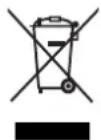
This symbol on the products and/or accompanying documents means that used electrical and electronic products should not be mixed with general household waste.
For proper treatment, recovery and recycling, please take these products to designated collection points, where they will be accepted on a free of charge basis. Alternatively, in some countries you may be able to return your products to
your local retailer upon the purchase of an equivalent new product.
Disposing of this product correctly will help to save valuable resources and prevent any potential negative effects on human health and the environment which could otherwise arise from inappropriate waste handling.
Please contact your local authority for further details of your nearest designated collection point.
Penalties may be applicable for incorrect disposal of this waste, in accordance with national legislation.
For business users in the European Union
If you wish to discard electrical and electronic equipment, please contact your dealer or supplier for further information.
Information on Disposal in other Countries outside the European Union
This symbol is only valid in the European Union.
If you wish to discard this product, please contact your local authorities or dealer and ask for the correct method of disposal.
Contents
Safety precautions .... 1
Introduction 5
Accessory 5
Precautions for use 6
Name of each part 7
Mounting 8
Connections 11
Appearance 12
Specifications 13
Introduction
When this board is installed in the AV-HS400N/E multi format line switcher, it enables two analog output lines to be supported.
Any of five signals (PGM, PVW, AUX, KEYOUT and multi view display) can be selected as the analog output signals of each of the two lines.
Accessory
Operating instructions .... 1
5 (E)
Precautions for use
- Handle carefully.
Do not drop the product, or subject it to strong shock or vibration.
- Use the product in an ambient temperature of 32 °F to 104 °F (0 °C to 40 °C).
Avoid using the product at a cold place below 32^ F ( 0^ C) or at a hot place above 104^ F ( 40^ C) because extremely low or high temperature will adversely affect the parts inside.
- Power off before connecting or disconnecting cables.
Before plugging or unplugging the cables, be sure to switch power off.
- Avoid humidity and dust.
Avoid using the product at a humid, dusty place because much humidity and dust will cause damage to the parts inside.
- When the product is to be discarded
When the product is to be discarded at the end of its service life, ask a specialized contractor to dispose of it properly in order to protect the environment.
6 (E)
Name of each part
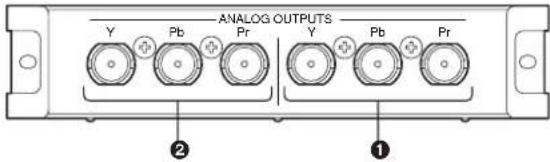
① Analog output connectors [ANALOG OUTPUTS]
When connected to the SLOT1 option output connector: OUTPUT3 When connected to the SLOT2 option output connector: OUTPUT5
② Analog output connectors [ANALOG OUTPUTS]
When connected to the SLOT1 option output connector: OUTPUT4 When connected to the SLOT2 option output connector: OUTPUT6
7 (E)
Mounting
Install this board in the multi-format live switcher AV-HS400N/E.
- Be sure to ask the store or dealer where you purchased the product for assistance with mounting and removal.
- Set to OFF and unplug the power connector before mounting and removal.
- Before handling this board, touch a metal part of the AV-HS400N/E to discharge the static electricity from the human body.
An anti-static wrist strap is recommended for safety. Failures may be caused if you touch this board while you are still charged with static electricity.
- Keep the metal parts of this board free of contact with other metal parts.
- Be sure to mount the blank panel installed with the AV-HS400N/E, after removing this board.
- When installing or removing this board, take care not to hurt yourself on the edges and metal parts of the boards.
① Turn off the power of the AV-HS400N/E, and unplug the power cord.
② Loosen the two screws of SLOT1 or SLOT2 on the output side at the rear of the AV-HS400N/E, and remove the blank panel.
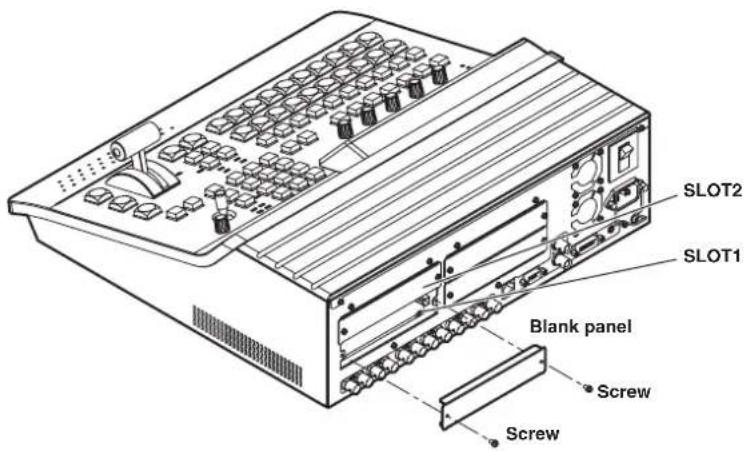
8 (E)
Mounting
③ Align the board with the guide rails, and insert it slowly.
Insert it all the way in. Take care not to use force to insert the board because the connectors may be damaged in the process.
④ Attach the board using the two screws.
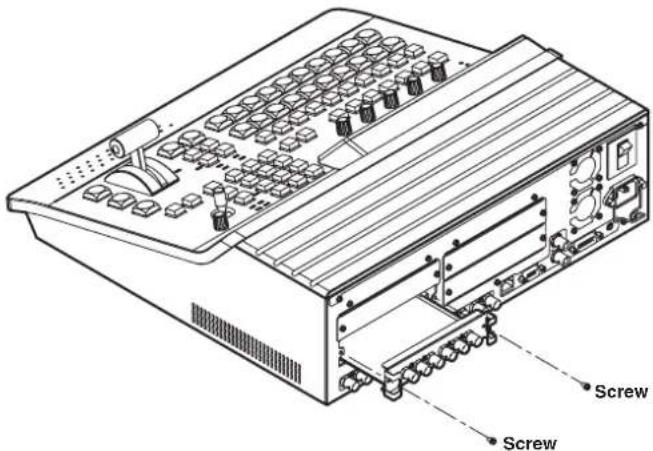
⑤ After connecting the necessary cables, plug in the power cord, and turn on the power.
9 (E)
Mounting
Checking that the board has been mounted correctly
Turn on the power of the AV-HS400N/E, and use the menu used to display the statuses of the option boards to check that the board has been mounted correctly.
① Press the [FUNC] button to light its indicator, and press the [SYSTEM] button to display the SYSTEM menu.
② Turn [F1] to display the OptVer sub menu.
- Operating Instructions
- Analog Output board
- Model No. AV-HS04M4
- ENGLISH VERSION
- Safety precautions
- WARNING:
- CAUTION:
- IMPORTANT SAFETY INSTRUCTIONS
- Information on Disposal for Users of Waste Electrical & Electronic Equipment (private households)
- For business users in the European Union
- Information on Disposal in other Countries outside the European Union
- Contents
- Introduction
- Accessory
- Precautions for use
- Name of each part
- Mounting
- Checking that the board has been mounted correctly
- Removal procedure
- Connections
- Memo
Brand : PANASONIC
Model : AV-HS04M4
Category : Audio/video converter