Q975 - Wristwatch Danish Design - Free user manual and instructions
Find the device manual for free Q975 Danish Design in PDF.


| Brand | Danish Design |
| Model | Q975 |
| Product Type | Wrist Watch |
| Movement | Quartz |
| Case Material | Stainless Steel |
| Strap Material | Leather |
| Dial Color | White |
| Case Diameter | 40 mm |
| Case Thickness | 10 mm |
| Water Resistance | 3 ATM (Splash Resistant) |
| Crystal | Mineral Glass |
| Battery Type | SR626SW |
| Weight | Approx. 60 g |
| Functions | Time, Date |
| Clasp Type | Buckle |
| Warranty | 2 Years |
| Cleaning Instructions | Wipe with soft dry cloth |
Frequently Asked Questions - Q975 Danish Design
User questions about Q975 Danish Design
0 question about this device. Answer the ones you know or ask your own.
Ask a new question about this device
Download the instructions for your Wristwatch in PDF format for free! Find your manual Q975 - Danish Design and take your electronic device back in hand. On this page are published all the documents necessary for the use of your device. Q975 by Danish Design.
USER MANUAL Q975 Danish Design
* The measured time is indicated by the stopwatch hands that move independently of the center hands.
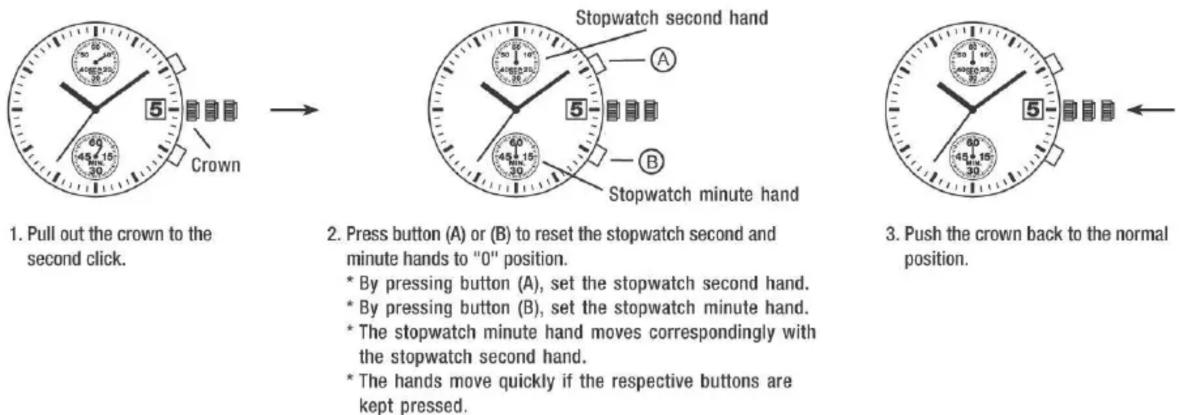
ADJUSTING THE STOPWATCH HAND POSITION
Before setting the time, check if the Stopwatch second and minute hands are at the "0"(12 o'clock) position. If the stopwatch is in use, press the button in the following order to reset it, and then, check if the hands return to "0" position. (For details, see "HOW TO USE THE STOPWATCH")
If the stopwatch is counting: If the stopwatch is stopped: If the split time is displayed:
(A) → (B) (B) (B) → (A) → (B)
* If either of the stopwatch hands are not at the "0" position, reset them following the procedure below:
TIME SETTING
* Before setting the time, check that the chronograph measurement is stopped.

flowchart
graph LR
    A["1. Pull out the crown to the first click."] --> B["2. Turn the crown clockwise until the previous day's date appears."]
    B --> C["3. Pull out the crown to the second click when the second hand is at the 12 o'clock position. It will stop on the spot and advance the hour and minute hands by turning the crown. (Check that AM/PM is set correctly.)* When the crown is at the second click position. Do not press any button. Otherwise, the chronograph hands will move."]
    C --> D["4. Push the crown back in to the normal position in accordance with a time signal."]
* Do not set the date between 9:00 P.M. and 1:00 A.M. Otherwise, the day may not change properly. If it is necessary to set the date during that time period, first change the time to any time outside it, set the date and then reset the correct time.
<>
HOW TO USE THE STOPWATCH
* The measured time is indicated by the stopwatch hands that move independently of the center hands.
* The stopwatch can measure up to 12 hours in seconds.
(Standard measurement)
Ex)100m race (Press the buttons in the following order: (A) → (A) → (B))

flowchart
graph LR
    A["START"] --> B["STOP (Finish)"]
    B --> C["RESET"]
    style A fill:#f9f,stroke:#333
    style B fill:#f9f,stroke:#333
    style C fill:#f9f,stroke:#333
(Accumulated elapsed time measurement)
Ex.) Basketball game(Press the buttons in the following order:
(A) (A) / (A) → ..... → (A) (B)
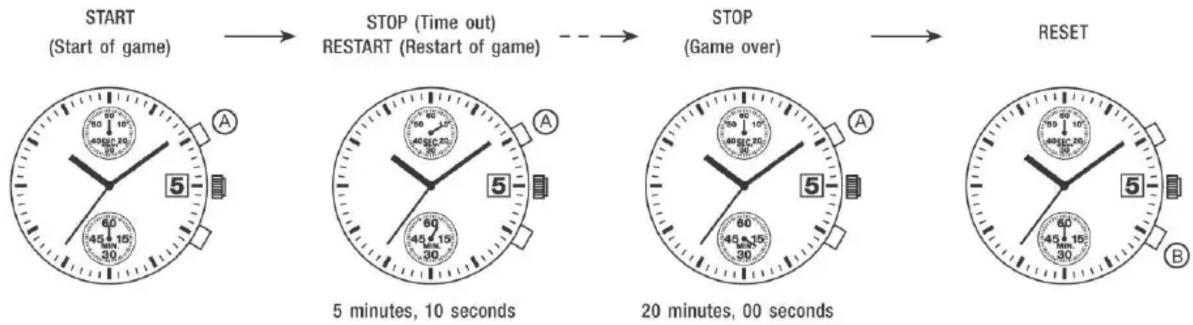
flowchart
graph LR
    A["START (Start of game)"] --> B["STOP (Time out) RESTART (Restart of game)"]
    B --> C["STOP (Game over)"]
    C --> D["RESET"]
* Restart and stop of the stopwatch can be repeated as many times as necessary by pressing button (A).
(Split time measurement)
Ex) 5,000m race (Press the buttons in the following order:
(A) (B) / (B) →......→ (A) (B)

flowchart
graph LR
    A["START"] --> B["SPLIT/SPLIT RELEASE"]
    B --> C["STOP"]
    C --> D["RESET"]
* Measurement and release of the split time can be repeated as many times as necessary by pressing button (B).
Brand : Danish Design
Model : Q975
Category : Wristwatch