
PID 13083 - Mobile Device Charger MONOPRICE - Free user manual and instructions
Find the device manual for free PID 13083 MONOPRICE in PDF.


| Product Type | Power Bank |
| Brand | Monoprice |
| Model | PID 13083 |
| Battery Type | Lithium-ion |
| Battery Capacity | 16000mAh |
| Input Connector Type | USB Micro B Female |
| Input Power | 5 VDC, 2000mA |
| Output 1 Power | 5 VDC, 1000mA |
| Output 1 Connector Type | USB A Female |
| Output 2 Power | 5 VDC, 2000mA |
| Output 2 Connector Type | USB A Female |
| Over Current Protection | Yes |
| Operating Temperature | +32 to +113°F (0 to +45°C) |
| Dimensions (L x W x H) | 6.3 x 3.2 x 0.9 inches (160 x 82 x 23 mm) |
| Weight | 15.4 oz (436g) |
| LED Flashlight | Built-in, activated by double-clicking Power button |
| Simultaneous Device Charging | Up to two devices |
| Included Cable | Micro USB charging cable |
| Water Resistance | Not waterproof |
| User Serviceable Parts | No |
| Cleaning Instructions | Use a dry, soft cloth. Avoid chemical solvents. |
Frequently Asked Questions - PID 13083 MONOPRICE
User questions about PID 13083 MONOPRICE
0 question about this device. Answer the ones you know or ask your own.
Ask a new question about this device
Download the instructions for your Mobile Device Charger in PDF format for free! Find your manual PID 13083 - MONOPRICE and take your electronic device back in hand. On this page are published all the documents necessary for the use of your device. PID 13083 by MONOPRICE.
USER MANUAL PID 13083 MONOPRICE
Select Series POWER BANK 16000mAh
User's Manual
PID 13083
Please read this manual prior to attempting operation. Keep this manual in a safe place for future reference. The information in this manual was current when published. However, Monoprice reserves the right to revise and improve our products, therefore all specifications are subject to change without notice.
CONTENTS
SAFETY WARNINGS....3
IMPORTANT USAGE NOTES 3
INTRODUCTION....3
FEATURES 4
CUSTOMER SERVICE 4
PACKAGE CONTENTS 4
PRODUCT OVERVIEW 5
CHECKING THE CHARGE LEVEL....5
USING THE FLASHLIGHT....6
CHARGING THE POWER BANK....6
CHARGING YOUR MOBILE DEVICE....7
TROUBLESHOOTING 8
TECHNICAL SUPPORT....8
SPECIFICATIONS 9
REGULATORY COMPLIANCE....10
SAFETY WARNINGS
- This device is not waterproof. Do not expose it to water or moisture of any kind.
- This device has no user serviceable parts. Do not attempt to open, service, or modify it.
- This device contains a Lithium-ion battery. Do not place this device in a fire or expose it to temperatures greater than +140°F (+60°C). Doing so could cause the battery to explode, causing personal injury and potentially causing a fire.
- This device contains a Lithium-ion battery. Do not dispose of this device by throwing it in the trash. It must be recycled in accordance with state and/or local laws.
- Keep out of reach of children.
- Keep away from corrosive materials.
- Do not use chemical solvents, cleaners, or soap to clean this device. Use only a dry, soft cloth. For particularly stubborn deposits, moisten the cloth with warm water.
IMPORTANT USAGE NOTES
- Charge this Power Bank fully before first use. It should be charged at least once every three months to keep the battery fresh and capable of holding a full charge.
- This Power Bank features overcurrent protection, which will automatically shut it down to prevent damage in the event of a short circuit or other fault. If the protection circuit activates, clear the fault, then charge the Power Bank to reset the protection circuit.
- If the battery is depleted to the point that the LEDs no longer illuminate, please cease use immediately and charge the Power Bank as soon as possible. Avoid fully depleting the battery.
INTRODUCTION
Thank you for purchasing this Power Bank!
This device is the perfect companion for the mobile electronics user on the go. It is capable of charging up to two devices simultaneously, keeping your mobile devices operating even when a power outlet is nowhere in sight. For best results, thoroughly read this manual before use, paying extra attention to the Safety Warnings and Usage Notes above.
FEATURES
- Powers and charges USB-powered devices
• Simultaneously charges two devices
• Overcurrent protection
• Automatic charging without the need to tap or hold a button - Includes an LED flashlight
- Includes a micro USB charging cable
CUSTOMER SERVICE
The Monoprice Customer Service department is dedicated to ensuring that your ordering, purchasing, and delivery experience is second to none. If you have any problem with your order, please give us an opportunity to make it right. You can contact a Monoprice Customer Service representative through the Live Chat link on our website www.monoprice.com during normal business hours (Mon-Fri: 5am-7pm PT, Sat-Sun: 9am-6pm PT) or via email at support@monoprice.com
PACKAGE CONTENTS
Please take an inventory of the package contents to ensure you have all the items listed below. If anything is missing or damaged, please contact Monoprice Customer Service for a replacement.
• 1x 16000mAh Power Bank
• 1x Micro USB charging cable
• 1x Quick user guide
PRODUCT OVERVIEW
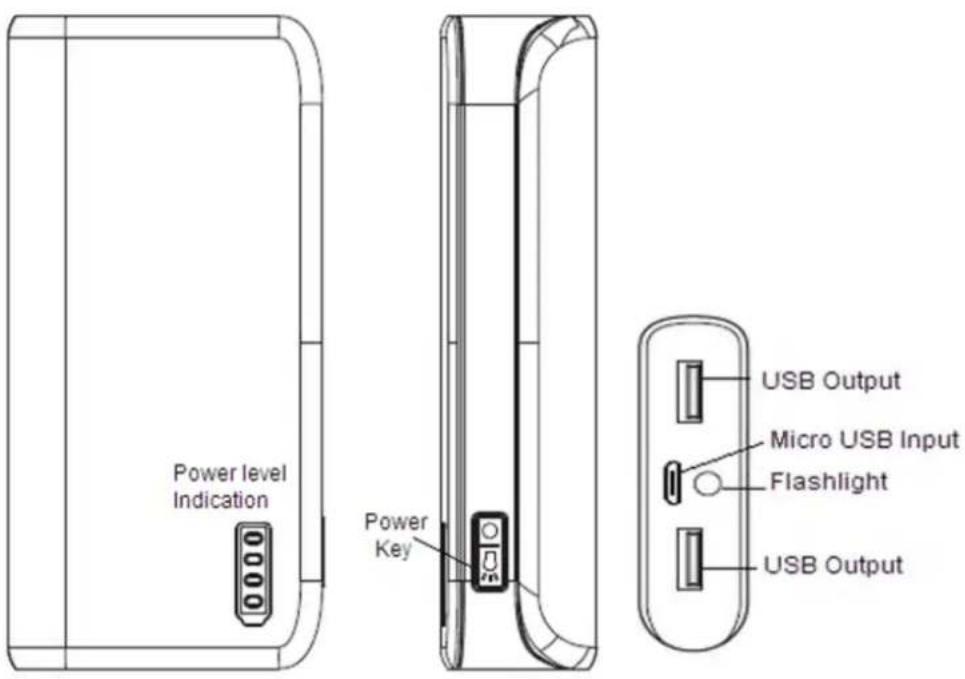
CHECKING THE CHARGE LEVEL
To check the current charge level of the Power Bank's internal battery, press the Power button. The LED Power Level Indicators will illuminate to show the current charge level, as shown in the following table. The LEDs will remain illuminated for about 7 seconds. Alternatively, press and hold the Power button for about 2 seconds to turn the LEDs off.
| LED # | Charge Level | ||||
| 0~5% | 6~25% | 26~50% | 51~75% | 76~100% | |
| 1 | off | on | on | on | on |
| 2 | off | off | on | on | on |
| 3 | off | off | off | on | on |
| 4 | off | off | off | off | on |
USING THE FLASHLIGHT
This Power Bank features a built-in LED flashlight. Press the Power button twice in quick succession to turn the flashlight On or Off.
CHARGING THE POWER BANK
The Power Bank is charged by plugging it into any USB power source, such as:
- a wall charger
• a computer's USB port
• another Power Bank
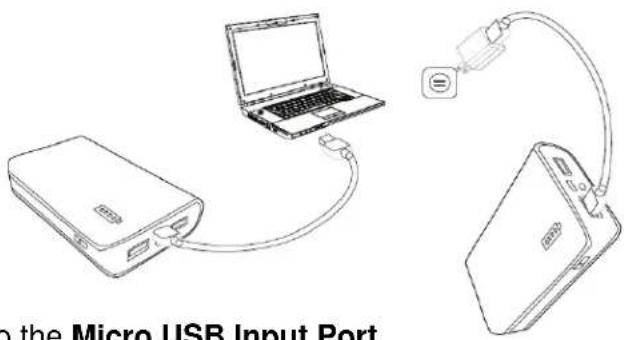
Perform the following steps to charge the Power Bank:
-
Plug the micro USB connector on the included charging cable into the Micro USB Input Port on the Power Bank.
-
Plug the other end of the cable into a USB power source. The LED Power Level Indicators will blink to indicate that the Power Bank is being charged. The number of fully illuminated LEDs and which one is blinking indicates the current charge level, as shown in the following table:
| LED # | Charge Level | ||||
| 0~24% | 25~49% | 50~74% | 75~99% | 100% | |
| 1 | blinking | on | on | on | on |
| 2 | off | blinking | on | on | on |
| 3 | off | off | blinking | on | on |
| 4 | off | off | off | blinking | on |
- When all the LEDs are fully illuminated, unplug the USB charging cable from the power source, and then unplug it from the Power Bank. The Power Bank is now fully charged and ready to power your mobile devices!
CHARGING YOUR MOBILE DEVICE
This Power Bank features two USB charging ports, allowing for simultaneous charging of two devices. The USB1 port is capable of producing up to 1A of charging current, while the USB2 port produces up to 2A, making it better suited for charging high current devices, such as tablets.
Perform the following steps to charge a mobile device using this Power Bank:
- Plug one end of the included micro USB charging cable into the charging input port on your mobile device.
Note: If your device does not use a micro USB connection for charging, use the cable that came with your device instead.
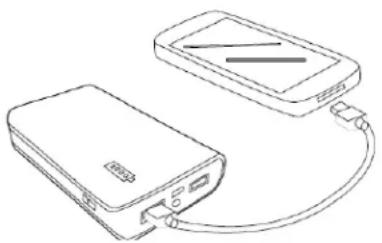
- Plug the other end of the charging cable into one of the USB Output ports on the Power Bank. Charging will begin automatically and the LED Power Level Indicators will illuminate to show the current charge level of the Power Bank. As the Power Bank's charge is consumed, the LEDs will turn off one by one to indicate the decreased charge level, as shown in the table below:
natural_image
Line drawing of a power bank connected to a smartphone (no text or symbols)| LED # | Charge Level | ||||
| 0~5% | 6~25% | 26~50% | 51~75% | 76~100% | |
| 1 | off | on | on | on | on |
| 2 | off | off | on | on | on |
| 3 | off | off | off | on | on |
| 4 | off | off | off | off | on |
Note: When all the LEDs are off, the Power Bank's internal battery is depleted. Please cease use immediately and fully charge it as soon as possible.
- When your device is fully charged, unplug the charging cable from the Power Bank, and then from your mobile device. The Power Bank will remain on for about 7 seconds, and then will automatically turn off. Alternatively, you can turn it off by pressing and holding the Power button for about 2 seconds.
TROUBLESHOOTING
Q1: The Power Bank won't charge my device and all the LEDs remain off.
A1: The battery is depleted. Please fully recharge the Power Bank and try again.
Q2: The flashlight won't turn on.
A2: Press the Power button twice rapidly (double-click) to turn the flashlight On or Off. Check the battery charge level and recharge as necessary.
Q3: Despite being fully charged, the Power Bank won't charge my device.
A3: Double check the cable connections and reseat as necessary. Try using a different charging cable. Check your device's owner's manual to verify it is compatible with Power Banks. Try charging a different device to see if it is the Power Bank, cable, or device that is causing the problem.
Q4: The Power Bank will charge using a wall charger, but won't charge when I plug it into my computer.
A4: Verify that you are not connecting through a passive USB hub. Try using a different USB port. Note that some laptop USB ports may have insufficient current to charge the Power Bank in a timely manner.
TECHNICAL SUPPORT
Monoprice is pleased to provide free, live, online technical support to assist you with any questions you may have about installation, setup, troubleshooting, or product recommendations. If you ever need assistance with your new product, please come online to talk to one of our friendly and knowledgeable Tech Support Associates.
Technical support is available through the online chat button on our website www.monoprice.com during regular business hours, 7 days a week. You can also get assistance through email by sending a message to tech@monoprice.com
SPECIFICATIONS
| Battery Type | Lithium-ion |
| Battery Capacity | 16000mAh |
| Input Connector Type | USB micro B female |
| Input Power | 5 VDC, 2000mA |
| Output 1 Power | 5 VDC, 1000mA |
| Output 1 Connector Type | USB A female |
| Output 2 Power | 5 VDC, 2000mA |
| Output 2 Connector Type | USB A female |
| Over Current Protection | Yes |
| Operating Temperature | +32 ~ +113°F (0 ~ +45°C) |
| Dimensions | 6.3" x 3.2" x 0.9" (160 x 82 x 23 mm) |
| Weight | 15.4 oz. (436g) |
REGULATORY COMPLIANCE
FC
Modifying the equipment without Monoprice's authorization may result in the equipment no longer complying with FCC requirements for Class B digital devices. In that event, your right to use the equipment may be limited by FCC regulations and you may be required to correct any interference to radio or television communications at your own expense.
This equipment has been tested and found to comply with the limits for a Class B digital device, pursuant to Part 15 of the FCC Rules. These limits are designed to provide reasonable protection against harmful interference in a residential installation. This equipment generates, uses, and can radiate radio frequency energy and, if not installed and used in accordance with the instructions, may cause harmful interference to radio communications. However, there is no guarantee that interference will not occur in a particular installation. If this equipment does cause harmful interference to radio or television reception, which can be determined by turning the equipment off and on, the user is encouraged to try to correct the interference by one or more of the following measures:
• Reorient or relocate the receiving antenna.
- Increase the separation between the equipment and receiver.
- Connect the equipment into an outlet on a circuit different from that to which the receiver is connected.
- Consult the dealer or an experienced radio/TV technician for help.
Notice for Industry Canada
This Class B digital apparatus complies with Canadian ICES-003.
This equipment complies with the essential requirements listed below:
• EMC Directive 2004/108/EC
• RoHS Directive 2011/65/EU
• WEEE Directive 2011/65/EU
- Select Series POWER BANK 16000mAh
- CONTENTS
- SAFETY WARNINGS
- IMPORTANT USAGE NOTES
- INTRODUCTION
- FEATURES
- CUSTOMER SERVICE
- PACKAGE CONTENTS
- CHECKING THE CHARGE LEVEL
- USING THE FLASHLIGHT
- CHARGING THE POWER BANK
- CHARGING YOUR MOBILE DEVICE
- TROUBLESHOOTING
- TECHNICAL SUPPORT
- REGULATORY COMPLIANCE
- FC
- Notice for Industry Canada
Brand : MONOPRICE
Model : PID 13083
Category : Mobile Device Charger