Link Uno - Bicycle Tern - Free user manual and instructions
Find the device manual for free Link Uno Tern in PDF.


Pick your language and provide your email: we'll send you a specifically translated version.
| Product Type | Folding Bicycle |
| Brand | Tern |
| Model | Link Uno |
| Wheel Size | 20 inches (406 mm) |
| Number of Gears | Single-speed |
| Frame Material | Aluminum |
| Folded Dimensions | 71 x 39 x 62 cm (28 x 15.4 x 24.4 in) |
| Weight | 12.9 kg (28.4 lb) |
| Max Rider Weight | 105 kg (231 lb) |
| Recommended Height | 142 - 190 cm (4'8" - 6'3") |
| Brakes | V-brakes (front and rear) |
| Tires | 20 x 1.5 inch (47-406) |
| Drivetrain | Single-speed, 52T chainring, 17T cog |
| Folding Mechanism | Tern proprietary fold, quick-release |
| Maintenance | Regular cleaning, lubrication of chain and pivot points, check tire pressure |
| Safety Features | Reflectors, bell included; recommend helmet and lights |
| Spare Parts Availability | Available through Tern dealers or online |
| Warranty | Limited lifetime on frame, 2 years on components |
Frequently Asked Questions - Link Uno Tern
How do I fold the Tern Link Uno?
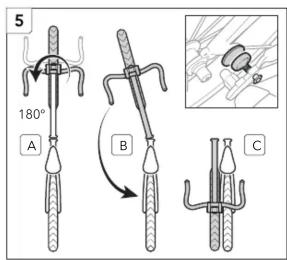
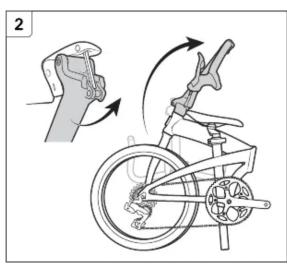
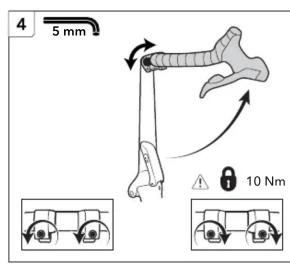
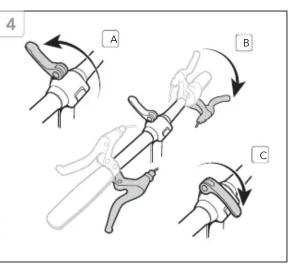
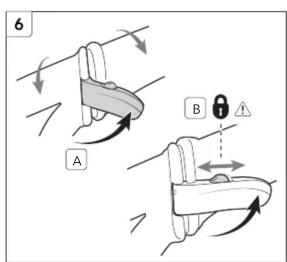
Start by lowering the seat post, then release the folding joint on the frame using the quick-release lever. Fold the main frame down, then fold the handlepost and secure with the magnet. Finally, fold the pedals and lock the frame together.
What is the weight limit for the Link Uno?
The maximum recommended rider weight is 105 kg (231 lb). This includes any cargo carried.
Can I change the gear ratio on the Link Uno?
Yes, you can swap the chainring or rear cog for a different gear ratio. However, since it's single-speed, changing significantly may affect chain tension.
How do I adjust the brakes on the Link Uno?
Use the barrel adjuster on the brake lever to tension the cable. If more adjustment is needed, loosen the cable anchor bolt, pull the cable tighter, and retighten. Ensure the brake pads align with the rim.
What tools are included with the bike?
The Link Uno typically comes with a multi-tool containing Allen keys and a tire lever. A pump is not included but recommended.
How do I lubricate the chain?
Apply a drop of bicycle chain lubricant to each link while turning the pedals backward. Wipe off excess to prevent attracting dirt. Lubricate every 100-200 km or after riding in rain.
What is the recommended tire pressure?
The recommended tire pressure is 40-65 psi (2.8-4.5 bar). Check the sidewall of your tires for exact range.
Is the Tern Link Uno suitable for long rides?
While it's designed for city commuting and short trips, some riders use it for longer rides on flat terrain. The single-speed gear limits hill climbing, but it's comfortable for distances up to 20-30 km.
How do I clean the bike?
Use a soft brush and mild soapy water to clean the frame and components. Avoid high-pressure washers as they can force water into bearings. Dry and lubricate after cleaning.
Where can I find replacement parts?
Replacement parts are available through authorized Tern dealers, online stores, or directly from Tern's website. Common parts include tires, brake pads, cables, and folding components.
User questions about Link Uno Tern
0 question about this device. Answer the ones you know or ask your own.
Ask a new question about this device
No questions yet. Be the first to ask one.
Download the instructions for your Bicycle in PDF format for free! Find your manual Link Uno - Tern and take your electronic device back in hand. On this page are published all the documents necessary for the use of your device. Link Uno by Tern.
USER MANUAL Link Uno Tern
natural_image
Diagram of a mechanical device with a belt and lever mechanism, showing directional arrows (no text or symbols)
natural_image
Diagram of a bicycle wheel and steering wheel assembly with motion arrow (no text or labels)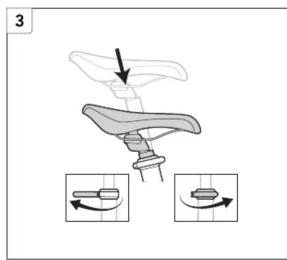



natural_image
Line drawing of a bicycle with a hand gesture indicating motion (no text or symbols)

natural_image
Diagram of a bicycle with motion arrows indicating rotation and change (no text or symbols)


natural_image
Diagram of a mechanical device with a rotating arrow indicating rotation (no text or symbols)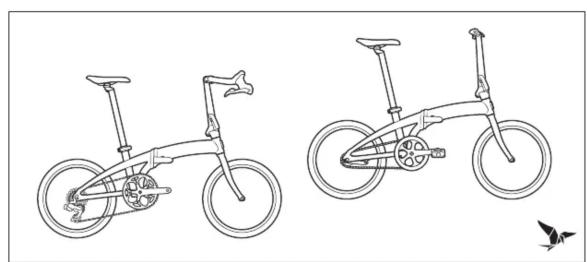
natural_image
Line drawings of two bicycle designs, one with a flat wheel and the other with a wide wheel and a side-mounted fan (no text or symbols)
Manual assistant
Powered by Anthropic
Waiting for your message
Product information
Brand : Tern
Model : Link Uno
Category : Bicycle