
EK4150K - Kitchen scale CAMRY - Free user manual and instructions
Find the device manual for free EK4150K CAMRY in PDF.


| Product Type | Kitchen Scale |
| Brand | Camry |
| Model | EK4150K |
| Color | Stainless Steel / Black |
| Dimensions (approx.) | 20.5 x 15.0 x 2.0 cm (8.1 x 5.9 x 0.8 in) |
| Weight (approx.) | 320 g (11.3 oz) |
| Power Source | 1 x CR2032 3V Lithium Battery (included) |
| Maximum Capacity | 5000 g (5 kg) / 11 lb |
| Accuracy | 1 g (0.05 oz) |
| Units | g, kg, lb, oz, ml (water), fl.oz (water) |
| Display | LCD, 4-digit, backlit |
| Material | Stainless Steel Platform, ABS Plastic Base |
| Functions | Tare, Auto-Zero, Auto-Off (after 2 min), Overload Indication, Low Battery Indicator |
| Operating Temperature | 0°C to 40°C (32°F to 104°F) |
| Care & Cleaning | Wipe with damp cloth; do not immerse in water; avoid abrasive cleaners |
| Safety | Keep away from water, heat sources, and children under 3 years; replace battery if leakage occurs |
| Spare Parts / Repairability | Battery (CR2032); no user-serviceable parts; contact support for repairs |
| Certifications | CE, RoHS |
| Package Contents | Scale, 1 x CR2032 Battery, User Manual |
Frequently Asked Questions - EK4150K CAMRY
User questions about EK4150K CAMRY
0 question about this device. Answer the ones you know or ask your own.
Ask a new question about this device
Download the instructions for your Kitchen scale in PDF format for free! Find your manual EK4150K - CAMRY and take your electronic device back in hand. On this page are published all the documents necessary for the use of your device. EK4150K by CAMRY.
USER MANUAL EK4150K CAMRY
■ AUTO SHUT OFF
Auto shut-off occurs if display shows '0' or shows the same weight reading for 2 minutes.

■ MANUAL SHUT OFF
To maximize battery life, always press ON/OFF aga in to turn off the scale after using.
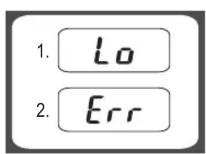
■ WARNING INDICATORS
- Replace new battery.
- Scale overload. Remove item to avoid damage. Max.Weight capacity is indicated on the scale.
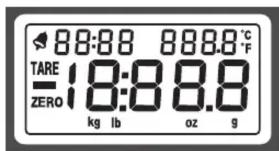
: Alarm
TARE : Tare Weight
: Negative Value
ZERO : Zero Weight
0000 : Alarm Timer
kg : Kilograms
g : Grams
lb : Pounds
oz : Ounces
°C / °F : Temperature

CLEANING AND CARE
- Clean the scale with a slightly damp cloth. DO NOT immerse the scale in water or use chemical/abrasive cleaning agents.
- All plastic parts should be cleaned immediately after contact with fats, spices, vinegar and strongly flavored/colored foods. Avoid contact with acids citrus juices.
- Always use the scale on a hard, flat surface. DO NOT use on carpet.
CAMRY®
ELECTRONIC KITCHEN SCALES
INSTRUCTIONS FOR USE
CE
[Non-Text]
EK-2A SERIES
BATTERY
1X9V (not included)
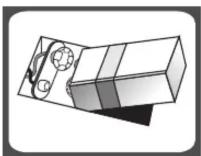
■ TO REPLACE BATTERY
Remove battery compartment cover and attach new battery onto the 9-volt battery snaps. Please take note to the polarity.
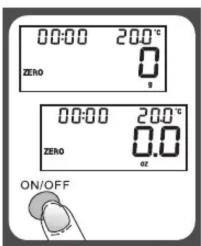
■ TO OPERATE SCALE
- Please put the scale on a hard and flat surface.
- Place bowl(if used) on the scale before turning on the unit.
- Press and release ON/OFF button to turn on the unit.
- Wait until LCD shows all information.

■ TO CONVERT WEIGHT UNIT
If the scale is with both measuring system of Metric (kilograms,grams) and Imperial (pounds,ounces), you can press UNIT to convert between two systems during the course of weighing.
■ "ZERO" OR "TARE" FUNCTION
To weigh different loads consecutively without removing loads from the scale. Put first Load on the scale, get weight reading. Press Z/T button to reset the LCD reading to "0" before adding next load. You can repeat this operation.

■ Condition 1: "ZERO" function When total sum of all loads on scale ≤4% of scale's max.weight capacity. (4%=80g when capacity is 2kg; 200g when capacity is 5kg)
LCD will show "0g" each time Z/T is pressed. Icon "ZERO" will show on lower left corner of LCD, indicating "ZERO" function is active. Max. weight capacity remains unchanged.
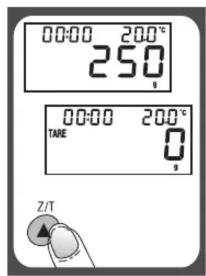
■ Condition 2: "TARE" function When total sum of all loads on scale >4% of scale's max.weight capacity. (4%=80g when capacity is 2kg; 200g when capacity is 5kg)
LCD will show "0g" each time Z/T is pressed. Icon "TARE" will show on upper left corner of LCD, indicating "TARE" function is active. Max. weight capacity is reduced by total weight of all loads.
■ TO SET ALARM TIMER

- Press T-SET to confirm and go to next digit.
- After setting time span, press T-SET to start counting down.
- Press any key to stop counting down.
- Press T-SET to clear time span.
- When timer counts down to "00:00", alarm will start "beeping" for 60 times and the scale will automatically shut off.
- Max.time span: 99:59
■ TEMPERATURE SENSOR
- Current temperature is shown at the higher right corner of LCD.
- Temperature range: 0\~+40°C
- Division: 0.5°C
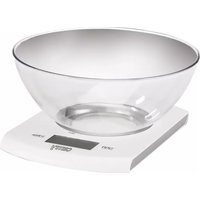
Brand : CAMRY
Model : EK4150K
Category : Kitchen scale