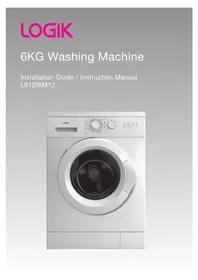
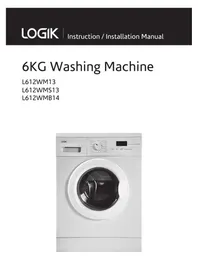
L612WD12 - Washing machine Logik - Free user manual and instructions
Find the device manual for free L612WD12 Logik in PDF.


| Product Type | Freestanding Washing Machine |
| Brand | Logik |
| Model | L612WD12 |
| Capacity | 6 kg |
| Maximum Spin Speed | 1200 rpm |
| Energy Efficiency Class | A++ |
| Dimensions (H x W x D) | 850 x 595 x 540 mm |
| Weight | 65 kg |
| Power Supply | 220-240 V, 50 Hz, 10 A |
| Rated Power | 2000 W |
| Water Connection | Cold water only, 3/4 inch thread |
| Programs | 15 programs including Cottons, Synthetics, Delicates, Quick Wash, Wool, Hand Wash, Rinse & Spin, Drain & Spin |
| Special Functions | Delay Start (up to 24 h), Child Lock, Pre-wash, Extra Rinse, Spin Speed Selection, Temperature Selection |
| Display | LED digital display with program status indicator |
| Drum Type | Stainless steel drum with gentle wave pattern |
| Noise Level (Wash/Spin) | 55 dB / 75 dB |
| Water Consumption per Cycle | Approx. 45 L (for standard cotton program) |
| Annual Energy Consumption | 175 kWh/year (based on 220 cycles) |
| Door | Front-loading, 180° opening, 30 cm porthole |
| Maintenance | Clean detergent drawer and filter regularly; check inlet hose for kinks; level the machine |
| Safety Features | Child lock, overheat protection, anti-flood system, door lock during operation |
| Spare Parts Availability | Parts available via Logik service centers; common parts like filters, hoses, belts |
| Repairability Index | 5.5 / 10 (based on user ratings) |
| Included Accessories | Inlet hose, drain hose, user manual, warranty card |
Frequently Asked Questions - L612WD12 Logik
User questions about L612WD12 Logik
0 question about this device. Answer the ones you know or ask your own.
Ask a new question about this device
Download the instructions for your Washing machine in PDF format for free! Find your manual L612WD12 - Logik and take your electronic device back in hand. On this page are published all the documents necessary for the use of your device. L612WD12 by Logik.
USER MANUAL L612WD12 Logik

Unpacking 5
Installing Your Washing Machine 6
Choosing the Right Location for Your Washing Machine 6
Moving and Installing 7
Installing the Noise Protection Board 7
Removing the Transit Bolts 7
Moving the Washing Machine from One Location to Another 8
Hose and Cable Lengths 8
Levelling the Washing Machine 9
Water Supply Hose 9
Water Drain Hose 10
Connecting to the Mains Supply 10
Product Overview 11
The Unit 11
The Control Panel 12
Preparation 13
Organising Laundry....13
Preparing Laundry 13
Adding Detergent and Softener 13
Selecting the Programme....14
Wash Setting 15
First Time Use....15
Standard Washing 15
Manual Soaking 15
Optional Functions 16
Super Wash Function 16
Power-Off Memory Function....17
Washing Machine Memorises....17
Removing Laundry....17
Switching Off 17
Important Information....18
Washing Delicates....18
Adding Delicate Laundry Items to the Drum....18
Which Detergent to Use....18
Tips for Hanging Delicate Items to Dry....18
If Clothing Shrinks in the Wash....18
How to Set the Key Lock ....19
Maintenance – Cleaning the Washing Machine 20
Cleaning the Drum....20
Cleaning the Exterior of your Washing Machine....20
Cleaning the Detergent Drawer....20
Cleaning the Door Seal and Window 20
Cleaning the Drain Filter 21
Preventing a Frozen Water Supply Hose....21
Cleaning the Filter Net of the Water Supply Hose 21
Hints and Tips 22
Troubleshooting 24
Error Code 24
Specifications....26
Product Fiche 27
Safety Warnings....28
Thank you for purchasing your new Logik Washer Dryer.
We recommend that you spend some time reading this installation/instruction manual in order that you fully understand all the operational features it offers.
Read all the safety instructions carefully before use and keep this installation/instruction manual for future reference.

Unpacking
Remove all packaging from the unit. Retain the packaging. If you dispose of it please do so according to local regulations.
The following items are included:
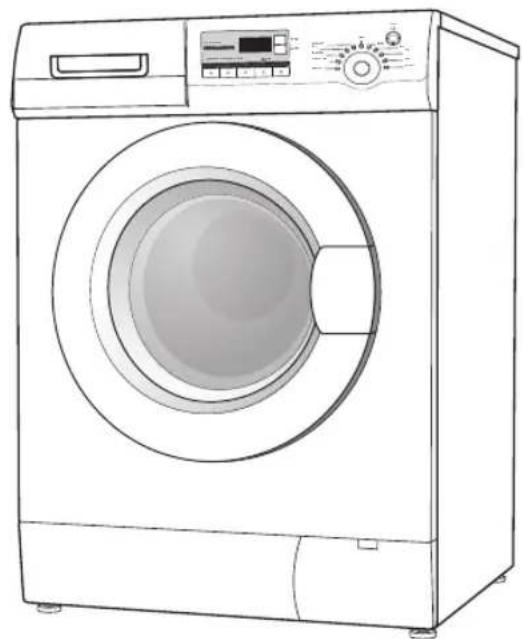
The Main Unit

This product has been wet tested to ensure correct operation. As a result some water may remain inside the unit. This is normal and safe. Remove any water droplets from the exterior if necessary.
Water Supply Hose
P.N.: 0020300158A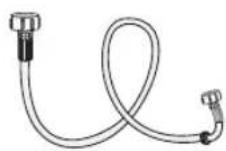
U-Shape Holder
P.N.: 00221123015002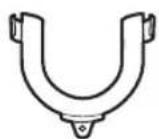
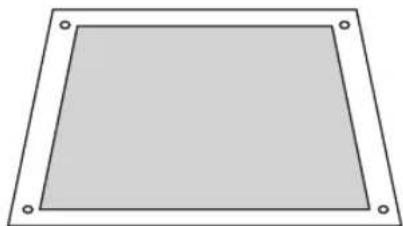
Noise Protection Board (includes the feather felt) P.N.: 00213400001800A
Cover Cap x 3
P.N.: 00221153000008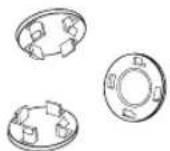
Instruction Manual P.N.: L612S_WD12-003

If items are missing or damaged please contact Partmaster (UK only). Tel: 0844 800 3456 for assistance.
Installing Your Washing Machine
Please read and follow the instructions carefully.
- In addition to the instructions mentioned here, special regulations of the relevant water and power supply companies may apply. If in doubt, have the washing machine connected by a qualified technician.
- The washing machine is heavy - caution when lifting it. Do not lift by projecting components (e.g. washing machine door).
- Warning: Frozen hoses may tear/burst. Do not install washing machine in outdoor areas or where there is a risk of frost.
- Lay hoses and cables in such a way that there is no risk of tripping over them.

An additional space of (150mm) is required at the rear of the washing machine. This is to allow enough space for the water hose and drain hose.
Choosing the Right Location for Your Washing Machine
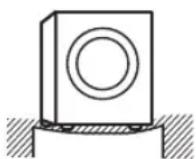
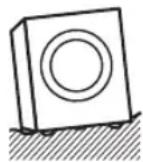
- Make sure there's enough space for your washing machine. • Install your washing machine on a flat, stable surface to avoid excessive vibrations and noise.
- Don't install your washing machine in direct sunlight or in a place where temperatures reach freezing.
Sloping surface, unstable, or bumpy surface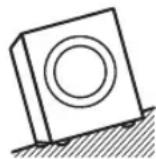

Two or more people are required to carry the washing machine.
- Start by tilting the washing machine backwards.
- One person should stand behind it, holding the rear of the top panel. The other person should grip the bottom feet at the front.
- Don't touch the door opening button while holding.
- Check that you have all the required accessories for installation.
- Entrust the installation of the washing machine to a qualified technician.

Moving and Installing

Two or more people are required to carry the washing machine and for any installation work.

Fix the Noise Protection Board onto the bottom of the machine BEFORE removing the transit bolts.
Installing the Noise Protection Board
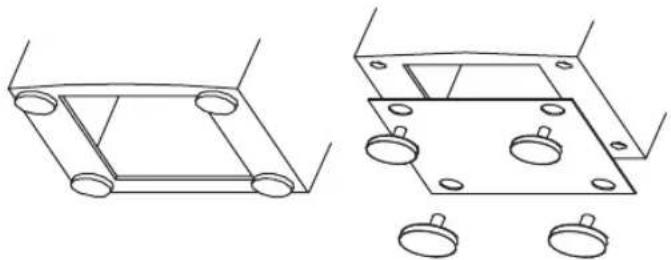
To reduce the noise produced by the washing machine, install the noise protection board.
- Lay down the machine. Unscrew the four feet.
- With the felt side of the noise protection board facing the inside of the machine, fit the board onto the bottom of the machine. The four holes in the board should correspond to the screw holes of the levelling feet.

Do not lean or push the machine towards its front.
- Screw the four levelling feet back on to fix the noise protection board to the machine.
- Stand the machine upright.
Removing the Transit Bolts
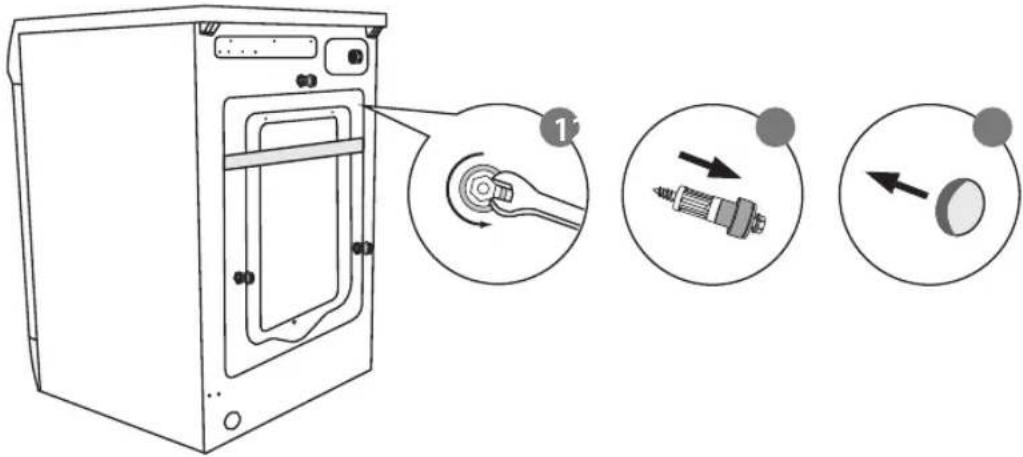
Three transit bolts keep the interior of the washing machine in place while it's being moved.
They need to be removed before installation. Use a spanner (not supplied) and follow the instructions detailed below.

Don't run the washing machine without removing the transit bolts, as this can cause excessive vibrations.
To remove the transit bolts:
- Use a spanner to remove the 3 transit bolts before removing the cross-bar. They are located at the rear side of the washing machine.
- Make sure the transit bolts and the entire cross-bar are removed.
- Push the three cover caps (included with your accessories) into the respective transit bolt holes.

You'll need the cross-bar and the transit bolts again if you move the washing machine in the future, so make sure you keep them in a safe place.
Moving the Washing Machine from One Location to Another
Before you move the washing machine:
- Shut off the tap and run the washing machine to drain the water. Drain any remaining water from the pump hose.
- Disconnect the mains cable.
- Attach the transit bolts.

Make sure transit bolts are fixed prior to moving the washing machine.
Hose and Cable Lengths
How to connect from the left side How to connect from the right side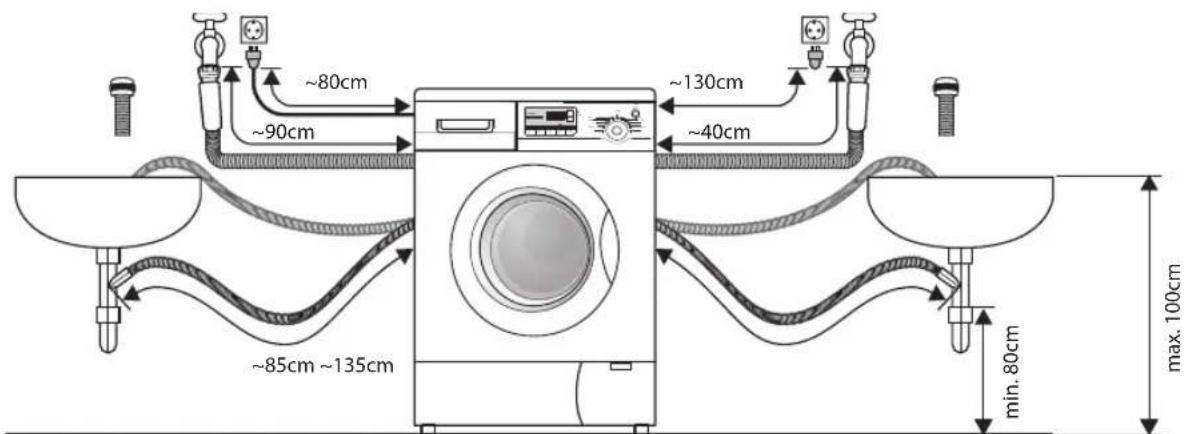
Levelling the Washing Machine
There are 4 levelling feet on the underside. They must be adjusted to make sure the washing machine is level.
- On each stand, loosen the lock nut by turning it clockwise with a spanner.
- Adjust all four feet in this way.
- Use a spirit level to ensure the washing machine is level.
- Tighten each lock nut by turning them anti-clockwise (towards the washing machine body), again using a spanner.
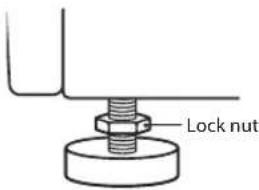
Ensure all four lock nuts are tightened securely. Check the feet are still bolted to the washing machine - if they're unbolted, the washing machine will move around.
Water Supply Hose
Points to remember
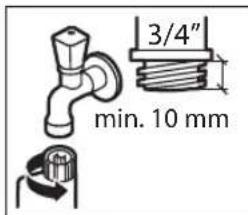
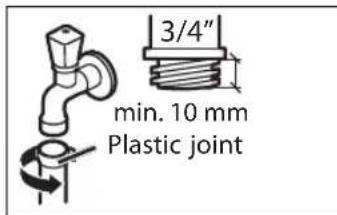
• Follow the instructions in this section to avoid water leaks. - Don't connect the hose to a combination tap. - Don't twist, squash, modify or cut the hose. - Optimum water pressure in the main pipe is 0.03 MPa - 1.0 MPa. If the water pressure is set higher than this, you will need to install a depressurising valve. Water-flow from the tap should be more than 5 litres per minute. If you're unsure, ask a qualified technician to connect the hose. • This unit must only be connected to the cold water mains using the new water inlet hose provided.
Connecting the Water Supply Hose
- Attach the hose to a tap, and tighten the plastic joint by hand.
- Open the tap slowly and check that there are no leaks around the joint.

The joint is subject to water pressure.
Water Drain Hose
Points to remember:
- Don't twist, pull out or bend the drain hose.
- Your washing machine should be no more than 135cm from the drain outlet.
Draining to a sink or wash-basin
- Secure the drain hose in position, so it can't drop out of the basin.
- Don't block the basin's drain outlet, and make sure that the drainage through it is sufficient.
- Don't let the tip of the drain hose dip into the drained water, as this can cause the water to flow back into the washing machine.
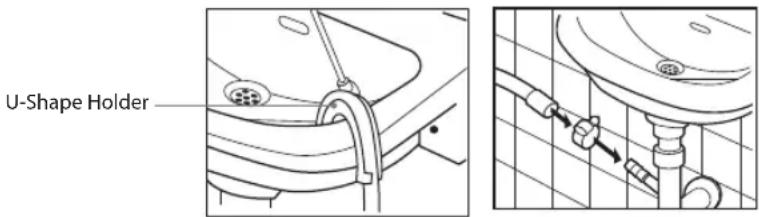
Draining to a wash-basin Draining to a drain hose
Connecting to the Mains Supply
For your safety:
- Do not use a mains plug adapter or extension cable.
- If the mains cable or mains plug are damaged, stop using them and call a qualified technician for assistance.
Installation Check List
By now, you should have installed the washing machine.
Let's go through the checklist to ensure that the installation has been done correctly!
| Questions Checkbox | ||
| Transit bolts - Have you removed them and attached the cover caps properly? | ||
| 4 levelling feet | Four Adjustable Stands - Are they bolted securely to the washing machine? | |
| Four Stand Cushions - Are they standing flat? | ||
| Power supply - Is the household dedicated mains socket, fully rated at AC220V to 240V independently? | ||
| Location - Is your washing machine on a flat, stable surface? Does it run without vibrating? | ||
| Water Supply Hose - Is it free from leaks and is the water supply normal? | ||
| Water Drain Hose - Is it free from leaks and is it draining normally? | ||
The unit
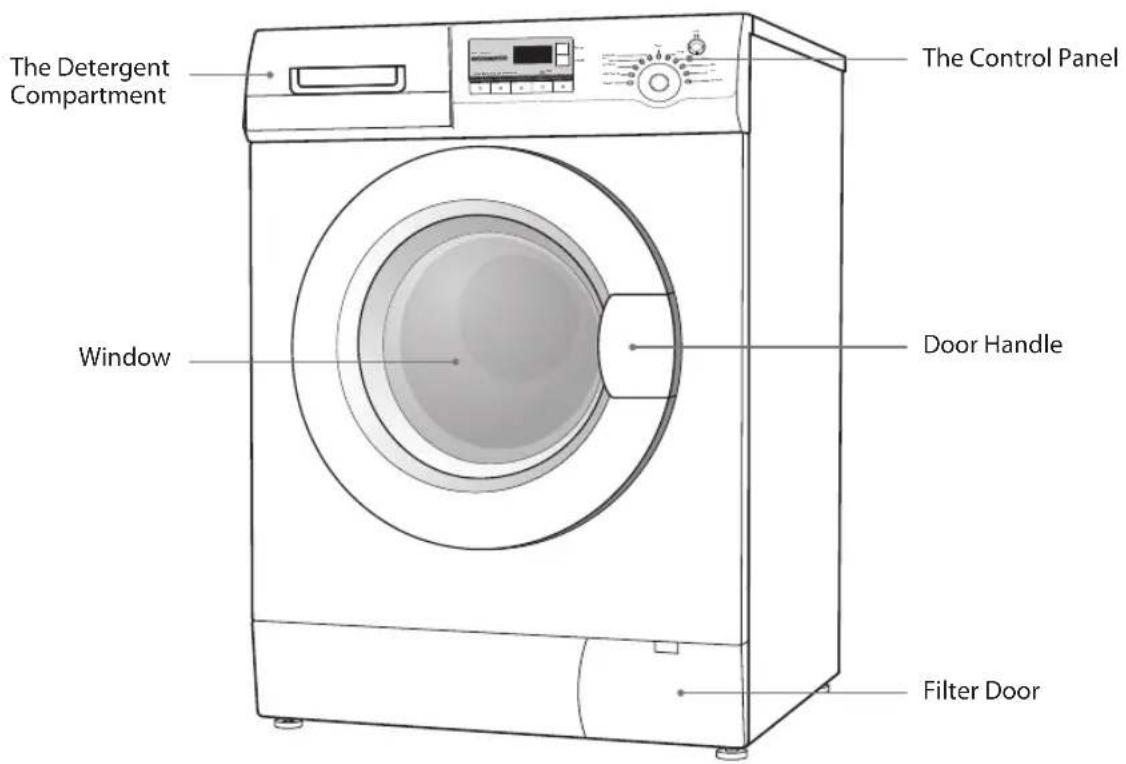
The Control Panel
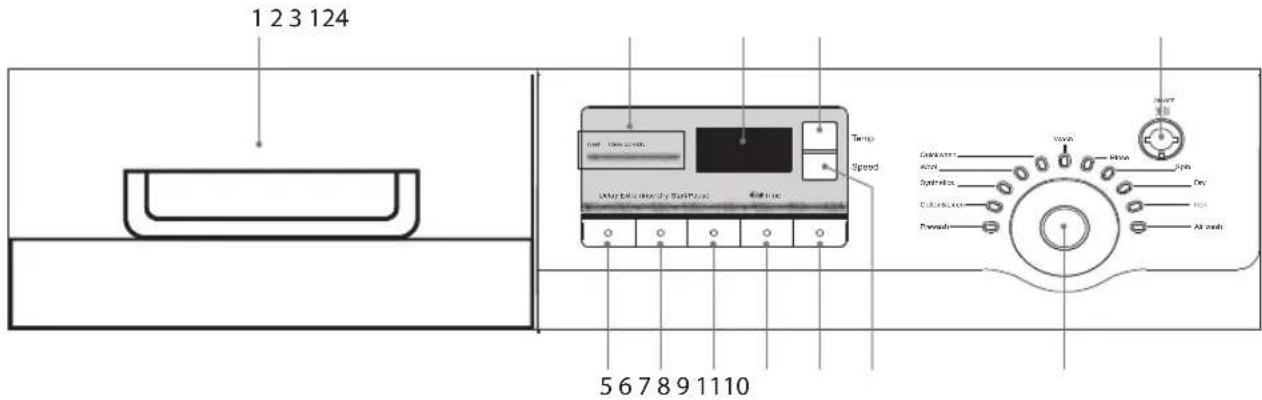
1. The Detergent Compartment
2. Washing Indicator
• Indicates the washing process of the selected program.
3. Display Window
- Displays the wash programme's finishing time, temperature or speed setting messages.
- LOCK will light up when the child lock function is selected.
4. Temperature Button
- Selects the required washing temperature.
5. Delay Button
- Presets the wash timer and delays the starting time by up to 24 hours. • Each press of this button increases the delay start time by 1/2 hour intervals.
6. Extra Rinse Button
- Activates additional rinse operation.
7. Dry Button
• Dry the laundry after last spinning cycle.
8. €0 Time Button
- Sets the required washing load.
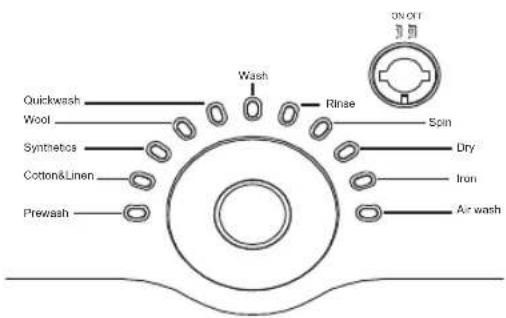
- Continue to press this button the display of load may cycle in the preset range: Prewash, Cotton, Synthetics, Dry, Quickwash, Wash, Rinse, Spin.
9. Start/Pause Button
- Press to start your wash.
- Press while in operation to pause your wash.
10. Speed Button
Adjusts the spin speed during the drying stage.
11. Programme Dial
Different wash programmes can be selected according to your wash requirements.
12. ON/OFF Button
Switches the washing machine On or Off.
Read the following to understand how best to prepare your laundry for washing.
Organising Laundry
- Read the washing label on each garment to help you sort your washing into different loads.
- Sort the laundry by colour, type of fabric and by how soiled it is.
This will help you choose the correct programme and temperature for each wash.
Do not exceed the maximum load! Be careful not to trap any items of clothing.
Preparing Laundry
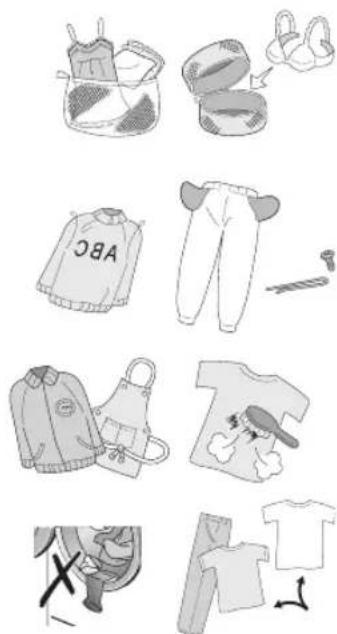
• Treat stains before washing. - Some items should be put into a cleaning net before going into the washing machine, e.g., bras with metal wires, tights, and lace clothing, to prevent damage. Check that pockets do not contain any objects which may damage your clothes and the washing machine. - Tie up any loose strings on laundry, close zippers, and reverse clothing with zips inside out. - Remove any surplus hair, animal fur, sand, and other materials with a brush before washing. • If clothes have raised fabric, turn them inside out. • Clothes that are not color fast should be washed separately. - Insert your clothes into the washing machine. Close the washing machine door. Ensure that you do not trap any items of clothing between the loading door and the rubber seal.
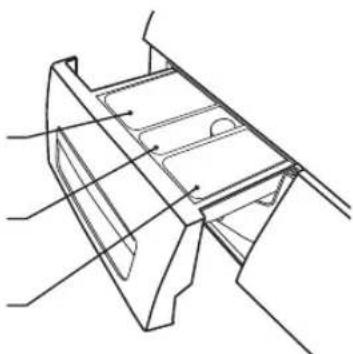
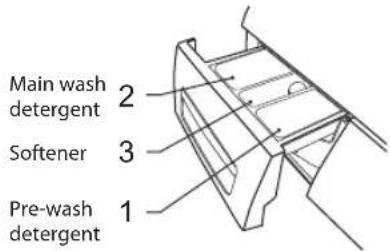
Adding Detergent and Softener
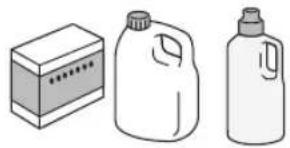
- Add detergent into the appropriate dispenser. • Apply softener before you start washing to prevent static.
- Apply detergent and softener according to the washing amount, the soiling level, the water hardness in your area, and the manufacturer's instructions of these products.

Dilute viscous fabric softener and fabric conditioner with water. Prevent blockage of the overflow. Do NOT exceed the MAX. level mark.
Main wash detergent
Softener
Pre-wash detergent
2
3
1
- Do not use the washing machine when the detergent drawer is removed. It may cause a water leak or it may not work normally.
- If you forget to add detergent and the wash programme has begun, press the Start/Pause button, then the ON/OFF button. This will cancel the previous wash programme.
- Turn on the machine again then select the SPIN cycle and press the Start/Pause button. After approximately 3 minutes, the water in the machine will have drained away. Press the Start/Pause button, then the ON/OFF button to cancel the SPIN cycle.
- Add detergent as normal, turn on the machine, select your desired wash programme and press the Start/Pause button.
- To prevent powder detergent staying in the drawer, dry the inside of the drawer with a cloth. Make sure the powder isn't lumpy when you add it into the drawer.
- If the rinse cycle isn't removing all the detergent from your wash, use less detergent.
- Softener should not exceed the MAX level in the compartment.
- Wash out unused softener with a splash of water or a damp cloth after the programme has finished.
Selecting the Programme
Here are the available programmes, additional functions and option settings.
Spin speed can be selected separately for certain programmes.
| Programme Description | Description | Preset Setting Optional Function | |||||||
| Temperature | Default Spin (rpm) | Approximate Time (Min) | Delay | Extra rinse | Dry | Eco Time | |||
| Prewash | Cold to 90°C | Heavily soiled laundry. 40°C 1000 133 | √√ | √√ | |||||
| Cotton & Linen | Cold to 90°C | For average soiled cottons, household linens and work / play clothes. | 40°C 1000 | 133 | √√ | √√ | |||
| Synthetics | Cold to 60°C | For average or lightly soiled garments for mixed cotton, linen and man-made fabrics. | 40°C 800 | 72 | √√ | √√ | |||
| Wool | Cold to 40°C | For machine washable woolens and other items marked with hand wash care label. | Cold 600 | 60 | √ | √ | X | X | |
| Quick Wash | Cold to 40°C | For lightly soiled cottons, household linens and work / play clothes. | Cold 800 | 12 | √ | X | √ | √ | |
| Wash | Cold to 60°C | For average soiled cottons, household linens and work / play clothes. No prewash or spin cycle. | 40°C - 61 | √ | X | X | √ | ||
| Rinse Sperate rinse procedure. Cold 800 24 X | √√ | √ | |||||||
| Spin | Sperate spin procedure. | Cold 1000 | 11 X X | √ | √ | ||||
| Dry | The laundry is completely dry when programme is finished. | - | -150 | XX | X | √ | |||
| Iron | The laundry has less wrinkles when programme is finished. | - | -60 X | XX | X | ||||
| Air Wash (Freshen) | The laundry is freshened up and may be clean when the programme is finished. | - | -30 X | XX | X | ||||

- When a programme is running, you can add optional functions to it, but you cannot change the wash temperature.
- To change the programme, press the Start/Pause button, then the ON/OFF button to turn off the machine off. Wait a few seconds, turn on the machine, select your desired wash programme.
- The buttons beep when pressed. This helps ensure you've chosen the right settings.
- Times depend on the programme and temperature settings selected.
- Times may be longer if the laundry in the drum needs to be balanced.
- If the Dry, Iron or Air programmes are selected, their corresponding Optional Function button LED will light up. There are no optional functions for these three (3) programmes.
First Time Use
Before the first use, run the machine empty with detergent using the cotton 90°C cycle. This ensures any effects from the manufacturing process are removed.
Standard Washing
- Pull the door handle and put the laundry in the drum. Make sure no laundry gets caught in the door.
- Close the door. Press the ON/OFF button to switch on the washing machine. Turn the Programme Dial to select your wash programme. It will display the operating time.
- Select any Optional Functions.
- Add detergent into the detergent drawer. The quantity of detergent will depend on the amount of laundry, the degree of soiling and the water hardness. Use the amount of detergent suggested on the packaging.
- Press the Start/Pause button to start the washing.

- For pre-wash programme, detergent should be added to both compartments 1 and 2.
- For other programmes, DO NOT add detergent to compartment 1.
- The washing machine will beep and the display window will show the remaining running time. "End" is displayed when the programme is complete.

If the door is locked and you switched the washing machine off - or if there's a power cut - it will stay locked for 1 minute until you turn it back on again.
Manual Soaking
To manually soak your laundry, press the Start/Pause button after 10 minutes of the wash programme. The washing machine will suspend the laundry to soak in the water. After your desired soaking time, press the Start/Pause button, the machine will continue the interrupted programme.

When you start the washing machine, the indicator flashes to confirm the function is in progress. Once the washing machine has started, you can't change the programme.
Optional Functions
Depending on the programme you select, you can combine different optional functions. You may need to press the function buttons more than once to get all the functions you want.
| Optional Function When you want to | How it works | |
| Water temperature(Press the Temp button) | Adjust the water temperature. | It increases / decreases the water temperature. |
| Spin speed(Press the Speed button) | Adjust the spin speed.(0, 400, 600, 800,1000, 1200) | Spin speed changes. |
| Delay(Press the Delay button repeatedly to select the desired delay time and then press the Start/Pause button to start countdown)The delay time must be longer than the programme time, otherwise, the washing machine will start he wash program directly. | Delay the programme starting time. | Delay the programme start time. |
| Extra Rinse(Press the Extra rinse button) | Extra Rinse. An additional rinse operation will be activated. | |
| Dry(Press the Dry button) | Dry the laundry after last spinning cycle(max. load 3kg). | Dry the laundry after last spinning cycle (max. load 3kg). |
| Eco wash(Press the Time button) | Select load. Press once to set the required washing load. Press the button repeatedly to select to display of load may cycle in the preset range: Prewash, Cotton, Synthetics, Dry, Quickwash, Wash, Rinse, Spin.(The weight will be shown on the display window. “L--1” means clothes are less than 1kg, “L--A” means clothes are almost full of the roller. | |
Super Wash Function
Super wash function can only be applied to cotton under the condition of 60°C temperature and clothes are almost full of the roller ("L--A" level). If the program, temperature or load is changed to another kind, the super wash function would be ineffective.
- Turn the Programme Dial to select Cotton programme.
- Press the Temp button repeatedly to select 60°C.
- Press the €0 Time button to select "L--A".
- Press and hold the Extra rinse button for 3 seconds. The display window will show 3:30.
- Press the Start/Pause button to start washing.

If the program, temperature, or load is changed to another kind, the super wash function would be ineffective.
Power-Off Memory Function
This machine has a power-off memory function. In case of an abrupt power failure or if the power must be cut off during a programme cycle, the current settings will be saved. Once power supply resumes, press the Start/Pause button to continue the preset operation.
Washing Machine Memorises
The washing machine memorises the previous wash settings for each programme. Press the Start/Pause button to change the settings before starting the washing machine.
Removing Laundry
- Open the washing machine door and remove your laundry.
- Remove any foreign objects to avoid the risk of rusting.
- Leave the door and detergent drawer open so that residual water can evaporate.

Be careful not to burn yourself while handling your clothes or touching the inside of the drum after a high-temperature wash.
Switching Off
Press the ON/OFF button to switch off the washing machine.
Washing Delicates
These programmes rock the drum gently for best results on delicate laundry.
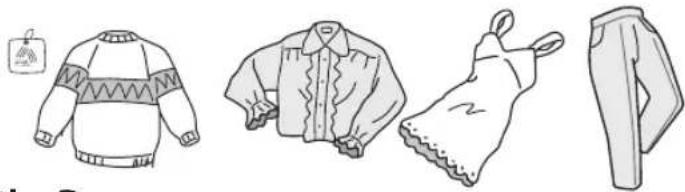
• Tips for Wool programme:
Approximate Weights:
- Wool sweater (400g)
- Blouse / under garment (200g)
- Trousers (400g)
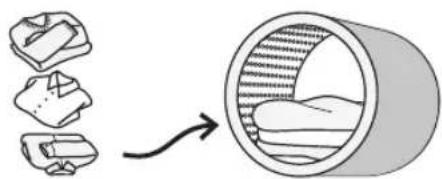
Adding Delicate Laundry Items to the Drum
- Close zips and buttons.
- Add items one by one on top of each other.
- Don't overload the drum as it may cause excessive vibrations or damage the washing machine.
Which Detergent to Use
• For woolen items, use a mild liquid detergent. Other detergents may damage your woolen clothes. - With Wool or Silk programmes, you may need to use an extra rinse cycle to remove excess detergent from your clothes. This depends on the amount of detergent you use, and the amount of foam that develops in the main wash cycle. - To do this, once the programme has finished, select the "Wool" programme using the Programme Dial and press the Start/Pause button to rinse again.
Tips for Hanging Delicate Items to Dry
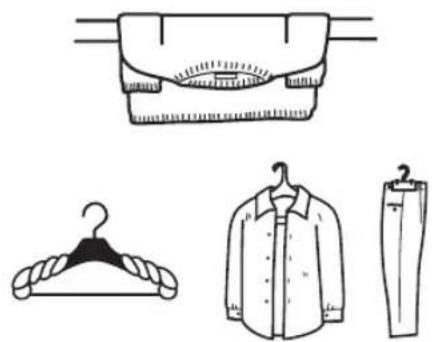
- Hang white or light colour clothes, and woolen and nylon clothes away from direct heat or sunlight. • After washing, smooth creases and folds out of woolen and nylon clothes and return them to their normal shape before hanging in the shade.
- Use a hanger for shirts, blouses and trousers. You can wrap a towel around the hanger to fit the shoulder width of your clothes, so they retain their shape as they dry.
- Spread woollen items such as sweaters out to dry.
If Clothing Shrinks in the Wash...
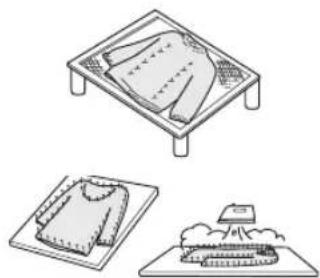
- You can spread the item out to its original size on an ironing board, and use dress pins to hold the size and shape. Then use an iron to steam the item and leave it to dry.
How to Set the Key Lock
The Key Lock prevents children stopping programmes accidentally. It only locks the control buttons not the Programme Dial.
- Switch the washing machine on.
- When the washing machine is operating, press and hold the Delay button and Start/Pause button at the same time for 5 seconds to set the keylock. You will hear an audible sound. The lock sign will show on the display window.
- Press the buttons in the same way to unlock the keylock. You will hear an audible sound.
Cleaning the Drum
Any rust left inside the drum by metal articles must be removed immediately with chlorine-free detergent. Never use steel wool.

Don't put laundry in the washing machine during the drum cleaning.
Cleaning the Exterior of your Washing Machine
- Clean the outside of your washing machine with a soft cloth and mild detergent such as kitchen detergent.
- Don't splash water over the washing machine.
- Do not use cream cleansers, thinners or products containing alcohol or kerosene.
Cleaning the Detergent Drawer
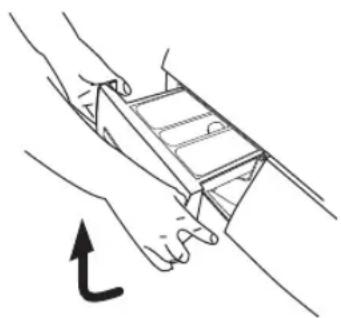
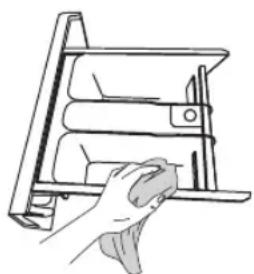
- Remove the detergent drawer by slightly lift up and pulling the main wash detergent compartment.
- Wash out old detergent from the drawer with water. (Use a cloth to clean the washing machine.) Residue detergent soon builds up if you don't clean the drawer regularly, and can develop mould.
Cleaning the Door Seal and Window
- Wipe the window and seal after each wash to remove lint and stains. If lint builds up, it can cause leaks.
- Remove any coins, buttons and other objects from the door seal after each wash.
Cleaning the Drain Filter

Be careful not to burn yourself while handling your clothes or touching the inside of the drum after a high temperature wash.
Before cleaning the drain filter, switch off and unplug the washing machine.
- Use a coin to open the Service Flap.
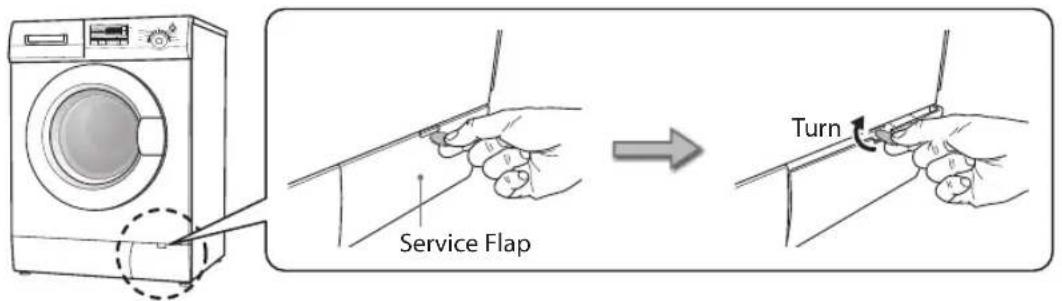
- Carefully loosen the drain filter. Water may drain out - this is normal.
- Turn it anticlockwise, unscrew the filter and remove it.
- Remove any lint and debris before carefully replacing the filter.

- Turn it clockwise and screw the filter back in place.
Preventing a Frozen Water Supply Hose
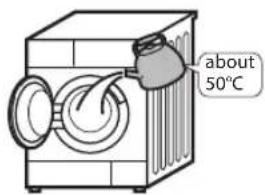
If your washing machine is delivered in freezing weather conditions, leave it at room temperature for 24 hours after you've set it up before using it. This ensures there's no ice blocking the water supply hose. If your water supply hose freezes, add 2 or 3 litres of warm water to the drum. Then run a "Spin" only programme.
Cleaning the Filter Net of the Water Supply Hose
- Turn the water supply off at the tap.
- Close the washing machine door and select "Drain" programme and press the Start/Pause button.
- When finished, turn the power off. Loosen the water supply hose and remove it from the washing machine.
- Use a small brush, e.g. a toothbrush to clean the filter of the water supply hose.
- Re-connect the water supply hose to the washing machine and turn the tap back on, checking for leaks.
| Problems Solutions | |
| Buttons don't work • Key lock is activated. Deactivate the key lock function.The washing machine is operating a wash programme.The Programme Dial was turned to a different programme. | |
| Door doesn't open • Door lock may be active.The water temperature or level could be too high. | |
| Unusual odour • Rubber parts may give off a smell when you first start using the washing machine, but this goes away over time.You should wash the drum once a month. | |
| You can't see any water This is normal: The water level is below the window. | |
| There's no water going into the washing machine | The water tap might be turned off.The water hose or water-supply hose may be frozen.Your water supply may be disrupted.The water-supply valve filter may be clogged. |
| There's only a small amount of water | If you have paused the programme and you restart, the washing machine may drain some water.Don't pour water in through the door. |
| Water adds up during washing | This is normal: water is supplied automatically as the level lowers, and with heavy loads the water may fill up repeatedly. |
| Water drains away during washing | This is normal: water often drains and refills to wash off excess foam.(This is called foam detection.) |
| There's no water going into the washing machine during rinse operation | Before rinsing, the washing machine spins to drain water remaining from the wash. The water will fill up after that. |
| Rinsing begins before the spinning finishes | If your laundry has collected to one side of the drum, rinsing will start automatically to correct the imbalance.If there's excess foam after washing, water may drain and refill to wash it off. (This is called foam detection.) |
| During the spin-dry, the drum stops and rotates several times | This is normal. The washing machine has detected an unbalanced load and is trying to correct it. |
| Foam and water remain in the door or door seal | Although foam and water may remain, it does not have any influence on the performance of a rinse. |
| Spin starting is repeated. This is normal. Although spin starting may be repeated, it is a function made to spin quietly. | |
| There's not much foam • This can happen if you've put powder detergent directly into the drum – you must put it in the detergent drawer.The amount of foam can vary, depending on the temperature, level and softness of your water.You may not be using enough detergent.You may be using a reduced-foam type of detergent.Heavily soiled laundry can reduce the amount of foam.Larger loads of laundry can also reduce the amount of foam. | |
| There's a lot of foam • The amount of foam can vary depending on the temperature, level and softness of your water. • You may have used too much detergent. • The type of detergent you use could cause excess foam. | |
| There's no foam • This can happen if you've put powder detergent directly into the drum – you must put it in the detergent drawer. • If your laundry has collected to one side of the drum, water will be supplied automatically to correct the imbalance – and this will prevent the foam wash. • The amount of foam can vary, depending on the temperature, level and softness of your water. | |
| Fabric softener overflows • You may have exceeded the MAX level in the softener drawer. • You may have spilt the liquid by closing the softener drawer too sharply. | |
| There's a residue of powder detergent at the end of the wash This can happen if you've put powder detergent directly into the drum – you must put it in the detergent drawer. | |
| There's an unusual noise or vibration • Check there's nothing metal in the drum. • Make sure the transit bolts used in transportation have been removed. • Check the washing machine is on a flat, stable surface. | |
| There's a noise when the water drains away This is normal, it's the pump starting and stopping. | |
| The electricity supply cuts out while the washing machine's on The washing machine will stop, and won't start by itself when the power comes back on. You'll need to select a programme and start it again. | |
| A circuit breaker trips the electricity supply • The washing machine will stop, and won't start by itself when you reset the breaker. • You'll need to find out what caused the breaker to trip, and put this right. Then reset the breaker, turn your electricity supply back on, and start the washing machine again. | |
| The water supply is disrupted When the water comes back on, it may be impure at first. You'll need to disconnect the water-supply hose and drain any impure water through the tap before using your washing machine again. Remember to re-connect the water supply hose first. | |
| Troubles Reason Solution | ||
| Washing machine cannot start up | Check that the door is closed tightly.Check that the power plug is inserted correctly.Check that the water supply tap is open.Check that the ON/OFF button is pressed.Check that the Start/Pause button is pressed. | |
| Water leakage | The connection between inlet pipe or outlet hose and tap or washing machine is not tight.Drain pipe in the room is blocked. | Check and fasten water hose connections.Clean up drain hose and ask a qualified technician to repair it if necessary. |
| Water overflows from the bottom of the machine | The inlet pipe is not connected firmly.Outlet hose has water leakage. | Fix the inlet hose.Replace the drain hose. |
| Indicator or display does not light | Power is disconnected or the unit is turned off. | Check that the power is shut off and the power plug is connected correctly.Check the mains plug and fuse.Check that the washing machine is turned on. |
| Washing effects are not good | The clothes are too dirty.Insufficient detergent quantity. | Select a proper wash programme.Add the proper detergent quantity according to the instructions on your detergent packaging. |
Error Code
When the error code is on, the washing machine will sound. If a fault cannot be rectified or a repair is required, then:
- Press the ON/OFF button to switch off the washing machine and then pull out the mains plug. • Turn off the tap and call for service.
| Display Fault What to do: | ||
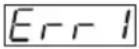 | Looking door function malfunction. | Reclose the door. |
 | Draining malfunction. | Rinse the filter of draining pump, examine whether the drainpipe is blocked. |
 | Temperature pickup malfunction. | Ask a qualified technician to repair it. |
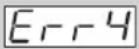 | Heating malfunction (display after procedure operation). | Ask a qualified technician to repair it. |
 | Water intake malfunction. | Check the water pressure is too low or water supply is cut off. |
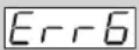 | Drying and heating malfunction. | Ask a qualified technician to repair it. |
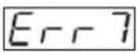 | There is a lot of foam in the washing machine or motor failure. | Select and run a programme to fill and then drain the washing machine or ask a qualified technician to repair it. |
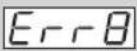 | Water overflow. Ask a qualified technician to repair it. | |
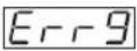 | Drying temperature sensor malfunction. | Ask a qualified technician to repair it. |
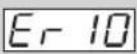 | Water level sensor malfunction. | Ask a qualified technician to repair it. |
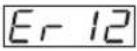 | Drying water level sensor abnormality. | Check whether the clothes are dried or not, and whether there is water in the washing machine. Dry it again after the drying process. |
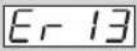 | Dryer error. Ask a qualified technician to repair it. | |
 | Washing machine has an unbalanced load protection function.When unbalanced weight is greater than allowable maximum, the washing machine will not spin and will run at a low speed to avoid abnormal vibration and noise. | In case washing 1 piece of laundry (carpet, bed sheet, table sheet, etc) make it symmetrical inside the drum.Lower the wet weight of laundry pieces by wringing manually and placing them back in the drum in symmetrical position.Take out and then reposition the laundry pieces inside the washing machine in a more balanced position on the inner wall of the drum.Add 1 or 2 pieces of laundry into the drum to reduce the unbalanced load effects.Restart the spin cycle by choosing Spin programme.In case the failure persists, please ask a qualified technician to repair it. |
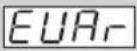 | Communication malfunction. | Ask a qualified technician to assist with repairs. |
| Model L612WD12 / L612SWD12 | |
| Rated Voltage 220 - 240 V ~ | |
| Rated Frequency 50Hz | |
| Maximum Energy Rated Power Input 2000W | |
| Heating Energy Rated Power Input 1000W | |
| Dimensions of the Product H=85cm, D=59cm, W=59.5cm | |
| Weight of the Product 82 kg | |
| Maximum Mass of Dry Cloth 3kg | |
| Pressure of Tap Water (0.03 ≤ p ≤ 1) Mpa |
Features and specifications are subject to change without prior notice.
Rated capacity: 6 kg
Energy efficiency class: C
EU Ecolabel: N/A
Energy efficiency class is "C", on a scale of A (most efficient) to G (least efficient).
Maximum spin speed: 1200 rpm
Airborne acoustical noise (spinning): 71 dB
Airborne acoustical noise (standard 60°C): 54.2 dB
Airborne acoustical noise (drying): 56.1 dB
Washing, Spinning & Drying:
• Energy consumption of complete operating cycles: 5.76 kWh • Energy consumption per year based on 200 times of complete operating cycles: 1152 kWh • Water consumption for complete cycles (litres): 156 L • Water consumption per year based on 200 times of complete operating cycles: 31200 L
Washing & Spinning:
• Energy consumption: 1.17 kWh • Energy consumption per year based on 200 times of complete operating cycles: 234 kWh • Water consumption based on standard 60°C cotton washing programme: 56 L • Water consumption per year based on 200 times of complete operating cycles: 11200 L
Washing Only:
- Washing performance class is "A", on a scale of A (higher) to G (lower).
- Washing capacity based on standard 60°C cotton washing programme: 6 kg
- Washing time based on standard 60°C cotton washing programme: 165 minutes
Drying Only:
• Drying efficiency based on standard 60°C cotton washing cycle: 0.3% • Drying capacity based on standard "dry cotton" drying cycle (kg): 3 kg • Drying time based on standard "dry cotton" drying cycle: 138 minutes - Drying efficiency is expressed as the water remaining after spin (%) (as a proportion of dry weight of wash).
For your continued safety and to reduce the risk of injury or electric shock, please follow all the safety precautions listed below.
WARNING!
- If you will not be using the washing machine for a while such as when you go on holiday, turn off the water supply to the washing machine. This is particularly important if there is no drainage around the washing machine.
If the water supply is left on, water pressure may build up and cause a leak.
General Use
- Do not install your washing machine anywhere that is damp or exposed to the weather. If you do, it may cause an electric shock, fire, failure or deterioration.
- Do not pour water directly onto any part of the washing machine. It may cause a short circuit or electric shock.
- Keep burning objects such as candles or cigarettes, away from the washing machine. They may cause a fire or damage.
- Keep flammable substances well away from the washing machine – for example kerosene, gasoline, benzene, paint thinner and alcohol, or clothing soaked with these. They may cause an explosion or a fire. • This washing machine is only suitable for washing textiles labelled washing machine washable.
- Transit bolts are used to transport the washing machine. You should remove these using a spanner or similar tool before you install the washing machine. If you do not, it will cause strong vibrations when the washing machine is spinning.
- Do not connect the washing machine to hot water. The washing machine works with cold water.
- Before you start using the washing machine, turn the tap on to check that the hose is properly connected. If it's not, there may be a water leak.
- Do not apply pesticide, hair spray or deodorant to the washing machine.
- Do not put any electrical equipment near the washing machine – for example a TV, radio or battery charger.
- Do not put too much laundry or detergent into the washing machine. It may cause washing machine troubles.
- Be careful not to get your laundry caught in the door when you close it. This could cause a water leak or damage your laundry.
Power Source and Cable
- Use an independent household dedicated mains socket, fully rated at AC 220V to 240V. If the washing machine is plugged in with other appliances, it may overheat and cause a fire.
- Make sure the mains plug is pushed firmly in the socket. A loose connection may overheat and cause electrical shock or a fire.
- Check the mains lead and mains plug for any damage. If the mains cable is damaged, it must be replaced by the manufacturer, its service agent or similarly qualified persons in order to avoid a hazard. • Unplug the mains lead when cleaning the washing machine.
- Do not touch the mains lead or mains plug with wet hands. It may cause an electric shock.
- Check the mains plug regularly for dirt. If dirt accumulates on the mains plug, it could cause a fire. To prevent this, unplug the cable and clean the mains plug with a dry rag.
- If you disconnect the mains plug, hold onto the mains plug not the cable. Pulling the cable may cause an electric shock or a fire.
- Do not use a mains plug adaptor or extension cable. It may overheat and cause a fire.
- Make sure your home voltage matches the voltage displayed on the washing machine. If you are not sure, contact an electrician.
To Prevent Injury
- Do not climb on the washing machine. You may hurt yourself or damage the washing machine.
- When opening and closing the door, ensure you keep fingers away from the door hinge, or this could lead to injury.
- Check your washing for objects such as nails, pins, coins, clips, etc. They could damage your laundry or the washing machine.
- Do not wash, rinse, or spin waterproof sheets or clothing. These may cause vibration or washing machine failure during spin-drying, which could lead to injury, damage to the washing machine, or damage due to water leaking.
- Be careful when draining hot water or any detergent from the drum. To prevent an injury.
- Do not dismantle, repair, or modify the washing machine. The washing machine could malfunction and cause a fire or injury.
- This appliance is not intended for use by persons (including children) with reduced physical, sensory, or mental capabilities, or lack of experience and knowledge, unless they have been given supervision or instruction concerning use of the appliance by a person responsible for their safety. Children should be supervised to ensure that they do not play with the appliance.
- Do not touch the laundry inside the washing machine until the drum has completely stopped. Even if the drum is spinning at low speed, it can cause an injury. Take particular care of children in this respect.
- The appliance is to be connected to the water mains using new hose-sets, and old hose-sets should not be reused. The ventilation openings in the base of the washing machine must not be obstructed by a carpet.

IT IS HAZARDOUS FOR ANYONE OTHER THAN AUTHORISED SERVICE PERSONNEL TO CARRY OUT SERVICING OF REPAIRS WHICH INVOLVE THE REMOVAL OF COVERS.

TO AVOID THE RISK OF AN ELECTRICAL SHOCK, DO NOT ATTEMPT REPAIRS YOURSELF.
| NOTE: If you require a replacement for any of the items listed below, please quote their corresponding part numbers: | |
| Replacement Part Part Number | |
| Water Supply Hose 0020300158A | |
| U-Shape Holder 00221123015002 | |
| Noise Protection Board 00213400001800A | |
| Cover Cap 00221153000008 | |
Visit Partmaster.co.uk today for the easiest way to buy electrical spares and accessories. With over 1 million spares and accessories available, we can deliver direct to your door the very next day.
Visit www.partmaster.co.uk or call 0844 800 3456 (UK customers only). Calls charged at National Rate.
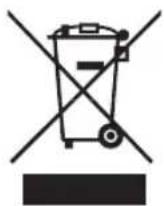
This symbol on the product or in the instructions means that your electrical and electronic equipment should be disposed of at the end of its life separately from your household waste. There are separate collection systems for recycling in the EU.
For more information, please contact the local authority or your retailer where you purchased the product.


- UNPACKING
- INSTALLING YOUR WASHING MACHINE
- MOVING AND INSTALLING
- PRODUCT OVERVIEW
- PREPARATION
- WASH SETTING
- IMPORTANT INFORMATION
- MAINTENANCE – CLEANING THE WASHING MACHINE
- THANK YOU FOR PURCHASING YOUR NEW LOGIK WASHER DRYER
- PLEASE READ AND FOLLOW THE INSTRUCTIONS CAREFULLY
- CHOOSING THE RIGHT LOCATION FOR YOUR WASHING MACHINE
- INSTALLING THE NOISE PROTECTION BOARD
- REMOVING THE TRANSIT BOLTS
- TO REMOVE THE TRANSIT BOLTS
- MOVING THE WASHING MACHINE FROM ONE LOCATION TO ANOTHER
- HOSE AND CABLE LENGTHS
- LEVELLING THE WASHING MACHINE
- WATER SUPPLY HOSE
- POINTS TO REMEMBER
- CONNECTING THE WATER SUPPLY HOSE
- WATER DRAIN HOSE
- DRAINING TO A SINK OR WASH-BASIN
- CONNECTING TO THE MAINS SUPPLY
- FOR YOUR SAFETY
- INSTALLATION CHECK LIST
- THE UNIT
- THE CONTROL PANEL
- THE DETERGENT COMPARTMENT
- WASHING INDICATOR
- DISPLAY WINDOW
- TEMPERATURE BUTTON
- DELAY BUTTON
- EXTRA RINSE BUTTON
- DRY BUTTON
- €0 TIME BUTTON
- START/PAUSE BUTTON
- SPEED BUTTON
- PROGRAMME DIAL
- ON/OFF BUTTON
- ORGANISING LAUNDRY
- PREPARING LAUNDRY
- ADDING DETERGENT AND SOFTENER
- SELECTING THE PROGRAMME
- FIRST TIME USE
- STANDARD WASHING
- MANUAL SOAKING
- OPTIONAL FUNCTIONS
- SUPER WASH FUNCTION
- POWER-OFF MEMORY FUNCTION
- WASHING MACHINE MEMORISES
- REMOVING LAUNDRY
- SWITCHING OFF
- WASHING DELICATES
- ADDING DELICATE LAUNDRY ITEMS TO THE DRUM
- WHICH DETERGENT TO USE
- TIPS FOR HANGING DELICATE ITEMS TO DRY
- IF CLOTHING SHRINKS IN THE WASH
- HOW TO SET THE KEY LOCK
- CLEANING THE DRUM
- CLEANING THE EXTERIOR OF YOUR WASHING MACHINE
- CLEANING THE DETERGENT DRAWER
- CLEANING THE DOOR SEAL AND WINDOW
- CLEANING THE DRAIN FILTER
- PREVENTING A FROZEN WATER SUPPLY HOSE
- CLEANING THE FILTER NET OF THE WATER SUPPLY HOSE
- ERROR CODE
- WASHING, SPINNING & DRYING
- WASHING & SPINNING
- WASHING ONLY
- DRYING ONLY
- WARNING
- GENERAL USE
- POWER SOURCE AND CABLE
- TO PREVENT INJURY
Brand : Logik
Model : L612WD12
Category : Washing machine