
CR6010A Collegiate - Turntable Crosley - Free user manual and instructions
Find the device manual for free CR6010A Collegiate Crosley in PDF.


| Product Type | Turntable |
| Model | CR6010A Collegiate |
| Brand | Crosley |
| Dimensions (approx.) | 14.2 x 10.8 x 4.5 inches |
| Weight (approx.) | 4.5 lbs |
| Power Supply | AC adapter (100-240V) |
| Drive System | Belt drive |
| Speeds | 33 1/3, 45, 78 RPM |
| Built-in Speakers | Yes, stereo speakers |
| Audio Outputs | RCA line out, headphone jack |
| USB Output | Yes, for digitizing vinyl |
| Cartridge Type | Ceramic stereo cartridge |
| Stylus | Sapphire tip, replaceable |
| Special Features | Portable design, carry handle, 3.5mm aux input |
| Maintenance | Clean stylus with brush; replace stylus after 400-500 hours |
| Safety Precautions | Keep away from moisture and heat sources; unplug when not in use |
| Repairability | Replaceable stylus and belt; consult manual for disassembly |
| Warranty | 1 year limited |
Frequently Asked Questions - CR6010A Collegiate Crosley
User questions about CR6010A Collegiate Crosley
0 question about this device. Answer the ones you know or ask your own.
Ask a new question about this device
Download the instructions for your Turntable in PDF format for free! Find your manual CR6010A Collegiate - Crosley and take your electronic device back in hand. On this page are published all the documents necessary for the use of your device. CR6010A Collegiate by Crosley.
USER MANUAL CR6010A Collegiate Crosley
natural_image
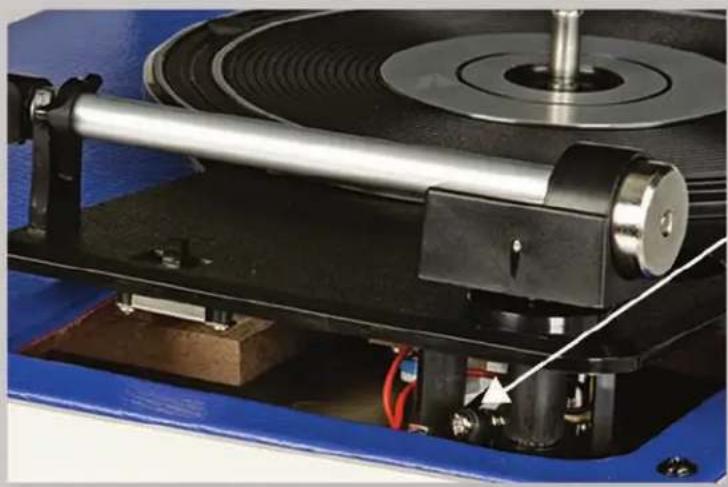
Exterior view of a vintage rotary disc with blue and white casing (no visible text or symbols)Step 1: Unplug the turntable and remove the lid. Position the turntable with the tone-arm side facing the front.
natural_image
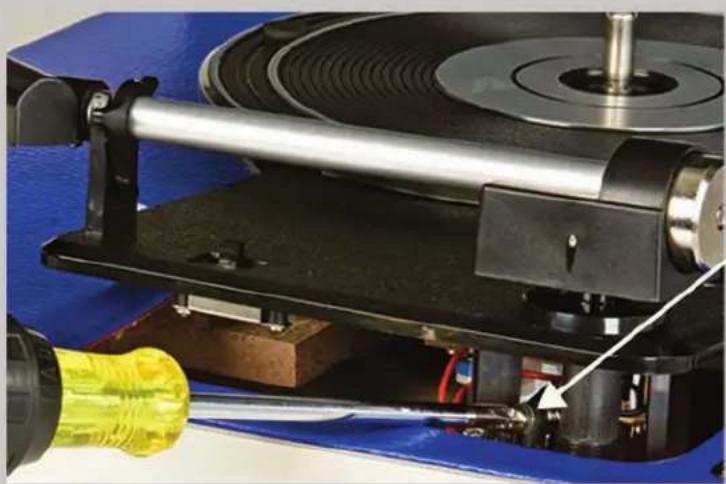
Close-up of a mechanical testing machine with a metallic cylindrical component and red wiring, mounted on a blue base (no visible text or symbols)Step 2: Lift the tone-arm side of the turntable high enough to see the chrome screw.
natural_image
Close-up of a mechanical testing machine with a yellow tool inserted, showing rotating components and a blue base (no visible text or symbols)Step 3: Using a Phillips head screw driver, turn the chrome screw COUNTER-CLOCKWISE in half turn increments to extend the playing time.
Brand : Crosley
Model : CR6010A Collegiate
Category : Turntable