
KXR 200 - Keyboard FENDER - Free user manual and instructions
Find the device manual for free KXR 200 FENDER in PDF.


| Product Type | Electronic Keyboard |
| Model | KXR 200 |
| Brand | Fender |
| Number of Keys | 61 (full-size, velocity-sensitive) |
| Sound Generation | Digital sampling |
| Polyphony | 32 notes |
| Built-in Speakers | 2 x 10W |
| Effects | Reverb, Chorus, Sustain |
| Rhythm Styles | 100 built-in rhythms |
| Demo Songs | 50 |
| Interfaces | USB-MIDI, Headphone out, Aux in, Sustain pedal |
| Power Supply | AC adapter 9V DC (included) or 6 x AA batteries |
| Dimensions (W x D x H) | 950 x 300 x 120 mm |
| Weight | 4.5 kg |
| Display | LED numeric display |
| Split/Layer | Yes, with adjustable split point |
| Transpose | Yes, +/- 12 semitones |
| Metronome | Built-in with adjustable tempo |
| Recording | Single track, 1 song |
| Included Accessories | Power adapter, music stand, user manual |
| Cleaning Instructions | Wipe with a dry soft cloth; avoid solvents |
| Safety Warning | Keep away from moisture; do not open the device |
| Spare Parts Availability | Contact Fender support for service |
| Reparability | Repairs only by authorized technicians |
Frequently Asked Questions - KXR 200 FENDER
User questions about KXR 200 FENDER
0 question about this device. Answer the ones you know or ask your own.
Ask a new question about this device
Download the instructions for your Keyboard in PDF format for free! Find your manual KXR 200 - FENDER and take your electronic device back in hand. On this page are published all the documents necessary for the use of your device. KXR 200 by FENDER.
USER MANUAL KXR 200 FENDER
Your new Fender ^® KXR 200 keyboard amplifier is the result of Fender's ^® ongoing dialog with many of today's top musicians. The KXR 200 uses state of the art technology to deliver clear, resonant and most importantly...musical sound.
The KXR 200 is actually much more than a keyboard amp. With its heavy-duty Fender® Special Design speaker and dual piezo-electric horn, it could actually be classified as a self-contained, portable P.A. system. The KXR 200 is suitable for almost any musical instrument requiring full-range reinforcement, for example, electronic keyboards, acoustic/ electric guitar, electric violin and also vocals. Compact packaging and high output power make the KXR 200 the perfect full-range instrument amplifier for rehearsal, studio or performances.
The preamp section of the KXR 200 features four independent channels. Channels one, two, and three each feature a single 1/4 inch, high-impedance-input jack, a three-band equalizer, a channel volume control, an effects send control and a reverb send control. Emphasizing on vocal, channel four is equipped with a low impedance XLR jack in addition to the 1/4 inch jack. Furthermore, channel four also features a four-band equalizer centered around the vocal frequencies, while still covering the whole audible audio spectrum. Channel four is also equipped with a channel volume control, an effects send control and a reverb send control. In addition to the features mentioned above, each channel also possesses an independent effects loop insertion point on the rear panel. This feature makes the KXR 200 even more versatile.
The KXR 200 is also equipped with a master section which contains a master volume control, an effect return control, a reverb return control, an effects send jack, an effects return jack, and a line-out portion comprising of a 1/4 inch and XLR jacks.
The KXR 200 keyboard amplifier was designed to give years of reliable service under all conditions and is equipped with a unique implementation of our exclusive, defeatable DELTACOMP™ compressor system. When DELTACOMP™ is engaged, it is practically impossible to cause the power amplifier to clip (distort). With DELTA-COMP™, apparent compressor release time is kept short, yet waveform distortion is kept to a minimum at low frequencies.
The selection of a Fender ^® amplifier will reward you with years of quality music in a wide range of sonic possibilities. This manual is designed to familiarize you with the features and functions of your KXR 200 amplifier. Read this manual carefully so you will benefit from these features as soon as you start using your new Fender ^® amplifier.
The built-in quality of a Fender® amplifier is the result of over four decades of dedication in the combined skills of the Fender® design team. That's why we proudly say, FENDER®... The Sound That Creates Legends.
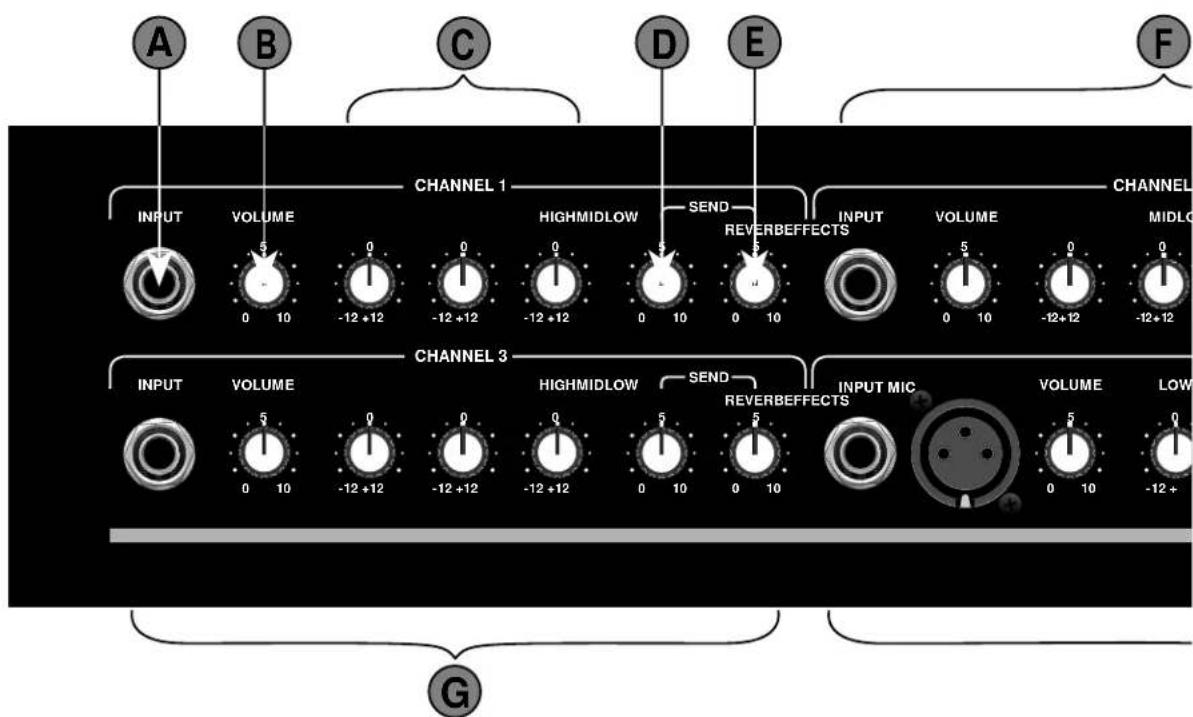
KXR 200 FRONT PANEL FUNCTIONS
A. CHANNEL 1 INPUT (1/4 INCH) - Plug-in connector for instruments. This balanced input can handle as much as 8V R.M.S.
B. CHANNEL 1 VOLUME CONTROL - This control adjusts the preamplifier gain of channel 1. It works in conjunction with the Master Volume control (item I) to set the overall loudness of the amplifier for channel 1 only. Being a true "gain" control, it allows for the use of a variety of microphones, keyboards or other instruments with differing output signal levels. Low-level instruments generally require a higher Channel Volume setting while "hotter" keyboards will require a lower setting.
C. CHANNEL 1 EQUALIZER - This equalizer allows adjustments of the tonal characteristics of channel 1 before amplification. Each control provides a 12dB boost or cut to bands of frequencies centered about 130, 540, and 4200 Hz. Note that all equalizer sections of the KXR 200 are designed so that if all center frequencies are set at +12dB, a flat overall response would be obtained. This is very useful if the signal source is weak.
D. CHANNEL 1 EFFECTS SEND CONTROL - This control works in conjunction with the effects send jack (item R), effects return jack (item S), and the effect return control (item J) to , respectively, allow a desired amount of preamp signal to be massaged, and to control the amount of return signal that has gone through an
external effects device. The effects send control in conjunction with the effects send jack could be used to drive another KXR 200 as a slave amp. This is done by connecting the effects send jack, with a standard guitar cord, to the effects return jack of another KXR 200. Note that each channel could be set to send a different amount of signal to the effects bus.
E. CHANNEL 1 REVERB SEND CONTROL - This control works in conjunction with the reverb return control (item K) to allow the amount of reverb to be mixed with the dry signal. The amount of reverb-sent signal is independent for each channel.
F,G. CHANNEL 2 AND 3 - These two channels are provided for two additional instruments. All the controls and jacks operate in the same manner as those in channel 1. When not in use, it is best to turn the channel volume, the effects send and the reverb send controls all the way down to avoid any amplification of unwanted noise. Likewise, when not in use, the equalizer sections should be kept flat (i.e. all knobs should be set at 12 O'clock).
H. CHANNEL 4 - This channel operates in the same manner as the other three channels, but with the addition of a few extra features: The XLR jack and an extra band in the equalizer section. With the vocalist in mind, the balanced, low impedance XLR jack provides a suitable connection for a microphone. Furthermore, the four-band equalizer was designed around the
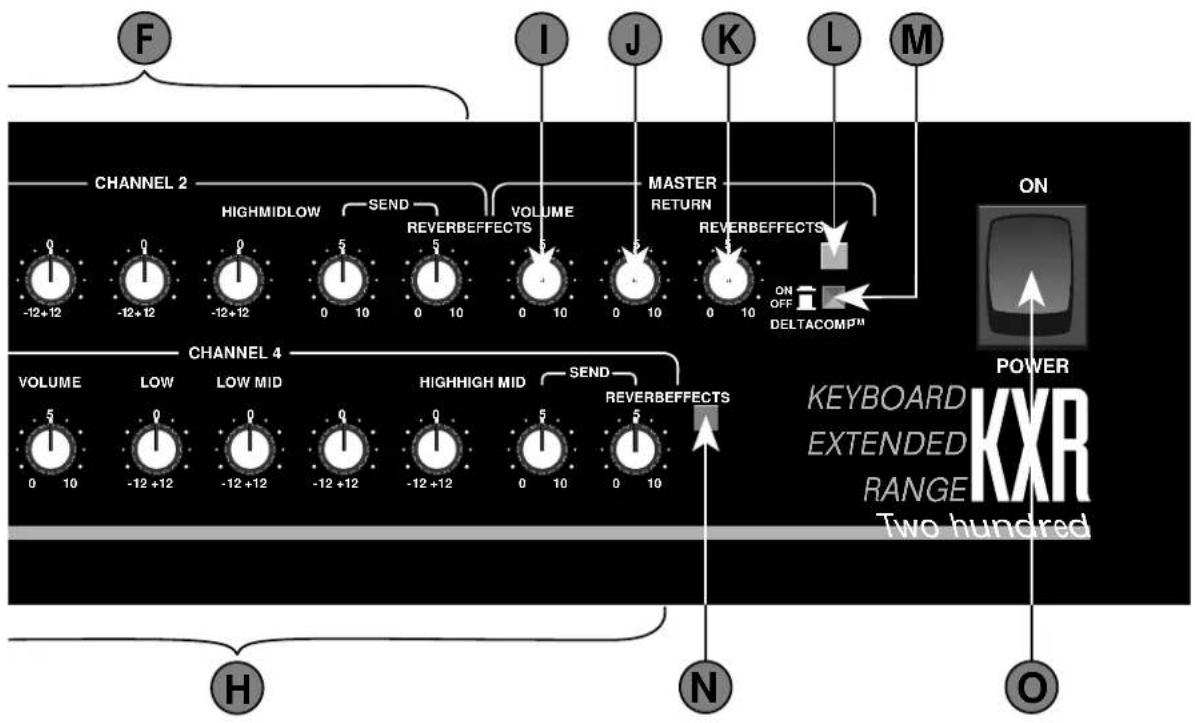
vocal frequencies. With each control providing 12dB of boost or cut, and centered about 125, 320, 1000 and 3200 Hz. If needed, this channel could also be used for another instrument.
I. MASTER VOLUME CONTROL - This control adjusts the level of the signal coming out of the preamplifier section. This control is used in conjunction with the Channel Volume controls to set the overall sound level of the amplifier. In order to maximize headroom and minimize noise, instruments with low-level output will require a high Channel Volume setting and a low Master Volume setting, while other instruments may require a lower Channel Volume and higher Master Volume setting. It is recommended that the Master Volume control be set as high as possible for maximum DELTACOMP™ compressor range.
J. EFFECTS RETURN CONTROL - This control adjusts the level of the signal coming into the power amplifier section from external effect devices. This is the master control for all the Channel Effects Send controls. If not in use, it is recommended that this control be set at 0 to avoid amplification of any unwanted signal.
K. REVERB RETURN CONTROL - This control adjusts the level of the reverb signal coming into the power amplifier from the reverb bus. The input to the reverb circuitry is the sum of the individual channel reverbs. When not in use, it is recommended that this control be set at 0 to avoid amplification of any unwanted signal.
L. PEAK LED INDICATOR - This LED comes on when excessive signal levels are being sent to the power amplifier. It illuminates on signal peaks that cause clipping (distortion) with DELTACOMP™ not activated, or for signal peaks that cause DELTACOMP™ to reduce level (DELTACOMP™ active). If the limiter is on for a large percentage of the time, the dynamic range of the system is reduced and the overall sound suffers. For this reason, level controls should be adjusted so that the yellow LED only flashes on occasional signal peaks.
M. DELTACOMP™ SWITCH - This switch is used to activate or de-activate the DELTACOMP™ circuitry. If peak-clipping of signal is not desired, then the DELTACOMP™ circuitry should be engaged by pushing this button in.
N. POWER LED INDICATOR - When this LED is illuminated, the KXR 200 is receiving power.
O. POWER SWITCH - This switch turns the KXR 200 on or off. When the switch is off, the amplifier is completely shut down.
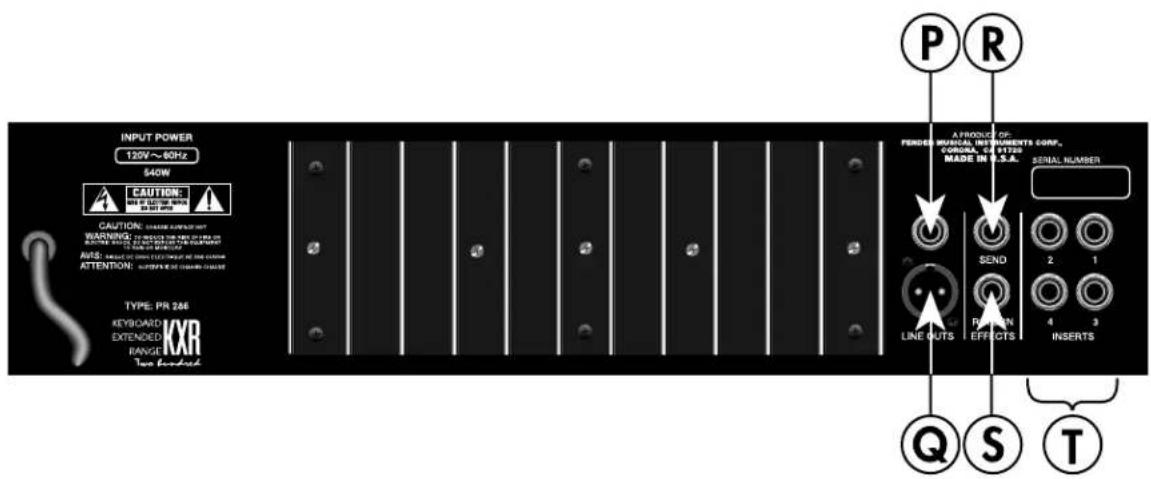
KXR 200 REAR PANEL
P,Q. LINE OUTPUT JACKS - Signal from each of the channels are combined with reverb and effects to form the input to the power amplifier stage. The Line Outs are wired from this point. The 1/4 Jack (Item P) and the XLR jack (Item Q) provide easy connection paths from the KXR 200 to any external devices, such as a slave amp or a mixer. It is also useful for recording live performances. Note that inserting a plug into one of the Line Outs jacks does not interrupt the normal internal signal flow of the KXR 200.
R. EFFECTS SEND JACK - This jack is the output of the effects bus, where all the channels Effects Send are combined. The signal coming out of this jack could be used to drive an effects device, a slave amp, or as an input to a mixer. Note that the signal coming out of this jack is reverb-free.
S. EFFECTS RETURN JACK - This jack inputs signal to the master section of the KXR 200 through the Effects Return control (Item J). This jack can be used with the Effects Send Jack (item R) as a patch point for mono effect devices. This jack can also be used as the input jack when the KXR 200 is used as a slave amp.
T. CHANNEL INSERT JACKS - These jacks are wired post-EQ and post channel volume control. By inserting an external signal source into one of these jacks, through a stereo jack wired to the tip and sleeve (with the ring left floating), the appropriate channel's EQ and volume control are bypassed. By shorting the tip of the inserting jack to its ring, the channel's signal and the externally input signal could be mixed together. The channel inserts can also serve as effects loop points by using a stereo jack wired tip=effects send, and ring=effects return. Note that the layout of the insert jacks on the back panel is the mirror image of the channels layout on the front panel.
POWER CORD - This amplifier is equipped with a grounding type supply cord to reduce the possibility of shock hazard. Be sure to connect it to a grounded AC receptacle. The line cord should be connected to a suitable power source, in accordance with the voltage and frequency as shown by the power rating on the rear panel. DO NOT ALTER THE AC (MAINS) PLUG.
NOTE: DO NOT BLOCK THE AIR FLOW TO THE REAR PANEL; FOR EXAMPLE, BY BACKING THE AMPLIFIER UP AGAINST A WALL. The rear panel contains a heatsink that needs air flow to cool off the amplifier. Blocking the air flow may result in equipment failure due to excessive heat building up inside the chassis.
WARNING : THIS EQUIPMENT MUST BE EARTH GROUNDED.
COVERING CARE - UNPLUG THE POWER CORD BEFORE CLEANING - The exclusive vinyl covering on your cabinet has been especially designed for years of lasting beauty. A very light, soapy solution on a sponge may be used to remove dirt and residue that may accumulate in the texture. Be careful as not to let any liquid get inside the chassis or contact the operating surfaces.
KXR 200 BLOCK DIAGRAM
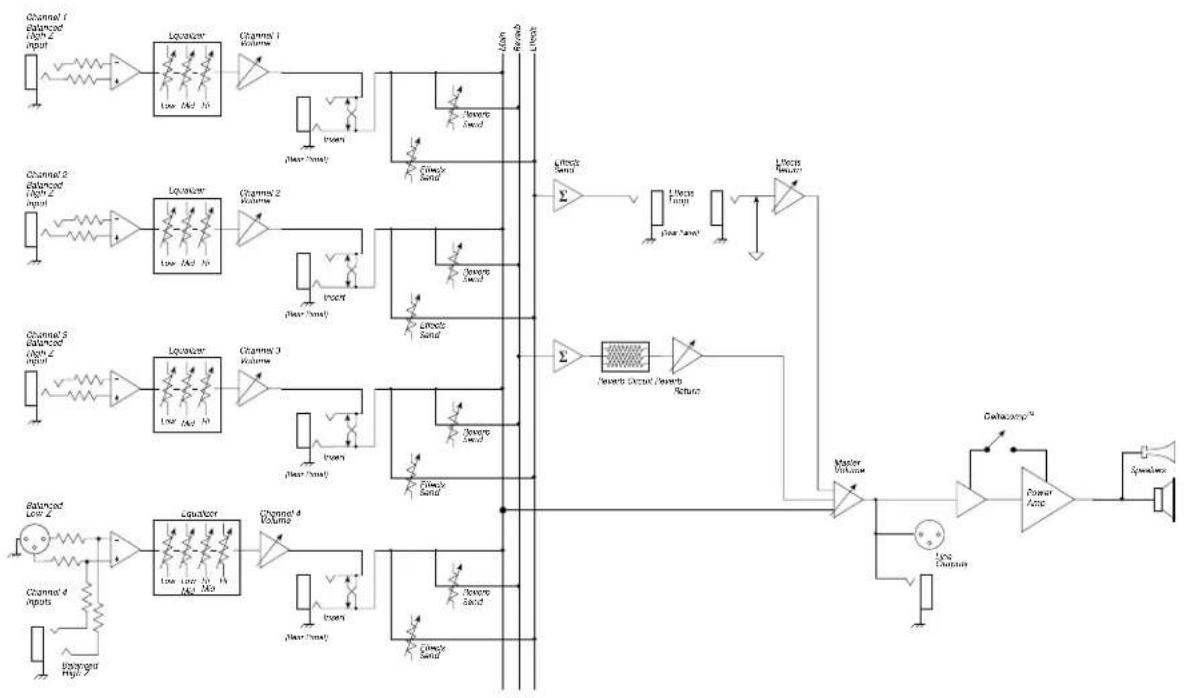
flowchart
graph TD
    subgraph Channel 1
        A["Channel 1: balanced High 2 Input"] --> B["Liquator"]
        B --> C["Low Mid N"]
        C --> D["Channel 1 Volume"]
        D --> E["Room"]
        E --> F["Livesc Signal"]
        F --> G["Return"]
        G --> H["Livesc Signal"]
    end

    subgraph Channel 2
        I["Channel 2: balanced High 2 Input"] --> J["Liquator"]
        J --> K["Low Mid N"]
        K --> L["Channel 2 Volume"]
        L --> M["Room"]
        M --> N["Livesc Signal"]
        N --> O["Livesc Signal"]
        O --> P["Livesc Tamp"]
        P --> Q["Livesc Signal"]
    end

    subgraph Channel 3
        R["Channel 3: balanced High 2 Input"] --> S["Liquator"]
        S --> T["Low Mid N"]
        T --> U["Channel 3 Volume"]
        U --> V["Room"]
        V --> W["Livesc Signal"]
        W --> X["Livesc Signal"]
        X --> Y["Livesc Tamp"]
        Y --> Z["Livesc Signal"]
    end

    subgraph Channel 4
        AA["Channel 4: Inputs"] --> AB["Liquator"]
        AB --> AC["Low Mid N, Mid N"]
        AC --> AD["Channel 4 Volume"]
        AD --> AE["Room"]
        AE --> AF["Livesc Signal"]
        AF --> AG["Livesc Signal"]
        AG --> AH["Livesc Signal"]
    end

    subgraph Capacamp
        AI["Capacamp™"] --> AJ["Power Amp"]
        AJ --> AK["Speaker"]
    end

    style Channel 1 fill:#f9f,stroke:#333
    style Channel 2 fill:#f9f,stroke:#333
    style Channel 3 fill:#f9f,stroke:#333
    style Channel 4 fill:#f9f,stroke:#333
    style Capacamp fill:#ccf,stroke:#333
    style CapacampXTM fill:#ccf,stroke:#333
    style CapacampXTN fill:#ccf,stroke:#333
TROUBLESHOOTER'S CHECKLIST
If the amplifier is set up but does not function, check the following items:
- Is the amplifier power cord plugged into an electrical outlet?
• Is there power at the outlet? - Are all the control knobs properly set?
- Are the controls knobs on the instrument properly set?
• Is the instrument properly plugged into the KXR 200 ?
(Eliminate any effect pedals and try another guitar cord.)
If after checking all of the above, and the system is still not performing correctly, consult your Authorized FENDER® Service Dealer.
KXR 200 SPECIFICATIONS
PART NUMBER : 100V Version : 22-8572
120V Version : 22-8502
DISTORTION AT 200 WATTS : Less than 1% @ 1kHz, below compression
Less than 1% @ 1kHz, maximum compression
SENSITIVITY : 1.03 Volts R.M.S.
INPUT IMPEDANCE : 22kΩ
DELTACOMP™ RANGE : 20dB.
PREAMP SECTION :
INPUT IMPEDANCE : XLR - 1.82kΩ
Phone - 18.2kΩ
Sensitivity for 200 watts : XLR - 2.9 mV R.M.S.
channel and master Phone - 29 mV R.M.S.
volume at maximum, all
tone control at "0"
EQUALIZER : For 3-band-EQ sections :
+/- 12dB at 130, 540 and 4200 Hz.
For 4-band-EQ section :
+/- 12 dB at 125, 320, 1000 and 3200 Hz.
Sensitivity for channel 500 mV R.M.S. (-6dBV).
inserts, Master volume
at maximum setting
Sensitivity for 130 mV R.M.S. (-18dBV).
Master volume and FX
return control at max.
29 - 3/4 inches w/o casters (75.6 cm)
WIDTH :
32 - 1/8 inches with casters (81.6 cm)
DEPTH
21 - 11/ 16 inches (55.1 cm)
WEIGHT :
12 inches (30.5 cm)
88 lbs. (40kg)
TO PREVENT FIRE OR SHOCK HAZARD.
DO NOT EXPOSE THIS EQUIPMENT TO RAIN OR MOISTURE.
A PRODUCT OF:
FENDER MUSICAL INSTRUMENTS CORP.,
CORONA, CA 91720

THIS EQUIPMENT CONFORMS TO
THE FOLLOWING DIRECTIVES
EMC 89/336/EEC AND LV 73/23/EEC
Brand : FENDER
Model : KXR 200
Category : Keyboard