
RDock-uni - Loudspeaker ARCAM - Free user manual and instructions
Find the device manual for free RDock-uni ARCAM in PDF.


| Product Type | Universal Docking Speaker for iPod/iPhone/iPad |
| Dimensions (W x H x D) | Approximately 280 x 150 x 120 mm |
| Weight | Approximately 1.5 kg |
| Power Supply | AC 100-240V, 50/60Hz (external adapter) |
| Power Consumption | 20W max |
| Amplifier Output | 2 x 15W RMS into 4 ohms |
| Frequency Response | 60Hz - 20kHz |
| Speaker Drivers | Two full-range drivers, passive radiator |
| Inputs | Apple 30-pin connector, 3.5mm auxiliary input |
| Outputs | None |
| Dock Compatibility | Most Apple devices with 30-pin connector (incl. iPhone 4S, iPod touch, iPad) |
| Remote Control | IR remote included |
| Main Functions | Charging and playback from docked device, auxiliary input for other sources, volume control, track skip |
| Maintenance and Cleaning | Wipe with a soft dry cloth; avoid liquids and abrasive cleaners |
| Safety Precautions | Do not expose to rain or moisture; use only supplied power adapter |
| Spare Parts and Repairability | Contact Arcam authorized service center; no user-serviceable parts |
| General Information | Manufacturer: Arcam (UK); Model: RDock-uni; Color: Black/silver |
Frequently Asked Questions - RDock-uni ARCAM
User questions about RDock-uni ARCAM
0 question about this device. Answer the ones you know or ask your own.
Ask a new question about this device
Download the instructions for your Loudspeaker in PDF format for free! Find your manual RDock-uni - ARCAM and take your electronic device back in hand. On this page are published all the documents necessary for the use of your device. RDock-uni by ARCAM.
USER MANUAL RDock-uni ARCAM
Connections and Quickstart Guide
Important Safety Instructions...
- Read these instructions.
- Keep these instructions.
- Heed all warnings.
- Follow all instructions.
- Do not use this apparatus near water.
-
Clean only with dry cloth.
-
Do not block any ventilation openings. Install in accordance with the manufacturer's instructions.
-
Do not install near any heat sources such as radiators, heat registers, stoves, or other apparatus (including amplifiers) that produce heat.
-
Do not defeat the safety purpose of the polarized or grounding-type plug. A polarized plug has two blades with one wider than the other. A grounding type plug has two blades and a third grounding prong. The wide blade or the third prong are provided for your safety. If the provided plug does not fit into your outlet, consult an electrician for replacement of the obsolete outlet.
-
Protect the power cord from being walked on or pinched particularly at plugs, convenience receptacles, and the point where they exit from the apparatus.
-
Only use attachments/accessories specified by the manufacturer.
-
Use only with the cart, stand, tripod, bracket, or table specified by the manufacturer, or sold with the apparatus. When a cart is used, use caution when moving the cart/ apparatus combination to avoid injury from tip-over.
-
Unplug this apparatus during lightning storms or when unused for long periods of time.
-
Refer all servicing to qualified service personnel. Servicing is required when the apparatus has been damaged in any way, such as power-supply cord or plug is damaged, liquid has been spilled or objects have fallen into the apparatus, the apparatus has been exposed to rain or moisture, does not operate normally, or has been dropped.
Contents
Power Adaptor Setup ....4
Docking Your Device ....5
Standalone Operation....6
Connections for any amplifier....6
rDock-uni remote control ....7
Legal Information 8
Worldwide Guarantee....9
Claims under guarantee 9
Problems?......9
Power Adaptor Setup
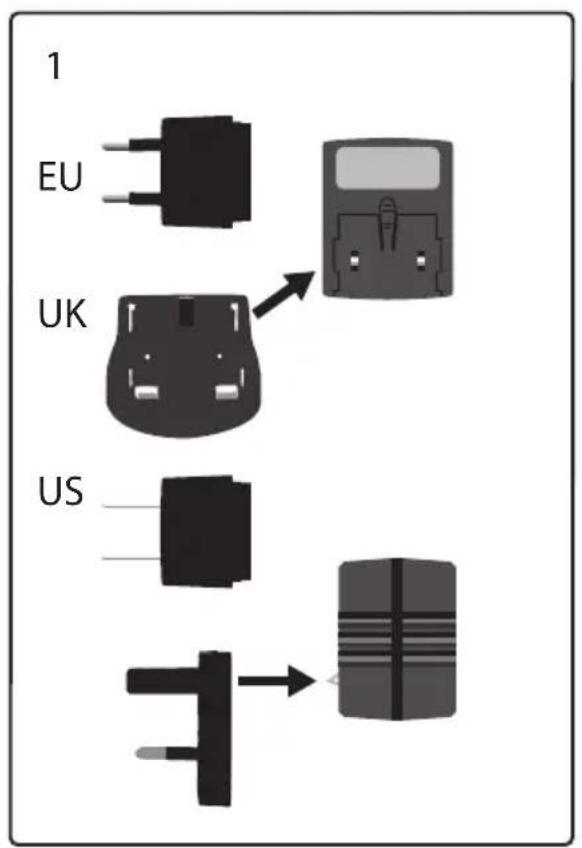
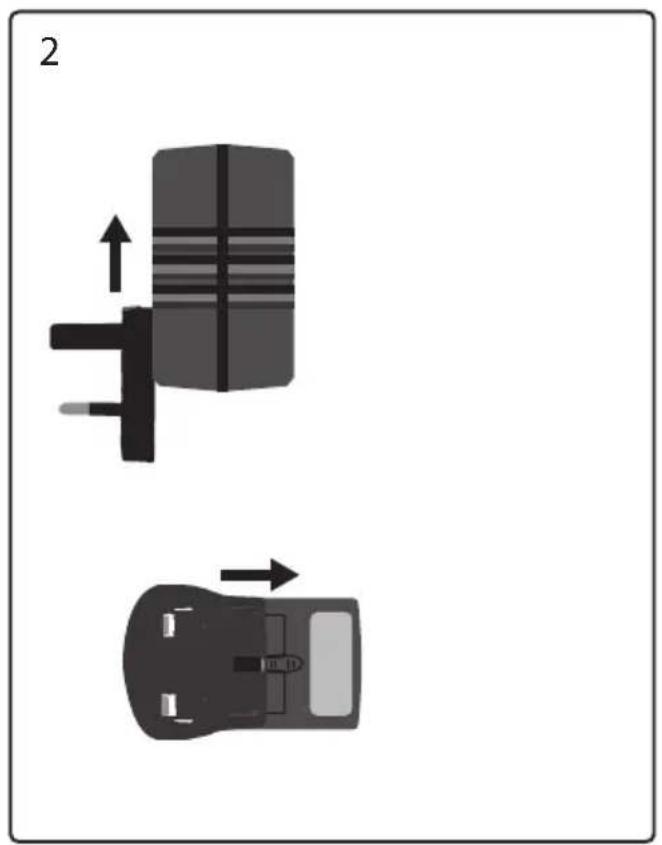
natural_image
Two technical diagrams showing a mechanical component with directional arrows, no text or symbols present.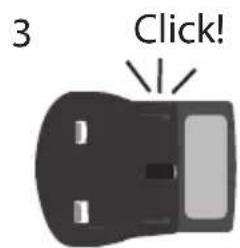
Docking Your Device
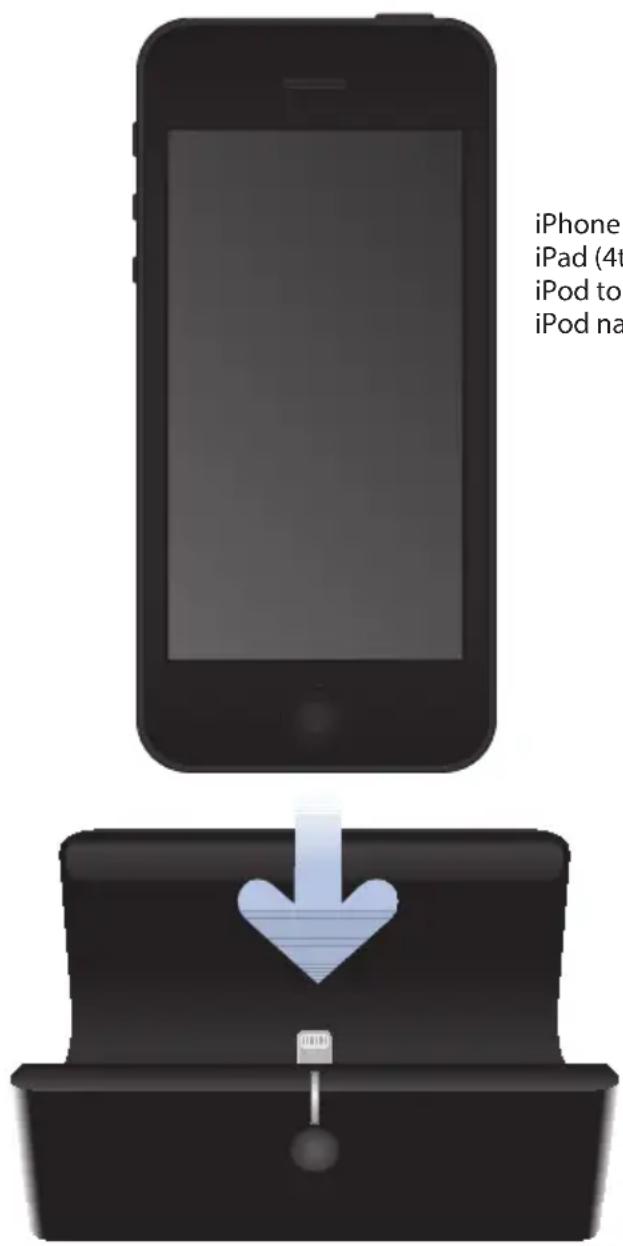
iPhone 5
iPad (4th generation)
iPod touch (5th generation)
iPod nano (7th generation)
Standalone Operation
Connections for any amplifier
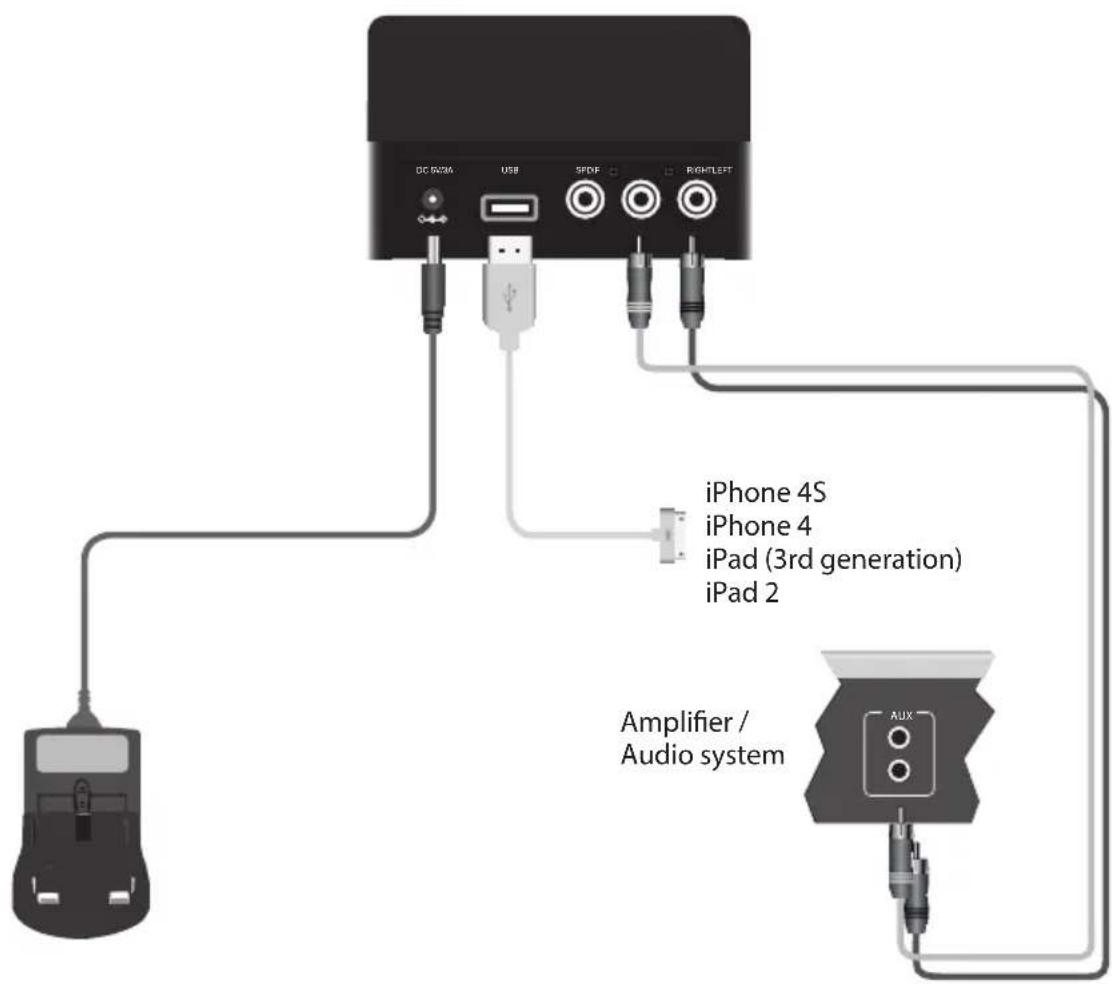
Connect power adaptor, USB cable and audio interconnects.
rDock-uni remote control
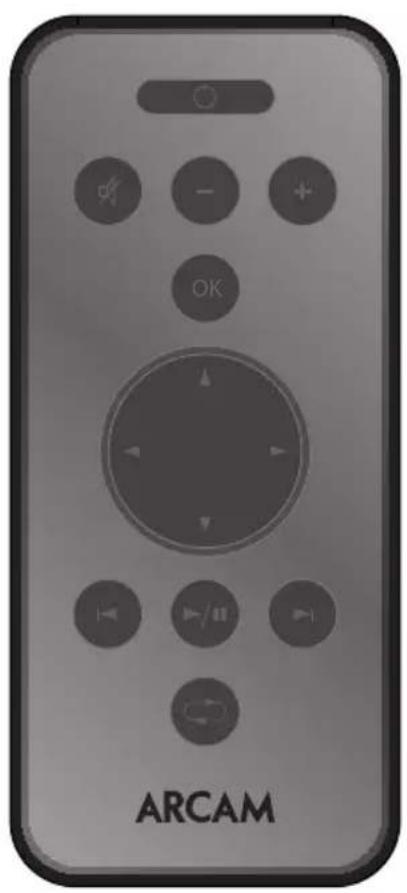
Please remove the plastic tab to connect the supplied batteries before use.
natural_image
Front view of an Arcam remote control device with no visible text or symbols on the device itself.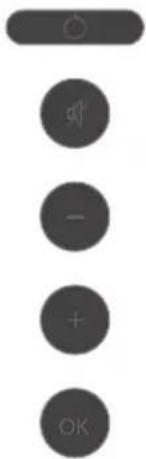
Turn the dock on/off.
Mute.
Increase volume.
Decrease volume.
Selects current track.
natural_image
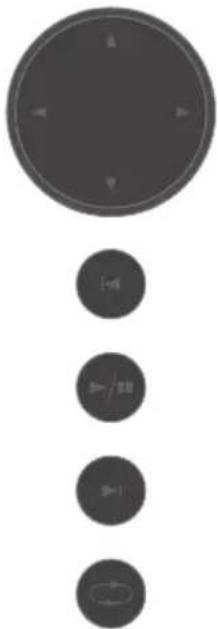
Vertical arrangement of four circular icons with directional arrows, no text or symbols presentSelect music by playlist, artist etc.
Jump to previous track.
Start or pause playback.
Jump to the next track.
Play selection continuously.
Specification
| DAC Burr-Brown/TI PCM5102 | |
| Frequency response 10Hz -20kHz, +0 -0.2dB | |
| Total Harmonic Distortion + Noise 0.002% | |
| Signal-to-noise ratio (A-weighted) 106dB (24-bit) | |
| Maximum output level 2.15V RMS | |
| Power requirements 5V DC, 3A | |
| Dimensions 100mm x 80mm x 65mm | |
| Weight 400g | |
| Accessories supplied PSU | Digital phono-phono cableStereo phono-phono cableManualRemote with CR2025 battery |
E&OE. All specifications are typical
Legal Information
FCC INFORMATION (FOR US CUSTOMERS)
1. PRODUCT
This product complies with Part 15 of the FCC Rules. Operation is subject to the following two conditions: (1) This device may not cause harmful interference, and (2) this device must accept any interference received, including interference that may cause undesired operation.
2. IMPORTANT NOTICE:
DO NOT MODIFY THIS PRODUCT
This product, when installed as indicated in the instructions contained in this manual, meets FCC requirements. Modification not expressly approved by ARCAM may void your authority, granted by the FCC, to use the product.
3. NOTE
This product has been tested and found to comply with the limits for a Class B digital device, pursuant to Part 15 of the FCC Rules. These limits are designed to provide reasonable protection against harmful interference in a residential installation.
This product generates, uses and can radiate radio frequency energy and, if not installed and used in accordance with the instructions, may cause harmful interference to radio communications. However, there is no guarantee that interference will not occur in a particular installation. If this product does cause harmful interference to radio or television reception, which can be determined by turning the product OFF and ON, the user is encouraged to try to correct the interference by one or more of the following measures:
• Reorient or relocate the receiving antenna.
- Increase the separation between the equipment and receiver.
- Connect the product into an outlet on a circuit different from that to which the receiver is connected.
- Consult the local retailer authorized to distribute this type of product or an experienced radio/TV technician for help.
Apple, Mac, Mac OS, iTunes, iPhone, iPod, iPod classic, iPod nano, iPod shuffle, and iPod touch are trademarks of Apple Inc., registered in the U.S. and other countries. iPad is a trademark of Apple Inc.
"Made for iPod," "Made for iPhone," and "Made for iPad" mean that an electronic accessory has been designed to connect specifically to iPod, iPhone, or iPad, respectively, and has been certified by the developer to meet Apple performance standards. Apple is not responsible for the operation of this device or its compliance with safety and regulatory standards. Please note that the use of this accessory with iPod, iPhone, or iPad may affect wireless performance.
Worldwide Guarantee
This entitles you to have the unit repaired free of charge for two years after purchase, provided that it was originally purchased from an authorised Arcam dealer. The manufacturer can take no responsibility for defects arising from accident, misuse, abuse, wear and tear, neglect or through unauthorised adjustment and/or repair, neither can they accept responsibility for damage or loss occurring during transit to or from the person claiming under the guarantee.
The warranty covers:
Parts and labour costs for two years from the purchase date. After two years you must pay for both parts and labour costs. The warranty does not cover transportation costs at any time.
Claims under guarantee
This equipment should be packed in the original packing and returned to the dealer from whom it was purchased, or failing this, directly to the Arcam distributor in the country where the product was purchased.
It should be sent carriage prepaid by a reputable carrier – not by post. No responsibility can be accepted for the unit whilst in transit to the dealer or distributor and customers are therefore advised to insure the unit against loss or damage whilst in transit.
For further details contact Arcam at:
Arcam Customer Support Department,
Stirling House, Waterbeach, CAMBRIDGE, CB25 9QE, England
or www.arcam.co.uk.
Problems?
If your Arcam dealer is unable to answer any query regarding this or any other Arcam product please contact Arcam Customer Support at the above address and we will do our best to help you.
Correct disposal of this product


This marking indicates that this product should not be disposed with other household waste throughout the EU.
To prevent possible harm to the environment or human health from uncontrolled waste disposal and to conserve material resources, this product should be recycled responsibly.
To dispose of your product, please use your local return and collection systems or contact the retailer where the product was purchased.
ARCAM
www.arcam.co.uk
WATERBEACH, CAMBRIDGE, CB25 9QE, ENGLAND
- Important Safety Instructions...
- Contents
- Power Adaptor Setup
- Docking Your Device
- Standalone Operation
- Connections for any amplifier
- rDock-uni remote control
- Specification
- Legal Information
- FCC INFORMATION (FOR US CUSTOMERS)
- PRODUCT
- IMPORTANT NOTICE:
- DO NOT MODIFY THIS PRODUCT
- NOTE
- Worldwide Guarantee
- The warranty covers:
- Claims under guarantee
- Problems?
- Correct disposal of this product
Brand : ARCAM
Model : RDock-uni
Category : Loudspeaker