TS12 - Tumble dryer Creda - Free user manual and instructions
Find the device manual for free TS12 Creda in PDF.


| Brand | Creda |
| Model | TS12 |
| Product Type | Tumble Dryer |
| Dimensions (W x D x H) | 60 cm x 60 cm x 85 cm |
| Weight | 35 kg |
| Power Supply | 220-240 V, 50 Hz |
| Power Consumption | 2000 W |
| Drying Capacity | 7 kg |
| Drying Programs | Cotton, Synthetic, Delicate, Time Dry, Anti-Crease |
| Sensor Drying | Yes (auto dry) |
| Lint Filter | Removable, clean after each use |
| Condenser Unit | Self-cleaning condenser |
| Noise Level | 65 dB |
| Energy Efficiency Class | C (typical for older models) |
| Safety Features | Thermal fuse, door safety switch |
| Spare Parts Available | Drum belt, heating element, capacitor, door seal |
| Repair Index (if applicable) | 6.5 / 10 |
| Manual Languages | EN (default), other languages on request |
Frequently Asked Questions - TS12 Creda
User questions about TS12 Creda
0 question about this device. Answer the ones you know or ask your own.
Ask a new question about this device
Download the instructions for your Tumble dryer in PDF format for free! Find your manual TS12 - Creda and take your electronic device back in hand. On this page are published all the documents necessary for the use of your device. TS12 by Creda.
USER MANUAL TS12 Creda
Tumble Dryer Instruction Book
5kg Models
You must read these instructions prior to using the appliance and retain them for future reference.
Contents
| Safety Advice 3-4 | |
| Electrical Requirements 5 | |
| Features - Get to know the main parts of your Dryer 6 | |
| Where to put and vent your Dryer 7-8 | |
| How to use your Dryer 9 | |
| The Controls 10-13 | |
| Sorting your laundry 14 | |
| Wash Care Labels 15 | |
| Items not suitable for tumble drying 15 | |
| Items requiring special attention 16 | |
| Speedy Iron Programme 17 | |
| Guide to Drying Times 18 | |
| How to remove and clean the fluff filter 19 | |
| Caring for your Dryer 20 | |
| If something goes wrong 22 | |
| Key Contacts | Back Cover |
Retention of this Instruction Book
This Instruction Book must be kept handy for reference as it contains important details on the safe and proper use of the appliance.
If you sell or pass the appliance to someone else, or move house and leave it behind, make sure this Book is also provided so the new owner can become familiar with the appliance and safety warnings.
If the Book is lost or damaged a copy may be obtained from:
GDA Ltd., Morley Way, Peterborough, PE2 9JB
For your safety
IMPORTANT
Using your Tumble Dryer is easy.
Nevertheless, for your own safety and to get the best results it is important to know your Dryer by reading right through this handbook before using your dryer for the first time.
NEVER ● Allow children to play with or otherwise interfere with the dryer.
NEVER ● Allow the air inlet at the back of the dryer, the air outlet or vent hose to be obstructed.
NEVER ● Direct the vent hose outlet towards the air intake at the back of the machine.
NEVER ● Allow the tumble dryer to recycle exhaust air.
NEVER ● Switch the machine off leaving a hot load in the drum.
NEVER ● Tumble dry without the filter in position.
NEVER ● Exceed the maximum load capacity recommended or place dripping wet items in the drum.
NEVER ● Use the dryer on a carpeted floor where the pile height would prevent air from entering the dryer from the base.
NEVER ● Allow lint to collect around the dryer.
NEVER ● Add liquid or sheet fabric conditioner to the dryer, use liquid conditioner in the final rinse of your wash.
NEVER ● Use the dryer for commercial drying, the dryer is only suitable for domestic use.
NEVER ● Dry Acrylics on the high heat setting.
NEVER ● Tumble dry articles that have NOT been well washed in water and detergent then well rinsed and spun.
NEVER ● Tumble dry articles that have had chemicals used for cleaning.
NEVER ● Dry articles that are contaminated with flammable substances such as: petrol, oil, paint, hair lacquer, creams, cooking fat or oil.
NEVER ● Tumble dry: rubber, foam rubber, plastic, plastic foam, nappy pants or liners, polythene or paper.
Large, very bulky items including duvets and sleeping bags.
NEVER ● Never attempt to stand on top of your dryer, it is not designed for such use and you could injure yourself or damage the dryer by such abuse.
NEVER ● Switch electricity On or Off with wet hands.
IMPORTANT
A CHILD COULD CLIMB INTO OR TAMPER WITH AN UNATTENDED TUMBLE DRYER.
WHEN THE MACHINE IS NOT IN USE SWITCH OFF, REMOVE THE PLUG AND CLOSE THE DOOR.
For your safety
ALWAYS ● When the dryer is not in use, switch off at the wall, remove plug and close the door.
ALWAYS ●Comply with the specified electrical requirements.
ALWAYS ● Ensure that your dryer is installed correctly and has adequate ventilation. (see, "Where to put and vent your dryer.")
ALWAYS ●Use the vent hose for optimum drying performance.
ALWAYS ● Finish every programme with the cool tumble cycle provided on the control.
ALWAYS ● Clean the filter, it is essential that the filter is kept clear of fluff after EACH drying cycle.
ALWAYS ●Observe the rules for drying garments:
In particular woollen articles should not be dried in a tumble dryer unless they are labelled ‘Superwash’, ‘Machine washable’ or have the ‘May be tumble dried’ symbol:
If in any doubt do not dry wool in the machine.
Unlike other materials, the mechanism of wool shrinkage is irreversible, i.e. it will not stretch back to the original size and shape.
ALWAYS ●Buy genuine accessories and spares.
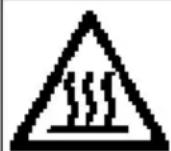
CAUTION: WHEN THE DRYER IS IN USE AVOID TOUCHING THE REAR OF THE DRYER AS IT MAY BE HOT.
Electrical Requirements
| Supply | WARNING:This appliance must be earthed! |
| REFER TO THE RATING PLATE FOR VOLTAGE AND CURRENT REQUIREMENTS. (see diagram for location.)The flexible mains lead is supplied fitted with a BS1363 plug and with a 13 amp BS1362 fuse.The plug should be connected to the mains supply via a suitable switched socket which is accessible after installing your dryer. | |
Changing the fuseMoulded plug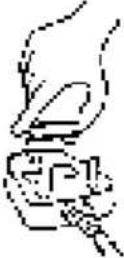 | If it is necessary to fit a replacement fuse, it must be a 13 amp ASTA approved to BS1362 type.WARNING:The plug must not be used without a fuse cover.If a replacement fuse holder/cover is required, it must be of the same colour coding or wording as shown on the base of the plug.Replacements are available from your Spares stockist. |
Changing the plugRewirable plug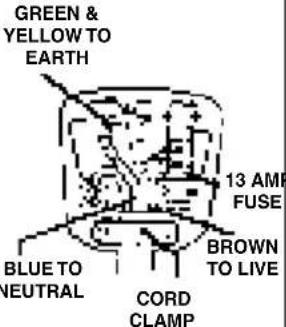 | The wires in the mains lead are coloured in accordance with the following:GREEN/YELLOW - EARTHBLUE - NEUTRALBROWN - LIVEIf a replacement plug is to be fitted, the appropriate wire must be connected to the correct terminal,as follows:Connect:Green/Yellow to terminal marked Earth or Green orBlue to terminal marked Neutral or N or BlackBrown to terminal marked Live or L or Red.If the plug being replaced is a non-rewirable type then the cut-off plug must be disposed of safely.DO NOTleave where it can be inserted into a socket and create a shock hazard. |
| Changing the mains cable | Should the mains lead ever require replacing at any time please contact your nearest Service Centre. A charge will be made for the replacement of the mains lead or if you require a longer lead.The mains lead must only be replaced by a specially prepared cable obtainable from your Spares Stockist and fitted by a qualified electrician. |
NOTE: IF IN DOUBT ABOUT ANY OF THE ABOVE CONSULT A QUALIFIED ELECTRICIAN.
Features - Get to know the main parts of your dryer
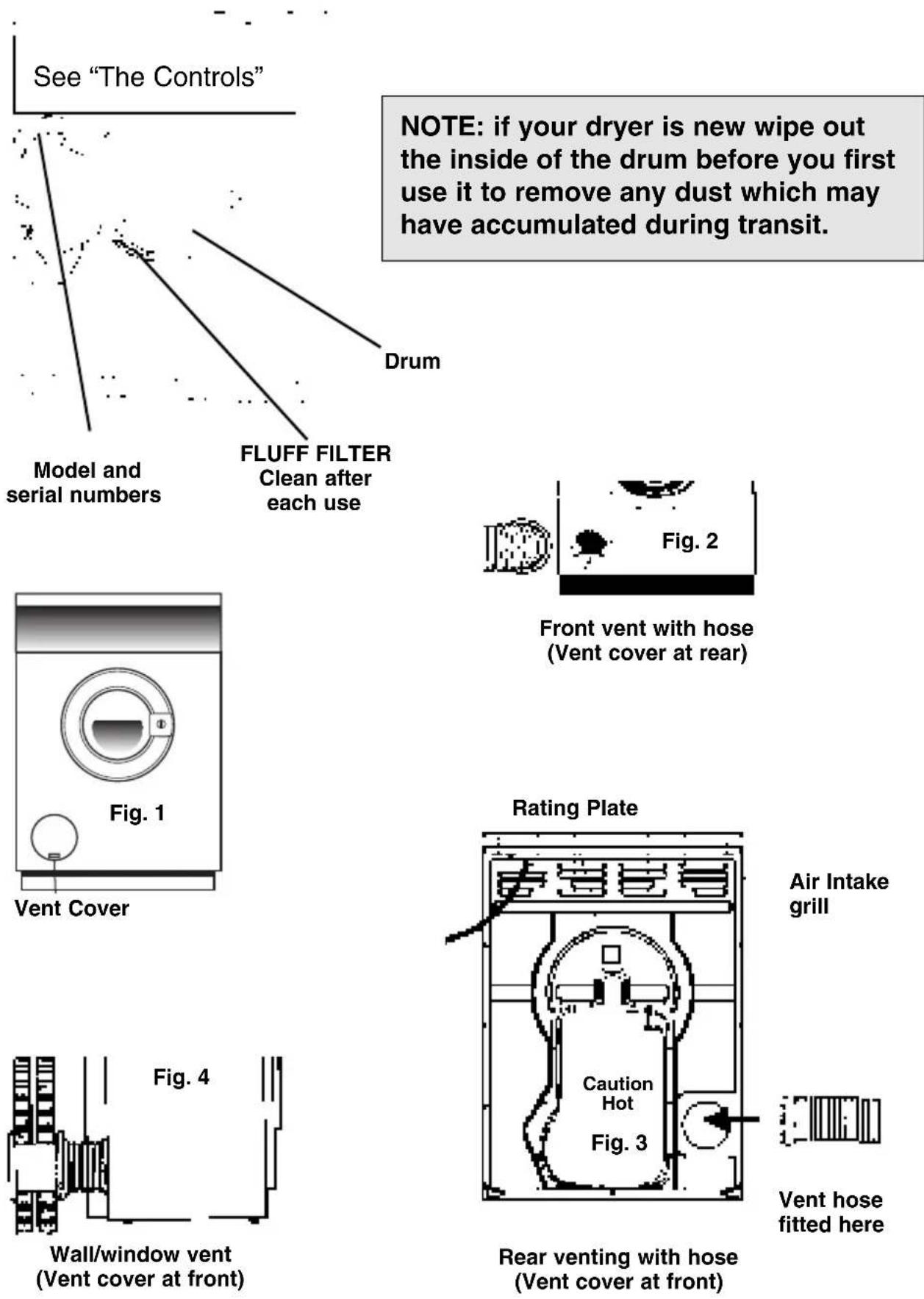
NOTE: if your dryer is new wipe out the inside of the drum before you first use it to remove any dust which may have accumulated during transit.
Where to put and vent your dryer
Stacking it on your washing machine
- Your tumble dryer should NOT be located adjacent to a gas hob, cooker, heater, or eye level grill as flames from the burners could cause damage to your machine.
- When the dryer is fitted under a work surface, allow space for air to enter the rear grille, 10mm above the dryer minimum.
- If you are using this dryer adjacent or stacked on top of a washing machine SEPARATE mains plugs and sockets must be used for each appliance. DO NOT use 2-way adaptors or extension leads.
Both your tumble dryer and front loading washing machine are similar in design allowing the tumble dryer to be permanently stacked on top saving you valuable floor space. A special stacking kit complete with instructions is available from your retailer or nearest Spares Centre.
IMPORTANT:
Only use genuine stacking kits. When ordering you must state the model numbers of both your Washing Machine and your Tumble Dryer. Unsuitable kits may result in potential hazard and will invalidate your warranty rights.
Venting options
Some models are designed to give the option of venting the moist air from the front of the dryer. The dryer as supplied is rear venting. Some models can be converted to front venting by removing the vent cover from the aperture on the front (Fig. 1) of the dryer and fitting it in the aperture at the back.
- When operating the dryer, there has to be adequate ventilation to avoid the back flow of gases into the room from appliances burning other fuels, including open fires.
● A vent hose is recommended for optimum performance.
● A vent hose must be used if the rear venting option is used. (If this is not supplied it can be obtained from your retailer or Spares Centre).
- When front venting without a hose a window must always be opened to reduce condensation.
- The hose must be fitted securely into the dryer, as shown on the diagrams on the previous page. If possible it is always best to connect the hose to a permanent outlet close to the dryer (see instructions on next page).
- Ensure that the end of the hose is not directed towards the air intake grille at the rear of the dryer.
- If permanent installation is not possible, the dryer will work just as well with the hose passed through a partly opened window. (See diagram on next page).
NOTE: The vent hose should not exceed 2.4 metres in length, and should be kept free of any possible accumulation of fluff lint (and water) by frequently shaking it out. Always ensure that the hose is not squashed.
Where to put and vent your dryer
Permanent Venting
In conjunction with the vent hose we recommend the use of a Wall/Window Vent Kit. These are available from your retailer or nearest Spares Centre.
Wall/Window Venting
Fitting instructions are supplied with the kits, which can be mounted through a wall or window. Details of positioning for wall mounting are as follows:- Break a hole through the wall to the left of the proposed position for the dryer. Keep the hose as short and straight as possible to prevent condensed moisture running back into the dryer. Similarly the duct inserted into the wall should slope downwards to the outside. For window venting with stacked dryer, the hole in the window should ideally be made below the outlet and the hose should be kept as short as possible.
Storm cover
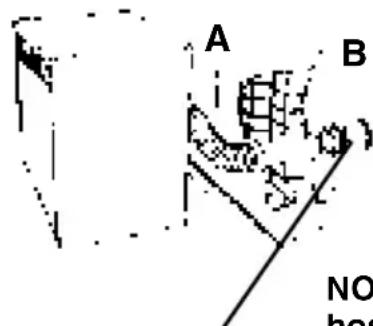
B Depending on the frequency of use, it is essential that the areas A and B in the illustrations are checked periodically and any fluff or debris removed.
It is particularly important that the vent hose adaptor is fitted securely thus preventing any moisture laden air from being emitted back into the room.
NOTE: The dryer should not be pushed so far back that the hose adaptor is pulled out of position or the hose squashed. The hose should be kept clear of the air intake grille and kinks or 'U' bends avoided as these will obstruct the hose or trap condensation.
natural_image
Simple line drawing of a mechanical component or tool (no text or symbols)
natural_image
Abstract black-and-white graphic with scattered dots and a diagonal bar (no text or symbols)WARNING:
- ENSURE THAT THE DRYER IS ADEQUATELY VENTILATED AND THAT THE END OF THE VENT HOSE IS NOT DIRECTED TOWARDS THE AIR INTAKE DUCT.
- THE DRYER MUST NOT RECYCLE EXHAUST AIR.
- THE VENT HOSE MUST ALWAYS BE FITTED FOR OPTIMUM PERFORMANCE.
- MAKE SURE THAT THE VENT HOSE AND AIR INTAKE GRILLES ARE NOT OBSTRUCTED OR BLOCKED.
- MISUSE OF A TUMBLE DRYER MAY CREATE A FIRE HAZARD.
- DO NOT DISCHARGE THE EXHAUST AIR INTO A FLUE WHICH IS USED FOR EXHAUSTING FUMES FROM OTHER APPLIANCES BURNING GAS OR OTHER FUELS.
For open window venting it must be possible for the end of the hose to be directed downwards to prevent warm, moist air condensing in the room or in the dryer.
How to use your dryer
- Plug in, switch on electricity.
WARNING: WHEN SWITCHING ELECTRICITY ON OR OFF, PLEASE ENSURE THAT YOUR HANDS ARE DRY.
- Sort your laundry (see section "Sorting Your Laundry")
- Open the door. Check that the fluff filter is clean (see section How to remove and clean the fluff filter).
- Load the dryer placing the clothes carefully in the drum pushing them well towards the back and away from the door seal. Close the door.
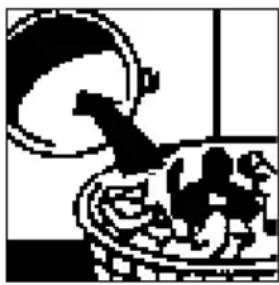
natural_image
Black and white illustration of a bowl with fish and a bird, no text or symbols present- Select the relevant heat setting (see section "Sorting Your Laundry"). When low heat is selected a coloured indicator (on top of switch) will be visible.
Button IN HIGH HEAT
Button OUT LOW HEAT (Gentle)
- (Selected models only) Select Alarm (Buzzer) option, if required. The buzzer is selected with the switch button 'IN' and cancelled with the button 'OUT'.
Button IN Alarm ON
Button OUT Alarm OFF
-
Select the required programme/ drying time (See section "The Controls"). The dryer will start.
-
When finished open the door and take out the laundry. Clean and replace the fluff filter.
- Switch off electricity and remove plug from socket.
WARNING: WHEN SWITCHING ELECTRICITY ON OR OFF, PLEASE ENSURE THAT YOUR HANDS ARE DRY.
Never switch the dryer off with a HOT load in the drum. You must terminate every programme with the Cool Tumble Phase.
The Controls - Basic Models (not 2-way Tumble models)
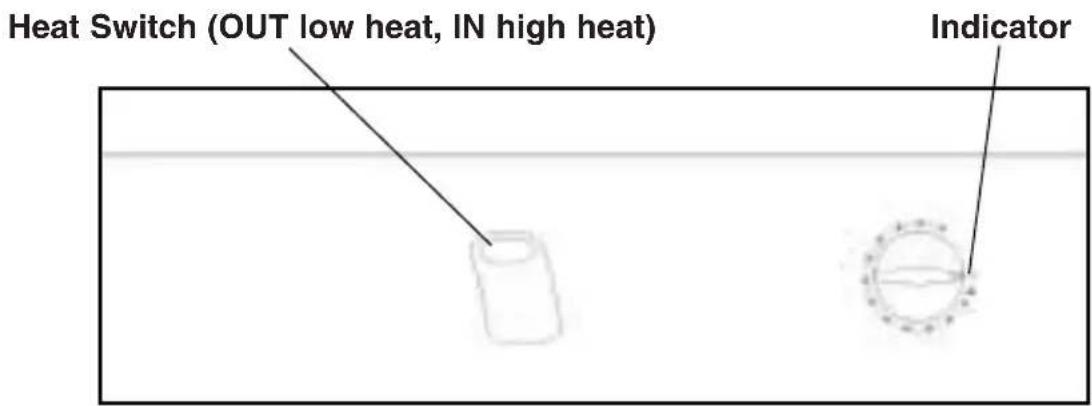
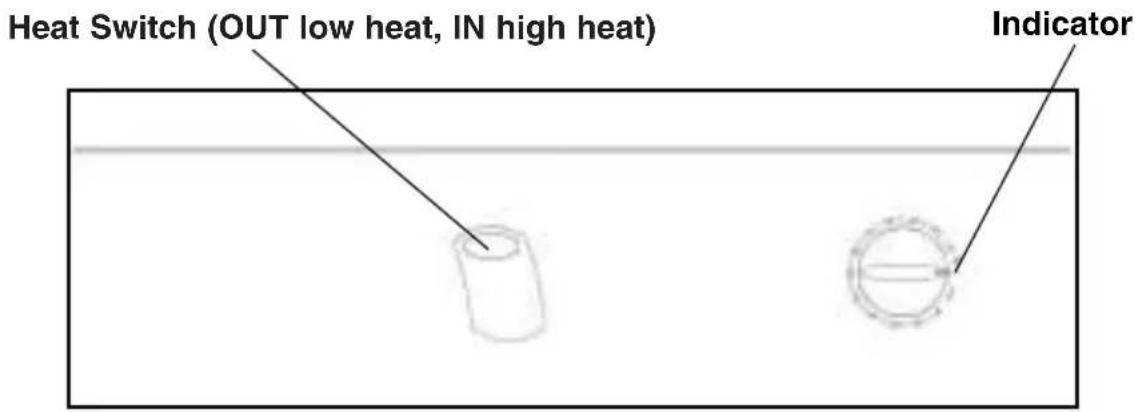
Timer control
Turn the timer clockwise from the zero position slightly past the required time, then back to the required time.
The drying time for both heat settings is controlled by the timer.
Do not rotate the knob beyond 120 minutes (maximum drying time), or past the zero stop. If you have selected more time than you require turn the knob anti-clockwise to select the correct time required.
This operation also starts the dryer, provided the door is closed and the machine is plugged in. The "Guide To Drying Times" section will tell you how much time you'll need for various loads.
The Cool Tumble phase
About 10 minutes before the programme is completed, the heating elements will be switched off and the programme enters the final 'Cool Tumble' phase. During this phase the fabric is cooled. You should always allow the dryer to complete this phase.
By opening the door, the dryer will stop and you can check the dryness of the load a often as you wish and, if you want, remove (or add) some items before they are fully dry. (This is particularly useful for a mixed load where you want to iron some items, but others are to be fully dried).
We recommend that the clothes are removed immediately after this programme to minimise creasing.
The Controls - Reverse (2-way Tumble models)
Timer control
Turn the timer clockwise to select the required drying time.
The drying time for both heat settings is controlled by the timer. All you have to do is turn the Timer Control clockwise until the required time appears in line with the indicator.
Never wind the timer control anti-clockwise.
This operation also starts the dryer, provided the door is closed and the machine is plugged in. The “Guide To Drying Times” section will tell you how much time you’ll need for various loads.
The Cool Tumble phase
About 10 minutes before the programme is completed, the heating elements will be switched off and the programme enters the final 'Cool Tumble' phase. During this phase the fabric is cooled. You should always allow the dryer to complete this phase.
By opening the door, the dryer will stop and you can check the dryness of the load a often as you wish and, if you want, remove (or add) some items before they are fully dry. (This is particularly useful for a mixed load where you want to iron some items, but others are to be fully dried).
We recommend that the clothes are removed immediately this programme is finished to minimise creasing.
The Controls - Excel Auto Sensor models
Heat Switch (OUT low heat, IN high heat)
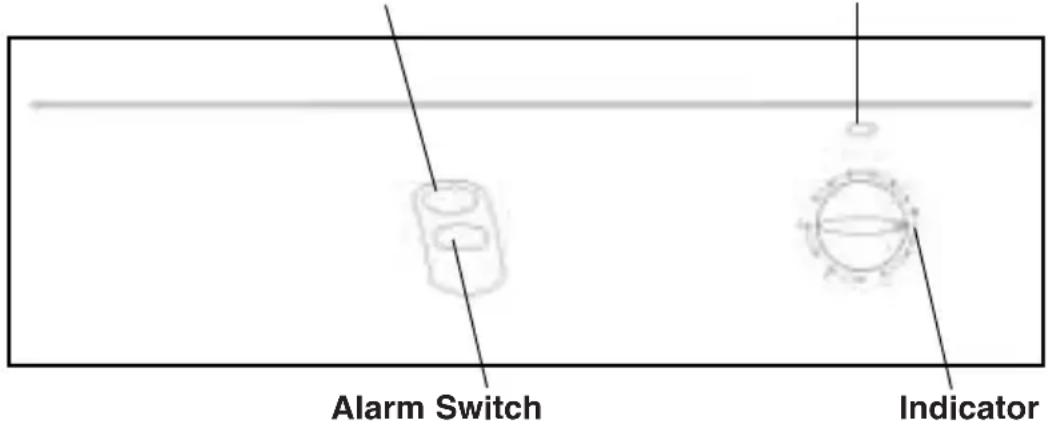
Sensor Drying Light
To set the required programme, all you have to do is turn the Timer Control clockwise until the required selection appears in line with the indicator. Never turn the timer control anti-clockwise.
This operation also starts the dryer, provided the door is closed and the machine is plugged in.
Programme options
- Sensor (Automatic) Drying B (average) loads
- Sensor (Automatic) Drying A (large) loads
- Speedy Iron Cycle
- Timed drying (up to 60 minutes)
- Cool Tumble Phase
i) Automatic Drying
The Sensor Drying programmes will automatically dry most loads to the fully dry ready to wear condition. This eliminates the need to guess the drying times and saves energy. High Heat MUST be selected. (Heat switch IN). To select Sensor Drying turn the selector to position:
B for average loads and A for large loads.
B 'Sensor' Drying average loads
1 to 3kg Cottons, Polycottons or Synthetics (Dry Weight).
A 'Sensor' Drying large loads
3 to 5kg Cottons (Dry weight)
When the door is closed the Sensor Drying light will glow to indicate that Sensor Drying programme is running. When the load is dry, the selector will automatically advance to the 8 minute cool tumble phase. Note:
- If LOW (Gentle) heat is selected for a Sensor Drying programme, the dryer will advance to COOL without drying the load.
- For acrylics and acrylic mixtures, select LOW heat and use timed drying.
- Small loads (less than 1kg) must be dried using the timed drying programme.
The Controls - Auto Sensor models (continued)
| Sensor Drying Light | This light will glow when Sensor Drying is selected. it will stop glowing when the load is dry and the programme advances to the Cool Tumble phase. |
| ii) Speedy Iron Cycle | This is a short programme of approximately 10 minutes to condition previously dried clothes (See section “Speedy Iron Programme”). It consists of a period of heating followed by a short cool tumble period (as detailed below).Select high heat for this programme.It should not be used on damp loads, as it is NOT a drying programme. |
| iii) Timed Drying | To set the required time, all you have to do is turn the timer control clockwise until the required time appears in line with the indicator.Never turn the timer control anti-clockwise.The chart in the section “Guide to Drying Times” will tell you how much time you’ll need for various loads.This programme is particularly useful in cases where a damp load is required for ironing or LOW heat drying is required and also for small loads. |
| iv) Cool Tumble Phase | About 10 minutes before the programme is completed, the heating elements are switched off and the programme enters the final ‘Cool Tumble” phase.During this phase the fabric is cooled. You should always allow the dryer to complete this phase.By opening the door the dryer will stop and you can check the dryness of the load as often as you wish and if you want to remove (or add) some items before they are fully dry. (This is particularly useful for a mixed load where you want to iron some items, but others are to be fully dried).After this cycle, the ready signal (Alarm) will sound (if selected) to remind you that the clothes are ready to take out. To cancel, turn the timer to ‘0’ or press the option button (to its OUT position).We recommend that the clothes Are removed immediately this programme ends to minimise creasing. |
Sorting your laundry
- Always separate laundry into the correct fabric groups before washing and drying.
- See that all zips are closed, hooks and eyes are fastened and belt, strings etc. are tied loosely in bows, you will normally have done this for each item before the washing stage.
- It is important to extract as much water as possible from each item before drying. This saves you time and money.
WARNING: CLOTHES SHOULD NEVER BE LOADED DRIPPING WET
- Make sure that the items to be dried are suitable for tumble drying, or are not of a type requiring ‘special attention’ (see “Wash Care Labels” section).
Maximum load size
Your dryer will hold a load of 5kg (11lb) dry weight of natural fabrics. if you are drying items of man-made fibres (synthetic or acrylics), the maximum load should not exceed 3kg (6.6lb) dry weight.
This difference is that man-made fibres require more space to tumble-dry without creasing.
WARNING: DO NOT OVERLOAD AS THIS COULD RESULT IN REDUCED DRYING PERFORMANCE AND A POSSIBLE FIRE HAZARD.
Typical load
To help you estimate how many items it takes to make up a drying load, the charts below show the approximate weights of some everyday washing items.
| Clothes | |
| Blouse Cotton 150g 5ozOther 100g 3 ^1/2 oz | |
| Dress | Cotton 500g 1lb 2ozOther 350g 12oz |
| Jeans | 700g 1lb 6oz |
| 10 Nappies | 1000g 2lb 3oz |
| Shirt | Cotton 300g 10 ^1/2 ozOther 200g 7oz |
| T-Shirt | 125g 4 ^1/2 oz |
| Household Items | |
| Duvet cover (Double) | Cotton 1500g 3lb 5ozOther 1000g 2lb 3oz |
| Large Tablecloth | 700g 1lb 6oz |
| Small Tablecloth | 250g 9oz |
| Tea Towel | 100g 3^1/2 oz |
| Bath Towel | 700g 1lb 8oz |
| Hand Towel | 350g 12oz |
| Double Sheet | 500g 1lb 2oz |
| Single Sheet | 350g 12oz |
If you group small cotton or terry-towelling items with a synthetic fabric load they could be damp at the end of the drying cycle. If this happens simply give them an additional short period of drying to finish them off.
Wash Care Labels
Most of today's fabrics can be tumble dried in your Dryer with no trouble at all, but there are certain fabric finishes which should be dried away from direct heat.
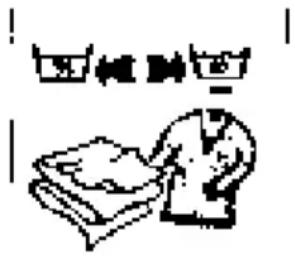
The majority of garments now have wash-care labels on them, giving full washing and drying instructions. These should always be followed carefully especially when you are drying something for the first time.
Typical symbols are:
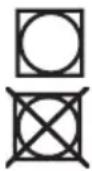
May be tumble dried
Do not tumble dry
Or:

Tumble dry at high heat setting

Tumble dry at low heat setting
Items not suitable for tumble drying
- Those containing foam rubber or rubber-like materials or plastic film (e.g. pillows, cushions, PVC rainwear), or any other articles which are inflammable or contain inflammable substances (e.g. towels contaminated with hair lacquer
- Fibreglass (e.g. some types of curtains)
- Items which have been dry cleaned
- Woollens. Woollen items need as much care in drying as they do in washing. The movement of the tumble-drying action causes the woollen fibre to shrink and distort.
- Garments with the ITCL Code (see ‘Items Requiring Special Attention’).

Do not tumble dry.
- Large bulky items e.g. continental quilts, sleeping bags, pillows, cushions, double blankets and large bedspreads. These expand when drying and would prevent airflow through the Dryer.
WARNING: THE DRYER IS INTENDED FOR USE ONLY WHERE WATER SOLUTION IS USED FOR THE CLEANING PROCESS. MISUSE OF A TUMBLE DRYER MAY CREATE A FIRE HAZARD.
Items requiring special attention
Blankets and Bedspreads
The drying requirements of blankets and bedspreads will, of course, vary tremendously according to size and weight. Some, however are simply too big. if you have difficulty getting them into the Dryer, the machine will have difficulty drying them properly. Blankets (and Garments) made from Acrylic fibres (e.g. Acilan, Courtelle, Orion and Dralon) must be dried with special care on Low heat setting. Overdrying should be avoided to ensure heat creasing does not occur.
Permanently pleated or creased garments
Your dryer will cope with such clothes very well, but you should always read the manufacturer's drying instructions attached to the garment before you begin.
Starched articles
Starched articles should be dried together in the same load to avoid the distribution of starch to non-starched items. You should use a slightly heavier starch solution than you would when drying the items on the washing line. Make sure that as much of the solution is removed from the load as possible before placing it in the Dryer. Remove the items from the dryer as soon as they reach ironing dampness. If they are overdried the starch will powder, leaving the fabric limp - which rather defeats the purpose of the exercise!
Fabric conditioner
To make sure all your tumble dried clothes come out really fresh and soft we recommend you use a liquid fabric conditioner in the final rinse of your wash. A liquid fabric conditioner restores bounce and softness and helps eliminate static cling.
WARNING: ON NO ACCOUNT SHOULD LIQUID OR SHEET FABRIC CONDITIONER BE ADDED TO THE DRYER ITSELF.
Home dry cleaning
Garments with the ITCL code ☒ may be cleaned using one of the Home Dry Cleaning Kits available. The instructions supplied with the Home Dry Cleaning Kit must be strictly followed.
Speedy Iron Programme - Selected models
| ‘Speedy Iron’ provides a short programme consisting of approximately 7.5 minutes of heat with an approximately 2.5 minutes cool tumble period. It is a short conditioning programme that softens the fibres allowing them to relax making handling and ironing easier and less time consuming. | ||
| When to use ‘Speedy Iron’ | However garments are dried, outside on the line, inside on a radiator, hung around the home or using a tumble dryer, once dry they usually get left in the same position/place for a long period of time. This tends to cause garment fibre stiffness which can make the handling of garments difficult and therefore the ironing time longer. Garments dried in any of the ways described above and left will benefit from the ‘Speedy Iron’ programme. | |
| Important! | ● The ‘Speedy Iron’ cycle is not a drying programme. It has been designed to condition/soften garments that have already been dried and left unattended in this state for a period of time. ● All materials do not behave in exactly the same way when heated. For instance, our testing has shown that materials such as Tencel® and Acrylics are not relaxed quite as effectively by applying the ‘Speedy Iron’ cycle as was found on the more traditional Cottons and Polycottons. ●To obtain the best results from ‘Speedy Iron’ it is important that the weights recommended below are not exceeded and high heat is selected. (Heat switch IN). ●For best results we recommend garments should be removed from the dryer immediately after the ‘Speedy Iron’ programme to be hung, folded neatly or ironed. When this is not possible the ‘Speedy Iron’ programme should be repeated. | |
| Recommended weights and materials | ||
| Material Maximum load | ||
| Cotton and Cotton mixtures | 2.5kg | |
| Synthetics | 2kg | |
| Denim | 2kg | |
| Alarm Signal | On completion of the programme an alarm signal is sounded (if selected) to remind you to remove garments from the dryer. | |
Guide to Drying Times
| Please note that the Drying Times stated below and on appliance control panel are a GUIDE only and drying times are affected by: | |
| The amount of water remaining in the clothes after spinning | Items such as towelling retain a lot of water after spinning, also the suggested wash programme for small items such as T-Shirts may sometimes incorporate a low spin speed which has the same effect. |
| The type of fabric | Your drying load may contain the same type of fabric but of different thicknesses. Thinner items will take less time to dry. Some fabrics, such as those used for jeans are of closer texture than others and although light when dry will be heavy after washing and spinning. |
| The quantity of clothes to be dried | Single items of clothes or small loads may take disproportionately longer to dry. It is more energy efficient to dry larger loads. |
| How dry you want the clothes | As it takes longer to fully dry clothes than to have them ready for ironing, you may wish to remove some clothes when they are slightly damp, ready for ironing and then continue to dry the remainder until they are fully dry. |
| The heat setting you have selected | The label on the garment should tell you the correct heat setting to select. See ‘Wash Care Labels’. |
| The temperature of the room | If the room in which the dryer is situated is cold, your clothes will take longer to dry than if the room is warm. |
| Bulky items | Some bulky items such as padded jackets can be dried, with care, and we do advise that you remove these items several times, shake them and return them to the dryer. THERE ARE HOWEVER SOME ITEMS THAT WE DO NOT ADVISE YOU TO DRY. SEE ‘ITEMS NOT SUITABLE FOR TUMBLE DRYING’ |
Drying Guide - approximate drying time in minutes (weights specified are when dry)
| COTTONS | SYNTHETICS | ACRYLICS | |||||||
| High Heat | High Heat | Gentle Heat | |||||||
| Drying times 800 - 1000rpm in washing machine | Drying times on reduced spin in washing machine | Drying times on reduced spin in washing machine | |||||||
| Half load | Full load | Half load | Full load | Half load | Full load | ||||
| 1 kg | 2 kg | 3 kg | 4 kg | 5 kg | 1 kg | 2 kg | 3 kg | 1 kg | 2 kg |
| 20 - 30 | 35 - 45 | 45 - 60 | 60 - 70 | 70 - 80 | 20 - 30 | 35 - 45 | 45 - 60 | 25 - 40 | 40 - 60 |
Be careful not to overdry
All fabrics contain a little natural moisture even when ‘dry’ and this natural moisture should not be lost if the clothes are to remain soft and fluffy. Clothes that are dried for too long tend to wrinkle and will need more ironing than usual giving you extra work that the dryer was designed to remove.
How to remove and clean the fluff filter
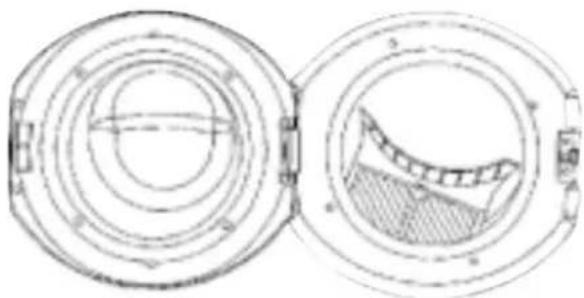
Position of filter
natural_image
Technical line drawing of two circular mechanical components with internal features (no text or symbols)WARNING: NEVER USE SHEET FABRIC CONDITIONER. IT MAY FALL INTO THE FILTER AND RESTRICT THE AIRFLOW THROUGH THE DRYER
To remove the filter
natural_image
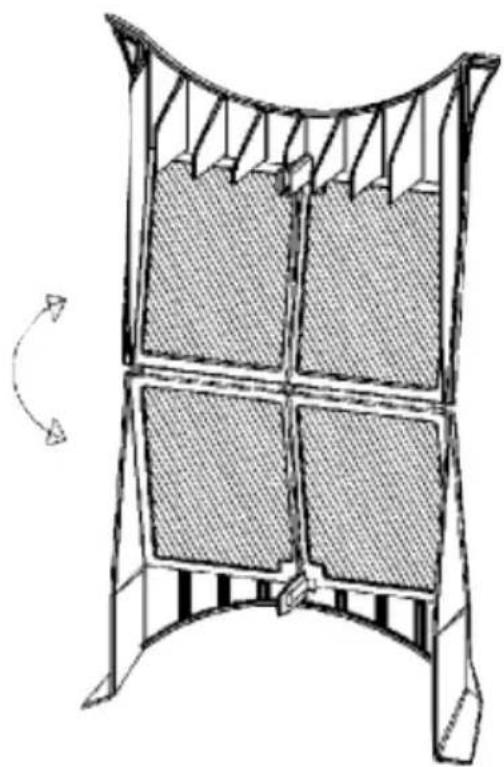
Technical line drawing of a four-panel mechanical structure with curved supports and grid panels, no text or symbols present.A very important part of your dryer is the fluff filter at the front edge of the drum. It's there to trap the particles of lint and fluff which are normally blown away when clothes are dried on the washing-line.
if the filter is allowed to become blocked, the passage of warm air through the drum will be severely restricted. This means your clothes will take much longer than normal to dry and the cost of drying them will be increased. it may also damage your dryer.
Small items, e.g. babies socks, may fall onto the filter. These should be removed so that the filter is not restricted.
WARNING: DO NOT OPERATE THE DRYER WITHOUT CLEANING THE FILTER AFTER EACH DRYING CYCLE. FAILURE TO CLEAN THE FILTER MAY RESULT IN A FIRE HAZARD.
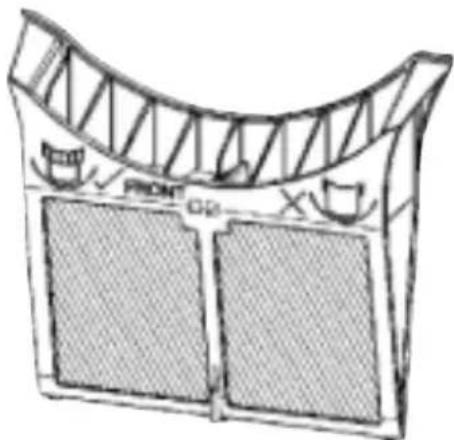
Grip the centre rib and pull the filter upwards and forwards through the door seal (see diagram).
Open the filter, and remove the fluff that has collected on the inside.
natural_image
Line drawing of a structural frame with truss roof and two side panels (no text or symbols)Wash or vacuum clean the filter occasionally.
Don't be alarmed by the amount of fluff you may find on the filter. It's part of the wearing, washing and drying process.
WARNING: DO NOT OPERATE THE DRYER WITHOUT THE FILTER IN POSITION.
It is essential that the filter is replaced correctly. It must be fitted so that the symbols, shown on the filter above, face towards the front of the dryer. Ensure the filter is fully located into the tumble dryer duct.
Caring for your Dryer
| Your tumble dryer needs very little attention. The following simple steps will keep it performing well. | |
| When finished | Switch off electricity and remove plug. |
| After each load | Always clean the filter and turn the drum by hand to check that small items like handkerchiefs do not get missed. |
| As necessary | Clean exterior metal and plastic surfaces with a damp cloth or silicon polish only. Regularly check and clean if necessary, the vent hose and any permanent venting fixture to ensure that there has been no accumulation of fluff or lint during the drying process.Clean fluff from the area below the fluff filter and the rear vent tube.Do not use abrasive cleaners, scouring agents, acids, chlorine bleach or metal polish to clean any part of the machine. These could damage the machine. |
| Lubrication | Your tumble dryer uses special bearing components. Lubrication by the user is not necessary and must not be attempted.We strongly recommend that all appliances are regularly checked for electrical and mechanical safety. |
Spare parts
Please remember your new appliance is a complex piece of equipment.
‘DIY’ repairs or unqualified and untrained service people may put you in danger, could damage the appliance, and might mean you lose cover under the Parts Guarantee.
If you do experience a problem with the appliance don't take risks, call in our Service Engineer. Our Spare Parts are designed exclusively to fit your appliance. Do not use them for any other purpose as you may create a safety hazard.
Disposal of your product
To minimise the risk of injury to children please dispose of your product carefully and safely.
Remove all doors and lids. Remove the mains cable (where fitted) by cutting off flush with the appliance and always ensure that no plug is left in a condition where it could be connected to the electricity supply.
To help the environment Local Authority instructions should be followed for the disposal of your product.
This appliance conforms to the following EEC Directives.
Low Voltage Equipment
72/23/EEC
93/68/EEC
Electromagnetic Compatibility
89/336/EEC
92/31/EEC
93/68/EEC
If something goes wrong
| First, don't panic! There may be nothing wrong at all. Look for your problem below, then check the things we suggest. More often than not, this will give you the answer to your problem, and you'll be able to carry on without having to telephone your Service Centre.If after this you still cannot get your machine to work, follow the advice given on the next page. | |
| Problem | Check these things first |
| ‘It won’t start’ | 1. Is the machine plugged in and switched on at the socket?2. Is the Timer Control set to required programme/time?3. Is the door securely closed?4. Has the fuse blown? (Try plugging in another appliance to check)5. Have you used an extension lead? Many are not suitable. Try plugging the dryer directly into a socket to check. |
| ‘It is taking a long time to dry’(All Models) | 1. Have you forgotten to clean the filter? Check it.2. Have you selected the correct Heat setting for the type of fabric you are drying? (IN for High, OUT for low (Gentle)).3. Is the flexible vent hose squashed, blocked or kinked? Check it for foreign objects or condensate (water).4. Is the air inlet obstructed in any way?5. Permanent venting - is flap on the storm cover obstructed?6. Were the clothes ‘excessively wet’ when they were put in?7. Was the correct programme/time selected?8. Have you overloaded the dryer? |
| Sensor Dry Programmes(Some models) | 1. Has the correct programme been selected for the load?3 - 5kg programme A1 - 3kg programme BLess than 1kg use timed dry programme.2. Has High heat been selected?The Sensor Dry programmes will not operate on Low (Gentle) heat, if low heat is required use timed dry. |
| ‘The dryer keeps buzzing’ (Some models) | This is perfectly normal, the dryer has finished its programme. Press the Alarm button and the buzzing will stop or turn the Timer Control to ‘O’, the off position. |
| Any other problem | Have you re-read this instruction book? |
Key Contacts Service
Creda has the largest appliance manufacturer's service team in Europe, trained specialists directly employed by us to ensure your complete confidence.
Repair Service
UK: 08709 066 066
Republic of Ireland: 1850 302 200
You will be asked for the following information:-
Name, address and postcode.
Telephone number
Model / Serial number of the appliance
Clear and concise details of the query or fault
Place and Date of purchase
(Please keep the receipt as evidence will be required when the engineer calls).
Extended Warranty
To join: UK 08709 088 088
Republic of Ireland: 1850 502 200
Genuine Parts & Accessories Mail Order Hotline
UK: 08709 077 077
Republic of Ireland: (01) 842 6836
For further product information 08701 50 60 70
All Creda Services are offered as an extra benefit and do not affect your statutory rights.

General Domestic Appliances Limited, Morley Way, Peterborough, PE2 9JB
- Tumble Dryer Instruction Book
- Contents
- Retention of this Instruction Book
- For your safety
- IMPORTANT
- Electrical Requirements
- Features - Get to know the main parts of your dryer
- Where to put and vent your dryer
- Stacking it on your washing machine
- IMPORTANT:
- Venting options
- Permanent Venting
- Wall/Window Venting
- WARNING:
- How to use your dryer
- The Controls - Basic Models (not 2-way Tumble models)
- Timer control
- The Cool Tumble phase
- The Controls - Reverse (2-way Tumble models)
- Never wind the timer control anti-clockwise.
- The Controls - Excel Auto Sensor models
- Programme options
- i) Automatic Drying
- The Controls - Auto Sensor models (continued)
- Sorting your laundry
- WARNING: CLOTHES SHOULD NEVER BE LOADED DRIPPING WET
- Maximum load size
- WARNING: DO NOT OVERLOAD AS THIS COULD RESULT IN REDUCED DRYING PERFORMANCE AND A POSSIBLE FIRE HAZARD.
- Typical load
- Wash Care Labels
- Items not suitable for tumble drying
- Items requiring special attention
- Blankets and Bedspreads
- Permanently pleated or creased garments
- Starched articles
- Fabric conditioner
- Home dry cleaning
- Speedy Iron Programme - Selected models
- Guide to Drying Times
- Be careful not to overdry
- How to remove and clean the fluff filter
- Caring for your Dryer
- Spare parts
- Disposal of your product
- If something goes wrong
- Key Contacts Service
- Repair Service
- Extended Warranty
- Genuine Parts & Accessories Mail Order Hotline
Brand : Creda
Model : TS12
Category : Tumble dryer