
DiVA DT81 DAB - Audio tuner ARCAM - Free user manual and instructions
Find the device manual for free DiVA DT81 DAB ARCAM in PDF.


| Product Type | Audio Tuner with DAB/DAB+ and FM RDS |
| Brand | Arcam |
| Model | DiVA DT81 DAB |
| Dimensions (W x H x D) | 430 x 85 x 290 mm |
| Weight | 4.5 kg |
| Power Supply | AC 230V, 50Hz |
| Power Consumption | 15 W (standby < 1 W) |
| Frequency Range FM | 87.5 - 108 MHz |
| Frequency Range DAB | 174 - 240 MHz (Band III) |
| Tuning Presets | 30 presets (FM and DAB) |
| Audio Outputs | Analog RCA, Digital Optical, Digital Coaxial |
| Antenna Input | 75 ohm coax for FM/DAB |
| Display | Alphanumeric dot matrix LCD with adjustable brightness |
| Remote Control | Included (CR80 type) |
| Additional Features | Auto search, manual tuning, alarm clock, sleep timer, dimmer |
| Care and Cleaning | Wipe with a dry soft cloth; do not use solvents or abrasives |
| Safety Precautions | Do not expose to moisture; use only provided power cord; no user-serviceable parts inside |
| Spare Parts and Repairability | Contact authorized Arcam dealer; available remotes and accessories |
| General Information | Supports DAB+ reception; RDS station information; detachable power cord |
Frequently Asked Questions - DiVA DT81 DAB ARCAM
User questions about DiVA DT81 DAB ARCAM
0 question about this device. Answer the ones you know or ask your own.
Ask a new question about this device
Download the instructions for your Audio tuner in PDF format for free! Find your manual DiVA DT81 DAB - ARCAM and take your electronic device back in hand. On this page are published all the documents necessary for the use of your device. DiVA DT81 DAB by ARCAM.
USER MANUAL DiVA DT81 DAB ARCAM
Arcam DT81 digital radio tuner
Safety guidelines
Safety instructions
This product is designed and manufactured to meet strict quality and safety standards. However, you should be aware of the following installation and operation precautions:
1. Take heed of warnings and instructions
You should read all the safety and operating instructions before operating this appliance. Retain this handbook for future reference and adhere to all warnings in the handbook or on the appliance.
2. Water and moisture
The presence of electricity near water can be dangerous. Do not use the appliance near water – for example next to a bathtub, washbowl, kitchen sink, in a wet basement or near a swimming pool, etc.
3. Object or liquid entry
Take care that objects do not fall and liquids are not spilled into the enclosure through any openings. Liquid filled objects such as vases should not be placed on the equipment.
4. Ventilation
Do not place the equipment on a bed, sofa, rug or similar soft surface, or in an enclosed bookcase or cabinet, since ventilation may be impeded. We recommend a minimum distance of 50mm (2 inches) around the sides and top of the appliance to provide adequate ventilation.
5. Heat
Locate the appliance away from naked flames or heat producing equipment such as radiators, stoves or other appliances (including other amplifiers) that produce heat.
6. Climate
The appliance has been designed for use in moderate climates.
7. Racks and stands
Only use a rack or stand that is recommended for use with audio equipment. If the equipment is on a portable rack it should be moved with great care, to avoid overturning the combination.
8. Cleaning
Unplug the unit from the mains supply before cleaning.
The case should normally only require a wipe with a soft, damp, lint-free cloth. Do not use paint thinners or other chemical solvents for cleaning.
We do not advise the use of furniture cleaning sprays or polishes as they can cause indelible white marks if the unit is subsequently wiped with a damp cloth.
9. Power sources
Only connect the appliance to a power supply of the type described in the operating instructions or as marked on the appliance.
10. Power-cord protection
Power supply cords should be routed so that they are not likely to be walked on or pinched by items placed upon or against them, paying particular attention to cords and plugs, and the point where they exit from the appliance.
11. Grounding
Ensure that the grounding means of the appliance is not defeated.
12. Power lines
Locate any outdoor antenna/aerial away from power lines.
13. Non-use periods
If the unit has a standby function, a small amount of current will continue to flow into the equipment in this mode. Unplug the power cord of the appliance from the outlet if left unused for a long period of time.
14. Abnormal smell
If an abnormal smell or smoke is detected from the appliance, turn the power off immediately and unplug the unit from the wall outlet. Contact your dealer immediately.
15. Servicing
You should not attempt to service the appliance beyond that described in this handbook. All other servicing should be referred to qualified service personnel.
16. Damage requiring service
The appliance should be serviced by qualified service personnel when:
A. the power-supply cord or the plug has been damaged, or
B. objects have fallen, or liquid has spilled into the appliance, or
C. the appliance has been exposed to rain, or
D. the appliance does not appear to operate normally or exhibits a marked change in performance, or
E. the appliance has been dropped or the enclosure damaged.
Safety compliance
This product has been designed to meet the IEC 60065 international electrical safety standard.
Using this handbook
This handbook has been designed to give you all the information you need to install, connect, set up and use the Arcam DT81 tuner. The CR-389 remote control handset supplied with this equipment is also described.
Safety
Safety guidelines are set out on the inside front cover of this handbook.
Many of these items are common sense precautions, but for your own safety, and to ensure that you do not damage the unit, we strongly recommend that you read them.
Radio interference
The DT81 digital radio tuner is an audio device containing microprocessors and other digital electronics. It has been designed to very high standards of electromagnetic compatibility.
If the equipment causes interference to radio/television reception, which can be determined by switching the equipment off and on, the following measures should be taken:
■ Reorient the receiving antenna or route the antenna cable of the receiver as far as possible from this appliance and its cabling.
■ Relocate the receiver with respect to this appliance.
■ Connect the receiver and this appliance to different mains outlets.
If the problem persists contact your Arcam dealer or Arcam Customer Support on +44 (0)1223 203203.
EU countries
This product has been designed to comply with directive 89/336/EEC.
Information on radio transmissions
For United Kingdom users the BBC publishes a booklet entitled "Radio Transmitting Stations" which contains details of all BBC transmitters in the UK together with other useful hints and tips.
This booklet can be obtained on request by sending a large stamped addressed envelope to:
BBC Engineering Information Dept.
BBC Radio
201 Wood Lane
London W12 7TS
Telephone: 08700 100123
Internet: www.bbc.co.uk/dab/
(for general DAB information)
The Radio Authority publishes a booklet which contains details of all independent radio stations. This booklet can be obtained on request by sending a large stamped addressed envelope to:
Radio Authority
Holbrook House
14 Great Queen Street
Holborn
London WC2B 5DG
Telephone: 020 7430 2724
Fax: 020 7405 7062
Email: info@radioauthority.org.uk
Internet: www.radioauthority.org.uk
Contents
Safety guidelines 2
Safety instructions 2
Safety compliance 2
Using this handbook 3
Safety 3
Information on radio transmissions 3
Installation 4
Positioning the unit 4
Setting up the aerial 4
Connecting to other equipment 4
Additional rear panel functions 5
Connecting to a power supply 5
Using your tuner 6
Front panel controls 6
Searching for services 6
Programming a preset 6
Selecting a preset 6
Changing the display mode 6
A note on programme types 7
A note on secondary services 7
Dynamic label 7
Signal quality meter 7
Engineering mode 7
Using the remote control 8
CR-389 remote control 8
Troubleshooting 9
Technical specifications 10
Guarantee 11
On line registration 11
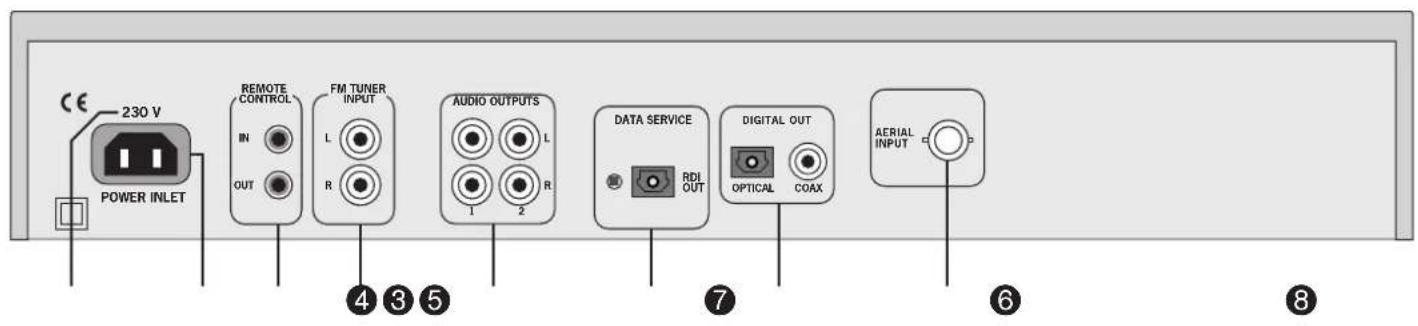
DT81 rear panel
① Voltage indicator
② Socket for IEC power inlet line
③ Remote control, in and out mini-jacks
4 FM tuner input
⑤ Audio output phono sockets, two pairs
⑥ Data Service on/off switch and RDI output
7 |Digital audio output, coaxial and TOSLINK
8 Aerial input, BNC locking coaxial
Positioning the unit
Always place the tuner on a level, firm surface.
Setting up the aerial
Your new Arcam tuner is capable of superb reception but only if it is receiving a good quality transmission signal.
We recommend that a roof mounted aerial is used where possible, to ensure the best performance. Use a Band III (multi-element Yagi) array if you are a long way from a transmitter, or use an omnidirectional or folded dipole aerial if you are close to more than one transmitter. In the U.K. this should be mounted with all elements vertical as the transmissions are vertically polarised. Be sure to use a good quality coaxial cable such as URM43, CT-100 or similar. For Band III use you can use either 50Ω or 75Ω cable provided it is good quality. Always use 50Ω cable for L-band use.
If the signal is strong the supplied indoor aerial may be sufficient. It should be hung on a wall with both wires fully stretched out vertically. However there will be many areas where one DAB ensemble (i.e. a group of stations transmitted together) is strong and others are weak. An external aerial is desirable in these cases in order to receive a higher number of services. If the DAB services in your area are transmitted on L-band (1.5GHz) then consult your dealer with regard to the best aerial to use.
NOTE: The supplied indoor aerial is suitable only for Band III, not L-band. An aerial is not supplied in US or Canada.
There is a small aerial made by Bosch which is suitable for L-Band and Band III and has been used with good results. The Bosch part number is: F01DE00144
The coaxial cable from the aerial should be fitted with a 50Ω BNC plug. Connect this to the aerial socket on the back of this tuner, turning to lock in place.
Connecting to other equipment
Interconnect cables
Interconnecting cables are not supplied with this tuner. We recommend high quality cables as inferior quality cables will degrade the sound quality of your system. Please contact your Arcam dealer for details of suitable cables.
Digital outputs
Optical and co-axial digital audio outputs are provided. These can be connected to an external DAC (Digital to Analogue Converter) in order to enhance the audio potential of this tuner. They can also be used to connect this tuner to a digital recording device (such as a CD-R or Minidisc recorder) for direct recording.
NOTE: The digital output data includes Serial Copy Management System (SCMS) codes. This allows you to make one generation of digital recording but further digital copies will be prevented.
AM/FM tuner audio input
The audio output from a conventional tuner can be connected here to save an input on the amplifier. When this tuner is switched off or is set to bypass mode, this input is routed straight to the audio output of this tuner.
Remote control in/out
If you are using this tuner with an amplifier that also features a remote bus (such as the Arcam Diva A85 or FMJ A22) you can connect the REMOTE OUT of the amplifier to the REMOTE IN of the tuner using a 3.5mm jack lead.
This allows the tuner to be positioned out of sight while still offering remote control as commands are passed through the amplifier. It can also be used to route control signals for multi-room use.
Additional rear panel functions
Data Service switch: DAB makes provision for providing dedicated text and other data services in the multiplex datastream. This switch can be set to the 'in' position (using the end of a ballpoint pen) to prevent data services from appearing among the available services on the tuner's display.
RDI out: The Radio Data Interface (RDI) is an optical data output that may allow future expansion to use certain data services via an outboard device such as a personal computer. The Data Service switch must be set to the 'out' position to access the data streams from these services.
Connecting to a power supply
Wrong plug?
Check that the plug supplied with the unit fi ts your supply and that your mains supply voltage agrees with the voltage setting (115V or 230V) indicated on the rear panel of the unit ①.
If your mains supply voltage or mains plug is different, consult your Arcam dealer or Arcam Customer Support on +44 (0)1223 203203.
Mains lead
The appliance is normally supplied with a moulded mains plug already fitted to the lead. If for any reason the plug needs to be removed, it must be disposed of immediately and securely, as it is a potential shock hazard when inserted into the mains socket. Should you require a new mains lead, contact your Arcam dealer.
Plugging in
Push the plug (IEC line socket) of the power cable supplied with the unit into the POWER INLET socket ② in the back of the unit. Make sure it is pushed in firmly.
Put the plug on the other end of the cable into your power supply socket and switch the socket on.
Using your tuner

Front panel controls
Power
Switches the unit on and off. When off the status LED shows red. When the tuner is switched on the status LED shows green.
Searching for services
When using the tuner for the first time we recommend that you perform a search to find all available services in your area. Once you have done this, you may wish to repeat a search periodically to discover if any new ensembles (groups of services) have gone on air. If you move to another area you should also perform a new search.
Selecting a search region
Access the 'Search Region' menu by pressing the MENU button three times. Use the rotary controller to select the world region that best describes your location; the options are UK, Canada or Rest of World. When the desired region is displayed, press SELECT. The tuner takes a few seconds to reconfigure its internal software before automatically switching out of the Search Region menu. You should now perform a search for available services.
To perform a search
Press SEARCH on the front panel, then SELECT when prompted. A bar graph will show the progress of the search. This can take up to three minutes depending on the search region you have selected. The search can be cancelled at any time by pressing any front panel button or rotating the rotary controller.
If no service is found after the search then either your aerial is insufficient for your location or, you may be outside of the covered area for DAB services. If this is the case contact either your Arcam dealer or Arcam customer services.
Selecting a service
Turn the rotary controller to scroll through the available services and choose the one you wish to listen to.
What happens next depends on the setting of the Selection mode (see page 7). If set to 'Auto', the displayed service is selected after 2.5 seconds; if set to 'Manual', the display returns to the current service after five seconds unless SELECT is pressed.
If >> is shown in the top right corner of the display when a service is selected, a secondary service is also available. Moving the rotary controller clockwise one more click will display this secondary service: press SELECT to listen to it.
Programming a preset
First select the service you wish to assign to a preset. Now press STORE 1-8 or STORE 9-16 and then briefly press the appropriate preset button to store the service.
It is not possible to assign secondary services to presets, only primary ones, since secondary services are often broadcast on a temporary basis and they may change from day to day.
Selecting a preset
To select presets 1 to 8, press and release the corresponding button. To select presets 9 to 16, press and hold the corresponding button for two seconds.
Changing the display mode
The bottom line of the display can be set to one of four modes: Programme type (a brief label), Dynamic label (scrolling text), Data rate (shows service data rate and stereo/mono mode) and Signal quality meter (a bar graph). See page 7 for further information.
Press DISPLAY MODE to cycle through the modes.
Compression mode
Press the MENU button once to access the compression menu. From this, dynamic range compression (DRC) can be applied to the audio signal within the tuner, provided the broadcaster has made it available for that service. The amount of compression is adjustable between 'off' and '5' (the maximum amount).
To set the compression level, turn the rotary controller until the required compression level is displayed and press SELECT. The tuner leaves the compression menu and displays the service name. 'C1' to 'C5' is shown in the top right corner of the display, according to the compression level selected.
To exit this menu without making any changes, press the MENU button until the tuner reverts to displaying the service name.
Note that the selected level of compression is applied to all services where compression data is made available by the broadcaster. It is not possible to store different compression levels for different stations.
Service sort menu
Services can be sorted by name or by programme type. To change between 'sort by name' and 'sort by programme type', press the MENU button twice to access the Service Sort menu and turn the rotary controller. Press SELECT to confirm the setting: the tuner reverts to displaying the service name.
To exit this menu without making any changes, press the MENU button until the tuner displays the service name.
Selection mode
Press the MENU button four times to access the Selection Mode menu. This can be used to change the way services are selected when scrolling with the rotary controller or when using the < and > buttons on the remote control.
To change between 'AUTO' and 'MANUAL', turn the rotary controller and press SELECT to confirm the setting: the tuner reverts to displaying the service name.
With the selection mode set to manual, the displayed service name is selected by pressing the SELECT button on the tuner or the BAND button on the remote control. When the selection mode is set to auto, the displayed service is automatically selected after 2.5 seconds.
TUNER BYPASS switch
The front panel Tuner Bypass switch is used to switch between this tuner's AUDIO OUTPUT and the audio output of an FM tuner attached to the FM TUNER INPUT sockets. The digital output continues to output the audio signal from the currently selected digital service on the DT81.
A note on Programme types
The Programme Type (PT) label is the short description displayed below the service name.
Two different PT labels are transmitted: Static PT and Dynamic PT. The static PT is the service 'genre' and does not change. Radio 4's static PT for example is 'Current affairs'. The dynamic PT reflects the current programme's content (for example, for Radio 4 typical dynamic PTs include 'Drama', 'News', etc.).
When a service is selected, the dynamic PT is displayed; at other times the static PT is shown. This means that Radio 4 will say 'Current affairs' while scrolling through services, then may change to 'Drama' when that service is selected. The tuner works this way because it cannot update dynamic PTs for a multiplex to which it is not currently tuned.
Note also that, for secondary services, the tuner displays the parent's static PT, since a dynamic PT would not be relevant.
A note on Secondary services
Primary services can have one or more secondary services attached to them. These tend to be temporary; sporting events like football matches for example may be broadcast as secondary services. Services that have secondary services attached to them are indicated by a >> symbol. Turning the rotary selector clockwise will then reveal these services. The secondary services themselves are indicated by a << symbol.
You need to select a main service in order to see if there are secondary services attached. The BBC is currently not distinguishing between primary and secondary services, to work with tuners that do not support secondary services. The effect of this is to make those services appear twice in the list, once as primary and once as secondary.
Note that only primary services can be attached to a preset.
Dynamic label
This is a 128 character block of scrolling text used by most broadcasters to display programme information (such as song titles, useful phone numbers and website addresses).
Signal quality meter
The signal quality meter is a simple bargraph which gives a quick visual guide to reception quality. Technically, it is an inverse measure of the Viterbi error rate, with zero errors at full scale (all segments are lit) and 300 errors/second (with all segments off). When reception is marginal, the number of segments displayed becomes a very sensitive function of the received signal strength and can be used to optimize the aerial position.
Engineering mode
The DT81 digital radio tuner has two modes – in addition to User Mode (in which the unit powers up) it also offers an Engineering Mode that allows you to view technical information about the currently selected service.
To access Engineering Mode, press SELECT and preset 8 simultaneously. 'ENGINEERING MODE' is briefly displayed. From Engineering Mode you can return to User Mode by pressing SELECT and preset 8 simultaneously again.
Once in Engineering Mode, each of the eight preset buttons shows different technical information:
Preset 1: Ensemble frequency. This is the carrier frequency of the currently selected ensemble.
Preset 2: Service data rate. This is the data rate of the current service in kilobits per second: the higher the number, the better the sound quality.
Preset 3: Service start and end CU numbers. The start and end CU (Capacity Unit) numbers indicate the service's position within the ensemble.
Preset 4: Viterbi error/CRC failure count. The Viterbi rate indicates the amount of error correction that is going on. Audio decoding normally works transparently with Viterbi rates up to about 200; above this, audible degradation of the signal may be noticeable. The CRC (Cyclic Redundancy Check) failure count indicates the amount of uncorrected errors. Any figure above zero may mean audio disruption.
Preset 5: Signal strength (AGC). A measure of raw RF strength at the receiver front end.
Preset 6: Transmitter ID information. This shows the IDs (identities) of all the transmitters detected for the current ensemble. DAB radio uses multiple transmitters for the same signal and can add together for better results. If you turn the rotor you can see how many transmitters are being picked up and their respective fi eld strengths on a scale of 1 to 7.
Preset 7: Audio mode. This shows that the selected programme is being transmitted in Stereo, Joint Stereo or Mono mode. (Joint stereo is an MPEG audio mode where the data for one channel is sent along with data representing the difference between the two channels. It allows a lower data rate to be used, but is not as good quality as true stereo.)
Preset 8: Transmission mode. This indicates which of four possible methods of encoding/decoding transmissions is used in the current service. This information may be useful to engineers in diagnosing certain unusual problems.
Using the remote control
CR-389 Remote Control
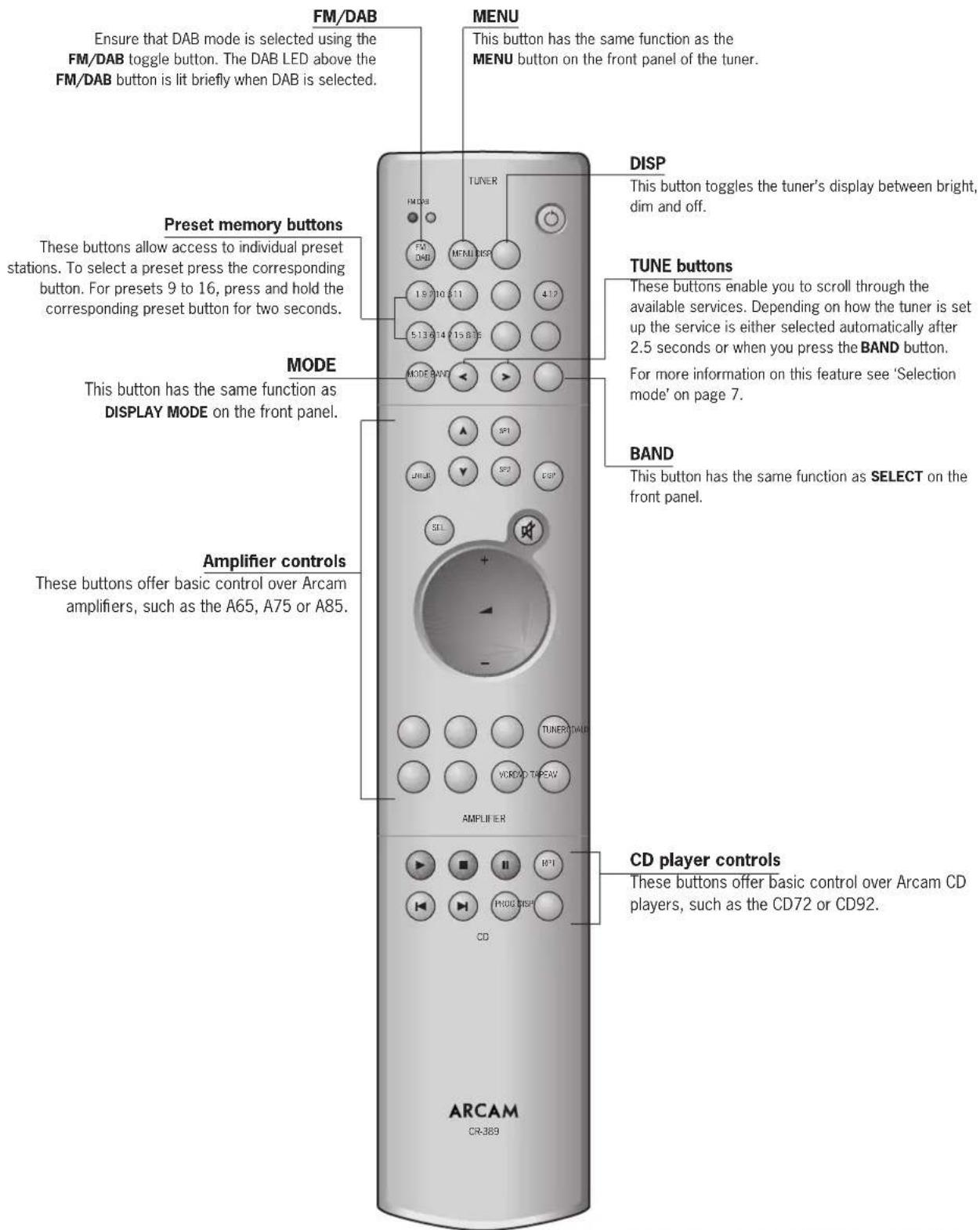
NOTE: Remember to install the two AAA batteries supplied before trying to use your remote control.
Do not place anything in front of the tuner (where the IR receiver is located), or the remote control may not work.
1. Display shows 'Service not found' when attempting to select a service
This can happen when the tuner has an ensemble stored that is no longer available. For example when the tuner is first shipped it has the BBC ensemble stored, and if it is used in another country then that ensemble will not be available. In this situation one should perform a search.
Note that re-confi guration of services within an ensemble is handled without having to perform a search, so if services are added or removed from the ensemble it is not necessary to perform a search. Therefore 'Service not found' may also appear when an attempt is made to select a service that has been removed from the ensemble. Normally redundant services are automatically removed from the list but occasionally they are not. If this happens, simply select another active service to remove redundant services from the list of available services and from any stored presets.
The other situation when the tuner may fail to select a service is when the signal strength is insufficient. When a service is not selected it is possible to view the signal strength in Engineering Mode (provided an attempt has been made to select a service from the required ensemble). Generally the meter needs to be past the 'E' in 'Strength' for reliable reception.
We strongly recommend that an external aerial is used for the best possible performance. If the signal strength is marginal then an indoor aerial will only work some of the time, as the signal quality is affected by weather and the time of day.
Note: There will be situations where some ensembles are strong and others are weak. With a good aerial you may be able to weakly pick up some ensembles from outside their normal coverage range.
2. Display shows 'No Signal'
This message is displayed if a signal at the required frequency is missing. Note that it may take some time (about one minute) to show the message. If you have removed the aerial and this message appears, reconnect the aerial and reselect a service to restore operation.
3. Display shows 'No services stored' at the end of the search
This will happen when the signal strength is insufficient due to either a poor aerial or lack of an available DAB signal.
4. Audio is lost and display shows 'signal weak – muted'
This happens when the signal becomes weak. A better aerial is required.
5. Audio is lost and display shows 'Service ended' or 'Arcam DAB Tuner'
This occurs if the selected service is no longer broadcast – in practice this will rarely happen. Select another active service.
6. Display shows 'No service stored' when a preset button is pressed
This message is shown if a service has not been assigned to a preset button or if that service has been removed from the ensemble, even temporarily. If ensemble components are only partially detected (due to weak signal strength) then the tuner sometimes decides that a service has been removed and the preset is deleted.
Notes on data rate and sound quality
The tuner supports MPEG audio data rates up to 256 kb/s which is the maximum rate as defined by the ETSI specification for DAB radio.
Data rates transmitted are generally lower than this because broadcasters prefer to include a high number of services within the available bandwidth. Higher compression factors are used to lower data rates, reducing audio quality.
Most stereo services operate at 192kb/s at present, and this has been found to give very high quality audio (though 256kb/s is even better).
Some speech-based services use mono in order to reduce the data rate and some apply higher compression as well. It is also common to find that different services have different audio quality even though they operate at the same data rate. This is due to differences in the audio processing techniques used in the transmission chain. Generally speaking, audio is transmitted without applying dynamic range compression (DRC) – unlike FM broadcasts. DAB uses a system whereby the coefficients for DRC are transmitted separately, so that the tuner can apply the compression itself. This is beneficial because the listener can decide whether or not to apply DRC: most hi-fi enthusiasts do not. However some DAB broadcasts have some form of DRC applied directly to the audio and this generally impairs audio quality.
Technical specifications
DT81 digital radio tuner
Analogue audio output
| Level | 2.4V RMS at 0dB FS |
| Output impedance | <100Ω |
| Minimum load | 600Ω |
| Bandwidth (±0.5dB) | 20Hz—20kHz |
Digital audio output
| Format | SPDIF coaxial & optical (TOSLINK) |
| Sample rate | 48kHz |
| Output impedance (coaxial) | 75Ω unbalanced |
Radio Data Interface (RDI) output
| Format | Optical |
| Modulation | Bi-phase |
RF input
| Tuning range 174—240MHz (Band III) | |
| 1452—1492MHz (L-band) | |
| Sensitivity | better than -91dBm, typically -95dBm |
Decoding
| Audio data rate (maximum) | 256kbits/s MPEG layer II, protection level 3 |
| Number of stored services (maximum) | 128 |
Aerial
| Impedance | 50Ω nominal in operational frequency range |
| Connector | BNC |
General
| Supply voltage | 115V or 230V AC |
| Power consumption | 30VA operational, 5VA standby |
| Size W x D x H | 435 x 320 x 83mm |
| Weight net | 4.6kg |
| Weight packed | 6.1kg |
| Supplied accessories | Mains lead |
| CR-389 remote control handset and 2 x AAA batteries | |
| Wire dipole aerial (Band III) |
E&OE
Continual improvement policy
Arcam has a policy of continual improvement for its products. This means that designs and specifications are subject to change without notice.
NOTE: All specification values are typical unless otherwise stated.
Guarantee
Worldwide Guarantee
This entitles you to have the unit repaired free of charge, during the first two years after purchase, at any authorised Arcam distributor provided that it was originally purchased from an authorised Arcam dealer or distributor. The manufacturer can take no responsibility for defects arising from accident, misuse, abuse, wear and tear, neglect or through unauthorised adjustment and/or repair, neither can they accept responsibility for damage or loss occurring during transit to or from the person claiming under the guarantee.
The warranty covers:
Parts and labour costs for two years from the purchase date. After two years you must pay for both parts and labour costs. The warranty does not cover transportation costs at any time.
Claims under guarantee
This equipment should be packed in the original packing and returned to the dealer from whom it was purchased, or failing this, directly to the Arcam distributor in the country of residence.
It should be sent carriage prepaid by a reputable carrier — NOT by post. No responsibility can be accepted for the unit whilst in transit to the dealer or distributor and customers are therefore advised to insure the unit against loss or damage whilst in transit.
For further details contact Arcam at:
Arcam Customer Support Department, Pembroke Avenue, Waterbeach, CAMBRIDGE CB5 9PB, England.
Telephone: +44 (0)1223 203203
Fax: +44 (0)1223 863384
Email: support@arcam.co.uk
Problems!
Always contact your dealer in the first instance.
If your dealer is unable to answer any query regarding this or any other Arcam product please contact Arcam Customer Support on +44 (0) 1223 203203 or write to us at the above address and we will do our best to help you.
On-line registration
You can register your Arcam product on line at:
www.arcam.co.uk/reg
ARCAM
PEMBROKE AVENUE, WATERBEACH, CAMBRIDGE CB5 9PB, ENGLAND
telephone +44 (0)1223 203203 fax +44 (0)1223 863384 email support@arcam.co.uk website www.arcam.co.uk
- Arcam DT81 digital radio tuner
- Safety guidelines
- Safety instructions
- Take heed of warnings and instructions
- Water and moisture
- Object or liquid entry
- Ventilation
- Heat
- Climate
- Racks and stands
- Cleaning
- Power sources
- Power-cord protection
- Grounding
- Power lines
- Non-use periods
- Abnormal smell
- Servicing
- Damage requiring service
- Safety compliance
- Using this handbook
- Safety
- Radio interference
- EU countries
- Information on radio transmissions
- Contents
- DT81 rear panel
- Positioning the unit
- Setting up the aerial
- Connecting to other equipment
- Interconnect cables
- Digital outputs
- AM/FM tuner audio input
- Remote control in/out
- Additional rear panel functions
- Connecting to a power supply
- Wrong plug?
- Mains lead
- Plugging in
- Using your tuner
- Front panel controls
- Power
- Searching for services
- Selecting a search region
- To perform a search
- Selecting a service
- Programming a preset
- Selecting a preset
- Changing the display mode
- Compression mode
- Service sort menu
- Selection mode
- TUNER BYPASS switch
- A note on Programme types
- A note on Secondary services
- Dynamic label
- Signal quality meter
- Engineering mode
- Using the remote control
- CR-389 Remote Control
- Display shows 'Service not found' when attempting to select a service
- Display shows 'No Signal'
- Display shows 'No services stored' at the end of the search
- Audio is lost and display shows 'signal weak – muted'
- Audio is lost and display shows 'Service ended' or 'Arcam DAB Tuner'
- Display shows 'No service stored' when a preset button is pressed
- Notes on data rate and sound quality
- Technical specifications
- Continual improvement policy
- Guarantee
- Worldwide Guarantee
- The warranty covers:
- Claims under guarantee
- For further details contact Arcam at:
- Problems!
- On-line registration
- ARCAM
Brand : ARCAM
Model : DiVA DT81 DAB
Category : Audio tuner