70360 - Vacuum Cleaner JCB - Free user manual and instructions
Find the device manual for free 70360 JCB in PDF.


| Product Type | Canister Vacuum Cleaner |
| Brand | JCB |
| Model | 70360 |
| Power Supply | Mains (corded), 220-240V |
| Motor Power | 2000 W (typical) |
| Noise Level | 78 dB(A) |
| Dust Capacity | 3 L bag or cyclone |
| Filtration System | HEPA filter (washable) |
| Weight | 8 kg |
| Dimensions (L x W x H) | 40 x 30 x 30 cm |
| Cord Length | 8 m |
| Suction Control | Electronic, variable |
| Included Accessories | Crevice tool, brush, upholstery nozzle |
| Dust Bag Indicator | Yes |
| Maintenance | Empty dust bag/container regularly; clean filters |
| Safety Features | Overheating protection, automatic shut-off |
| Operating Radius | 10 m (cord + hose) |
| Energy Class | A (typical) |
| Warranty | 2 years |
| Color | Yellow and black |
Frequently Asked Questions - 70360 JCB
User questions about 70360 JCB
0 question about this device. Answer the ones you know or ask your own.
Ask a new question about this device
Download the instructions for your Vacuum Cleaner in PDF format for free! Find your manual 70360 - JCB and take your electronic device back in hand. On this page are published all the documents necessary for the use of your device. 70360 by JCB.
USER MANUAL 70360 JCB
natural_image
White JCB air purifier device with black branding and visible exhaust pipe (no text or symbols on body)12V
Portable Wet & Dry
Vacuum Cleaner
70360
I2V Portable Wet & Dry Vacuum Cleaner 70360
Thank you for purchasing this JCB product
JCB is a byword around the world for quality, innovation and success.
With the application of stringent design parameters and utilising high performance, modern materials and manufacturing processes, your JCB product has been developed for optimum functionality and practical application.
Used for the purposes for which it is intended, and with careful maintenance as outlined in this user guide, your JCB product will give years of trouble-free service.
IMPORTANT
Please read all of the product safety and operating instructions carefully before using this product. Please pay particular to all sections of this user guide that carry warning symbols and notices.
WARNING!
This is a Warning symbol. This symbol is used throughout the user guide whenever there is a risk of personal injury. Ensure that these warnings are read and understood at all times.
CAUTION!

a Caution symbol. This symbol is used throughout the user guide whenever there of damaging your JCB product. Ensure that these warnings are read and good at all times.
NOTE:
Used throughout the user guide to provide additional information, hints and tips.
Our products are continually monitored to comply with changing technical standards and requirements. The company reserves the right to alter design and specifications without prior notice. E. & O. E. errors and omissions exempted.
SAFETY INSTRUCTIONS
Personal safety
- WARNING!: When using this vacuum cleaner, basic safety precautions, including the following, should be followed to reduce the risk of personal injury and material damage. Read all of this User Guide before using this vacuum cleaner.
- Never use in the presence of explosive liquid or vapours.
- Never pick up inflammable or poisonous liquids such as petrol, copier toner or other volatile substances.
- Never pick up acids, asbestos or asbestos dust.
- Never touch the adaptor or cable with wet hands.
- Unprofessional repairs can be dangerous for users.
- This appliance is intended for domestic use only. Misuse or use for commercial or any other purpose will render the guarantee invalid.
- To protect against fire, electric shock and personal injury, do not immerse cord, adaptor or cleaner in water or other liquid.
- This appliance is not intended for use by persons (including children) with reduced physical, sensory or mental capabilities, or lack of experience and knowledge, unless they have been given supervision or instruction concerning the use of the appliance by a person responsible for their safety.
Children
• Children do not understand the dangers associated with operating electrical appliances. Never allow children to use this appliance.
• Children should be supervised to ensure that they do not play with the appliance.
Product safety
- CAUTION!: Never use the appliance without the filter being installed.
- CAUTION!: Never use the appliance to vacuum hot ashes, broken glass, sharp objects or liquids.
- Use only JCB approved spare parts and accessories.
- Never modify the cleaner in any way.
Location
- Do not use or keep this product outside.
- Do not store the appliance near hot surfaces eg. ovens or heating appliances.
Electrical requirements
- Check that the voltage on the rating plate of the charger corresponds with your house electricity supply which must be A.C. (Alternating Current).
- Use only the battery pack and chargers supplied with the unit.
- Do not attempt to remove the battery from the unit to charge it.
- Never throw the battery unit into fire.
- Do not remove or damage the battery casing.
- The battery must be recycled or disposed of correctly.
OVERVIEW OF The AppLIANCE COMPONENTS
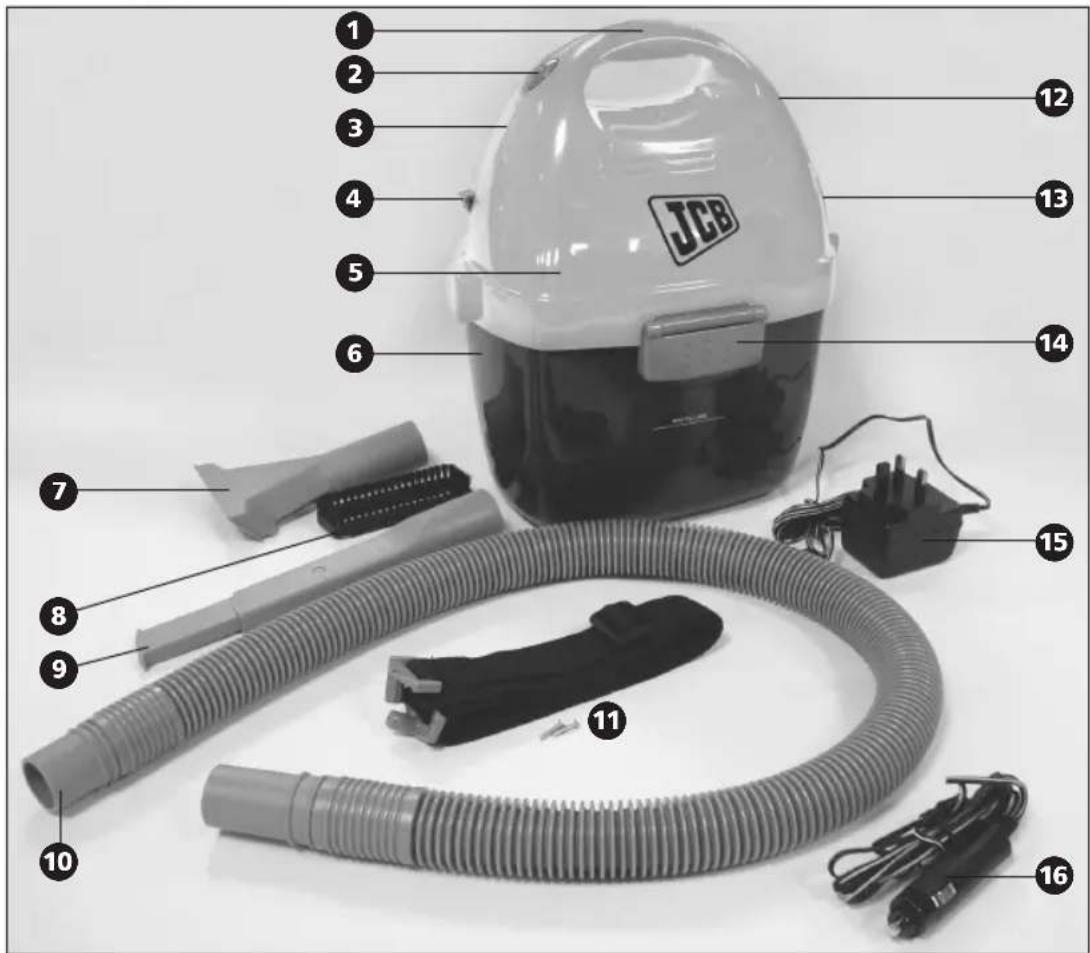
| 1 Carry handle 9 Extending Crevice tool | ||
| 2 On/off switch 10 Hose | ||
| 3 Charging indicator light 11 Carrying strap (including 2 x fixing screws) | ||
| 4 Lock button 12 Charging jack | ||
| 5 Motor housing 13 Battery door | ||
| 6 Tank 14 Tank catches | ||
| 7 Upholstery nozzle 15 Mains power charging adaptor | ||
| 8 Brush attachment 16 In-car power charging adaptor | ||

FITTING The CARRYING STRAp
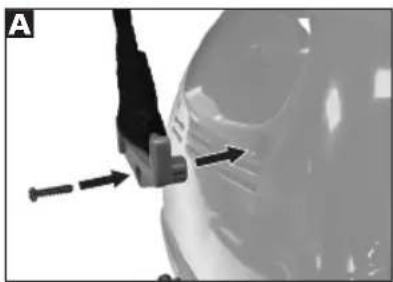
To attach the carrying strap 11, locate the two end plates of the strap into the holes provided in the motor housing 5 of the cleaner as shown A. Secure the plates in position using the two cross-head screws (provided), ensuring the screws are tight.
natural_image
Close-up of a car's side panel with a tool and directional arrows indicating movement (no text or symbols)The strap is adjustable to the user by sliding the strap material through the buckle to adjust.
ChARGING The BATTERY
The product is supplied with the battery in a low charge condition. Charge the battery for 16 hours before use. Do not charge in extreme ambient temperatures, ie. below 0°C or above 40°C. After use, recharge for a maximum of 16 hours, avoid over-charging, do not leave the product continuously on charge. If the product is not being used for a while, recharge for 16 hours once per month to keep the battery topped up.
IMPORTANT: Do not allow the battery to be fully discharged. When the suction becomes low, switch off and recharge the battery.
Mains power charging adaptor 15
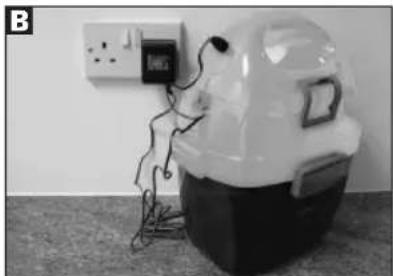
To charge using the mains power charging adaptor 15, plug the adaptor into a mains socket outlet and switch the mains socket to on, then locate the plug from the adaptor into the charging jack 12 in the vacuum cleaner B.
natural_image
Medical device with attached medical device and wires, no visible text or symbolsThe red charging indicator light Ⓔ shows charging is in progress, when the red light goes out, the battery is fully charged.
In-car power charging adaptor 16
To charge using the in-car power charging adaptor 16, plug the in-car adaptor into the cigarette lighter socket outlet and then locate the plug from the adaptor into the charging jack 12 in the vacuum cleaner.
NOTE: With the vacuum cleaner switch in the ON position, the charger is disconnected from the battery, so the battery will not charge if the switch is in the ON position. The charging adaptors are not designed to run the motor in the vacuum cleaner, they are only designed to charge the battery.
The red charging indicator light ③ shows charging is in progress, but when using the in-car power charging adaptor, it will not go out when the battery is fully charged.
CAUTION!: Leaving the vacuum cleaner on charge for an extended period without the car engine running will drain the car's battery. Ideally charge whilst the car is in use.
USING The CLEANER
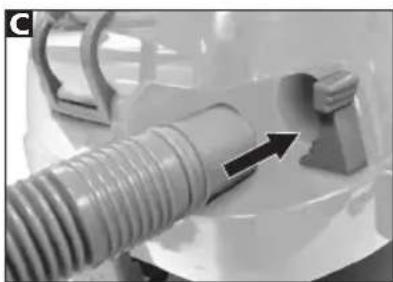
Connect the hose 10 to the cleaner and push in until it locks into position C (to release the hose, push the lock button 4). Attach the required accessory 7 8 or 9.
natural_image
Close-up of a mechanical component with a threaded tube and a bracket, showing an arrow indicating direction (no text or symbols visible)
EXTENDING CREVICE TOOL 9
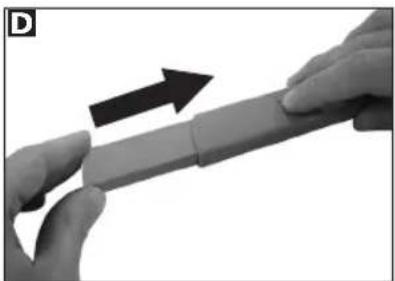
This is useful for spot cleaning and hard to reach places. To extend the crevice tool ⑨, pull out the extending section. To retract, push the button on the side and push the end back into the tool body D.
natural_image
Close-up of hands holding a cylindrical object with an arrow indicating upward motion (no text or symbols visible)UphOLSTERY NOZZLE ⑦ & BRUSH ATTACHMENT ⑧
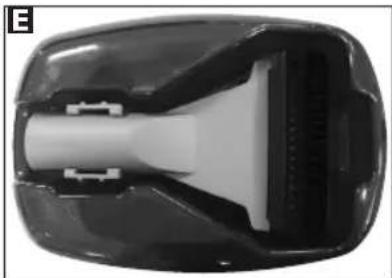
This is stored on the underside of the tank E.
natural_image
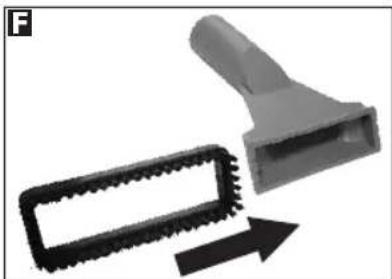
Close-up of a black plastic electronic device casing with internal components (no visible text or symbols)The upholstery nozzle ⑦ is useful for larger areas of soft furnishings. Attach the brush ⑧ for use on hard surfaces F.
natural_image
Close-up of a mechanical tool with a textured rectangular component and an arrow indicating direction (no text or symbols)DRY VACUUM CLEANING
When picking up fine dust, the filter will clog more quickly. Emptying the tank ⑥ and cleaning the filter (see Filter section) after every use will help maintain full suction.
WET pICK-Up
When picking up liquids, do not fill beyond the max fill line.
EMpTYING
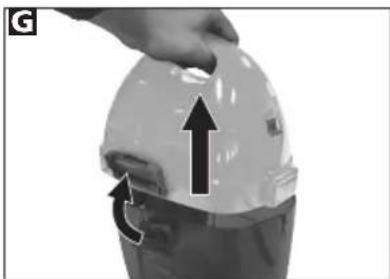
To empty, lift the two tank catches 14 on either side of the motor housing 5 and lift off the top section of the cleaner from the tank 6 G. Empty the tank 6. Rinse out any dirt and dry fully before re-fitting the motor housing 5.
natural_image
Hand holding a hard hat with an upward arrow and a circular arrow indicating motion (no text or symbols)FILTER
To maintain maximum suction, the filter must be clean. Ideally, the filter should be cleaned after every use, especially if fine dust is picked up.
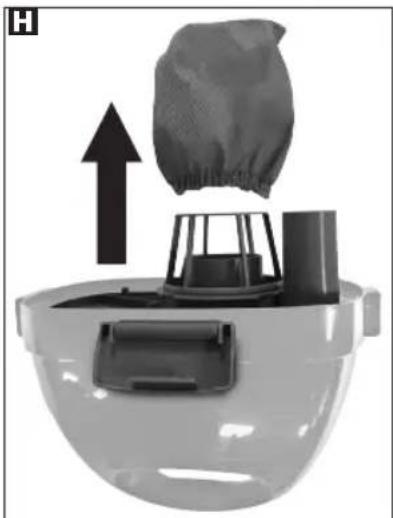
To clean, remove the filter from the filter cage by stretching the elastic neck of the filter off the filter cage. Wash the filter in cool clean water (no detergent). Leave to air-dry before refitting.
natural_image
Diagram of a mechanical device with a mesh bag and upward arrow, no text or symbols presentWhen refitting, make sure that the filter is secured by making sure the elastic neck of the filter is located over the circular rib of the filter cage.
STORAGE
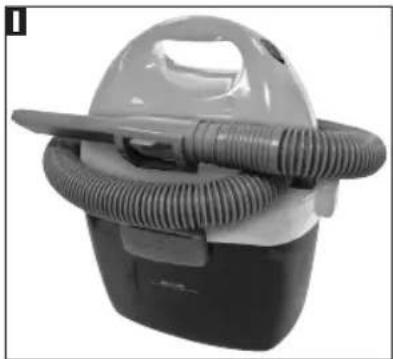
After use, for tidy storage, the hose 10 should be wrapped around the cleaner and the extending crevice tool 9 located in its storage clip 1.
natural_image
Close-up of a vacuum cleaner with coiled tubing (no visible text or symbols)BATTERY REMOVAL
This product contains a sealed lead acid battery.
At the end of a product's useful life, for environmental reasons, the battery must be removed and recycled separately.
The battery must be disposed of at an authorised recycling plant. Your local authority will have a centre which accepts such waste for recycling.
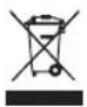
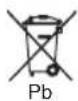
WARNING!: Before removing the battery, ensure the product is disconnected from either of the charging adaptors 15 16.
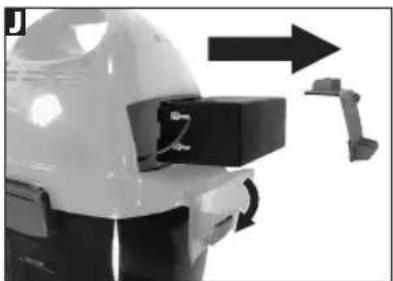
- Open the battery door ⑬, pull out the battery holder, then slide out the battery ⑪.
natural_image
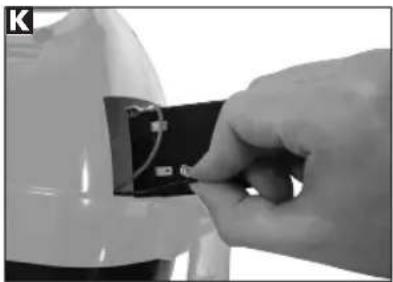
Close-up of a mechanical device with a directional arrow and a bracket, no visible text or symbols- Pull off the electrical terminals from the battery to allow the battery to come free from the cleaner K. Dispose of in accordance with local regulations.
natural_image
Close-up of a hand inserting a small electronic component into a white plastic housing (no visible text or symbols)- Dispose of the remainder of the product also in accordance with local regulations.
hELpLINE
If you have any difficulty with your appliance, do not hesitate to call us.
We are more likely to be able to help than the store from where you bought it.
Please have the following information ready to enable our staff to deal with your query quickly.
• Name of the product
- Model number as shown on the underside of the appliance
- Serial number as shown on the rating label
UK Helpline and Replacement Parts: 0844 871 0961
ADDRESS
JCB.
Mexborough,
South Yorkshire,
England,
S64 8AJ

GUARANTEE
It is important to retain the retailer's receipt as proof of purchase. Staple your receipt to this back cover for future reference.
Please quote the following information if the product develops a fault. These numbers can be found on the base of the product.
Model no.
Serial no.
All JCB products are individually tested before leaving the factory. In the unlikely event of any appliance proving to be faulty within 28 days of purchase, it should be returned to the place of purchase for it to be replaced.
If the fault develops after 28 days and within 3 years of original purchase, you should contact the Helpline number quoting Model number and Serial number on the product, or write to JCB at the address shown.
You may be asked to return a copy of proof of purchase. Subject to the exclusions set out below, the faulty appliance will then be repaired or replaced and dispatched usually within 7 working days of receipt.
If you suspect a fault, follow the simple checks detailed below before retrying the appliance or calling the helpline.
- Check the tools / tubes / hose for blockages.
- Check the adaptor is firmly in the socket.
- Check the socket is working by trying another appliance.
If for any reason this item is replaced during the 3 year guarantee period, the guarantee on the new item will be calculated from the original purchase date.
Therefore it is vital to retain your original till receipt or invoice to indicate the date of initial purchase.
To qualify for the 3 year guarantee, the appliance must have been used according to the instructions supplied.
Exclusions
JCB shall not be liable to replace or repair the goods under the terms of the guarantee where:
I. The fault has been caused or is attributable to accidental use, misuse, negligent use or used contrary to the manufacturer's recommendations or where the fault has been caused by power surges or damage caused in transit.
2. The appliance has been used on a voltage supply other than that stamped on the products.
3. Repairs have been attempted by persons other than our service staff (or authorised dealer).
4. Where the appliance has been used for hire purposes or non domestic use.
5. JCB are not liable to carry out any type of servicing work, under the guarantee.
6. The guarantee excludes consumables such as filters.
- This guarantee does not confer any rights other than those expressly set out above and does not cover any claims for consequential loss or damage. This guarantee is offered as an additional benefit and does not affect your statutory rights as a consumer.

For electrical products sold within the European Community. At the end of the electrical product's useful life, it should not be disposed of with household waste.
Please recycle where facilities exist. Check with your Local Authority or retailer for recycling advice in your country.
This JCB product is intended for household use only. JCB has a policy of continuous improvement in product quality and design. The company, therefore, reserves the right to change the specification of its models at any time.
JCB is used under license.
- I2V Portable Wet & Dry Vacuum Cleaner 70360
- Thank you for purchasing this JCB product
- IMPORTANT
- WARNING!
- CAUTION!
- NOTE:
- SAFETY INSTRUCTIONS
- Personal safety
- Children
- Product safety
- Location
- Electrical requirements
- OVERVIEW OF The AppLIANCE COMPONENTS
- FITTING The CARRYING STRAp
- ChARGING The BATTERY
- Mains power charging adaptor 15
- In-car power charging adaptor 16
- USING The CLEANER
- EXTENDING CREVICE TOOL 9
- UphOLSTERY NOZZLE ⑦ & BRUSH ATTACHMENT ⑧
- DRY VACUUM CLEANING
- WET pICK-Up
- EMpTYING
- FILTER
- STORAGE
- BATTERY REMOVAL
- hELpLINE
- ADDRESS
- GUARANTEE
- Model no.
- Serial no.
- Exclusions
Brand : JCB
Model : 70360
Category : Vacuum Cleaner