
GE-H900A-D1 - Computer Adapter GIGABYTE - Free user manual and instructions
Find the device manual for free GE-H900A-D1 GIGABYTE in PDF.


| Product Type | AC Adapter / Power Supply |
| Brand | Gigabyte |
| Model | GE-H900A-D1 |
| Input Voltage | 100-240V AC, 50-60Hz |
| Output Voltage | 19V DC |
| Output Current | 4.74A |
| Max Power | 90W |
| Connector Type | Barrel jack (5.5mm x 2.5mm) |
| Cable Length | 1.8 meters |
| Dimensions (L x W x H) | 130 x 55 x 30 mm |
| Weight | approx. 350 g |
| Color | Black |
| Operating Temperature | 0°C to 40°C |
| Storage Temperature | -20°C to 60°C |
| Protection Features | Overvoltage, overcurrent, short circuit |
| Compliance | CE, FCC, RoHS |
| Maintenance | Wipe with dry cloth; do not use liquids |
| Safety Instructions | Unplug during storms; avoid water exposure |
| Spare Parts | Contact authorized service center |
| Repairability | Do not disassemble; no user-serviceable parts |
| General Information | Designed for Gigabyte laptops and compatible devices |
Frequently Asked Questions - GE-H900A-D1 GIGABYTE
User questions about GE-H900A-D1 GIGABYTE
0 question about this device. Answer the ones you know or ask your own.
Ask a new question about this device
Download the instructions for your Computer Adapter in PDF format for free! Find your manual GE-H900A-D1 - GIGABYTE and take your electronic device back in hand. On this page are published all the documents necessary for the use of your device. GE-H900A-D1 by GIGABYTE.
USER MANUAL GE-H900A-D1 GIGABYTE
natural_image
Black Gigabyte computer power supply unit with visible fan and ventilation grille (no readable text or symbols)The Lord of Power
Sumo Power Silver 900W/1200W
- User Manual / English
- Handbuch / Deutsche
• Manual de l'utilisateur / Français - Manual de usuario / Español
Table of Contents Page
Cautions and Warnings 2
Components Check....2
- Product Introduction ...... 3
1-1 Introduction ...... 3
1-2 Product Highlights .... 3
1-3 Model Description .... 3
- Product Specifications....4
2-1 Power Input Specifications.... 4
2-2 Power Output Specifications....5
2-3 Features....5
- Description of Power Connectors 6
3-1 Number of Connectors 6
3-2 Description of Standard Cables 7
3-3 Descriptions of Modular Cables 8
-
Installation 10
-
Troubleshooting....11
-
Introduction of Protection Mechanism 12
Cautions and Warnings
※ Please unplug or switch off the power supply when installing it.
※ Make sure that the power source is consistent with the specifications labeled on the nameplate before turning on the power supply.
※ Do not pull and/or unplug the power cord when the power supply is in use. Doing so may cause damage to your components. You should change a new power cord or outlet if there is any bad connection.
※ Do not use the power supply in a high humidity and/or temperature environment.
※ High voltages exist in the power supply. Only an authorized service technician or electrician can open the power supply case. Doing so will void the warranty.
※ All warranties and guarantees will be voided in the event of failure to comply with any of the warnings and cautions covered in this manual.
※ If the power supply is not working properly, please contact our Product Service Center.
Components Check
• Sumo Power Silver power supply
- Modular cables
- AC power cord
- User manual
• Installation screw kit
1. Product Introduction
1-1 Introduction
A power supply is the supply center for all power needs. With this component, the system operation may be supported so that its stability and reliability can be maintained. GIGABYTE launches the high-performance, 80 Plus Silver certified Sumo Power Silver 900W/1200W power supply that streamlines the operation of your computer by utilizing the best power source while enhancing the system liability to prevent power supply abnormalities resulting from surge, etc. Equipped with the Japanese-made capacitors and solid capacitors, each Sumo Power silver 900W/1200W has the longest lifespan. Furthermore, the 12-cm Blue LED fan comes with the power supply so that you can enjoy every single moment while using it.
1-2 Product Highlights
• 80 Plus Silver certified - up to 88% efficient
- Compliant with the latest power supply design: Intel 12V v2.3/EPS12V v2.91
• Double anti-EMI design
- 5 (900W)/6 (1200W) +12V rails for the best system compatibility
- High quality Japanese-made capacitors and solid capacitors for a longer lifespan of power supply
- Modular connectors for easier cabling management
• 12-cm blue LED silent cooling fan with switchable light control
- Safety protection mechanism: over-current Protection, over-power protection, over-voltage protection, under-voltage protection, short circuit protection, and over temperature protection
• Multiple safety compliance certifications: CUL/TUV/CB/CE/FCC/BSMI/C-tick
- Compliant with the latest ErP/RoHS/WEEE environmental certification standards
• Sound and robust enclosure with anti-scratch design
1-3 Model Description
| Product Name Model | |
| Sumo Power Silver 900W | GE-H900A-D1 |
| Sumo Power Silver 1200W | GE-HK20A-D1 |
2. Product Specifications
2-1 Power Input Specifications
• Type: ATX 12V V2.3/SSI EPS 12V V2.91
• Voltage: 900W-100\~240Vac / 1200W-110\~240Vac
- Current: 900W-12A@115Vac/6.3A@230Vac, 1200W-15A@115Vac/10A@230Vac
• Frequency: 60/50Hz
• Power good signal: 100ms\~500ms
- Hold up time: > 17ms
• Efficiency: 88% Typically
• Continuous output capacity: 900W/1200W
• Maximum output capacity: 950W/1250W
2-2 Power Output Specifications
Sumo Power 900W
| Model GE-H900A-D1 | |||||||||
| AC Input Voltage 100-240Vac, 12-6.3A | |||||||||
| Frequency 60/50Hz | |||||||||
| Power Factor Correction type | Active PFC | ||||||||
| DC Output +5V +3.3V +1 | 2V1 +12 | V2 +12V | 3 +12V4 | +12V5 | -12V +5 | Vsb | |||
| Max. Output Current 25A 25A | 25A 25A | 25A 28A | 28A 0 | 5A 4 | 0A | ||||
| Max. Output Power | 166W | 864W | 6W | 20W | |||||
| Total Power | 900W | ||||||||
Sumo Power 1200W
| Model | GE-HK20A-D1 | |||||||||
| AC Input Voltage | 110-240Vac, 15-10A | |||||||||
| Frequency 60/50Hz | ||||||||||
| Power Factor Correction type | Active PFC | |||||||||
| DC Output | +5V | +3.3V | +12V1 | +12V2 | +12V3 | +12V4 | +12V5 | +12V6 | -12V | +5Vsb |
| Max. Output Current | 25A | 25A | 25A | 25A | 25A | 30A | 30A | 30A | 0.5A | 4.0A |
| Max. Output Power | 190W | 1166W | 6W | 20W | ||||||
| Total Power 1200W | ||||||||||
2-3 Features
• Dimensions: L 200 x W 150 x H 86 (mm)
- Operating Temperature: 0 \~ 40°C
• MTBF: > 100,000 Hours
- EMC: CE/FCC/CB
• Safety compliance: CUL/TUV/BSMI/C-tick
3. Description of Power Connectors
3-1 Number of Connectors
| Connector GE-H900A-D1 GE-HK20A-D1 | |||
| 24-pin Motherboard Connector |  | 1 | 1 |
| (4+4)-pin +12V CPU Connector |  | 1 | 1 |
| 8-pin +12V CPU Connector |  | 1 | 1 |
| (6+2)-pin PCI-E2.0 Connectors |  | 6 | 6 |
| SATA Connectors |  | 12 | 12 |
| 4-pin Peripheral Connectors | 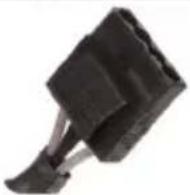 | 5 | 5 |
| 4-pin Floppy Connector |  | 1 | 1 |
3-2 Description of Standard Cables
24-pin Connector (P1)

| Pin No. | Description | Color |
| 12 | +3.3V | Orange |
| 11 | +12V | Yellow |
| 10 | +12V | Yellow |
| 9 | +5Vsb | Purple |
| 8 | PWR_ok | Gray |
| 7 | COM | Black |
| 6 | +5V | Red |
| 5 | COM | Black |
| 4 | +5V | Red |
| 3 | COM | Black |
| 2 | +3.3V | Orange |
| 1 | +3.3V | Orange |

| Pin No. | Description | Color |
| 24 | COM | Black |
| 23 | +5V | Red |
| 22 | +5V | Red |
| 21 | +5V | Red |
| 20 | ---- | ---- |
| 19 | COM | Black |
| 18 | COM | Black |
| 17 | COM | Black |
| 16 | PS-ON | Green |
| 15 | COM | Black |
| 14 | -12V | Blue |
| 13 | +3.3V | Orange |
| +3.3V | Brown |

4+4-PIN CPU Power Connector (P2, P3)

| Pin No. | Description | Color |
| 4 | +12V2 | Yellow |
| 3 | +12V2 | Yellow |
| 4 | +12V2 | Yellow |
| 3 | +12V2 | Yellow |

| Pin No. | Description | Color |
| 2 | COM | Black |
| 1 | COM | Black |
| 2 | COM | Black |
| 1 | COM | Black |
8-PIN CPU Power Connector

| Pin No. | Description | Color |
| 8 | +12V6 | Yellow/White |
| 7 | +12V6 | Yellow/White |
| 6 | +12V6 | Yellow/White |
| 5 | +12V6 | Yellow/White |
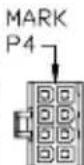
| Pin No. | Description | Color |
| 4 | COM | Black |
| 3 | COM | Black |
| 2 | COM | Black |
| 1 | COM | Black |
3-3 Descriptions of Modular Cables
Modular Backplane
Sumo Power Silver 900W
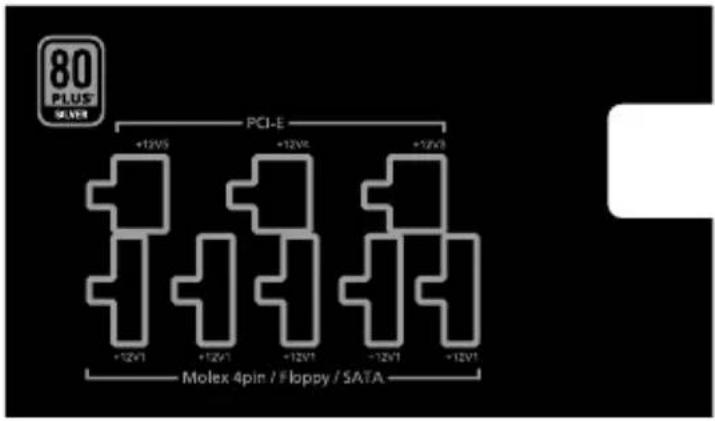
Sumo Power Silver 1200W

Graphic Card Connectors: 6-pin PCI-E power connector to dual 6+2-pin PCI-E power connectors x 3
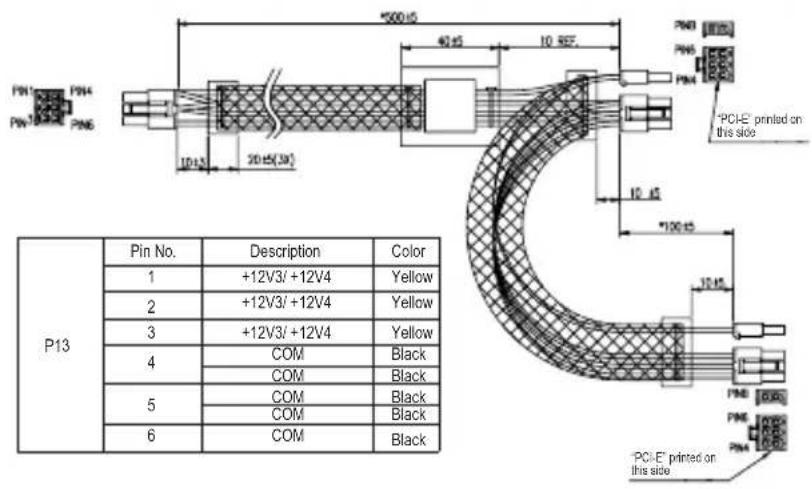
| PCI-E | Pin No. | Description | Color |
| 1 | +12V3/+12V4 | Yellow | |
| 2 | +12V3/+12V4 | Yellow | |
| 3 | +12V3/+12V4 | Yellow | |
| 4 | COM | Black | |
| 5 | COM | Black | |
| 6 | COM | Black | |
| 7 | COM | Black | |
| 8 | COM | Black | |
| PCI-E | Pin No. | Description | Color |
| 1 | +12V3/+12V4 | Yellow | |
| 2 | +12V3/+12V4 | Yellow | |
| 3 | +12V3/+12V4 | Yellow | |
| 4 | COM | Black | |
| 5 | COM | Black | |
| 6 | COM | Black | |
| 7 | COM | ||
| 8 | COM | Black | |
SATA Connectors: 5-pin power connector to quad SATA power connectors x3

4-pin Peripheral Power Connectors: 5-pin power connector to triple 4-pin peripheral power connectors x 1

4-pin Floppy power connector: 5-pin power connector to dual 4-pin peripheral power connectors and single small 4-pin floppy power connector x 1

4. Installation
- Switch off the main power and unplug the power cord.
- Unfasten the case screws on the case to open the panel on the side of the housing.
- Unplug all power connectors from the motherboard and peripherals, such as system fans, hard disk drives, optical drives, floppy disk drives, etc.
- Place the power supply in proper location and secure it with screws.
- Connect the P1 (24-pin) and P2 (CPU 4+4-pin) connectors to the motherboard.
- Then connect peripheral system components with proper connectors.
- Make sure that all connectors have been connected.
- Close the housing and secure the case screws.
- Insert the power cord and switch on the main power.
5. Troubleshooting
If the power supply does not work properly, please follow the troubleshooting steps below:
(1) Is the power cord inserted correctly into both the AC outlet and the AC power socket of the power supply?
(2) Ensure that the "I/O" switch on the power supply is switched to "I".
(3) Make sure that all the appropriate power connectors are properly connected to each device.
(4) If the UPS is connected, ensure that it is open and working normally.
If the power supply is not working properly after following the instructions above, please contact local stores or GIGABYTE offices for after-sale service. For more information about technical support, please visit the GIGABYTE website: www.gigabyte.com.
6. Introduction of Protection Mechanism
◎ Over-Current Protection:
| Voltage | GE-H900A-D1 GE-HK20A-D1 | |||
| Protection Point Protection Point | ||||
| Min Max | Min Max | |||
| +5V 30A 60A | 30A 65A | |||
| +3.3V 30A 60A | 30A 65A | |||
| +12V1.2.3.4.5 | 30A 60A | 30A 65A | ||
| +12V6 30A 65A | ||||
◎ Over-Voltage Protection:
| Voltage | Protection Point | |
| Min Max | ||
| +5V 5.75V 7.0V | ||
| +3.3V 3.76V 4.5V | ||
| +12V 1.2.3.4.5.6 | 13.50V 16.0V | |
◎ Over-Power Protection:
• 900W: 110 \~ 150% of Full-Loading
• 1200W: 110 \~ 130% of Full-Loading
◎ Short Circuit Protection:
The short circuit placed on +3.3V, +5V, +12V and -12V output shall cause no damage and the power supply shall shut down or latch.
natural_image
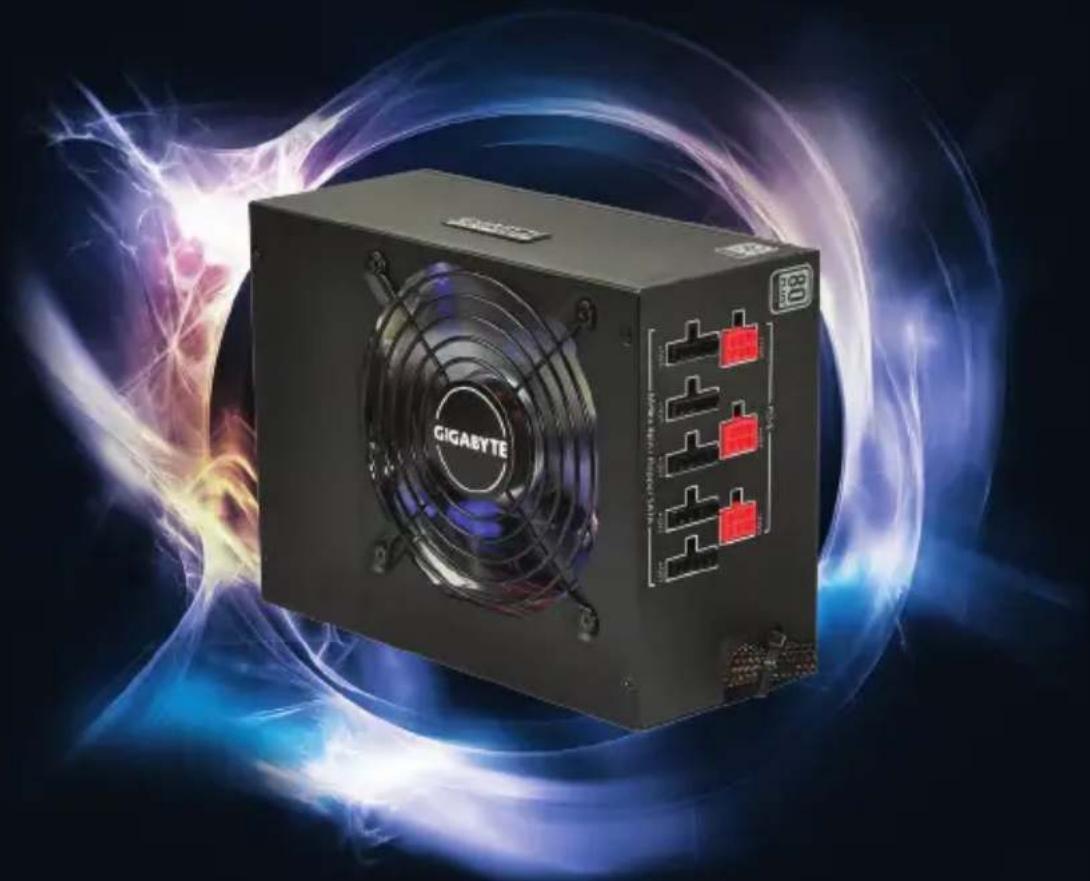
Black Gigabyte power supply unit with fan and buttons, surrounded by glowing blue and red light effects (no readable text or symbols)Sumo Power Silver 900W/1200W
• The specifications and pictures are subject to change without notice.
- All trademarks and logos are the property of their respective holders.
www.gigabyte.com
GIGABYTE™

- The Lord of Power
- Table of Contents Page
- Cautions and Warnings
- Components Check
- Product Introduction
- 1-1 Introduction
- 1-2 Product Highlights
- 1-3 Model Description
- Product Specifications
- 2-1 Power Input Specifications
- 2-2 Power Output Specifications
- 2-3 Features
- Description of Power Connectors
- 3-1 Number of Connectors
- 3-2 Description of Standard Cables
- 3-3 Descriptions of Modular Cables
- Installation
- Troubleshooting
- Introduction of Protection Mechanism
- ◎ Over-Power Protection:
- ◎ Short Circuit Protection:
- Sumo Power Silver 900W/1200W
Brand : GIGABYTE
Model : GE-H900A-D1
Category : Computer Adapter