
HP-3000E - Carte réseau/Adaptateur AIRLIVE - Free user manual and instructions
Find the device manual for free HP-3000E AIRLIVE in PDF.


| Product Type | Network Adapter |
| Brand | AirLive |
| Model | HP-3000E |
| Interface | PCI Express (x1) |
| Supported Standards | IEEE 802.3, IEEE 802.3u, IEEE 802.3ab |
| Data Transfer Rate | 10/100/1000 Mbps (Gigabit Ethernet) |
| Connector | 1 x RJ45 |
| LED Indicators | Link/Act, Power |
| Dimensions (L x W x H) | 120 x 70 x 10 mm |
| Weight | 50 g |
| Power Consumption | 2.5 W (via PCIe slot) |
| Operating Temperature | 0°C to 40°C |
| Storage Temperature | -10°C to 70°C |
| Operating Humidity | 10% to 90% (non-condensing) |
| Storage Humidity | 5% to 95% (non-condensing) |
| OS Support | Windows 10/8/7, Linux, macOS |
| Features | Wake-on-LAN, Jumbo Frame (up to 9k), Auto-Negotiation, Flow Control |
| Package Contents | HP-3000E adapter, Low-profile bracket, Driver CD, User Manual |
Frequently Asked Questions - HP-3000E AIRLIVE
User questions about HP-3000E AIRLIVE
0 question about this device. Answer the ones you know or ask your own.
Ask a new question about this device
Download the instructions for your Carte réseau/Adaptateur in PDF format for free! Find your manual HP-3000E - AIRLIVE and take your electronic device back in hand. On this page are published all the documents necessary for the use of your device. HP-3000E by AIRLIVE.
USER MANUAL HP-3000E AIRLIVE
Declaration of Conformity
We, Manufacturer/Importer
OvisLink Corp.
5F., NO.6, Lane 130, Min-Chuan Rd.,
Hsin-Tien City, Taipei County, Taiwan
Declare that the product
200Mbps Powerline Ethernet Adapter
AirLive HP-3000E
is in conformity with
In accordance with 89/336 EEC-EMC Directive and 1999/5 EC-R & TTE Directive
Clause Description
■ EN 55022:2006
Limits and methods of measurement of radio disturbance characteristics of information technology equipment
■ EN 61000-3-2:2000
Disturbances in supply systems caused by household appliances and similar electrical equipment "Harmonics"
■ EN 61000-3-3:1995/A1:2001
Disturbances in supply systems caused by household appliances and similar electrical equipment "Voltage fluctuations"
■ EN 55024:1998/A1 :2001/A2:2003
Information Technology equipment-Immunity characteristics-Limits And methods of measurement
■ EN 60950-1:2001
Safety for information technology equipment including electrical business equipment
■ CE marking

Manufacturer/Importer
Signature
Albert Y.
Name
Albert Yeh
Position/ Title
Vice President
(Stamp)
Date : 2008/2/13
AirLive HP-3000E CE Declaration Statement
| Country Declaration Country Declaration | |||
| csČesky [Czech] | OvisLink Corp. tímto prohlašuje, že tento AirLive HP-3000E je ve shodě se základními požadavky a dalšími příslušnými ustanoveními směrnice 1999/5/ES. | ItLietuvių[Lithuanian] | ŠiuO OvisLink Corp. deklaruoja, kad šis AirLive HP-3000E atitinka esminius reikalavimus ir kitas 1999/5/EB Direktyvos nuostatas. |
| daDansk [Danish] | Undertegnede OvisLink Corp. erklærer herved, at følgende udstyr AirLive HP-3000E overholder de væsentlige krav og øvrige relevante krav i direktiv 1999/5/EF. | nlNederlands [Dutch | Hierbij verklaart OvisLink Corp. dat het toestel AirLive HP-3000E in overeenstemming is met de essentiële eisen en de andere relevante bepalingen van richtlijn 1999/5/EG. |
| deDeutsch[German] | Hiermit erklärt OvisLink Corp., dass sich das Gerät AirLive HP-3000E in Übereinstimmung mit den grundlegenden Anforderungen und den übrigen einschlägigen Bestimmungen der Richtlinie 1999/5/EG befindet. | mtMalti [Maltese] | Hawnhekk, OvisLink Corp, jiddikjara li dan AirLive HP-3000E jikkonforma mal-ħtiġijiet essenzjali u ma provvedimenti oħrajn relevanti li hemm fid-Dirrettiva 1999/5/EC. |
| etEesti [Estonian] | Käesolevaga kinnitab OvisLink Corp. seadme AirLive HP-3000E vastavust direktiivi 1999/5/EÜ põhinõuetele ja nimetatud direktiivist tulenevatele teistele asjakohastele sätetele. | huMagyar[Hungarian] | Az OvisLink Corporation kijelenti, hogy az AirLive HP-3000E megfelel az 1999/05/CE irányely alapvető követelményeinek és egyéb vonatkozó rendelkezéseinek. |
| enEnglish | Hereby, OvisLink Corp., declares that this AirLive HP-3000E is in compliance with the essential requirements and other relevant provisions of Directive 1999/5/EC. | plPolski [Polish] | Niniejszym OvisLink Corp oświadcza, že AirLive HP-3000E jest zgodny z zasadniczymi wymogami oraz pozostalými stosownymi postanowieniami Dyrektywy 1999/5/EC. |
| esEspañol[Spanish] | Por medio de la presente OvisLink Corp. declara que el AirLive HP-3000E cumple con los requisitos esenciales y cualesquiera otras disposiciones aplicables o exigibles de la Directiva 1999/5/CE. | ptPortuguês[Portuguese] | OvisLink Corp declara que este AirLive HP-3000E está conforme com os requisitos essenciais e outras disposições da Directiva 1999/5/CE. |
| elΕλληνική [Greek] | ME THN ΠΑΡΟΥΣΑ OvisLink Corp. ΔΗΛΩΝΕΙ OTI AirLive HP-3000E ΣΥΜΜΟΡΦΩΝΕΤΑΙ ΠΡΟΣ ΤΙΣ ΟΥΣΙΩΔΕΙΣ ΑΠΑΙΤΗΣΕΙΣ ΚΑΙ ΤΙΣ ΛΟΙΠΕΣ ΣΧΕΤΙΚΕΣ ΔΙΑΤΑΞΕΙΣ ΤΗΣ ΟΔΗΓΙΑΣ 1999/5/EK. | slSlovensko[Slovenian] | OvisLink Corp izjavlja, da je ta AirLive HP-3000E v skladu z bistvenimi zahtevami in ostalimi relevantnimi določili direktive 1999/5/ES. |
| frFrançais [French] | Par la présente OvisLink Corp. déclare que l'appareil AirLive HP-3000E est conforme aux exigences essentielles et aux autres dispositions pertinentes de la directive 1999/5/CE | skSlovensky [Slovak] | OvisLink Corp týmto vyhlasuje, že AirLive HP-3000E splňa základné požiadavky a všetky príslušné ustanovenia Smernice 1999/5/ES. |
| itItaliano [Italian] | Con la presente OvisLink Corp. dichiara che questo AirLive HP-3000E è conforme ai requisiti essenziali ed alle altre disposizioni pertinenti stabilite dalla direttiva 1999/5/CE. | fiSuomi [Finnish] | OvisLink Corp vakuuttaa täten että AirLive HP-3000E tyyppinen laite on direktiivin 1999/5/EY oleellisten vaatimusten ja sită koskevien direktiivin muiden ehtojen mukainen |
| lvLatviski [Latvian] | Ar šo OvisLink Corp. deklarē, ka AirLive HP-3000E atbilst Direktīvas 1999/5/EK bütiskajām prasībām un citiem ar to saistītajiem noteikumiem. | Íslenska [Icelandic] | Hér með lýsir OvisLink Corp yfir því að AirLive HP-3000E er í samræmi við grunnkröfur og aðrar kröfur, sem gerðar eru í tilskipun 1999/5/EC. |
| svSvenska[Swedish] | Härmed intygar OvisLink Corp. att denna AirLive HP-3000E står I överensstämmelse med de väsentliga egenskapskrav och övriga relevanta bestämmelser som framgår av direktiv 1999/5/EG. | noNorsk [Norwegian] | OvisLink Corp erklærer herved at utstyret AirLive HP-3000E er i samsvar med de grunnleggende krav og øvrige relevante krav i direktiv 1999/5/EF. |
A copy of the full CE report can be obtained from the following address:
OvisLink Corp.
5F, No.6 Lane 130,
Min-Chuan Rd, Hsin-Tien City,
Taipei, Taiwan, R.O.C.
This equipment may be used in AT, BE, CY, CZ, DK, EE, FI, FR, DE, GR, HU, IE, IT, LV, LT, LU, MT, NL, PL, PT, SK, SI, ES, SE, GB, IS, LI, NO, CH, BG, RO, TR
COPYRIGHT
Copyright ©2005/2006 by this company. All rights reserved. No part of this publication may be reproduced, transmitted, transcribed, stored in a retrieval system, or translated into any language or computer language, in any form or by any means, electronic, mechanical, magnetic, optical, chemical, manual or otherwise, without the prior written permission of this company
This company makes no representations or warranties, either expressed or implied, with respect to the contents hereof and specifically disclaims any warranties, merchantability or fitness for any particular purpose. Any software described in this manual is sold or licensed "as is". Should the programs prove defective following their purchase, the buyer (and not this company, its distributor, or its dealer) assumes the entire cost of all necessary servicing, repair, and any incidental or consequential damages resulting from any defect in the software. Further, this company reserves the right to revise this publication and to make changes from time to time in the contents hereof without obligation to notify any person of such revision or changes.
All brand and product names mentioned in this manual are trademarks and/or registered trademarks of their respective holders.
Federal Communication Commission Interference Statement
This equipment has been tested and found to comply with the limits for a Class B digital device, pursuant to Part 15 of FCC Rules. These limits are designed to provide reasonable protection against harmful interference in a residential installation. This equipment generates, uses, and can radiate radio frequency energy and, if not installed and used in accordance with the instructions, may cause harmful interference to radio communications. However, there is no guarantee that interference will not occur in a particular installation. If this equipment does cause harmful interference to radio or television reception, which can be determined by turning the equipment off and on, the user is encouraged to try to correct the interference by one or more of the following measures:
- Reorient or relocate the receiving antenna.
- Increase the separation between the equipment and receiver.
- Connect the equipment into an outlet on a circuit different from that to which the receiver is connected.
- Consult the dealer or an experienced radio technician for help.
FCC Caution
This equipment must be installed and operated in accordance with provided instructions and a minimum 20 cm spacing must be provided between computer mounted antenna and person's body (excluding extremities of hands, wrist and feet) during wireless modes of operation.
This device complies with Part 15 of the FCC Rules. Operation is subject to the following two conditions: (1) this device may not cause harmful interference, and (2) this device must accept any interference received, including interference that may cause undesired operation.
Any changes or modifications not expressly approved by the party responsible for compliance could void the authority to operate equipment.
Federal Communication Commission (FCC) Radiation Exposure Statement
This equipment complies with FCC radiation exposure set forth for an uncontrolled environment. In order to avoid the possibility of exceeding the FCC radio frequency exposure limits, human proximity to the antenna shall not be less than 20cm (8 inches) during normal operation.
The antenna(s) used for this transmitter must not be co-located or operating in conjunction with any other antenna or transmitter.
R&TTE Compliance Statement
This equipment complies with all the requirements of DIRECTIVE 1999/5/EC OF THE EUROPEAN PARLIAMENT AND THE COUNCIL of March 9, 1999 on radio equipment and telecommunication terminal Equipment and the mutual recognition of their conformity (R&TTE)
The R&TTE Directive repeals and replaces in the directive 98/13/EEC (Telecommunications Terminal Equipment and Satellite Earth Station Equipment) As of April 8, 2000.
Safety
This equipment is designed with the utmost care for the safety of those who install and use it. However, special attention must be paid to the dangers of electric shock and static electricity when working with electrical equipment. All guidelines of this and of the computer manufacture must therefore be allowed at all times to ensure the safe use of the equipment.
EU Countries Intended for Use
The ETSI version of this device is intended for home and office use in Austria, Belgium, Denmark, Finland, France, Germany, Greece, Ireland, Italy, Luxembourg, the Netherlands, Portugal, Spain, Sweden, and the United Kingdom.
The ETSI version of this device is also authorized for use in EFTA member states: Iceland, Liechtenstein, Norway, and Switzerland.
EU Countries Not intended for use
None.
CONTENTS
Chapter I : Introduction...... 4
1.1 Overview ...... 4
1.2 Physical Details....4
1.2.1 LEDs 5
1.2.2 Buttons 5
Chapter II : Setup....6
Chapter III : Security Button.... 10
Chapter IV : Operation .... 11
Chapter V : Specification 12
Chapter I : Introduction
1.1 Overview
The 200Mbps Powerline Ethernet Adapter allows you to connect any device which has an Ethernet port to a Powerline network. In operation, the 200Mbps Powerline Ethernet Adapter is completely transparent, and simply passes data between the Ethernet port and the Powerline network. The data transfer rate can be up to 200Mbps.
The 200Mbps Powerline Ethernet Adapter is a simple plug and play installation, no configuration or software setup required. But a Windows PC can be used for configuration when needed.
1.2 Physical Details
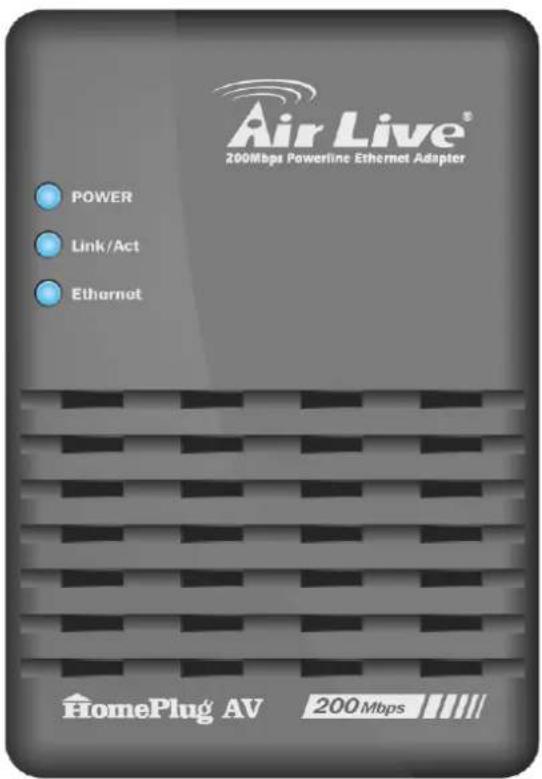
1.2.1 LEDs
| Power | On - Normal operation.Off - No power |
| PLC link | On - The Powerline network is active.This means that at least one other Powerline device was detected.Off - Powerline network is not available - no other Powerline devices were detected.Flashing (Blue) - Received data rate via the Powerline network is bigger than 80Mbps.Flashing (Pink) - Received data rate via the Powerline network is between 80 Mbps and 50Mbps.Flashing (Red) - Received data rate via the Powerline network is smaller than 50Mbps. |
| Ethernet | On - Ethernet connection is active.Off - No Ethernet connection.Flashing - Data is being transmitted or received via the Ethernet Port. |
1.2.2 Buttons
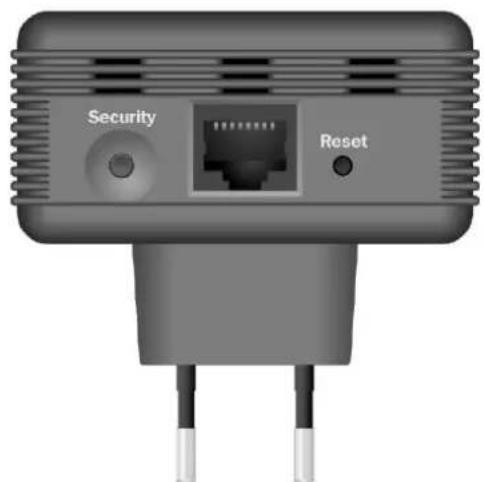
natural_image
Front view of a network device with Security and Reset ports (no text or symbols on the device body)| Security Button | Click this button to connect the device to the Powerline network.Please refer to Security Button section for more details. |
| LAN Port | Use standard LAN cables (RJ45 connectors) to connect the device to the port. |
| Reset Button | This button is used to clear ALL data and restore ALL settings to the factory default values. |
The rear panel contains only the AC plug and a sticker containing the 200Mbps Powerline Ethernet Adapter's Password. (Each Powerline device has a unique Password.)
Chapter II : Setup
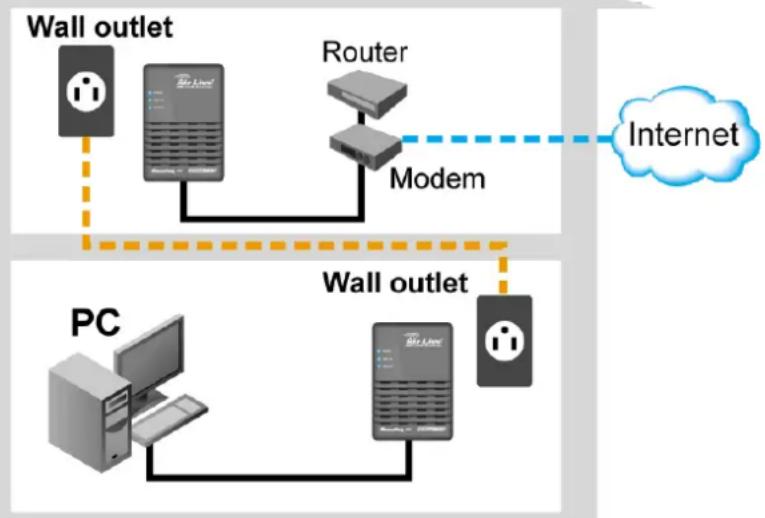
Configuration requires the use of a Windows PC. Once configured, any device may be connected to the 200Mbps Powerline Ethernet Adapter's Ethernet port. To perform configuration, follow this procedure.
flowchart
graph TD
    A["Wall outlet"] --> B["Router"]
    B --> C["Modem"]
    C --> D["Internet"]
    E["PC"] --> F["Wall outlet"]
    F --> G["Modem"]
    G --> H["Internet"]
- Connect a standard LAN cable from the 200Mbps Powerline Ethernet Adapter's Ethernet port to your PC.
- Plug the 200Mbps Powerline Ethernet Adapter into a normal AC power point.
- Wait a few seconds for startup to be completed, and then check the LEDs
• The Power LED should be ON.
- The PLC Link LED will be ON if other Powerline devices are detected, otherwise it will be OFF.
• The Ethernet LED should be ON.
- Insert the supplied CD-ROM into your Windows PC, and wait for it to start. If it does not start automatically, locate and run SETUP.EXE.
- Follow the prompts to install the HP-3000E utility.
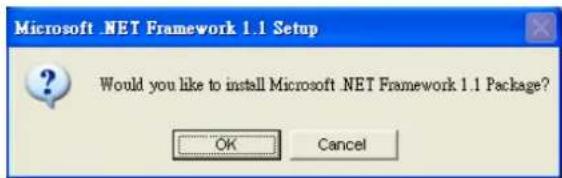
- Microsoft .NET Framework 1.1 is needed for installing HP-3000E utility. The wizard will check automatically whether the Microsoft .NET Framework 1.1 was installed on your PC or not. If not, the wizard will pop up a message box. Click OK to install Microsoft .NET Framework 1.1 first.
- Once installation is completed, run the HP-3000E utility program. The first screen (Network Tab) will display information of the compatible devices found.
Choose the desired device from the Device Selection, and the information of the selected device will be displayed in the Network Topology table.
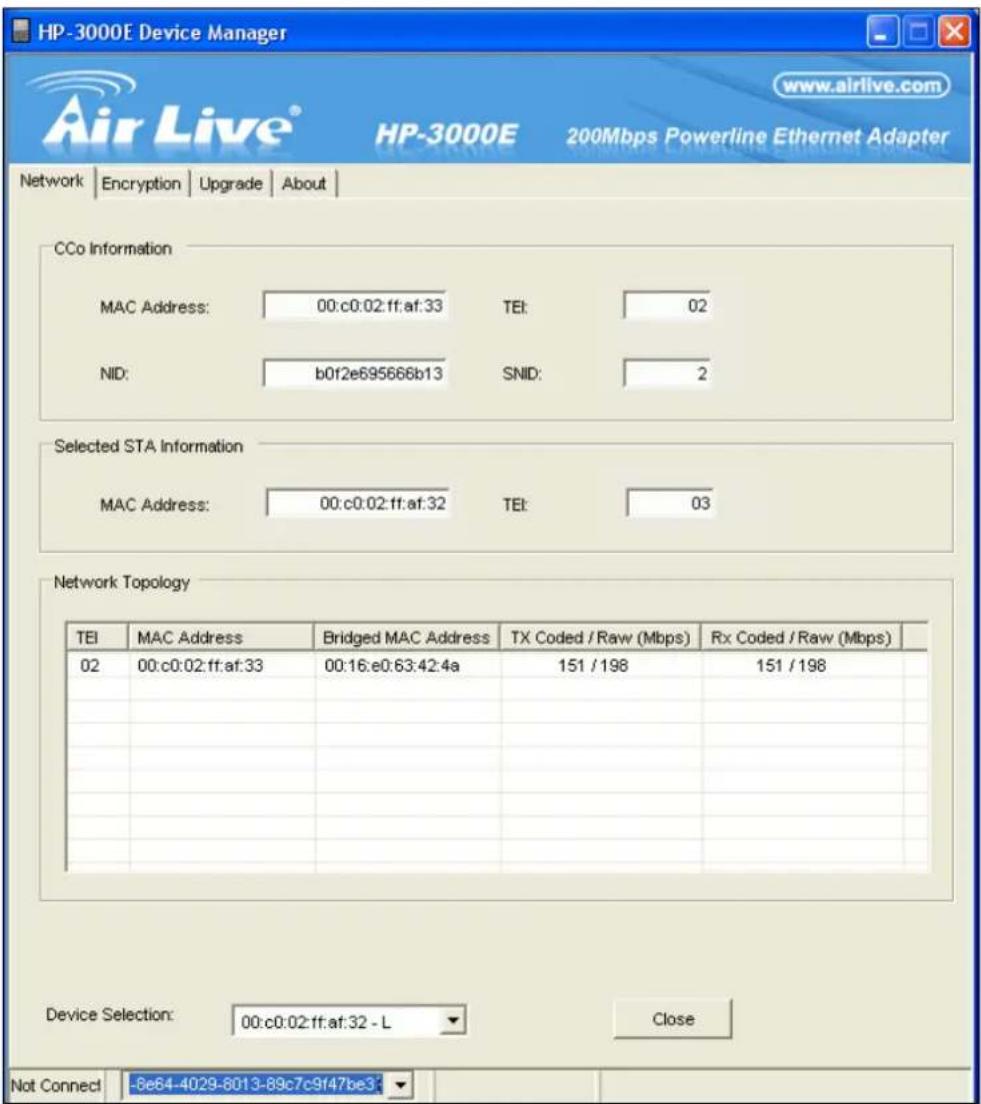
- The status bar on the bottom of the screen indicates the connection status of the Powerline device. Click the Encryption tab. You will see a screen like the example below.
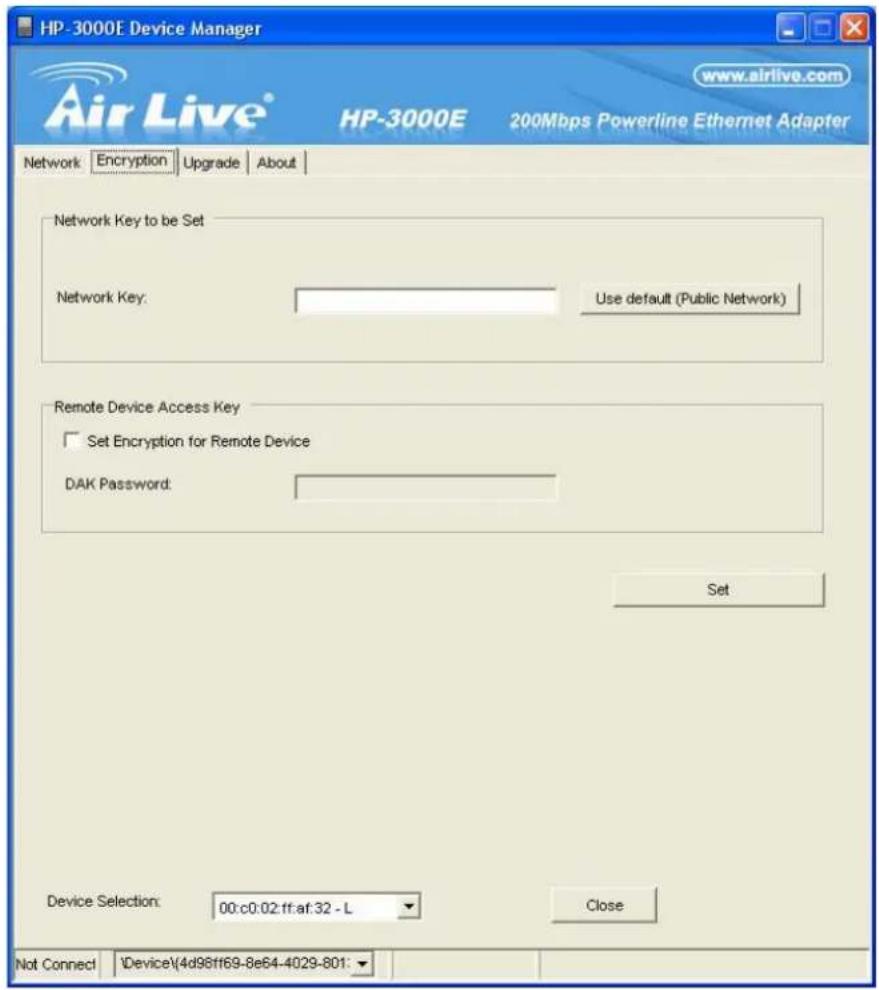
- Enter the desired Network Password in the field provided. Enable the Set Encryption for Remote Device and enter the Remote Device password in the DAK Password field. Click Set to save this value.
If the DAK Password is left blank, the Network Key will be saved to the local Powerline device only.
- All Powerline devices must use the same Network Key, or they will not be able to communicate with each other.
-
On this screen, you can also click Use default to use the 200Mbps Powerline Ethernet Adapter's default Network Key.
-
Click Close to exit the HP-3000E utility.
Setup is now complete.
If your PC is not the device you wish to use with the 200Mbps Powerline Ethernet Adapter, connect the Ethernet cable from the 200Mbps Powerline Ethernet Adapter to the desired device.
The 200Mbps Powerline Ethernet Adapter is now ready for use.
Chapter III : Security Button
This section describes how to use Security button for configuration in the following situations:
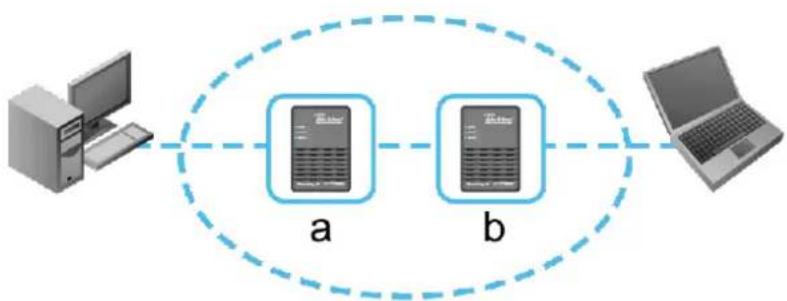
- Two unassociated adapters (a,b) are forming a new network (Network AB).
Network AB
flowchart
graph LR
    A["Computer"] --> B["a"]
    B --> C["b"]
    C --> D["Laptop"]
    style A fill:#f9f,stroke:#333
    style D fill:#bbf,stroke:#333
The procedure is as follows:
-
Press the security button on the adapter (a) for less than 3 seconds.
-
Press the security button on the adapter (b) for less than 3 seconds.
-
The Power LEDs start to flash.
-
After a few seconds, the Power and PLC link LEDs should be on. The configuration is successful.
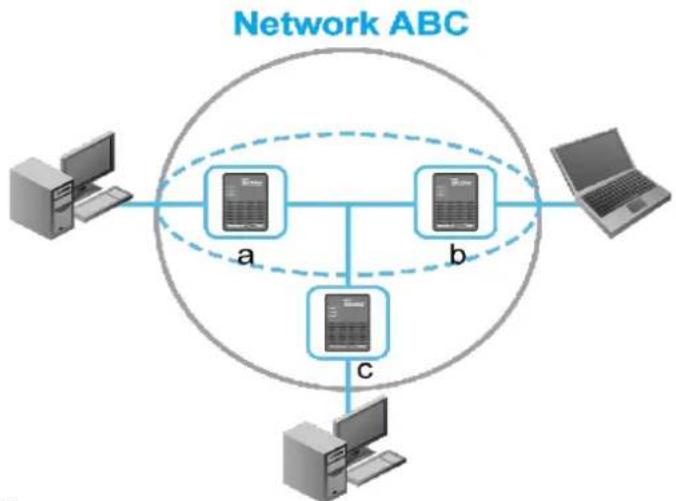
Join an unassociated adapter (c) to an existing network (Network AB).
flowchart
graph TD
    A["Computer"] --> B["a"]
    C["Server"] --> D["b"]
    E["Server"] --> F["c"]
    B --> G["Central Network ABC"]
    D --> G
    F --> G
    style G fill:#f9f,stroke:#333
The procedure is as follows:
-
Press the security button on the adapter a (or b) for less than 3 seconds.
-
Press the security button on the adapter (c) for less than 3 seconds.
-
The Power LEDs start to flash.
-
After a few seconds, the Power and PLC link LEDs should be on. The configuration is successful.
AirLive HP-3000E User's Manual
Chapter IV : Operation
If your Powerline devices have difficulty communicating with each other, check the following:
• Each Powerline device must use the same Network Key.
You can use the Encryption tab of theHP3000E utility to assign a Network Key to other Powerline devices.
- 200Mbps Powerline Ethernet Adapter works better when plugged into the wall socket. Connect the 200Mbps Powerline Ethernet Adapter into the power strip or surge protectors may degrade the network performance.
Chapter V : Specification
| Powerline Standards | HomePlug AV |
| Transfer Rate | Up to 200 Mbps |
| Modulation | 1024/256/64/16/8 QAM, QPSK, BPSK |
| Forward Error Correction | Turbo Codes |
| Protocol | TDMA, CSMA/CA |
| Security | 128-bit AES Encryption |
| LEDs | 1 * Power1 * PLC Link1 * Ethernet |
| Ethernet Interface | 1 * RJ45 LAN PortAuto-negotiation, Auto MDI/MDIX |
| Ethernet Standards | Ethernet specification IEEE802.3,IEEE802.3u, IEEE802.3x |
| Power | 100 - 240VAC, 50-60 Hz |
| Power Consumption | 100mA (max.) |
| Operating Temperature | 0°C to 40°C |
| Storage Temperature | -25°C to 70°C |
| Operating Humidity | 10-90%RH (max) |
| Certifications | FCC Part 15 Class BCE Mark, 89/336/EEC |
| Safety Approvals | UL Listed (UL60950-1)/cUL CSANo.22-60950-01-03CB, IEC/EN 60950-1;2001 |
| Operating Systems | Windows 98, Windows Me, Windows 2000,Windows XP, Linux, Mac OS X or any otheroperating system with network support |
- Declaration of Conformity
- 200Mbps Powerline Ethernet Adapter
- Clause Description
- COPYRIGHT
- Federal Communication Commission Interference Statement
- FCC Caution
- Federal Communication Commission (FCC) Radiation Exposure Statement
- R&TTE Compliance Statement
- Safety
- EU Countries Intended for Use
- EU Countries Not intended for use
- CONTENTS
- Chapter I : Introduction...... 4
- Chapter II : Setup....6
- Chapter III : Security Button.... 10
- Chapter IV : Operation .... 11
- Chapter V : Specification 12
- Chapter I : Introduction
- Overview
- Physical Details
- LEDs
- Buttons
- Chapter II : Setup
- Chapter III : Security Button
- Chapter IV : Operation
- Chapter V : Specification
Brand : AIRLIVE
Model : HP-3000E
Category : Carte réseau/Adaptateur