
LA1956x - Screen COMPAQ - Free user manual and instructions
Find the device manual for free LA1956x COMPAQ in PDF.


| Product Type | LCD Monitor |
| Model | Compaq LA1956x |
| Display Size | 19 inches (48.3 cm) diagonal |
| Native Resolution | 1280 x 1024 (SXGA) |
| Aspect Ratio | 5:4 |
| Pixel Pitch | 0.294 mm |
| Brightness | 250 cd/m² |
| Contrast Ratio | 1000:1 (typical) |
| Response Time | 5 ms |
| Viewing Angles | 170° horizontal / 160° vertical |
| Input Connectors | VGA (D-Sub), DVI-D |
| Power Supply | 100-240 V AC, 50/60 Hz |
| Power Consumption | 20 W (typical), <1 W (standby) |
| Dimensions (with stand) | 17.2 x 14.9 x 17.2 inches (437 x 378 x 437 mm) |
| Weight (with stand) | 9.9 lbs (4.5 kg) |
| VESA Mounting | 100 x 100 mm |
| Adjustability | Tilt: -5° to +20° |
| On-Screen Display (OSD) | Yes, with buttons for brightness, contrast, and other settings |
| Cleaning Instructions | Wipe with a soft, dry, lint-free cloth. Do not use harsh chemicals. |
| Safety Notes | Ensure vents are unobstructed; do not place near heat sources; use a grounded outlet. |
| Spare Parts / Repairability | Contact Compaq support or authorized service centers for replacement parts. |
| Certifications | Energy Star, RoHS |
Frequently Asked Questions - LA1956x COMPAQ
User questions about LA1956x COMPAQ
0 question about this device. Answer the ones you know or ask your own.
Ask a new question about this device
Download the instructions for your Screen in PDF format for free! Find your manual LA1956x - COMPAQ and take your electronic device back in hand. On this page are published all the documents necessary for the use of your device. LA1956x by COMPAQ.
USER MANUAL LA1956x COMPAQ
- Menu/Select
- "-" OSD Navigation/Auto Adjust
-
"+" OSD Navigation/Input Select
-
OK
- Power
- Power LED
Overview

natural_image
Technical line drawing of a computer monitor with a base mount and internal panel (no text or symbols)Side view
- USB 2.0 ports
Overview
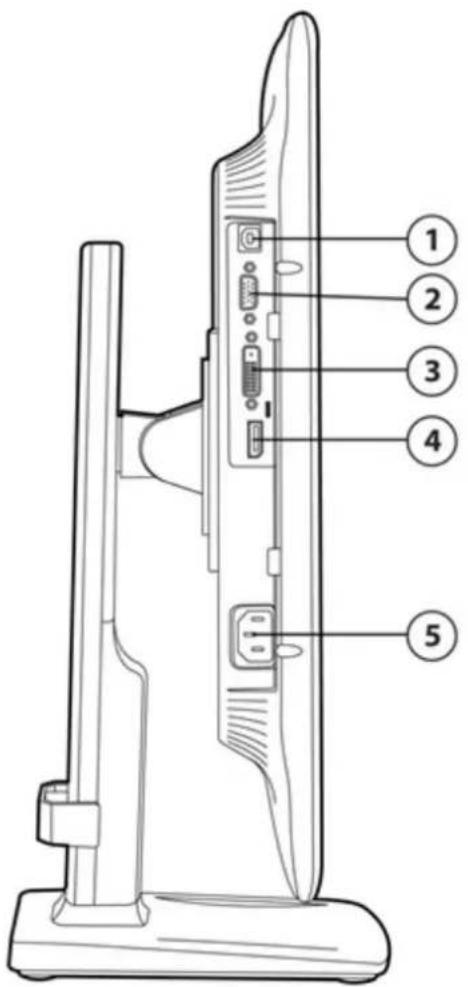
Pivot view (monitor pivoted to reveal bottom ports)
- USB upstream connector
- VGA connector
-
DVI-D connector
-
DisplayPort connector
- Power connector
Models
Part Number: A9S75AA
Technical Specifications
| Panel | Type | TN (Twisted Nematic) LED Backlit LCD |
| Viewable Image Area (diagonal) | 48,25 cm (19 in) | |
| Screen Opening (WxH) | 37,8 x 30,3 cm (14.9 x 11.9 in) | |
| Aspect Ratio | 5:4 | |
| Viewing Angle (typical)* | Up to 170° horizontal/160° vertical (10:1 contrast ratio) | |
| Brightness (typical)* | 250 nits (cd/m2) | |
| Dynamic Contrast Ratio (typical) | 1,000,000:1 | |
| Contrast Ratio (typical)* | 1000:1 | |
| Response Time (typical)* | 5 ms (rise + fall) | |
| Pixel Pitch | 0.294 mm | |
| Backlight Lamp Life (to half brightness) | 30K hours | |
| Color Gamut | 72% | |
| Color Support** | Can display up to 16.7 million colors | |
| * All performance specifications represent the typical specifications provided by HP's component manufacturers; actual performance may vary either higher or lower. ** With the use of FRC technology. | ||
| Video/Other Inputs | Plug and Play | Yes |
| USB 2.0 Hub | Self-powered; two ports (cable included) | |
| USB Cable | 1,8 m (5.9 ft); detached | |
| Input Connectors | Three connectors: (1) 15-pin mini D-sub analog VGA and (1) DVI-D and (1) Display Port | |
| Input Impedance | 75 ohms ± 2% | |
| Sync Input | Separate sync (HSYNC/VSYNC) | |
| Video Cables | VGA, DVI-D (select regions), DisplayPort(select regions) | |
| Video Cable Length | 1,8 m (5.9 ft.); detached | |
| Signal Interface/Performance | Horizontal Frequency | 24 to 83 kHz |
| Vertical Frequency | 50 Hz to 76 Hz | |
| Native Resolution | 1280 x 1024 @ 60 Hz (analog) | |
| 1280 x 1024 @ 60 Hz (digital) | ||
| Max Resolution (Analog) | 1280 x 1024 @ 60 Hz | |
| Max Resolution (Digital) | 1280 x 1024 @ 60 Hz | |
| Preset VESA Modes (non-interlaced) | 640 x 480 @ 60 Hz | |
| 720 x 400 @ 70 Hz | ||
| 800 x 600 @ 60 Hz | ||
| 1024 x 768 @ 60 Hz | ||
| 1280 x 1024 @ 60 Hz | ||
Technical Specifications
| Fail Safe Mode | Yes (limits out of range signal messages) | ||
| Max Pixel Clock Speed | 170 MHz | ||
| User Programmable Modes | Yes, 10 | ||
| Anti-Glare | Yes | ||
| Anti-Static | Yes | ||
| Asset Control | Yes (accessible on HP Compaq Business Desktops featuring HP Client Manager) | ||
| Default Color Temperature | Warm (6500° Kelvin) | ||
| On Screen Display (OSD) Controls | Buttons and Switches | 4-button OSD (menu, minus, plus, OK); power on/off; second level OSD buttons include dual-input switch, auto-adjust | |
| Languages | English, Spanish, French, German, Dutch, Italian, Simplified Chinese, Japanese, Portuguese, and Traditional Chinese | ||
| User Controls | Size and positioning, contrast, brightness, clock, clock phase, selectable color temperature, serial number, mode displayed, sleep timer, input selection, factory reset, individual color contrast, full-screen resolution | ||
| Power | Power Supply | Auto-ranging, 90 to 265 VAC; internal power supply | |
| Input Power | 100 ~ 240 VAC | ||
| Nominal Current | 1.5 A maximum | ||
| Frequency | 50 ~ 60 Hz | ||
| Maximum | 35 W | ||
| Average | 27 W | ||
| Power Saving Mode | < 0.5 W | ||
| Off Mode | < 0.5 W | ||
| Power Cable Length | 1,9 m (6.2 ft); detached | ||
| Mechanical | Dimensions(W x D x H) | Packaged | 48,6 x 42,2 x 19 cm(19.1 x 16.6 x 7.48 in) |
| Unpacked with stand(minimum) | 41,7 x 36,6 x 19,2 cm(16.4 x 14.4 x 7.5 in) | ||
| Unpacked with stand(maximum height) | 41,7 x 48,6 x 19,2 cm(16.4 x 19.1 x 7.5 in) | ||
| Base area (footprint) | 21 x 19,2 cm(8.26 x 7.56 in) | ||
| Panel only (without stand) | 41,7 x 4,7 x 34,7 cm(16.4 x 1.8 x 13.6 in) | ||
| Weight | Packaged | 6,2 kg (13.67 lb) | |
| Unpacked with stand | 4,5 kg (9.92 lb) | ||
| Panel Only (without stand) | 2,8 kg (6.17 lb) | ||
Technical Specifications
| Bezel Width | 19,9 mm (.78 in) left and right, 19,9 mm (.78 in) top, and 25,7 mm (1.01 in) bottom | |
| Tilt Range | -5° to +25° | |
| Swivel Range | ± 180° horizontal swivel | |
| Height Adjustable | Yes, 12 cm (4.7 in) adjustment range | |
| Pivot Rotation | Yes, 90° into portrait orientation | |
| Base | Ships attached and is removable (four screws) | |
| Environmental | Temp. - Operating | 41° to 95° F (5° to 35°C) |
| Temp. - Non-operating | -4° to 140° F (-20° to 60°C) | |
| Humidity - Operating | 20% to 80%, non-condensing | |
| Humidity - Non-operating | 5% to 95% | |
| Altitude - Operating | 0 to 5,000 m (0 to 16,404 ft) | |
| Altitude - Non-operating | 0 to 12192 m (0 to 40,000 ft) | |
| White LED Backlights | Yes | |
| CCFL Panel | No | |
| Arsenic-Free Glass* | Yes | |
| BFR/PVC Free** | Yes | |
| Mercury Free | Yes | |
| * Arsenic and its compounds were not detected using US EPA Test Methods 3052 & 3052/6010b by ICP or ICP-AES with a with a Method Detection Limit of 10 ppm.** Meets the evolving definition of 'BFR/PVC-free' as set forth in the "iNEMI Position Statement on the 'Definition of Low-Halogen' Electronics (BFR/CFR/PVC-Free)". Plastic parts contain < 1000 ppm (0.1%) of bromine [if the Br source is from BFRs] and < 1000 ppm (0.1%) of chlorine [if the Cl source is from CFRs or PVC or PVC copolymers]. All printed circuit board (PCB) and substrate laminates contain bromine/chlorine total < 1500 ppm (.15%) with a maximum chlorine of 900 ppm (.09%) and maximum bromine being 900 ppm (.09%). External cables (power, video and USB) are not BFR/PVC-free. Service parts after purchase may not be BFR/PVC-free. | ||
| Environmental Data | Eco-Label Certifications & declarations | This product has received or is in the process of being certified to the following approvals and may be labeled with one or more of these marks:US ENERGY STAR®IT ECO declarationTCO 05EPEAT®Goldwhere HP registers commercial display products. See http://www.epeat.net for registration status in your country. |
| Energy Consumption (in accordance with US Energy Star® test method) | 115VAC, 60Hz 230VAC, 50Hz 100VAC, 60Hz | |
Technical Specifications
| Normal Operation | 16.4 W 17.3 W 16.2 W | ||
| Sleep | 0.34 W 0.41 W 0.34 W | ||
| Off | 0.28 W 0.36 W 0.28 W | ||
| Heat Dissipation * | 115VAC, 60Hz 230VAC, 50Hz 100VAC, 60Hz | ||
| Normal Operation | 56 BTU/hr 59 BTU/hr 55 BTU/hr | ||
| Sleep | 1 BTU/hr 1 BTU/hr 1 BTU/hr | ||
| Off | 1 BTU/hr 1 BTU/hr 1 BTU/hr | ||
| * Heat dissipation is calculated based on the measured watts, assuming the service level is attained for one hour. | |||
| Additional Information | This product is in compliance with the Restrictions of Hazardous Substances (RoHS) directive - 2002/95/EC.This HP product is designed to comply with the Waste Electrical and Electronic Equipment (WEEE) Directive - 2002/96/EC.This product is in compliance with California Proposition 65 (State of California; Safe Drinking Water and Toxic Enforcement Act of 1986).This product is in compliance with the IEEE 1680 (EPEAT®) standard at the Gold level, see www.epeat.netPlastics parts weighing over 25 grams used in the product are marked per ISO 11469 and ISO1043.This product contains 16.2% post-consumer recycled plastic (by wt.)This product is 98.9% recycle-able when properly disposed of at end of life. | ||
| Packaging Materials | External: | PAPER/Paper | 503 g |
| Internal: | PLASTIC/EPS (Expanded Polystyrene) | 280 g | |
| PLASTIC/EPE-Expanded Polyethylene | 39.7g | ||
| RoHS Compliance | Hewlett-Packard is committed to compliance with all applicable environmental laws and regulations, including the European Union Restriction of Hazardous Substances (RoHS) Directive. HP's goal is to exceed compliance obligations by meeting the requirements of the RoHS Directive on a worldwide basis. By July 1, 2006, RoHS substances will be virtually eliminated (virtually = to levels below legal limits) for all HP electronic products subject to the RoHS Directive, except where it is widely recognized that there is no technically feasible alternative (as indicated by an exemption under the EU RoHS Directive). | ||
| Material Usage | This product does not contain any of the following substances in excess of regulatory limits (refer to the HP General Specification for the Environment at: http://www.hp.com/hpinfo/globalcitizenship/environment/supplychain/gen_specifications.html):AsbestosCertain Azo ColorantsCertain Brominated Flame Retardants - may not be used as flame retardants in plasticsCadmiumChlorinated Hydrocarbons | ||
Technical Specifications
| Chlorinated ParaffinsFormaldehydeHalogenated Diphenyl MethanesLead carbonates and sulfatesLead and Lead compoundsMercuric Oxide BatteriesNickel - finishes must not be used on the external surface designed to be frequently handled or carried by the user.Ozone Depleting SubstancesPolybrominated Biphenyls (PBBs)Polybrominated Biphenyl Ethers (PBBEs)Polybrominated Biphenyl Oxides (PBBOs)Polychlorinated Biphenyl (PCB)Polychlorinated Terphenyls (PCT)Polyvinyl Chloride (PVC) - except for wires and cables, and certain retail packaging has been voluntarily removed from most applications.Radioactive SubstancesTributyl Tin (TBT), Triphenyl Tin (TPT), Tributyl Tin Oxide (TBTO) | |
| Packaging | HP follows these guidelines to decrease the environmental impact of product packaging:Eliminate the use of heavy metals such as lead, chromium, mercury and cadmium in packaging materials.Eliminate the use of ozone-depleting substances (ODS) in packaging materials.Design packaging materials for ease of disassembly.Maximize the use of post-consumer recycled content materials in packaging materials.Use readily recyclable packaging materials such as paper and corrugated materials.Reduce size and weight of packages to improve transportation fuel efficiency.Plastic packaging materials are marked according to ISO 11469 and DIN 6120 standards. |
| End-of-life Management and Recycling | Hewlett-Packard offers end-of-life HP product return and recycling programs in many geographic areas. To recycle your product, please go to:http://www.hp.com/go/reuse-recycleor contact your nearest HP sales office. Products returned to HP will be recycled, recovered or disposed of in a responsible manner.The EU WEEE directive (2002/95/EC) requires manufacturers to provide treatment information for each product type for use by treatment facilities. This information (product disassembly instructions) is posted on the Hewlett Packard web site at:http://www.hp.com/go/recyclers. These instructions may be used by recyclers and other WEEE treatment facilities as well as HP OEM customers who integrate and re-sell HP equipment. |
| Hewlett-Packard Corporate Environmental Information | For more information about HP's commitment to the environment:Global Citizenship Reporthttp://www.hp.com/hpinfo/globalcitizenship/gcreport/index.html |
Technical Specifications
| Eco-label certificationshttp://www.hp.com/hpinfo/globalcitizenship/environment/productdesign/ecolabels.htmlISO 14001 certificates:http://www.hp.com/hpinfo/globalcitizenship/environment/operations/envmanagement.html | ||
| Options(sold separately) | HP LCD Speaker Bar— Part number NQ576AA | Powered directly by the connected PC, the Speaker Bar seamlessly attaches to the monitor's lower bezel to bring full audio support to select HP flat panel monitors. Features include dual speakers with full sound range and dual external headphone jacks. Sold separately. For more information, refer to the product's QuickSpecs. |
| HP LCD Monitor Quick Release — Part number EM870AA | An easy-to-use, VESA-compliant, LCD monitor mounting solution that allows you to quickly and securely attach an LCD monitor to a variety of stands, brackets, arms or wall mounts. For more information, refer to this product's QuickSpecs document.* The HP Quick Release has been designed to support a maximum of up to 24 lbs (10.9 kg) for all devices mounted. Because mounting surfaces vary widely and the final mounting method and configuration may vary, mounting fasteners are not supplied (other than the VESA-compliant screws). HP recommends that you consult with a qualified engineering, architectural or construction professional to determine the appropriate type and quantity of mounting fasteners required for your application and to ensure that your mounting solution is properly installed to support applied loads. | |
| HP USB Graphics Adapter— Part number NL571AA | Enables connection of up to six simultaneous displays to help you boost productivity and multi-task across several open applications. Use one Adapter to bridge between a notebook or desktop PC and second monitor or use multiple Adapters to connect several displays to each other. | |
| HP Business PC Security Lock Kit — Part number PV606AA | Attaches to the rear of the PC with a six-foot steel cable that can be used to secure a PC or peripherals such as mice, keyboards, monitors or USB security devices to protect them against unauthorized removal by physically connecting the system to an anchor point. | |
| What's in the box? | Monitor and Accessories | HP LA1956x19inch LED Backlit Monitor; VGA cable; DVI cable (select regions); DisplayPort cable (select regions); USB cable; AC Power cable |
| Documentation | Printed documentation and CD | |
| Featured Software | Yes – HP Display Asst, Auto Adjustment Pattern Utility, Monitor Driver, PDF Complete (v35109 rc4) | |
| Other | User Guide Languages | English, Danish, Dutch, Finnish, French, German, Italian, Kazakh, Norwegian, Portuguese (Brazilian), Spanish, Swedish, Czech, Greek, Hungarian, Polish, Russian, Slovenian, Turkish, Arabic, T. Chinese, S. Chinese, Korean, Bahasa Indonesia, Japanese |
| Warranty Languages | English, Danish, Dutch, Finnish, French, German, Italian, Kazakh, Norwegian, Portuguese (Brazilian), Spanish, Swedish, Czech, Greek, Hungarian, Polish, Russian, Slovenian, Turkish, Arabic, T. Chinese, S. Chinese, Korean, Bahasa Indonesia, Japanese | |
| Color | Silver | |
Technical Specifications
| VESA Mounting Support | Yes (one set of standard 4-hole pattern, 100 mm). Base must first be removed. | |
| Security Lock-Ready | Yes | |
| Certification and Compliance | TCO Displays, ISO 9241-307, CISPR Requirements, VCCI Approvals, KC and KCC (Korean) Requirements, CSA 60950-1, UL 60950-1, EN55022 Class B, CNS 13438 Class B, IEC 60950-1, China Energy Label (CEL), China MEPS, Korea MEPS (pending, Energy Boy), SmartWay - NA only - Energy logistics, EUP Lot 6 Tier 1 AS/NZS 3548 Class B Approval, "GS" Mark, TUV Approvals, GEEA, CE Marking, FCC Part 15 class B Approval, ENERGY STAR® qualified, EN55024 Class B, EN60950 -1, CUL, CCIB, CCEE, IT ECO (EDS), EPEAT® Gold (select regions)* *EPEAT® Gold where HP registers commercial display products. See www.epeat.net for registration status in your country. | |
| Compatibility | VESA Video Signal Standard (VSIS) Compliant video cards have been tested and proven compatible for use with this monitor. Recommended for use with HP products. | |
| Service and Warranty | Protected by HP, including a 3 years parts, 3 years labor, and 3 years onsite service (3/3/3) standard limited warranty. Optional Care Pack Services are extended service contracts which go beyond your standard warranties.* *HP Care Pack Services extend service contracts beyond the standard warranties. Service levels and response times for HP Care Packs may vary depending on your geographic location. Service starts from date of hardware purchase. To choose the right level of service for your HP product, use the HP Care Pack Services Lookup Tool at http://www.hp.com/go/lookuptool. Additional HP Care Pack Services information by product is available at http://www.hp.com/hps/carepack. | |
© Copyright 2012 Hewlett-Packard Development Company, L.P.
ENERGY STAR is a registered mark owned by the U.S. government.
All specifications represent the typical specifications provided by HP's component manufacturers; actual performance may vary either higher or lower. The only warranties for HP products and services are set forth in the express warranty statements accompanying such products and services. Nothing herein should be construed as constituting an additional warranty. HP shall not be liable for technical or editorial errors or omissions contained herein.
Brand : COMPAQ
Model : LA1956x
Category : Screen