
DC-16 - Emergency charger NOKIA - Free user manual and instructions
Find the device manual for free DC-16 NOKIA in PDF.


| Product Type | Emergency Charger / Power Bank |
| Brand | Nokia |
| Model | DC-16 |
| Battery Capacity | Approx. 2000mAh |
| Input Voltage | 5V DC |
| Output Voltage | 5V DC |
| Output Current | 1A (typical) |
| Charging Time | Approx. 4-6 hours via USB |
| Dimensions | Approx. 90 x 50 x 12 mm |
| Weight | Approx. 80 g |
| LED Indicators | Yes, for battery level and charging status |
| Compatible Devices | Most mobile phones and USB-powered devices |
| Charging Cable | Includes micro-USB or Nokia proprietary cable |
| Safety Features | Over-current, over-voltage, and short-circuit protection |
| Operating Temperature | 0°C to 40°C |
| Storage Temperature | -20°C to 60°C |
| Maintenance | Keep dry, clean contacts with dry cloth, avoid extreme temperatures |
| Repairability | Non-serviceable; dispose of according to local regulations |
Frequently Asked Questions - DC-16 NOKIA
User questions about DC-16 NOKIA
0 question about this device. Answer the ones you know or ask your own.
Ask a new question about this device
Download the instructions for your Emergency charger in PDF format for free! Find your manual DC-16 - NOKIA and take your electronic device back in hand. On this page are published all the documents necessary for the use of your device. DC-16 by NOKIA.
USER MANUAL DC-16 NOKIA
Nokia Universal Portable USB Charger DC-16 User Guide
Contents
About your portable charger 3
Keys and parts 3
Charge the Nokia DC-16 3
Charge the battery of another device 4
Operating temperature 5
Product and safety information 5
About your portable charger
With the Nokia Universal Portable USB Charger DC-16, you can charge the battery of a compatible device when you don't have access to a regular power source.
Read this user guide carefully before using the product. Also, read the user guide for the device that you connect to the product.
Keys and parts

1 USB connector
2 Indicator lights
3 Charger connector
4 Power indicator key
The surface of this product is nickel-free.
Charge the Nokia DC-16
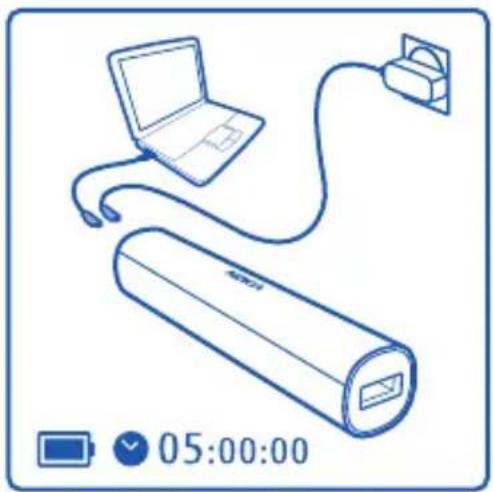
1 Plug the charger into a wall outlet, or connect a charger cable to a compatible PC.
2 Connect the micro-USB end of the cable to the charger connector on the Nokia DC-16.
natural_image
Line drawing of a laptop connected to a cylindrical device via cable, with a charging plug nearby (no text or symbols)When the Nokia DC-16 is charging, the indicator lights blink. When the battery is fully charged, the indicator lights stay on.
3 Unplug the charger from the Nokia DC-16, then from the wall outlet or PC.
Check the battery level
Press the power indicator key.

When you unplug a charger, hold and pull the plug, not the cord.
Charge the battery of another device
1 Connect the standard USB end of the CA-189CD cable to the portable charger.
2 Connect the micro-USB end of the cable to the other device.

natural_image
Line drawing of a rectangular battery with a USB cable and a smartphone attached (no text or symbols)The indicator lights come on briefly.
If you're charging the portable charger at the same time, it is charged first. When it's fully charged, the other device begins to charge.
When you charge the battery of a low-power device, such as a Bluetooth headset, the indicator lights may not come on at all.
3 Unplug the cable from the other device.
If the portable charger runs out of battery while charging the other device, the first indicator light starts to blink.
To check the battery level of the portable charger while charging, press the power indicator key.
Operating temperature
- When charging another device: -15^ C +55^ C
- When charging the Nokia DC-16: 0^ C + 45^ C
If the temperature is outside the operating range, the first and fourth indicator lights flash.
Product and safety information
Take care of your device
Handle your device, charger and accessories with care. The following suggestions help you protect your warranty coverage.
- Keep the device dry. Precipitation, humidity, and all types of liquids or moisture can contain minerals that corrode electronic circuits. If your device gets wet, allow the device to dry.
• Do not use or store the device in dusty or dirty areas. Moving parts and electronic components can be damaged. -
Do not store the device in high temperatures. High temperatures can shorten the life of the device, damage the battery, and warp or melt plastics.
-
Do not store the device in cold temperatures. When the device warms to its normal temperature, moisture can form inside the device and damage electronic circuits.
- Do not attempt to open the device.
• Unauthorised modifications may damage the device and violate regulations governing radio devices.
• Do not drop, knock, or shake the device. Rough handling can break internal circuit boards and mechanics. - Only use a soft, clean, dry cloth to clean the surface of the device.
• Do not paint the device. Paint can clog moving parts and prevent proper operation.
Recycle
Always return your used electronic products, batteries, and packaging materials to dedicated collection points. This way you help prevent uncontrolled waste disposal and promote the recycling of materials.
Crossed-out wheeled-bin symbol
The crossed-out wheeled-bin symbol on your product, battery, literature, or packaging reminds you that all electrical and electronic products, batteries, and accumulators must be taken to separate collection at the end of their working life. This requirement applies in the European Union. Do not dispose of these products as unsorted municipal waste. For more environmental information, see the product Eco profile at www.nokia.com/ecoprofile.
Batteries and chargers
Battery and charger information
Your device has an internal, non-removable, rechargeable battery. Do not attempt to remove the battery, as you may damage the device.
This device is intended for use when supplied with power from a Nokia micro-USB charger, car charger, or USB cable connected to a PC.
The battery can be charged and discharged hundreds of times, but it will eventually wear out.
Battery safety
Note: The battery in your device is non-removable, so refer to the battery-related statements as applicable to your device.
When you unplug a charger or an accessory, hold and pull the plug, not the cord.
When your charger is not in use, unplug it from the electrical plug and the device. Do not leave a fully charged battery connected to a charger, as overcharging may shorten the battery's lifetime. If left unused, a fully charged battery will lose its charge over time.
Always keep the battery between 15^ C and 25^ C ( 59^ F and 77^ F). Extreme temperatures reduce the capacity and lifetime of the battery. A device with a hot or cold battery may not work temporarily.
Do not dispose of batteries in a fire as they may explode. Dispose of batteries according to local regulations. Recycle when possible. Do not dispose as household waste.
Do not dismantle, cut, open, crush, bend, puncture, or shred cells or batteries. If a battery leaks, do not let battery liquid touch skin or eyes. If this happens, immediately flush the affected areas with water, or seek medical help.
Do not modify, remanufacture, attempt to insert foreign objects into the battery, or immerse or expose it to water or other liquids. Batteries may explode if damaged.
Use the battery and charger for their intended purposes only. Improper use, or use of unapproved batteries or incompatible chargers may present a risk of fire, explosion, or other hazard, and may invalidate any approval or warranty. If you believe the battery or charger is damaged, take it to a service centre for inspection before continuing to use it. Never use a damaged battery or charger. Only use the charger indoors.
Copyright and other notices
DECLARATION OF CONFORMITY

Hereby, NOKIA CORPORATION declares that this DC-16 product is in compliance with the essential requirements and the other relevant provisions of Directive 2004/108/EC.
© 2012 Nokia. All rights reserved.
Nokia, Nokia Connecting People and Nokia Original Accessories logo are trademarks or registered trademarks of Nokia Corporation.
FCC/INDUSTRY CANADA NOTICE
This device complies with part 15 of the FCC rules and Industry Canada licence-exempt RSS standard(s). Operation is subject to the following two conditions: (1) This device may not cause harmful interference, and (2) this device must accept any interference received, including interference that may cause undesired operation. Your device may cause TV or radio interference (for example, when using a device in close proximity to receiving equipment). If you require assistance, contact your local service facility. Any changes or modifications not expressly approved by Nokia could void the user's authority to operate this equipment.
/Issue 1.0 EN
- Nokia Universal Portable USB Charger DC-16 User Guide
- Contents
- About your portable charger 3
- Keys and parts 3
- Charge the Nokia DC-16 3
- Charge the battery of another device 4
- Operating temperature 5
- Product and safety information 5
- About your portable charger
- Keys and parts
- Charge the Nokia DC-16
- Check the battery level
- Charge the battery of another device
- Operating temperature
- Product and safety information
- Take care of your device
- Recycle
- Crossed-out wheeled-bin symbol
- Batteries and chargers
- Battery and charger information
- Battery safety
- Copyright and other notices
- FCC/INDUSTRY CANADA NOTICE
Brand : NOKIA
Model : DC-16
Category : Emergency charger