HS-529 - Mp3 player Hip Street - Free user manual and instructions
Find the device manual for free HS-529 Hip Street in PDF.


| Product Type | MP3 Player |
| Brand | Hip Street |
| Model | HS-529 |
| Storage Capacity | 8 GB (internal, expandable via microSD) |
| Display | 1.8-inch color LCD |
| Dimensions | 3.7 x 1.5 x 0.5 inches (94 x 38 x 12 mm) |
| Weight | 1.4 oz (40 g) including battery |
| Power Source | Rechargeable lithium-ion battery (400 mAh) |
| Battery Life | Up to 15 hours of music playback |
| Connectivity | USB 2.0, 3.5mm headphone jack |
| Audio Formats Supported | MP3, WMA, WAV, FLAC, AAC |
| FM Radio | Yes, with preset storage |
| Voice Recording | Yes, built-in microphone |
| Equalizer Settings | Rock, Pop, Jazz, Classical, Normal |
| Playback Modes | Repeat one, repeat all, shuffle, intro |
| Operating System Compatibility | Windows, Mac OS, Linux (mass storage class) |
| Charging Time | Approximately 2 hours |
| Battery Type | Built-in rechargeable Li-ion |
| Color Options | Black, Silver, Blue, Pink (depending on availability) |
| Included Accessories | USB cable, earphones, user manual |
| Cleaning Instructions | Wipe with a soft, dry cloth. Do not use liquid or aerosol cleaners. |
| Safety Warnings | Do not disassemble, expose to water, or use near heat sources. |
| Repairability | Battery replacement by qualified technician; other parts not user-serviceable. |
Frequently Asked Questions - HS-529 Hip Street
User questions about HS-529 Hip Street
0 question about this device. Answer the ones you know or ask your own.
Ask a new question about this device
Download the instructions for your Mp3 player in PDF format for free! Find your manual HS-529 - Hip Street and take your electronic device back in hand. On this page are published all the documents necessary for the use of your device. HS-529 by Hip Street.
USER MANUAL HS-529 Hip Street
Thank you for your purchase of this Hip Street MP3 player and we hope you enjoy using it.
Please visit our website at www.hipstreetonline.com.
Please ensure that you fully read and understand the information with this instruction manual prior to using your product. It is advised that you keep this instruction manual in a safe place for future reference. We sincerely hope that this high quality product offers you endless hours of entertainment.
Important safety precautions
- Always follow these basic safety precautions when using your player. This will reduce the risk of product damage and personal injury.
- Do not disassemble, repair or modify the player by yourself. Refer servicing to qualified personnel.
- Do not dispose of the player in fire to avoid explosion.
- Keep the player away from direct sunlight or heat source.
- Do not expose the unit to rain or moisture to avoid any malfunction.
- Do not use the player in a rather dry environment to avoid static.
- Never apply heavy impact on the player like dropping it or placing it on a magnet.
- Clean only with a dry cloth. Make sure the player is turned off before cleaning. Do not use liquid cleanser.
- Be sure to back up your files. We will not be liable for the loss of data due to improper operation, repair or other causes.
Precautions in using the earphones
- Do not use the player with earphones while driving an automobile or riding a bicycle.
- To avoid an accident, do not turn up the volume of the earphones too high while walking.
- It's not recommended that you use the earphones at a high volume for an extended time as this may cause hearing damage.
Features
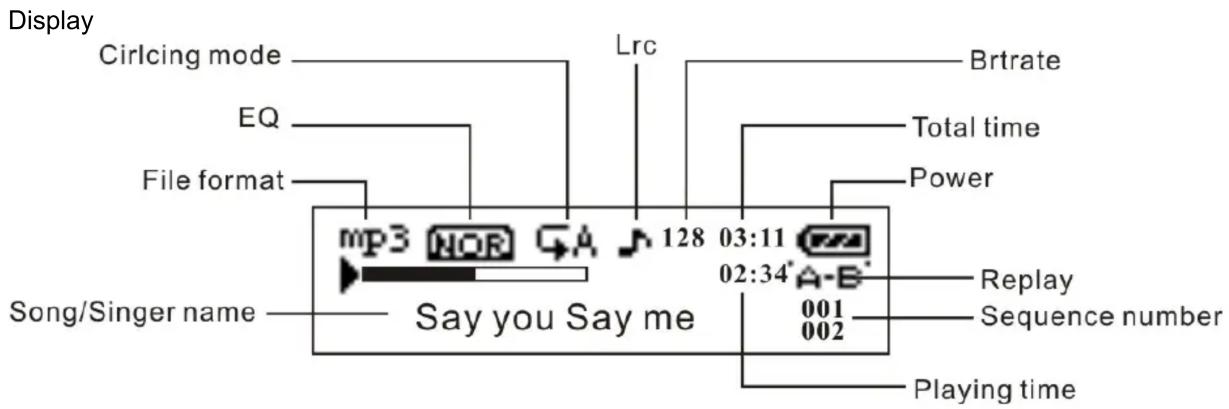
- LCD Display
- Works as a memory storage device (USB flash drive)
Diagram

| 1 Power off/power on /pause /play 6 Power On / Off | |
| 2 MENU 7 Display | |
| 3 previous/ back fast (music or voice mode) ( ) | 8 Earphone jack |
| 4 next/play fast (music or voice mode) ( ) | 9 USB port |
| 5 Volume adjust |
Connecting with the Computer
System requirements
Your computer system must meet the following specifications:
- Pentium III or Higher
• Microsoft Windows 2000/ME/XP/Vista.
• 120MB of available hard disk space - USB port supported
Connecting the player to computer
Before connecting the player, make sure your computer is powered on.
- Insert the USB cable provided into the player and computer.
- For Windows, the computer system detects "New hardware" and starts to install the driver automatically. Wait for the system to finish the installation. When it has finished, a
new “Removable Disk” will be created in “My Computer”.
Loading files to the player
To download the files from your computer, perform the following steps.
- Open Windows Explorer or My computer. "Removable Disk" will be displayed.
- Select the files on your computer and simply move it into the "Removable Disk" in the usual way (drag-and-drop or copy-and-paste). After copying is completed, the data will be available on the MP3 player.
Note:
- Do not disconnect the player during loading. It may cause malfunction of the player and the files.
Disconnecting the player
After completing the file transfer, safely disconnect the MP3 player.
- Double click the green arrow "Safety Remove Hardware" in the taskbar on the bottom right of the window.
- Select "USB Device" and click "Stop".
- When the "Stop a Hardware device" appears, click "OK" to disconnect the USB mass storage device. Then you can unplug the player safely.
Mass Storage
The MP3 player can be used to store any type of file as a USB flash drive. It can, for example, be used to simply transfer files from one computer to another or as a back-up device.
Charging the battery
The battery of the player is charged automatically when the player is connected to the computer. Ensure the computer is turned on.
The battery of the player is 80% charged in about one hour and fully charged in about two hours. If you charge the player while loading files to the player, it may take longer.
2. Basic functions
- Function mode
There are 3 mode selections in this device. When the device is powered on, the main menu will be displayed, press the ‘ ’ & ‘ ’ keys to select the various modes.
3. Key operation and functions.
- PLAY key (▶). Power on / Power off / Play / Pause
When power switch is on, press ▶key to turn player on
When power is on, press and hold ▶key to turn off
When music or voice files are playing, press ▶to pause, press ▶again to play.
When recording, short press ▶key to start recording; press ▶again to stop.
Remark: This device has a sleep and power saving function, when the device is idle without pressing any keys buttons, it will power off automatically.
- MENU (M) key: Function menu key (music or voice mode)
When this device is powered on, press M to enter submenu, press and hold to go back to main menu. When MP3 files are being played: press M to enter EQ modes, press and hold M to go back to the main menu.
When music or voice files have been paused, press M to enter a submenu, press and hold to go back to main menu.
• Key: Next / Play fast (music or voice mode) Next (right key)
When in music mode: press key to select next music or voice file.
When playing, press key to play next music, press and hold key to fast-forward.
• Key: Previous / Back fast (music or voice mode) Last (left key)
When in music mode: press key to select previous music or voice file.
While playing, press key to play previous music or voice file, press and hold key to circulate
USB port: Connect to PC through the USB port to transfer data files.
4. Music play
- Simple operation – Playing your music
- Connect the earphone to the device, with the Power button in the ON position.
- Press and hold the ▶key to turn the device ON.
- Select Music mode, press M to enter.
- Short press the ▶key to play your music.
- Press ▶ key to pause, press the M key to select EQ function.
- Select music files
Key: select previous song. key: select next song
- Volume Control
Press and hold VOL key till you see the volume bar and then press key to decrease volume; press key to increase volume.
Troubleshooting
If you have problems in operating your player, please check the points below before sending it to the service center.
Cannot power on
- The battery may be fully discharged. Please recharge the battery.
Files cannot be downloaded
- Check the connection between the player and PC.
- The memory capacity may be full.
No sound from the earphone
- Please adjust the volume and ensure the earphone jack is connected properly.
- Check if the format of the music file is supported by the player.
Need assistance? Please call us!
If you encounter any difficulties with this product, please visit our website at www.hipstreetonline.com and review our support section or call us. Our representatives are ready to help you with any questions about your product. We can guide you through connections, first-time use, or any of the features. Just give us a call or send us an email.
Customer & Technical Support: 1-888-4KOBIAN or 1-888-456-2426
Monday through Friday: 8:30am – 5:00pm EST
Email: support@hipstreetonline.com
We want you to start enjoying your product right away!
- Important safety precautions
- Precautions in using the earphones
- Features
- Diagram
- Connecting with the Computer
- System requirements
- Connecting the player to computer
- Loading files to the player
- Note:
- Disconnecting the player
- Mass Storage
- Charging the battery
- Basic functions
- - Function mode
- Key operation and functions.
- Music play
- Troubleshooting
- Cannot power on
- Files cannot be downloaded
- No sound from the earphone
- Need assistance? Please call us!
Brand : Hip Street
Model : HS-529
Category : Mp3 player