
PX - Microphone Synco - Free user manual and instructions
Find the device manual for free PX Synco in PDF.


| Product Type | Microphone |
| Brand | Synco |
| Model | PX |
| Dimensions (L x Diameter) | 200 mm x 20 mm |
| Weight | 150 g |
| Power Supply | Plug-in power (3.5 mm TRS) |
| Frequency Response | 50 Hz - 20 kHz |
| Sensitivity | -30 dB ± 3 dB |
| Polar Pattern | Cardioid |
| Impedance | 200 Ω |
| Signal-to-Noise Ratio | 80 dB |
| Connector Type | 3.5 mm TRS (gold plated) |
| Cable Length | 2 m |
| Mounting | Built-in clip with shoe mount adapter |
| Main Features | Compact design, low noise, compatible with cameras and recorders |
| Cleaning Instructions | Wipe with dry cloth; avoid moisture |
| Safety Warnings | Do not disassemble; keep away from liquids |
| Spare Parts Availability | Contact Synco support for replacement parts |
| Warranty | 1 year limited warranty |
Frequently Asked Questions - PX Synco
User questions about PX Synco
0 question about this device. Answer the ones you know or ask your own.
Ask a new question about this device
Download the instructions for your Microphone in PDF format for free! Find your manual PX - Synco and take your electronic device back in hand. On this page are published all the documents necessary for the use of your device. PX by Synco.
USER MANUAL PX Synco
SYNCO

Microphone P1X
User Manual
-
Thank you for choosing SYNCO product. Please read this manual carefully before use and follow all instructions mentioned herein.
Caring For Your SYNCO Product
- Please keep the product in a dry, clean, dust-free environment.
- Keep corrosive chemicals, liquids and heat source away from the
product to prevent mechanics damage.
- Use only a soft and dry cloth for cleaning the product.
- Malfunction may be caused by dropping, impact of external force.
• Do not warranty
• Please have the product checked or repaired by authorized
technicians if any malfunctions happened.
- Failure to follow all the instructions may result in mechanics
damage.
- Warranty does not apply to human errors.
Package List
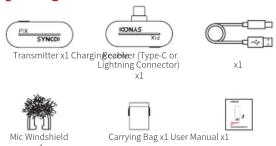
Product Introduction
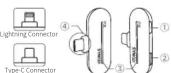
- TX Transmitter
① Power Key
② Working Indicator
③ Built-in Microphone
④ Back Clip
⑤ Type-C Charging Port
2. RX Receiver
① Volume Button
② Type-C Port
③ Working Indicator
④ Connector

3. Indicator
* Note: The indicator identification shown as follows.

① Transmitter
| Working Indicators (White Light) On:○ Flash:◆ | |
| Slow Flash | Unpaired |
| Illuminate sequentially | Paired, normal working |
| Single indicator keeps on | Noise cancellation on |
② Receiver
| Working Indicators (White Light) On Flash | |
| Slow Flash | Unpaired |
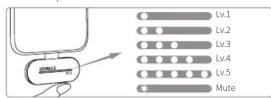
| 1~5 indicators on | Connected and working normally. The number of lights on indicates the current volume |
| Single indicator flashed slowly | Mute on |
Operations
- Turn On/Off
① Transmitter: Long press the power button of the transmitter for 3
seconds
*Note: The transmitter will shut down automatically if it is unpaired or disconnected for 5 minutes.
② Receiver: Insert the mobile
⑧ Receiver. Insert the mobile phone device to switch on automatically, and the indicator flashes.
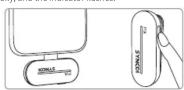
2. Charge
Transmitter:
Charge the transmitter via the Type-C charging port and charging cable.
port and charging cable.

Mobile Phone
Insert your phone's charging cable into the Type-C port of the
receiver when in use, and the charging current is adjusted according to the phone's battery max up to 800mA.
*Note: The receiver does not need to be charged and can be used.
directly when plugged in the phone.
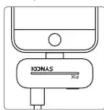
3. Paring
The transmitter and receiver will automatically start pairing once
power on.
*Note: For PIXT/L, each transmitter can only pair with a receiver.
4. Adjust the Volume
Press the receiver volume button to adjust the volume and the number of indicators shows the current volume level.
Double press the volume button to enable or disable mute and single indicator keeps on when mute is on.
5. Noise Reduction
Press the power button of the transmitter to turn on the noise reduction, the single indicator leaves on
* Double press the power button of the transmitter to turn off/on the light effect.

Specifications
TX Transmitter
| Wireless Transmission | Digital 2.4GHz |
| RF Frequency Band | 2400-2483.5MHz |
| Frequency Response | 20Hz-20KHz |
| Working Distance | 492ft/150m(|OS area);164ft/50m(|NLOS area) |
| Sampling Rate | 48kHz |
| Bit Depth | 16bit |
| Sensitivity | >6dB |
| SNR | >75dB |
| Battery Type | Built-in Lithium Battery, 120mAh |
| Battery Charging Time | 1.5H |
| Battery Life | 5H |
| Dimensions | 49x19x19 (mm) |
| Material | ABS |
| Width | 10mm |
RX Receiver
| Wireless Transmission | Digital 2.4GHz |
| RF Frequency Band | 2400-2483.5MHz |
| Working Distance | 492ft/150m(LOS area);164ft/50m(NLOS area) |
| Sampling Rate | 48KHz |
| Bit Depth | 16Bit |
| Connector | Type-C or Lightning Output |
| Power Input | Type-C |
| Dimensions | 49x30x9 (mm) |
| Material | ABS |
| Weight | 5g |
Warranty
Warranty Period
Thank you for purchasing SYNCO products.
-
Customers are entitled to free replacement or repair service in case of quality defect(s) found in the product under normal use within 30 days upon receipt of the product.
-
Original SYNCO products are entitled to 12-month limited warranty service. The warranty period begins on the date of purchase of brand new, unused products by the first end-user.
Within the warranty period, if product defect or failure is attributable to material defection or technological problem, the defective product or defective part will be repaired or replaced without charge (service and materials fee).
Warranty Exclusions and Limitations
Faults resulted from inappropriate use of a product without following its operation specification
-
Artificial damage, e.g. crash, squeeze, scratch, or soaking
-
Modifications to a product by its user or a third party without prior written consent of SYNCO, e.g. replacement of element or circuit, label alteration
-
The code on product is inconsistent with that of warranty certificate, or the code on the product or warranty certificate is altered or torn off.
-
All consumable accessory attached to a product, like cable, wind muff, battery
-
Faults as a result of force majeure, such as fire, flood, lightning, etc.
Warranty Claim Procedure
- If failure or any problem occurs to your product after
purchase, please contact a local agent for assistance, or you can always contact SYNCO's customer service through email at support@syncoaudio.com.
-
Please retain your sales receipt and warranty certificate as proof of purchase. If any of these documents is missing, only sales return or chargeable service will be provided.
-
If the SYNCO product is out of the warranty coverage, the service and the parts cost will be charged.
WARRANTY CERTIFICATE
Product Model:
Date of Purchas
Serial Number:
Malfunction Description :
Buyer Name:
Buyer Telephone
Buyer Man.
Cause of Malfunction
*Please register your warranty. Meanwhile, you are welcomed to contact us via Email: support@source automation.com
2017年6月25日星期六
Guangzhou Zhiying Technology Co., Ltd
Room 2401, 24 / F, South Tower, Lisheng Plaza, No. 68 Huadi Avenue,
Liwan District, Guangzhou, China, 510000 support@syncoaudio.com
www.syncoaudio.com
[Non-Text]
Brand : Synco
Model : PX
Category : Microphone