MSP 231 - Video card RGBlink - Free user manual and instructions
Find the device manual for free MSP 231 RGBlink in PDF.


| Product Type | Multi-format Video Switcher/Scaler |
| Brand | RGBlink |
| Model | MSP 231 |
| Inputs | 2x HDMI, 2x SDI |
| Outputs | 1x HDMI, 1x SDI |
| Maximum Resolution | 1920x1080@60Hz |
| Dimensions (W x H x D) | 250 mm x 100 mm x 30 mm |
| Weight | 0.5 kg |
| Power Supply | DC 12V, 1A |
| Control Interface | Front panel buttons, RS-232 |
| Functions | Seamless switching, scaling, picture-in-picture |
| Supported Video Formats | NTSC, PAL, 720p, 1080i, 1080p |
| Audio Support | Embedded audio via HDMI/SDI |
| Cleaning Instructions | Use a soft, dry cloth to clean the exterior |
| Safety Precautions | Do not expose to moisture or extreme temperatures |
| Spare Parts Availability | Contact RGBlink support for replacement parts |
| Repairability | Professional repair recommended; no user-serviceable parts inside |
| Warranty | Standard 2-year warranty |
Frequently Asked Questions - MSP 231 RGBlink
User questions about MSP 231 RGBlink
0 question about this device. Answer the ones you know or ask your own.
Ask a new question about this device
Download the instructions for your Video card in PDF format for free! Find your manual MSP 231 - RGBlink and take your electronic device back in hand. On this page are published all the documents necessary for the use of your device. MSP 231 by RGBlink.
USER MANUAL MSP 231 RGBlink
Article No: RGB-RD-UM-MSP231 E001
Revision No: V1.0
CONTENTS
CONTENTS....1
Declarations....2
FCC/Warranty 2
Operators Safety Summary....3
Installation Safety Summary....3
Chapter 1 Your Product....5
1.1 In the Box....5
1.2 Product Overview....5
1.2.1 Interface....7
Chapter 2 Caution....8
Computer Configuration Requirements....8
Mobile Phone Requirements....8
USB Host Restriction List....8
Chapter 3 OBS Streaming....10
OBS Setting....10
Streaming Setting....11
Chapter 4 Order Codes....12
Chapter 5 Support....13
5.1 Contact Us.... 13
Chapter 6 Appendix....14
6.1 Specification....14
6.2 Terms & Definitions....15
5.3 Revision History....22
Thank you for choosing our product!
This User Manual is designed to show you how to use this video processor quickly and make use of all the features. Please read all directions and instructions carefully before using this product.
Declarations
FCC/Warranty
Federal Communications Commission (FCC)
Statement
This equipment has been tested and found to comply with the limits for a class A digital device, pursuant to Part 15 of the FCC rules. These limits are designed to provide reasonable protection against harmful interference when the equipment is operated in a commercial environment. This equipment generates, uses, and can radiate radio frequency energy and, if not installed and used in accordance with the instruction manual, may cause harmful interference to radio communications. Operation of this equipment in a residential area may cause harmful interference, in which case the user will be responsible for correcting any interference.
Guarantee and Compensation
RGBlink provides a guarantee relating to perfect manufacturing as part of the legally stipulated terms of guarantee. On receipt, the purchaser must immediately inspect all delivered goods for damage incurred during transport, as well as for material and manufacturing faults. RGBlink must be informed immediately in writing of any complains.
The period of guarantee begins on the date of transfer of risks, in the case of special systems and software on the date of commissioning, at latest 30 days after the transfer of risks. In the event of justified notice of compliant, RGBlink can repair the fault or provide a replacement at its own discretion within an appropriate period. If this measure proves to be impossible or unsuccessful, the purchaser can demand a reduction in the purchase price or cancellation of the contract. All other claims, in particular those relating to compensation for direct or indirect damage, and also damage attributed to the operation of software as well as to other service provided by RGBlink, being a component of the system or independent service, will be deemed invalid provided the damage is not proven to be attributed to the absence of properties guaranteed in writing or due to the intent or gross negligence or part of RGBlink.
If the purchaser or a third party carries out modifications or repairs on goods delivered by
RGBlink, or if the goods are handled incorrectly, in particular if the systems are
commissioned operated incorrectly or if, after the transfer of risks, the goods are subject to influences not agreed upon in the contract, all guarantee claims of the purchaser will be rendered invalid. Not included in the guarantee coverage are system failures which are attributed to programs or special electronic circuitry provided by the purchaser, e.g.
interfaces. Normal wear as well as normal maintenance are not subject to the guarantee provided by RGBlink either.
The environmental conditions as well as the servicing and maintenance regulations specified in this manual must be complied with by the customer.
Operators Safety Summary
The general safety information in this summary is for operating personnel.
Do Not Remove Covers or Panels
There are no user-serviceable parts within the unit. Removal of the top cover will expose dangerous voltages. To avoid personal injury, do not remove the top cover. Do not operate the unit without the cover installed.
Power Source
This product is powered by USB 3.0 with input voltage no more than 5V.
Do Not Operate in Explosive Atmospheres
To avoid explosion, do not operate this product in an explosive atmosphere.
Installation Safety Summary
Safety Precautions
For all MSP 231 installation procedures, please observe the following important safety and handling rules to avoid damage to yourself and the equipment.
To protect users from electric shock, ensure that the chassis connects to earth via the ground wire provided in the AC power Cord.
The AC Socket-outlet should be installed near the equipment and be easily accessible.
Unpacking and Inspection
Before opening MSP 231 processor shipping box, inspect it for damage. If you find any damage, notify the shipping carrier immediately for all claims adjustments. As you open the box, compare its contents against the packing slip. If you find any shortages, contact your sales representative.
Once you have removed all the components from their packaging and checked that all the listed components are present, visually inspect the system to ensure there was no damage during shipping. If there is damage, notify the shipping carrier immediately for all claims adjustments.
Site Preparation
The environment in which you install your MSP 231 should be clean, properly lit, free from static, and have adequate power, ventilation, and space for all components.
Chapter 1 Your Product
1.1 In the Box
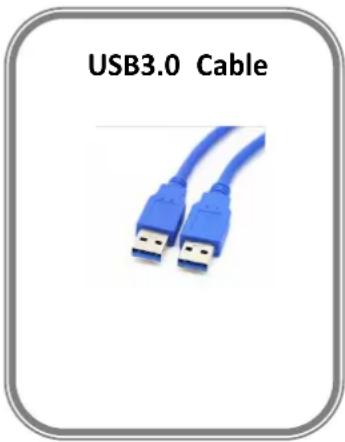
1.2 Product Overview
MSP231 is an easy to carry, 4K HDMI to USB3.0 Video Capture Dongle, with superior performance and compatibility and many other features such as simple installation, plug and play etc. It can capture a single HDMI input up to 4K@30 and output at 1080P60. It is compatible with USB 3.0 interface on Windows, Linux, and macOS X. As MSP 231 is compatible with many USB3.0 chipsets such as Intel, Renesas, ASMedia, Fresco Logic and so on, backward compatible with USB2.0 too. Ready to be used as Preview, record, capture, live broadcast through a number of third-party software via USB3.0 interface. MSP 231 HDMI video capture meets UVC and UAC standard.
The key features of MSP 231 are as follows:
- Capture one single channel HD HDMI video signal
- Capture resolution up to 1080P@60Hz, input resolution up to 4K@30Hz
• Support MJPEG and YUY2 - Support UAC&UVC, support 48 KHz PCM audio sampling rate
- No need to install driver on Win10, partial need on Win7
- Compatible with Windows 7,Windows8,Windows8.1,Windows10 or later, Linux OS, macOS operating systems.
- Up to 300\~350MB / s throughput and backward compatible with USB 2.0 (40MB/s throughput max).
- Automatically detect the input video formats and adjust to the set output size and frame rate automatically.
- Automatically detect the input audio formats and swift it to 48KHz PCM audio.
• Support two capture on one PC
• Support firmware update online
- RGB color range 0-255, less delay.
- Support for all third-party player software compatible with UVC and UAC protocols.
• Support loudspeaker/ earphone.
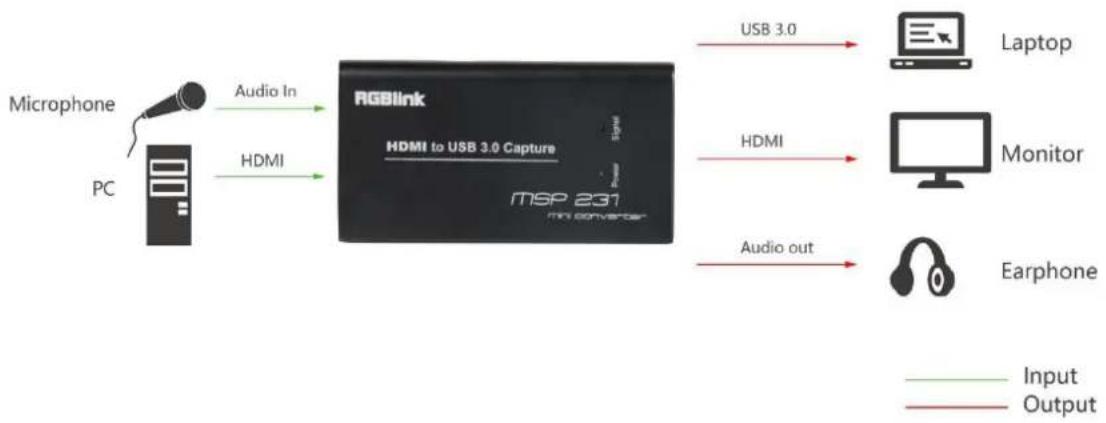
flowchart
graph LR
    A["Microphone"] -->|Audio In| B["RGBlink"]
    C["PC"] -->|HDMI| B
    B -->|USB 3.0| D["Laptop"]
    B -->|HDMI| E["Monitor"]
    B -->|Audio out| F["Earphone"]
    style A fill:#f9f,stroke:#333
    style C fill:#f9f,stroke:#333
    style B fill:#ccf,stroke:#333
    style D fill:#cfc,stroke:#333
    style E fill:#cfc,stroke:#333
    style F fill:#fcc,stroke:#333
MSP 231 System Connection Diagram
1.2.1 Interface
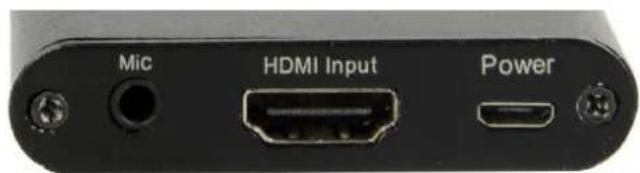
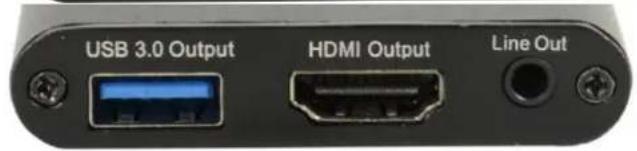
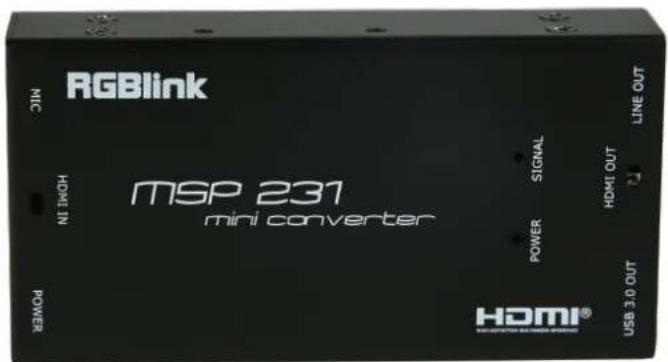
| Illumination | |||
| Mic | Audio input, connect to microphone | HDMI Input | Camera, Vidicon, Game box, IPTV box,and so on. |
| Power | Connect the power supply when the power supply is insufficient | USB3.0 | connect to the USB3.0 input of the computer or NoteBook |
| HDMI Output | HDMI Output to display device | Line Out | Loudspeaker/ Earphone |
| Power | This LED illuminates when the device is connected to computer USB port. | Signal | This LED illuminates when the device capture the video normally. |
Computer Configuration Requirements
System: Windows ^® 10 / Windows 8.1 / Windows 7 (SP1)/macOS10.13 below/macOS10.15 and above (macOS10.13-10.14 not supported)
PC: Intel ^® Core ^TM i5-4440 3.10 GHz + NVIDIA ^® GeForce ^® GTX 660or above
Notebook: Intel Core i7-4810MQ + NVIDIA GeForce GTX 870M or above
RAM:4 GB RAM (suggest 8 GB)
Graphic card compatible with DirectX10.
Mobile Phone Requirements
Android phone (Most phones are supported)
Only USB2.0, no USB3.0 (android UVC driver not support USB3.0)
If it's an Android phone with USB, then pure USB2.0 cable is needed and force it into USB 2.0 mode.
USB Host Restriction List
| Limitation | ||
| Host | platform | remark |
| HEC200 | Win10 YUY2 OKWin10: USB3 MJ may flickerWin7: USB YUY2 720P60 FPS=0,change resolution error message,reopen ok | |
| VIA805 | need VIA driverwin10 inbox drive, audio sample rate=48K,no sound | |
| Fresco FL1100 | need Fresco driver | |
| ASMedia 1143 PID:1343 | Asus PRIME X370 PRO AMD CPU | 1080P60 YUY2 when first play will be, OKy more action will "Not enough USB controller resource"(host driver issue) |
| ASMedia 1343E | need windows inbox driver | |
| ASMedia 1042AE PID:1242 | Z97 on board | need windows inbox driver |
| ASMedia | X99 on board | need windows inbox driver |
| 1142(3.0) PID:1142 | ||
| Asmedia 1142(3.1) PID:1242 | Z97 on board | PID:1242, inbox drive 1080P60 when first play will be ,O&ny more action will "Not enough USB controller resource"(host driver issue) |
| Not support | ||
| Host | platform | remark |
| EJ168 old versionVID:IE4EPID:7023 | ISOC mode BW issue | |
| Fresco FL1000VID:1B73PID:1000 | ISOC mode BW issue,only 1080P30 | |
| VIA800VID:1106PID:3432 | ISOC mode BW issue,1080P60MJ and YUY2 fram rate <10 | |
| VIA801 | ISOC mode BW issue,1080P60MJ and YUY2 fram rate <10 | |
| ASMedia 1042(0.96) VID:1B21 PID:1042 | Z77 on board | ISOC mode BW issue, YUY2(x), MJ(O) |
Chapter 3 OBS Streaming
OBS Setting
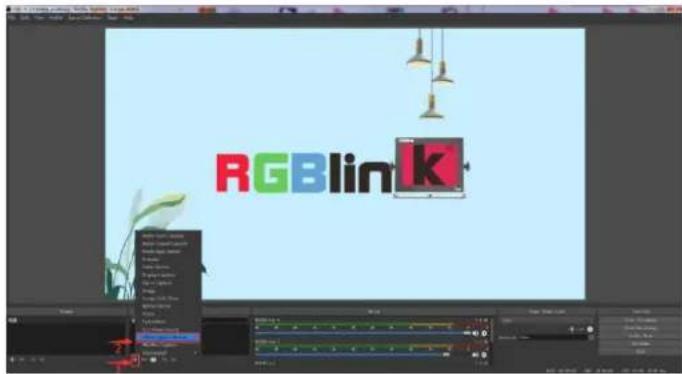
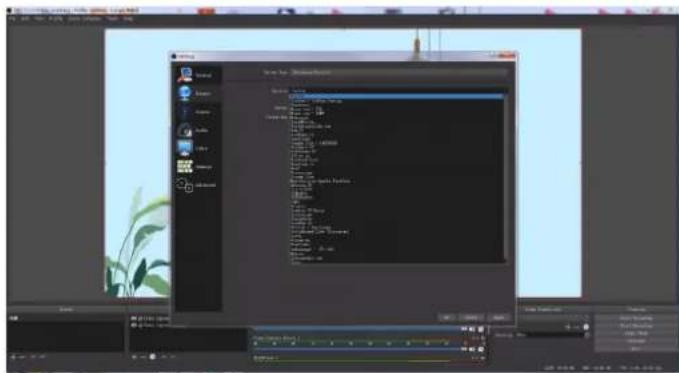
MSP231 is compatible with many third party steaming softwares, we recommend OBS, which is available to download on https://obsproject.com/download
Download the software and update to the latest version.
- Click" + "icon
2.choose video capture device
3.Click video capture device to open up setting page
4.Choose "XXX USB device"
5.Choose Video Format
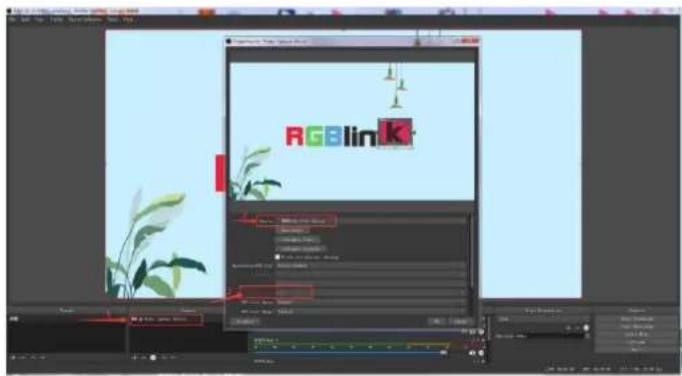
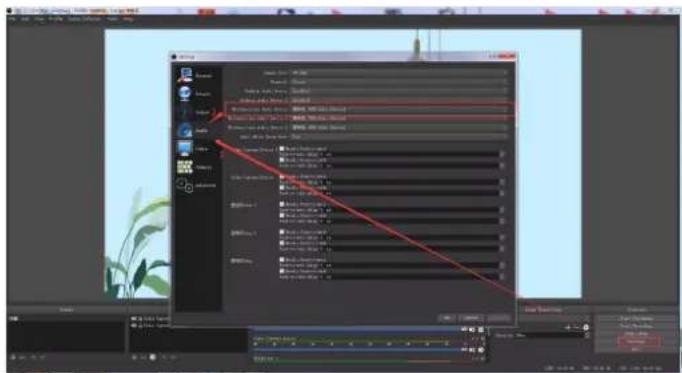
Choose Audio, click Setting and choose audio device (Mic/Auxiliary Audio Device)
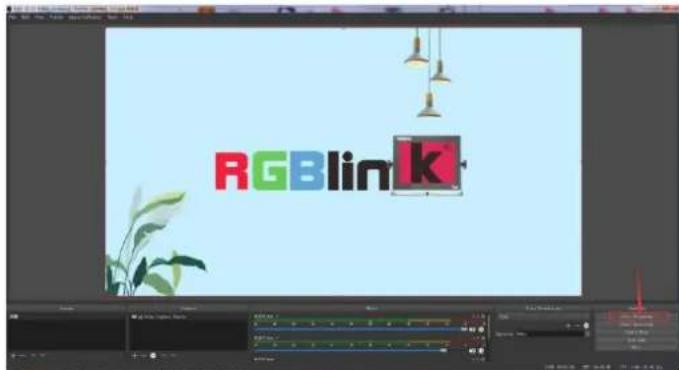
Streaming Setting
-
Find the UL and Live Streaming Code provided by streaming broadcast website.
-
Copy rtmp address and broadcast code
-
Back to OBS, click setting in the lower right corner and click "Stream". Choose Stream Type as "Custom Streaming Server" Paste the RMTP address to server and broadcast code to stream key.
4.Click "Start Streaming"
- Go back to live broadcast website and check the broadcasting.
![View 10 - [Image] (RGB) 10 20000000000000000000000000000000000000000000000000000000000000000000000000000000000000000000000000000 1.1.1 1.1.1 1.1.1 1.1.1 1.1.1 1.1.1 1.1.1 1.1.1 1.1.1 1.1.1 1.1.1 1.1.1 1.1.1 1.1.1 1.1.1 1.1.1 1.1.1 1.2.2 1.2.2 1.2.2 1.2.2 1.2.2 1.2.2 1.2.2 1.2.2 1.2.2 1.2.2 1.2.2 1.2.2 1.2.2 1.2.2 1.2.2 1.2.2 1.3.3 1.3.3 1.3.3 1.3.3 1.3.3 1.3.3 1.3.3 1.3.3 1.3.3 1.3.3 1.3.3 1.3.3 1.3.3 1.3.3 1.3.3 1.3.3 1.3.3 1.4.4 1.4.4 1.4.4 1.4.4 1.4.4 1.4.4 1.4.4 1.4.4 1.4.4 1.4.4 1.4.4 1.4.4 1.4.4 1.4.4 1.5. 1.5. 1.5. 1.5. 1.5. 1.5. 1.5. 1.5. 1.5. 1.5. 1.5. 1.5. 1.5. 1.5. 1.5. 1.5. 1.6. 1.6. 1.6. 1.6. 1.6. 1.6. 1.6. 1.6. 1.6. 1.6. 1.6. 1.6. 1.6. 1.6. 1.6. 1.6. 1.6. 1.7. 1.7. 1.7. 1.7. 1.7. 1.7. 1.7. 1.7. 1.7. 1.7. 1.7. 1.7. 1.7. 1.7. 1.7. 1.7. 1.8. 1.8. 1.8. 1.8. 1.8. 1.8. 1.8. 1.8. 1.8. 1.8. 1.8. 1.8. 1.8. 1.8. 1.8. 1.8. 2 2 2 2 2 2 2 2 2 2 2 2 2 2 2 2 2 2 2 2 2 2 2 2 2 2 2 2 2](/content/2026/05/958916/images/ba2f0d251b12b605be9fa956902fd3ca5857b4ac94fc397ab17cbb501812ba73.jpg)
Chapter 4 Order Codes
| Product Code | Item |
| 601-0231-00-0 | MSP231 |
Chapter 5 Support
5.1 Contact Us
www.rgblink.com

@RGBLINK

/rgblink

+rgblink

/rgblink

rgblink

rgblink






Chapter 6 Appendix
6.1 Specification
| Connectors | Input | HDMI | 1×HDMI-A |
| Output | HDMI | 1×HDMI-A | |
| USB 3.0 | 1×USB-A | ||
| Audio | Mic | 1×3.5mm Jack | |
| Line Out | 1×3.5mm Jack | ||
| Power | 1×Mini USB | ||
| Performance | Input | HDMI | |
| Resolutions | 720p@50/60 | 1080i@50/60 | | ||
| SMPTE | 1080p@23.98/24/25/29.97/30/50/59.94/60 | | ||
| 2160p@24/25/30 | |||
| VESA | 640×480@60 | 808600@60 | 1024×768@60|1280×1024@60 | | ||
| 1920×1080@60 | 38402160@24/25/30 | 4096×2160@24 | |||
| Output | HDMI | USB (output resolution is not configurable) | ||
| Resolutions | SMPTE | 1080p@60 | |
| VESA | 1920×1080@60 | ||
| Supported | HDMI | 1 | |
| Standard | USB | 3.0 | |
| Power | Input Voltage | DC 5V 2A | |
| Enviroment | Working Temperature | -0 ~50°C | |
| Humidity | 20 - 90% | ||
| Physical | Weight | Net (Device) | 0.08kg |
| Dimensions | Net (Device) | 113mm×61mm×13mm | |
6.2 Terms & Definitions
●RCA: Connector used primarily in consumer AV equipment for both audio and video. The RCA connector was developed by the Radio Corporation of America.
- BNC: Stands for Bayonet Neill-Concelman. A cable connector used extensively in television (named for its inventors). A cylindrical bayonet connector that operates with a twist-locking motion.
- CVBS: CVBS or Composite video, is an analog video signal without audio. Most commonly CVBS is used for transmission of standard definition signals. In consumer applications the connector is typically RCA type, while in professional applications the connector is BNC type.
- YPbPr: Used to describe the colour space for progressive-scan. Otherwise known as component video.
- VGA: Video Graphics Array. VGA is an analog signal typically used on earlier computers. The signal is non-interlaced in modes 1, 2, and 3 and interlaced when using in mode
- DVI: Digital Visual Interface. The digital video connectivity standard that was developed by DDWG (Digital Display Work Group). This connection standard offers two different connectors: one with 24 pins that handles digital video signals only, and one with 29 pins that handles both digital and analog video.
- SDI: Serial Digital Interface. Standard definition video is carried on this 270 Mbps data transfer rate. Video pixels are characterized with a 10-bit depth and 4:2:2 color quantization. Ancillary data is included on this interface and typically includes audio or other metadata. Up to sixteen audio channels can be transmitted. Audio is organised into blocks of 4 stereo pairs. Connector is BNC.
- HD-SDI: high-definition serial digital interface (HD-SDI), is standardized in SMPTE 292M this provides a nominal data rate of 1.485 Gbit/s.
- 3G-SDI: standardized in SMPTE 424M, consists of a single 2.970 Gbit/s serial link that allows replacing dual link HD-SDI.
- 6G-SDI: standardized in SMPTE ST-2081 released in 2015, 6Gbit/s bitrate and able to support 2160p@30.
- 12G-SDI:standardized in SMPTE ST-2082 released in 2015, 12Gbit/s bitrate and able to support 2160p@60.
- U-SDI:Technology for transmitting large-volume 8K signals over a single cable. a signal interface called the ultra high definition signal/data interface (U-SDI) for transmitting 4K and 8K signals using a single optical cable. The interface was standardized as the SMPTE ST 2036-4.
- HDMI : High Definition Multimedia Interface: An interface used for the transmission of uncompressed high definition video, up to 8 channels of audio, and control signals, over a single cable.
- HDMI 1.3: released on June 22 2006, and increased the maximum TMDS clock to 340 MHz (10.2 Gbit/s). Support resolution 1920 × 1080 at 120 Hz or 2560 × 1440 at 60 Hz). It added support for 10 bpc, 12 bpc, and 16 bpc color depth (30, 36, and 48 bit/px), called deep color.
- HDMI 1.4: released on June 5, 2009, added support for 4096 × 2160 at 24Hz , 3840 × 2160 at 24, 25, and 30Hz , and 1920 × 1080 at 120Hz . Compared to HDMI 1.3, 3 more features added which are HDMI Ethernet Channel (HEC), audio return channel (ARC), 3D Over HDMI, a new Micro HDMI Connector, an expanded set of color spaces.
- HDMI 2.0, released on September 4, 2013 increases the maximum bandwidth to 18.0 Gbit/s. Other features of HDMI 2.0 include up to 32 audio channels, up to 1536 kHz audio sample frequency, the HE-AAC and DRA audio standards, improved 3D capability, and additional CEC functions.
- HDMI 2.0a: was released on April 8, 2015, and added support for High Dynamic Range (HDR) video with static metadata.
- HDMI 2.0b: was released March, 2016, support for HDR Video transport and extends the static metadata signaling to include Hybrid Log-Gamma (HLG).
- HDMI 2.1 : released on November 28, 2017. It adds support for higher resolutions and higher refresh rates, Dynamic HDR including 4K 120 Hz and 8K 120 Hz.
- DisplayPort: A VESA standard interface primarily for video, but also for audio, USB and other data. DisplayPort (orDP) is backwards compatible with HDMI, DVI and VGA.
- DP 1.1: was ratified on 2 April 2007, and version 1.1a was ratified on 11 January 2008. DisplayPort 1.1 allow a maximum bandwidth of 10.8 Gbit/s (8.64 Gbit/s data rate) over a standard 4-lane main link, enough to support 1920x1080@60Hz
- DP 1.2: introduced on 7 January 2010, effective bandwidth to 17.28 Gbit/s support increased resolutions, higher refresh rates, and greater color depth, maximum resolution 3840 × 2160@60Hz
- DP 1.4: publish on 1 Mar, 2016.overall transmission bandwidth 32.4 Gbit/s ,DisplayPort 1.4 adds support for Display Stream Compression 1.2 (DSC), DSC is a "visually lossless" encoding technique with up to a 3:1 compression ratio. Using DSC with HBR3 transmission rates, DisplayPort 1.4 can support 8K UHD (7680×4320) at 60 Hz or 4K UHD (3840×2160) at 120 Hz with 30 bit/px RGB color and HDR. 4K at 60 Hz 30 bit/px RGB/HDR can be achieved without the need for DSC.
- Multi-mode Fiber: Fibers that support many propagation paths or transverse modes are called multi-mode fibers, generally have a wider core diameter and are used for short-distance communication links and for applications where high power must be transmitted.
- Single-mode Fiber: Fiber that support a single mode are called single-mode fibers. Single-mode
fibers are used for most communication links longer than 1,000 meters (3,300 ft).
- SFP: small form-factor pluggable, is a compact, hot-pluggable network interface module used for both telecommunication and data communications applications.
- optical fiber connector: terminates the end of an optical fiber, and enables quicker connection and disconnection than splicing. The connectors mechanically couple and align the cores of fibers so light can pass. 4 most common types of optical fiber connectors are SC, FC, LC,ST.
- SC:(Subscriber Connector), also known as the square connector was also created by the Japanese company – Nippon Telegraph and Telephone. SC is a push-pull coupling type of connector and has a 2.5mm diameter. Nowadays, it is used mostly in single mode fiber optic patch cords, analog, GBIC, and CATV. SC is one of the most popular options, as its simplicity in design comes along with great durability and affordable prices.
- LC: (Lucent Connector) is a small factor connector (uses only a 1.25mm ferrule diameter) that has a snap coupling mechanism. Because of its small dimensions, it is the perfect fit for high-density connections, XFP, SFP, and SFP+ transceivers.
- FC :(Ferrule Connector) is a screw type connector with a 2.5mm ferrule. FC is a round shaped threaded fiber optic connector, mostly used on Datacom, telecom, measurement equipment, single-mode laser.
- ST: (Straight Tip) was invented by AT&T and uses a bayonet mount along with a long spring-loaded ferrule to support the fiber.
- USB: Universal Serial Bus is a standard that was developed in the mid-1990s that defines cables, connectors and communication protocols. This technology is designed to allow a connection, communication and power supply for peripheral devices and computers.
- USB 1.1: Full-Bandwidth USB, specification was the first release to be widely adopted by the consumer market. This specification allowed for a maximum bandwidth of 12Mbps.
- USB 2.0:or Hi-Speed USB, specification made many improvements over USB 1.1. The main improvement was an increase in bandwidth to a maximum of 480Mbps.
- USB 3.2: Super Speed USB with 3 varieties of 3.2 Gen 1(original name USB 3.0), 3.2Gen 2(original name USB 3.1), 3.2 Gen 2x2 (original name USB 3.2) with speed up to 5Gbps,10Gbps,20Gbps respectively.
USB version and connectors figure:
| Type A | Type B | Mini A | Mini B | Micro-A | Micro-B | Type C | |
| USB 2.0 |  |  |  |  |  | ||
| USB 3.0 |  |  |  | ||||
| USB 3.1&3.2 | 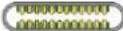 |
- NTSC : The colour video standard used in North America and some other parts of the world created by the National Television Standards Committee in the 1950s. NTSC utilizes an interlaced video signals.
- PAL: Phase Alternate Line. A television standard in which the phase of the colour carrier is alternated from line to line. It takes four full images (8 fields) for the colour-to-horizontalimages (8 fields) for the colour-to-horizontal phase relationship to return to the reference point. This alternation helps cancel out phase errors. For this reason, the hue control is not needed on a PAL TV set. PAL, is widely used in needed on a PAL TV set. PAL, is widely used in Western Europe, Australia, Africa, the Middle East, and Micronesia. PAL uses 625-line, 50-field (25 fps) composite colour transmission system.
- SMPTE: Society of Motion image and Television Engineers. A global organization, based in the United States, that sets standards for baseband visual communications. This includes film as well as video and television standards.
- VESA: Video Electronics Standards Association. An organization facilitating computer graphics through standards.
●HDCP: High-bandwidth Digital Content Protection (HDCP) was developed by Intel Corporation and is in wide use for protection of video during transmission between devices.
- HDBaseT: A video standard for the transmission of uncompressed video (HDMI signals) and related features using Cat 5e/Cat6 cabling infrastructure.
- ST2110: A SMPTE developed standard, ST2110 describes how to send digital video over and IP networks. Video is transmitted uncompressed with audio and other data in a separate streams. SMPTE2110 is intended principally for broadcast production and distribution facilities where quality and flexibility are more important.
- SDVoE: Software Defined Video over Ethernet (SDVoE) is a method for transmission, distribution and management AV signals using a TCP/IP Ethernet infrastructure for transport with low latency. SDVoE is commonly used in integration applications.
Dante AV: The Dante protocol was developed for and widely adopted in audio systems fothe transmission of uncompressed digital audio on IP based networks. The more recent Dante AV specification includes support for digital video.
- NDI: Network Device interface (NDI) is a software standard developed by NewTek to enable
video-compatible products to communicate, deliver, and receive broadcast quality video in a high quality, low latency manner that frame-accurate and suitable for switching in a live production environment over TCP (UDP) Ethernet based networks. NDI commonly found in broadcast applications.
- RTMP: Real-Time Messaging Protocol (RTMP) was initially a proprietary protocol developed by Macromedia (now Adobe) for streaming audio, video and data over the Internet, between a Flash player and a server.
- RTSP : The Real Time Streaming Protocol (RTSP) is a network control protocol designed for use in entertainment and communications systems to control streaming media servers. The protocol is used for establishing and controlling media sessions between end points.
- MPEG: Moving Picture Experts Group is a working group formed from ISO and IEC developing standards that allow audio/video digital compression and Transmission.
- H.264: Also known as AVC (Advanced Video Coding) or MPEG-4i is a common video compression standard. H.264 was standardized by the ITU-T Video Coding Experts Group (VCEG) together with the ISO/IEC JTC1 Moving Picture Experts Group (MPEG).
- H.265: Also known as HEVC (High Efficiency Video Coding) H.265 is the successor to the widely used H.264/AVC digital video coding standard. Developed under the auspices of ITU, resolutions up to 8192x4320 may be compressed.
- API: An Application Programming Interface (API) provides a predefined function which allows access capabilities and features or routines via a software or hardware, without accessing source code or understanding the details of inner working mechanism. An API call may execute and/or provide datafeedback/report.
- DMX512: The communication standard developed by USITT for entertainment and digital lighting systems. The wide adoption of the Digital Multiplex (DMX) protocol has seen the protocol used for a wide range of other devices including video controller DMX512 is delivered over cable of 2 twisted pairs with 5pin XLR cables for connection.
- ArtNet: An ethernet protocol based on TCP/IP protocol stack, mainly used in entertainment/events applications. Built on the DMX512 data format, ArtNet enables multiple “universes” of DMX512 to be transmitted using ethernet networks for transport.
-
MIDI: MIDI is the abbreviation of Musical Instrument Digital Interface. As the name indicates the protocol was developed for communication between electronic musical instruments and latterly computers. MIDI instructions are triggers or commands sent over twisted pair cables, typically using 5pin DIN connectors.
-
OSC: The principle of Open Sound Control (OSC) protocol is for networking sound synthesizers, computers, and multimedia devices for musical performance or show control. As with XML and JSON, the OSC protocol allows sharing data. OSC is transported via UDP packets between devices connected on an Ethernet.
- Brightness: Usually refers to the amount or intensity video light produced on a screen without regard to colour. Sometimes called black level.
- Contrast Ratio: The ratio of the high light output level divided by the low light output level. In theory, the contrast ratio of the television system should be at least 100:1, if not 300:1. In reality, there are several limitations. Well-controlled viewing conditions should yield a practical contrast ratio of 30:1 to 50:1.
- Colour Temperature: The colour quality, expressed in degrees Kelvin (K), of a light source. The higher the colour temperature, the bluer the light. The lower the temperature, the redder the light. Benchmark colour temperature for the A/V industry include 5000^ , 6500^ , and 9000^ .
- Saturation: Chroma, Chroma gain. The intensity of the colour, or the extent to which a given colour in any image is free from white. The less white in a colour, the truer the colour or the greater its saturation. Saturation is the amount of pigment in a colour, and not the intensity.
- Gamma: The light output of a CRT is not linear with respect to the voltage input. The difference between what you should have and what is actually output is known as gamma.
- Frame: In interlaced video, a frame is one complete image. A video frame is made up of two fields, or two sets of interlaced lines. In a film, a frame is one still image of a series that makes up a motion image.
- Genlock: Allows synchronisation of otherwise video devices. A signal generator provides a signal pulses which connected devices can reference. Also see Black Burst and Color Burst.
- Blackburst: The video waveform without the video elements. It includes the vertical sync, horizontal sync, and the Chroma burst information. Blackburst is used to synchronize video equipment to align the video output.
- ColourBurst: In colour TV systems, a burst of subcarrier frequency located on the back part of the composite video signal. This serves as a colour synchronizing signal to establish a frequency and phase reference for the Chroma signal. Colour burst is 3.58 MHz for NTSC and 4.43 MHz for PAL.
-
Colour Bars: A standard test pattern of several basic colours (white, yellow, cyan, green, magenta, red, blue, and black) as a reference for system alignment and testing. In NTSC video, the most commonly used colour bars are the SMPTE standard colour bars. In PAL video, the most commonly used colour bars are eight full field bars. On computer monitors the most commonly used colour bars are two rows of reversed colour bars
-
Seamless Switching: A feature found on many video switchers. This feature causes the switcher to wait until the vertical interval to switch. This avoids a glitch (temporary scrambling) which often is seen when switching between sources.
- Scaling: A conversion of a video or computer graphic signal from a starting resolution to a new resolution. Scaling from one resolution to another is typically done to optimize the signal for input to an image processor, transmission path or to improve its quality when presented on a particular display.
- PIP: Picture-In-Picture. A small image within a larger image created by scaling down one of image to make it smaller. Other forms of PIP displays include Picture-By-Picture (PBP) and Picture- With-Picture (PWP), which are commonly used with 16:9 aspect display devices. PBP and PWP image formats require a separate scaler for each video window.
- HDR: is a high dynamic range (HDR) technique used in imaging and photography to reproduce a greater dynamic range of luminosity than what is possible with standard digital imaging or photographic techniques. The aim is to present a similar range of luminance to that experienced through the human visual system.
- UHD: Standing for Ultra High Definition and comprising 8K television standards with a 16:9 ratio, UHD follows the 2K HDTV standard. A UHD 4K display has a physical resolution of 3840x2160 which is four times the area and twice both the width and height of a HDTV/FullHD(1920x1080) video signal.
- EDID: Extended Display Identification Data. EDID is a data structure used to communicate video display information, including native resolution and vertical interval refresh rate requirements, to a source device. The source device will then output the provided EDID data, ensuring proper video image quality.
5.3 Revision History
The table below lists the changes of MSP 231 User Manual.
| Format | Time | ECO# | Description | Principal |
| V1.0 | 2020-6-28 | 0000# | Release | Fanny |
All information herein is Xiamen RGBlink Science & Technology Co Ltd. excepting noted. RGBlink is a registered trademark of Xiamen RGBlink Science & Technology Co Ltd. While all efforts are made for accuracy at time of printing, we reserve the right to alter otherwise make change without notice. E&OM excepted.
- CONTENTS
- CONTENTS....1
- Declarations....2
- Chapter 1 Your Product....5
- Chapter 2 Caution....8
- Chapter 3 OBS Streaming....10
- Chapter 4 Order Codes....12
- Chapter 5 Support....13
- Chapter 6 Appendix....14
- Declarations
- FCC/Warranty
- Federal Communications Commission (FCC)
- Statement
- Guarantee and Compensation
- Operators Safety Summary
- Do Not Remove Covers or Panels
- Power Source
- Do Not Operate in Explosive Atmospheres
- Installation Safety Summary
- Safety Precautions
- Unpacking and Inspection
- Site Preparation
- Chapter 1 Your Product
- In the Box
- Product Overview
- Interface
- Computer Configuration Requirements
- Mobile Phone Requirements
- USB Host Restriction List
- Chapter 3 OBS Streaming
- OBS Setting
- Streaming Setting
- Chapter 4 Order Codes
- Chapter 5 Support
- Contact Us
- Chapter 6 Appendix
- Terms & Definitions
- Revision History
Brand : RGBlink
Model : MSP 231
Category : Video card