
MW-41BT - Hand blender TOA - Free user manual and instructions
Find the device manual for free MW-41BT TOA in PDF.


| Product Type | Audio Interface with USB and Bluetooth |
| Brand | TOA |
| Model | MW-41BT |
| Dimensions (W x H x D) | 120 x 120 x 40.2 mm (4.72" x 4.72" x 1.58") |
| Weight | 0.2 kg (0.44 lbs) |
| Power Source | 100-240 V AC, 50/60 Hz (via included AC adapter) |
| Power Consumption | 3 W |
| Audio Inputs | MIC (XLR, -60 dBV, 2.2 kΩ), AUX (3.5 mm stereo, -10 dBV, 10 kΩ), USB (MP3/WAV, FAT16/32, max 32 GB), Bluetooth (v5.0, up to 10 m) |
| Audio Output | Balanced line output via RJ45 (0 dBV, 10 kΩ) |
| Frequency Response | 20 Hz - 20 kHz, ±3 dB |
| Total Harmonic Distortion | < 0.1% |
| Signal-to-Noise Ratio | > 90 dB (A-weighted) |
| Phantom Power | +24 V DC, switchable (for MIC input) |
| Indicators | Power (blue), MIC (blue), AUX (blue), USB (blue), Bluetooth (blue) |
| Controls | Power switch, input selection, volume up/down, play/pause, skip track, mute, 0-9 numeric keys (USB), remote control |
| Bluetooth | Version 5.0; device name: MW-41BT; pairing PIN: 4141 |
| Microphone Priority | MIC input has highest priority; other sources ducked by 20 dB when MIC signal detected |
| Mounting | Fits standard 2-Gang electrical box (not included) |
| Accessories Included | AC power adapter, remote control, box mounting screws (4), RJ45 conversion socket |
| Operating Temperature | 0°C to +40°C (32°F to 104°F) |
| Operating Humidity | 90% RH or less (no condensation) |
| Finish | Panel: Aluminum, sandblasted, silver; Decorative sheet: Acrylic, black |
| Safety Compliance | FCC Part 15 Class B, Industry Canada RSS |
Frequently Asked Questions - MW-41BT TOA
User questions about MW-41BT TOA
0 question about this device. Answer the ones you know or ask your own.
Ask a new question about this device
Download the instructions for your Hand blender in PDF format for free! Find your manual MW-41BT - TOA and take your electronic device back in hand. On this page are published all the documents necessary for the use of your device. MW-41BT by TOA.
USER MANUAL MW-41BT TOA
AUDIO INTERFACE WITH USB AND BLUETOOTH
MW-41BT
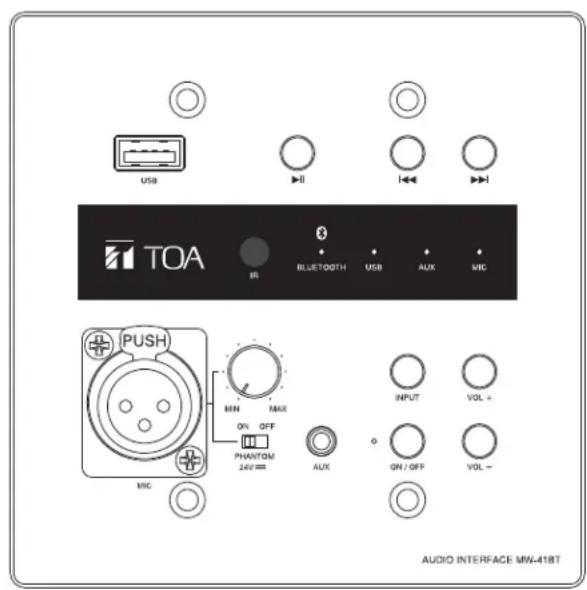
TABLE OF CONTENTS
- IMPORTANT SAFETY INSTRUCTIONS ..... 2
- GENERAL DESCRIPTION .... 5
- FEATURES .... 5
-
NOMENCLATURES AND FUNCTIONS ..... 5
-
CONNECTIONS ...... 7
- INSTALLATION ...... 7
- DIMENSIONAL DIAGRAM 8
- SPECIFICATIONS 8
Thank you for purchasing TOA's Audio Interface with USB and Bluetooth. Please carefully follow the instructions in this manual to ensure long, trouble-free use of your equipment.
IMPORTANT SAFETY INSTRUCTIONS
- Read these instructions.
- Keep these instructions.
- Heed all warnings.
- Follow all instructions.
- Do not use this apparatus near water.
- Clean only with dry cloth.
- Do not block any ventilation openings. Install in accordance with the manufacturer's instructions.
- Do not install near any heat sources such as radiators, heat registers, stoves, or other apparatuses (including amplifiers) that produce heat.
- Protect the power cord from being walked on or pinched particularly at plugs, convenience receptacles, and the point where they exit from the apparatus.
- Only use attachments/accessories specified by the manufacturer.
- Unplug this apparatus during lightning storms or when unused for long periods of time.
- Refer all servicing to qualified service personnel. Servicing is required when the apparatus has been damaged in any way, such as power-supply cord or plug is damaged, liquid has been spilled or objects have fallen into the apparatus, the apparatus has been exposed to rain or moisture, does not operate normally, or has been dropped.
INSTRUCTIONS ESSENTIELLES POUR LA SÉCURITÉ
- Before installation or use, be sure to carefully read all the instructions in this section for correct and safe operation.
- Be sure to follow all the precautionary instructions in this section, which contain important warnings and/or cautions regarding safety.
• After reading, keep this manual handy for future reference. - To prevent electrostatic buildup/discharge, TOA recommends that the MW-41BT be grounded during installation.
Safety Symbol and Message Conventions
Safety symbols and messages described below are used in this manual to prevent bodily injury and property damage which could result from mishandling. Before operating your product, read this manual first and understand the safety symbols and messages so you are thoroughly aware of the potential safety hazards.

The exclamation point within an equilateral triangle is intended to alert the user to the presence of important operation and maintenance (servicing) instruction in the literature accompanying the appliance.

Indicates a potentially hazardous situation which, if mishandled, could result in death or serious personal injury.
When Installing the Unit
- WARNING: Do not expose the unit to rain or an environment where it may be splashed by water or other liquids, as doing so may result in fire or electric shock.
- Use the unit only with the voltage specified on the unit. Using a voltage higher than that which is specified may result in fire or electric shock.
- Do not cut, kink, or otherwise damage nor modify the power supply cord. In addition, avoid using the power cord in close proximity to heaters, and never place heavy objects -- including the unit itself -- on the power cord, as doing so may result in fire or electric shock.
- Avoid installing or mounting the unit in unstable locations, such as on a rickety table or a slanted surface. Doing so may result in the unit falling down and causing personal injury and/or property damage.
- The socket-outlet shall be installed near the equipment and the plug (disconnecting device) shall be easily accessible.
When the Unit is in Use
- Should the following irregularity be found during use, immediately switch off the power, disconnect the power supply plug from the AC outlet and contact your nearest TOA dealer. Make no further attempt to operate the unit in this condition as this may cause fire or electric shock.
· If you detect smoke or a strange smell coming from the unit
· If water or any metallic object gets into the unit - If the unit falls, or the unit case breaks
- If the power supply cord is damaged (exposure of the core, detached, etc.)
· If it is malfunctioning (no tone sounds.)
- To prevent a fire or electric shock, never open nor remove the unit case as there are high voltage components inside the unit. Refer all servicing to your nearest TOA dealer.
- Do not place cups, bowls, or other containers of liquid or metallic objects on top of the unit. If they accidentally spill into the unit, this may cause a fire or electric shock.
- Do not insert nor drop metallic objects or flammable materials in the ventilation slots of the unit's cover, as this may result in fire or electric shock.

CAUTION
Indicates a potentially hazardous situation which, if mishandled, could result in moderate or minor personal injury, and/or property damage.
When Installing the Unit
- Never plug in nor remove the power supply plug with wet hands, as doing so may cause electric shock.
- When unplugging the power supply cord, be sure to grasp the power supply plug; never pull on the cord itself. Operating the unit with a damaged power supply cord may cause a fire or electric shock.
- When moving the unit, be sure to remove its power supply cord from the wall outlet. Moving the unit with the power cord connected to the outlet may cause damage to the power cord, resulting in fire or electric shock. When removing the power cord, be sure to hold its plug to pull.
- Avoid installing the unit in humid or dusty locations, in locations exposed to direct sunlight, near heaters, or in locations generating dirty smoke or steam as doing so may result in fire or electric shock.
When the Unit is in Use
- Do not place heavy objects on the unit as this may cause it to fall or break which may result in personal injury and/or property damage. In addition, the object itself may fall off and cause injury and/or damage.
- Make sure that the amplifier volume control is set to minimum position before power is switched on. Loud noise produced at high volume when power is switched on can impair hearing.
- Do not operate the unit for an extended period of time with the sound distorting. This is an indication of a malfunction, which in turn can cause heat to generate and result in a fire.
- If dust accumulates on the power supply plug or in the wall AC outlet, a fire may result. Clean it periodically. In addition, insert the plug in the wall outlet securely.
- Switch off the power, and unplug the power supply plug from the AC outlet for safety purposes when cleaning or leaving the unit unused for 10 days or more. Doing so may cause a fire or electric shock.

The lighting flash with arrowhead symbol, within an equilateral triangle, is intended to alert the user to the presence of uninsulated "dangerous voltage" within the product's enclosure that may be of sufficient magnitude to constitute a risk of electric shock to persons.

Note: This equipment has been tested and found to comply with the limits for a Class B digital device, pursuant to part 15 of the FCC Rules. These limits are designed to provide reasonable protection against harmful interference in a residential installation. This equipment generates, uses and can radiate radio frequency energy and, if not installed and used in accordance with the instructions, may cause harmful interference to radio communications. However, there is no guarantee that interference will not occur in a particular installation.
If this equipment does cause harmful interference to radio or television reception, which can be determined by turning the equipment off and on, the user is encouraged to try to correct the interference by one or more of the following measures:
- Reorient or relocate the receiving antenna.
- Increase the separation between the equipment and receiver.
- Connect the equipment into an outlet on a circuit different from that to which the receiver is connected.
- Consult the dealer to an experienced radio/TV technician for help.
Note: This device complies with Industry Canada's licence-exempt RSSs. Operation is subject to the following two conditions:
(1) This device may not cause interference; and
(2) This device must accept any interference, including interference that may cause undesired operation of the device.
The device should be installed and used within a distance of at least 20 cm between the radiator and the body.
MW-41BT is TOA's second generation of audio input panels. It is equipped with Microphone, Aux (3.5mm), USB and Bluetooth inputs, and one Mono balanced output. The in-wall design and elegant appearance make it ideal for saving space and integration to various facilities.
The microphone input has the highest priority over the other inputs. Any active input will be ducked by 20dB once a microphone signal is detected.
The panel fits in a standard 2-Gang Electrical box (not included), and it requires a power supply (included).
3. FEATURES
- Microphone and line level inputs • Input Selection Button
- 24V Phantom Power on the Mic input • Volume Control
- USB input (compatible with MP3 and WAV)
- Bluetooth ^ input • AC Adapter included
• Balanced line output
- Priority on the Mic input
• 2-Gang Electrical box required (not included)
4. NOMENCLATURES AND FUNCTIONS
Bluetooth name: MW-41BT
Pairing password: 4141
Note: If multiple interfaces are installed in the same location, you can modify the name of MW-41BT on the audio playback device to distinguish it after the Bluetooth pairing is successful.
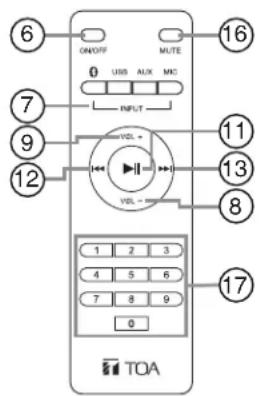
[Front Panel] [Remote controller]
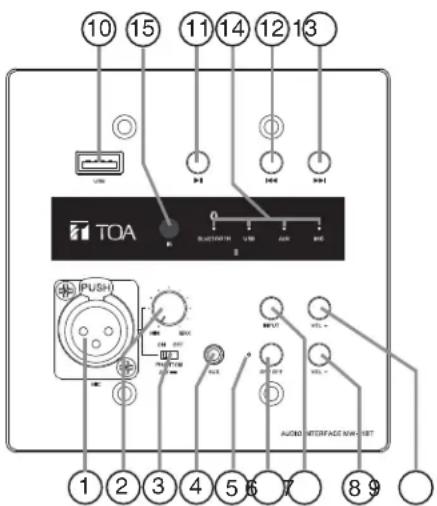
1. Microphone Input Terminal
-60 dBV, 600 Ω, electronically balanced, female XLR type connector.
Note: The microphone has the highest priority. When the microphone is turned on and the system detects a microphone signal, the sound of the source being used will be reduced by 20dB.
When the microphone is turned off, its volume is automatically restored.
2. Microphone Volume Control
Adjust the microphone volume level.
Note: When the microphone is not in use, turn down the volume control to reduce the noise.
3. Phantom Power Switch
Turns ON or OFF depending on whether or not the microphone connected to the MIC input requires phantom power.
ON: Supplies phantom power (24 V DC) to the microphone.
OFF: Turns off the phantom power supply.
4. AUX Input Terminal
-10 dBV, 10 kΩ, unbalanced, stereo 3.5 mm (1/8") mini-jack.
5. Power Indicator
Lights blue when power is switched on.
6. Power Switch
Press ON/OFF to turn on the power.
Press again to turn off the power.
7. Input Channel Selection Button
Press the Input button to select the input channel, and ensure input channel indicator (No.14) is on.
When the device is connected to a Bluetooth player, press and hold for 4 seconds or press and hold the Bluetooth button on the remote controller for 4 seconds to disconnect the device from the Bluetooth player.
8. Volume Down Button
The volume decreases by one level when short press, and decreases quickly when long press.
When the volume is reduced to the minimum, the system will prompt you with a beep sound.
9. Volume Up Button
The volume increases by one level when short press, and increases quickly when long press.
When the volume is increased to the maximum, the system will prompt you with a beep sound.
10. USB Card Input
Socket for USB Input.
Audio formats: MP3, WAV.
Format: FAT16, FAT32, Max. 32GB.
Note: not recommended for charging.
11. Play/Pause
Press this button to toggle between Play and Pause. Note: If Bluetooth or USB input is selected, this button will play and pause the music source. If AUX input is selected, this button will mute and unmute the music source.
12. Skip to Last Track
Press this button to skip to previous track.
Note: Operates while Bluetooth/USB is active.
13. Skip to Next Track
Press this button to skip to next track.
Note: Operates while Bluetooth/USB is active.
14. Input Channel Indicator
Lights blue when the input channel is selected.
15. IR Receiver
Signal receiver from accessory remote control.
16. Mute
Press this button while playing to mute sound, press again to recovery sound.
17.0-9
Operates while USB is active, press this keys to select the track directly.
[Rear Panel]
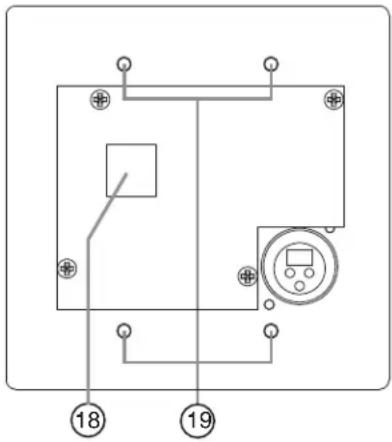
18. DC Power Input And Audio Output Connector
RJ45 connector.
• DC Power Input (Pin7 24V+, Pin8 24V-)
Connects to the accessory AC adapter.
• Audio Output (Pin1 Hot, Pin2 Cold, Pin3 Earth)
0 dBV, 10 kΩ, electronically balanced, connect to an amplifier.
19. Mounting holes
Use the accessory screws to install the interface to the 2 gang box. (Refer to p.7.)
5. CONNECTIONS
Example of external equipment connections
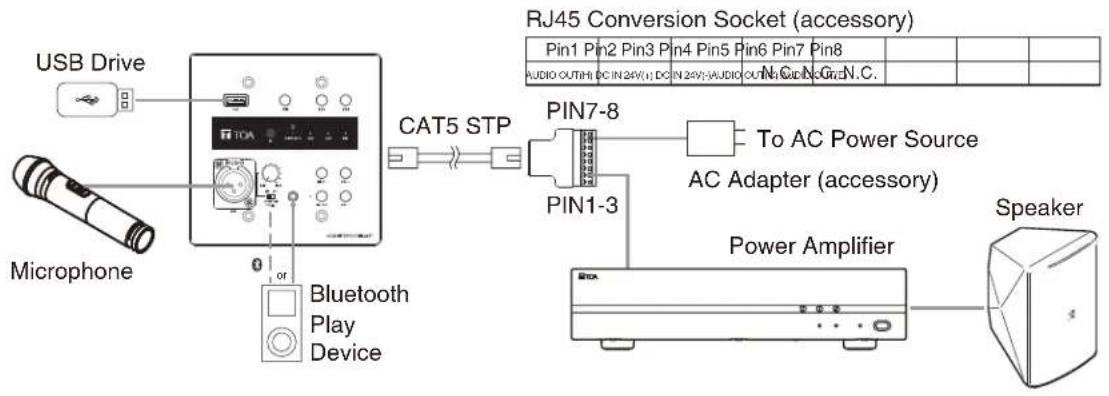
flowchart
graph TD
    A["USB Drive"] --> B["Microphone"]
    B --> C["Bluetooth Play Device"]
    C --> D["CNCA"]
    D --> E["CNCA"]
    E --> F["CNCA"]
    F --> G["CNCA"]
    G --> H["CNCA"]
    H --> I["CNCA"]
    I --> J["CNCA"]
    J --> K["CNCA"]
    K --> L["CNCA"]
    L --> M["CNCA"]
    M --> N["CNCA"]
    N --> O["CNCA"]
    O --> P["CNCA"]
    P --> Q["CNCA"]
    Q --> R["CNCA"]
    R --> S["CNCA"]
    S --> T["CNCA"]
    T --> U["CNCA"]
    U --> V["CNCA"]
    V --> W["CNCA"]
    W --> X["CNCA"]
    X --> Y["CNCA"]
    Y --> Z["CNCA"]
    Z --> AA["CNCA"]
    AA --> AB["CNCA"]
    AB --> AC["CNCA"]
    AC --> AD["CNCA"]
    AD --> AE["CNCA"]
    AE --> AF["CNCA"]
    AF --> AG["CNCA"]
    AG --> AH["CNCA"]
    AH --> AI["CNCA"]
    AI --> AJ["CNCA"]
    AJ --> AK["CNCA"]
    AK --> AL["CNCA"]
    AL --> AM["CNCA"]
    AM --> AN["CNCA"]
    AN --> AO["CNCA"]
    AO --> AP["CNCA"]
    AP --> AQ["CNCA"]
    AQ --> AR["CNCA"]
    AR --> AS["CNCA"]
    AS --> AT["CNCA"]
    AT --> AU["CNCA"]
    AU --> AV["CNCA"]
    AV --> AW["CNCA"]
    AW --> AX["CNCA"]
    AX --> AY["CNCA"]
6. INSTALLATION
- Embed 2 gang box on the wall first and tighten it with screws.
Note: Please ground the 2 gang box or any mounting screw on the back of the equipment to avoid static electricity damaging the equipment or causing the equipment to work abnormally.
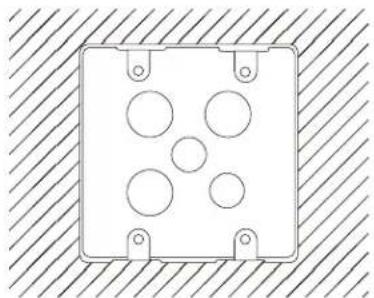
natural_image
Simple line drawing of a rectangular enclosure with circular cutouts and mounting holes, set against a hatched background (no text or symbols)- Connect CAT5-STP cable, then install the panel into the 2 gang box and tighten it with accessory screws.
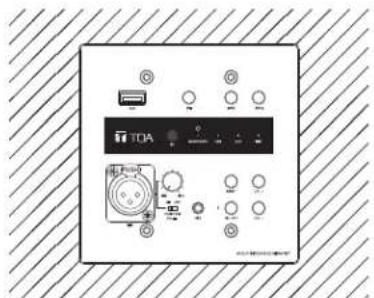
- First connect the power amplifier and the AC adapter, and then connect the AC adapter to the AC power source.
Power ON/OFF Sequence

flowchart
graph LR
    A["Power on"] --> B["Power off"]
    B --> C["— Audio Interface Aud, Power Amplifier — Power Amplifier —"]
NOTES:
For high-power systems, power on/off sequence is very important. Failure to follow the sequence is likely to damage the equipment.
7. DIMENSIONAL DIAGRAM
Units : mm [inches]
![120 [4.72"] 28.4 [1.12"] TOA 0 BLUTTER USB USB USB 120 [4.72"] PUSH AUDIO INTERFACE MIN-13T](/content/2026/05/958860/images/3a0ab8db5661642fea0ca41cc99443b94155c5bea262cdac4b52ab0744a62930.jpg)
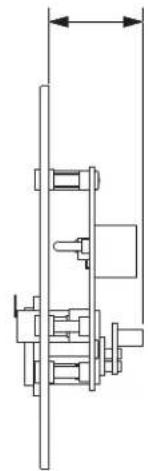
natural_image
Technical line drawing of a mechanical assembly with no visible text or symbols8. SPECIFICATIONS
| Power Source 100-240V AC 50/60Hz | |
| Power Consumption 3W | |
| Audio Input MIC input : -60 dBV, 2.2 kΩ, electronic balanced, female XLR ConnectorAUX input : -10 dBV, 10 kΩ,unbalanced, stereo 3.5 mm(1/8") mini-jackUSB input : Audio formats: MP3, WAVFormat: FAT16, FAT32, Max. 32GBBluetooth input : Ver. 5.0, Max. 10m | |
| Audio Output 0 dBV, 10 kΩ, electronic balanced, RJ45 connector | |
| Frequency Response 20 - 20,000 Hz, ±3 dB | |
| Total Harmonic Distortion < 0.1% | |
| S/N Ratio >90dB (A weighted) | |
| +24 VDC, switchable, MIC inputPhantom Power | |
| Indicators Power (Blue) x 1, MIC (Blue) x 1, AUX (Blue) x 1, USB (Blue) x 1, Bluetooth (Blue) x 1 | |
| Operating Temperature 0°C to +40°C (32 °F to 104 °F) | |
| Operating Humidity 90% RH or less (no condensation) | |
| Finish Panel: Aluminum, Sandblasting, SilverDecorative sheet: Acrylic, Black | |
| Dimensions 120 (W) x 120 (H) x 40.2 (D) mm (4.72" x 4.72" x 1.58") | |
| Weight 0.2 kg (0.44 lbs) | |
| Accessory AC Power adapter ...1, Remote control ...1, Box mounting screw (6-32UNC) ...4RJ45 Conversion socket ...1 | |
Note : Design and specification are subject to change without prior notice for improvement.
URL: toacanada.com
202401
- AUDIO INTERFACE WITH USB AND BLUETOOTH
- MW-41BT
- TABLE OF CONTENTS
- IMPORTANT SAFETY INSTRUCTIONS
- INSTRUCTIONS ESSENTIELLES POUR LA SÉCURITÉ
- Safety Symbol and Message Conventions
- When Installing the Unit
- When the Unit is in Use
- CAUTION
- FEATURES
- NOMENCLATURES AND FUNCTIONS
- Microphone Input Terminal
- Microphone Volume Control
- Phantom Power Switch
- AUX Input Terminal
- Power Indicator
- Power Switch
- Input Channel Selection Button
- Volume Down Button
- Volume Up Button
- USB Card Input
- Play/Pause
- Skip to Last Track
- Skip to Next Track
- Input Channel Indicator
- IR Receiver
- Mute
- 17.0-9
- DC Power Input And Audio Output Connector
- Mounting holes
- CONNECTIONS
- INSTALLATION
- NOTES:
- DIMENSIONAL DIAGRAM
- SPECIFICATIONS
Brand : TOA
Model : MW-41BT
Category : Hand blender