
EDID-EW-H-II - Émulateur HDMI Apantac - Free user manual and instructions
Find the device manual for free EDID-EW-H-II Apantac in PDF.


| Type | HDMI EDID Learner / Emulator (Bi-directional) |
| Brand | Apantac |
| Model | EDID-EW-H-II (Gen II) |
| Compatibility | HDMI with HDCP 1.x / 2.x |
| Supported Resolution | Up to 4K/UHD @ 60Hz (RGB, 4:4:4, 8-bit) |
| Number of Custom EDIDs | 3 |
| Pre-installed EDIDs | 5: 480P, 720P, 1080P (FHD), 4K30, 4K60 (UHD) |
| Power Supply | Passive inline – No external power needed (powered via HDMI source) |
| Connectors | 1 x HDMI Type A Male, 1 x HDMI Type A Female |
| Controls | Rotary switch (16 positions) and Save button |
| Indicators | Status LED |
| Hot Pluggable | Yes |
| Directional | Bi-directional (can be used in either direction) |
| Bypass Mode | Rotary switch position 0 (pass-through) |
| Additional Features | Learn and store desired EDID from display; accidental overwrite protection |
Frequently Asked Questions - EDID-EW-H-II Apantac
User questions about EDID-EW-H-II Apantac
0 question about this device. Answer the ones you know or ask your own.
Ask a new question about this device
Download the instructions for your Émulateur HDMI in PDF format for free! Find your manual EDID-EW-H-II - Apantac and take your electronic device back in hand. On this page are published all the documents necessary for the use of your device. EDID-EW-H-II by Apantac.
USER MANUAL EDID-EW-H-II Apantac
HDMI EDID Learner / Emulator (Bi-directional)
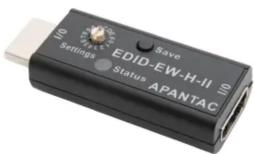
EDID-EW-H-II (Gen II) USER MANUAL v.5.0
Overview
EDID-EW-H-II is the second generation of HDMI EDID learner / Emulator from Apantac. This new generation addressed the accidental over writing of the stored EDID also allows multiple “custom” EDID to be stored.
Package Contents
■ 1 x EDID-EW-H-II
Features
- Learn and store desired EDID from Display
■ Save up to 3 "custom" EDIDs
■ 5 preinstalled EDID - Passive inline device – No external power needed
■ It can be used in either direction (Bi-directional)
■ HDCP 1.x / 2.x Compatible
Hot pluggable
■ Supports up to 4K/UHD @ 60Hz (RGB, 444, 8 bit)
Specifications

- HDMI Type A Male
- HDMI Type A Female
- Save button
- Status LED Indicator
- Rotary Switch for EDID settings
Rotoary switch function

| Position | Functions |
| 0 | Bypass |
| 1 | Built-in 480P EDID |
| 2 | Built-in 720P EDID |
| 3 | Built-in 1080P(FHD) EDID |
| 4 | Built-in 4K30 |
| 5 | Built-in 4K60(UHD) |
| 6 | Save Custom EDID 1 |
| 7 | Use Custom EDID 2 |
| 8 | Save Custom EDID 2 |
| 9 | Use Custom EDID 2 |
| A | Save Custom EDID 3 |
| B | Use Custom EDID 3 |
How to learn/save/use EDID
Example: Custom EDID 1
- Set the rotary switch to "6"
- Connect to a desired display
- Connect the EDID-EW-H-II to a video source to provide power
- Press the "SAVE" button
- Set the rotary switch to "7" to use the Custom EDID 1
- Follow similar steps for Custom EDID 2 and 3
Preinstalled EDID
- Turn the rotary switch to 1 to 5 to select the preinstalled EDID
- It is recommended to power cycle all equipment before the emulator is used to ensure HDMI handshake initialization

© 2022 APANTAC LLC. All rights reserved
10200 SW Allen Blvd, Suite C
Beaverton, OR 97005, USA
PHONE +1 503 968 3000
FAX +1 503 389 7921
The content of this document is provided in connection with Apantac LLC ("Apantac") products. Apantac makes no representation or warranties with respect to the accuracy or completeness of the contents of this publication and reserves the right to make changes to specification and product descriptions at any time without notice
Brand : Apantac
Model : EDID-EW-H-II
Category : Émulateur HDMI