Royal Kludge RK71 70% - Keyboard

RK71 70% - Keyboard Royal Kludge - Free user manual and instructions

Find the device manual for free RK71 70% Royal Kludge in PDF.

📄 2 pages English EN Download 💬 AI Question 10 questions ⚙️ Specs
Notice Royal Kludge RK71 70% - page 1
Pick your language and provide your email: we'll send you a specifically translated version.
Product Type Wireless Mechanical Keyboard
Brand Royal Kludge
Model RK71 70%
Layout 71 Keys (70%)
Connectivity Wired (USB-C) & Wireless (Bluetooth 5.0)
Switch Type Mechanical (Blue/Brown/Red options)
Backlighting Per-key RGB
Battery 2000mAh Rechargeable
Dimensions (approx.) 313 x 114 x 35 mm (12.3 x 4.5 x 1.4 in)
Weight (approx.) 550 g (1.2 lbs)
Operating System Support Windows and Mac (with system switching)
Warranty 12 months (replacement or refund for defects)
Included Accessories USB-C cable, keycap puller, user manual
Special Features System switching (Win/Mac), wired/wireless mode, Bluetooth pairing
Cleaning & Care Use soft dry cloth, avoid liquids, disconnect when cleaning

Frequently Asked Questions - RK71 70% Royal Kludge

How do I switch between Windows and Mac modes?
To switch to Windows mode, press Fn + A. To switch to Mac mode, press Fn + S. The keyboard will automatically remap keys for the selected system.
How do I pair the keyboard via Bluetooth?
First, slide the power switch to ON. Then, long-press the Bluetooth pairing button (Step 2) until the indicator blinks. On your device, search for 'RK71' and connect. Short press switches between paired devices.
Can I use the keyboard while charging?
Yes, you can use the keyboard wired via USB-C while charging. The battery will charge automatically when connected.
What is the warranty policy?
Royal Kludge offers a 12-month warranty covering replacements and full refund for defective products (excluding man-made damages). Contact the seller or support@rkgaming.com.
How do I access the function (F1-F12) keys?
Press Fn combined with the number row keys. For example, Fn+1 for F1, Fn+2 for F2, etc. In Mac mode, some keys control media functions.
Does the keyboard support hot-swappable switches?
This feature is not mentioned in the manual. Please refer to the product specifications or contact support for confirmation.
How do I clean the keyboard?
Unplug the keyboard and use a soft, dry cloth to wipe the surface. For stubborn dirt, slightly dampen the cloth with water. Avoid using harsh chemicals or submerging the keyboard.
My keyboard is not connecting wirelessly. What should I do?
Ensure the power switch is ON and the keyboard is charged. Try re-pairing by long-pressing the pairing button. If issues persist, contact support at support@rkgaming.com.
Can I use the keyboard with multiple devices?
Yes, the keyboard can pair with up to 3 devices. Use the short press (Step 1) to switch between connected devices.
Where can I download the user manual?
You can download the PDF manual from notice-facile.com or the official Royal Kludge website. Additionally, you can request a translated version via email on the manual page.

User questions about RK71 70% Royal Kludge

0 question about this device. Answer the ones you know or ask your own.

Ask a new question about this device

The email remains private: it is only used to notify you if someone responds to your question.

No questions yet. Be the first to ask one.

Download the instructions for your Keyboard in PDF format for free! Find your manual RK71 70% - Royal Kludge and take your electronic device back in hand. On this page are published all the documents necessary for the use of your device. RK71 70% by Royal Kludge.

USER MANUAL RK71 70% Royal Kludge

In Windows System
(Fn) + (A): switch to Win system

In Mac System
(Fn) + (s): switch to Mac system

( Fn ) + ( 7 )Previous Track
( Fn ) + ( 8 )Play/Pause
( Fn ) + ( 9 )Next Track
( Fn ) + ( 10Mute
( Fn ) + ( 11Volume Down
( Fn ) + ( 12Volume Up

WIRED/WIRELESS CONNECTION

ON OFF

Switch Wired/Wireless Mode
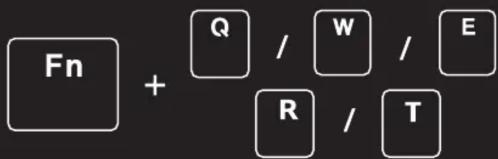
Fn + Q / W / E R / T

Step 1: Click for connected wireless devices switching

Step 2: Long-press for wireless pairing

Royal Kludge RK71 70% - WIRED/WIRELESS CONNECTION - 2

HOW TO PAIR? SCAN IT!!

Have an issue with one of our RK products?

Feel free to contact us with any product issues or questions.

We will reply as quickly as possible to ensure all your needs are handled.

Please contact the seller or reach out to support@rkgaming.com.

Royal Kludge RK71 70% - Have an issue with one of our RK products? - 1

Purchase RK worry free with our 12 months warranty.

Our warranty includes replacements, and full refund for defective products (except man-made damages).

We hope you enjoy our products!

Table of contents Click a title to access it
Manual assistant
Powered by Anthropic
Waiting for your message
Product information

Brand : Royal Kludge

Model : RK71 70%

Category : Keyboard