
Nitro 55R - Mobile Phone Maxwest - Free user manual and instructions
Find the device manual for free Nitro 55R Maxwest in PDF.


Pick your language and provide your email: we'll send you a specifically translated version.
| Product Type | Mobile Phone |
| Brand | Maxwest |
| Model | Nitro 55R |
| Dimensions (approx.) | 150 x 70 x 10 mm |
| Weight (approx.) | 150 g |
| Power Source | Rechargeable Li-ion Battery (1000-2000 mAh) |
| Charging Method | Micro USB cable (included) |
| Display | 2.4" - 3.5" TFT LCD (typical) |
| SIM Card Type | Standard SIM (or dual SIM) |
| Connectivity | GSM, Wi-Fi 802.11 b/g/n |
| Camera | Front and Rear Camera (VGA or 0.3 MP) |
| Audio | Speaker, 3.5mm headphone jack, microphone |
| Storage | MicroSD card slot (up to 32 GB) |
| Key Features | Texting, Contact List, Alarm, Calculator, FM Radio |
| Additional Functions | Torch, Bluetooth (v2.1+EDR) |
| Recommended Cleaning | Wipe with a soft, dry cloth; avoid liquids |
| Safety Notice | Use only approved batteries and charger; keep away from water |
| Accessories Included | Charger, USB cable, User Manual, Battery |
| Warranty | 1 year (varies by region) |
Frequently Asked Questions - Nitro 55R Maxwest
How do I insert the SIM card?
Turn off the phone, remove the back cover and battery. Slide the SIM card into the slot with the gold contacts facing down.
How do I charge the battery?
Use the included micro USB cable and charger. Plug the cable into the phone and the charger into a wall outlet. The battery icon will indicate charging.
How can I save battery life?
Reduce screen brightness, turn off Wi-Fi and Bluetooth when not in use, and set a short sleep mode timeout.
How do I take a photo?
Open the Camera app from the menu. Aim and press the capture button (or volume key if set). Photos are saved in the gallery.
How do I connect to Wi-Fi?
Go to Settings > Wi-Fi, enable it, select your network, and enter the password if required.
How do I set a ringtone?
Go to Settings > Audio Profiles, choose a profile, then select a ringtone from the list or your music files.
How do I transfer files to a computer?
Connect the phone via USB cable. On the phone, select 'File Transfer' mode. Your computer will detect it as a removable drive.
What should I do if the phone freezes?
Remove and reinsert the battery to force restart. If the problem persists, contact support.
Can I use a memory card for extra storage?
Yes, insert a microSD card into the slot under the back cover. It supports cards up to 32 GB.
How do I clean the phone?
Turn off the phone. Wipe the exterior with a soft, slightly damp cloth. Do not use harsh chemicals or submerge in water.
User questions about Nitro 55R Maxwest
0 question about this device. Answer the ones you know or ask your own.
Ask a new question about this device
No questions yet. Be the first to ask one.
Download the instructions for your Mobile Phone in PDF format for free! Find your manual Nitro 55R - Maxwest and take your electronic device back in hand. On this page are published all the documents necessary for the use of your device. Nitro 55R by Maxwest.
USER MANUAL Nitro 55R Maxwest
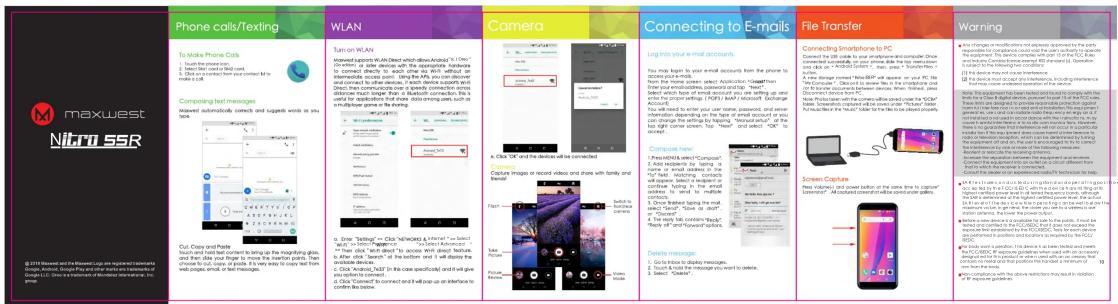

maxwest
NitrossR
with Corning Hall of Association Clerk

Manual assistant
Powered by Anthropic
Waiting for your message
Product information
Brand : Maxwest
Model : Nitro 55R
Category : Mobile Phone