
DMX5002 - Receiver PHONIC - Free user manual and instructions
Find the device manual for free DMX5002 PHONIC in PDF.


| Product Type | UHF Wireless Receiver |
| Brand | Phonic |
| Model | DMX5002 |
| Dimensions (WxHxD) | 7.0 x 1.7 x 5.5 inches (178 x 43 x 140 mm) |
| Weight | 1.1 lbs (0.5 kg) |
| Power Supply | 12 V DC, 500 mA (external adapter) |
| Frequency Range | UHF 500-900 MHz (depending on region) |
| Number of Channels | 100 selectable channels |
| Frequency Response | 40 Hz - 15 kHz |
| Signal-to-Noise Ratio | >105 dB |
| Audio Output | XLR balanced, 1/4" unbalanced |
| Antenna | Removable BNC antennas |
| Display | LCD with channel and signal strength |
| Squelch Control | Adjustable |
| Operating Range | Up to 300 ft (90 m) line of sight |
| Maintenance & Cleaning | Wipe with dry cloth; avoid liquids and solvents |
| Safety | CE, FCC certified; use only supplied power adapter |
| Spare Parts & Repairability | Contact Phonic support for replacement antennas, power supplies |
| General Information | Rack-mountable 1/2U; includes rack ears |
Frequently Asked Questions - DMX5002 PHONIC
User questions about DMX5002 PHONIC
0 question about this device. Answer the ones you know or ask your own.
Ask a new question about this device
Download the instructions for your Receiver in PDF format for free! Find your manual DMX5002 - PHONIC and take your electronic device back in hand. On this page are published all the documents necessary for the use of your device. DMX5002 by PHONIC.
USER MANUAL DMX5002 PHONIC
Safety instructions 01
Features 02
Factory settings 03
Installation and connection 04
Cabinet installation 05
Performance graph 06 - 08
Technical performance Specification 09
Service and Repair 10
简体中文 11-20
安全说明 11
功能简介 12
出厂设置 13
安装与连接 14
机柜安装 15
典型性能图 16-18
功率放大器技术性能表 19
服务与维修 20
Phonic preserves the right to improve or alter any information within this document without prior notice
PHONIC
PHONIC
Important safety instructions and safety symbols
1) Please read the use information(user's manual)
2) Please place this user's manual in a secure place during the use period of the amplifier. This user's manual is only a constituent part of the amplifier. The amplifier can only be resold with the user's manual. Please record any change of the amplifier in written form and give it to the buyer for reselling.
3) Please pay attention to all the warnings.
4) Please abide by all the instructions.
5) Do not use the amplifier near the water source(such as the humid indoors or near the swimming pool).
6) Clean it with a piece of dry cloth.
7) Do not block any air vent. Please install it according to the user's manual.
8) Do not install it around the heat source(such as radiator, heat reservoir, furnace and other equipment that can generate heat).
9) Please protect the power supply cord and prevent the damage caused by trampling, squeezing, etc. Pay particular attention to the plug contact and amplifier connector.
10) Please use the amplifier in compliance with the user's manual and abide by all the suggestions before using and in use, particularly the security suggestions listed in detail in the user's manual. The amplifier is used for amplifying the pulse audio signal, which can only be connected to the loudspeaker with indicated average impedance.

11) Do not place the amplifier in unsteady cart, table, tripod, support or table top. It may cause the serious human injuries in case of falling or severely damage the equipment.
12) We can only cut off the power supply by unplugging the plug contact. Please place the plug contact in the place with easy access at random. Please unplug the amplifier if it is exposed in the thunderstorm or not use for long.
13) Only qualified personnel can conduct the maintenance work.
Maintenance in case of the following circumstances.
■ Power supply cord or plug damage ■ Liquid or objects splashing or falling into the amplifier
■ Amplifier exposed in rain or humid air ■ Amplifier falling or damage in any other ways
■ Entirely different changes of amplifier to its normal function or performance
Warning: To reduce the risk of fire or electric shock, do not expose this unit to rain or moisture
Note: Any manipulation, adjustment or setting procedure not approved by this manual may generate dangerous electromagnetic radiation.
Only suitable for safe use in areas with an altitude of 2000m and below
For safe use in non-tropical climates only
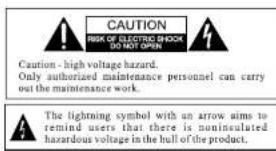
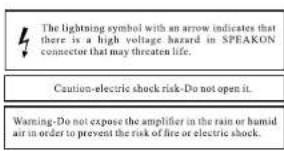
The exclamation mark aims to remind users that there are important notes about the maintenance in the attached text materials of amplifier.
DMX802 / DMX1502 / DMX2502 / DMX5002
Introduction to the function of front and rear panel
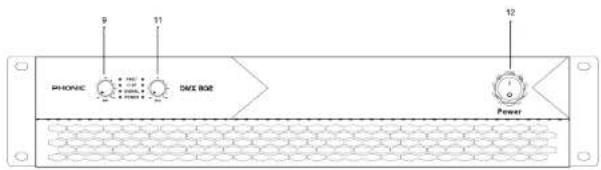
Introduction to the function of front panel
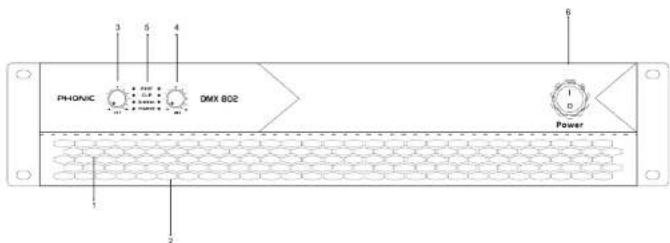
1 Channel cooling air inlet vent
2 Detachable air filtration system
3 Volume control channel A
4 Volume control channel B
5 A,B channel function prompt
6 Power switch ON/OFF switch
● "Protection"A,B (Protect) LED
● "Amplitude limit" A,B (Limit) LED
● "Signal level" A, B (-4dB -30dB)
● "Power indicator light"(POWER)
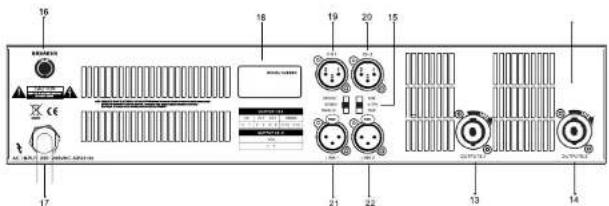
Introduction to the function of rear panel
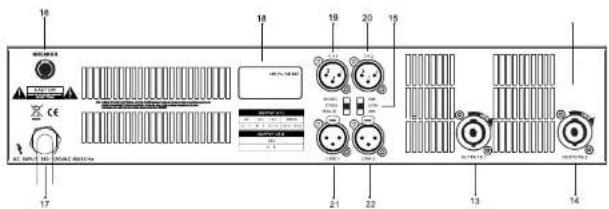
13 CH 1 signal output
14 CH2 signal output
15 Dial-up function selection
16 Recoverable AC fuse base
17 AC input wire
18 Serial number
19 CH 1 signal input
20 CH 2 signal input
21 CH 1signal input
22 CH 2 signal input
The front panel of amplifier is configured with the factory setting below before delivery.

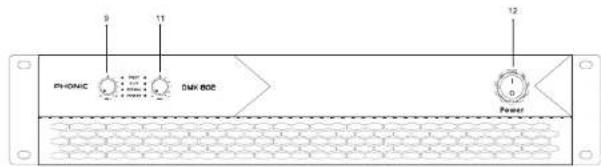
Front panel:
12 ON/OFF switch
Amplifier is in OFF status
9 - 11 Volume control
Volume control is set the minimum value
The rear panel of amplifier is configured with the factory setting below before delivery.
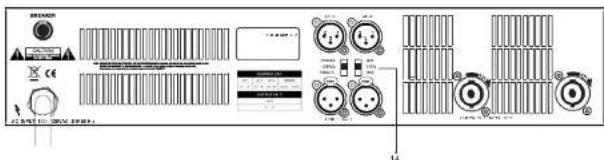
Rear panel
14 Function selector
Stereo, 26db
Earth conducting
Diagram
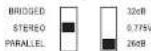
Make sure that the ON/OFF setting is the necessary configuration for each special application.
DMX802 / DMX1502 / DMX2502 / DMX5002
Installation and connection
Power supply
Disconnect the power supply for the installation or connection of the amplifier. Please connect the amplifier to the corresponding AC circuit and outlet according to the requirements of second line indication of the nameplate.
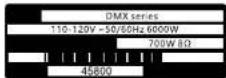
Applicable to the reference nameplate of 110 V\~50/60 Hz power supply.
Notes: We can only select fixed 220V operation. It is prohibited to use the amplifier for long term beyond the specified range(rated voltage ±10%) because it will affect the overall performance.
Notes: The rated power consumption and supply current consumption is 1/8 of the rated output power, namely, 2 x 150W is measured in circumstance of 800W*2. Pink noise represents the typical music signal. It depends on the valid output power. The power current and power can reach quite high(low) value.
Turn on/off switch
"ON/OFF" switch is rocker switch, which is located in the right side of the front panel. Turn on the amplifier and push the switch upwards. It starts by activating the surge current limiter. Wave clipping and signal LED will be lighted for several seconds during power connection period. Please push the switch downwards in order to turn off the amplifier.
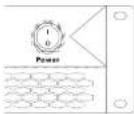
Amplifier in ON status
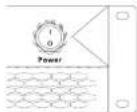
Amplifier in OFF status
Notes: This switch does not disconnect the amplifier from the power supply cord.
The switch starts by activating the current limiting function. Immediately after the power amplifier is connected to the power supply, a voltage is supplied to the line filter and to the input of the fusible controllable rectifier. The amplifier can only be disconnected from the power supply by physically pulling out the power plug. So the power plug must be easily accessible. Pull the power plug from the amplifier during thunderstorms or when not in use for a long time. Alternatively, you can turn off the amplifier by disconnecting all external electrodes from the power supply.
The amplifier will automatically restart after power restore and maintain all the settings before shutdown if the power supply is disconnected when the amplifier is turned on.
DMX802 / DMX1502 / DMX2502 / DMX5002

Introduction to cabinet installation
Install the amplifier front rack with four screws and cushion ring. We can use 19" installation component for the fixation of the amplifier because the amplifier is movable.
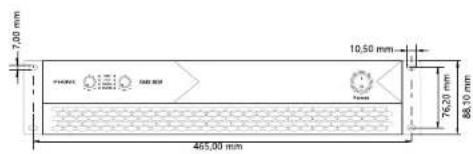
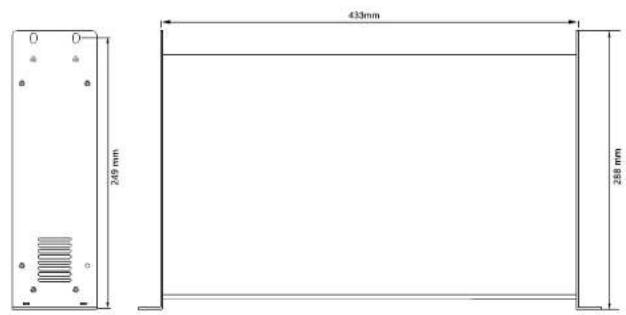
DMX802 / DMX1502 / DMX2502 / DMX5002
Typical performance map
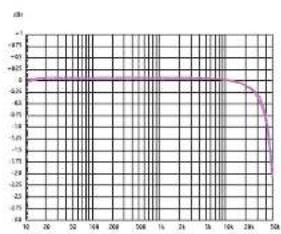
line
| X-Axis | Y-Axis | |---|---| | 10 | -6.5 | | 20 | -6.5 | | 30 | -6.5 | | 40 | -6.5 | | 50 | -6.5 | | 60 | -6.5 | | 70 | -6.5 | | 80 | -6.5 | | 90 | -6.5 | | 100 | -6.5 | | 110 | -6.5 | | 120 | -6.5 | | 130 | -6.5 | | 140 | -6.5 | | 150 | -6.5 | | 160 | -6.5 | | 170 | -6.5 | | 180 | -6.5 | | 190 | -6.5 | | 200 | -6.5 | | 210 | -6.5 | | 220 | -6.5 | | 230 | -6.5 | | 240 | -6.5 | | 250 | -6.5 | | 260 | -6.5 | | 270 | -6.5 | | 280 | -6.5 | | 290 | -6.5 | | 300 | -6.5 | | 310 | -6.5 | | 320 | -6.5 | | 330 | -6.5 | | 340 | -6.5 | | 350 | -6.5 | | 360 | -6.5 | | 370 | -6.5 | | 380 | -6.5 | | 390 | -6.5 | | 400 | -6.5 | | 410 | -6.5 | | 420 | -6.5 | | 430 | -6.5 | | 440 | -6.5 | | 450 | -6.5 | | 460 | -6.5 | | 470 | -6.5 | | 480 | -6.5 | | 490 | -6.5 | | 500 | -6.5 | | 510 | -6.5 | | 520 | -6.5 | | 530 | -6.5 | | 540 | -6.5 | | 550 | -6.5 | | 560 | -6.5 | | 570 | -6.5 | | 580 | -6.5 | | 590 | -6.5 | | 600 | -6.5 | | 610 | -6.5 | | 620 | -6.5 | | 630 | -6.5 | | 640 | -6.5 | | 650 | -6.5 | | 660 | -6.5 | | 670 | -6.5 | | 680 | -6.5 | | 690 | -6.5 | | 700 | -6.5 | | 710 | -6.5 | | 720 | -6.5 | | 730 | -6.5 | | 740 | -6.5 | | 750 | -6.5 | | 760 | -6.5 | | 770 | -6.5 | | 780 | -6.5 | | 790 | -6.5 | | 800 | -6.5 | | 810 | -6.5 | | 820 | -6.5 | | 830 | -6.5 | | 840 | -6.5 | | 850 | -6.5 | | 860 | -6.5 | | 870 | -6.5 | | 880 | -6.5 | | 890 | -6.5 | | 900 | -6.5 | | 910 | -6.5 | | 920 | -6.5 | | 930 | -6.5 | | 940 | -6.5 | | 950 | -6.5 | | 960 | -6.5 | | 970 | -6.5 | | 980 | -6.5 | | 990 | -6.5 | | 1000 | -6.5 |Gain and frequency (Class D) (Typical performance measured value)
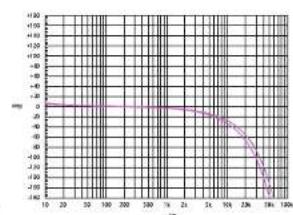
line
| X | Y | |---|---| | 10 | 0 | | 20 | 0 | | 30 | 0 | | 40 | 0 | | 50 | 0 | | 60 | -1 | | 70 | -1 | | 80 | -2 | | 90 | -3 | | 100 | -4 | | 110 | -5 | | 120 | -6 | | 130 | -7 | | 140 | -8 | | 150 | -9 | | 160 | -10 | | 170 | -11 | | 180 | -12 | | 190 | -13 | | 200 | -14 | | 210 | -15 | | 220 | -16 | | 230 | -17 | | 240 | -18 | | 250 | -19 | | 260 | -20 | | 270 | -21 | | 280 | -22 | | 290 | -23 | | 300 | -24 | | 310 | -25 | | 320 | -26 | | 330 | -27 | | 340 | -28 | | 350 | -29 | | 360 | -30 | | 370 | -31 | | 380 | -32 | | 390 | -33 | | 400 | -34 | | 410 | -35 | | 420 | -36 | | 430 | -37 | | 440 | -38 | | 450 | -39 | | 460 | -40 | | 470 | -41 | | 480 | -42 | | 490 | -43 | | 500 | -44 | | 510 | -45 | | 520 | -46 | | 530 | -47 | | 540 | -48 | | 550 | -49 | | 560 | -50 | | 570 | -51 | | 580 | -52 | | 590 | -53 | | 600 | -54 | | 610 | -55 | | 620 | -56 | | 630 | -57 | | 640 | -58 | | 650 | -59 | | 660 | -60 | | 670 | -61 | | 680 | -62 | | 690 | -63 | | 700 | -64 | | 710 | -65 | | 720 | -66 | | 730 | -67 | | 740 | -68 | | 750 | -69 | | 760 | -70 | | 770 | -71 | | 780 | -72 | | 790 | -73 | | 800 | -74 | | 810 | -75 | | 820 | -76 | | 830 | -77 | | 840 | -78 | | 850 | -79 | | 860 | -80 | | 870 | -81 | | 880 | -82 | | 890 | -83 | | 900 | -84 | | 910 | -85 | | 920 | -86 | | 930 | -87 | | 940 | -88 | | 950 | -89 | | 960 | -90 | | 970 | -91 | | 980 | -92 | | 990 | -93 | | 1000 | -94 |Phase and frequency (Class D) (Typical performance measured value)
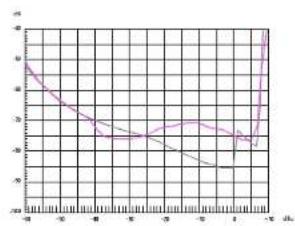
THD@1 kHz,8Ω and input voltage(Class D)
(Typical performance measured value)
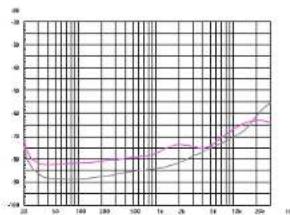
THD and frequency, absorbing wave and below 10dB below clip, 8Ω (Class D)
(Typical performance measured value)
DMX802 / DMX1502 / DMX2502 / DMX5002
Typical performance map
Typical performance map
English
line
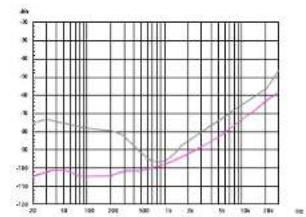
| X | Y (Series 1) | Y (Series 2) | |---|---|---| | 20 | -100 | -95 | | 18 | -100 | -90 | | 16 | -100 | -85 | | 14 | -100 | -80 | | 12 | -100 | -75 | | 10 | -100 | -70 | | 8 | -100 | -65 | | 6 | -100 | -60 | | 4 | -100 | -55 | | 2 | -100 | -50 | | 0 | -100 | -45 | | 2 | -100 | -40 | | 4 | -100 | -35 | | 6 | -100 | -30 | | 8 | -100 | -25 | | 10 | -100 | -20 | | 12 | -100 | -15 | | 14 | -100 | -10 | | 16 | -100 | -5 | | 18 | -100 | 0 | | 20 | -100 | 5 | | 22 | -100 | 10 | | 24 | -100 | 15 | | 26 | -100 | 20 | | 28 | -100 | 25 | | 30 | -100 | 30 | | 32 | -100 | 35 | | 34 | -100 | 40 | | 36 | -100 | 45 | | 38 | -100 | 50 | | 40 | -100 | 55 | | 42 | -100 | 60 | | 44 | -100 | 65 | | 46 | -100 | 70 | | 48 | -100 | 75 | | 50 | -100 | 80 | | 52 | -100 | 85 | | 54 | -100 | 90 | | 56 | -100 | 95 | | 58 | -100 | 100 | | 60 | -100 | 105 | | 62 | -100 | 110 | | 64 | -100 | 115 | | 66 | -100 | 120 | | 68 | -100 | 125 | | 70 | -100 | 130 | | 72 | -100 | 135 | | 74 | -100 | 140 | | 76 | -100 | 145 | | 78 | -100 | 150 | | 80 | -100 | 155 | | 82 | -100 | 160 | | 84 | -100 | 165 | | 86 | -100 | 170 | | 88 | -100 | 175 | | 90 | -100 | 180 | | 92 | -100 | 185 | | 94 | -100 | 190 | | 96 | -100 | 195 | | 98 | -100 | 200 | | 100 | -100 | 205 | | 128 | -95 | 295 | | 136 | -95 | 345 | | 184 | -95 | 435 | The chart displays a line graph with two data series: one for Series 2 and one for Series 3. The x-axis ranges from '22' to '28', and the y-axis ranges from '22' to '32'. The lines are connected by lines forming a U-shaped curve. The legend indicates 'Series 2' in black and 'Series 3' in gray. The chart is divided into three sections: top-left, bottom-left, and bottom-right. The y-values represent the corresponding data points for each series at each x-coordinate. The chart is labeled with the same axes and the label 'Y' but does not correspond to the data series labels. The chart is saved as a PNG file named 'chart.png'.Channel separation and frequency @10W/4Ω Class D (Typical performance measured value)
line
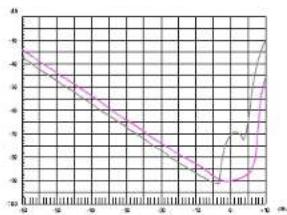
| x | y | | ---- | ----- | | 0 | 4.0 | | 1 | 3.8 | | 2 | 3.6 | | 3 | 3.4 | | 4 | 3.2 | | 5 | 3.0 | | 6 | 2.8 | | 7 | 2.6 | | 8 | 2.4 | | 9 | 2.2 | | 10 | 2.0 | | 11 | 1.8 | | 12 | 1.6 | | 13 | 1.4 | | 14 | 1.2 | | 15 | 1.0 | | 16 | 0.8 | | 17 | 0.6 | | 18 | 0.4 | | 19 | 0.2 | | 20 | 0.0 | | 21 | -0.2 | | 22 | -0.4 | | 23 | -0.6 | | 24 | -0.8 | | 25 | -1.0 | | 26 | -1.2 | | 27 | -1.4 | | 28 | -1.6 | | 29 | -1.8 | | 30 | -2.0 | | 31 | -2.2 | | 32 | -2.4 | | 33 | -2.6 | | 34 | -2.8 | | 35 | -3.0 | | 36 | -3.2 | | 37 | -3.4 | | 38 | -3.6 | | 39 | -3.8 | | 40 | -4.0 | | 41 | -4.2 | | 42 | -4.4 | | 43 | -4.6 | | 44 | -4.8 | | 45 | -5.0 | | 46 | -5.2 | | 47 | -5.4 | | 48 | -5.6 | | 49 | -5.8 | | 50 | -6.0 | | 51 | -6.2 | | 52 | -6.4 | | 53 | -6.6 | | 54 | -6.8 | | 55 | -7.0 | | 56 | -7.2 | | 57 | -7.4 | | 58 | -7.6 | | 59 | -7.8 | | 60 | -8.0 | | 61 | -8.2 | | 62 | -8.4 | | 63 | -8.6 | | 64 | -8.8 | | 65 | -9.0 | | 66 | -9.2 | | 67 | -9.4 | | 68 | -9.6 | | 69 | -9.8 | | 70 | -10.0 | | 71 | -10.2 | | 72 | -10.4 | | 73 | -10.6 | | 74 | -10.8 | | 75 | -11.0 | | 76 | -11.2 | | 77 | -11.4 | | 78 | -11.6 | | 79 | -11.8 | | 80 | -12.0 | | 81 | -12.2 | | 82 | -12.4 | | 83 | -12.6 | | 84 | -12.8 | | 85 | -13.0 | | 86 | -13.2 | | 87 | -13.4 | | 88 | -13.6 | | 89 | -13.8 | | 90 | -14.0 | | 91 | -14.2 | | 92 | -14.4 | | 93 | -14.6 | | 94 | -14.8 | | 95 | -15.0 | | 96 | -15.2 | | 97 | -15.4 | | 98 | -15.6 | | 99 | -15.8 | | 100 | -16.0 |DIM intermodulation distortion @8Ω and input level Class D
(Typical performance measured value)
line
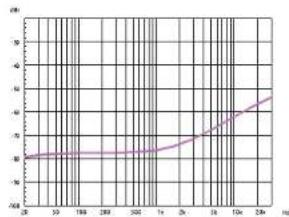
| Frequency (Hz) | Value | |---|---| | 10 | 38 | | 50 | 39 | | 100 | 40 | | 150 | 41 | | 200 | 42 | | 250 | 43 | | 300 | 44 | | 350 | 45 | | 400 | 46 | | 450 | 47 | | 500 | 48 | | 550 | 49 | | 600 | 50 | | 650 | 51 | | 700 | 52 | | 750 | 53 | | 800 | 54 | | 850 | 55 | | 900 | 56 | | 950 | 57 | | 1000 | 58 | | 1050 | 59 | | 1100 | 60 | | 1150 | 61 | | 1200 | 62 | | 1250 | 63 | | 1300 | 64 | | 1350 | 65 | | 1400 | 66 | | 1450 | 67 | | 1500 | 68 | | 1550 | 69 | | 1600 | 70 | | 1650 | 71 | | 1700 | 72 | | 1750 | 73 | | 1800 | 74 | | 1850 | 75 | | 1900 | 76 | | 1950 | 77 | | 2000 | 78 | | 2050 | 79 | | 2100 | 80 | | 2150 | 81 | | 2200 | 82 | | 2250 | 83 | | 2300 | 84 | | 2350 | 85 | | 2400 | 86 | | 2450 | 87 | | 2500 | 88 | | 2550 | 89 | | 2600 | 90 | | 2650 | 91 | | 2700 | 92 | | 2750 | 93 | | 2800 | 94 | | 2850 | 95 | | 2900 | 96 | | 2950 | 97 | | 3000 | 98 | | 3050 | 99 | | 3100 | 100 | | 3150 | 101 | | 3200 | 102 | | 3250 | 103 | | 3300 | 104 | | 3350 | 105 | | 3400 | 106 | | 3450 | 107 | | 3500 | 108 | | 3550 | 109 | | 3600 | 110 | | 3650 | 111 | | 3700 | 112 | | 3750 | 113 | | 3800 | 114 | | 3850 | 115 | | 3900 | 116 | | 3950 | 117 | | 4000 | 118 | | 4050 | 119 | | 4100 | 120 | | 4150 | 121 | | 4200 | 122 | | 4250 | 123 | | 4300 | 124 | | 4350 | 125 | | 4400 | 126 | | 4450 | 127 | | 4500 | 128 | | 4550 | 129 | | 4600 | 130 | | 4650 | 131 | | 4700 | 132 | | 4750 | 133 | | 4800 | 134 | | 4850 | 135 | | 4900 | 136 | | 4950 | 137 | | 5000 | 138 | | Note: The data is already in CSV format, so no changes are needed. The values for 'Value' and 'Rate' columns are estimated based on the provided code. There is only one data series in this case. The values for 'Rate' columns are not explicitly labeled in the chart. Therefore, the values for 'Rate' columns are estimated based on the provided code.Common mode rejection ratio Class D (Typical performance measured value)
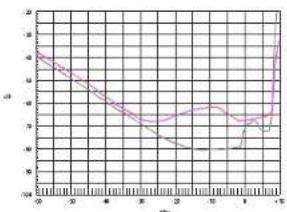
SMPTE intermodulation distortion (60 Hz and 7kHz) @8Ω and input level Class D
(Typical performance measured value)
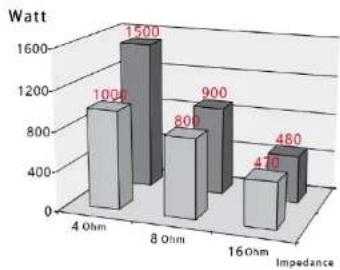
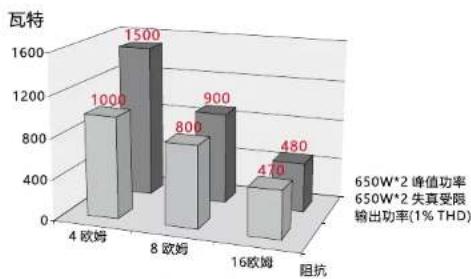
bar
| Impedance | Watt | |---|---| | 4 Ohm | 1000 | | 8 Ohm | 1500 | | 16 Ohm | 800 | | 16 Ohm | 900 | | 16 Ohm | 470 | | 16 Ohm | 480 |650W*2 (Typical performance measured value)
650W*2 peak power
650W*2 distortion constraint
Output power(1%THD)
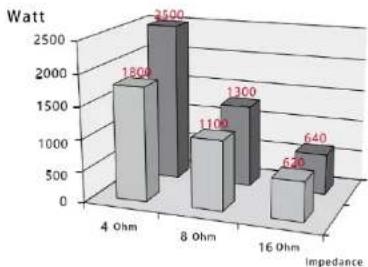
bar
| Impedance | Watt | |---|---| | 4 Ohm | 1800 | | 8 Ohm | 2500 | | 16 Ohm | 1300 | | 16 Ohm | 640 | | 16 Ohm | 520 |850W*2 (Typical performance measured value)
850W*2 peak power
850W*2 distortion constraint
Output power (1%THD)
DMX802 / DMX1502 / DMX2502 / DMX5002
DMX802 / DMX1502 / DMX2502 / DMX5002
PHONIC
PHONIC
Power amplifier specification performance index list
| DNX 802 DMX | 1502 DNX 2502 DMX | 5002 | |||
| Output power (1KHz, THD<1%, all channel drive | 8Ω stereo 200M*2 | 400M*2 850M*2 1300M*2 | |||
| 4Ω stereo 320M*2 | 560M*2 1190M*2 1850M*2 | ||||
| 2Ω stereo 450M*2 | 780M*2 1490M*2 2300M*2 | ||||
| 8Ω Bridge 480M 960W 2010W 3500M | |||||
| 4Ω Bridge 680M 1350W 2700W 4200M | |||||
| Amplifier Protection | DC protection | ✓ ✓ ✓ | ✓ | ||
| Short circuit protection | ✓ ✓ ✓ | ✓ | |||
| Sensitivity overheat management system | ✓ ✓ ✓ | ✓ | |||
| Overheating protection | ✓ ✓ ✓ | ✓ | |||
| Input overload protection | ✓ ✓ ✓ | ✓ | |||
| over load protection | ✓ ✓ ✓ | ✓ | |||
| Soft start protection | ✓ ✓ ✓ | ✓ | |||
| Limiting protection up to 10V up to 10V up to 10V up to 10V up to 10V up to 10V up to 10V up to 10V up to 10V up to 10V up to 10V up to 10V up to 10V up to 10V up to 10V up to 10V up to 10V up to 30V up to 30V up to 30V up to 30V up to 30V up to 30V up to 30V up to 30V up to 30V up to 30V up to 30V up to 30V up to 30V up to 30V up to 30V up to 30V up to 30V up. | |||||
| Frequency Response (1W,8Ω,20Hz,20kHz) | (±0.5dB) (±0.5dB) (±0.5dB) (±0.5dB) | ||||
| Sensitivity (8Ω,1KHz) | 0.775v/26dB/32 dB | 0.775v/26dB/32 dB | 0.775v/26dB/32 dB | 0.775v/26dB/32 dB | |
| Connectors | Input/Link XLR XLR | XLR XLR | |||
| Output SPEAKON SPEAKON SPEAKON SPEAKON SPEAKON SPEAKON SPEAKON SPEAKON SPEAKON SPEAKON SPEAKON SPEAKON SPEAKON SPEAKON SPEAKON SPEAKON SPEAKON SPEAKON SPEAKON SPEAKON SPEAKON SPEAKON SPEAKON SPEAKON SPEAKON SPEAKON SPEAKON SPEAKON SPEAKON SPEAKON SPEAKON SPEAKON SPEAKON SPEAKON PEAKON PEAKON PEAKON PEAKON PEAKON PEAKON PEAKON PEAKON PEAKON PEAKON PEAKON PEAKON PEAKON PEAKON PEAKON PEAKON PEAKON PEAKON PEAKON PEAKON PEAKON PEAKON PEAKON PEAKON PEAKON PEAKON PEAKON PEAKON PEAKON PEAKON PEAKON PEAKON PEAKON PEKON PEAKON PEAKON PEAKON PEAKON PEAKON PEAKON PEAKON PEAKON PEAKON PEAKON PEAKON PEAKON PEAKON PEAKON PEAKON PEAKON PEAKON PEAKON PEAKON PEAKON PEAKON PEAKON PEAKON PEAKON PEAKON PEAKON PEAKON PEAKON PEAKON PEAKON PEAKON PEAKON PEAK ON PEAKON PEAKON PEAKON PEAKON PEAKON PEAKON PEAKON PEAKON PEAKON PEAKON PEAKON PEAKON PEAKON PEAKON PEAKON PEAKON PEAKON PEAKON PEAKON PEAKON PEAKON PEAKON PEAKON PEAKON PEAKON PEAKON PEAKON PEAKON PEAKON PEAKON PEAKON PEAKON PEAKONPEAKON PEAKON PEAKON PEAKON PEAKON PEAKON PEAKON PEAKON PEAKON PEAKON PEAKON PEAKON PEAKON PEAKON PEAKON PEAKON PEAKON PEAKON PEAKON PEAKON PEAKON PEAKON PEAKON PEAKON PEAKON PEAKON PEAKON PEAKON PEAKON PEAKON PEAKON PEAKON PEAKON PE AKON PE AKON PE AKON PE AKON PE AKON PE AKON PE AKON PE AKON PE AKON PE AKON PE AKON PE AKON PE AKON PE AKON PE AKON PE AKON PE AKON PE AKON PE AKON PE AKON PE AKON PE AKON PE AKON PE AKON PE AKON PE AKON PE AKON PE AKON PE AKON PE AKON PE AKON PE AKON PE AKON PE AK ON PE AK ON PE AK ON PE AK ON PE AK ON PE AK ON PE AK ON PE AK ON PE AK ON PE AK ON PE AK ON PE AK ON PE AK ON PE AK ON PE AK ON PE AK ON PE AK ON PE AK ON PE AK ON PE AK ON PE AK ON PE AK ON PE AK ON PE AK ON PE AK ON PE AK ON PE AK ON PE AK ON PE AK ON PE AK ON PE AK ON PE AK ON PE AK ON PE AK ON VE AK ON VE AK ON VE AK ON VE AK ON VE AK ON VE AK ON VE AK ON VE AK ON VE AK ON VE AK ON VE AK ON VE AK ON VE AK ON VE AK ON VE AK ON VE AK ON VE AK ON VE AK ON VE AK ON VE AK ON VE AK ON VE AK ON VE AK ON VE AK ON VE AK ON VE AK ON VE AK ON VE AK ON VE AK ON VE AK ON VE AK ON VE AK ON VE AK ON VEAK ON VE AK ON VE AK ON VE AK ON VE AK ON VE AK ON VE AK ON VE AK ON VE AK ON VE AK ON VE AK ON VE AK ON VE AK ON VE AK ON VE AK ON VE AK ON VE AK ON VE AK ON VE AK ON VE AK ON VE AK ON VE AK ON VE AK ON VE AK ON VE AK ON VE AK ON VE AK ON VE AK ON VE AK ON VE AK ON VE AK ON VE AK ON VE AK ON VE AK on VE AK on VE AK on VE AK on VE AK on VE AK on VE AK on VE AK on VE AK on VE AK on VE AK on VE AK on VE AK on VE AK on VE AK on VE AK on VE AK on VE AK on VE AK on VE AK on VE AK on VE AK on VE AK on VE AK on VE AK on VE AK on VE AK on VE AK on VE AK on VE AK on VE AK on VE AK on VE AK on VE AK on VEX AVE AVE AVE AVE AVE AVE AVE AVE AVE AVE AVE AVE AVE AVE AVE AVE AVE AVE AVE AVE AVE AVE AVE AVE AVE AVE AVE AVE AVE AVE AVE AVE AVE AVE AVE AVE AVE AVE AVE AVE AVE AVE AVE AVE AVE AVE AVE AVE AVE AVE A VEX AVE AVE AVE AVE AVE AVE AVE AVE AVE AVE AVE AVE AVE AVE AVE AVE AVE AVE AVE AVE AVE AVE AVE AVE AVE AVE AVE AVE AVE AVE AVE AVE AVE AVE AVE AVE AVE AVE AVE AVE AVE AVE AVE AVE AVE AVE AVE AVE A VEXA VEXA VEXA VEXA VEXA VEXA VEXA VEXA VEXA VEXA VEXA VEXA VEXA VEXA VEXA VEXA VEXA VEXA VEXA VEXA VEXA VEXA VEXA VEXA VEXA VEXA VEXA VEXA VEXA VEXA VEXA VEXA VEXA VEXA AVE AVE AVE AVE AVE AVE AVE AVE AVE AVE AVE AVE AVE AVE AVE AVE AVE AVE AVE AVE AVE AVE AVE AVE AVE AVE AVE AVE AVE AVE AVE AVE AVE AVE AVE AVE AVE AVE AVE AVE AVE AVE AVE AVE AVE AVE AVE AVE AVE AVO AVO AVO AVO AVO AVO AVO AVO AVO AVO AVO AVO AVO AVO AVO AVO AVO AVO AVO AVO AVO AVO AVO AVO AVO AVO AVO AVO AVO AVO AVO AVO AVO AVO AVO AVO AVO AVO AVO AVO AVO AVO AVO AVO AVO AVO AVO AVO AVO AVO AFO AVO AVO AVO AVO AVO AVO AVO AVO AVO AVO AVO AVO AVO AVO AVO AVO AVO AVO AVO AVO AVO AVO AVO AVO AVO AVO AVO AVO AVO AVO AVO AVO AVO AVO AVO AVO AVO AVO AVO AVO AVO AVO AVO AVO AVO AVO AVO AVO AVO ABO AVO AVO AVO AVO AVO AVO AVO AVO AVO AVO AVO AVO AVO AVO AVO AVO AVO AVO AVO AVO AVO AVO AVO AVO AVO AVO AVO AVO AVO AVO AVO AVO AVO AVO AVO AVO AVO AVO AVO AVO AVO AVO AVO AVO AVO AVO AVO AVO AVO AGO AVO AVO AVO AVO AVO AVO AVO AVO AVO AVO AVO AVO AVO AVO AVO AVO AVO AVO AVO AVO AVO AVO AVO AVO AVO AVO AVO AVO AVO AVO AVO AVO AVO AVO AVO AVO AVO AVO AVO AVO AVO AVO AVO AVO AVO AVO AVO AVO AVO ASO AVO AVO AVO AVO AVO AVO AVO AVO AVO AVO AVO AVO AVO AVO AVO AVO AVO AVO AVO AVO AVO AVO AVO AVO AVO AVO AVO AVO AVO AVO AVO AVO AVO AVO AVO AVO AVO AVO AVO AVO AVO AVO AVO AVO AVO AVO AVO AVO AVO ADO AVO AVO AVO AVO AVO AVO AVO AVO AVO AVO AVO AVO AVO AVO AVO AVO AVO AVO AVO AVO AVO AVO AVO AVO AVO AVO AVO AVO AVO AVO AVO AVO AVO AVO AVO AVO AVO AVO AVO AVO AVO AVO AVO AVO AVO AVO AVO AVO AVO Avo AVO AVO AVO AVO AVO AVO AVO AVO AVO AVO AVO AVO AVO AVO AVO AVO AVO AVO AVO AVO AVO AVO AVO AVO AVO AVO AVO AVO AVO AVO AVO AVO AVO AVO AVO AVO AVO AVO AVO AVO AVO AVO AVO AVO AVO AVO AVO AVO AVO ACO AVO AVO AVO AVO AVO AVO AVO AVO AVO AVO AVO AVO AVO AVO AVO AVO AVO AVO AVO AVO AVO AVO AVO AVO AVO AVO AVO AVO AVO AVO AVO AVO AVO AVO AVO AVO AVO AVO AVO AVO AVO AVO AVO AVO AVO AVO AVO AVO AVO AOO AVO AVO AVO AVO AVO AVO AVO AVO AVO AVO AVO AVO AVO AVO AVO AVO AVO AVO AVO AVO AVO AVO AVO AVO AVO AVO AVO AVO AVO AVO AVO AVO AVO AVO AVO AVO AVO AVO AVO AVO AVO AVO AVO AVO AVO AVO AVO AVO AVO A VO AVO AVO AVO AVO AVO AVO AVO AVO AVO AVO AVO AVO AVO AVO AVO AVO AVO AVO AVO AVO AVO AVO AVO AVO AVO AVO AVO AVO AVO AVO AVO AVO AVO AVO AVO AVO AVO AVO AVO AVO AVO AVO AVO AVO AVO AVO AVO AVO AVO ATOA OVA OVA OVA OVA OVA OVA OVA OVA OVA OVA OVA OVA OVA OVA OVA OVA OVA OVA OVA OVA OVA OVA OVA OVA OVA OVA OVA OVA OVA OVA OVA OVA OVA OVA OVA OVA OVA OVA OVA OVA OVA OVA OVA OVA OVA OVA OVA OVA OVA OVA OSA OVA OVA OVA OVA OVA OVA OVA OVA OVA OVA OVA OVA OVA OVA OVA OVA OVA OVA OVA OVA OVA OVA OVA OVA OVA OVA OVA OVA OVA OVA OVA OVA OVA OVA OVA OVA OVA OVA OVA OVA OVA OVA OVA OVA OVA OVA OVA OVA OVA OFA OVA OVA OVA OVA OVA OVA OVA OVA OVA OVA OVA OVA OVA OVA OVA OVA OVA OVA OVA OVA OVA OVA OVA OVA OVA OVA OVA OVA OVA OVA OVA OVA OVA OVA OVA OVA OVA OVA OVA OVA OVA OVA OVA OVA OVA OVA OVA OVA OVA OGA OVA OVA OVA OVA OVA OVA OVA OVA OVA OVA OVA OVA OVA OVA OVA OVA OVA OVA OVA OVA OVA OVA OVA OVA OVA OVA OVA OVA OVA OVA OVA OVA OVA OVA OVA OVA OVA OVA OVA OVA OVA OVA OVA OVA OVA OVA OVA OVA OVA OCA OVA OVA OVA OVA OVA OVA OVA OVA OVA OVA OVA OVA OVA OVA OVA OVA OVA OVA OVA OVA OVA OVA OVA OVA OVA OVA OVA OVA OVA OVA OVA OVA OVA OVA OVA OVA OVA OVA OVA OVA OVA OVA OVA OVA OVA OVA OVA OVA OVA Ova OVA OVA OVA OVA OVA OVA OVA OVA OVA OVA OVA OVA OVA OVA OVA OVA OVA OVA OVA OVA OVA OVA OVA OVA OVA OVA OVA OVA OVA OVA OVA OVA OVA OVA OVA OVA OVA OVA OVA OVA OVA OVA OVA OVA OVA OVA OVA OVA OVA OBA OBA OBA OBA OBA OBA OBA OBA OBA OBA OBA OBA OBA OBA OBA OBA OBA OBA OBA OBA OBA OBA OBA OBA OBA OBA OBA OBA OBA OBA OBA OBA OBA OBA OBA OBA OBA OBA OBA OBA OBA OBA OBA OBA OBA OBA OBA OBA OBA OBA OPA OBA OBA OBA OBA OBA OBA OBA OBA OBA OBA OBA OBA OBA OBA OBA OBA OBA OBA OBA OBA OBA OBA OBA OBA OBA OBA OBA OBA OBA OBA OBA OBA OBA OBA OBA OBA OBA OBA OBA OBA OBA OBA OBA OBA OBA OBA OBA OBA OBA OBT OBT OBT OBT OBT OBT OBT OBT OBT OBT OBT OBT OBT OBT OBT OBT OBT OBT OBT OBT OBT OBT OBT OBT OBT OBT OBT OBT OBT OBT OBT OBT OBT OBT OBT OBT OBT OBT OBT OBT OBT OBT OBT OBT OBT OBT OBT OBT OBT OBT O BT OBT OBT OBT OBT OBT OBT OBT OBT OBT OBT OBT OBT OBT OBT OBT OBT OBT OBT OBT OBT OBT OBT OBT OBT OBT OBT OBT OBT OBT OBT OBT OBT OBT OBT OBT OBT OBT OBT OBT OBT OBT OBT OBT OBT OBT OBT OBT OBT OBT OBR OBR OBR OBR OBR OBR OBR OBR OBR OBR OBR OBR OBR OBR OBR OBR OBR OBR OBR OBR OBR OBR OBR OBR OBR OBR OBR OBR OBR OBR OBR OBR OBR OBR OBR OBR OBR OBR OBR OBR OBR OBR OBR OBR OBR OBR OBR OBR OBR OBR O BR OBR OBR OBR OBR OBR OBR OBR OBR OBR OBR OBR OBR OBR OBR OBR OBR OBR OBR OBR OBR OBR OBR OBR OBR OBR OBR OBR OBR OBR OBR OBR OBR OBR OBR OBR OBR OBR OBR OBR OBR OBR OBR OBR OBR OBR OBR OBR OBR OBR OBr OBR OBR OBR OBR OBR OBR OBR OBR OBR OBR OBR OBR OBR OBR OBR OBR OBR OBR OBR OBR OBR OBR OBR OBR OBR OBR OBR OBR OBR OBR OBR OBR OBR OBR OBR OBR OBR OBR OBR OBR OBR OBR OBR OBR OBR OBR OBR OBR OBR OBF OBF OBF OBF OBF OBF OBF OBF OBF OBF OBF OBF OBF OBF OBF OBF OBF OBF OBF OBF OBF OBF OBF OBF OBF OBF OBF OBF OBF OBF OBF OBF OBF OBF OBF OBF OBF OBF OBF OBF OBF OBF OBF OBF OBF OBF OBF OBF OBF OBF OBE OBF OBF OBF OBF OBF OBF OBF OBF OBF OBF OBF OBF OBF OBF OBF OBF OBF OBF OBF OBF OBF OBF OBF OBF OBF OBF OBF OBF OBF OBF OBF OBF OBF OBF OBF OBF OBF OBF OBF OBF OBF OBF OBF OBF OBF OBF OBF OBF OBF OBT OBT OBT OBT OBT OBT OBT OBT OBT OBT OBT OBT OBT OBT OBT OBT OBT OBT OBT OBT OBT OBT OBT OBT OBT OBT OBT OBT OBT OBT OBT OBT OBT OBT OBT OBT OBT OBT OBT OBT OBT OBT OBT OBT OBT OBT OBT OBT OBT OBF OBF OBF OBF OBF OBF OBF OBF OBF OBF OBF OBF OBF OBF OBF OBF OBF OBF OBF OBF OBF OBF OBF OBF OBF OBF OBF OBF OBF OBF OBF OBF OBF OBF OBF OBF OBF OBF OBF OBF OBF OBF OBF OBF OBF OBF OBF OBF OBF OBSO BEXO BEXO BEXO BEXO BEXO BEXO BEXO BEXO BEXO BEXO BEXO BEXO BEXO BEXO BEXO BEXO BEXO BEXO BEXO BEXO BEXO BEXO BEXO BEXO BEXO BEXO BEXO BEXO BEXO BEXO BEXO BEXO BEXO BEXN BEXO BEXO BEXO BEXO BEXO BEXO BEXO BEXO BEXO BEXO BEXO BEXO BEXO BEXO BEXO BEXO BEXO BEXO BEXO BEXO BEXO BEXO BEXO BEXO BEXO BEXO BEXO BEXO BEXO BEXO BEXO BEXO BEXO SBCB BEXO BEXO BEXO BEXO BEXO BEXO BEXO BEXO BEXO BEXO BEXO BEXO BEXO BEXO BEXO BEXO BEXO BEXO BEXO BEXO BEXO BEXO BEXO BEXO BEXO BEXO BEXO BEXO BEXO BEXO BEXO BEXO BEXO CBO BEXO BEXO BEXO BEXO BEXO BEXO BEXO BEXO BEXO BEXO BEXO BEXO BEXO BEXO BEXO BEXO BEXO BEXO BEXO BEXO BEXO BEXO BEXO BEXO BEXO BEXO BEXO BEXO BEXO BEXO BEXO BEXO BEXO DBO BEXO BEXO BEXO BEXO BEXO BEXO BEXO BEXO BEXO BEXO BEXO BEXO BEXO BEXO BEXO BEXO BEXO BEXO BEXO BEXO BEXO BEXO BEXO BEXO BEXO BEXO BEXO BEXO BEXO BEXO BEXO BEXO BEXI BEXO BEXO BEXO BEXO BEXO BEXO BEXO BEXO BEXO BEXO BEXO BEXO BEXO BEXO BEXO BEXO BEXO BEXO BEXO BEXO BEXO BEXO BEXO BEXO BEXO BEXO BEXO BEXO BEXO BEXO BEXO BEXO BEXO NEXO BEXO BEXO BEXO BEXO BEXO BEXO BEXO BEXO BEXO BEXO BEXO BEXO BEXO BEXO BEXO BEXO BEXO BEXO BEXO BEXO BEXO BEXO BEXO BEXO BEXO BEXO BEXO BEXO BEXO BEXO BEXO BEXO BFXO BEXO BEXO BEXO BEXO BEXO BEXO BEXO BEXO BEXO BEXO BEXO BEXO BEXO BEXO BEXO BEXO BEXO BEXO BEXO BEXO BEXO BEXO BEXO BEXO BEXO BEXO BEXO BEXO BEXO BEXO BEXO BEXO BEXI NEXO NEXO NEXO NEXO NEXO NEXO NEXO NEXO NEXO NEXO NEXO NEXO NEXO NEXO NEXO NEXO NEXO NEXO NEXO NEXO NEXO NEXO NEXO NEXO NEXO NEXO NEXO NEXO NEXO NEXO NEXO NEXO NEXO NEXO NO NEXO NO NEXO NO NEXO NO NEXO NO NEXO NO NEXO NO NEXO NO NEXO NO NEXO NO NEXO NO NEXO NO NEXO NO NEXO NO NEXO NO NEXO NO NEXO NO NEXO NO NEXO NO NEXO NO NEXO NO NEXO NO NEXO NO NEXO NO NEXO NO NEXONO NEXO NEXO NEXO NEXO NEXO NEXO NEXO NEXO NEXO NEXO NEXO NEXO NEXO NEXO NEXO NEXO NEXO NEXO NEXO NEXO NEXO NEXO NEXO NEXO NEXO NEXO NEXO NEXO NEXO NEXO NEXO NEXO NEXO No NEXO No NEXO No NEXO No NEXO No NEXO No NEXO No NEXO No NEXO No NEXO No NEXO No NEXO No NEXO No NEXO No NEXO No NEXO No NEXO No NEXO No NEXO No NEXO No NEXO No NEXO No NEXO No NEXO No NEXO No NEXONo NEXO No NEXO No NEXO No NEXO No NEXO No NEXO No NEXO No NEXO No NEXO No NEXO No NEXO No NEXO No NEXO No NEXO No NEXO No NEXO No NEXO No NEXO No NEXO No NEXO No NEXO No NEXO No NEXO No NEXO No NEXO NO NEXO NO NEXO NO NEXO NO NEXO NO NEXO NO NEXO NO NEXO NO NEXO NO NEXO NO NEXO NO NEXO NO NEXO NO NEXO NO NEXO NO NEXO NO NEXO NO NEXO NO NEXO NO NEXO NO NEXO NO NEXO NO NEXO NO NEXO NO NEXO No NEXO No NEXO No NEXO No NEXO No NEXO No NEXO No NEXO No NEXO No NEXO No NEXO No NEXO No NEXO No NEXO No NEXO No NEXO No NEXO No NEXO No NEXO No NEXO No NEXO No NEXO No NEXO No NEXO No NEXO NEXO NEXO NEXO NEXO NEXO NEXO NEXO NEXO NEXO NEXO NEXO NEXO NEXO NEXO NEXO NEXO NEXO NEXO NEXO NEXO NEXO NEXO NEXO NEXO NEXO NEXO NEXO NEXO NEXO NEXO NEXO NEXO SBCB NEXO NEXO NEXO NEXO NEXO NEXO NEXO NEXO NEXO NEXO NEXO NEXO NEXO NEXO NEXO NEXO NEXO NEXO NEXO NEXO NEXO NEXO NEXO NEXO NEXO NEXO NEXO NEXO NEXO NEXO NEXO NEXO NEXO MEXN NEXO NEXO NEXO NEXO NEXO NEXO NEXO NEXO NEXO NEXO NEXO NEXO NEXO NEXO NEXO NEXO NEXO NEXO NEXO NEXO NEXO NEXO NEXO NEXO NEXO NEXO NEXO NEXO NEXO NEXO NEXO NEXO NEXO PAXN NEXO NEXO NEXO NEXO NEXO NEXO NEXO NEXO NEXO NEXO NEXO NEXO NEXO NEXO NEXO NEXO NEXO NEXO NEXO NEXO NEXO NEXO NEXO NEXO NEXO NEXO NEXO NEXO NEXO NEXO NEXO NEXO NEXoN NEXO NEXO NEXO NEXO NEXO NEXO NEXO NEXO NEXO NEXO NEXO NEXO NEXO NEXO NEXO NEXO NEXO NEXO NEXO NEXO NEXO NEXO NEXO NEXO NEXO NEXO NEXO NEXO NEXO NEXO NEXO NEXO NEXN NEXO NEXO NEXO NEXO NEXO NEXO NEXO NEXO NEXO NEXO NEXO NEXO NEXO NEXO NEXO NEXO NEXO NEXO NEXO NEXO NEXO NEXO NEXO NEXO NEXO NEXO NEXO NEXO NEXO NEXO NEXO NEXO NExoN NExoN NExoN NExoN NExoN NExoN NExoN NExoN NExoN NExoN NExoN NExoN NExoN NExoN NExoN NExoN NExoN NExoN NExoN NExoN NExoN NExoN NExoN NExoN NExoN NExoT NExoN NExoN NExoN NExoN NExoN NExoN NExoN NExoN NExoN NExoN NExoN NExoN NExoN NExoN NExoN NExoN NExoN NExoN NExoN NExoN NExoN NExoN NExoN NExoN NExo | |||||
Statement: This user's manual is only for specification and instruction reference. Our company reserves the right to update the product or specification. Any product or specification update will subject to changes with no prior notice.
DMX802 / DMX1502 / DMX2502 / DMX5002
SERVICE AND REPAIR
For replacement parts, service and repairs please contact the Phonic distributor in your country. Phonic does not release service manuals to consumers, and advice users to not attempt any self repairs, as doing so voids all warranties. You can locate a dealer near you at http://www.phonic.com/where/.
WARRANTY INFORMATION
Phonic stands behind every product we make with a no-hassles warranty. Warranty coverage may be extended, depending on your region. Phonic Corporation warrants this product for a minimum of one year from the original date of purchase against defects in material and workmanship under use as instructed by the user's manual. Phonic, at its option, shall repairor replace the defective unit covered by this warranty. Please retain the dated sales receipt as evidence of the date of purchase. You will need it for any warranty service. No returns or repairs will be accepted without a proper RMA number (return merchandise authorization). In order to keep this warranty in effect, the product must have been handled and used as prescribed in the instructions accompanying this warranty. Any tampering of the product or attempts of self repair voids all warranty. This warranty does not cover any damage due to accident, misuse, abuse, or negligence. This warranty is valid only if the product was purchased new from an authorized Phonic dealer distributor. For complete warranty policy information please visit http://www.phonic.com/warranty/.
CUSTOMER SERVICE AND TECHNICAL SUPPORT
We encourage you to visit our online help at http://www.phonic.com/support/. There you can find answers to frequently asked questions, tech tips, driver downloads, returns instruction and other helpful information. we make every effort to answer your questions within one business day.
support@phonic.com http://www.phonic.com
PHONIC
PHONIC
PHONIC
重要安全说明与安全符号说明
● “限幅”A,B (Limit) LED
● “信号电平”A,B (-4dB -30dB)
● “电源指示灯”(POWER)
后面板功能简介
13 CH 1信号输出
14 CH 2信号输出
15 拨码功能选择
16 可恢复交流保险管座
17 交流输入电线
18 序号
19 CH 1信号输入
20 CH 2信号输入
21 CH 1信号输入
22 CH 2信号输入
DMX802 / DMX1502 / DMX2502 / DMX5002
出厂设置
放大器在交付时前面板具有如下出厂设置:

前面板:
line
| X-Axis | Y-Axis (Left Axis) | Y-Axis (Right Axis) | |---|---|---| | 20 | -130 | -10 | | 30 | -125 | -95 | | 40 | -120 | -90 | | 50 | -115 | -85 | | 60 | -110 | -80 | | 70 | -105 | -75 | | 80 | -100 | -70 | | 90 | -95 | -65 | | 100 | -90 | -60 | | 110 | -85 | -55 | | 120 | -80 | -50 | | 130 | -75 | -45 | | 140 | -70 | -40 | | 150 | -65 | -35 | | 160 | -60 | -30 | | 170 | -55 | -25 | | 180 | -50 | -20 | | 190 | -45 | -15 | | 200 | -40 | -10 | | 210 | -35 | -5 | | 220 | -30 | 0 | | 230 | -25 | 5 | | 240 | -20 | 10 | | 250 | -15 | 15 | | 260 | -10 | 20 | | 270 | -5 | 25 | | 280 | 0 | 30 | The chart displays a single line representing 'Y-Axis' over 'Time' (X-Axis). The data series are labeled as 'Y-Axis'. The chart is divided into two sections: 'Left Panel' and 'Right Panel', each showing a downward-sloping trend. The 'Left Panel' section contains values ranging from approximately -130 to -75, while the 'Right Panel' section contains values from approximately -115 to -65. The vertical axis is labeled 'Y-Axis' with tick marks at 2, 3, 4, and 5 for the left panel and 6, 7, and 8 for the right panel. The chart is divided into two sections: 'Left Panel' and 'Right Panel', which are labeled with the same axes but not explicitly defined in the legend. The chart is saved as a PNG file named 'chart.png'.通道分离与频率 @ 10 W / 4Ω Class D
(典型性能测量值)
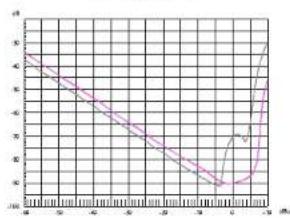
line
| x | y | |---|---| | -10 | 5 | | -9 | 4.5 | | -8 | 4 | | -7 | 3.5 | | -6 | 3 | | -5 | 2.5 | | -4 | 2 | | -3 | 1.5 | | -2 | 1 | | -1 | 0.5 | | 0 | 0 | | 1 | 1 | | 2 | 2 | | 3 | 3 | | 4 | 4 | | 5 | 5 | | 6 | 6 | | 7 | 7 | | 8 | 8 | | 9 | 9 | | 10 | 10 |DIM 互调失真@8Ω与输入电平 Class D (典型性能测量值)
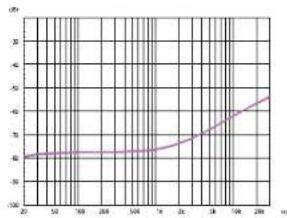
line
| X | Y | |---|---| | 20 | 40 | | 30 | 41 | | 40 | 42 | | 50 | 43 | | 60 | 44 | | 70 | 45 | | 80 | 46 | | 90 | 47 | | 100 | 48 | | 110 | 49 | | 120 | 50 | | 130 | 51 | | 140 | 52 | | 150 | 53 | | 160 | 54 | | 170 | 55 | | 180 | 56 | | 190 | 57 | | 200 | 58 | | 210 | 59 | | 220 | 60 | | 230 | 61 | | 240 | 62 | | 250 | 63 | | 260 | 64 | | 270 | 65 | | 280 | 66 |共模抑制比 Class D (典型性能测量值)
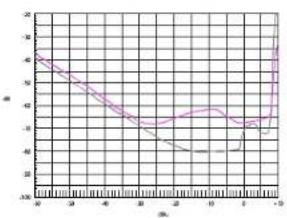
line
| n | m | |---|---| | 0 | 45 | | 1 | 42 | | 2 | 38 | | 3 | 35 | | 4 | 32 | | 5 | 30 | | 6 | 28 | | 7 | 26 | | 8 | 24 | | 9 | 22 | | 10 | 20 | | 11 | 18 | | 12 | 16 | | 13 | 14 | | 14 | 12 | | 15 | 10 | | 16 | 8 | | 17 | 6 | | 18 | 4 | | 19 | 2 | | 20 | 0 |SMPTE 互调失真 (60 Hz and 7 kHz) @8Ω与输入电平 Class D (典型性能测量值)
- PHONIC
- Important safety instructions and safety symbols
- Introduction to the function of front and rear panel
- Front panel:
- Rear panel
- Diagram
- Installation and connection
- Power supply
- Turn on/off switch
- Notes: This switch does not disconnect the amplifier from the power supply cord.
- Introduction to cabinet installation
- Typical performance map
- SERVICE AND REPAIR
- WARRANTY INFORMATION
- CUSTOMER SERVICE AND TECHNICAL SUPPORT
- 重要安全说明与安全符号说明
- 出厂设置
Brand : PHONIC
Model : DMX5002
Category : Receiver