
Power Station - Power Station CAME-TV - Free user manual and instructions
Find the device manual for free Power Station CAME-TV in PDF.


| Product Type | Portable Power Station |
| Brand | CAME-TV |
| Model | Power Station |
| Battery Type | Lithium-ion |
| Battery Capacity | Approximately 500 Wh |
| AC Output | 110V/220V, 500W continuous (1000W peak) |
| USB Output | 2x USB-A (5V/2.4A), 1x USB-C PD (up to 60W) |
| DC Output | 1x 12V/10A (cigarette lighter), 2x 12V/3A (DC barrel) |
| Charging Input | AC wall charger (100-240V), optional solar panel (12-30V, up to 100W) |
| Charging Time | About 6-8 hours via AC, 10-15 hours via solar |
| Dimensions | 30 x 20 x 18 cm (approx) |
| Weight | About 5 kg |
| Operating Temperature | 0°C to 40°C |
| Display | LCD screen showing battery level, input/output wattage |
| Safety Features | Overload, short circuit, over-temperature, over-voltage protection |
| Maintenance | Store in cool dry place; recharge every 3 months if not in use |
| Cleaning | Wipe with dry soft cloth; do not use liquids or solvents |
| Spare Parts Availability | Contact CAME-TV support for replacement battery or chargers |
Frequently Asked Questions - Power Station CAME-TV
User questions about Power Station CAME-TV
0 question about this device. Answer the ones you know or ask your own.
Ask a new question about this device
Download the instructions for your Power Station in PDF format for free! Find your manual Power Station - CAME-TV and take your electronic device back in hand. On this page are published all the documents necessary for the use of your device. Power Station by CAME-TV.
USER MANUAL Power Station CAME-TV
Dual Battery Charger & Power Inverter & Power Strip
We are proud to introduce this versatile power station that brings convenience to your life. This power station is not only an inverter, capable of converting one or two 14.4V V-mount batteries into AC output, but also features multiple interfaces for easy connection to different devices. Additionally, it serves as an efficient battery charger, capable of simultaneously charging two V-mount batteries. Even without batteries, it can be used as a practical power strip, providing you with even more convenience.
Our product design philosophy aims to achieve a perfect combination of high performance and compact size. To ensure that the device maintains stability and extends its service life during high-load operations, we have adopted a high-speed fan for cooling. The high-speed fan can provide greater airflow within a limited space, effectively removing heat. However, this also means that the fan will generate a certain level of noise during operation.
Instructions
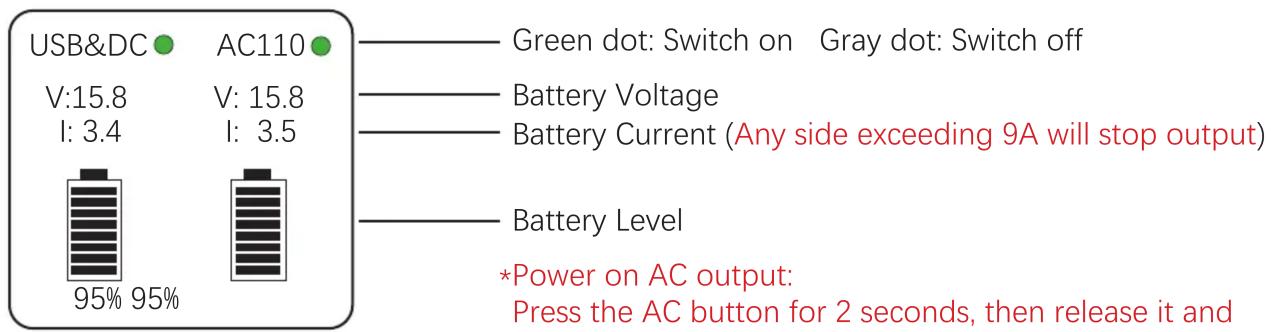

- Secure AC Startup: To maximize inverter longevity, initiate AC power by holding the AC button for 2 seconds, then releasing it and allowing 4 seconds for the AC to stabilize before plugging in devices into the AC Outlet.
- Optimal Battery Capacity: For consistent performance and extended battery life, we recommend using 99Wh or higher capacity batteries. Smaller batteries have lower current protection thresholds, increasing the risk of overcharging or over discharging.
- Built-in Overload Protection: Each inverter side features 9A current protection to safeguard battery health. Exceeding 9A on either side will automatically trigger the automatic protection feature and will disable the output. To reset, power off the unit, remove any batteries and devices plugged in, and restart the Power Station.
- Balanced Power Utilization: Optimal performance is achieved with two fully charged batteries. Uneven voltages may cause the inverter to prioritize the higher voltage battery while waiting for the other to reach a sufficient level for simultaneous operation.
- Prioritized Charging: During dual battery charging, the charger prioritizes the battery with the significantly lower voltage. Once voltages become balanced, simultaneous charging commences.
- Power Overload Recovery: Should the device activate automatic protection due to exceeding maximum power draw, simply disconnect it or perform a restart to restore normal functionality.
- D-Tap Output Dependency: The D-Tap output relies on the connected battery for power. With no battery present, the D-Tap port will remain inactive.
- Controlled Power Distribution: There are 4 power switches that control different functions such as the Main power for charging batteries, powering on the LED Light, enabling power on the USB & DC Outputs, and a switch to activate the AC Inverter. You can enable and disable each part of the CAME-TV Power Station as required.
Aftersales Service
While we trust you will never have the need, if you do, our service is both friendly and hassle-free.
Email:
Americas: americas@came-tv. com
Outside Americas: europe@came-tv.com
Brand : CAME-TV
Model : Power Station
Category : Power Station