
Video Camera Bird Feeder - Camera Sharper Image - Free user manual and instructions
Find the device manual for free Video Camera Bird Feeder Sharper Image in PDF.


| Product Type | Video Camera Bird Feeder |
| Brand | Sharper Image |
| Model Number | 208583 |
| Dimensions | 9.5" L x 8.7" W x 11" H |
| Weight | Approximately 2.5 lbs (estimate) |
| Power Supply | DC 5V 2A via USB-C or Solar Panel |
| Battery | 5200 mAh Rechargeable Lithium Ion |
| Battery Life | Up to 4-6 months (standby up to 3 months) |
| Camera Resolution | 2 Megapixel (1080P HD) |
| Field of View | 130° |
| Night Vision | Up to 8m (26 ft) via Infrared LEDs |
| Connectivity | 802.11 b/g/n Wi-Fi @ 2.4 GHz (not 5G) |
| Detection | Dual-Action Motion and Accelerometer |
| Bird Identification | Up to 10,000 species via app |
| Audio | Built-in microphone and speaker for one-way talk |
| Waterproof Rating | IP65 (weather resistant, do not submerge) |
| Operating Temperature | -5°F to 120°F (-20°C to 49°C) |
| Operating Humidity | 10% to 95% non-condensing |
| Solar Panel | 6V, 400mA, IPCE 19% (charges battery during daylight) |
| Storage | MicroSD card (included) or Cloud service via app |
| App Compatibility | Bird Lover app (iOS/Android) |
| Voice Control | Amazon Alexa and Google Assistant |
| Warranty | 1-year limited replacement warranty |
Frequently Asked Questions - Video Camera Bird Feeder Sharper Image
User questions about Video Camera Bird Feeder Sharper Image
0 question about this device. Answer the ones you know or ask your own.
Ask a new question about this device
Download the instructions for your Camera in PDF format for free! Find your manual Video Camera Bird Feeder - Sharper Image and take your electronic device back in hand. On this page are published all the documents necessary for the use of your device. Video Camera Bird Feeder by Sharper Image.
USER MANUAL Video Camera Bird Feeder Sharper Image
natural_image
Exterior view of a smart security camera with solar panel and mounted camera module (no text or symbols visible)Thank you for purchasing the Video Camera Bird Feeder by Sharper Image. Please take a moment to read this guide and store it for future reference.
INTRODUCTION
The Video Camera Bird Feeder by Sharper Image has built-in sensors to detect, identify and record up to 10,000 species of birds. When a bird lands, it identifies the bird and sends you images on your smartphone.
CONTENTS OF PACKAGE

DESCRIPTION OF PARTS

SPECIFICATIONS
Item No. 208583
Detection Dual-Action Motion and Accelerometer
Charging USB and Solar Energy (USB charging cable included)
Power 5200 mAh Rechargeable Lithium Ion Battery
Camera 2 megapixel
Video 1080P HD Live Streaming Video
Built-in Microphone Waterproof Yes
Operating Temperature -5°F to 120°F
Weather Resistant Yes
Connectivity 802.11 b/g/n Wi-Fi connection @2.4 GHz
Field of View 130°
Dimensions 9.5" L x 8.7" W x 11" H
SOLAR PANEL SPECIFICATIONS
IPCE 19%
Working Voltage [VMP] 6V±5%
Working Current [LMP] 400mA±5%
Open Circuit Voltage (VOC) 7.2V±5%
Short-Circuit Current [ISC] 480mA±5%
CAMERA IDENTIFICATION

- Status LED
- Infrared LED
- Microphone
- Motion Sensor
- Light Sensor
- Lens
- Mounting Hole
- Speaker
- Power ON / OFF
- Sync / Reset
- Charging Port
- Memory Card Slot
CAMERA SPECIFICATIONS
Power Supply DC 5V2A
Power Consumption 2W [Max.]
Standby Current <500uA
Battery Life 4-6 months
Battery Capacity 5200mAh
Image Quality 2 megapixel/1080P
Viewing Angle 130°
Night Vision Range 8m [Max]
Wireless Connection 2.4 GHz Wi-Fi IEEE 802.11 b/g/n
Anti-Flicker 50HZ 60HZ
Operating Temperature -5F° to 120°F
Operating Humidity 10% \~ 95% non-condensing
LED INDICATOR LIGHT STATUS
| Red light on continuously Booting up | |
| Red light fast blinking Waiting for network setting | |
| Green light fast blinking | Network connecting |
| Green light on continuously | Network connected |
| Red light slow blinking | Abnormal status |
| Yellow light on continuously | Firmware upgrading |
| White light on continuously | Battery charging |
| White light off | Battery fully charged |
NOTES BEFORE INSTALLATION
- Keep this device out of reach of children and pets.
- Make sure the camera has been fully charged (DC 5V/2A). We recommend charging the camera indoors via type C and correct adapter at first. Once it is set up, you can plug the type C charging cable directly into the solar panel for continuous hassle-free charging.
- Working temperature -5F^ to 120^ .
- Working relative humidity 10% \~ 95%.
- Do not expose the camera lens to direct sunlight.
- The camera is rated IP65 waterproof for use in the rain or snow. However, do please not submerge the camera in water.
PLEASE NOTE:
- This device will not connect to a 5G (5GHz) Wi-Fi frequency. You must have a 2.4GHz router or a dual-band (2.4GHz + 5G) router and enable both bands. Consult your router instructions for details.
- Strong lights may interfere with scanning the QR Code.
- Avoid placing this device behind furniture or near a microwave oven.
- Keep this device within your Wi-Fi network range.
ASSEMBLING THE DEVICE
- Use the provided template to mark the holes on your wall. Use a drill to drill the 4 holes indicated.

natural_image
Diagram of a hairdryer with motion lines indicating light emission and motion direction (no text or symbols)- Install the included wall anchors as shown.

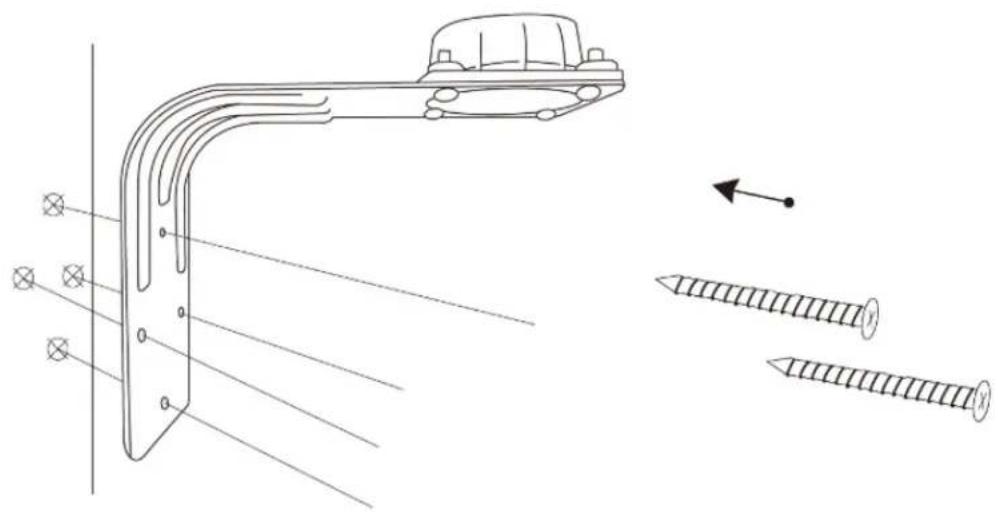
- Use the included screws to mount the bracket as shown.
natural_image
Technical line drawing of a mechanical bracket with screw fasteners and mounting holes (no text or symbols)- Place the bracket connector into the bottom of the bracket and secure it with 3 long screws.

natural_image
Technical line drawing of a mechanical component with mounting holes and three vertical slots (no text or symbols)
natural_image
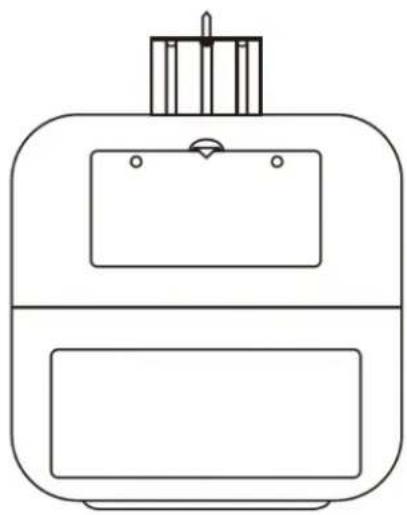
Three identical screw illustrations with cross-shaped notches, shown in a row (no text or symbols)- After opening the lid and adding the bird food, fasten the 2 short screws to prevent it from being opened by squirrels.
natural_image
Line drawing of a mechanical device with a top component and two bottom compartments (no text or symbols)DOWNLOADING THE APP
To download the required app, scan the QR Code below or search for the BIRD LOVER app in the iTunes App Store or Google Play. Once downloaded, the app will ask you to register your device. You will receive an email or text with a registration code. You will then be able to create a password.


WI-FI CONNECTION
Open the app on your device. In the "ADD DEVICE" screen, click "Add Device" or "+" to add your Bird Feeder. [SEE FIG. 1.]
Select any "Smart Bird Feeder" icon to add your device. Turn on the Bird Feeder and make sure the Red LED is flashing quickly. Then, follow the instructions in the app to add the device. [SEE FIG. 2.]

FIG. 1
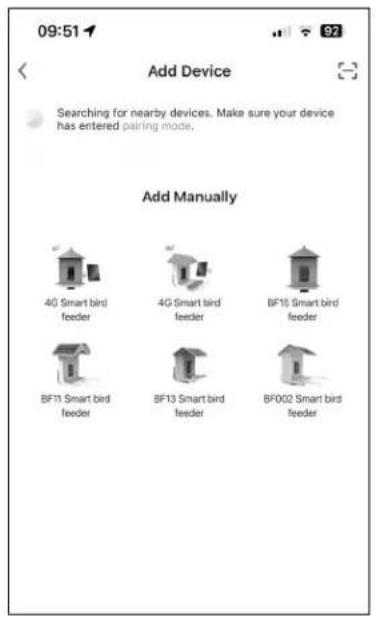
FIG. 2
USING THE APP
- Sharpness adjustment. Choose High Definition [HD] or Standard Definition [SD].
- Battery level remaining
- Voice switch
- Zoom in on the screen
- Screen orientation [horizontal or vertical]
- Take photo
- Bird recognition
- Video function
- Playback previous clips
- View saved photos or videos
- Review bird collection
- Share
- Motion detection [click to turn On or Off]
- Device volume
- One-way talk
- Anti-squirrel siren
- Notification
- Cloud storage service
- History of bird identifications
- Personal settings
FREQUENTLY ASKED QUESTIONS

- Does this device need Wi-Fi to operate?
Yes, the Video Camera Bird Feeder by Sharper Image requires a Wi-Fi connection. It uses a 2.4GHz Wi-Fi connection to stream videos to your mobile device.
- Does this device have local storage?
If you insert the included memory card or buy iCloud service in the app, it will have local storage, which you can use to store, view and play back your photos and videos.
- Can more than one person connect to a Bird Feeder?
Only one person can directly connect to one bird feeder. However, you can share the device with other users and set up different accounts. Each account will have different data.
- What languages are available?
The Bird Lover app is translated into all major word languages, but the bird identification result will only be in English or Chinese.
- How long does the battery last?
Depending on how often the camera is used, the battery can last up to 3 months in standby mode on a full charge.
- How is the battery charged?
The battery can be charged indoors via USB. Or, you can connect the included charging cable to the solar panel for continuous charging during daylight hours. You should decide which option is best for you based on your weather conditions.
7. Can the device be voice controlled?
Yes, the app supports third-party voice services, including Amazon Alexa and Google Assistant. If you have one of these devices, you can use voice control.
8. Why are there no saved videos, even after I inserted a memory card or purchased Cloud storage through the app?
Please adjust the recording settings after you insert the memory card or bought Cloud service. Then, the camera will automatically record videos when motion is detected.
9. Why did my device misidentify a bird?
The result accuracy depends on the angle and clarity of the bird pictures. To ensure you get a correct result, please ensure the picture is clear enough, the identifying features (bird head, tail, wings or pattern on feathers) are not covered by obstacles, the bird occupies the main position of the picture. If there are two or more bird species in one picture, the identified result will be the one on the main position. See the image below for optimum photo angle.

natural_image
Black-and-white photo of a small bird perched on a metal rack in a forest setting (no text or symbols visible)Optimum angle for accurate bird identification.
WARRANTY AND CUSTOMER SERVICE
This item from SharperImage.com includes a 1-year limited replacement warranty. If you have any questions not covered in this guide, please call our Customer Service department at 1 (877) 210-3449. Customer Service agents are available Monday through Friday, 9:00 a.m. to 6:00 p.m. ET.
SHARPER IMAGE®
The SHARPER IMAGE® name and logo are registered trademarks. @Sharper Image. All Rights Reserved.

- INTRODUCTION
- SPECIFICATIONS
- SOLAR PANEL SPECIFICATIONS
- CAMERA IDENTIFICATION
- CAMERA SPECIFICATIONS
- NOTES BEFORE INSTALLATION
- PLEASE NOTE:
- ASSEMBLING THE DEVICE
- DOWNLOADING THE APP
- WI-FI CONNECTION
- USING THE APP
- FREQUENTLY ASKED QUESTIONS
- Can the device be voice controlled?
- Why are there no saved videos, even after I inserted a memory card or purchased Cloud storage through the app?
- Why did my device misidentify a bird?
- WARRANTY AND CUSTOMER SERVICE
- SHARPER IMAGE®
Brand : Sharper Image
Model : Video Camera Bird Feeder
Category : Camera