
AT-GAIN-VOL - Régulateur de volume audio mural Atlona - Free user manual and instructions
Find the device manual for free AT-GAIN-VOL Atlona in PDF.


| Product Type | Volume Control Wallplate |
| Brand | Atlona |
| Model | AT-GAIN-VOL |
| Compatibility | Atlona AT-GAIN-M50-LZ Mixer Amplifier |
| Enclosure Type | US one-gang |
| Dimensions | Approx. 2.75 x 1.75 inches (70 x 45 mm) |
| Weight | Approx. 0.1 kg (0.22 lbs) |
| Power Supply | Passive; no external power required |
| Control Interface | Rotary knob with volume range from mute to maximum output |
| Connection Type | 3-pin captive screw connector to CTRL/RS-232 port |
| Included Accessories | White and black faceplates, Decora wallplates, 3-pin captive screw connector, QR code insert |
| Faceplate Material | Plastic with interchangeable black or white trim kits |
| Maintenance | Clean with a dry, soft cloth. Do not use liquid cleaners. |
| Safety | Do not over-tighten screws during assembly. Use low-torque tools. |
| Spare Parts | Faceplates (black and white) available separately |
| Repairability | No user-serviceable parts; contact Atlona for support |
| Warranty | See Atlona warranty policy at https://atlona.com/warranty/ |
| Certification | CE, RoHS (China) |
| Mounting | Standard US electrical box or mud ring |
Frequently Asked Questions - AT-GAIN-VOL Atlona
User questions about AT-GAIN-VOL Atlona
0 question about this device. Answer the ones you know or ask your own.
Ask a new question about this device
Download the instructions for your Régulateur de volume audio mural in PDF format for free! Find your manual AT-GAIN-VOL - Atlona and take your electronic device back in hand. On this page are published all the documents necessary for the use of your device. AT-GAIN-VOL by Atlona.
USER MANUAL AT-GAIN-VOL Atlona
GAIN Volume Control Wallplate
AT-GAIN-VOL

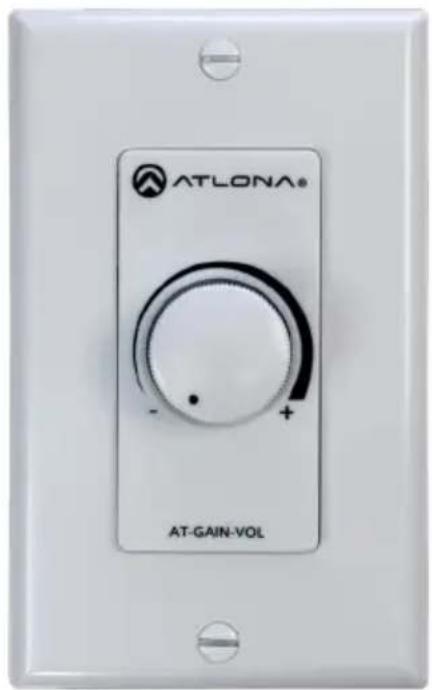
The Atlona AT-GAIN-VOL is a volume control wallplate for use with the AT-GAIN-M50-LZ mixer amplifier. It provides a convenient, easy-to-use manual interface for controlling audio levels of the amplifier. Volume control range is from no audio (mute) to maximum output level. The GAIN-VOL is housed in a US one-gang enclosure intended for wallplate openings and includes interchangeable black or white trim kits.
Package Contents
1 x AT-GAIN-VOL
1 x White faceplate
1 x White Decora® wallplate
1 x Black faceplate
1 x Black Decora® wallplate
1 x 3-pin captive screw connector
1 x Insert w/ QR code
Panel Descriptions
Front Back
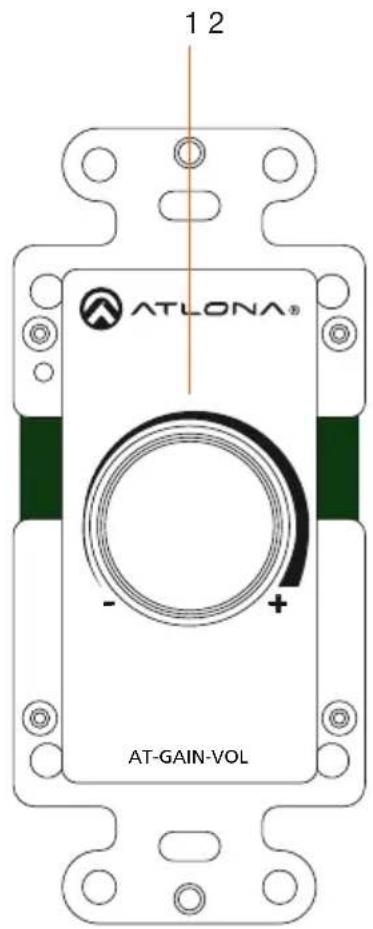
1 Volume Knob
Rotate this knob clockwise to increase the output volume. Rotate clockwise to decrease the output volume.
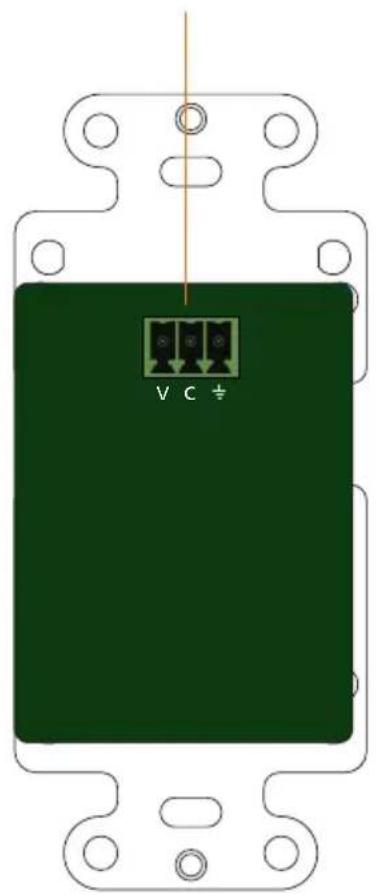
2 Control
This port connects to the top port of the CTRL / RS-232 port on the AT-GAIN-M50-LZ.
Installation
AT-GAIN-M50-LZ
- Connect the included 3-pin captive screw connector from the Control port to the top port of the CTRL / RS-232 port on the AT-GAIN-M50-LZ.
- Install the AT-GAIN-VOL into the electrical box or mud ring.
- Attach the wallplate.

Wiring Diagram
![graph LR A["Laptop"] -->|40ms| B["AT-OME-TX1-WP"] B --> C["AT-GAIN-VOL"] C --> D["AT-OME-TX11"] D --> E["Projector"] F["Wireless Microphone"] --> G["AT-OME-M50-LZ"] H["Public Address System"] --> I["Speaker"] J["Assistive Listening System"] --> K["Speaker"] C -->|Ethernet| D D -->|40ms| E style A fi…](/content/2026/05/958101/images/82108c4a204457d450f139e5a9536453ff2ff3f9335d0742dedaacbe51a71c06.jpg)
Faceplate Removal and Assembly
Removal of the faceplate requires that the AT-GAIN-VOL be disassembled from the electrical box or mud ring. A small Phillips-head screwdriver is required to remove the faceplate.
- Unscrew the four Phillips-head screws from the sides of the faceplate, as shown:

-
Gently remove the faceplate by pulling it toward you.
-
Attach the new faceplate, then secure it using the four Phillips-head screws. Do not over-tighten or apply high-torque devices to the screws. Doing so may damage the faceplate and/or the screws.
-
Reinstall the AT-GAIN-VOL into the electrical box or mud ring.
-
Reattach the wallplate.
Warranty
To view the product warranty, use the following link or QR code: https://atlona.com/warranty/.

English Declaration of Conformity
The English version can be found under the resources tab at: https://atlona.com/product/at-gain-vol/.

Chinese Declaration of Conformity 中国RoHS合格声明
由SKU列出於:
https://atlona.com/about-us/china-rohs/.

Brand : Atlona
Model : AT-GAIN-VOL
Category : Régulateur de volume audio mural