NF-912 - Detector Noyafa - Free user manual and instructions
Find the device manual for free NF-912 Noyafa in PDF.


| Product Type | Cable & Wire Detector / Tracer |
| Brand | Noyafa |
| Model | NF-912 |
| Dimensions (approx.) | 190 x 45 x 30 mm (each unit) |
| Weight (approx.) | 250 g (including batteries) |
| Power Supply | 2 x 9V batteries (6F22) per unit |
| Display | LED indicators for continuity, polarity, and tone |
| Main Functions | Continuity test, cable polarity, tone generation and tracing, RJ11/RJ45 port detection |
| Detection Range | Up to 1000 m for tone tracing |
| Frequency Output | Approximately 1 kHz modulated tone |
| Cable Types | UTP, STP, coaxial, telephone (RJ11, RJ45) |
| Safety | Overvoltage protection up to 60V DC/AC, CAT II rated |
| Operating Temperature | 0°C to 40°C |
| Storage Temperature | -20°C to 60°C |
| Accessories Included | Transmitter unit, receiver unit, 2 x test leads, 1 x RJ45 coupler, 1 x RJ11 coupler, carrying case |
| Spare Parts / Repairability | Limited: batteries replaceable; no user-serviceable internal parts |
| Cleaning | Wipe with dry cloth; do not use solvents |
| Certifications | CE, RoHS |
| Warranty | 1 year limited warranty |
Frequently Asked Questions - NF-912 Noyafa
User questions about NF-912 Noyafa
0 question about this device. Answer the ones you know or ask your own.
Ask a new question about this device
Download the instructions for your Detector in PDF format for free! Find your manual NF-912 - Noyafa and take your electronic device back in hand. On this page are published all the documents necessary for the use of your device. NF-912 by Noyafa.
USER MANUAL NF-912 Noyafa
Please read before using or repairing this equipment And understand the safety considerations.
Thank you for buying NOYAFA handheld laser rangefinder series products!
Safety regulations
Please read the safety regulations and operation instructions carefully before using the instrument for the first time.
- Do not turn on or repair the instrument by yourself in any way, and illegal modification or modification is strictly prohibited. To change the performance of the laser transmitter of the instrument, please take good care of the instrument and do not place it in a place accessible to children. It is strictly forbidden to illuminate your own or other people's eyes and other parts of the body with an instrument laser, and it is strictly forbidden to illuminate the laser on the surface of a highly reflective object.
- The electromagnetic radiation of the instrument may cause interference to other equipment and devices, please do not use this instrument near aircraft or medical equipment, do not use the instrument in flammable and explosive environment. There are any quality problems with the instrument. Or if you have any questions about the use of the instrument, please contact the local dealer or instrument manufacturer in time, and we will solve it for you as soon as possible.
- Please dispose of the discarded instruments in accordance with the laws of your place.
Catalogue
- overview ...... 1
2.How to use it 2
01) On and off 2
03) Records are kept .... 2
3.Scope of application 5
4.Detailed parameters 6
- Charge the battery 7
6.Matters needing attention 8
7.Product list 8
I. Overview
The NF-912 PON optical power meter is designed through a specially designed optical path and electricity.-Path structure to realize the special requirements of signal optical power measurement in PON system. In other words, it is necessary to meet the simultaneous test and on-line measurement of three kinds of optical signal wavelengths on the line. The burst test function of testing and 1310nm signals, Thus it is convenient to install, manage and maintain the PON system.
1
2. Method of use
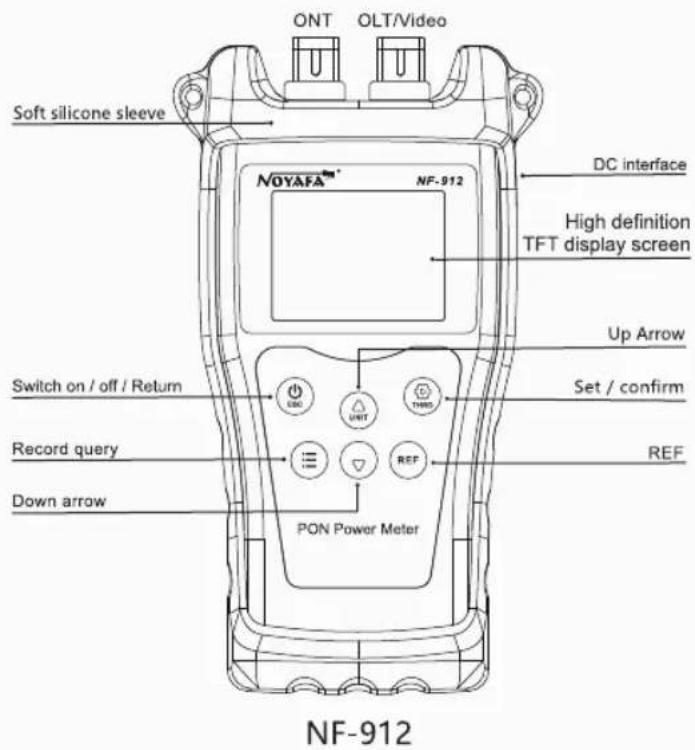
01) Switch: press ⏻ for about 2 seconds to switch on and off manually
02) Unit switching: short press Ⓗ
to switch optical power units in the measurement interface, which can be switched to dBm, dB,xW
03) Record saving: press Ⓔ to save the record in the measurement interface
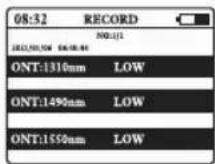
04) Record view: press Ⓔ in the measurement interface to enter the record view interface
05) Record deletion: press to delete all records in the record interface



2
06) View REF: in the measurement interface, press to enter the REF view interface
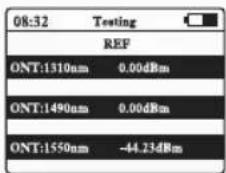
07) Save REF: in the measurement interface long press to save the REF value

08) System language: select "system language" in the settings menu interface and press 📄

09) System time: select "date time" in the setting menu interface and press 📋 to select the year, month, day and hour. Then press △ or ▽ to adjust the value.

10) Automatic shutdown: in the settings menu interface, select "automatic shutdown" short press (©), you can select "off, 15 minutes, 30 minutes, 1 hour, 2 hours"

11) Backlight brightness: select "backlight brightness" short press in the setting menu interface, select brightness gear: 1, 2, 3, 4

12) Backlight delay: select backlight delay in the setting menu interface by pressing 📋 for a short time. You can choose "close, 15 seconds, 30 seconds, one minute."

13) Threshold setting: select "threshold" setting short press to enter, long press to select different adjustment ratio, first short press or to select different objects, then short press to do you can see that the underline is d press or to adjust the value to save the exit value after adjusting the underline is displayed as a cyan valve, and the valve function is turned for a long time in the measure

14) Offset settings: select backlight delay in the settings menu interface by pressing ☑ toenter, select, and adjust values by Ⓗ or ▽

15) System information: select system Information on the setup menu interface and press 📋 to enter

3.Scope of application
At present, FTTx/PON (fiber to home, fiber to building, fiber to resident, etc.) network construction is becoming a hot spot in the construction of global access network. The power meter is suitable for measuring optical fiber-to-home network. The specific measurement power meter outputs three kinds of wavelength laser (1310nm 1490nm 1550nm) from a single port, in which 1330nm measures the uplink transmission direction, 1490 and 1550 can measure the downlink direction test.
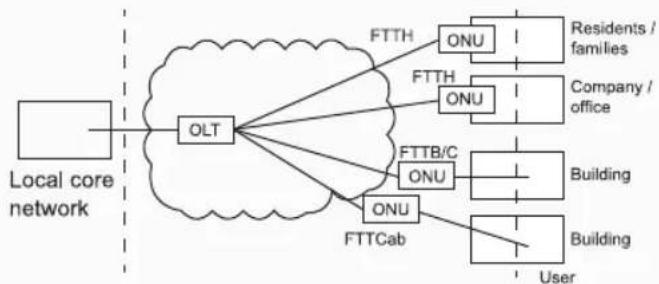
flowchart
graph TD
    A["Local core network"] --> B["OLT"]
    B --> C["FTTH"]
    B --> D["FTTH"]
    B --> E["FTTB/C"]
    B --> F["FTTCab"]
    C --> G["ONU"]
    D --> H["ONU"]
    E --> I["ONU"]
    F --> J["ONU"]
    G --> K["Residents / families"]
    H --> L["Company / office"]
    I --> M["Building"]
    J --> N["Building"]
    K --> O["User"]
    L --> P["User"]
    M --> Q["User"]
    N --> R["User"]
Broadband optical access network

flowchart
graph TD
    A["ONT"] --> B["①"]
    C["OLT/Video"] --> D["②"]
-
ONT Uplink signal probe (1310nm)
2.OLT/Video Downlink signal probe (1490/1550nm) -
Detailed parameters
| Type | NF-912 | ||
| Calibration wavelength | 1310 Uplink test | 1490 Downlink Test | 1550 Downlink Test |
| Passband (nm) | 1260~ 1360 | 1480~1500 | 1535~ 1570 |
| Detection range (dBm) | -35~+10 | -50~+10 | -50~+10 |
| Isolation 1310nm (dB) | - | >40 | >40 |
| Isolation 1490nm (dB) | >40 | - | >40 |
| Isolation 1550nm (dB) | >40 | >40 | - |
| Precision (dB) | ±0.5 | ||
| Linearity | ±2% | ||
| Fiber optic adapter | Optical fiber SC interface | ||
| Detector type | Yes | ||
| Battery type | 3.7V/1440mAh lithium battery | ||
| Battery life (H) | >50 | ||
| Use temperature | -10%~+50°C, <90%RH | ||
| Storage temperature | -20%~+60°C, <90%RH | ||
| Product size (mm) | 182*105*50 | ||
5.Battery charging
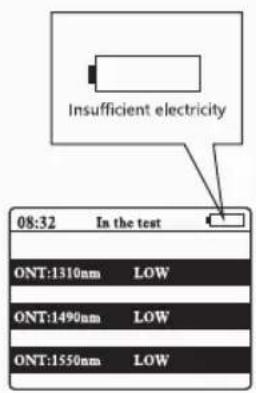
When the power icon in the upper right corner of the host screen appears low power or does not boot properly, it is usually caused by insufficient battery voltage and needs to be plugged in a power adapter to charge the battery.

6.Matters needing attention

natural_image
Simple diagram of a toggle switch with one pointer and two blank buttons (no text or symbols)- Do not push too hard in the operation of optical fiber SC interface, insert or unplug the interface into or out of the SC single flange of the main engine, should plug and pull smoothly

- After the instrument test, please turn it off in time so as not to affect the battery life
natural_image
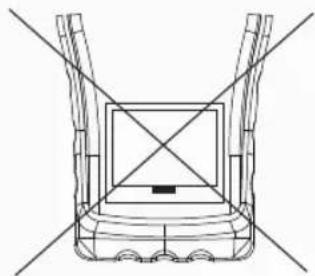
Technical line drawing of a mechanical component with intersecting diagonals (no text or symbols)- Do not open the rear cover of the main engine on your own, need to be repaired or calibrated on time, please send it back to the production plant or agent.
7. List of products
- Instruction manual 1
- Product inspection certificate 1
- product warranty card 1
- instrument set 1
- charging line 1
Brand : Noyafa
Model : NF-912
Category : Detector