NF-866 - Electronic Tester Noyafa - Free user manual and instructions
Find the device manual for free NF-866 Noyafa in PDF.


| Product Type | Network Cable Tester |
| Brand | Noyafa |
| Model | NF-866 |
| Dimensions | 95 x 58 x 28 mm |
| Weight | 110 g (including batteries) |
| Power Supply | 1 x 9V battery (6F22 or equivalent) |
| Battery Life | Approximately 20 hours of continuous use |
| Main Functions | Cable continuity test, wire mapping, polarity detection, tone generation, length measurement |
| Supported Cable Types | RJ45, RJ11, RJ12, coaxial, USB (with adapter) |
| Display | LCD screen with backlight |
| Test Distance | Up to 300 meters |
| Tone Generator | Yes, selectable frequency |
| Auto Power Off | After 10 minutes of inactivity |
| Operating Temperature | 0°C to 40°C |
| Storage Temperature | -10°C to 50°C |
| Maintenance & Cleaning | Wipe with a soft, dry cloth. Do not use solvents. |
| Safety | Do not test live circuits. Use only on de-energized cables. |
| Spare Parts & Repairability | Replaceable 9V battery. No user-serviceable parts inside. |
| General Information | Comes with remote unit, carrying pouch, and user manual. |
Frequently Asked Questions - NF-866 Noyafa
User questions about NF-866 Noyafa
0 question about this device. Answer the ones you know or ask your own.
Ask a new question about this device
Download the instructions for your Electronic Tester in PDF format for free! Find your manual NF-866 - Noyafa and take your electronic device back in hand. On this page are published all the documents necessary for the use of your device. NF-866 by Noyafa.
USER MANUAL NF-866 Noyafa
-1-
Outline:
First, I'd like to express my thanks to you who choose the NF-866 Phone Checker. This kind of phone checker has the function of automatically detecting FSK and DTMF call information, super lightning protection and so on. It can meet the requirement of all kinds of switch phones both at home and abroad. As this phone has many functions, so please read the Instruction Manual carefully before you use it.
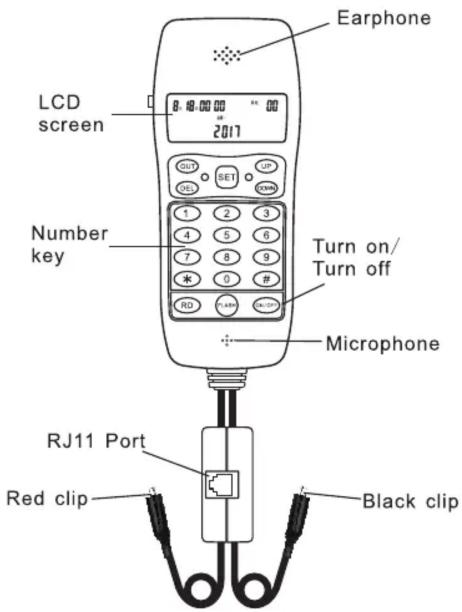
Interface introduction
-2-
I. Features:
1.FSK and DTMF caller ID display, automatic detection;
-
Backlight: Adjustable brightness;
-
Redial, callback, Flashing function;
-
Overvoltage protection;
5.16 groups of outgoing call storage;
6.62 groups of dynamic call storage;
7.32-bit pre-dialing and error correction function;
- It looks beautiful and small in appearance and easy to carry and use.
II.User instruction:
- The preparation before using
Put the plug of the arranged phone line insert into the outlet of the phone checker, and put the other end in external wire. Then the screen shows the initial time and the phone is in available.
- Exterior line query:
This check phone is similar to cordless phone, if you need to check the landline number, press the switch to dial your own phone or other phone number to query the landline phone number, and use with alligator clips to query when checking telephone exchange room, which is convenient and simple.
- Internal line query:
According to the instruction from the switch, the checker can automatically receive call back and then check the internal line.
- Dial and call operation
To answer the phone : Make the phone hang up. Answer the phone directly by press the "on/off" button when hear the ring . Directly press the "on/off" button , call when hear the dial tone . The dial number shows in the screen. Talking can begin when connected and hang up when finish.
- Flash function
The user can use the phone checker to dial two phone number in the same time.
Using the phone checker to dial the user A number, during the call, press the "FLASH" button, after hearing dial tone, dial the user B number to have a call; if fail to call, press the "FLASH" button to continue calling with the user A.
-3-
Ⅲ.Set up the system:
-
When the phone hang up, press the "set" button and the screen shows "SET1DATA", and this time, press "up" and "down", the LCD screen will show different options. Press "set" bottom to enter the option; and press "set" button again to enter the next option. Press "up" and "down" to set the detail, and press "DEL" button to exit.
-
Set up the time /date When the phone hang up, press the "set" button and the screen shows "SET 1 DATA", then press the button again to enter into the time setting, press "up" and "down" to adjust the year, press the "set" button to confirm. Then continue set the date and clock in the same way. Press the "DEL" button can exit.
-
Set up the Code When the phone hang up, press the "set" button and then press"up" or "down" to make the screen showing the "SET 2 CODE", then enter into area code setting. Press the "set" button, the screen shows "CODE----". Press the "up" or "down" button at the first "-" to choose the number from 0 to 9. After setting the No.1, press the "set" button to set the No.2 and so on.
-
Set up the Pcode When the phone hang up, press the "set" button and then press "up" or "down" to make the screen showing the "SET 3PCODE", then enter into area code setting. Press the "set" button, the screen shows "PCODE----". Press the "up" or "down" button at the first "-" to choose the number from 0 to 9. After setting the PCode, press the "set" button to enter the next option. When dialing the pre-dial number, memory number and caller ID, if the number is greater than or equal to 6-bit and the first. bit is different with PCode, the phone checker will automatically add PCode. When dialing the outgoing number is not considered to add the PCode. When adding an automatic IP number, the phone checker will dial the IP number after dialing PCode, in order to adapt to the switches, the phone checker will automatically suspend for 1s after dialing the Pcode.
In the locked state, the phone checker does not lock out the Pcode, but will consider to lock the number behind the Pcode.
Note: When the lock is locked, the PCode can not be set.
IV. Query:
- Call query:
The Phone Checker can identify ,receive , storage call number and talk time . It can store at most 62 groups of numbers. Users can check ,delete , re-call the call numbers: Check the number : Pressing the " up" button can show the last call number and time .Pressing the "down" button can show the next call number and time. Re-dial the number: Press the " RD" button , the phone will dial the show number automatically. Talk when connected. Press the "repeat dial "button twice continually ,the Phone will re-call automatically.Delete: Press the "DEL" button to delete the call number. All the call numbers will be deleted when press the "DEL" button for 4 seconds.
- To store and check the dial number and time: After dialing the number for 8 seconds, the Phone begin timing automatically. The dial number will be stored after hanging up. It can store at most 10 groups. Users can check, delete, re-call the call numbers. Check the number: Pressing the "check" button can check all the dial numbers and time. Call back the number: checking the outgoing number need to call back, press "RD" button to dial the number automatically. Redial the number: When calling, if have a busy tone, please hang up again and then press the "RD" button or directly press the "RD" button, the phone checker will automatically take the line once and then redial.
V、Attention:
- Caller ID display:
This function can be used only after registering from the Telecommunications. Small switchboards, anti-theft machines, splitters can not be used between the
Phone and external wires, otherwise it may be have the bad influence on the Caller ID display function. In order to receive the call information completely, it is best to pick up the phone after two rings.
2.Fault handle
If find the phone not in the normal way, unplug the external wire and then insert it again after 10 minutes, the Phone will come to normal.
Remark : For this phone lineman series, there are three models for choice:
NF-855 (Junior Section)
NF-866 (Intermediate Section)
NF-877 (Advanced Section)
| NF-866 Technical Parameters | |
| Environment temperature | -10~+40°C |
| Relative Humidity | 10%~95% |
| Atmospheric pressure | 86~106kpa |
| Environmental Noise | ≤60dB(A) |
| Ring tone level | ≥70dB(A) |
| Transfer indications: (When the user's line length is 5 km) | |
| Send loudness assessed value | ≤12dB |
| Receive loudness assessed value | ≤-1dB |
| Side tone hiding assessed value | ≥10dB |
| DC Resistance | ≤350Ω |
| Weight | About 220g |
| Specification | 170mm*70*32mm |
CE

Brand : Noyafa
Model : NF-866
Category : Electronic Tester