
SDC12 - Controller Elation - Free user manual and instructions
Find the device manual for free SDC12 Elation in PDF.


| Product Type | DMX Controller |
| Brand | Elation |
| Model | SDC12 |
| Channels | 12 DMX channels (2 banks of 6) |
| DMX Outputs | 3-Pin XLR, 5-Pin XLR |
| Controls | 6 Faders, Master Slider, Channel Bank Button |
| DMX Patch | Binary DIP switch (channels 1-512) |
| Power Input | DC 12V 500mA (external adapter) or 9V battery (not included) |
| Dimensions (L x W x H) | 7.5 x 5.9 x 1.6 in (191 x 149 x 41 mm) |
| Weight (net) | 2 lbs (0.9 kg) |
| Protection Class | Class 1 (grounded) |
| Indoor Use Only | Yes |
| Certifications | CE, RoHS |
| Warranty | 2 years limited |
| Box Contents | Controller, 12V power supply, manual & warranty card |
Frequently Asked Questions - SDC12 Elation
User questions about SDC12 Elation
0 question about this device. Answer the ones you know or ask your own.
Ask a new question about this device
Download the instructions for your Controller in PDF format for free! Find your manual SDC12 - Elation and take your electronic device back in hand. On this page are published all the documents necessary for the use of your device. SDC12 by Elation.
USER MANUAL SDC12 Elation
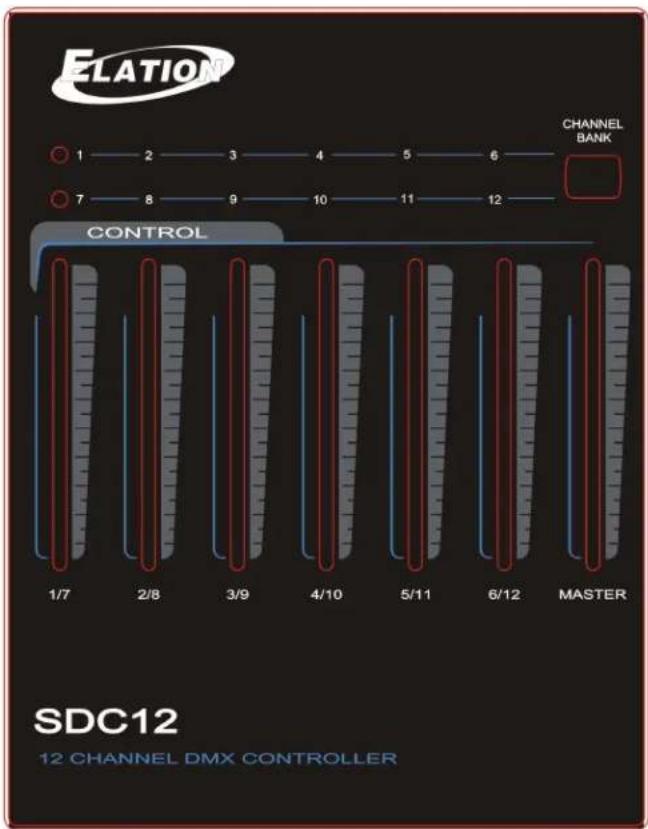
flowchart
graph LR
    A["1"] --> B["2"]
    B --> C["3"]
    C --> D["4"]
    D --> E["5"]
    E --> F["6"]
    G["7"] --> H["8"]
    H --> I["9"]
    I --> J["10"]
    J --> K["11"]
    K --> L["12"]
    M["CHANNEL BANK"] --> N["MASTER"]
    O["CONTROL"] --> P["1/7"]
    O --> Q["2/8"]
    O --> R["3/9"]
    O --> S["4/10"]
    O --> T["5/11"]
    O --> U["6/12"]
    O --> V["MASTER"]
SDC12 ^TM
user manual 1.0
©2013 ELATION PROFESSIONAL all rights reserved. Information, specifications, diagrams, images, and instructions herein are subject to change without notice. ELATION PROFESSIONAL logo and identifying product names and numbers herein are trademarks of ELATION PROFESSIONAL. Copyright protection claimed includes all forms and matters of copyrightable materials and information now allowed by statutory or judicial law or hereinafter granted. Product names used in this document may be trademarks or registered trademarks of their respective companies and are hereby acknowledged. All non-ELATION brands and product names are trademarks or registered trademarks of their respective companies.
ELATION PROFESSIONAL and all affiliated companies hereby disclaim any and all liabilities for property, equipment, building, and electrical damages, injuries to any persons, and direct or indirect economic loss associated with the use or reliance of any information contained within this document, and/or as a result of the improper, unsafe, insufficient and negligent assembly, installation, rigging, and operation of this product.
Elation Professional USA | 6122 S. Eastern Ave. | Los Angeles, CA. 90040
323-582-3322 | 323-832-9142 fax | www.elationlighting.com | info@elationlighting.com
Elation Professional B.V. | Junostraat 2 | 6468 EW Kerkrade, Netherlands
+31 45 546 85 66 | +31 45 546 85 96 fax | www.elationlighting.eu | info@elationlighting.eu
PRODUCT INFORMATION
INTRODUCTION
The SDC12 ^™ is a basic 12 Channel portable DMX controller which features 3-Pin and 5-Pin XLR DMX outputs, 6 faders which controls channels 1-6 or 7-12, and is powered by an external 12V power supply or standard 9V battery.
UNPACKING
Thank you for purchasing the SDC12 ^™ by Elation Professional®. Every SDC12 ^™ has been thoroughly tested and has been shipped in perfect operating condition. Carefully check the shipping carton for damage that may have occurred during shipping. If the carton appears to be damaged, carefully inspect your unit for damage and be sure all accessories necessary to operate the unit have arrived intact. In the event damage has been found or parts are missing, please contact our customer support team for further instructions. Please do not return this unit to your dealer without first contacting customer support at the number listed below. Please do not discard the shipping carton in the trash. Please recycle whenever possible.
BOX CONTENTS
• (1) 12V Power Supply
- Manual & Warranty Card

MANUAL UPDATES
Please check www.elationlighting.com for the latest revision/update of this manual.
CUSTOMER SUPPORT
Elation Professional® provides a customer support line, to provide set up help and to answer any question should you encounter problems during your set up or initial operation. You may also visit us on the web at www.elationlighting.com for any comments or suggestions. For service related issue please contact Elation Professional®. Service Hours are Monday through Friday 8:00 a.m. to 5:00 p.m. Pacific Standard Time.
Voice: 323-582-3322
Fax: 323-832-9142
E-mail: support@elationlighting.com
Forum: www.ElationLighting.com/forum
WARRANTY REGISTRATION
The SDC12 ^™ carries a two year (730 days) limited warranty. Please fill out the enclosed warranty card to validate your purchase. All returned service items whether under warranty or not, must be freight pre-paid and accompany a return authorization (R.A.) number. The R.A. number must be clearly written on the outside of the return package. A brief description of the problem as well as the R.A. number must also be written down on a piece of paper and included in the shipping container. If the unit is under warranty, you must provide a copy of your proof of purchase invoice. Items returned without a R.A. number clearly marked on the outside of the package will be refused and returned at customer's expense. You may obtain a R.A. number by contacting customer support at 323-582-3322.
IMPORTANT NOTICE!
There are no user serviceable parts inside this unit. Do not attempt any repairs yourself; doing so will void your manufactures warranty. Damages resulting from modifications to this fixture and/or the disregard of safety and general user instructions found in this user manual void the manufactures warranty and are not subject to any warranty claims and/or repairs.
2-YEAR LIMITED WARRANTY
A. Elation Professional® hereby warrants, to the original purchaser, Elation Professional® products to be free of manufacturing defects in material and workmanship for a period of two years, (730 days) from the date of purchase. This warranty shall be valid only if the product is purchased within the United States of America, including possessions and territories. It is the owner's responsibility to establish the date and place of purchase by acceptable evidence, at the time service is sought.
B. For warranty service, send the product only to the Elation Professional® factory. All shipping charges must be pre-paid. If the requested repairs or service (including parts replacement) are within the terms of this warranty, Elation Professional® will pay return shipping charges only to a designated point within the United States. If the entire instrument is sent, it must be shipped in its original package. No accessories should be shipped with the product. If any accessories are shipped with the product, Elation Professional® shall have no liability what so ever for loss of or damage to any such accessories, nor for the safe return thereof.
C. This warranty is void if the serial number has been altered or removed; if the product is modified in any manner which Elation Professional® concludes, after inspection, affects the reliability of the product; if the product has been repaired or serviced by anyone other than the Elation Professional® factory unless prior written authorization was issued to purchaser by Elation Professional®; if the product is damaged because not properly maintained as set forth in the instruction manual.
D. This is not a service contract, and this warranty does not include maintenance, cleaning or periodic check-up. During the period specified above, Elation Professional® will replace defective parts at its expense, and will absorb all expenses for warranty service and repair labor by reason of defects in material or workmanship. The sole responsibility of Elation Professional® under this warranty shall be limited to the repair of the product, or replacement thereof, including parts, at the sole discretion of Elation Professional®. All products covered by this warranty were manufactured after January 1, 1990, and bare identifying marks to that effect.
E. Elation Professional® reserves the right to make changes in design and/or improvements upon its products without any obligation to include these changes in any products theretofore manufactured.
F. No warranty, whether expressed or implied, is given or made with respect to any accessory supplied with products described above. Except to the extent prohibited by applicable law, all implied warranties made by Elation Professional® in connection with this product, including warranties of merchantability or fitness, are limited in duration to the warranty period set forth above. And no warranties, whether expressed or implied, including warranties of merchantability or fitness, shall apply to this product after said period has expired. The consumer's and or Dealer's sole remedy shall be such repair or replacement as is expressly provided above; and under no circumstances shall Elation Professional® be liable for any loss or damage, direct or consequential, arising out of the use of, or inability to use, this product.
G. This warranty is the only written warranty applicable to Elation Professional® Products and supersedes all prior warranties and written descriptions of warranty terms and conditions heretofore published.
SAFETY INSTRUCTIONS

This device falls under PROTECTION CLASS 1. It's essential this device is grounded properly, and only qualified personnel perform all electrical connections
• This device must be grounded.
• This device is intended for indoor use only.
• To prevent fire, shock, or hazard, DO NOT expose to water and/or high levels humidity.
- Please use the original packaging and materials to transport the device in for service.
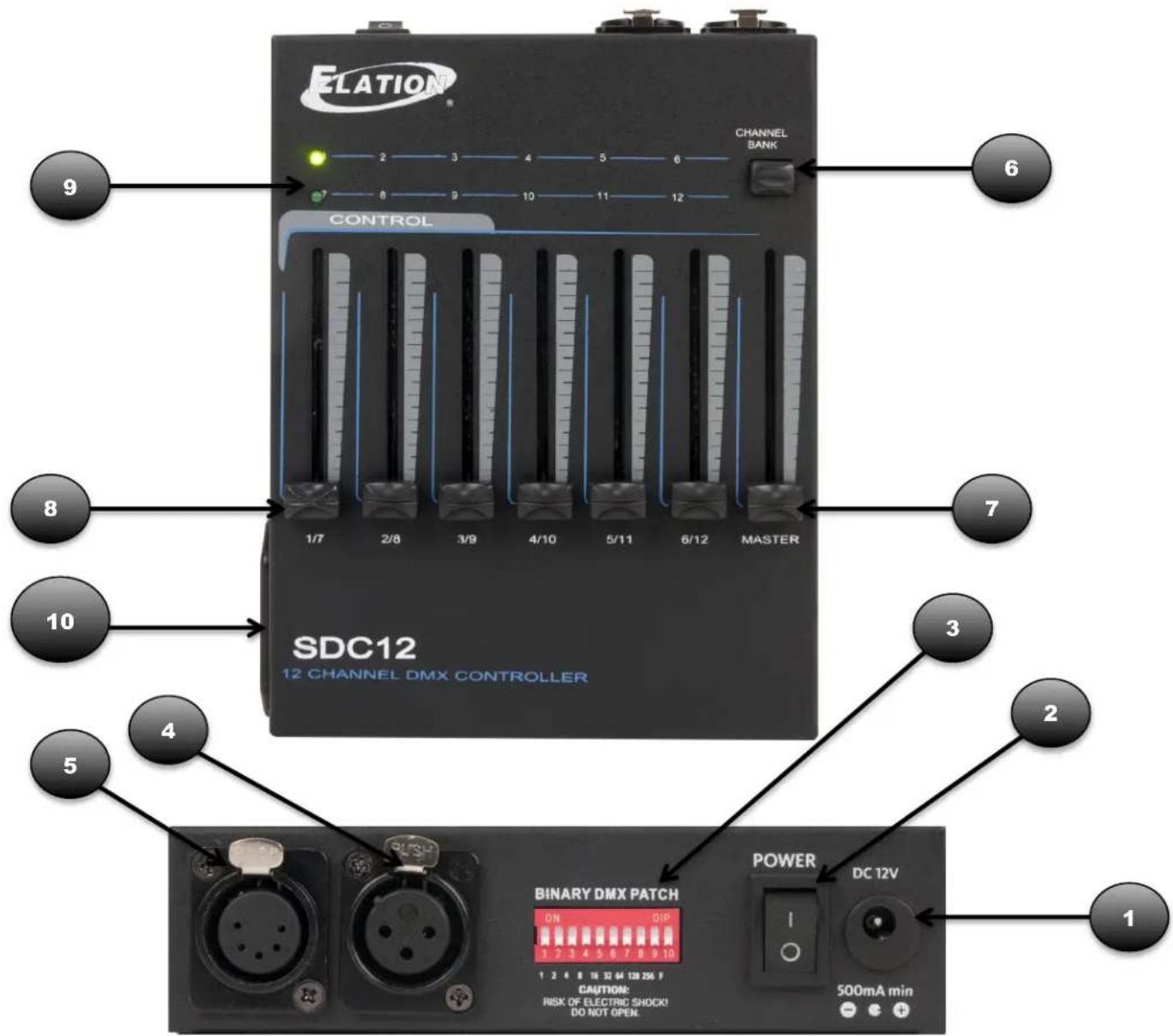
PRODUCT OVERVIEW
1: POWER IN - DC 12V power supply input.
2: POWER SWITCH - Used to power device ON or OFF.
3: BINARY DMX PATCH - DIP switches to set starting DMX Channel.
4: 3-PIN DMX OUT - Sends DMX signal to attached lighting device.
5: 5-PIN DMX OUT - Sends DMX signal to attached lighting device.
6: CHANNEL BANK - Button toggles between banks 1-6 and 7-12.
7: MASTER SLIDER - Controls total DMX output values of channels 1-6 when in Channel Bank 1-6, and channels 7-12 when in Channel Bank 7-12.
8: FADERS (1/7, 2/8, 3/9, 4/10, 5/11, 6/12) - Direct control over corresponding dimmers of channels 1-6 when in Channel Bank 1-6, and channels 7-12 when in Channel Bank 7-12.
9: CHANEL BANK LED - Indicates Channel Bank selected; 1-6 or 7-12.
10: BATTERY TRAY - Houses standard 9V DC Battery (not included).
BINARY DMX PATCH SETTING
| DIP SWITCH ON | = DMX CHANNEL |
| 1 | 1 |
| 2 | 2 |
| 3 | 4 |
| 4 | 8 |
| 5 | 16 |
| 6 | 32 |
| 7 | 64 |
| 8 | 128 |
| 9 | 256 |
| 10 | N/A |
TECHNICAL SPECIFICATIONS
| POWER INPUT | |
| Voltage Requirements | DC 12V 500mA min / 9V Battery |
| DMX CONNECTORS | |
| 3-PIN XLR: [+] = Pin 3, [-] = Pin 2, [Ground] = Pin 15-PIN XLR: [open] = Pin 5, [open] = Pin 4, [+] = Pin 3, [-] = Pin 2, [Ground] = Pin 1 | |
| SIZE / WEIGHT | |
| Dimensions | 7.5 (L) x 5.9 (W) x 1.6 inches (H)191 (L) x 149 (W) x 41 mm (H) |
| Weight (net) | 2 lbs / 0.9kgs |
| RATINGS / APPROVALS | |
| CE | Approved |
| RoHs | Compliant |
Please Note: Specifications and improvements in the design of this unit and this manual are subject to change without any prior written notice.
Brand : Elation
Model : SDC12
Category : Controller