
2444A - Car electronic accessory CRUX - Free user manual and instructions
Find the device manual for free 2444A CRUX in PDF.


| Product Type | Retention Harness |
| Brand | CRUX |
| Model | 2444A |
| Compatible Vehicles | Select GM models with factory Rear Seat Entertainment (RSE) |
| Primary Function | Retain factory overhead screen, rear AV inputs, camera & microphone when installing aftermarket radio |
| Connector Type | 20-pin factory RSE connector |
| Inputs/Outputs | RCA for AV input (rear panel) and AV output (to overhead screen) |
| Required Parts (sold separately) | SOOGM-16W, SWRGM-49A, DKGM-49A |
| Dimensions (approx.) | 6 x 4 x 1 inches (harness with wires) |
| Weight (approx.) | 0.2 lbs |
| Power Requirements | Passive (no external power needed) |
| Installation | Plug into factory 20-pin RSE connector at radio location; connect RCA cables to aftermarket radio |
| Camera & Microphone Retention | Yes, if equipped |
| Rear AV Input Retention | Yes, via RCA labeled 'AV INPUT' to aftermarket radio AV input |
| Video Output to Overhead Screen | Yes, via RCA labeled 'TO FACTORY OVERHEAD SCREEN' from aftermarket radio AV output |
| Manual Pages | 1 |
| Material | Wiring harness with PVC insulation |
| Warranty | 1 year limited (typical) |
| Country of Origin | China (typical) |
| Category | Uncategorized (Car Audio Accessories) |
Frequently Asked Questions - 2444A CRUX
User questions about 2444A CRUX
0 question about this device. Answer the ones you know or ask your own.
Ask a new question about this device
Download the instructions for your Car electronic accessory in PDF format for free! Find your manual 2444A - CRUX and take your electronic device back in hand. On this page are published all the documents necessary for the use of your device. 2444A by CRUX.
USER MANUAL 2444A CRUX
- Retains the factory Rear Seat Entertainment Screen when adding an aftermarket radio.
- Retains the use of the factory rear panel AV inputs when used with an aftermarket radio with AV Inputs
- Retains factory camera & microphone if equipped
NOTE:
The CRUX 2444A Rear Seat Entertainment screen retention harness & camera retention harness is used in conjunction with Crux part numbers SOOGM-16W, SWRGM-49A & DKGM-49A when installing an aftermarket radio.
PARTS INCLUDED:
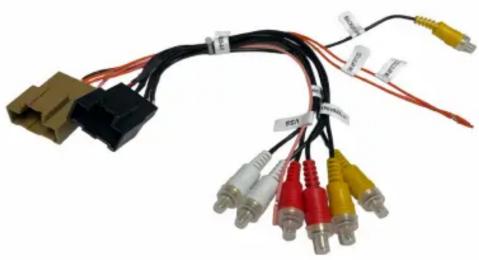
natural_image
Coiled electronic device with various colored connectors and cables (no visible text or symbols)Installation Diagram

flowchart
graph LR
    A["To Factory 20-Pin Connector"] --> B["AV INPUT"]
    A --> C["TO FACTORY OVERHEAD SCREEN"]
    B --> D["To AV Input"]
    C --> E["To AV Output"]

- Remove the OEM radio and plug the CRUX 2444A's 20 pin connector to the vehicle's 20 pin factory RSE connector at the factory radio location. Use one of the Crux parts listed in the Note section.
- To view videos from the aftermarket radio on the factory overhead screen, connect the RCA's lebeled "TO FACTORY OVERHEAD SCREEN" to the aftermarket radio AV output.
- To retain the use of the factory rear panel AV inputs, plug the RCA's labeled "AV INPUT" to the aftermarket radio's AV input (optional).
4 Test the audio & video on the overhead screen before installing the radio back into the dashboard

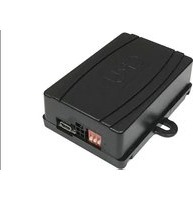
Brand : CRUX
Model : 2444A
Category : Car electronic accessory