
xB (2014) - Car Scion - Free user manual and instructions
Find the device manual for free xB (2014) Scion in PDF.


| Brand | Scion |
| Model | xB (2014) |
| Category | Car |
| Body Style | Wagon/SUV |
| Dimensions (L x W x H) | 168.1 x 69.3 x 64.6 in |
| Wheelbase | 102.4 in |
| Curb Weight | 3,120 lb |
| Engine | 2.4L 4-cylinder |
| Horsepower | 158 hp @ 6,000 rpm |
| Torque | 162 lb-ft @ 4,000 rpm |
| Transmission | 4-speed automatic / 5-speed manual |
| Fuel Type | Gasoline |
| Fuel Economy (city/highway) | 22 / 28 mpg |
| Fuel Tank Capacity | 14.0 gal |
| Seating Capacity | 5 |
| Cargo Volume (behind rear seats) | 21.7 cu ft |
| Key Features | Power windows, cruise control, CD player, auxiliary input |
| Maintenance Interval | Oil change every 5,000 miles |
| Recommended Oil | 5W-20 |
| Tire Size | P205/55R16 |
| Safety | Front, side, and curtain airbags; stability control |
| Warranty | 3 years / 36,000 miles basic |
Frequently Asked Questions - xB (2014) Scion
User questions about xB (2014) Scion
0 question about this device. Answer the ones you know or ask your own.
Ask a new question about this device
Download the instructions for your Car in PDF format for free! Find your manual xB (2014) - Scion and take your electronic device back in hand. On this page are published all the documents necessary for the use of your device. xB (2014) by Scion.
USER MANUAL xB (2014) Scion
2014 Scion xB Quick Reference Guide
2014 Scion xB
This Quick Reference Guide is a summary of basic vehicle operations. It contains brief descriptions of fundamental operations so you can locate and use the vehicle's main equipment quickly and easily.
The Quick Reference Guide is not intended as a substitute for the Owner's Manual located in the vehicle's glove box. We strongly encourage you to review the Owner's Manual and supplementary manuals so you will have a better understanding of the vehicle's capabilities and limitations.
Your dealership and the entire staff of Toyota Motor Sales, U.S.A., Inc. wish you many years of satisfied driving in your new Scion xB.
A word about safe vehicle operations
This Quick Reference Guide is not a full description of Scion xB operations. Every Scion xB owner should review the Owner's Manual that accompanies this vehicle.
Pay special attention to the boxed information highlighted in color throughout the Owner's Manual. Each box contains safe operating instructions to help you avoid injury or equipment malfunction.
All information in this Quick Reference Guide is current at the time of printing. Toyota reserves the right to make changes at any time without notice.
INDEX
| OVERVIEW | Engine maintenance 7Fuel tank door release and cap 7Hood release 6Indicator symbols 4-5Instrument cluster 4Instrument panel 2-3Keyless entry1 6Light control-Instrument panel 6 |
| FEATURES/OPERATIONS | Air Conditioning/Heating 12Auto lock/unlock2 8Automatic Transmission 8AUX port/USB port 13Bottle holders 13Cruise control 11Lights & turn signals 10Multi-Information Display 14Parking brake 8Power outlet 14Seat adjustments-Front 9Seat-Folding down rear seat 9Seats-Head restraints 9Steering wheel switches 13Tilt steering wheel 12Windows 11Windshield wipers & washers 10 |
| SAFETY AND EMERGENCY FEATURES | Door locks 15Doors-Child safety locks 15Floor mat installation 19Seat belts 16Seat belts-Shoulder belt anchor 15Spare tire & tools 17Star Safety SystemTM 18Tire Pressure Monitoring (warning) System 16 |
1 Visit your Scion dealer for information on customizing this feature. 2 Programmable by customer. Refer to the Owner's Manual for instructions and more information.
OVERVIEW
Instrument panel
Steering wheel
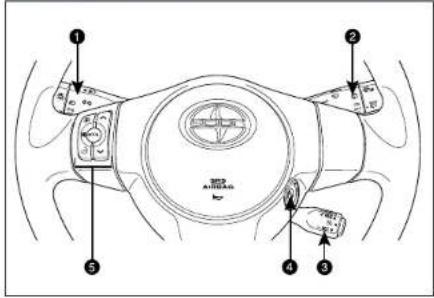

① Headlight and turn signal controls
② Wiper and washer controls
③ Cruise control
4 Ignition switch
⑤ Steering wheel audio controls*
6 Rear window defogger button
7 Front passenger occupant classification indicator/Front passenger seat belt reminder light
8 Air Conditioning controls
9 Power outlet
10 Emergency flasher button
⑪ Tire Pressure Monitoring (warning) System reset
⑫ Tilt and telescopic steering lock release
⑬ "VSC OFF" (Vehicle Stability Control "OFF")
14 Power outside rearview mirror controls
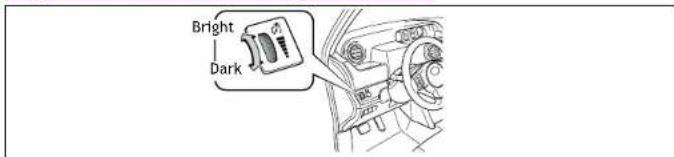
15 Instrument panel light control dial
* For details, refer to the SCION Audio System Owner's Manual or SCION Navigation System Owner's Manual.
Instrument cluster

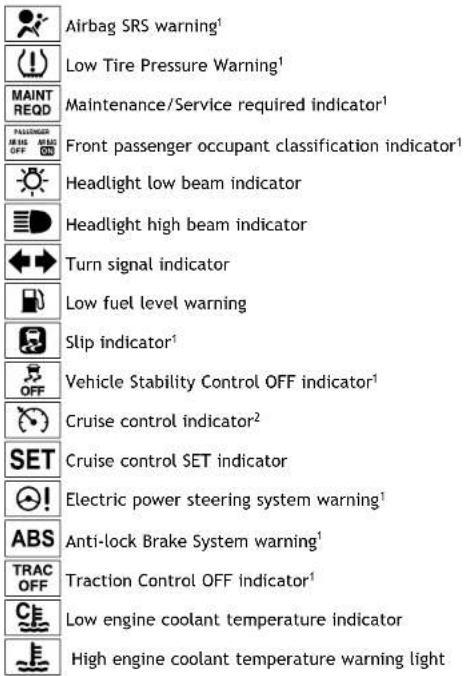
Indicator symbols
For details, refer to "Indicators and warning lights," Section 2-2, 2014 Owner's Manual.

OVERVIEW
Keyless entry

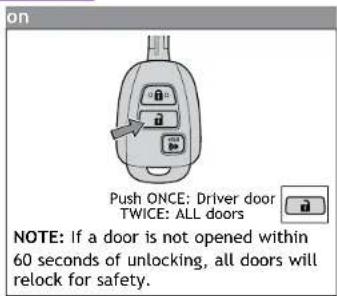
Panic button

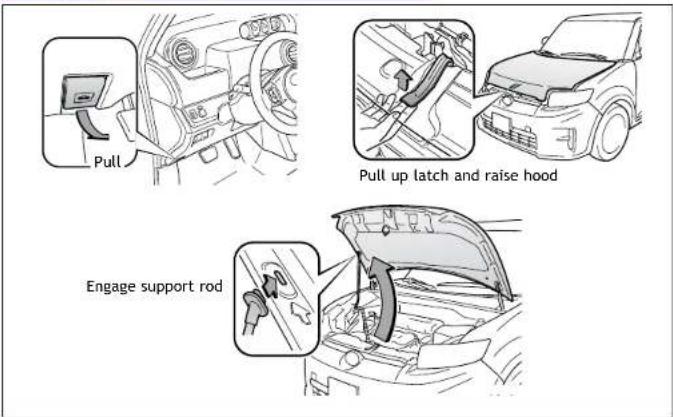
Hood release
Light control-Instrument panel
Fuel tank door release and cap

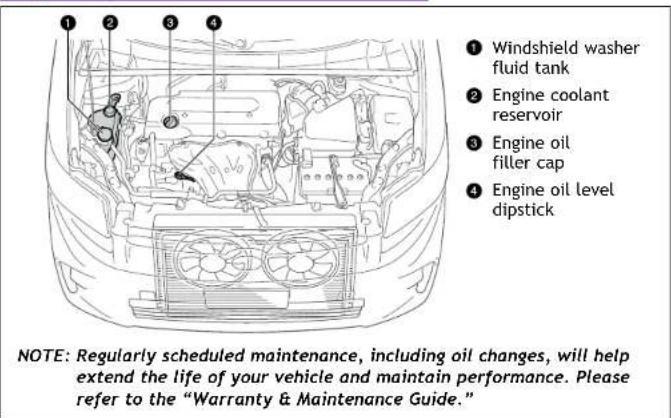
Engine maintenance
FEATURES/OPERATIONS
Auto lock/unlock
Automatic door locks can be programmed to operate in four different modes, or turned OFF.
-Doors lock when shifting from Park.
-Doors lock when the vehicle speed goes above approximately 12 mph. 2
-Doors unlock when ignition key is turned to "ACC" or "LOCK" position and driver's door is opened. 2
-Doors unlock when shifting into Park.1
1 Automatic Transmission only
2 Default setting is off
Refer to the Owner's Manual for more details.
Automatic Transmission (if equipped)

* The ignition switch must be "ON" and the brake pedal depressed to shift from Park.
"S" (Sequential) mode
Push shift lever to the left from "D" position.
+: Upshift (push and release)
Downshifting increases power going uphill, or provides engine braking downhill. For best fuel economy during normal driving conditions, always drive with the shift lever in the "D" position.
Parking brake

Seats-Head restraints

Seat adjustments-Front

① Seat position (forward/backward)
② Height crank (driver side only)
3 Seatback angle
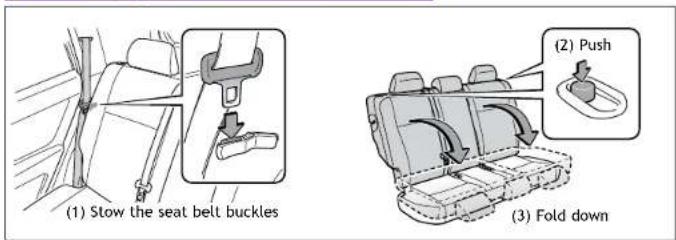
Seat-Folding down rear seat
FEATURES/OPERATIONS
Lights & turn signals
Headlights
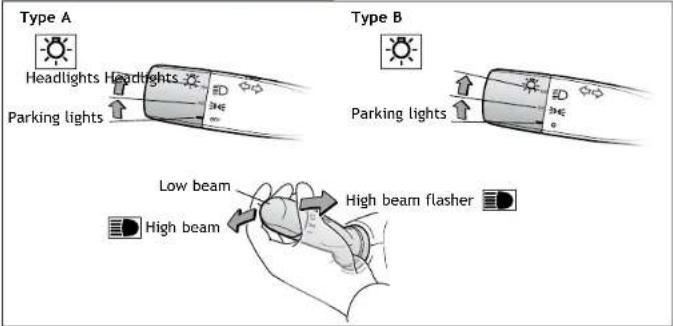
Turn signals

Windshield wipers & washers
Front

Rear

Windows
Driver side
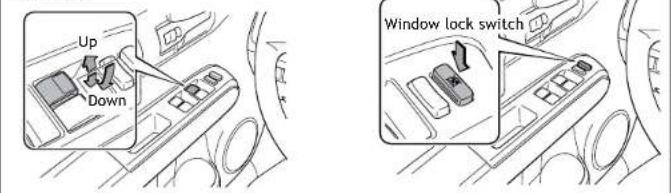
Automatic operation (driver's window only) Push the switch completely down and release to fully open. To stop the window partway, operate the switch in the opposite direction.
Window lock switch Deactivates all passenger windows. Driver's window remains operable.
Cruise control
System ON/OFF

Functions

1 The set speed may also be cancelled by depressing the brake pedal or the clutch pedal (manual transmission only).
2 The set speed may be resumed once vehicle speed reaches approximately 25 mph.
FEATURES/OPERATIONS
Tilt steering wheel

Hold wheel, push lever down, set angle and return lever.
NOTE: Do not attempt to adjust while the vehicle is in motion.
Air Conditioning/Heating
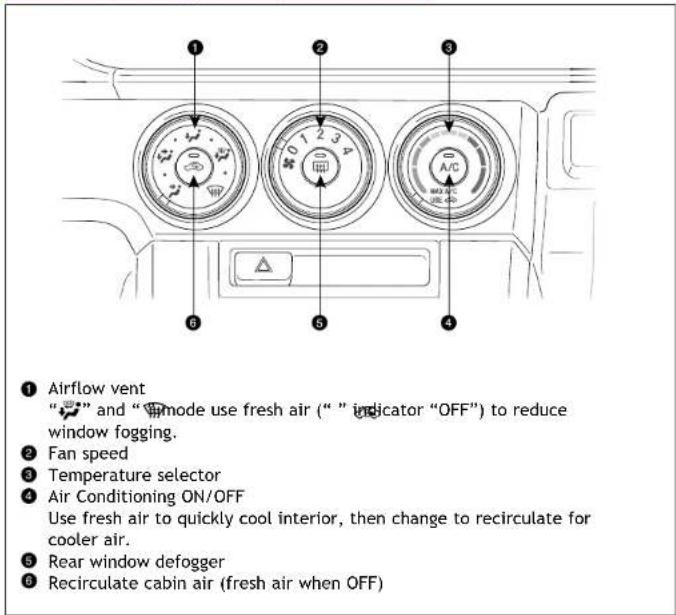
Steering wheel switches

① “∧V”
Use to search within the selected audio medium (radio, CD, iPod ® , etc.).
② "MODE"
Push to turn audio ON and select an audio mode. Push and hold to turn the audio system OFF.
Refer to the SCION Audio System Owner's Manual or SCION Navigation System Owner's Manual for more details.
AUX port/USB port

By inserting a mini plug into the AUX port/USB port, you can listen to music from a portable audio device through the vehicle's speaker system while in AUX or USB/AUX mode.
If you do not have a SCION genuine audio system, you will not be able to use the AUX port/USB port.
Refer to the SCION Audio System Owner's Manual or SCION Navigation System Owner's Manual for more details.
Bottle holders

FEATURES/OPERATIONS
Multi-Information Display
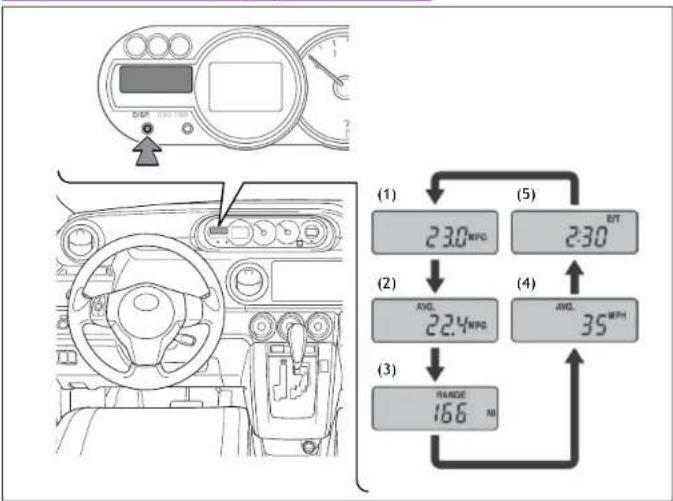
Push "DISP" to change information in the following succession:
(1) Current gas mileage (MPG)
(2) Average gas mileage (AVG/MPG)
(3) Miles left on remaining fuel (RANGE/MI)
(4) Average vehicle speed from engine start (AVG/MPH)
(5) Running time from engine start (E/T)
Power outlet

Designed for car accessories. Key must be in the "ACC" or "ON" position to use.
SAFETY AND EMERGENCY FEATURES
Door locks
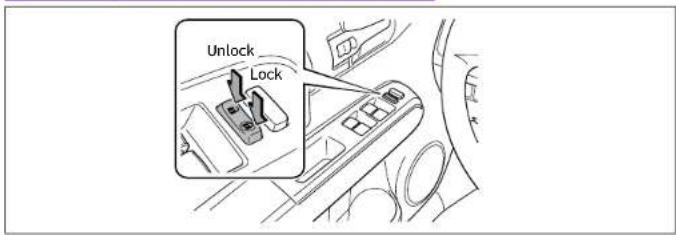
Doors-Child safety locks

Moving the lever downward will allow the door to be opened only from the outside.
Seat belts-Shoulder belt anchor
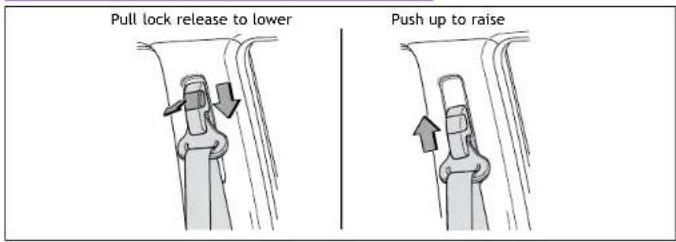
Seat belts Spare tire & tools

If belt is fully extended, then retracted even slightly, it cannot be re-extended beyond that point, unless fully retracted again. This feature is used to help hold child restraint systems securely.
To find more information about seat belts, and how to install a child restraint system, refer to the Owner's Manual.
Tire Pressure Monitoring (warning) System
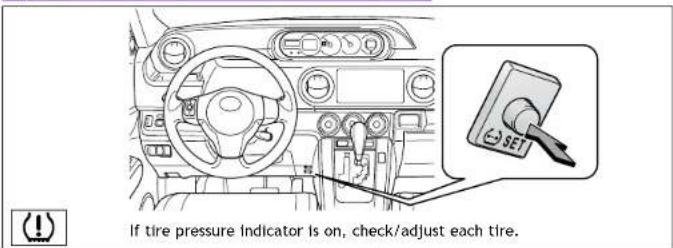
After adjusting tire pressures, or after tires have been rotated or replaced, turn the ignition switch to "ON" and press and hold the "SET" button until indicator blinks three times. Let the vehicle sit for a few minutes to allow initialization to complete.
Refer to the load label on the door jamb or the Owner's Manual for tire inflation specifications.
If the tire pressure indicator flashes for more than 60 seconds and then remains on, take the vehicle to your local Scion dealer.
NOTE: The warning light may come on due to temperature changes or changes in tire pressure from natural air leakage. If the system has not been initialized recently, setting the tire pressures to factory specifications should turn off the light.
Tool and spare tire location

Removing the spare tire

(1) Remove the luggage mat.
(2) Remove the center auxiliary boxes.
(3) Loosen the center fastener that secures the spare tire.
Refer to the Owner's Manual for jack positioning and tire changing procedures.
SAFETY AND EMERGENCY FEATURES
Star Safety System™
All new Toyota vehicles come standard with the Star Safety System ™ , which combines Traction Control (TRAC), Electronic Brake-force Distribution (EBD), Vehicle Stability Control (VSC), Brake Assist (BA), an Anti-lock Braking System (ABS) and Smart Stop Technology (SST).
Vehicle Stability Control (VSC)
VSC helps prevent loss of traction during cornering by reducing engine power and applying brake force to selected wheels.
Toyota's VSC monitors steering angle and the direction your vehicle is traveling. When it senses that the front or rear wheels begin to lose traction, VSC reduces engine power and applies braking to selected wheels. This helps restore traction and vehicle control.
Traction Control (TRAC)
VSC helps prevent loss of traction during cornering by reducing engine power, and Traction Control helps maintain traction on loose gravel and wet, icy, or uneven surfaces by applying brake force to the spinning wheel(s).
Toyota's TRAC sensors are activated when one of the drive wheels starts to slip. TRAC limits engine output and applies the brakes to the spinning wheel. This transfers power to the wheels that still have traction to help keep you on track.
Brake Assist (BA)
Brake Assist is designed to detect sudden or "panic" braking, and then add braking pressure to help decrease the vehicle's stopping distance. When there's only a split second to react, Brake Assist can add additional brake pressure more quickly than just the driver alone can.
Electronic Brake Force Distribution (EBD)
Toyota's ABS technology has Electronic Brake-force Distribution (EBD) to help maintain control and balance when braking. Abrupt stops can cause a vehicle to tilt forward, reducing the braking power of the rear wheels. EBD responds to sudden stops by redistributing brake force to enhance the braking effectiveness of all four wheels.
Anti-Lock Brake System (ABS)
ABS helps prevent brakes from locking up by "pulsing" brake pressure to each wheel. This limits brake lockup and helps provide directional control for the current road conditions.
Toyota's ABS sensors detect which wheels are locking up and limits wheel lockup by "pulsing" each wheel's brakes independently. Pulsing releases brake pressure repeatedly for fractions of a second. This helps the tires attain the traction that current road conditions will allow, helping you to stay in directional control.
Smart Stop Technology (SST)
Smart Stop Technology automatically reduces driving torque when the accelerator and brake pedals are pressed simultaneously under certain conditions.
SST engages when the accelerator is depressed first and the brakes are applied firmly for longer than one-half second at speeds greater than five miles per hour.
SST doesn't engage if the brake pedal is depressed before the accelerator pedal, allowing vehicles to start on a steep hill and safely accelerate without rolling backward.
Floor mat installation
There are two types of Toyota floor mats: carpeted and all-weather. Each vehicle has model-specific floor mats. Installation is easy.
To keep your floor mat properly positioned, follow these steps:
• Only use floor mats designed for your specific model.
- Use only one floor mat at a time, using the retaining hooks to keep the mat in place.
• Install floor mats right side up.

NOTES
- 2014 SCION XB QUICK REFERENCE GUIDE
- 2014 SCION XB
- A WORD ABOUT SAFE VEHICLE OPERATIONS
- OVERVIEW
- INDICATOR SYMBOLS
- FEATURES/OPERATIONS
- AUTO LOCK/UNLOCK
- S" (SEQUENTIAL) MODE
- SAFETY AND EMERGENCY FEATURES
- STAR SAFETY SYSTEM™
- VEHICLE STABILITY CONTROL (VSC)
- TRACTION CONTROL (TRAC)
- BRAKE ASSIST (BA)
- ELECTRONIC BRAKE FORCE DISTRIBUTION (EBD)
- ANTI-LOCK BRAKE SYSTEM (ABS)
- SMART STOP TECHNOLOGY (SST)
- FLOOR MAT INSTALLATION
Brand : Scion
Model : xB (2014)
Category : Car