
DP-301 - Video projector CASIO - Free user manual and instructions
Find the device manual for free DP-301 CASIO in PDF.


| Product Type | Video Projector |
| Brand | Casio |
| Model | DP-301 |
| Display Technology | DLP |
| Brightness | 3000 ANSI Lumens |
| Native Resolution | 1024 x 768 (XGA) |
| Contrast Ratio | 2000:1 |
| Lamp Life (Normal Mode) | 3000 hours |
| Lamp Life (Eco Mode) | 4000 hours |
| Projection Distance | 1.2 - 12 m |
| Image Size (Diagonal) | 30 - 300 inches |
| Keystone Correction | Vertical ±30° |
| Zoom Ratio | 1.2x Manual |
| Inputs | HDMI, VGA, Composite, Audio (3.5mm) |
| Outputs | Audio (3.5mm), USB (Service) |
| Power Supply | AC 100-240V, 50/60Hz |
| Power Consumption | 280W (Normal), 230W (Eco) |
| Dimensions (W x D x H) | 315 x 215 x 85 mm |
| Weight | 2.8 kg |
| Noise Level | 35 dB (Normal), 30 dB (Eco) |
| Operating Temperature | 0°C to 40°C |
| Safety Features | Overheat protection, automatic power-off |
| Maintenance | Clean air filter every 500 hours; replace lamp as needed |
| Accessories Included | Power cable, VGA cable, remote control, user manual |
| Spare Parts Available | Replacement lamp (model: Casio L-V-01), air filter |
Frequently Asked Questions - DP-301 CASIO
User questions about DP-301 CASIO
0 question about this device. Answer the ones you know or ask your own.
Ask a new question about this device
Download the instructions for your Video projector in PDF format for free! Find your manual DP-301 - CASIO and take your electronic device back in hand. On this page are published all the documents necessary for the use of your device. DP-301 by CASIO.
USER MANUAL DP-301 CASIO
The DP-301 Digital Pen is an optional item for use with the CASIO YA-W72M/YA-W82M Interactive Whiteboard. For detailed information about how to use the digital pen, see the YA-W72M/YA-W82M User's Guide, which you can download at the website below. http://world.casio.com/manual/projector/
Important!
- Before using the digital pen, be sure to read the information in this manual under "Safety Precautions" and "Operating Precautions", and ensure that you always use the product correctly.
- Keep this manual in a safe place for future reference.
Unpacking
The digital pen comes with the items listed below. Check to make sure that all items are included.
DP-301 Anoto Digital Pen with stylus core•
Test battery (AAA-size ×1)
Replacement stylus refill•
Replacement ballpoint pen refill•
Read this first! (This document)•
Warranty•
Safety Precautions
■ About safety symbols
Various symbols are used in this manual and on the product itself to ensure safe use, and to protect you and others against the risk of injury and against material damage. The meaning of each of the symbols is explained below.
| Danger | This symbol indicates information that, if ignored or applied incorrectly, create the risk of death or serious personal injury. |
| Warning | This symbol indicates information that, if ignored or applied incorrectly, could possibly create the risk of death or serious personal injury. |
| Caution | This symbol indicates information that, if ignored or applied incorrectly, could possibly create the risk of personal injury or material damage. |
■ Icon Examples

A triangle indicates a situation against which you need to exercise caution. The example shown here indicates you should take precaution against electric shock.

A circle with a line through it indicates information about an action that you should not perform. The specific action is indicated by the figure inside the circle. The example shown here means disassembly is prohibited.

A black circle indicates information about an action that you must perform. The specific action is indicated by the figure inside the circle. The example shown here indicates you must unplug the power cord from the power outlet.
Battery Precautions
Danger

Should liquid leaking from an alkaline battery get into the eyes, immediately take the following steps.
- Do not rub the eyes! Wash the eyes with clean water.
- Contact a physician immediately. Failure to take
immediate action can lead to loss of eyesight.
Warning
Misuse of batteries can cause them to leak and stain the area around them, or to explode, creating the risk of fire and personal injury. Make sure that you always observe the following precautions.

Never try to take batteries apart and do not allow them to become shorted.
Never expose batteries to heat or throw them • into fire.
- Never try to charge batteries.

• Take care that the battery is oriented correctly when you load it.
Caution
Misuse of batteries can cause them to leak and stain the area around them, or to explode, creating the risk of fire and personal injury. Make sure that you always observe the following precaution.

- Use only the type of the battery that is specified for the digital pen.

- Remove the battery from the digital pen if you do not plan to use it for a long time.
- Be sure to remove the battery from the digital pen as soon as it goes dead.
- Keep batteries out of the reach of small children.

Keep batteries out of the reach of small children. Should a battery ever be swallowed, contact a physician immediately.
● Disposing of batteries
Make sure that you dispose of used batteries in accordance with the rules and regulations in your local area.
Digital Pen
Warning
- Do not point the nib of the digital pen at the eyes.

Directly viewing the infrared light emitted by the nib of the digital pen creates the risk of damaged eyesight.
● Avoid water and other liquids.

Never allow the digital pen to become wet. Water and other liquids create the risk of fire and electric shock.
- Do not disassemble or modify the digital pen in any way.

Never try to take the digital pen apart or modify it in any way. Doing so creates the risk of electric shock, burn injury, personal injury, or operational malfunction. Disassembling or modifying the digital pen can void its warranty or make it ineligible for servicing. Request all servicing and repair from your original retailer or the contact specified for repair.
● Do not dispose of the digital pen by burning it.

Never try to dispose of the digital pen by burning it. Doing so can cause an explosion, which creates the risk of fire and personal injury.
- Do not use or leave the digital pen in any of the
following locations.
Doing so creates the risk of fire and electric shock.
- Areas subject to large amounts of moisture or dust
- In a kitchen or other areas exposed to oil smoke
- Near a heater, on a heated carpet, or in an area exposed to direct sunlight
- Other areas subjected to temperature extremes
● Never leave the digital pen in a bathroom or anywhere else there is the chance that it will become wet.
- Immediately stop using the digital pen whenever any one of the following conditions exists.
Failure to do so creates the risk of fire, electric shock, or overheating of batteries, and explosion.
- When the digital pen is damaged due to dropping - When the digital pen is emitting smoke or strange odor, when the digital pen does not operate normally even when used as instructed by the user's guide, or any other time malfunction of the digital pen is suspected In any of the above cases request servicing and repair from your original retailer or the contact specified for repair.
● Avoid dropping the digital pen or otherwise subjecting it to impact or shock.
Failure to do so creates the risk of fire, electric shock, or overheating of batteries, and explosion.
● Radio waves emitted by the digital pen
Never use the digital pen inside of an aircraft or medical facility, or in any other location where use of such devices is prohibited. Whenever you are in such a location, place the cap over the nib of the digital pen, which will cause digital pen power to be turned off. Radio waves can have an effect on the operation of electronic equipment and medical equipment, and create the risk of accidents.
Do not use the digital pen in the vicinity of high-precision electronic instruments or electronic devices that handle weak radio signals. Radio waves can have an effect on the operation of such equipment, and create the risk of accidents.
- If you are using a pace maker or any other electronic medical device, be sure to consult your physician or device manufacturer before using this digital pen.
Caution
● Ballpoint pen Refill Ink Precautions

Take care when using the ballpoint pen refill. You may not be able to remove stains from its permanent oil-based ink from clothing, etc.
● The ballpoint pen refill cannot write with its nib pointed upwards.
Do not attempt to write with the ballpoint pen refill nib pointed upwards. Doing so can cause ink to leak.
- Use only the special stylus or ballpoint pen refill. - Use only specified refills.
- Choose storage locations carefully.
Do not store the digital pen in any location expose to direct sunlight (such as inside of a motor vehicle), in locations subjected to high temperatures, in locations subjected to extremely low temperatures, or in locations subjected to large amounts of moisture and/or dust. Any of these conditions can cause deformation and/or malfunction.
English-2
- Do not point the lens of the digital pen's built-in camera at the sun.

Pointing the lens of the digital pen's built-in camera at the sun can result in malfunction
- Do not subject the digital pen to strong impact.

Dropping the digital pen or otherwise subjecting it to strong impact can result in malfunction of the pen nib or internal circuitry.
- Keep the digital pen and its cap, stylus core (or stylus refill), and ballpoint pen refill out of the reach of small children.

These items could potentially harm or injure small children. Do not allow small children to handle them.
In particular, the digital pen cap or core could possibly be swallowed by a small child. Should any pet part ever be swallowed accidentally, contact a physician immediately.
● Itching, Rash, and Other Skin Irritation Precautions

Depending on your particular physical predisposition or condition, use of this product can result in itching, rash, or other skin irritation. Should you ever experience any one of these symptoms, immediately stop using the product and consult your physician.
- Be sure to follow all applicable local laws and regulations when disposing of the digital pen.
Operating Precautions
● Passkey when adding a Bluetooth device
The passkey of the digital pen is 0000.
- Avoid using or storing the digital pen in locations where any of the conditions described below are present or are prone to occur. Such conditions create the risk of malfunction of and damage to the digital pen.
Electrostatic charge•
Strong radio waves or magnetism•
Extremely high or low temperatures•
High humidity or near a humidifier•
Sudden temperature changes•
Large amounts of oil smoke or steam•
Large amounts dust•
Water or other moisture (that can get on the digital •
pen)
Corrosive gas•
- Do not use the digital pen in environments subjected to temperature extremes.
The digital pen is designed for use within the temperatures of 5^ to 35^ (41°F to 95°F). Use outside of this temperature range creates the risk of malfunction of and damage to the digital pen.
- Do not use the digital pen in the vicinity of a TV or radio. Doing so can cause noise in the TV image or interference with radio reception.
- Do not allow the digital pen nib to be covered by your fingers.
The digital pen takes snapshots of the paper to find out where you are writing on the paper. Do not allow your fingers to cover the nib when writing.
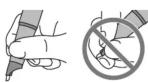
- Do not press the switch with your fingers.
The digital pen turns off when the cap is in placed on it. Take care not to press the switch with your fingers when you hold the pen as shown in the figure. The digital pen will turn off if the switch is held down for a few seconds.

- Be careful not to damage the digital pen nib when replacing the refill.
● To clean the digital pen, wipe it with a soft, dry cloth. Any other type of cleaning method creates the risk of malfunction of or damage to the digital pen.
● Use in Other Countries
The digital pen has been certified as complying with the wireless regulations in the country where it is marketed. Be sure to use the digital pen only in the country where it was originally marketed. Use of the digital pen in another country may be illegal.
● Anoto and the Anoto logotype are trademarks of Anoto Group AB (Sweden).
● "Bluetooth" is the trademark of Bluetooth SIG, Inc.
● Other company and product names may be registered trademarks or trademarks of their respective owners.
● The contents of this manual are subject to change without notice.
● Copying of this manual, either in part or its entirety, is forbidden. You are allowed to use this manual for your own personal use. Any other use is forbidden without the permission of CASIO COMPUTER CO., LTD.
- CASIO COMPUTER CO., LTD. shall not be held liable for any lost profits or claims from third parties arising out of the use of this product or this manual.
- CASIO COMPUTER CO., LTD. shall not be held liable for any loss or lost profits due to loss of data caused by malfunction or maintenance of this product, or due to any other reason.
CASIO COMPUTER CO., LTD.
5-2, Hon-machi 1-chome
Shibuya-ku, Tokyo 151-8543, Japan


Brand : CASIO
Model : DP-301
Category : Video projector